实现效果:文件可以进行预览,编辑,保存,也可以后续实现多人协同功能。
编辑器效果:
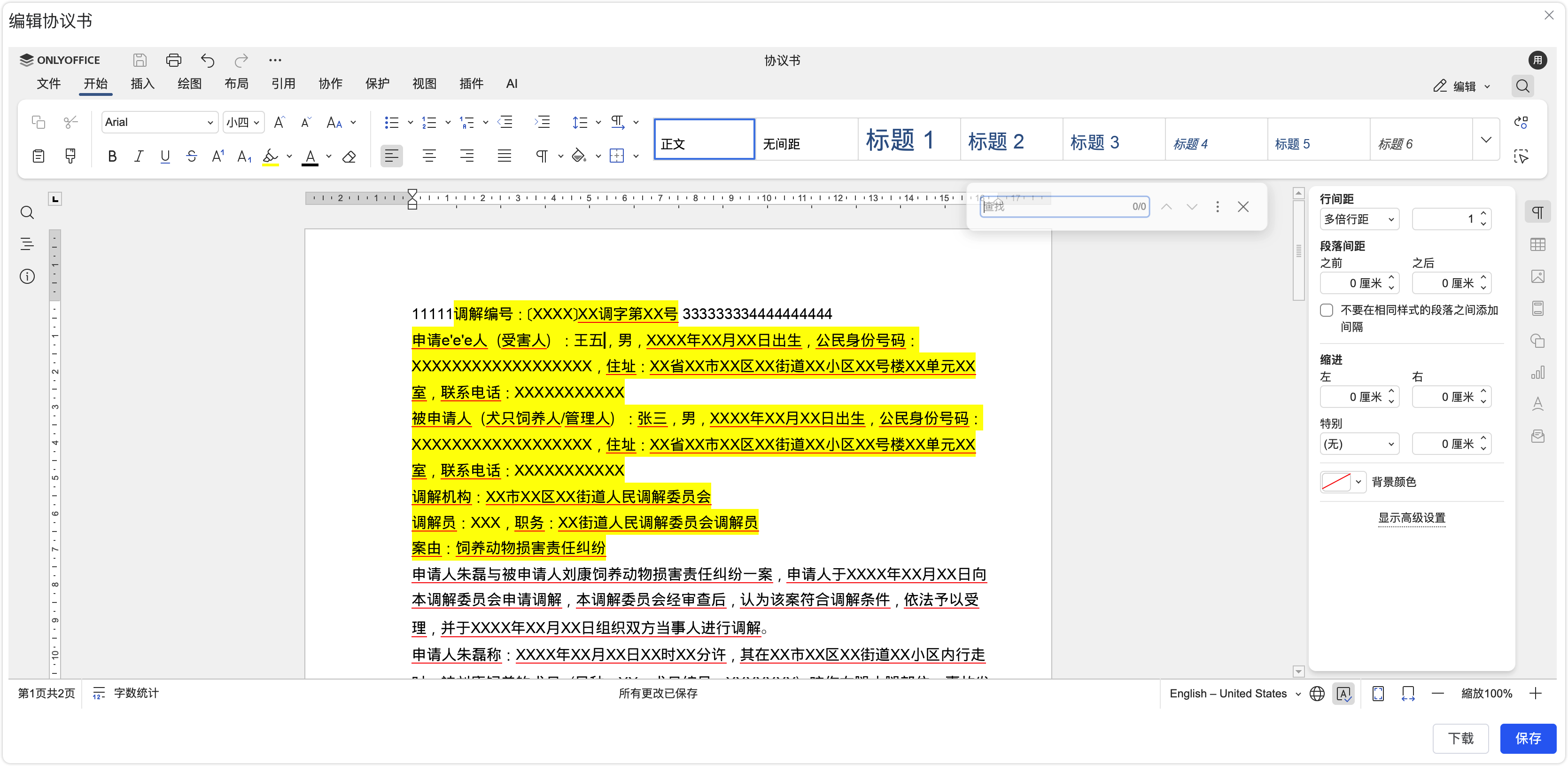
1. 组件文件:OnlyOfficeEditor.vue
javascript
<template>
  <div class="onlyoffice-editor-wrapper">
    <!-- OnlyOffice 编辑器容器 -->
    <div
      v-if="isEditMode"
      :id="editorId"
      class="onlyoffice-editor"
    ></div>

    <!-- 文档预览 iframe -->
    <iframe
      v-else-if="previewDocumentUrl"
      :src="previewDocumentUrl"
      class="document-iframe"
      frameborder="0"
    ></iframe>

    <!-- 加载状态 -->
    <div v-else class="document-loading">
      <el-icon class="loading-icon" :size="40">
        <Loading />
      </el-icon>
      <p>{{ loadingText }}</p>
    </div>
  </div>
</template>

<script setup lang="ts">
import { ref, onBeforeUnmount, nextTick, watch } from 'vue'
import { ElMessage } from 'element-plus'
import { Loading } from '@element-plus/icons-vue'

// Props
interface Props {
  // 文档 URL(必填)
  documentUrl: string
  // 编辑器容器 ID(可选,默认自动生成)
  editorId?: string
  // 文档标题(可选)
  documentTitle?: string
  // 用户信息(可选)
  user?: {
    id: string
    name: string
  }
  // 是否自动进入编辑模式(可选,默认 false)
  autoEdit?: boolean
  // 预览服务地址(可选,默认使用 xdocin)
  previewServiceUrl?: string
  // OnlyOffice 服务器地址(可选,如果不提供则从环境变量获取)
  onlyOfficeServerUrl?: string
  // 保存回调函数(可选)
  onSave?: (savedUrl: string) => void | Promise<void>
  // 保存接口(可选,用于保存文档到服务器)
  saveApi?: (params: {
    url: string
    key: string
    [key: string]: any
  }) => Promise<{ url: string; fileName?: string; key?: string }>
}

const props = withDefaults(defineProps<Props>(), {
  editorId: () => `onlyoffice-editor-${Date.now()}`,
  documentTitle: '文档',
  user: () => ({ id: 'user_001', name: '用户' }),
  autoEdit: false,
  previewServiceUrl: 'https://view.xdocin.com/view',
  onlyOfficeServerUrl: '',
})

// Emits
const emit = defineEmits<{
  ready: []
  error: [error: Error]
  save: [url: string]
}>()

// 状态
const isEditMode = ref(props.autoEdit)
const previewDocumentUrl = ref('')
const loadingText = ref('正在加载文档...')
const isUploading = ref(false)

// 编辑器实例
let onlyOfficeEditor: any = null
let documentId = ''
let lastDownloadUrl = ''
let originalOnMessage: ((event: MessageEvent) => void) | null = null

// 获取 OnlyOffice 服务器地址
const getOnlyOfficeServerUrl = (): string => {
  if (props.onlyOfficeServerUrl) {
    return props.onlyOfficeServerUrl
  }

  // 从环境变量获取
  if (import.meta.env.DEV) {
    return import.meta.env.VITE_ONLYOFFICE_SERVER_URL || 'http://192.168.90.82:8080'
  }

  return import.meta.env.VITE_ONLYOFFICE_SERVER_URL || ''
}

// 获取文件类型
const getFileType = (url: string): string => {
  const ext = url.split('.').pop()?.toLowerCase()
  const typeMap: Record<string, string> = {
    doc: 'doc',
    docx: 'docx',
    xls: 'xls',
    xlsx: 'xlsx',
    ppt: 'ppt',
    pptx: 'pptx',
    pdf: 'pdf',
    txt: 'txt',
  }
  return typeMap[ext || ''] || 'doc'
}

// 加载 OnlyOffice API
const loadOnlyOfficeAPI = (): Promise<void> => {
  return new Promise((resolve, reject) => {
    if (typeof (window as any).DocsAPI !== 'undefined') {
      console.log('OnlyOffice API已存在')
      resolve()
      return
    }

    const docServerUrl = getOnlyOfficeServerUrl()
    if (!docServerUrl) {
      reject(new Error('OnlyOffice 文档服务器地址未配置'))
      return
    }

    const script = document.createElement('script')
    script.src = `${docServerUrl}/web-apps/apps/api/documents/api.js`
    script.onload = () => {
      console.log('OnlyOffice API加载完成')
      resolve()
    }
    script.onerror = () => {
      console.error('OnlyOffice API加载失败')
      reject(new Error('OnlyOffice API加载失败'))
    }
    document.head.appendChild(script)
  })
}

// OnlyOffice 消息处理函数
const handleOnlyOfficeMessage = (event: any) => {
  try {
    const data =
      typeof event.data === 'string' ? JSON.parse(event.data) : event.data

    // 监听下载事件
    if (data.event === 'onDownloadAs' && data.data && data.data.url) {
      console.log('收到下载URL:', data.data)
      lastDownloadUrl = data.data.url
    }

    // 监听文档状态变化
    if (data.event === 'onDocumentStateChange' && data.data === false) {
      console.log('文档保存完成')
    }
  } catch (error) {
    // 不是 JSON 消息,忽略
  }
}

// 设置全局消息监听
const setupGlobalMessageListener = () => {
  if (window.onmessage && window.onmessage !== handleOnlyOfficeMessage) {
    originalOnMessage = window.onmessage as any
  }
  window.onmessage = handleOnlyOfficeMessage
}

// 清理全局消息监听器
const cleanupGlobalMessageListener = () => {
  if (window.onmessage === handleOnlyOfficeMessage) {
    if (originalOnMessage) {
      window.onmessage = originalOnMessage
      originalOnMessage = null
    } else {
      window.onmessage = null as any
    }
  }
}

// 初始化 OnlyOffice 编辑器
const initOnlyOfficeEditor = async () => {
  try {
    loadingText.value = '正在加载编辑器...'

    // 确保 API 已加载
    await loadOnlyOfficeAPI()

    if (typeof (window as any).DocsAPI === 'undefined') {
      throw new Error('OnlyOffice API未加载')
    }

    // 销毁之前的编辑器
    if (onlyOfficeEditor) {
      try {
        onlyOfficeEditor.destroyEditor()
      } catch (e) {
        console.warn('销毁编辑器失败:', e)
      }
      onlyOfficeEditor = null
    }

    // 清空容器
    const editorContainer = document.getElementById(props.editorId)
    if (!editorContainer) {
      throw new Error('找不到编辑器容器')
    }
    editorContainer.innerHTML = ''

    // 生成文档 ID
    documentId = `doc_${Date.now()}`

    // 获取文件类型
    const fileType = getFileType(props.documentUrl)

    // 构建编辑器配置
    const config = {
      width: '100%',
      height: '100%',
      type: 'desktop',
      documentType: fileType === 'pdf' ? 'pdf' : 'word',
      document: {
        fileType: fileType,
        key: documentId,
        title: props.documentTitle,
        url: props.documentUrl,
        permissions: {
          edit: true,
          download: true,
          print: true,
          review: false,
          comment: false,
        },
      },
      editorConfig: {
        mode: 'edit',
        lang: 'zh-CN',
        location: 'zh-CN',
        customization: {
          autosave: false,
          forcesave: false,
          chat: false,
          comments: false,
          help: true,
          hideRightMenu: false,
          hideRulers: false,
        },
        user: props.user,
      },
      events: {
        onDocumentReady: () => {
          console.log('OnlyOffice 文档准备就绪')
          loadingText.value = ''
          ElMessage.success('文档加载完成,可以开始编辑')
          emit('ready')
        },
        onDocumentStateChange: (event: any) => {
          console.log('文档状态变化:', event)
        },
        onError: (event: any) => {
          console.error('编辑器错误:', event)
          ElMessage.error('编辑器发生错误')
          loadingText.value = ''
          emit('error', new Error('编辑器发生错误'))
        },
        onWarning: (event: any) => {
          console.warn('编辑器警告:', event)
        },
      },
    }

    // 创建编辑器
    onlyOfficeEditor = new (window as any).DocsAPI.DocEditor(
      props.editorId,
      config
    )
    console.log('OnlyOffice 编辑器初始化成功')

    // 设置全局消息监听
    setupGlobalMessageListener()
  } catch (error: any) {
    console.error('初始化编辑器失败:', error)
    ElMessage.error('初始化编辑器失败: ' + (error.message || '未知错误'))
    loadingText.value = ''
    emit('error', error)
  }
}

// 强制保存文档到 OnlyOffice 服务器
const forceSaveDocument = async (): Promise<boolean> => {
  try {
    console.log('强制保存文档到 OnlyOffice 服务器...')

    if (!onlyOfficeEditor) {
      console.error('OnlyOffice API未初始化')
      return false
    }

    // 尝试多种保存方法
    const saveMethods = [
      () => onlyOfficeEditor.saveDocument && onlyOfficeEditor.saveDocument(),
      () => onlyOfficeEditor.save && onlyOfficeEditor.save(),
      () => onlyOfficeEditor.download && onlyOfficeEditor.download(),
      () => onlyOfficeEditor.downloadAs && onlyOfficeEditor.downloadAs(),
    ]

    for (let i = 0; i < saveMethods.length; i++) {
      try {
        const method = saveMethods[i]
        if (typeof method() === 'function') {
          console.log(`尝试保存方法 ${i + 1}...`)
          method()
          await new Promise(resolve => setTimeout(resolve, 1000))
        }
      } catch (error: any) {
        console.warn(`保存方法 ${i + 1} 失败:`, error.message)
      }
    }

    console.log('强制保存完成')
    return true
  } catch (error: any) {
    console.error(`强制保存失败: ${error.message}`)
    return false
  }
}

// 获取编辑后的文档内容
const getEditedDocumentContent = async (): Promise<any> => {
  try {
    console.log('获取编辑后的文档内容...')

    if (!lastDownloadUrl) {
      return null
    }

    // 如果有保存接口,调用保存接口
    if (props.saveApi) {
      try {
        const result = await props.saveApi({
          url: lastDownloadUrl,
          key: documentId,
        })
        return {
          success: true,
          url: result.url,
          fileName: result.fileName,
          key: result.key,
        }
      } catch (error: any) {
        console.warn('保存接口调用失败:', error.message)
        return null
      }
    }

    // 如果没有保存接口,返回下载 URL
    return {
      success: true,
      url: lastDownloadUrl,
    }
  } catch (error: any) {
    console.error(`获取编辑后的文档内容失败: ${error.message}`)
    return null
  }
}

// 初始化文档预览
const initDocumentPreview = () => {
  if (!props.documentUrl) {
    ElMessage.warning('文档链接不存在')
    return
  }

  const docUrl = encodeURIComponent(props.documentUrl)
  previewDocumentUrl.value = `${props.previewServiceUrl}?src=${docUrl}&toolbar=false`
  loadingText.value = ''
}

// 进入编辑模式
const enterEditMode = async () => {
  if (!props.documentUrl) {
    ElMessage.warning('文档链接不存在')
    return
  }

  try {
    isEditMode.value = true
    loadingText.value = '正在加载编辑器...'
    previewDocumentUrl.value = ''

    await nextTick()
    await initOnlyOfficeEditor()
  } catch (error: any) {
    console.error('打开编辑器失败:', error)
    ElMessage.error('打开编辑器失败: ' + (error.message || '未知错误'))
    isEditMode.value = false
    loadingText.value = ''
  }
}

// 退出编辑模式
const exitEditMode = () => {
  isEditMode.value = false
  previewDocumentUrl.value = ''

  // 销毁编辑器
  if (onlyOfficeEditor) {
    try {
      onlyOfficeEditor.destroyEditor()
    } catch (e) {
      console.warn('销毁编辑器失败:', e)
    }
    onlyOfficeEditor = null
  }

  // 清理编辑器容器
  const editorContainer = document.getElementById(props.editorId)
  if (editorContainer) {
    editorContainer.innerHTML = ''
  }

  // 清理全局消息监听器
  cleanupGlobalMessageListener()

  // 重置状态
  lastDownloadUrl = ''
  documentId = ''
  loadingText.value = '正在加载文档...'

  // 恢复预览
  initDocumentPreview()
}

// 保存文档
const saveDocument = async (): Promise<string | null> => {
  if (!onlyOfficeEditor) {
    ElMessage.warning('编辑器未初始化')
    return null
  }

  if (isUploading.value) {
    ElMessage.warning('正在处理中,请稍候...')
    return null
  }

  isUploading.value = true

  try {
    ElMessage.info('正在保存文档并上传到服务器,请稍候...')

    // 步骤1:先强制保存文档到 OnlyOffice 服务器
    console.log('步骤1:强制保存文档到 OnlyOffice 服务器...')
    await forceSaveDocument()

    // 等待保存完成
    await new Promise(resolve => setTimeout(resolve, 3000))

    // 步骤2:尝试获取编辑后的文档内容
    console.log('步骤2:获取编辑后的文档内容...')
    const editedContent = await getEditedDocumentContent()

    if (
      editedContent &&
      typeof editedContent === 'object' &&
      'success' in editedContent &&
      editedContent.success
    ) {
      const result = editedContent as any
      if (result.url) {
        console.log('文档保存成功,URL:', result.url)
        isUploading.value = false

        // 调用保存回调
        if (props.onSave) {
          await props.onSave(result.url)
        }

        emit('save', result.url)
        ElMessage.success('文档保存成功!')
        return result.url
      }
    }

    // 如果无法获取编辑后的内容,尝试触发下载
    if (typeof onlyOfficeEditor.downloadAs === 'function') {
      const downloadPromise = new Promise<boolean>(resolve => {
        onlyOfficeEditor.downloadAs((event: any) => {
          console.log('downloadAs 回调:', event)
          if (event && event.data && event.data.url) {
            lastDownloadUrl = event.data.url
            console.log('获得下载 URL:', lastDownloadUrl)
            resolve(true)
          } else {
            resolve(false)
          }
        })

        setTimeout(() => {
          resolve(false)
        }, 10000)
      })

      const downloadSuccess = await downloadPromise

      if (downloadSuccess) {
        await new Promise(resolve => setTimeout(resolve, 2000))
        const retryContent = await getEditedDocumentContent()
        if (
          retryContent &&
          typeof retryContent === 'object' &&
          'success' in retryContent &&
          retryContent.success
        ) {
          const result = retryContent as any
          if (result.url) {
            console.log('文档保存成功,URL:', result.url)
            isUploading.value = false

            if (props.onSave) {
              await props.onSave(result.url)
            }

            emit('save', result.url)
            ElMessage.success('文档保存成功!')
            return result.url
          }
        }
      }
    }

    ElMessage.error('无法获取文档内容,请重试')
    isUploading.value = false
    return null
  } catch (error: any) {
    console.error(`保存文档失败: ${error.message}`)
    ElMessage.error(`操作失败: ${error.message}`)
    isUploading.value = false
    return null
  }
}

// 监听 documentUrl 变化
watch(
  () => props.documentUrl,
  (newUrl) => {
    if (newUrl && !isEditMode.value) {
      initDocumentPreview()
    }
  },
  { immediate: true }
)

// 监听 autoEdit 变化
watch(
  () => props.autoEdit,
  (newVal) => {
    if (newVal && props.documentUrl) {
      enterEditMode()
    }
  },
  { immediate: true }
)

// 暴露方法给父组件
defineExpose({
  enterEditMode,
  exitEditMode,
  saveDocument,
  isEditMode: () => isEditMode.value,
  isUploading: () => isUploading.value,
})

// 组件卸载时清理
onBeforeUnmount(() => {
  if (onlyOfficeEditor) {
    try {
      onlyOfficeEditor.destroyEditor()
    } catch (e) {
      console.warn('销毁编辑器失败:', e)
    }
    onlyOfficeEditor = null
  }
  cleanupGlobalMessageListener()
})
</script>

<style scoped lang="scss">
.onlyoffice-editor-wrapper {
  width: 100%;
  height: 100%;
  position: relative;

  .onlyoffice-editor {
    width: 100%;
    height: 100%;
    border: 1px solid #e4e7ed;
    border-radius: 4px;
  }

  .document-iframe {
    width: 100%;
    height: 100%;
    border: 1px solid #e4e7ed;
    border-radius: 4px;
  }

  .document-loading {
    position: absolute;
    top: 50%;
    left: 50%;
    transform: translate(-50%, -50%);
    display: flex;
    flex-direction: column;
    align-items: center;
    justify-content: center;
    color: #909399;
    z-index: 10;

    .loading-icon {
      animation: rotate 1s linear infinite;
      margin-bottom: 12px;
    }

    p {
      margin: 0;
      font-size: 14px;
    }
  }
}

@keyframes rotate {
  from {
    transform: rotate(0deg);
  }
  to {
    transform: rotate(360deg);
  }
}
</style>
2. 使用示例
javascript
<template>
  <div>
    <el-button @click="handleEdit">编辑</el-button>
    <el-button @click="handleSave" :disabled="!editorRef">保存</el-button>

    <OnlyOfficeEditor
      ref="editorRef"
      :document-url="documentUrl"
      :document-title="'协议书'"
      :user="{ id: 'user_001', name: '张三' }"
      :save-api="saveDocumentApi"
      @ready="handleReady"
      @save="handleSaveSuccess"
      @error="handleError"
    />
  </div>
</template>

<script setup lang="ts">
import { ref } from 'vue'
import OnlyOfficeEditor from '@/components/OnlyOfficeEditor.vue'
import { request } from '@/utils/request'

const editorRef = ref<InstanceType<typeof OnlyOfficeEditor> | null>(null)
const documentUrl = ref('https://example.com/document.docx')

// 保存接口
const saveDocumentApi = async (params: {
  url: string
  key: string
}) => {
  const response = await request.post('/mediation/onlyoffice/proxy-download', {
    url: params.url,
    key: params.key,
    // 其他参数...
  })

  return {
    url: response.url,
    fileName: response.fileName,
    key: response.key,
  }
}

const handleEdit = () => {
  editorRef.value?.enterEditMode()
}

const handleSave = async () => {
  await editorRef.value?.saveDocument()
}

const handleReady = () => {
  console.log('编辑器准备就绪')
}

const handleSaveSuccess = (url: string) => {
  console.log('保存成功,新URL:', url)
  documentUrl.value = url
}

const handleError = (error: Error) => {
  console.error('编辑器错误:', error)
}
</script>
3. 环境变量配置(.env)
javascript
# OnlyOffice 服务器地址
VITE_ONLYOFFICE_SERVER_URL=http://192.168.90.82:8080
4. 类型定义(可选)
javascript
// types/onlyoffice.d.ts
export interface OnlyOfficeEditorInstance {
  enterEditMode: () => Promise<void>
  exitEditMode: () => void
  saveDocument: () => Promise<string | null>
  isEditMode: () => boolean
  isUploading: () => boolean
}
使用说明
- 将 OnlyOfficeEditor.vue 放入项目的 components 目录
- 在需要使用的组件中导入并使用
- 配置环境变量 VITE_ONLYOFFICE_SERVER_URL(或通过 props 传入)
- 可选:提供 saveApi 用于保存文档到服务器
- 可选:提供 onSave 回调处理保存成功后的逻辑
组件特性:
- 支持预览和编辑模式切换
- 自动加载 OnlyOffice API
- 完整的生命周期管理(初始化、保存、销毁)
- 支持自定义保存接口
- 提供事件回调(ready、save、error)
- 暴露方法供父组件调用
可直接复制到其他项目使用。