目录
- 一、CSS优先级基本规则
-
- [1.1 优先级权重计算](#1.1 优先级权重计算)
- [1.2 优先级比较原则](#1.2 优先级比较原则)
- 二、提升CSS优先级的方法
-
- [2.1 增加选择器特定性](#2.1 增加选择器特定性)
- [2.2 使用ID选择器](#2.2 使用ID选择器)
- [2.3 嵌套SCSS/SASS选择器](#2.3 嵌套SCSS/SASS选择器)
- [2.4 使用!important](#2.4 使用!important)
- [2.5 属性选择器重复](#2.5 属性选择器重复)
- [2.6 内联样式](#2.6 内联样式)
- 三、框架中的样式穿透/优先级设置
-
- [3.1 React中的样式解决方案](#3.1 React中的样式解决方案)
- [3.2 Vue中的样式穿透](#3.2 Vue中的样式穿透)
- [3.3 Angular中的样式穿透](#3.3 Angular中的样式穿透)
- 四、各方法优缺点对比
- 五、建议与总结
-
- [5.1 最佳实践建议](#5.1 最佳实践建议)
- [5.2 总结](#5.2 总结)
一、CSS优先级基本规则
CSS优先级是由选择器的特定性(Specificity)决定的,遵循以下规则:
1.1 优先级权重计算
-
内联样式:1000
-
ID选择器:100
-
类/伪类/属性选择器:10
-
元素/伪元素选择器:1
-
通配符/组合器/否定伪类:0(不影响特定性但参与匹配)
1.2 优先级比较原则
-
比较权重值,数值高的优先级高
-
权重相同,后定义的样式覆盖先定义的
-
!important 拥有最高优先级(慎用)
计算规则参考:
css
/* 示例:优先级计算 */
#header .nav li a:hover { } /* 权重: 100 + 10 + 1 + 1 + 10 = 122 */
div#main .content p { }     /* 权重: 1 + 100 + 10 + 1 = 112 */
.container .item { }        /* 权重: 10 + 10 = 20 */
div p { }                   /* 权重: 1 + 1 = 2 */
二、提升CSS优先级的方法
2.1 增加选择器特定性
css
/* 原始样式 */
.button {
  color: blue;
}

/* 提升优先级 */
body .button {
  color: red; /* 更高优先级 */
}

.container .button.button {
  color: green; /* 重复类名增加权重 */
}
优点 :符合CSS标准,可维护性好
缺点:可能造成选择器过长
2.2 使用ID选择器
css
/* 通过ID增加权重 */
#specific-element .button {
  color: red; /* 权重: 100 + 10 = 110 */
}
优点 :权重高,易于定位
缺点:ID在页面应唯一,复用性差
2.3 嵌套SCSS/SASS选择器
css
.parent {
  .child {
    color: blue;

    &--modifier {
      color: red; // 编译为 .parent .child--modifier
    }
  }
}
优点 :结构清晰,自动增加权重
缺点:可能造成过度嵌套
2.4 使用!important
css
.button {
  color: red !important; /* 最高优先级 */
}
优点 :立即生效,优先级最高
缺点:难以覆盖,破坏样式层叠,维护困难(应尽量避免)
2.5 属性选择器重复
css
/* 重复属性选择器增加权重 */
[class="button"][class] {
  color: red; /* 权重: 10 + 10 = 20 */
}
优点 :不依赖DOM结构
缺点:语法怪异,可读性差
2.6 内联样式
css
<div style="color: red;">内容</div>优点 :优先级仅低于!important
缺点:难以维护,无法复用
三、框架中的样式穿透/优先级设置
3.1 React中的样式解决方案
CSS Modules(推荐)
css
// Button.module.css
.button {
  color: blue;
}

.highPriority {
  composes: button;
  color: red !important;
}

// Button.jsx
import styles from './Button.module.css';

function Button() {
  return (
    <button className={`${styles.button} ${styles.highPriority}`}>
      按钮
    </button>
  );
}
Styled-components(CSS-in-JS)
css
import styled from 'styled-components';

const StyledButton = styled.button`
  color: blue;

  /* 通过增加特异性提升优先级 */
  && {
    color: red;
  }

  /* 使用!important */
  &! {
    color: green;
  }
`;

function Component() {
  return <StyledButton>按钮</StyledButton>;
}
内联样式(不推荐)
css
function Component() {
  return (
    <div style={{ color: 'red', fontSize: '16px' }}>
      内容
    </div>
  );
}
3.2 Vue中的样式穿透
Scoped样式与深度选择器
css
<template>
  <div class="parent">
    <child-component class="child" />
  </div>
</template>

<style scoped>
/* Vue 2.x 使用 /deep/ 或 >>> */
.parent /deep/ .child {
  color: red;
}

/* Vue 3.x 使用 :deep() */
.parent :deep(.child) {
  color: red;
}

/* 使用:global绕过scoped */
:global(.important-class) {
  color: red !important;
}
</style>
CSS Modules
css
<template>
  <button :class="[$style.button, $style.highPriority]">
    按钮
  </button>
</template>

<style module>
.button {
  color: blue;
}

.highPriority {
  composes: button;
  color: red;
}
</style>
3.3 Angular中的样式穿透
组件样式封装与:host-context
css
// component.ts
@Component({
  selector: 'app-button',
  template: `<button class="btn">按钮</button>`,
  styles: [`
    .btn {
      color: blue;
    }

    /* 提升组件内样式优先级 */
    :host .btn.btn {
      color: red;
    }

    /* 根据宿主上下文调整 */
    :host-context(.dark-theme) .btn {
      color: white;
    }

    /* 使用::ng-deep(已弃用但可用) */
    ::ng-deep .high-priority {
      color: red !important;
    }
  `],
  // encapsulation: ViewEncapsulation.None // 禁用样式封装
})
export class ButtonComponent {}
全局样式与特殊选择器
css
/* global.css */
/* 使用更高权重覆盖组件样式 */
body app-button .btn {
  color: red;
}

/* 使用!important */
app-button .btn {
  color: green !important;
}
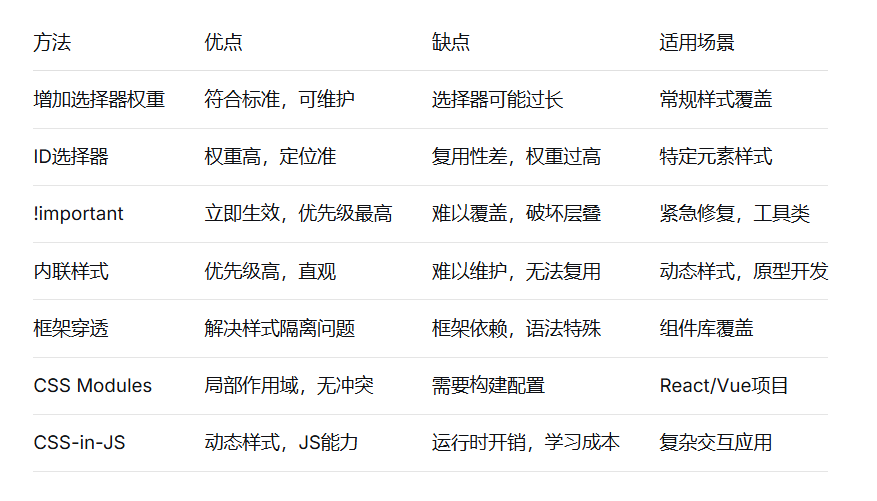
四、各方法优缺点对比
五、建议与总结
5.1 最佳实践建议
-
遵循样式层叠原则
-
优先使用类选择器
-
避免过度使用ID选择器
-
谨慎使用!important
CSS架构建议
css
/* 使用BEM等命名约定 */
.block {}
.block__element {}
.block--modifier {}

/* 工具类可适度使用!important */
.text-red { color: red !important; }
.mt-20 { margin-top: 20px !important; }
框架使用建议
React:推荐CSS Modules或Styled-components
Vue:Scoped样式配合CSS Modules
Angular:组件样式配合全局工具类
提升优先级策略
css
/* 推荐:增加相关父级选择器 */
.theme-dark .button {
  color: white;
}

/* 不推荐:无意义增加权重 */
html body .container .button {}
5.2 总结
-
CSS优先级管理是现代Web开发的重要技能。理解特异性计算规则是基础,合理使用各种提升优先级的方法是关键。在框架开发中,应优先使用框架提供的样式解决方案(如CSS Modules、Scoped样式),谨慎使用样式穿透功能,避免破坏组件封装性。
-
核心原则:尽量通过良好的CSS架构和命名规范来避免优先级冲突,而不是依赖权重竞争。当确实需要提升优先级时,选择对代码可维护性影响最小的方法,并记录相关决策原因。
通过合理的CSS架构和优先级策略,可以创建出既灵活又易于维护的样式系统。
