案例说明:
生产环境,将原KingbaseES V8R6集群架构,拆分为单实例环境,以下为具体的操作步骤。 适用版本:
KingbaseES V8R6
一、集群节点信息
1、集群节点状态
bash
[kingbase@node1 zip]$ cd /opt/kingbase/cluster/install/kingbase/bin/
[kingbase@node1 bin]$ ./repmgr cluster show
 ID | Name  | Role    | Status    | Upstream | Location | Priority | Timeline | LSN_Lag | Connection string
----+-------+---------+-----------+----------+----------+----------+----------+---------+------------------------------------------------------------------------------------------------------------------------------------------------------------------------
 1  | node1 | primary | * running |          | default  | 100      | 1        |         | host=192.168.40.27 user=esrep dbname=esrep port=54321 connect_timeout=10 keepalives=1 keepalives_idle=2 keepalives_interval=2 keepalives_count=3 tcp_user_timeout=9000
 2  | node2 | standby |   running | node1    | default  | 100      | 1        | 0 bytes | host=192.168.40.26 user=esrep dbname=esrep port=54321 connect_timeout=10 keepalives=1 keepalives_idle=2 keepalives_interval=2 keepalives_count=3 tcp_user_timeout=9000
2、流复制状态
bash
[kingbase@node1 bin]$ ./ksql test system
用户 system 的口令:
输入 "help" 来获取帮助信息.

test=# select * from sys_stat_replication;
 pid  | usesysid | usename | application_name |  client_addr  | client_hostname | client_port |         backend_start         | backend_xmin |   state   | sent_lsn  | wri
te_lsn | flush_lsn | replay_lsn | write_lag | flush_lag | replay_lag | sync_priority | sync_state |          reply_time
------+----------+---------+------------------+---------------+-----------------+-------------+-------------------------------+--------------+-----------+-----------+----
-------+-----------+------------+-----------+-----------+------------+---------------+------------+-------------------------------
 1586 |    16385 | esrep   | node2            | 192.168.40.26 |                 |        9560 | 2026-01-13 21:20:50.794859+08 |              | streaming | 0/90003C8 | 0/9
0003C8 | 0/90003C8 | 0/90003C8  |           |           |            |             1 | quorum     | 2026-01-13 21:21:51.193410+08
(1 行记录)
二、拆分集群节点管理
1、暂停主备节点repmgrd服务
bash
[kingbase@node1 bin]$ ./repmgr service pause
[NOTICE] node 1 (node1) paused
[NOTICE] node 2 (node2) paused
bash
[kingbase@node1 bin]$ ./repmgr service status
 ID | Name  | Role    | Status    | Upstream | repmgrd | PID  | Paused? | Upstream last seen
----+-------+---------+-----------+----------+---------+------+---------+--------------------
 1  | node1 | primary | * running |          | running | 1704 | yes     | n/a
2 | node2 | standby | running | node1 | running | 1527 | yes | 1 second(s) ago 
2、注销备库节点注册
bash
[kingbase@node2 bin]$ ./repmgr standby unregister
[INFO] connecting to local standby
[INFO] connecting to primary database
[NOTICE] unregistering node 2
[INFO] SET synchronous TO "async" on primary host
[INFO] change synchronous_standby_names from "ANY 1( node2)" to ""
[INFO] try to drop slot "repmgr_slot_2" of node 2 on primary node
[WARNING] replication slot "repmgr_slot_2" is still active on node 2
[INFO] standby unregistration complete
bash
[kingbase@node2 bin]$ ./repmgr cluster show
 ID | Name  | Role    | Status    | Upstream | Location | Priority | Timeline | LSN_Lag | Connection string
----+-------+---------+-----------+----------+----------+----------+----------+---------+------------------------------------------------------------------------------------------------------------------------------------------------------------------------
 1  | node1 | primary | * running |          | default  | 100      | 1        |         | host=192.168.40.27 user=esrep dbname=esrep port=54321 connect_timeout=10 keepalives=1 keepalives_idle=2 keepalives_interval=2 keepalives_count=3 tcp_user_timeout=9000
3、停止备库节点数据库服务
bash
[kingbase@node2 bin]$ /opt/kingbase/cluster/install/kingbase/bin/sys_ctl -D /opt/kingbase/cluster/install/kingbase/data/ stop
等待服务器进程关闭 .... 完成
服务器进程已经关闭
删除备库standby.signal文件:
bash
[kingbase@node2 data]$ ls -lh standby.signal
-rw------- 1 kingbase kingbase 20 1月  13 21:14 standby.signal
[kingbase@node2 data]$ mv standby.signal standby.signal.bk
4、注销主库节点注册
bash
[kingbase@node1 bin]$ ./repmgr primary unregister --force
[INFO] node "node1" (ID: 1) was successfully unregistered
bash
[kingbase@node1 bin]$ ./repmgr cluster show
[ERROR] no node records were found
[HINT] ensure at least one node is registered
三、拆分流复制架构
1、查看复制槽信息
bash
[kingbase@node1 bin]$ ./ksql test system
用户 system 的口令:
输入 "help" 来获取帮助信息.

test=#
test=#
test=# select * from sys_replication_slots;
   slot_name   | plugin | slot_type | datoid | database | temporary | active | active_pid | xmin | catalog_xmin | restart_lsn | confirmed_flush_lsn
---------------+--------+-----------+--------+----------+-----------+--------+------------+------+--------------+-------------+---------------------
 repmgr_slot_2 |        | physical  |        |          | f         | f      |            | 1134 |              | 0/9011600   |
(1 行记录)

test=# 
2、删除备库复制槽(需先关闭备库数据库服务)
bash
[kingbase@node1 bin]$ ./ksql test system
用户 system 的口令:
输入 "help" 来获取帮助信息.

test=#
test=#
test=# select * from sys_replication_slots;
   slot_name   | plugin | slot_type | datoid | database | temporary | active | active_pid | xmin | catalog_xmin | restart_lsn | confirmed_flush_lsn
---------------+--------+-----------+--------+----------+-----------+--------+------------+------+--------------+-------------+---------------------
 repmgr_slot_2 |        | physical  |        |          | f         | f      |            | 1134 |              | 0/9011600   |
(1 行记录)

test=# select sys_drop_replication_slot('repmgr_slot_2');
 sys_drop_replication_slot
---------------------------

(1 行记录)

test=# select * from sys_replication_slots;
 slot_name | plugin | slot_type | datoid | database | temporary | active | active_pid | xmin | catalog_xmin | restart_lsn | confirmed_flush_lsn
-----------+--------+-----------+--------+----------+-----------+--------+------------+------+--------------+-------------+---------------------
(0 行记录)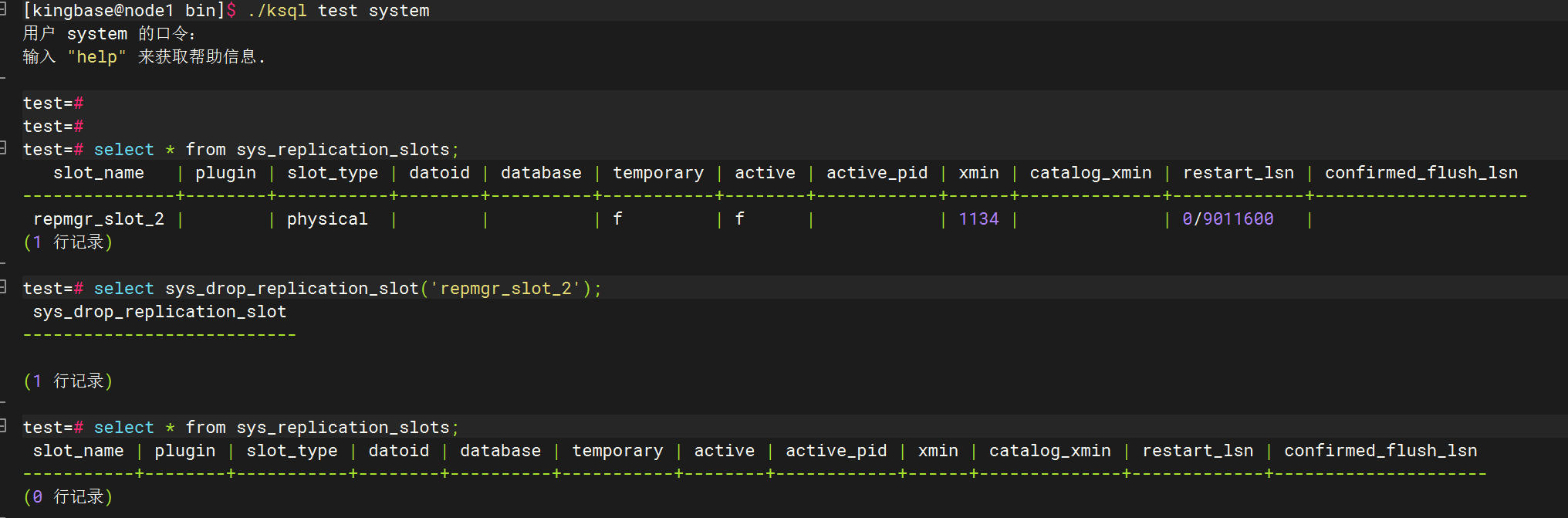
四、修改流复制配置
1、修改synchronous_commit参数(主备库)
可以修改kingbase.conf或kingbase.auto.conf、es_rep.conf配置:
bash
test=# show synchronous_commit ;
 synchronous_commit
--------------------
 remote_apply
(1 row)

test=# alter system set synchronous_commit=on;
ALTER SYSTEM
test=# select sys_reload_conf();
 sys_reload_conf()
-------------------
 t
(1 row)

test=# show synchronous_commit ;
 synchronous_commit
--------------------
 on
(1 row)

也可以修改主备库的es_rep.conf

[kingbase@node1 bin]$ vim ../data/es_rep.conf

把synchronous_commit = remote_apply 修改为 synchronous_commit = on
2、删除或注释集群连接串和复制槽配置
bash
[kingbase@node2 data]$ cat kingbase.auto.conf
# Do not edit this file manually!
# It will be overwritten by the ALTER SYSTEM command.
#primary_conninfo = 'host=192.168.40.27 user=esrep port=54321 application_name=node2 connect_timeout=10 keepalives=1 keepalives_idle=2 keepalives_interval=2 keepalives_count=3 tcp_user_timeout=9000'
#primary_slot_name = 'repmgr_slot_2'
3、禁用kbha进程的启动项
bash
[root@node201 ~]# cat /etc/cron.d/KINGBASECRON

#*/1 * * * * kingbase . /etc/profile;/home/kingbase/cluster/R6/R6HA/kingbase/bin/kbha -A daemon -f /home/kingbase/cluster/R6/R6HA/kingbase/bin/../etc/repmgr.conf
五、总结
完成以上操作步骤后,将原集群架构拆分为两个独立的单实例环境(支持RW),对于原集群管理的目录及配置,可以清理或保存,并不影响实例的正常运行。