实际效果


主要思路
- 从img标签获取图片原始尺寸 获取图片容器尺寸
- 计算图片实际展示的宽高 将基于原始尺寸的坐标转化为基于展示尺寸的 并设置相应的拖拽区
- 选择框框使用motion.div构建 用x/y/width/height四个motion value描述
- 选择框框整体拖拽使用motion自带功能即可 但四边、四角的拖拽逻辑要手写
- 选择框按照左上角的位置进行排序 设置zindex 越靠上越靠左z越小 尽可能避免某个拖拽框被完全遮盖
代码结构
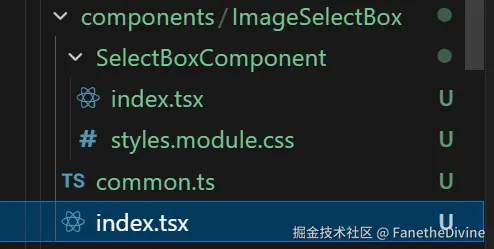
实际代码
common.ts
ts
import { match } from 'ts-pattern'

/** 选择框 */
export type SelectBox = {
  key: string | number
  /** 左上角坐标和右下角坐标 */
  position: [x1: number, y1: number, x2: number, y2: number]
  style?: {
    fill?: string
    border?: string
    borderWidth?: number
  }
}

/** 区域或图片的大小 */
export type Size = {
  width: number
  height: number
}

/** 获取图片的原始尺寸 */
export async function getImageNaturalSize(src: string) {
  const img = new Image()
  img.src = src
  const { promise, resolve, reject } = Promise.withResolvers<Size>()
  img.addEventListener('load', () => {
    resolve({ width: img.naturalWidth, height: img.naturalHeight })
  })
  img.addEventListener('error', reject)
  return promise
}

/** 计算图片的展示尺寸 */
export function getDisplaySize(naturalSize: Size, containerSize: Size) {
  const scaleX = containerSize.width / naturalSize.width
  const scaleY = containerSize.height / naturalSize.height
  const scale = Math.min(scaleX, scaleY)
  return {
    width: naturalSize.width * scale,
    height: naturalSize.height * scale,
  }
}

/** 计算选择框的z-index 使所有选择框都可以点击 */
export function getBoxZIndexs(boxs: SelectBox[]) {
  const keyMap = new Map<SelectBox['key'], number>()
  // 矩形靠上、靠左的 z较低
  const sorted = [...boxs].sort((A, B) => {
    const {
      position: [Ax1, Ay1],
    } = A
    const {
      position: [Bx1, By1],
    } = B
    return Ay1 !== By1 ? Ay1 - By1 : Ax1 - Bx1
  })
  sorted.forEach((item, i) => {
    keyMap.set(item.key, i)
  })
  return boxs.map((item) => keyMap.get(item.key))
}

/**
 * 将基于原始尺寸的坐标转化为基于展示尺寸的坐标 或者反过来/
 * 转化后的坐标不小于0 不大于目标尺寸的最大值
 */
export function convertPosition(
  position: SelectBox['position'],
  naturalSize: Size,
  displaySize: Size,
  to: 'natural' | 'display',
) {
  const [originSize, resultSize] = match(to)
    .with('display', () => [naturalSize, displaySize])
    .with('natural', () => [displaySize, naturalSize])
    .exhaustive()
  const scaleX = resultSize.width / originSize.width
  const scaleY = resultSize.height / originSize.height
  const maxX = resultSize.width
  const maxY = resultSize.height
  const [x1, y1, x2, y2] = position
  return [
    Math.max(0, Math.min(x1 * scaleX, maxX)),
    Math.max(0, Math.min(y1 * scaleY, maxY)),
    Math.max(0, Math.min(x2 * scaleX, maxX)),
    Math.max(0, Math.min(y2 * scaleY, maxY)),
  ] as SelectBox['position']
}

/** 获取符合左上右下顺序的position */
export function getLegalPosition(position: SelectBox['position']) {
  const [_x1, _y1, _x2, _y2] = position
  const [x1, x2] = _x1 <= _x2 ? [_x1, _x2] : [_x2, _x1]
  const [y1, y2] = _y1 <= _y2 ? [_y1, _y2] : [_y2, _y1]
  return [x1, y1, x2, y2] as SelectBox['position']
}

/** 拖拽方向类型 */
export type DragDirection =
  | 'top'
  | 'top-left'
  | 'top-right'
  | 'left'
  | 'right'
  | 'bottom'
  | 'bottom-left'
  | 'bottom-right'

export const DirectionCursorMap: Record<DragDirection, string> = {
  top: 'ns-resize',
  bottom: 'ns-resize',
  left: 'ew-resize',
  right: 'ew-resize',
  'top-left': 'nwse-resize',
  'bottom-right': 'nwse-resize',
  'top-right': 'nesw-resize',
  'bottom-left': 'nesw-resize',
}

/** 根据拖拽方向获取鼠标指针样式 */
export function getCursorStyle(dir: DragDirection) {
  return DirectionCursorMap[dir]
}
index.tsx
tsx
import {
  useRef,
  forwardRef,
  useImperativeHandle,
  useState,
  useMemo,
} from 'react'
import { Skeleton } from 'antd'
import { useMemoizedFn, useSize } from 'ahooks'
import useSWR from 'swr'
import { match, P } from 'ts-pattern'
import { cn } from '@/utils'
import { SelectBoxComponent } from './SelectBoxComponent'
import {
  type SelectBox,
  convertPosition,
  getImageNaturalSize,
  getDisplaySize,
  getBoxZIndexs,
} from './common'

export { type SelectBox } from './common'

export type ImageSelectBoxProps = Style & {
  src: string
  boxs: SelectBox[]
  onPositionChange: (key: SelectBox['key'], position: SelectBox['position']) => void
  onCreateBox?: (position: SelectBox['position']) => void
  onClick?: (boxKey: SelectBox['key'] | undefined, e: React.MouseEvent) => void
}

export type ImageSelectBoxInstance = {
  /** 调用此函数后 在拖拽区点击 便可创建一个新的区域并开启其拖拽 */
  createBox: () => void
}

export const ImageSelectBox = forwardRef<ImageSelectBoxInstance, ImageSelectBoxProps>(
  (props, ref) => {
    const { src, boxs, onPositionChange, onCreateBox, onClick, className, style } = props

    // 图片和拖拽区的尺寸
    const { data: naturalSize, isValidating, error } = useSWR(src, getImageNaturalSize)
    const containerRef = useRef<HTMLDivElement>(null)
    const containerSize = useSize(containerRef)
    // 计算展示尺寸
    const displaySize = useMemo(() => {
      if (!naturalSize || !containerSize) return undefined
      const size = getDisplaySize(naturalSize, containerSize)
      return size
    }, [containerSize, naturalSize])
    const dragRange = useRef<HTMLDivElement>(null)

    // 为选择框设置zindex 避免重叠遮挡
    const zIndexList = useMemo(() => {
      const zList = getBoxZIndexs(boxs)
      return zList
    }, [boxs])

    // 用于点击选择框事件 如果指针移动 则不触发此事件
    const pointerMoved = useRef(false)

    // 创建选择框
    const isCreating = useRef(false)
    const [creatingInitPosition, setInitPosition] = useState<SelectBox['position']>()
    const createBox = useMemoizedFn(() => {
      isCreating.current = true
    })
    useImperativeHandle(
      ref,
      () => ({
        createBox,
      }),
      [createBox],
    )
    return (
      <div
        className={cn(
          'relative flex h-full w-full items-center justify-center overflow-hidden',
          className,
        )}
        style={style}
        onClick={(e) => {
          if (e.target === e.currentTarget) {
            onClick?.(undefined, e)
          }
        }}
        ref={containerRef}
      >
        {match({ isValidating, error: error as Error | null, naturalSize, displaySize })
          .with({ isValidating: false, error: P.nonNullable }, () => '图片加载失败')
          .with(
            { isValidating: false, naturalSize: P.nonNullable, displaySize: P.nonNullable },
            ({ naturalSize, displaySize }) => (
              <>
                <img src={src} className='h-full w-full object-contain' />
                <div
                  className='absolute top-1/2 left-1/2 z-10 -translate-x-1/2 -translate-y-1/2'
                  style={displaySize}
                  ref={dragRange}
                  onPointerDownCapture={(e) => {
                    pointerMoved.current = false
                    if (!isCreating.current) return
                    if (!dragRange.current) return
                    e.stopPropagation()
                    const { clientX, clientY } = e
                    const { x = 0, y = 0 } = dragRange.current.getBoundingClientRect()
                    const x1 = clientX - x
                    const y1 = clientY - y
                    setInitPosition([x1, y1, x1, y1])
                  }}
                  onPointerMoveCapture={()=>{
                    pointerMoved.current = true
                  }}
                >
                  {boxs.map((b, i) => (
                    <SelectBoxComponent
                      key={b.key}
                      position={convertPosition(b.position, naturalSize, displaySize, 'display')}
                      dragRange={dragRange}
                      onPositionChange={(val) =>
                        onPositionChange?.(
                          b.key,
                          convertPosition(val, naturalSize, displaySize, 'natural'),
                        )
                      }
                      onClick={(e) => {
                        // 如果鼠标移动了 不触发点击
                        if (pointerMoved.current) return
                        onClick?.(b.key, e)
                      }}
                      style={{ zIndex: zIndexList[i] }}
                    />
                  ))}
                  {creatingInitPosition ? (
                    <SelectBoxComponent
                      position={creatingInitPosition}
                      defaultDragDirection='bottom-right'
                      dragRange={dragRange}
                      onPositionChange={(val) => {
                        onCreateBox?.(convertPosition(val, naturalSize, displaySize, 'natural'))
                        setInitPosition(undefined)
                      }}
                      style={{ zIndex: 9999 }}
                    />
                  ) : null}
                </div>
              </>
            ),
          )
          .otherwise(() => (
            <Skeleton active className='p-4' />
          ))}
      </div>
    )
  },
)
SelectBoxComponent/index.tsx
这个文件包含了拖拽逻辑 包括溢出和翻转等
tsx
import React, { useLayoutEffect, FC } from 'react'
import { useMemoizedFn, useMount } from 'ahooks'
import { motion, useMotionValue } from 'motion/react'
import { cn } from '@/utils'
import {
  type SelectBox,
  getLegalPosition,
  getCursorStyle,
  DirectionCursorMap,
  DragDirection,
} from '../common'
import styles from './styles.module.css'

export type SelectBoxComponentProps = Style & {
  position: SelectBox['position']
  dragRange: { current: HTMLElement | null }
  onPositionChange?: (val: SelectBox['position']) => void
  onClick?: (e: React.MouseEvent) => void
  boxStyle?: SelectBox['style']
  /** 传入此项 则选择框初始可拖拽 */
  defaultDragDirection?: DragDirection
}

export const SelectBoxComponent: FC<SelectBoxComponentProps> = (props) => {
  const {
    position,
    dragRange,
    boxStyle,
    onPositionChange,
    onClick,
    defaultDragDirection,
    className,
    style,
  } = props
  const { fill = '#ff000010', border = '#ff0000', borderWidth = 2 } = boxStyle ?? {}

  const x = useMotionValue(0)
  const y = useMotionValue(0)
  const width = useMotionValue(0)
  const height = useMotionValue(0)
  useLayoutEffect(() => {
    const [x1, y1, x2, y2] = getLegalPosition(position)
    x.set(x1)
    y.set(y1)
    width.set(x2 - x1)
    height.set(y2 - y1)
  }, [height, position, width, x, y])
  const onDragEnd = useMemoizedFn(() => {
    const x1 = x.get()
    const y1 = y.get()
    const x2 = x1 + width.get()
    const y2 = y1 + height.get()
    onPositionChange?.([x1, y1, x2, y2])
  })

  /**
   * 拖拽区应当跟随鼠标移动 因此可以根据鼠标位置设置矩形四点的位置
   */
  const startHandlerDrag = useMemoizedFn((dir: DragDirection) => {
    document.body.classList.add(styles.dragging)
    document.body.style.setProperty('--cursor-style', getCursorStyle(dir))
    document.addEventListener('pointermove', onHandlerDrag)
    document.addEventListener('pointerup', stopHandlerDrag)

    function stopHandlerDrag() {
      document.body.classList.remove(styles.dragging)
      document.body.style.removeProperty('--cursor-style')
      document.removeEventListener('pointermove', onHandlerDrag)
      document.removeEventListener('pointerup', stopHandlerDrag)
      onDragEnd()
    }

    let currentDirection = dir
    function onHandlerDrag(e: PointerEvent) {
      if (!dragRange.current) return
      const { clientX, clientY } = e
      const {
        x: rangeX,
        y: rangeY,
        width: maxWidth,
        height: maxHeight,
      } = dragRange.current.getBoundingClientRect()

      // 在允许水平拖拽时计算x/width
      // 注意矩形翻转的问题
      if (currentDirection.includes('left') || currentDirection.includes('right')) {
        const currentX1 = x.get()
        const currentX2 = currentX1 + width.get()
        const isLeft = currentDirection.includes('left')
        let [newCurrentX1, newCurrentX2] = isLeft
          ? [clientX - rangeX, currentX2]
          : [currentX1, clientX - rangeX]
        // newCurrentX1 > newCurrentX2 说明之前的左上点变为了右上点 矩形翻转了
        // 翻转后 拖拽防线同样需要更改
        if (newCurrentX1 > newCurrentX2) {
          ;[newCurrentX1, newCurrentX2] = [newCurrentX2, newCurrentX1]
          currentDirection = (
            isLeft
              ? currentDirection.replace('left', 'right')
              : currentDirection.replace('right', 'left')
          ) as DragDirection
        }
        // 矩形大小溢出
        if (newCurrentX1 < 0) {
          newCurrentX1 = 0
        }
        if (newCurrentX2 > maxWidth) {
          newCurrentX2 = maxWidth
        }
        x.set(newCurrentX1)
        width.set(newCurrentX2 - newCurrentX1)
      }
      // 在允许竖直拖拽时计算y/height 逻辑类似
      if (currentDirection.includes('top') || currentDirection.includes('bottom')) {
        const currentY1 = y.get()
        const currentY2 = currentY1 + height.get()
        const isTop = currentDirection.includes('top')
        let [newCurrentY1, newCurrentY2] = isTop
          ? [clientY - rangeY, currentY2]
          : [currentY1, clientY - rangeY]
        if (newCurrentY1 > newCurrentY2) {
          ;[newCurrentY1, newCurrentY2] = [newCurrentY2, newCurrentY1]
          currentDirection = (
            isTop
              ? currentDirection.replace('top', 'bottom')
              : currentDirection.replace('bottom', 'top')
          ) as DragDirection
        }
        if (newCurrentY1 < 0) {
          newCurrentY1 = 0
        }
        if (newCurrentY2 > maxHeight) {
          newCurrentY2 = maxHeight
        }
        y.set(newCurrentY1)
        height.set(newCurrentY2 - newCurrentY1)
      }
    }
  })

  useMount(() => {
    if (defaultDragDirection) {
      startHandlerDrag(defaultDragDirection)
    }
  })
  return (
    <motion.div
      className={cn('absolute top-0 left-0', styles.selectBox, className)}
      style={{
        // @ts-expect-error 为拖拽手柄提供css变量
        '--handler-width': `${borderWidth}px`,
        '--handler-background-color': border,
        backgroundColor: fill,
        x,
        y,
        width,
        height,
        ...style,
      }}
      drag
      dragElastic={0}
      dragMomentum={false}
      dragConstraints={dragRange}
      onDragEnd={onDragEnd}
      onClick={onClick}
    >
      {Object.keys(DirectionCursorMap).map((dir) => (
        <div
          key={dir}
          className={cn(styles.handler, styles[dir])}
          onPointerDownCapture={(e) => {
            e.stopPropagation()
            startHandlerDrag(dir as DragDirection)
          }}
        ></div>
      ))}
    </motion.div>
  )
}
SelectBoxComponent/styles.module.css
css
body.dragging {

  &,
  & * {
    cursor: var(--cursor-style) !important;
  }
}

.selectBox {
  .handler {
    position: absolute;
    width: var(--handler-width);
    height: var(--handler-width);
    background-color: var(--handler-background-color);

    /* 角落手柄 - 正方形 */
    &.top-left {
      top: 0;
      left: 0;
      cursor: nwse-resize;
    }

    &.top-right {
      top: 0;
      right: 0;
      cursor: nesw-resize;
    }

    &.bottom-left {
      bottom: 0;
      left: 0;
      cursor: nesw-resize;
    }

    &.bottom-right {
      bottom: 0;
      right: 0;
      cursor: nwse-resize;
    }

    /* 边缘手柄 - 矩形 */
    &.top {
      top: 0;
      left: var(--handler-width);
      right: var(--handler-width);
      width: auto;
      cursor: ns-resize;
    }

    &.bottom {
      bottom: 0;
      left: var(--handler-width);
      right: var(--handler-width);
      width: auto;
      cursor: ns-resize;
    }

    &.left {
      left: 0;
      top: var(--handler-width);
      bottom: var(--handler-width);
      height: auto;
      cursor: ew-resize;
    }

    &.right {
      right: 0;
      top: var(--handler-width);
      bottom: var(--handler-width);
      height: auto;
      cursor: ew-resize;
    }
  }
}