目录
[audio2face 有两种驱动方式](#audio2face 有两种驱动方式)
[ue 5.1python 接口实时驱动:](#ue 5.1python 接口实时驱动:)
audio2face 有两种驱动方式
- nvidia ace模式 ,docker服务器
2.live link模式,audio2face2023 为代表。
ue 5.1python 接口实时驱动:
/World/audio2face/Player
audio2face 用的
SimpleUDPTCPSocketClient 通讯
角色蓝图里面 socket client init udp receiver
127.0.0.1 5008
绑定事件到 on receiver
版本:audio2face-2023.2.0

audio2face 新增 audio player,选择stream audio player.
可以播放,不能驱动
python
import subprocess
import os

# 注意:请替换为你的Audio2Face实际安装路径
A2F_SCRIPTS_DIR = r"D:\pro_2026\audio2face-2023.2.0\exts\omni.audio2face.player\omni\audio2face\player\scripts\streaming_server/"


def stream_audio_to_a2f(wav_file_path):
    """
    向正在运行的Audio2Face Streaming Player发送音频文件
    """
    # 切换到流服务器脚本目录
    os.chdir(A2F_SCRIPTS_DIR)

    # 构建命令:使用test_client.py发送音频
    # 假设你的Streaming Player在USD场景中的路径是 /World/StreamingPlayer
    command = f"python test_client.py {wav_file_path} /World/audio2face/StreamingPlayer"
    # command = f"python test_client.py {wav_file_path} /omni.audio2face.player.Player"
    command = f"python test_client.py {wav_file_path} /World/audio2face/Player"
    command = f"python test_client.py {wav_file_path} /World/audio2face/PlayerStreaming"

    try:
        subprocess.run(command, shell=True, check=True)
        print(f"成功发送音频: {wav_file_path}")
    except subprocess.CalledProcessError as e:
        print(f"发送失败,命令执行错误: {e}")
    except FileNotFoundError:
        print("错误:未找到test_client.py脚本,请检查A2F_SCRIPTS_DIR路径。")


# 使用示例
stream_audio_to_a2f(r"D:\data\audios\post_0.wav")
可以驱动,待测试
教程地址:
https://zhuanlan.zhihu.com/p/14780170973
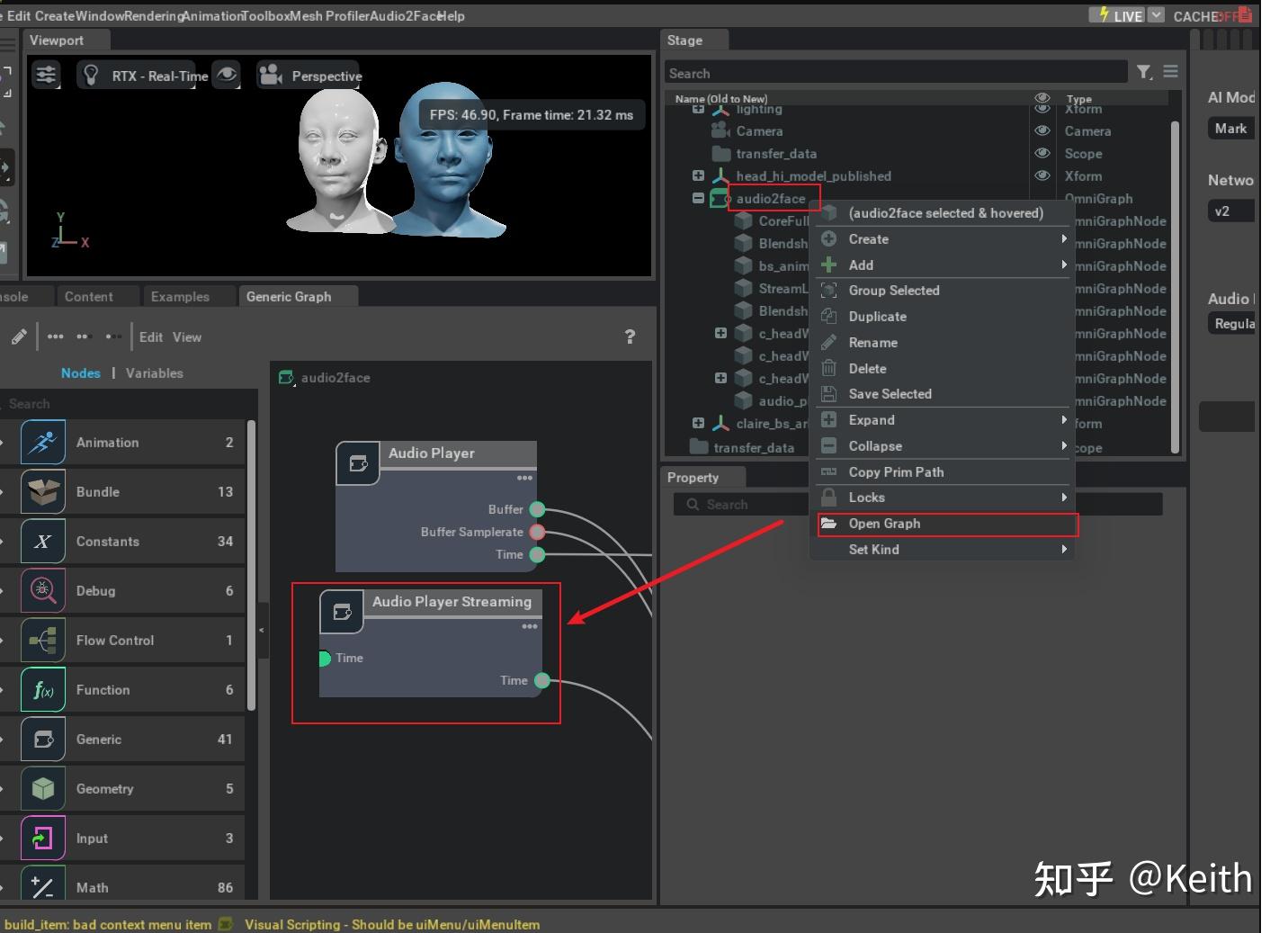
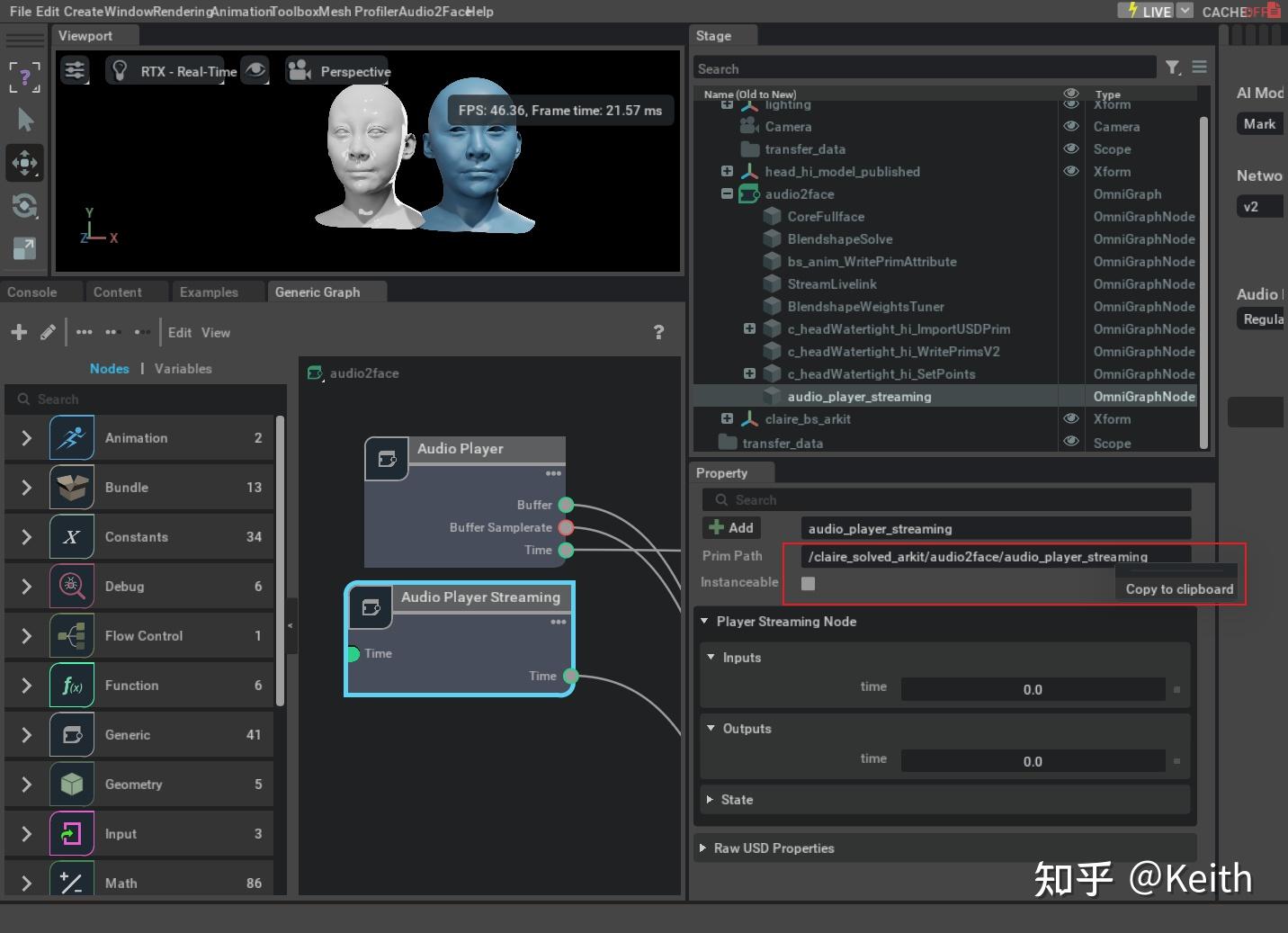
python
def send_audio_to_audio2face(audio_file_path):
    """
    通过命令行发送音频文件给数字人模型。
    先切换到目标目录,然后执行命令。

    参数:
    - wav_path: 音频文件的路径,例如 "D:/Postgraduate/研0/人工智能前沿应用/TTS/output.wav"
    - instance_name: Audio2Face的实例名称,例如 "D:/Nvidiaomini/pkg/audio2face-2023.2.0/exts/omni.audio2face.player/omni/audio2face/player/scripts/streaming_server/World/audio2face/CoreFullface"
    """
    # 设置目标路径
    target_directory = "D:/Nvidiaomini/pkg/audio2face-2023.2.0/exts/omni.audio2face.player/omni/audio2face/player/scripts/streaming_server/"

    # 切换到目标目录
    os.chdir(target_directory)

    # 构建命令
    command = f"python test_client.py {audio_file_path} /World/audio2face/PlayerStreaming"

    # 调用命令行执行
    try:
        subprocess.run(command, shell=True, check=True)
        print("音频文件已成功发送给Audio2Face")
    except subprocess.CalledProcessError as e:
        print(f"命令执行失败: {e}")
    except Exception as e:
        print(f"发生错误: {e}")