Redux介绍(一)
一、定义
1、redux是一个专门用于做状态管理的JS库
2、可以用在react、vue、angularJs等项目库,但基本与react配合使用
3、作用: 集中式管理react应用中多个组件共享状态
二、使用情况
1、某个组件的状态,需要让其它组件可以随时共享
2、一个组件需要改变另一个组件状态,实现组件间通信
3、总体原则: 能不用就不用,如果不用比较吃力,再考虑使用
三、redux原理图
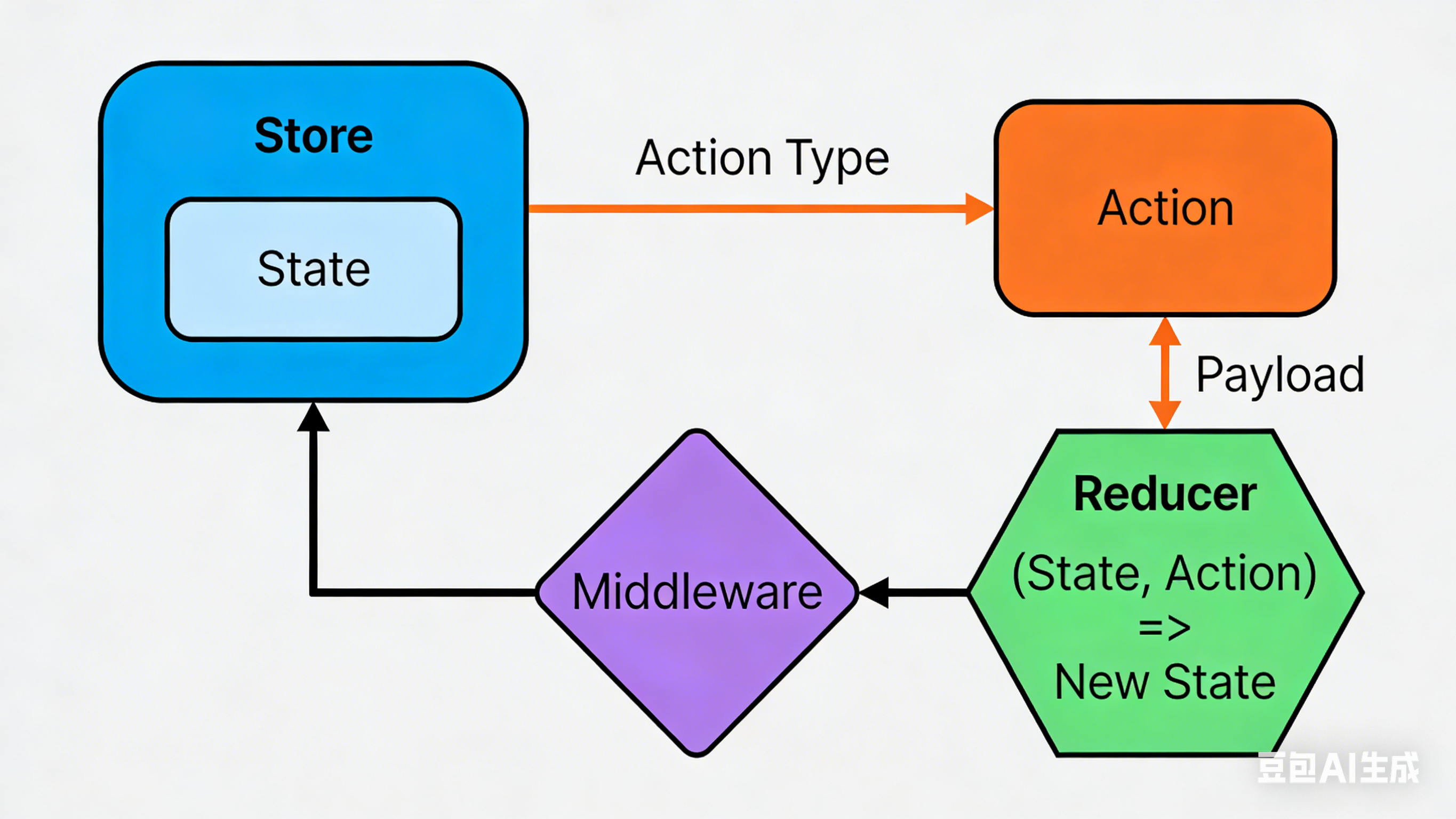
四、redux核心概念
1、action
1.1 动作的对象
1.2 包含2个属性: type-标识属性,值为字符串,唯一,必要属性;data-数据属性,值为任意类型
2、reducer
2.1 用于初始化状态,加工状态
2.2 加工时,根据旧的state和action,产生新的state纯函数
3、store
3.1 将state、action、reduce联系在一起的对象
3.2 生成store对象
javascript
// store.ts
import { legacy_createStore, applyMiddleware } from 'redux'
// 引入thunk用于支持异步action
import { thunk } from 'redux-thunk'
import countReducer from './reducer.ts'

const store = legacy_createStore(countReducer, applyMiddleware(thunk))

export default store3.3 对象功能:
getState(): 得到store
dispatch(action): 分发action,触发reducer,产生新的state
subscribe(listener): 注册监听,当产生新的state时,自动调用五、求和案例redux实践
1、在main.tsx中检测store中状态的改变,一旦发生改变重新渲染App
javascript
// main.tsx
import { StrictMode } from 'react'
import { createRoot } from 'react-dom/client'
import { Provider } from 'react-redux'
import App from './App.tsx'
import store from './redux/store.ts'

const root = createRoot(document.getElementById('root')!)
root.render(
  <StrictMode>
    <Provider store={store}>
      <App />
    </Provider>
  </StrictMode>,
)
2、App.tsx组件
javascript
import { Component } from 'react'
import Count from './containers/Count'

export default class App extends Component {
  render() {
    return (
      <div>
        <Count />
      </div>
    )
  }
}
3、Count组件
javascript
import { Component } from 'react'

export default class Count extends Component {

    selectRef = null
    increment() {
        const { value } = this.selectRef
        this.props.add(value)
    }

    decrement() {
        const { value } = this.selectRef
        this.props.reduce(value)
    }

    incrementIfOdd() {
        const { value } = this.selectRef
        if (this.props.count % 2 !== 0) {
            this.props.add(value)
        }
    }
    incrementAsync() {
        const { value } = this.selectRef
        this.props.addAsync(value, 1000)
    }

    render() {
        return (
            <div>
                <h1>当前求和: {this.props.count}</h1>
                <select ref={c => this.selectRef = c}>
                    <option value="1">1</option>
                    <option value="2">2</option>
                    <option value="3">3</option>
                </select>
                <button onClick={() => this.increment()}>add</button>
                <button onClick={() => this.decrement()}>decrement</button>
                <button onClick={() => this.incrementIfOdd()}>increment odd</button>
                <button onClick={() => this.incrementAsync()}>async add</button>
            </div>
        )
    }
}
4、count.ts常量文件
javascript
/**
 * 该文件用于定义用到的常量
 */

export const INCREMENT = 'increment'
export const DECREMENT = 'decrement'
5、store.ts文件
javascript
import { legacy_createStore, applyMiddleware } from 'redux'
// 引入thunk用于支持异步action
import { thunk } from 'redux-thunk'
import countReducer from './reducer.ts'

const store = legacy_createStore(countReducer, applyMiddleware(thunk))

export default store
6、reducer.ts
javascript
/**
 * 该文件用于创建一个为Count组件服务的reducer,reducer本质是一个函数
 *
 * reducer函数接收两个参数:之前的状态(preState)、动作对象(action)
 *                        第一次被调用时,preState为undefined
 */

import { DECREMENT, INCREMENT } from "../constants/count";

const initState = 0
export default function countReducer(preState: number = initState, action: Record<string, any>) {
    console.log(preState, action); // 初始化preState: 0 初始化action: type: "@@redux/INIT0.o.r.w.0.q"

    const { type, data } = action

    switch (type) {
        case INCREMENT:
            return preState + data * 1
        case DECREMENT:
            return preState - data * 1
        default:
            return preState
    }
}
7、action.ts
javascript
import { INCREMENT, DECREMENT } from '../constants/count.ts'

// 同步action,指的是值为object的一般对象
export const incrementAction = (data: number) => {
    return { type: INCREMENT, data }
}

export const decrementAction = (data: number) => {
    return { type: DECREMENT, data }
}

// 异步action,指的是action值为函数, 异步action中一般都会调用同步action
export const incrementAsyncAction = (data: number, time: number) => {
    return (dispatch: Function) => {
        setTimeout(() => {
            dispatch(incrementAction(data))
        }, time)
    }
}