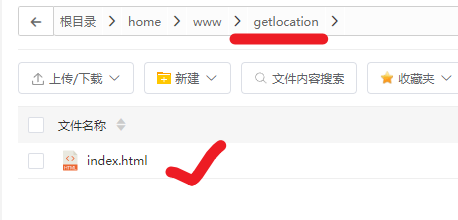
存放路径:
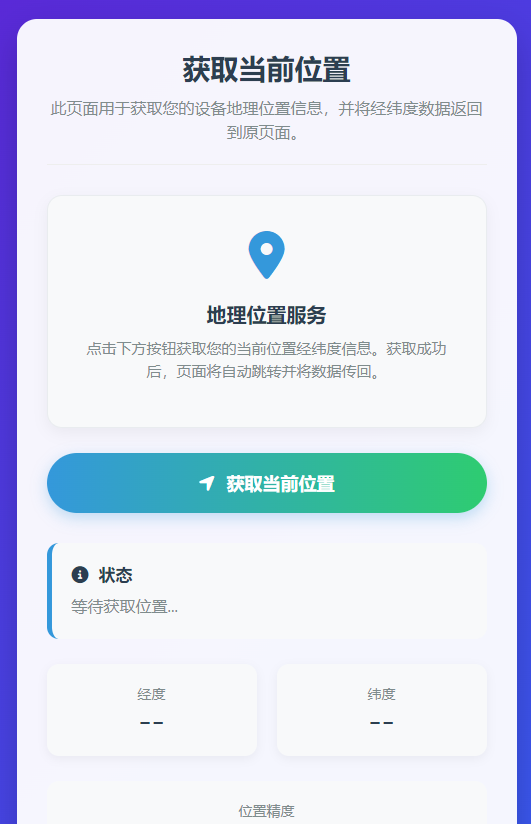
代码:获取经纬度后返回上一页附带经纬度:
<!DOCTYPE html>
<html lang="zh-CN">
<head>
<meta charset="UTF-8">
<meta name="viewport" content="width=device-width, initial-scale=1.0">
<title>获取当前位置经纬度</title>
<link rel="stylesheet" href="https://cdnjs.cloudflare.com/ajax/libs/font-awesome/6.4.0/css/all.min.css">
<style>
* {
margin: 0;
padding: 0;
box-sizing: border-box;
font-family: 'Segoe UI', 'Microsoft YaHei', sans-serif;
}
body {
background: linear-gradient(135deg, #6a11cb 0%, #2575fc 100%);
color: #333;
min-height: 100vh;
display: flex;
flex-direction: column;
align-items: center;
padding: 20px;
}
.container {
width: 100%;
max-width: 500px;
background-color: rgba(255, 255, 255, 0.95);
border-radius: 20px;
box-shadow: 0 15px 35px rgba(0, 0, 0, 0.2);
overflow: hidden;
margin-top: 40px;
padding: 30px;
}
.header {
text-align: center;
margin-bottom: 30px;
padding-bottom: 20px;
border-bottom: 1px solid #eee;
}
.header h1 {
color: #2c3e50;
font-size: 28px;
margin-bottom: 10px;
font-weight: 700;
}
.header p {
color: #7f8c8d;
font-size: 16px;
line-height: 1.5;
}
.location-card {
background: #f8f9fa;
border-radius: 15px;
padding: 25px;
margin-bottom: 25px;
box-shadow: 0 5px 15px rgba(0, 0, 0, 0.05);
border: 1px solid #e9ecef;
text-align: center;
}
.location-icon {
font-size: 48px;
color: #3498db;
margin-bottom: 15px;
}
.location-title {
font-size: 20px;
color: #2c3e50;
margin-bottom: 10px;
font-weight: 600;
}
.location-desc {
color: #7f8c8d;
font-size: 15px;
line-height: 1.5;
margin-bottom: 20px;
}
.get-location-btn {
background: linear-gradient(to right, #3498db, #2ecc71);
color: white;
border: none;
border-radius: 50px;
padding: 18px 30px;
font-size: 18px;
font-weight: 600;
cursor: pointer;
display: flex;
align-items: center;
justify-content: center;
gap: 12px;
width: 100%;
transition: all 0.3s ease;
box-shadow: 0 5px 15px rgba(52, 152, 219, 0.3);
margin-bottom: 30px;
}
.get-location-btn:hover {
transform: translateY(-3px);
box-shadow: 0 8px 20px rgba(52, 152, 219, 0.4);
}
.get-location-btn:active {
transform: translateY(0);
}
.get-location-btn:disabled {
background: linear-gradient(to right, #95a5a6, #7f8c8d);
cursor: not-allowed;
transform: none;
box-shadow: none;
}
.status-container {
background-color: #f8f9fa;
border-radius: 12px;
padding: 20px;
margin-bottom: 25px;
border-left: 5px solid #3498db;
transition: all 0.3s ease;
}
.status-title {
font-weight: 600;
color: #2c3e50;
margin-bottom: 10px;
font-size: 17px;
display: flex;
align-items: center;
gap: 10px;
}
.status-content {
color: #7f8c8d;
font-size: 16px;
min-height: 24px;
}
.data-container {
display: grid;
grid-template-columns: 1fr 1fr;
gap: 20px;
margin-bottom: 25px;
}
.data-box {
background: #f8f9fa;
border-radius: 12px;
padding: 20px;
text-align: center;
box-shadow: 0 3px 10px rgba(0, 0, 0, 0.05);
}
.data-label {
font-size: 14px;
color: #7f8c8d;
margin-bottom: 8px;
}
.data-value {
font-size: 22px;
color: #2c3e50;
font-weight: 700;
font-family: 'Courier New', monospace;
}
.accuracy-container {
background: #f8f9fa;
border-radius: 12px;
padding: 20px;
text-align: center;
margin-bottom: 25px;
}
.accuracy-value {
font-size: 28px;
color: #e74c3c;
font-weight: 700;
margin-top: 5px;
}
.loading {
display: none;
text-align: center;
margin: 20px 0;
}
.spinner {
border: 4px solid rgba(0, 0, 0, 0.1);
width: 40px;
height: 40px;
border-radius: 50%;
border-left-color: #3498db;
animation: spin 1s linear infinite;
margin: 0 auto 15px;
}
@keyframes spin {
0% { transform: rotate(0deg); }
100% { transform: rotate(360deg); }
}
.footer {
text-align: center;
color: rgba(255, 255, 255, 0.8);
font-size: 14px;
margin-top: 30px;
padding: 20px;
}
.footer a {
color: white;
text-decoration: underline;
}
@media (max-width: 600px) {
.container {
padding: 20px;
margin-top: 20px;
}
.header h1 {
font-size: 24px;
}
.data-container {
grid-template-columns: 1fr;
gap: 15px;
}
}
</style>
</head>
<body>
<div class="container">
<div class="header">
<h1>获取当前位置</h1>
<p>此页面用于获取您的设备地理位置信息,并将经纬度数据返回到原页面。</p>
</div>
<div class="location-card">
<div class="location-icon">
<i class="fas fa-map-marker-alt"></i>
</div>
<div class="location-title">地理位置服务</div>
<div class="location-desc">
点击下方按钮获取您的当前位置经纬度信息。获取成功后,页面将自动跳转并将数据传回。
</div>
</div>
<button class="get-location-btn" id="locationBtn" onclick="getLocation()">
<i class="fas fa-location-arrow"></i>
获取当前位置
</button>
<div class="loading" id="loading">
<div class="spinner"></div>
<p>正在获取位置信息...</p>
</div>
<div class="status-container">
<div class="status-title">
<i class="fas fa-info-circle"></i>
状态
</div>
<div class="status-content" id="status">等待获取位置...</div>
</div>
<div class="data-container">
<div class="data-box">
<div class="data-label">经度</div>
<div class="data-value" id="longitude">--</div>
</div>
<div class="data-box">
<div class="data-label">纬度</div>
<div class="data-value" id="latitude">--</div>
</div>
</div>
<div class="accuracy-container">
<div class="data-label">位置精度</div>
<div class="accuracy-value" id="accuracy">-- 米</div>
</div>
</div>
<div class="footer">
地理位置服务由您的设备提供 © 2023
</div>
<script>
// 获取URL参数
function getQueryParam(name) {
const urlParams = new URLSearchParams(window.location.search);
return urlParams.get(name);
}
// 获取returnUrl参数
const returnUrl = getQueryParam('returnUrl');
// DOM元素
const locationBtn = document.getElementById('locationBtn');
const statusElement = document.getElementById('status');
const latitudeElement = document.getElementById('latitude');
const longitudeElement = document.getElementById('longitude');
const accuracyElement = document.getElementById('accuracy');
const loadingElement = document.getElementById('loading');
function getLocation() {
// 禁用按钮,防止重复点击
locationBtn.disabled = true;
locationBtn.innerHTML = '<i class="fas fa-spinner fa-spin"></i> 获取中...';
// 显示加载动画
loadingElement.style.display = 'block';
// 更新状态
statusElement.textContent = "正在获取位置...";
statusElement.style.color = "#3498db";
// 检查浏览器是否支持地理位置API
if (!navigator.geolocation) {
statusElement.textContent = "您的浏览器不支持地理位置功能";
statusElement.style.color = "#e74c3c";
locationBtn.innerHTML = '<i class="fas fa-exclamation-triangle"></i> 浏览器不支持';
loadingElement.style.display = 'none';
return;
}
// 获取当前位置
navigator.geolocation.getCurrentPosition(
// 成功回调函数
function(position) {
const latitude = position.coords.latitude;
const longitude = position.coords.longitude;
const accuracy = position.coords.accuracy;
// 更新UI显示
latitudeElement.textContent = latitude.toFixed(6);
longitudeElement.textContent = longitude.toFixed(6);
accuracyElement.textContent = accuracy.toFixed(2) + " 米";
statusElement.textContent = "位置获取成功! 正在跳转...";
statusElement.style.color = "#2ecc71";
// 添加成功动画
locationBtn.innerHTML = '<i class="fas fa-check-circle"></i> 获取成功';
locationBtn.style.background = 'linear-gradient(to right, #2ecc71, #27ae60)';
// 隐藏加载动画
loadingElement.style.display = 'none';
// 如果有returnUrl,将位置数据传回原页面
if (returnUrl) {
// 等待2秒,让用户看到成功信息
setTimeout(() => {
// 跳转回原页面,携带位置数据
window.location.href = returnUrl + '/' + longitude + '/' + latitude;
}, 2000);
} else {
// 如果没有returnUrl,重新启用按钮
setTimeout(() => {
locationBtn.disabled = false;
locationBtn.innerHTML = '<i class="fas fa-location-arrow"></i> 再次获取位置';
locationBtn.style.background = 'linear-gradient(to right, #3498db, #2ecc71)';
}, 3000);
}
},
// 错误回调函数
function(error) {
let errorMessage = "获取位置失败 - ";
switch(error.code) {
case error.PERMISSION_DENIED:
errorMessage += "用户拒绝了位置请求";
break;
case error.POSITION_UNAVAILABLE:
errorMessage += "位置信息不可用";
break;
case error.TIMEOUT:
errorMessage += "请求超时";
break;
default:
errorMessage += "未知错误";
}
// 更新状态显示
statusElement.textContent = errorMessage;
statusElement.style.color = "#e74c3c";
// 更新按钮状态
locationBtn.innerHTML = '<i class="fas fa-exclamation-triangle"></i> 获取失败,点击重试';
locationBtn.disabled = false;
locationBtn.style.background = 'linear-gradient(to right, #e74c3c, #c0392b)';
// 隐藏加载动画
loadingElement.style.display = 'none';
// 如果获取位置失败,也跳转回原页面
if (returnUrl) {
// 可以添加错误标识
setTimeout(() => {
window.location.href = returnUrl;
}, 3000);
}
},
// 可选的选项
{
enableHighAccuracy: true, // 启用高精度
timeout: 15000, // 15秒超时
maximumAge: 0 // 不使用缓存位置
}
);
}
// 如果页面加载时有returnUrl参数,可以显示提示
if (returnUrl) {
console.log("returnUrl参数: " + returnUrl);
// 可以添加一个提示,告知用户将跳转回原页面
const locationDesc = document.querySelector('.location-desc');
locationDesc.innerHTML += "<br><br><strong>注意:</strong>获取位置后将自动跳转回原页面。";
}
</script>
</body>
</html>最终效果: