===
在前端开发中,跨执行环境的通信是常见需求------比如主线程与Web Worker间的数据交互、iframe与父页面的消息传递等。传统的全局事件监听方式虽然简单,但在复杂场景下容易出现消息冲突、性能低下等问题。MessageChannel作为JavaScript原生提供的双向通信API,为这类场景提供了轻量、高效的解决方案。本文将深入解析MessageChannel的工作原理、核心优势及实际应用。
一、MessageChannel核心概念:建立专属通信通道
什么是MessageChannel?
MessageChannel是浏览器提供的原生API,用于在两个独立的JavaScript执行环境之间建立专属的双向通信通道 。每个通道包含两个互相关联的端口(port1和port2),形成一个完整的通信闭环。
核心特性解析
-
双向通信:两个端口均可发送和接收消息,实现真正的双向对话
-
独立通道:每个通道都是隔离的,不同通道互不干扰,避免消息污染
-
跨环境支持:可在主线程、Web Worker、iframe、SharedWorker等任意组合间建立连接
-
异步无阻塞:基于事件机制,不会阻塞主线程执行
-
所有权转移:端口可以安全地转移给其他执行环境
基础工作流程
javascript
// 1. 创建通道实例
const channel = new MessageChannel();
const { port1, port2 } = channel;
// 2. 将一个端口传递给目标环境
target.postMessage('init', '*', [port2]);
// 3. 监听端口消息
port1.onmessage = (event) => {
console.log('收到消息:', event.data);
};
// 4. 发送消息
port1.postMessage('Hello from port1');
// 5. 关闭端口(可选)
// port1.close();二、MessageChannel典型使用场景
1. 主线程与Web Worker的高效通信
Web Worker常用于处理计算密集型任务,但传统的worker.postMessage()方式存在性能瓶颈。每次通信都需要对数据进行序列化/反序列化(结构化克隆),频繁通信时开销明显。
MessageChannel解决方案:
-
建立专属通道,减少序列化开销
-
实现精准的"一对一"通信
-
支持复杂的数据传输(如ArrayBuffer、ImageBitmap等可转移对象)
2. 父页面与iframe的安全通信
window.postMessage虽然能实现跨域通信,但存在安全隐患:
-
全局监听可能被恶意页面劫持
-
多iframe场景下消息来源难以区分
-
缺乏消息确认机制
MessageChannel优势:
javascript
// 为每个iframe创建独立通道
const iframeChannels = new Map();
function connectToIframe(iframeId) {
const channel = new MessageChannel();
iframeChannels.set(iframeId, channel.port1);
// 仅目标iframe能接收到端口
document.getElementById(iframeId).contentWindow
.postMessage('channel-init', '*', [channel.port2]);
}3. SharedWorker多页面通信管理
当多个页面共享同一个Worker时,MessageChannel能为每个页面建立独立的通信链路,避免消息广播带来的混乱。
4. 异步任务解耦与封装
在微前端、插件化架构中,可通过MessageChannel将独立模块封装在隔离环境中:
javascript
// 创建数据处理专用Worker
class DataProcessor {
  constructor() {
    this.channel = new MessageChannel();
    this.worker = new Worker('processor.js');
    this.setupChannel();
  }

  async process(data) {
    return new Promise((resolve) => {
      this.channel.port1.onmessage = (e) => resolve(e.data);
      this.channel.port1.postMessage(data);
    });
  }
}
5. 跨标签页通信优化
结合BroadcastChannel实现跨标签页的高效通信:
-
使用BroadcastChannel广播通道建立请求
-
通过MessageChannel建立专属数据通道
-
进行高频或大数据量的传输
三、实战示例:核心场景代码实现
示例1:主线程与Web Worker的双向通信
主线程代码(main.js):
kotlin
class WorkerManager {
  constructor(workerUrl) {
    this.worker = new Worker(workerUrl);
    this.channel = new MessageChannel();
    this.initChannel();
  }

  initChannel() {
    // 将port2传递给Worker
    this.worker.postMessage(
      { type: 'INIT_CHANNEL' },
      [this.channel.port2]
    );

    // 设置消息监听
    this.channel.port1.onmessage = this.handleMessage.bind(this);
    this.channel.port1.onmessageerror = this.handleError.bind(this);
  }

  handleMessage(event) {
    const { type, data, id } = event.data;

    if (type === 'RESULT') {
      // 处理Worker返回的结果
      this.pendingRequests.get(id)?.resolve(data);
      this.pendingRequests.delete(id);
    }
  }

  async sendTask(taskData) {
    const taskId = Date.now() + Math.random();

    return new Promise((resolve, reject) => {
      this.pendingRequests.set(taskId, { resolve, reject });

      this.channel.port1.postMessage({
        type: 'EXECUTE_TASK',
        id: taskId,
        data: taskData
      });

      // 设置超时
      setTimeout(() => {
        if (this.pendingRequests.has(taskId)) {
          reject(new Error('Worker timeout'));
          this.pendingRequests.delete(taskId);
        }
      }, 5000);
    });
  }
}Worker代码(worker.js):
typescript
let communicationPort = null;
// 监听主线程初始化
self.onmessage = function(event) {
const { type, ports } = event.data;
if (type === 'INIT_CHANNEL' && ports[0]) {
communicationPort = ports[0];
communicationPort.onmessage = async function(event) {
const { type, id, data } = event.data;
if (type === 'EXECUTE_TASK') {
try {
// 执行计算密集型任务
const result = await processData(data);
// 返回结果
communicationPort.postMessage({
type: 'RESULT',
id,
data: result
});
} catch (error) {
communicationPort.postMessage({
type: 'ERROR',
id,
error: error.message
});
}
}
};
}
};
// 数据处理函数
async function processData(data) {
// 模拟复杂计算
await new Promise(resolve => setTimeout(resolve, 100));
return {
processed: true,
timestamp: Date.now(),
summary: `Processed ${data.length} items`
};
}示例2:安全的iframe通信架构
父页面控制器:
typescript
class IframeCommunicator {
  constructor() {
    this.channels = new Map();
    this.messageHandlers = new Map();
  }

  registerIframe(iframeElement, allowedOrigins) {
    const channel = new MessageChannel();
    const iframeId = iframeElement.id;

    // 存储通道引用
    this.channels.set(iframeId, {
      port: channel.port1,
      iframe: iframeElement,
      allowedOrigins
    });

    // 设置消息监听
    channel.port1.onmessage = (event) => {
      this.handleIncomingMessage(iframeId, event);
    };

    // 等待iframe加载完成后发送端口
    iframeElement.addEventListener('load', () => {
      iframeElement.contentWindow.postMessage(
        {
          type: 'CHANNEL_INIT',
          iframeId
        },
        '*',
        [channel.port2]
      );
    });

    return {
      send: (type, data) => this.sendToIframe(iframeId, type, data),
      on: (type, handler) => this.registerHandler(iframeId, type, handler)
    };
  }

  sendToIframe(iframeId, type, data) {
    const channel = this.channels.get(iframeId);
    if (channel && channel.port) {
      channel.port.postMessage({ type, data });
    }
  }
}iframe端适配器:
kotlin
class IframeBridge {
  constructor() {
    this.parentPort = null;
    this.handlers = new Map();

    window.addEventListener('message', (event) => {
      if (event.data.type === 'CHANNEL_INIT' && event.ports[0]) {
        this.parentPort = event.ports[0];

        this.parentPort.onmessage = (messageEvent) => {
          const { type, data } = messageEvent.data;
          this.dispatchMessage(type, data);
        };

        // 通知父页面连接就绪
        this.send('READY', { status: 'connected' });
      }
    });
  }

  send(type, data) {
    if (this.parentPort) {
      this.parentPort.postMessage({ type, data });
    }
  }

  on(type, handler) {
    if (!this.handlers.has(type)) {
      this.handlers.set(type, []);
    }
    this.handlers.get(type).push(handler);
  }
}
四、高级应用与最佳实践
1. 错误处理与重连机制
kotlin
class RobustMessageChannel {
  constructor(target, options = {}) {
    this.target = target;
    this.maxRetries = options.maxRetries || 3;
    this.reconnectDelay = options.reconnectDelay || 1000;
    this.retryCount = 0;

    this.setupChannel();
  }

  setupChannel() {
    try {
      this.channel = new MessageChannel();
      this.setupEventListeners();

      // 发送端口到目标
      this.target.postMessage('INIT', '*', [this.channel.port2]);

      // 设置连接超时
      this.connectionTimeout = setTimeout(() => {
        this.handleDisconnection();
      }, 5000);

    } catch (error) {
      this.handleError(error);
    }
  }

  handleDisconnection() {
    if (this.retryCount < this.maxRetries) {
      this.retryCount++;
      setTimeout(() => this.setupChannel(), this.reconnectDelay);
    }
  }
}
2. 消息序列化与性能优化
kotlin
// 使用Transferable对象提升性能
function sendLargeBuffer(port, buffer) {
  // 标记为可转移对象,避免复制
  port.postMessage(
    { type: 'LARGE_BUFFER', buffer },
    [buffer]
  );
}

// 批量消息处理
class MessageBatcher {
  constructor(port, batchSize = 10) {
    this.port = port;
    this.batchSize = batchSize;
    this.queue = [];
    this.flushTimeout = null;
  }

  send(type, data) {
    this.queue.push({ type, data, timestamp: Date.now() });

    if (this.queue.length >= this.batchSize) {
      this.flush();
    } else if (!this.flushTimeout) {
      this.flushTimeout = setTimeout(() => this.flush(), 50);
    }
  }

  flush() {
    if (this.queue.length > 0) {
      this.port.postMessage({
        type: 'BATCH',
        messages: this.queue
      });
      this.queue = [];
    }
    clearTimeout(this.flushTimeout);
    this.flushTimeout = null;
  }
}
3. 类型安全的消息通信
typescript
// 使用TypeScript或JSDoc增强类型安全
/**
 * @typedef {Object} MessageProtocol
 * @property {'TASK' | 'RESULT' | 'ERROR'} type
 * @property {string} id
 * @property {any} [data]
 * @property {string} [error]
 */

class TypedMessageChannel {
  /**
   * @param {MessagePort} port
   */
  constructor(port) {
    this.port = port;
  }

  /**
   * @param {'TASK' | 'RESULT' | 'ERROR'} type
   * @param {any} data
   * @returns {Promise<any>}
   */
  send(type, data) {
    return new Promise((resolve, reject) => {
      const messageId = this.generateId();

      const handler = (event) => {
        const response = /** @type {MessageProtocol} */ (event.data);
        if (response.id === messageId) {
          this.port.removeEventListener('message', handler);
          if (response.type === 'ERROR') {
            reject(new Error(response.error));
          } else {
            resolve(response.data);
          }
        }
      };

      this.port.addEventListener('message', handler);
      this.port.postMessage({ type, id: messageId, data });
    });
  }
}
五、使用注意事项与兼容性
关键注意事项
-
端口所有权转移 :传递端口时必须在
postMessage的第二个参数中声明php// 正确:声明转移 target.postMessage('init', '*', [port2]); // 错误:端口将被冻结 target.postMessage({ port: port2 }, '*'); -
内存管理:及时关闭不再使用的端口
ini// 通信结束时清理 port.close(); channel = null; -
数据类型限制:结构化克隆算法不支持函数、DOM节点等
-
支持:对象、数组、Blob、ArrayBuffer、ImageBitmap等
-
不支持:函数、Symbol、DOM节点、原型链
-
-
安全考虑:
-
验证消息来源
-
设置消息超时
-
实施速率限制
-
兼容性处理
javascript
function createCommunicationChannel(target) {
  // 检测MessageChannel支持
  if (typeof MessageChannel !== 'undefined') {
    const channel = new MessageChannel();
    target.postMessage('init', '*', [channel.port2]);
    return channel.port1;
  } else {
    // 降级方案:使用postMessage + 消息ID
    return new LegacyChannel(target);
  }
}

class LegacyChannel {
  constructor(target) {
    this.target = target;
    this.listeners = new Map();
    window.addEventListener('message', this.handleMessage.bind(this));
  }

  postMessage(data) {
    this.target.postMessage({
      _legacyChannel: true,
      data
    }, '*');
  }
}
六、性能对比与选型建议
MessageChannel vs postMessage
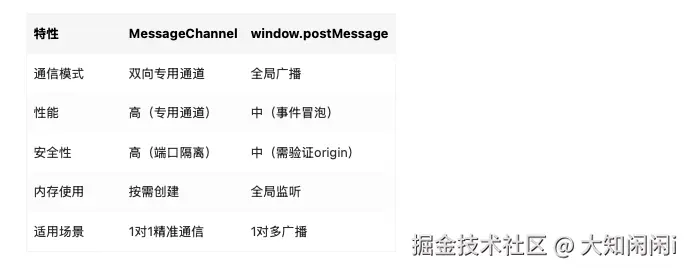
选型建议
-
选择MessageChannel当:
-
需要高频双向通信
-
要求通信隔离和安全性
-
传输大量或敏感数据
-
需要精准的"请求-响应"模式
-
-
使用postMessage当:
-
简单的单向通知
-
广播消息到多个目标
-
兼容旧版浏览器
-
轻量级通信需求
-
七、总结
MessageChannel是现代前端架构中不可或缺的通信工具,它解决了跨执行环境通信的关键问题:
核心价值
-
性能卓越:专用通道避免全局事件竞争,提升通信效率
-
安全可靠:端口隔离机制防止消息泄露和污染
-
架构清晰:明确的"端口对"模型简化了复杂通信逻辑
-
功能强大:支持可转移对象、双向通信、错误处理等高级特性
适用场景总结
-
✅ Web Worker与主线程的高频数据交换
-
✅ 微前端架构中的模块通信
-
✅ 复杂iframe应用的父子页面交互
-
✅ 需要严格隔离的插件系统
-
✅ 实时数据处理管道
最佳实践要点
-
始终实现错误处理和重连逻辑
-
通信结束后及时清理端口资源
-
对于大型数据传输使用Transferable对象
-
在生产环境中添加监控和日志记录
-
考虑降级方案以保证兼容性
随着Web应用越来越复杂,对执行环境隔离和高效通信的需求日益增长。MessageChannel提供的专属、双向、高性能通信能力,使其成为构建现代化、模块化前端应用的基石技术。掌握MessageChannel不仅能够解决具体的通信问题,更能帮助你设计出更清晰、更可维护的前端架构。