这一期讲解的控件是时钟控件,dclock 是 LVGL 库中的一个组件,用于创建模拟时钟时用来用数字显示当前的时间。
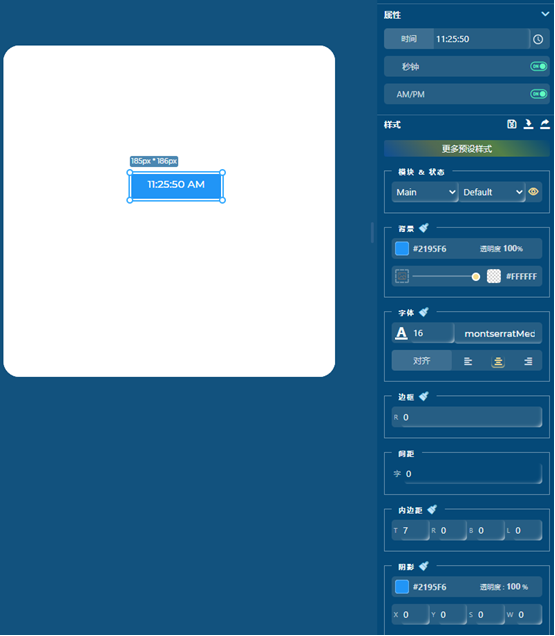
• 显示当前时间:时钟控件可以显示当前的小时和分钟。
• 自定义外观:开发人员可以自定义时钟控件的外观,包括字体、颜色、背景等。
• 动态更新:时钟控件可以根据实时时间进行动态更新,显示当前时间。
• 事件处理:时钟控件可以处理用户交互事件,例如点击或按压事件。
如上图所示,在GUI_guider中使用控件拖拽的方式在右侧的属性列表中,使用特定参数控制数字时钟的时间、颜色、位置大小以及主题等设置。
以下是实现的代码:
//全局变量
int screen_1_digital_clock_1_min_value = 25;
int screen_1_digital_clock_1_hour_value = 11;
int screen_1_digital_clock_1_sec_value = 50;
char screen_1_digital_clock_1_meridiem\[\] = "AM";
//Write codes screen_1_digital_clock_1
//静态布尔变量,用于标记定时器是否已启用
static bool screen_1_digital_clock_1_timer_enabled = false;
//创建数字时钟控件
ui->screen_1_digital_clock_1 = lv_dclock_create(ui->screen_1, "11:25:50 AM");
//创建并启用定时器
if (!screen_1_digital_clock_1_timer_enabled) {
lv_timer_create(screen_1_digital_clock_1_timer, 1000, NULL);
screen_1_digital_clock_1_timer_enabled = true;
}
//设置位置以及大小
lv_obj_set_pos(ui->screen_1_digital_clock_1, 185, 186);
lv_obj_set_size(ui->screen_1_digital_clock_1, 130, 36);
//Write style for screen_1_digital_clock_1, Part: LV_PART_MAIN, State: LV_STATE_DEFAULT.
//设置圆角半径为0
lv_obj_set_style_radius(ui->screen_1_digital_clock_1, 0, LV_PART_MAIN|LV_STATE_DEFAULT);
//设置文字颜色为#FFFFFF白色
lv_obj_set_style_text_color(ui->screen_1_digital_clock_1, lv_color_hex(0xffffff), LV_PART_MAIN|LV_STATE_DEFAULT);
//使用 Montserrat Medium 16号字体
lv_obj_set_style_text_font(ui->screen_1_digital_clock_1, &lv_font_montserratMedium_16, LV_PART_MAIN|LV_STATE_DEFAULT);
//文字不透明度255
lv_obj_set_style_text_opa(ui->screen_1_digital_clock_1, 255, LV_PART_MAIN|LV_STATE_DEFAULT);
//字间距为0
lv_obj_set_style_text_letter_space(ui->screen_1_digital_clock_1, 0, LV_PART_MAIN|LV_STATE_DEFAULT);
//文字对齐
lv_obj_set_style_text_align(ui->screen_1_digital_clock_1, LV_TEXT_ALIGN_CENTER, LV_PART_MAIN|LV_STATE_DEFAULT);
//背景不透明度255
lv_obj_set_style_bg_opa(ui->screen_1_digital_clock_1, 255, LV_PART_MAIN|LV_STATE_DEFAULT);
//背景颜色蓝色#2195f6
lv_obj_set_style_bg_color(ui->screen_1_digital_clock_1, lv_color_hex(0x2195f6), LV_PART_MAIN|LV_STATE_DEFAULT);
//无渐变效果
lv_obj_set_style_bg_grad_dir(ui->screen_1_digital_clock_1, LV_GRAD_DIR_NONE, LV_PART_MAIN|LV_STATE_DEFAULT);
//上内边距:7px 右、下、左内边距:0px
lv_obj_set_style_pad_top(ui->screen_1_digital_clock_1, 7, LV_PART_MAIN|LV_STATE_DEFAULT);
lv_obj_set_style_pad_right(ui->screen_1_digital_clock_1, 0, LV_PART_MAIN|LV_STATE_DEFAULT);
lv_obj_set_style_pad_bottom(ui->screen_1_digital_clock_1, 0, LV_PART_MAIN|LV_STATE_DEFAULT);
lv_obj_set_style_pad_left(ui->screen_1_digital_clock_1, 0, LV_PART_MAIN|LV_STATE_DEFAULT);
//阴影宽度为0(无阴影)
lv_obj_set_style_shadow_width(ui->screen_1_digital_clock_1, 0, LV_PART_MAIN|LV_STATE_DEFAULT);
本文章由威三学社出品
对课程感兴趣可以私信联系