1、前言
湿度报警的核心是 "传感器采集→阈值判定→分级联动",适配海康、大华、宇视等主流监控设备及 NVR/DVR/ 动环平台,下面是可直接落地的通用设置指南:
一、核心原理与前提准备
湿度报警通过内置 / 外接湿度传感器(如 DHT11/22、SHT30)实时采集相对湿度(RH),与预设阈值对比,超限时触发联动动作,用于防范凝露、腐蚀、静电等风险。
- 硬件前提:设备支持湿度监测,或外接传感器并正常接线(如 485 总线型),确保传感器在线且数据稳定。
- 软件前提:进入系统 "报警 / 事件配置" 界面,已完成设备接入与数据同步。
二、通用设置步骤(按操作顺序)
-
进入湿度报警配置页
- NVR/DVR:主菜单 → 报警 → 事件管理 → 湿度报警 / 模拟量报警
- 摄像机 Web:配置 → 事件 → 湿度检测
- 平台软件:设备管理 → 报警规则 → 新增 "湿度事件"
- 动环系统:监测点配置 → 湿度参数 → 报警设置
-
选择湿度源与报警模式
- 湿度源:内置传感器 / 外接传感器(指定通道 / 地址)
- 模式:高湿报警、低湿报警、双向报警(同时设高低阈值)
-
设置湿度阈值(关键)
参考设备手册、行业标准及场景需求,预留安全裕量,启用 3--10 秒去抖动防止误报
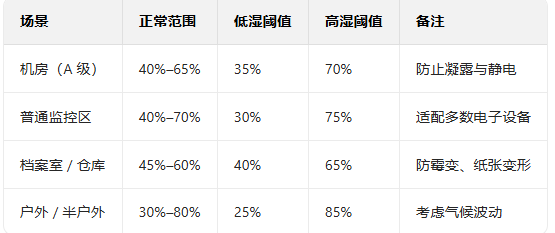
4.配置报警动作(分级联动)
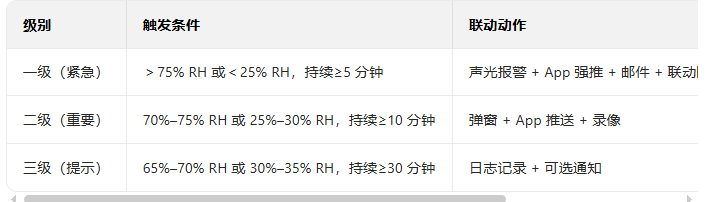
5. 设置生效规则
- 时间段:全天 / 工作时段(如机房 24 小时监测,普通区域仅工作时段)
- 生效范围:指定设备 / 区域,避免无关点位误触发
6.保存并测试验证
- 保存配置后,用加湿 / 除湿手段触发阈值,检查本地(蜂鸣、弹窗)与远程(推送、邮件)动作是否正常。
- 核对报警日志,确保湿度数据、触发时间、联动记录一致
三、品牌专属路径(快速参考)
- 海康:主菜单 → 事件 → 湿度检测 → 启用 → 设置阈值 → 联动报警输出 / 邮件
- 大华:配置 → 智能事件 → 湿度报警 → 选择通道 → 设高低阈值 → 联动动作
- 萤石云:App → 设备 → 报警设置 → 湿度报警 → 开启并设参数 → 开启推送
- 动环平台(迈世 / 力控):监测点 → 湿度 → 阈值配置 → 联动策略(如空调、除湿机)
2、现在干
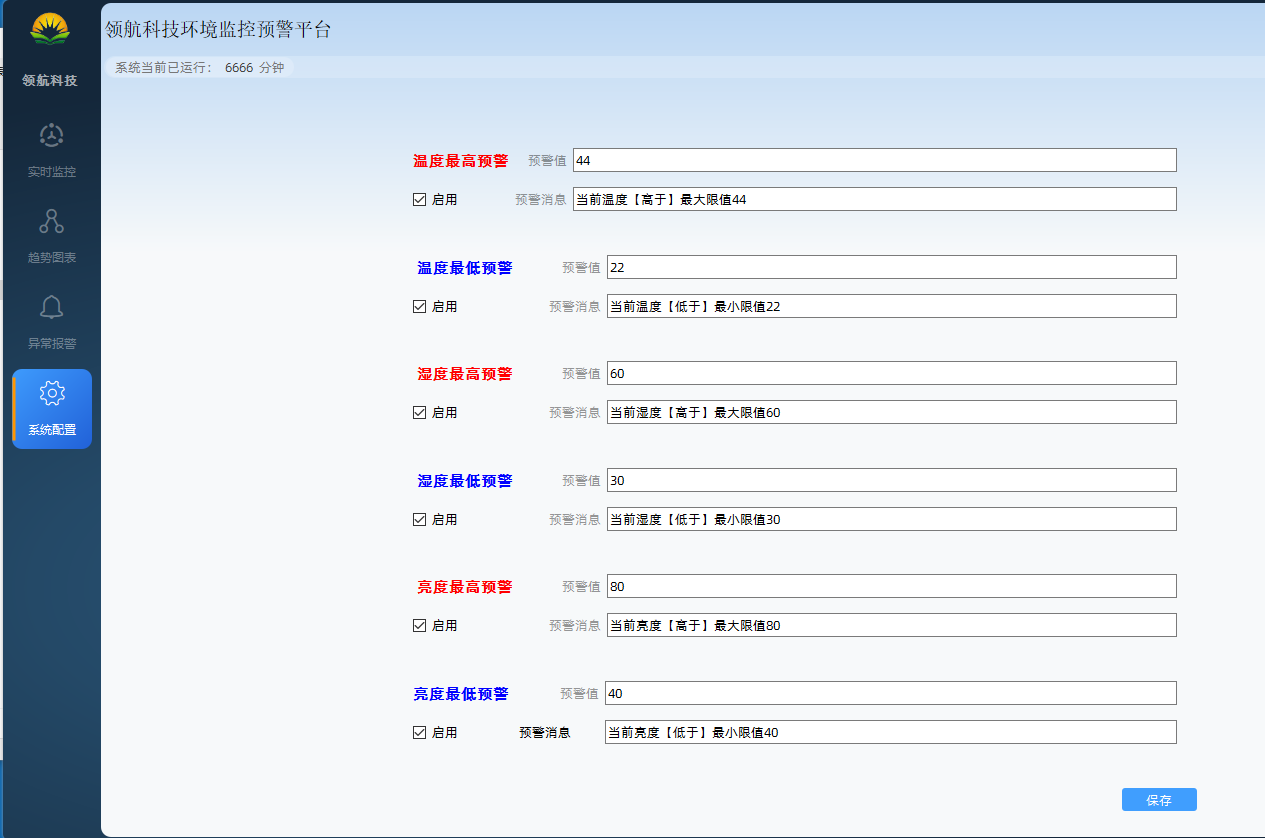
1、报警完整链路
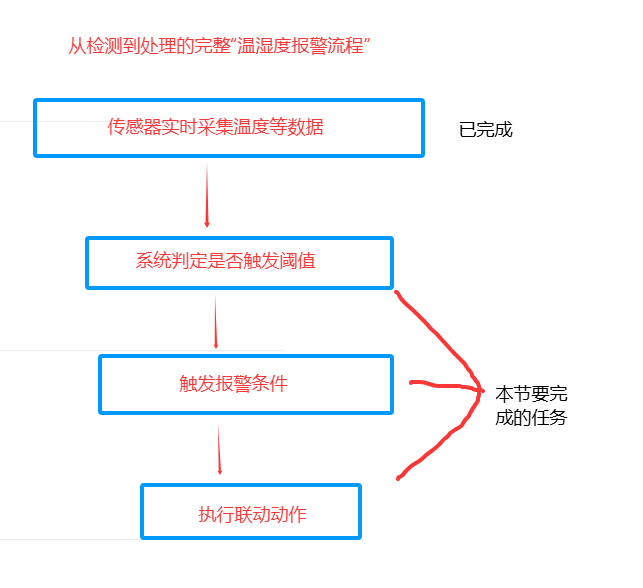
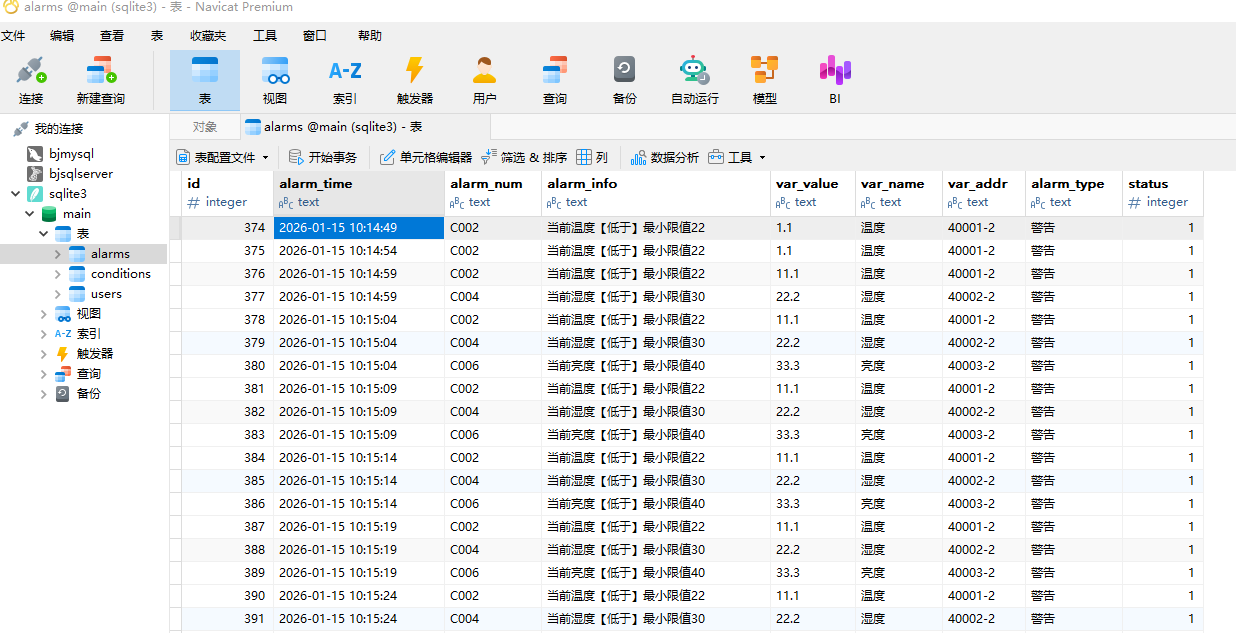
2、数据库表设计
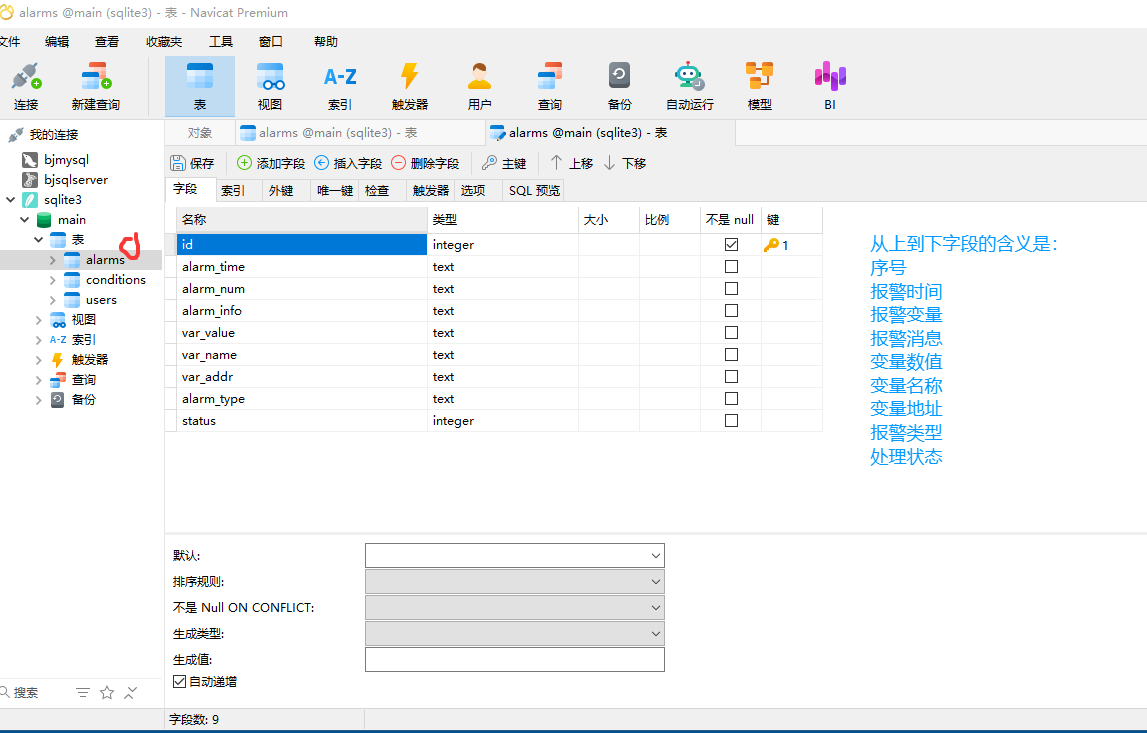
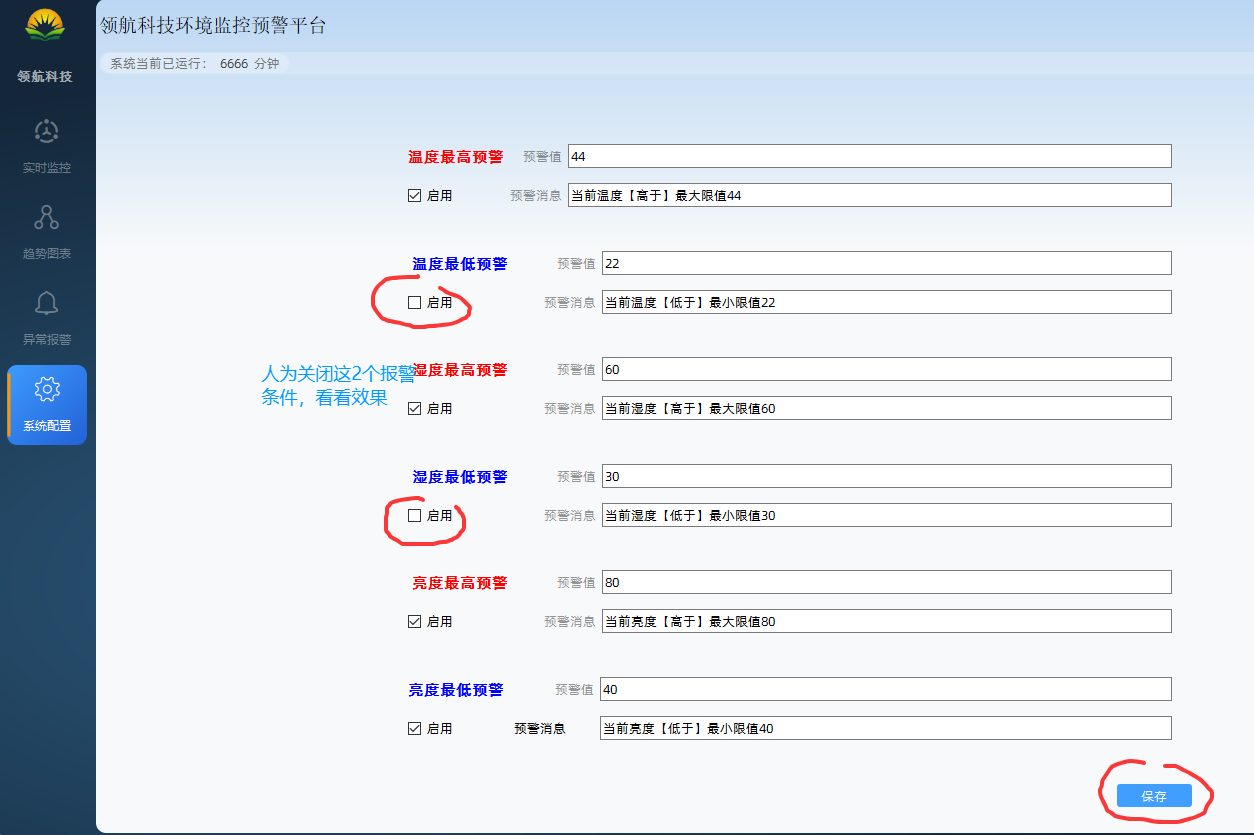
3、获取报警条件
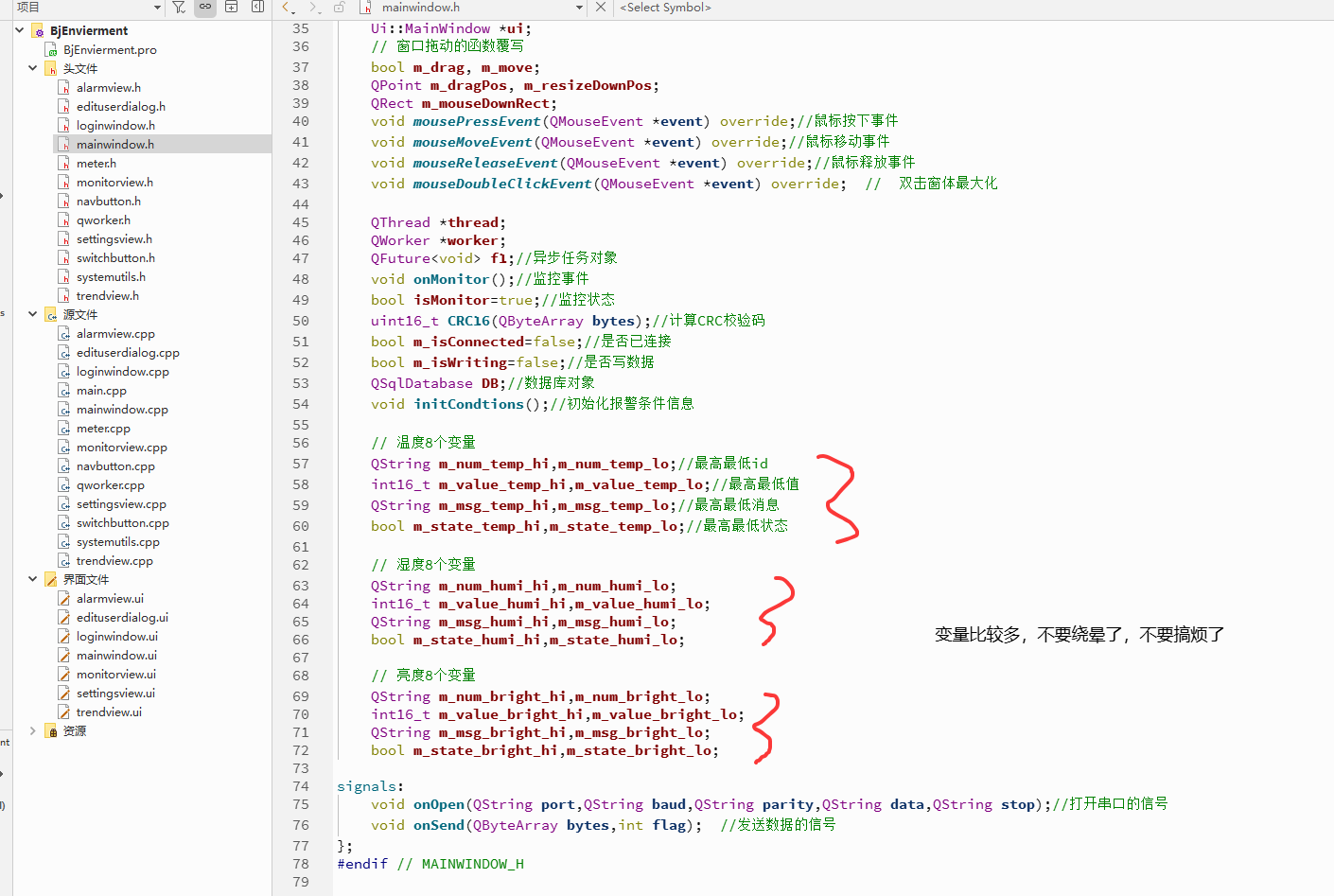
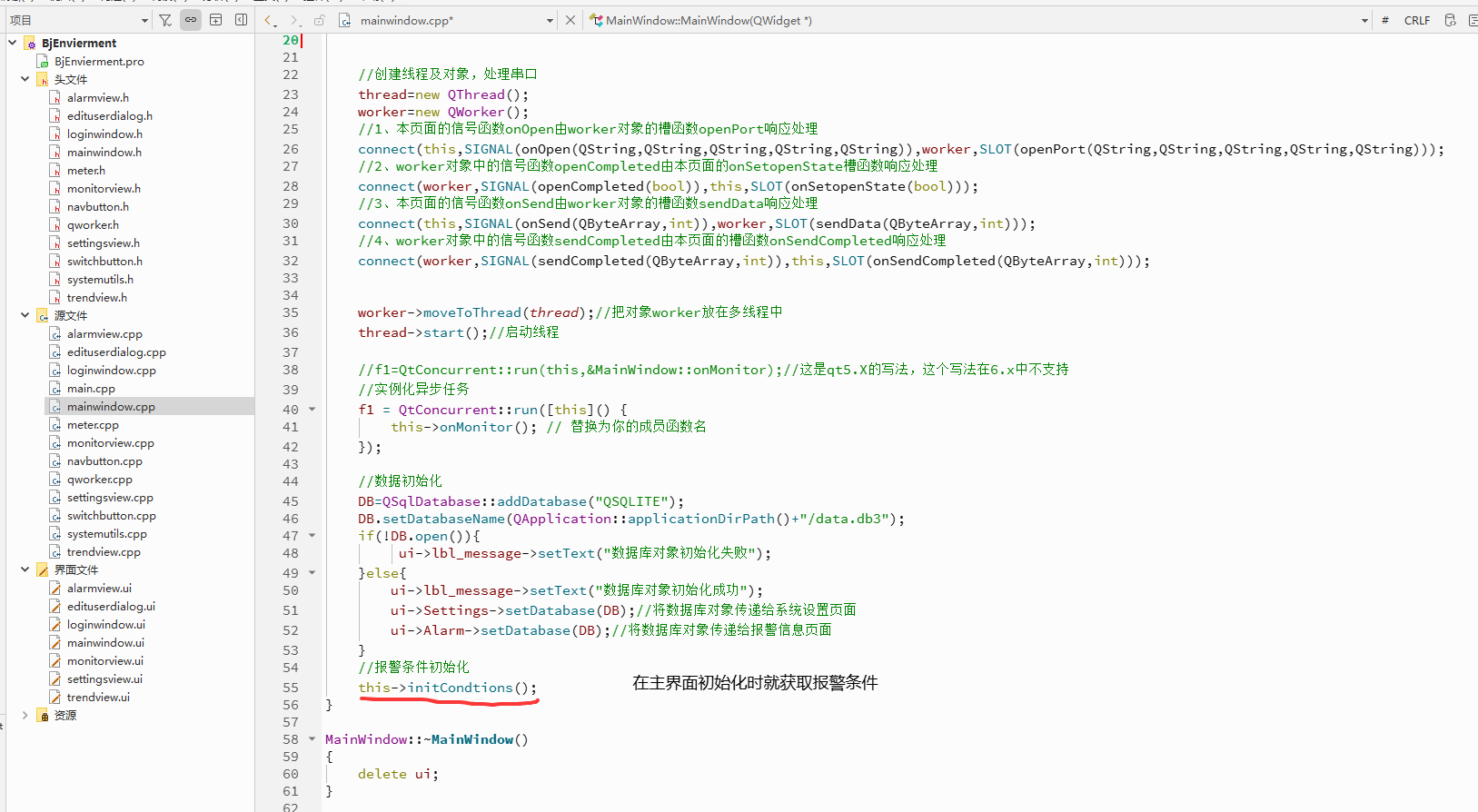
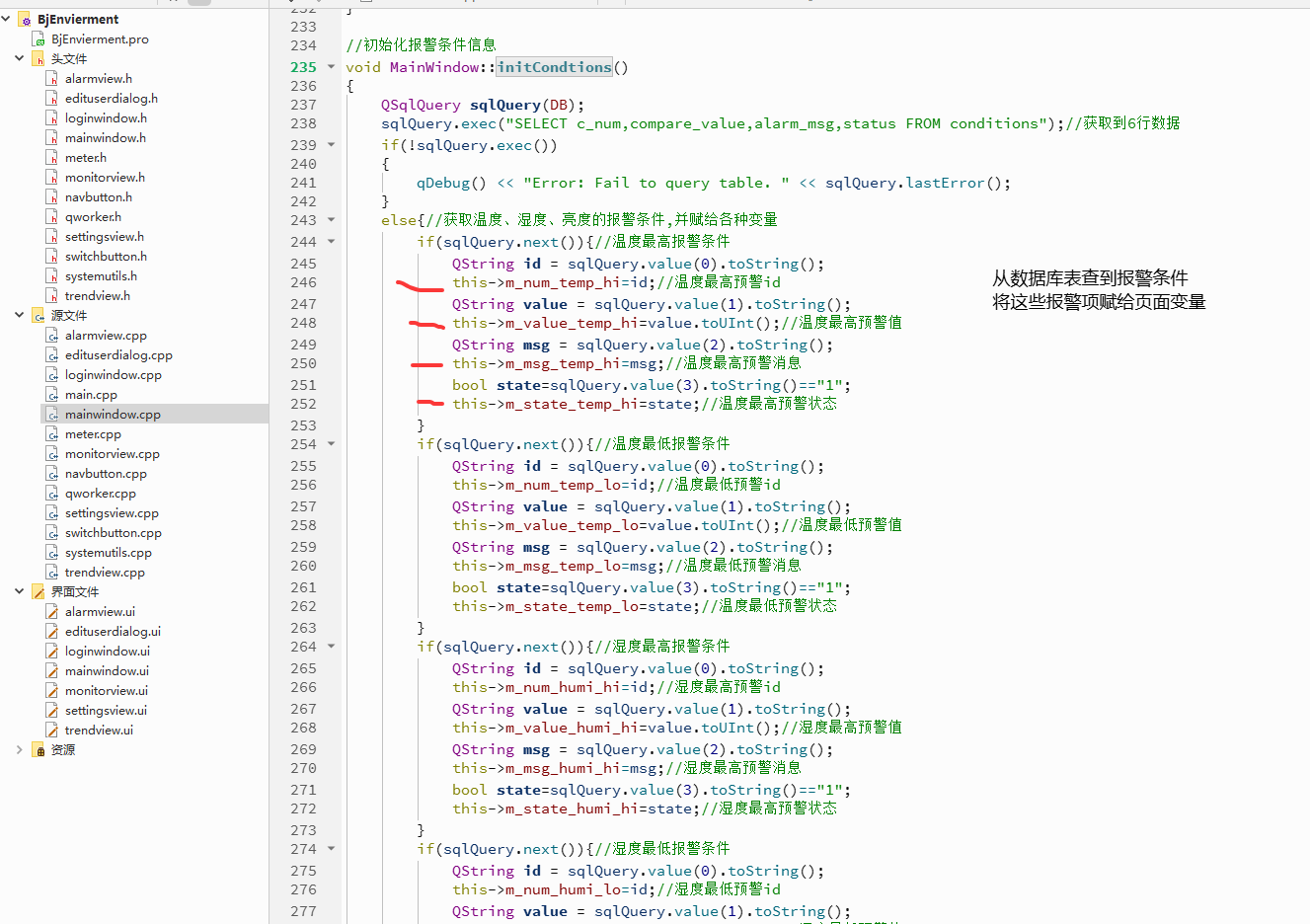
cpp
#include "mainwindow.h"
#include "systemutils.h"
#include "ui_mainwindow.h"
#include <QMessageBox>
#include <QMouseEvent>
#include <QThread>
#include <QtConcurrent/QtConcurrentRun>
#include <QDebug>
#include <QSqlError>

MainWindow::MainWindow(QWidget *parent)
    : QMainWindow(parent)
    , ui(new Ui::MainWindow)
{
    ui->setupUi(this);

    // 1.设置窗口无边框和窗口透明
    this->setWindowFlags(Qt::FramelessWindowHint);
    this->setAttribute(Qt::WA_TranslucentBackground);


    //创建线程及对象,处理串口
    thread=new QThread();
    worker=new QWorker();
    //1、本页面的信号函数onOpen由worker对象的槽函数openPort响应处理
    connect(this,SIGNAL(onOpen(QString,QString,QString,QString,QString)),worker,SLOT(openPort(QString,QString,QString,QString,QString)));
    //2、worker对象中的信号函数openCompleted由本页面的onSetopenState槽函数响应处理
    connect(worker,SIGNAL(openCompleted(bool)),this,SLOT(onSetopenState(bool)));
    //3、本页面的信号函数onSend由worker对象的槽函数sendData响应处理
    connect(this,SIGNAL(onSend(QByteArray,int)),worker,SLOT(sendData(QByteArray,int)));
    //4、worker对象中的信号函数sendCompleted由本页面的槽函数onSendCompleted响应处理
    connect(worker,SIGNAL(sendCompleted(QByteArray,int)),this,SLOT(onSendCompleted(QByteArray,int)));


    worker->moveToThread(thread);//把对象worker放在多线程中
    thread->start();//启动线程

    //f1=QtConcurrent::run(this,&MainWindow::onMonitor);//这是qt5.X的写法,这个写法在6.x中不支持
    //实例化异步任务
    f1 = QtConcurrent::run([this]() {
        this->onMonitor(); // 替换为你的成员函数名
    });

    //数据初始化
    DB=QSqlDatabase::addDatabase("QSQLITE");
    DB.setDatabaseName(QApplication::applicationDirPath()+"/data.db3");
    if(!DB.open()){
         ui->lbl_message->setText("数据库对象初始化失败");
    }else{
        ui->lbl_message->setText("数据库对象初始化成功");
        ui->Settings->setDatabase(DB);//将数据库对象传递给系统设置页面
        ui->Alarm->setDatabase(DB);//将数据库对象传递给报警信息页面
    }
    //报警条件初始化
    this->initCondtions();
}

MainWindow::~MainWindow()
{
    delete ui;
}

//监控事件
void MainWindow::onMonitor()
{
    while(this->isMonitor){
        if(m_isConnected){
            // 从设备中获取到相关数据
            QByteArray bytes;
            bytes.resize(6);
            bytes[0]=0x01;//设备地址
            bytes[1]=0x03;//功能码
            bytes[2]=0x00;//开始地址
            bytes[3]=0x00;
            bytes[4]=0x00;//请求数量
            bytes[5]=0x03;

            // CRC16算法
            auto crc=this->CRC16(bytes);
            uint8_t hi=uint8_t(crc>>8);
            uint8_t lo=uint8_t(crc);
            bytes.resize(8);
            bytes[6]=lo;//crc校验码
            bytes[7]=hi;

            // 需要给QWorker对象发送一个信号
            emit onSend(bytes,1);//向传感器发送信号

            QByteArray bytes2;
            bytes2.resize(6);
            bytes2[0]=0x01;//设备地址
            bytes2[1]=0x01;//功能码
            bytes2[2]=0x00;//开始地址
            bytes2[3]=0x00;
            bytes2[4]=0x00;//请求数量
            bytes2[5]=0x05;

            // CRC16算法
            auto crc2=this->CRC16(bytes2);
            uint8_t hi2=uint8_t(crc2>>8);
            uint8_t lo2=uint8_t(crc2);
            bytes2.resize(8);
            bytes2[6]=lo2;//crc校验码
            bytes2[7]=hi2;

            emit onSend(bytes2,2);//向灯珠发送信号
        }
        QThread::msleep(5000);
    }
}

//鼠标按下事件
void MainWindow::mousePressEvent(QMouseEvent *event){
    if (event->button() == Qt::LeftButton) {  // 如果按下左边按钮
        m_drag = true;//表示要移动
        // 获取当前光标的位置
        m_dragPos = event->pos();
        // 当前鼠标点相对于桌面屏幕左上角的坐标(0,0),全局坐标;
        m_resizeDownPos = event->globalPosition().toPoint();
        // 获取当前窗口的相关参数,包括位置,大小等等各种参数
        m_mouseDownRect = this->rect();
    }
}

//鼠标移动事件
void MainWindow::mouseMoveEvent(QMouseEvent *event){
    // 如果是鼠标在拖动时,当前窗口是全屏,不做任何处理
    if (isFullScreen()) {
        return;
    }
    if (m_move) {
        move(event->globalPosition().toPoint() - m_dragPos);
        return;
    }

    setCursor(Qt::ArrowCursor);
    if (m_drag && (event->buttons() & Qt::LeftButton)) {
        m_move = true;
        move(event->globalPosition().toPoint() - m_dragPos);
    }
}

//鼠标释放事件
void MainWindow::mouseReleaseEvent(QMouseEvent *event){
    Q_UNUSED(event)
    m_drag = false;
    if (m_move) {
        m_move = false;
    }
    setCursor(Qt::ArrowCursor);
}

//关闭事件
void MainWindow::on_pb_close_clicked()
{
    QMessageBox::StandardButton ret=QMessageBox::question(this,tr("关闭系统运行"),tr("您确定要退出系统吗?"),QMessageBox::Yes | QMessageBox::No,QMessageBox::Yes );
    if(ret== QMessageBox::Yes){
        this->isMonitor=false;
        this->close();
    }
}

//最大化
void MainWindow::on_pb_max_clicked()
{
    this->showFullScreen();  // 全屏展示
}

//最小化
void MainWindow::on_pb_min_clicked()
{
    this->showMinimized();
}

//窗体双击事件
void MainWindow::mouseDoubleClickEvent(QMouseEvent *event)
{
    Q_UNUSED(event); // 标记参数未使用,消除警告
    if (isFullScreen()) {
        showNormal();  // 如果是全屏,就恢复到非全屏
    } else {
        showFullScreen();  // 否则就变成全屏的
    }
}

//导航按钮的点击响应事件
void MainWindow::onNavClicked(int index)
{
    ui->sw_pages->setCurrentIndex(index);
}

//连接串口设备
void MainWindow::onConnect(QString port, QString baud, QString parity, QString data, QString stop)
{
    //执行串口对象的连接动作,动作必须在后台线程中处理
    //触发信号,让qworker这个对象来接收信号
    emit onOpen(port,baud,parity,data,stop);
}

//串口连接状态
void MainWindow::onSetopenState(bool state)
{
    m_isConnected=true;
    //接收到worker对象中的打开状态信号
    ui->Monitor->setOpenState(state);
}

//计算CRC校验码
uint16_t MainWindow::CRC16(QByteArray bytes)
{
    int len=bytes.size();
    uint16_t wcrc=0XFFFF;//预置16位crc寄存器,初值全部为1
    uint8_t temp;//定义中间变量
    int i=0,j=0;//定义计数

    for(i=0;i<len;i++)//循环计算每个数据
    {
        temp=bytes.at(i);
        wcrc^=temp;
        for(j=0;j<8;j++){
            //判断右移出的是不是1,如果是1则与多项式进行异或。
            if(wcrc&0X0001){
                wcrc>>=1;//先将数据右移一位
                wcrc^=0XA001;//与上面的多项式进行异或
            }
            else//如果不是1,则直接移出
                wcrc>>=1;//直接移出
        }
    }
    temp=wcrc;//crc的值
    return wcrc;
}

//初始化报警条件信息
void MainWindow::initCondtions()
{
    QSqlQuery sqlQuery(DB);
    sqlQuery.exec("SELECT c_num,compare_value,alarm_msg,status FROM conditions");//获取到6行数据
    if(!sqlQuery.exec())
    {
        qDebug() << "Error: Fail to query table. " << sqlQuery.lastError();
    }
    else{//获取温度、湿度、亮度的报警条件,并赋给各种变量
        if(sqlQuery.next()){//温度最高报警条件
            QString id = sqlQuery.value(0).toString();
            this->m_num_temp_hi=id;//温度最高预警id
            QString value = sqlQuery.value(1).toString();
            this->m_value_temp_hi=value.toUInt();//温度最高预警值
            QString msg = sqlQuery.value(2).toString();
            this->m_msg_temp_hi=msg;//温度最高预警消息
            bool state=sqlQuery.value(3).toString()=="1";
            this->m_state_temp_hi=state;//温度最高预警状态
        }
        if(sqlQuery.next()){//温度最低报警条件
            QString id = sqlQuery.value(0).toString();
            this->m_num_temp_lo=id;//温度最低预警id
            QString value = sqlQuery.value(1).toString();
            this->m_value_temp_lo=value.toUInt();//温度最低预警值
            QString msg = sqlQuery.value(2).toString();
            this->m_msg_temp_lo=msg;//温度最低预警消息
            bool state=sqlQuery.value(3).toString()=="1";
            this->m_state_temp_lo=state;//温度最低预警状态
        }
        if(sqlQuery.next()){//湿度最高报警条件
            QString id = sqlQuery.value(0).toString();
            this->m_num_humi_hi=id;//湿度最高预警id
            QString value = sqlQuery.value(1).toString();
            this->m_value_humi_hi=value.toUInt();//湿度最高预警值
            QString msg = sqlQuery.value(2).toString();
            this->m_msg_humi_hi=msg;//湿度最高预警消息
            bool state=sqlQuery.value(3).toString()=="1";
            this->m_state_humi_hi=state;//湿度最高预警状态
        }
        if(sqlQuery.next()){//湿度最低报警条件
            QString id = sqlQuery.value(0).toString();
            this->m_num_humi_lo=id;//湿度最低预警id
            QString value = sqlQuery.value(1).toString();
            this->m_value_humi_lo=value.toUInt();//湿度最低预警值
            QString msg = sqlQuery.value(2).toString();
            this->m_msg_humi_lo=msg;//湿度最低预警消息
            bool state=sqlQuery.value(3).toString()=="1";
            this->m_state_humi_lo=state;//湿度最低预警状态
        }
        if(sqlQuery.next()){//亮度最高报警条件
            QString id = sqlQuery.value(0).toString();
            this->m_num_bright_hi=id;//亮度最高预警id
            QString value = sqlQuery.value(1).toString();
            this->m_value_bright_hi=value.toUInt();//亮度最高预警值
            QString msg = sqlQuery.value(2).toString();
            this->m_msg_bright_hi=msg;//亮度最高预警消息
            bool state=sqlQuery.value(3).toString()=="1";
            this->m_state_bright_hi=state;//亮度最高预警状态
        }
        if(sqlQuery.next()){//亮度最低报警条件
            QString id = sqlQuery.value(0).toString();
            this->m_num_bright_lo=id;//亮度最低预警id
            QString value = sqlQuery.value(1).toString();
            this->m_value_bright_lo=value.toUInt();//亮度最低预警值
            QString msg = sqlQuery.value(2).toString();
            this->m_msg_bright_lo=msg;//亮度最低预警消息
            bool state=sqlQuery.value(3).toString()=="1";
            this->m_state_bright_lo=state;//亮度最低预警状态
        }
    }
}


//发送完成后
void MainWindow::onSendCompleted(QByteArray bytes, int flag)
{
    if(flag==1){
        if(bytes.length()>3&&(bytes[1]&0x80)==0){//这个条件说明返回的数据没有问题,这里只是一个简单的判断
            bool ok;
            //截取指定位置指定长度的数据,转换成16进制,再转换成10进制
            uint16_t temp=bytes.mid(3,2).toHex().toUInt(&ok,16);
            uint16_t humi=bytes.mid(5,2).toHex().toUInt(&ok,16);
            uint16_t bright=bytes.mid(7,2).toHex().toUInt(&ok,16);
            // qDebug()<<"温度:"<<temp;            // qDebug()<<"湿度:"<<humi;            // qDebug()<<"亮度:"<<bright;
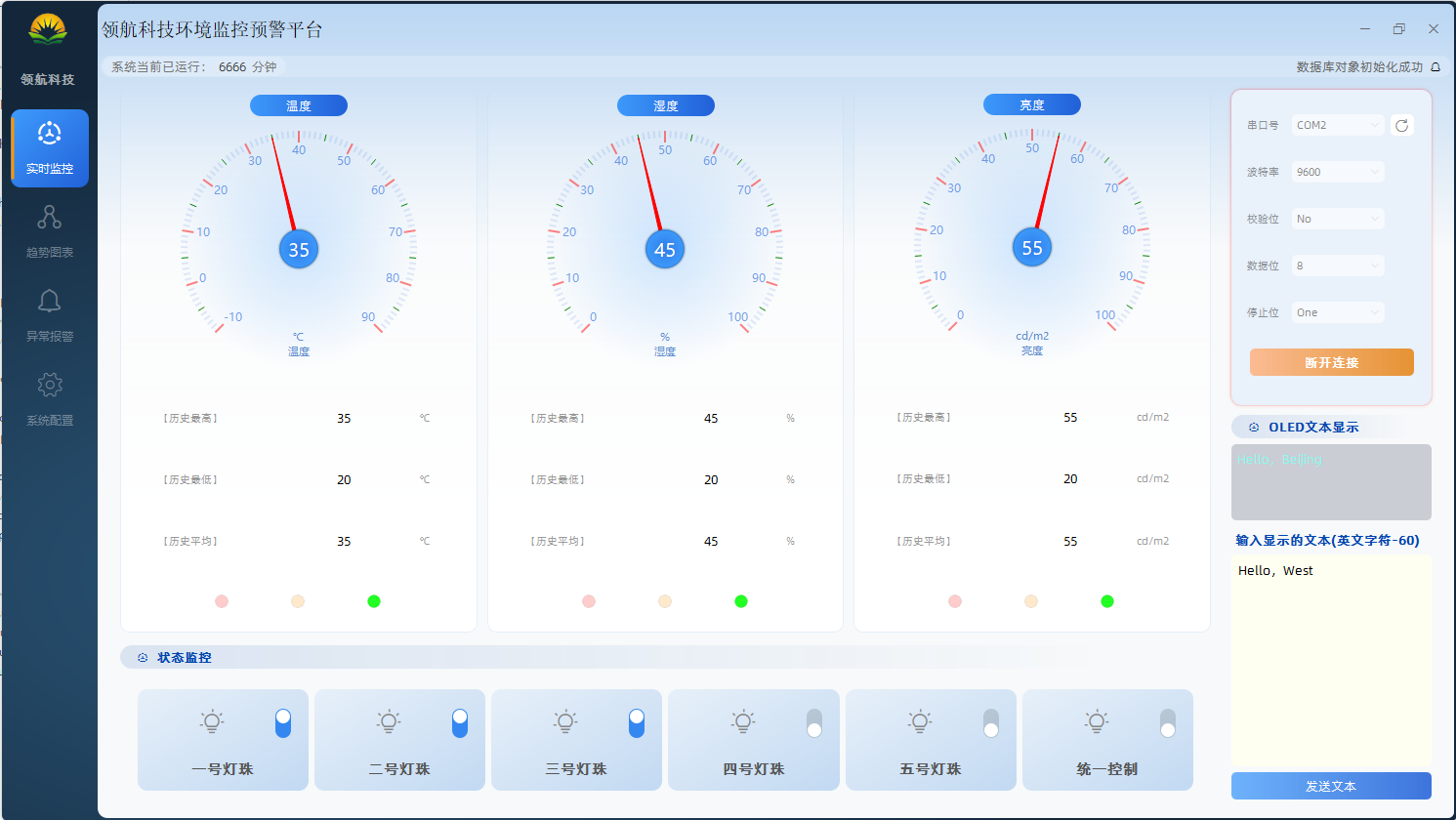
            ui->Monitor->setValue(temp,humi,bright);//设置监控页面数据值
            ui->Trend->onDataReceive(temp,humi,bright);//设置趋势页面数据值

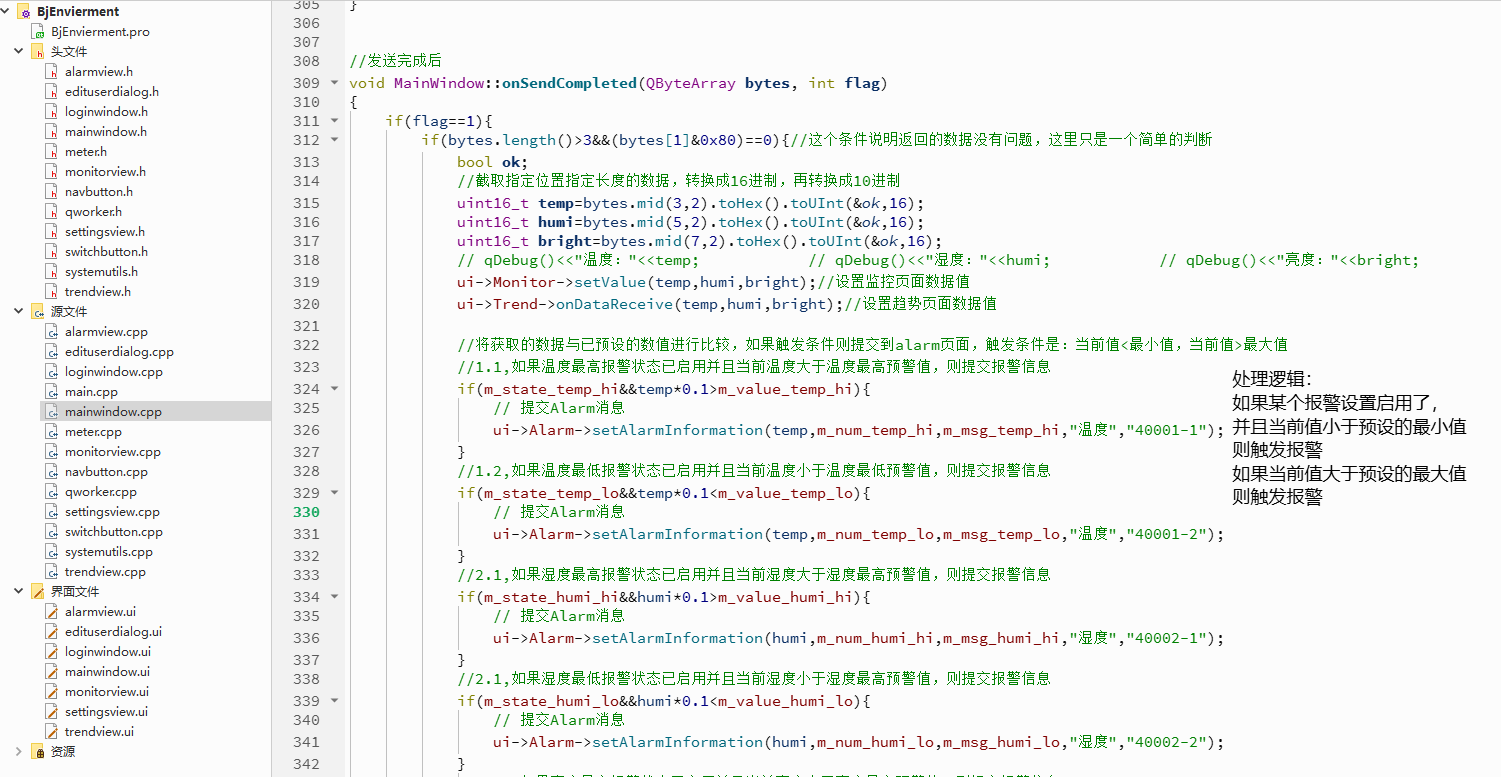
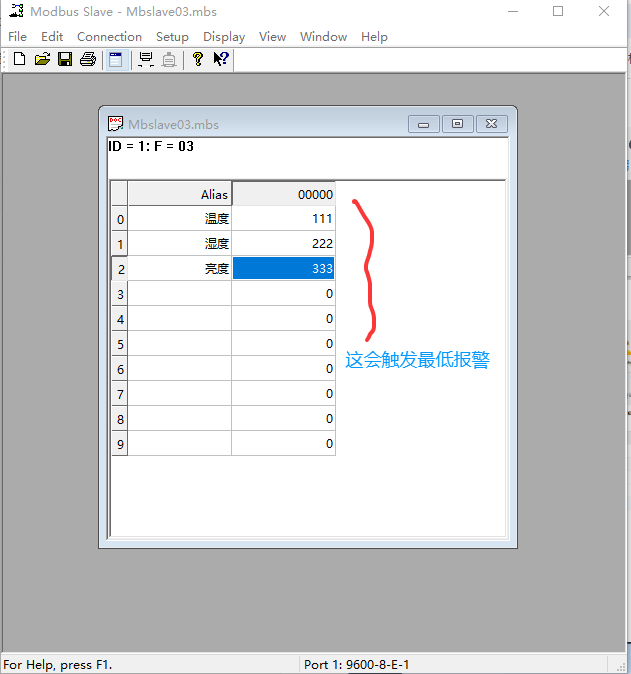
            //将获取的数据与已预设的数值进行比较,如果触发条件则提交到alarm页面,触发条件是:当前值<最小值,当前值>最大值
            //1.1,如果温度最高报警状态已启用并且当前温度大于温度最高预警值,则提交报警信息
            if(m_state_temp_hi&&temp*0.1>m_value_temp_hi){
                // 提交Alarm消息
                ui->Alarm->setAlarmInformation(temp,m_num_temp_hi,m_msg_temp_hi,"温度","40001-1");
            }
            //1.2,如果温度最低报警状态已启用并且当前温度小于温度最低预警值,则提交报警信息
            if(m_state_temp_lo&&temp*0.1<m_value_temp_lo){
                // 提交Alarm消息
                ui->Alarm->setAlarmInformation(temp,m_num_temp_lo,m_msg_temp_lo,"温度","40001-2");
            }
            //2.1,如果湿度最高报警状态已启用并且当前湿度大于湿度最高预警值,则提交报警信息
            if(m_state_humi_hi&&humi*0.1>m_value_humi_hi){
                // 提交Alarm消息
                ui->Alarm->setAlarmInformation(humi,m_num_humi_hi,m_msg_humi_hi,"湿度","40002-1");
            }
            //2.1,如果湿度最低报警状态已启用并且当前湿度小于湿度最高预警值,则提交报警信息
            if(m_state_humi_lo&&humi*0.1<m_value_humi_lo){
                // 提交Alarm消息
                ui->Alarm->setAlarmInformation(humi,m_num_humi_lo,m_msg_humi_lo,"湿度","40002-2");
            }
             //3.1,如果亮度最高报警状态已启用并且当前亮度大于亮度最高预警值,则提交报警信息
            if(m_state_bright_hi&&bright*0.1>m_value_bright_hi){
                // 提交Alarm消息
                ui->Alarm->setAlarmInformation(bright,m_num_bright_hi,m_msg_bright_hi,"亮度","40003-1");
            }
             //3.2,如果亮度最低报警状态已启用并且当前亮度小于亮度最低预警值,则提交报警信息
            if(m_state_bright_lo&&bright*0.1<m_value_bright_lo){
                // 提交Alarm消息
                ui->Alarm->setAlarmInformation(bright,m_num_bright_lo,m_msg_bright_lo,"亮度","40003-2");
            }
        }
    }else if(flag==2){
        //处理灯珠状态,如果不是写的命令,即是读的命令时才执行读取灯珠状态
        if(!m_isWriting&&bytes.length()>3&&(bytes[1]&0x80)==0){
            bool ok;
            Q_UNUSED(ok); // 标记参数未使用,消除警告
            //解析状态数据
            bool s1=bytes[3]&1;
            bool s2=bytes[3]&2;
            bool s3=bytes[3]&4;
            bool s4=bytes[3]&8;
            bool s5=bytes[3]&16;
            ui->Monitor->setStatus(s1,s2,s3,s4,s5);//将数据交给界面显示
        }
        if(this->m_isWriting){
            m_isWriting=false;//修改写的状态为假,即读
        }
    }
}

//发送指令
void MainWindow::onTextCompleted(QString text)
{
    QByteArray data(text.toLatin1());
    uint16_t len=data.size();
    uint16_t count=len/2;
    if(len%2>0) count+=1;


    // 将前面文本数据拼接在一起发给设备
    QByteArray req;
    req.resize(7);
    req[0]=0x01;
    req[1]=0x10;
    req[2]=0x00;
    req[3]=0x08;
    req[4]=uint8_t(count>>8);
    req[5]=uint8_t(count);
    req[6]=len;
    req.append(data);

    auto crc=this->CRC16(req);
    uint8_t hi=uint8_t(crc>>8);
    uint8_t lo=uint8_t(crc);
    req.append(lo);
    req.append(hi);

    // 将指定数据指令发到QWorker里处理
    emit onSend(req,3);
}

//灯珠状态发送指令完成
void MainWindow::onStatusCompleted(bool state, int index)
{
    this->m_isWriting=true;

    QByteArray bytes;
    if(index==5){// 灯珠统一设置的命令
        char l1=state?0x01:0x00;
        char l2=state?(0x01<<1):0x00;
        char l3=state?(0x01<<2):0x00;
        char l4=state?(0x01<<3):0x00;
        char l5=state?(0x01<<4):0x00;

        bytes.resize(8);
        bytes[0]=0x01;
        bytes[1]=0x0F;
        bytes[2]=0x00;
        bytes[3]=0x00;
        bytes[4]=0x00;
        bytes[5]=0x05;
        bytes[6]=0x01;
        bytes[7]=0x00|l1|l2|l3|l4|l5;

        auto result=this->CRC16(bytes);
        uint8_t hi=uint8_t(result>>8);
        uint8_t lo=uint8_t(result);
        bytes.append(lo);
        bytes.append(hi);
    }
    else {// 单个灯珠设置的命令
        bytes.resize(6);
        bytes[0]=0x01;
        bytes[1]=0x05;
        bytes[2]=0x00;
        bytes[3]=uint8_t(index);
        bytes[4]=state?0xFF:0x00;
        bytes[5]=0x00;

        auto result=this->CRC16(bytes);
        uint8_t hi=uint8_t(result>>8);
        uint8_t lo=uint8_t(result);
        bytes.append(lo);
        bytes.append(hi);
    }
    emit onSend(bytes,3);
}
3、判断阈值变量
4、执行报警动作
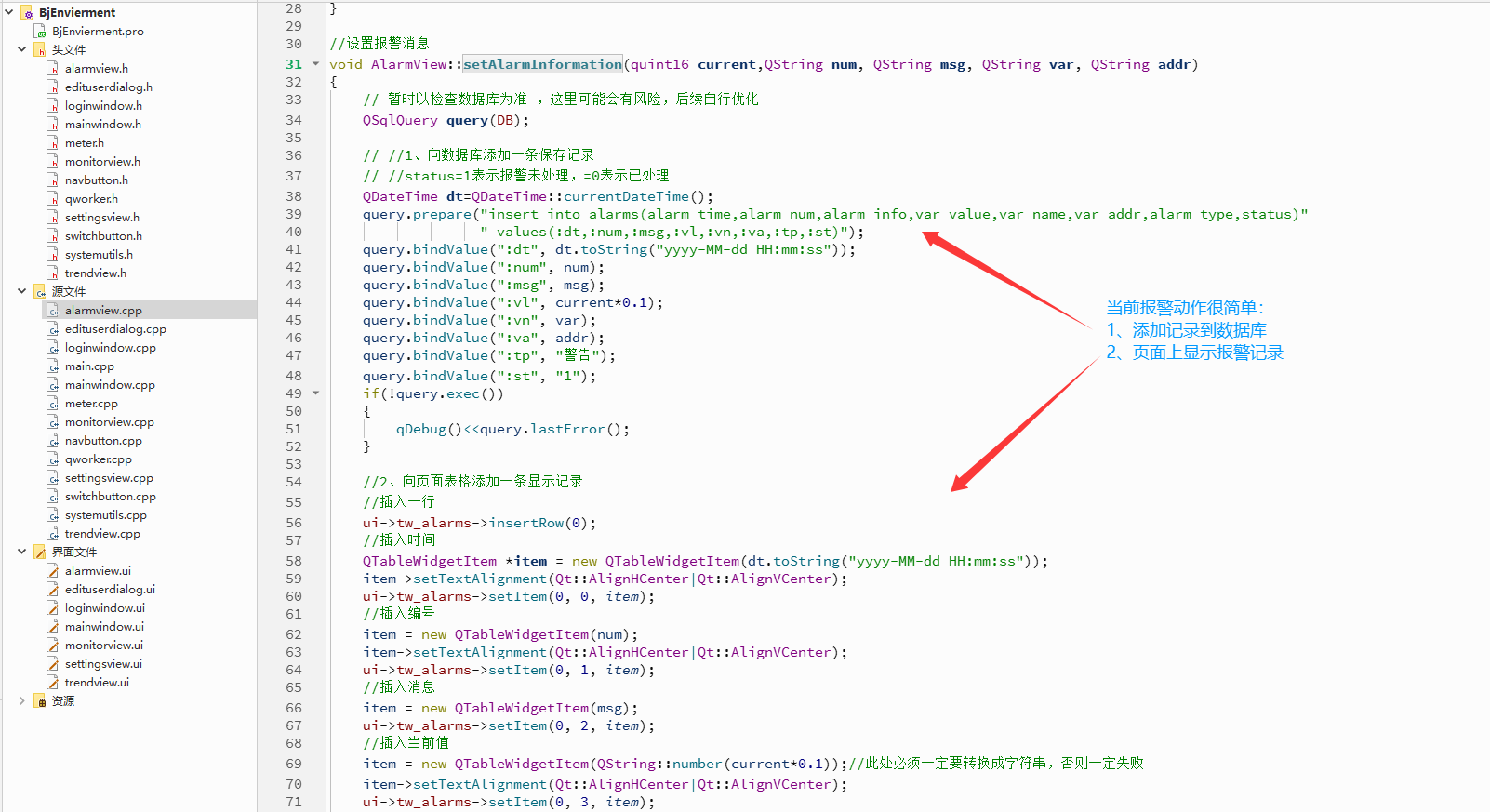
完整代码
cpp
#include "alarmview.h"
#include "ui_alarmview.h"

#include <QSqlQuery>
#include <QSqlError>
#include <QMessageBox>

AlarmView::AlarmView(QWidget *parent)
    : QWidget(parent)
    , ui(new Ui::AlarmView)
{
    ui->setupUi(this);
    //设置"报警消息"这一列,即第2列的内容自适应
    ui->tw_alarms->horizontalHeader()->setSectionResizeMode(2,QHeaderView::Stretch);

    //设置时间这一列的宽度
    ui->tw_alarms->setColumnWidth(0,150);

    //设置时间控件的启始时间
    QDateTime dt=QDateTime::currentDateTime();
    ui->de_start->setDate(dt.addDays(-7).date());//将当前时间向前推7天作为开始时间
    ui->de_end->setDate(dt.date());//将当前时间作为开始时间
}

AlarmView::~AlarmView()
{
    delete ui;
}

//设置报警消息
void AlarmView::setAlarmInformation(quint16 current,QString num, QString msg, QString var, QString addr)
{
    // 暂时以检查数据库为准 ,这里可能会有风险,后续自行优化
    QSqlQuery query(DB);

    // //1、向数据库添加一条保存记录
    // //status=1表示报警未处理,=0表示已处理
    QDateTime dt=QDateTime::currentDateTime();
    query.prepare("insert into alarms(alarm_time,alarm_num,alarm_info,var_value,var_name,var_addr,alarm_type,status)"
                  " values(:dt,:num,:msg,:vl,:vn,:va,:tp,:st)");
    query.bindValue(":dt", dt.toString("yyyy-MM-dd HH:mm:ss"));
    query.bindValue(":num", num);
    query.bindValue(":msg", msg);
    query.bindValue(":vl", current*0.1);
    query.bindValue(":vn", var);
    query.bindValue(":va", addr);
    query.bindValue(":tp", "警告");
    query.bindValue(":st", "1");
    if(!query.exec())
    {
        qDebug()<<query.lastError();
    }

    //2、向页面表格添加一条显示记录
    //插入一行
    ui->tw_alarms->insertRow(0);
    //插入时间
    QTableWidgetItem *item = new QTableWidgetItem(dt.toString("yyyy-MM-dd HH:mm:ss"));
    item->setTextAlignment(Qt::AlignHCenter|Qt::AlignVCenter);
    ui->tw_alarms->setItem(0, 0, item);
    //插入编号
    item = new QTableWidgetItem(num);
    item->setTextAlignment(Qt::AlignHCenter|Qt::AlignVCenter);
    ui->tw_alarms->setItem(0, 1, item);
    //插入消息
    item = new QTableWidgetItem(msg);
    ui->tw_alarms->setItem(0, 2, item);
    //插入当前值
    item = new QTableWidgetItem(QString::number(current*0.1));//此处必须一定要转换成字符串,否则一定失败
    item->setTextAlignment(Qt::AlignHCenter|Qt::AlignVCenter);
    ui->tw_alarms->setItem(0, 3, item);
    //插入报警变量
    item = new QTableWidgetItem(var);
    item->setTextAlignment(Qt::AlignHCenter|Qt::AlignVCenter);
    ui->tw_alarms->setItem(0, 4, item);
    //插入报警地址
    item = new QTableWidgetItem(addr);
    item->setTextAlignment(Qt::AlignHCenter|Qt::AlignVCenter);
    ui->tw_alarms->setItem(0, 5, item);
    //插入报警类型
    item = new QTableWidgetItem("警告");
    item->setTextAlignment(Qt::AlignHCenter|Qt::AlignVCenter);
    ui->tw_alarms->setItem(0, 6, item);
    //插入状态
    item = new QTableWidgetItem("未处理");
    item->setTextAlignment(Qt::AlignHCenter|Qt::AlignVCenter);
    ui->tw_alarms->setItem(0, 7, item);
}

//刷新数据
void AlarmView::refresh(){
    ui->tw_alarms->setRowCount(0);//清空所有行

    QSqlQuery sqlQuery(DB);
    sqlQuery.exec("SELECT alarm_time,alarm_num,alarm_info,var_value,var_name,var_addr,alarm_type,status FROM alarms");
    // 这里查询的时候没有添加时间区间条件,自行处理

    if(!sqlQuery.exec())
    {
        qDebug() << "Error: Fail to query table. " << sqlQuery.lastError();
    }
    else
    {
        while (sqlQuery.next()) {
            //将查询的结果显示到控件上
            ui->tw_alarms->insertRow(0);//向第0行,即第一行添加数据
            for (int i=0;i<8;i++) {
                QString v=sqlQuery.value(i).toString();
                if(i==7){//报警类型
                    v= (v=="1"?"未处理":"已处理");
                }

                QTableWidgetItem *item = new QTableWidgetItem(v);
                if(i!=2){ //处理不是"消息"列的那些列对齐方式
                    item->setTextAlignment(Qt::AlignHCenter|Qt::AlignVCenter);
                }
                ui->tw_alarms->setItem(0, i, item);
            }
        }
    }
}

//刷新
void AlarmView::on_pb_refresh_clicked()
{
    this->refresh();
    QMessageBox::information(this,"提示","刷新成功",QMessageBox::NoButton,QMessageBox::Close);
}

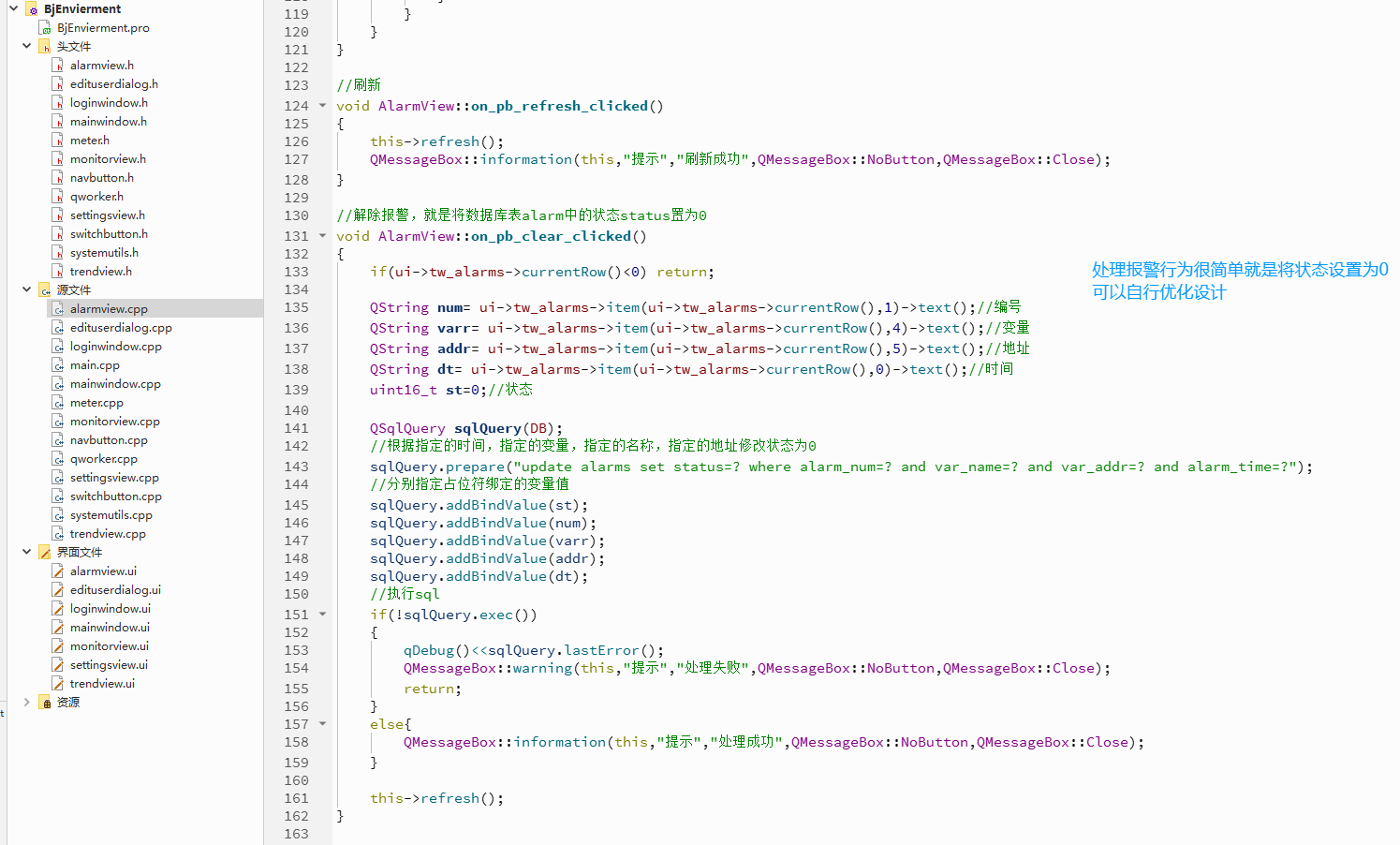
//解除报警,就是将数据库表alarm中的状态status置为0
void AlarmView::on_pb_clear_clicked()
{
    if(ui->tw_alarms->currentRow()<0) return;

    QString num= ui->tw_alarms->item(ui->tw_alarms->currentRow(),1)->text();//编号
    QString varr= ui->tw_alarms->item(ui->tw_alarms->currentRow(),4)->text();//变量
    QString addr= ui->tw_alarms->item(ui->tw_alarms->currentRow(),5)->text();//地址
    QString dt= ui->tw_alarms->item(ui->tw_alarms->currentRow(),0)->text();//时间
    uint16_t st=0;//状态

    QSqlQuery sqlQuery(DB);
    //根据指定的时间,指定的变量,指定的名称,指定的地址修改状态为0
    sqlQuery.prepare("update alarms set status=? where alarm_num=? and var_name=? and var_addr=? and alarm_time=?");
    //分别指定占位符绑定的变量值
    sqlQuery.addBindValue(st);
    sqlQuery.addBindValue(num);
    sqlQuery.addBindValue(varr);
    sqlQuery.addBindValue(addr);
    sqlQuery.addBindValue(dt);
    //执行sql
    if(!sqlQuery.exec())
    {
        qDebug()<<sqlQuery.lastError();
        QMessageBox::warning(this,"提示","处理失败",QMessageBox::NoButton,QMessageBox::Close);
        return;
    }
    else{
        QMessageBox::information(this,"提示","处理成功",QMessageBox::NoButton,QMessageBox::Close);
    }

    this->refresh();
}
5、处理报警行为
6、测试效果
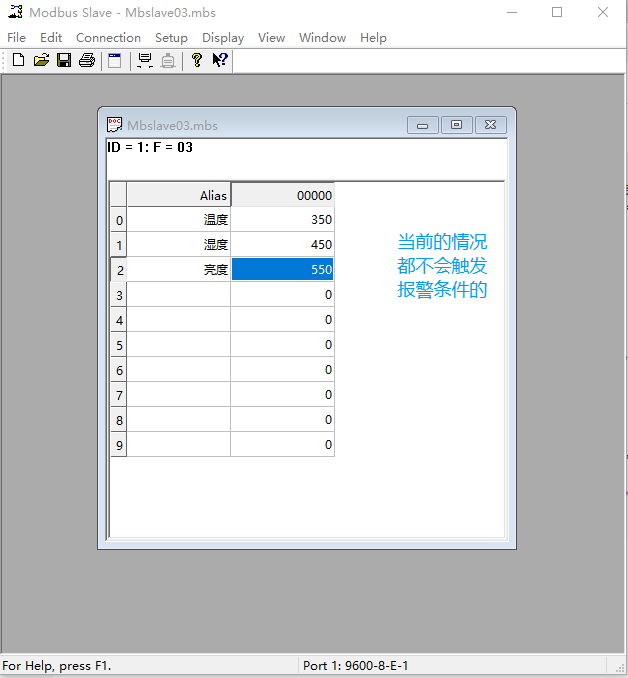
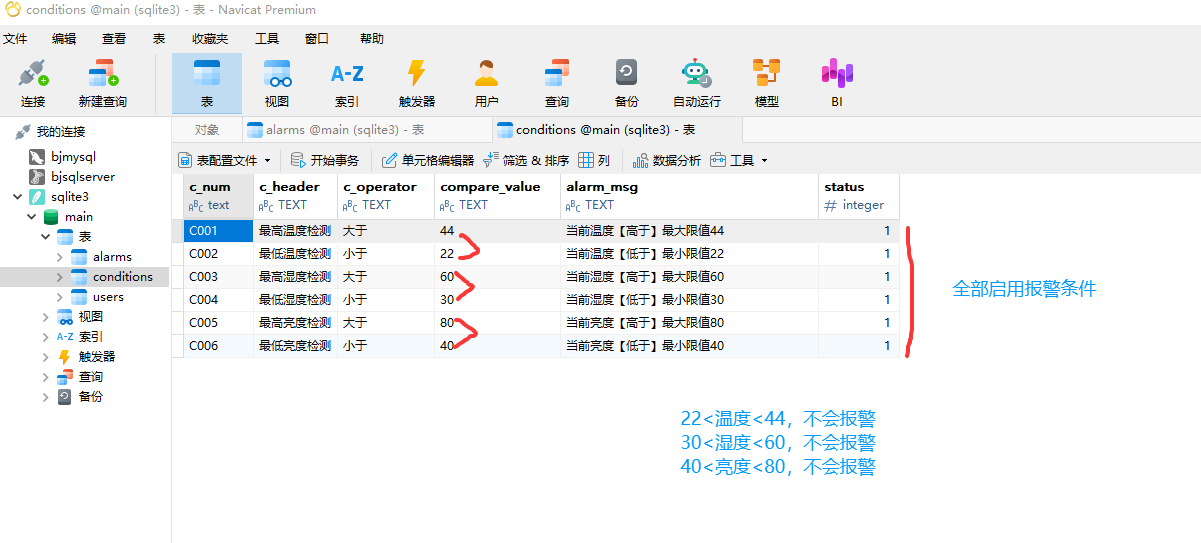
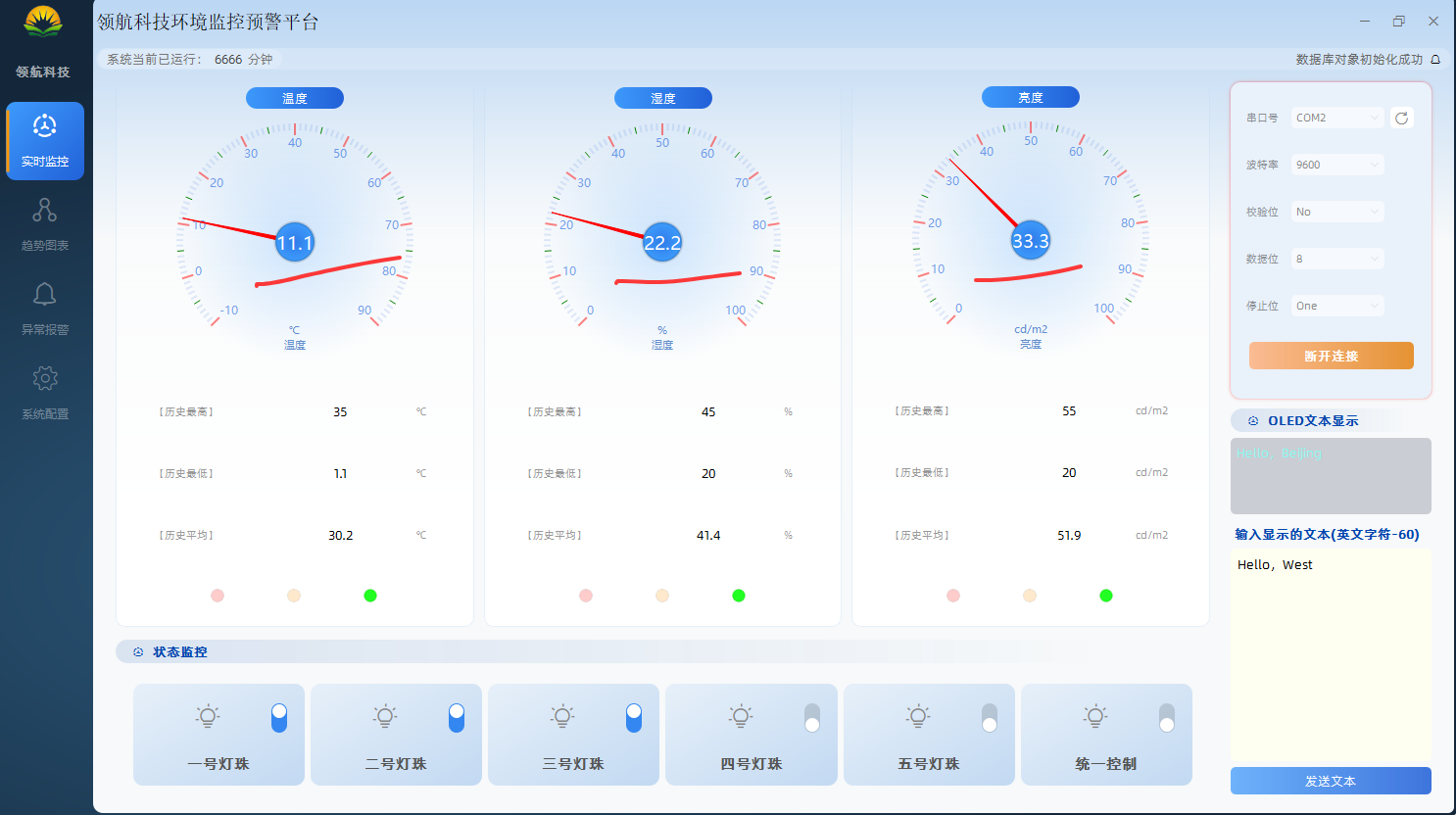
1、实时采集
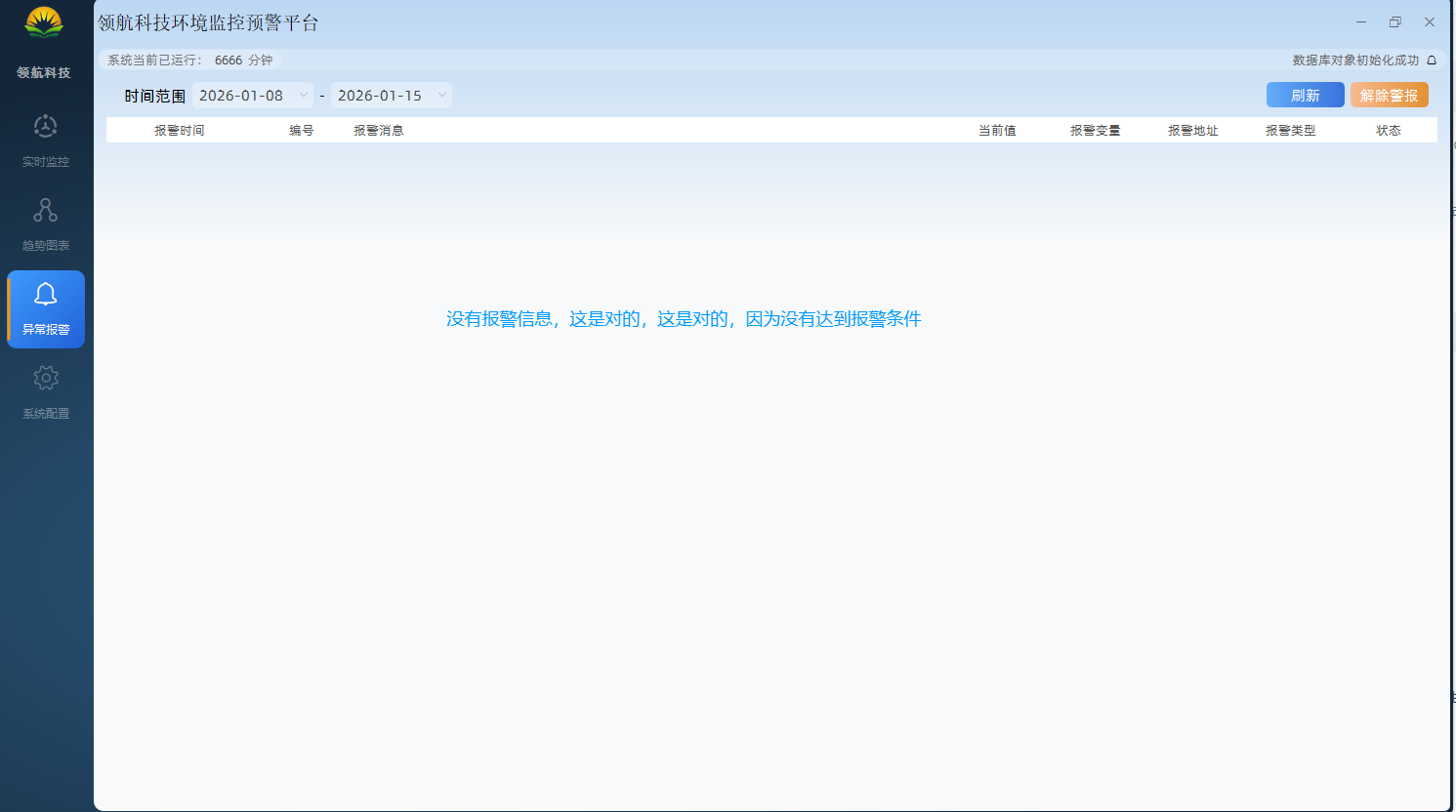
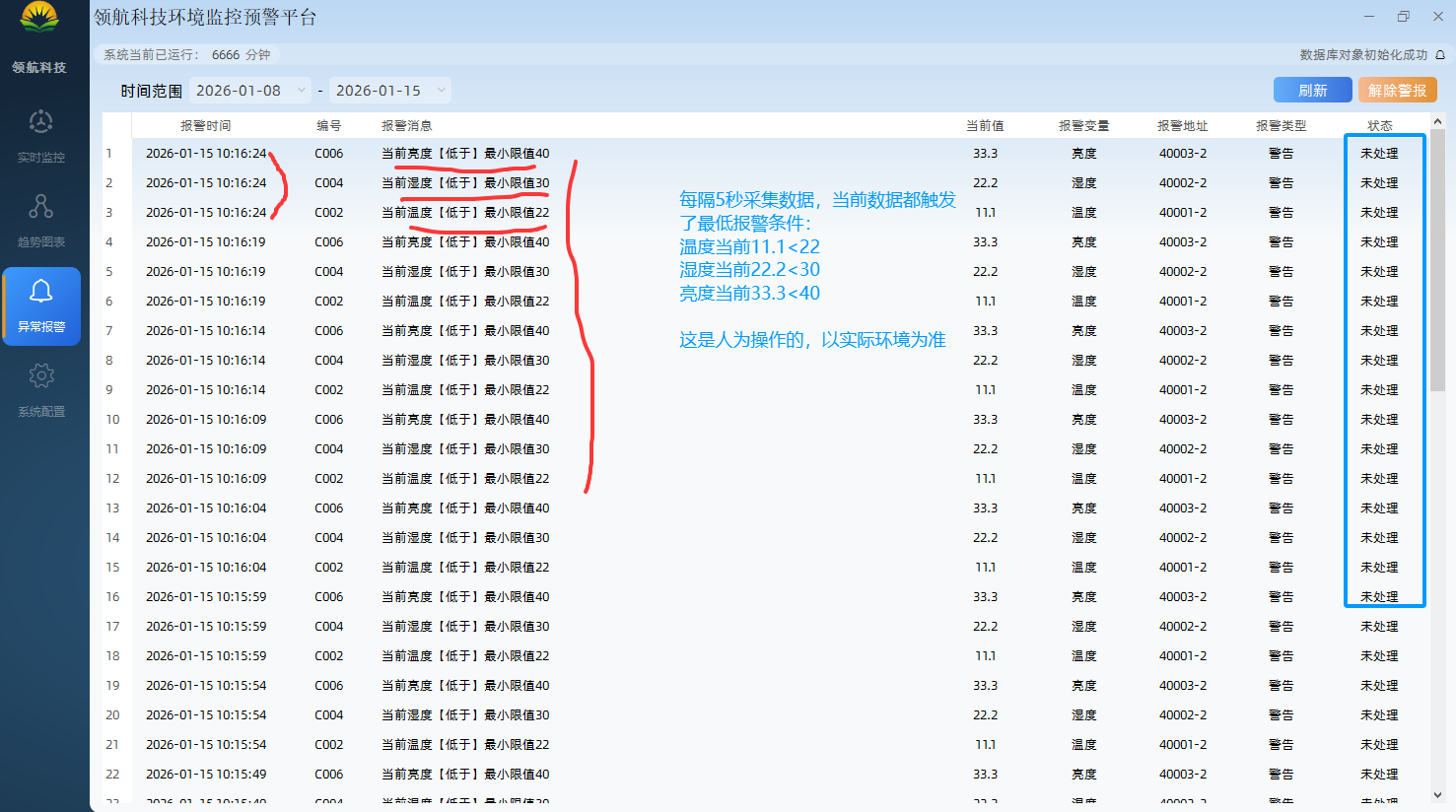
2、产生报警
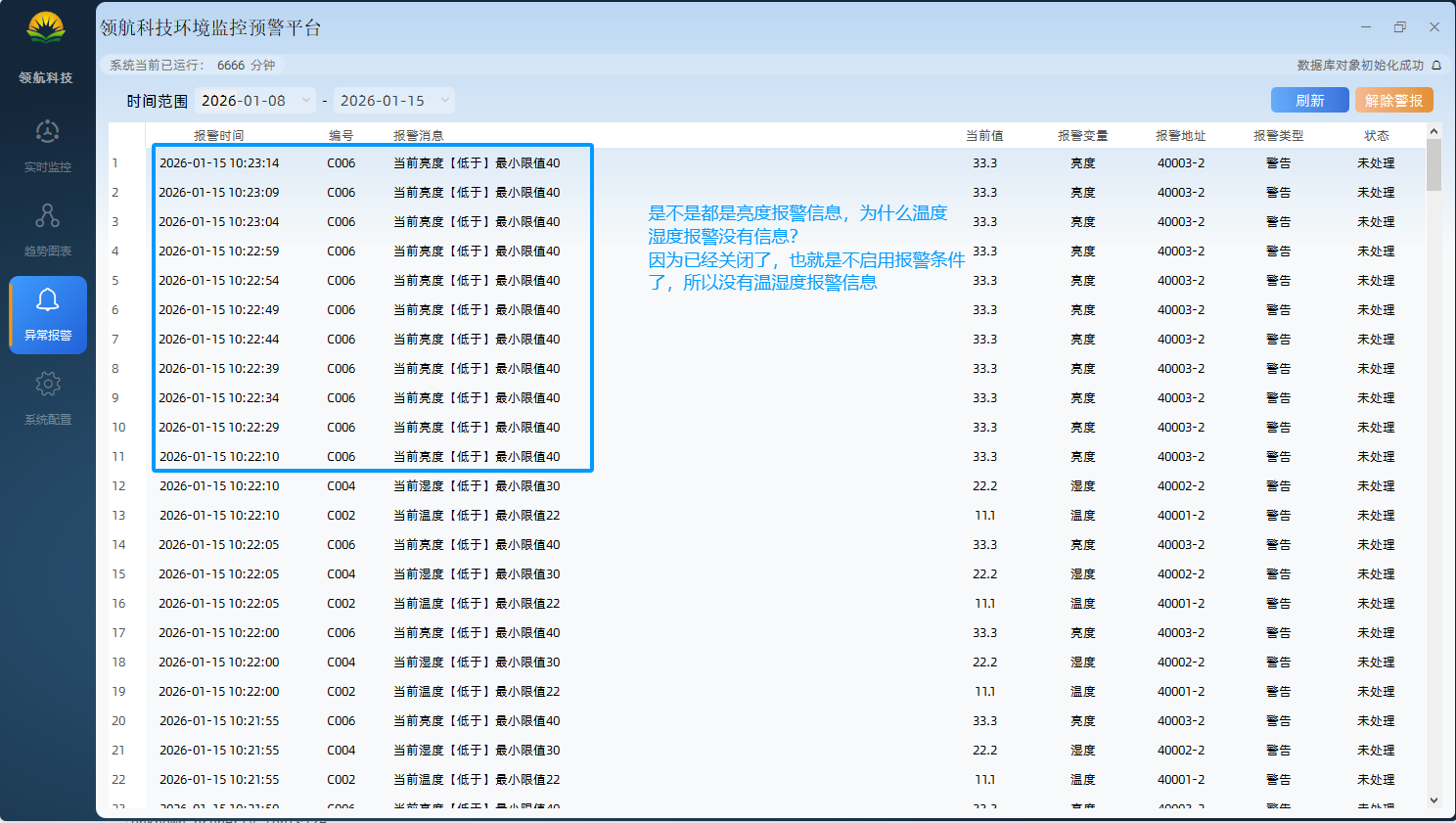
3、处理报警
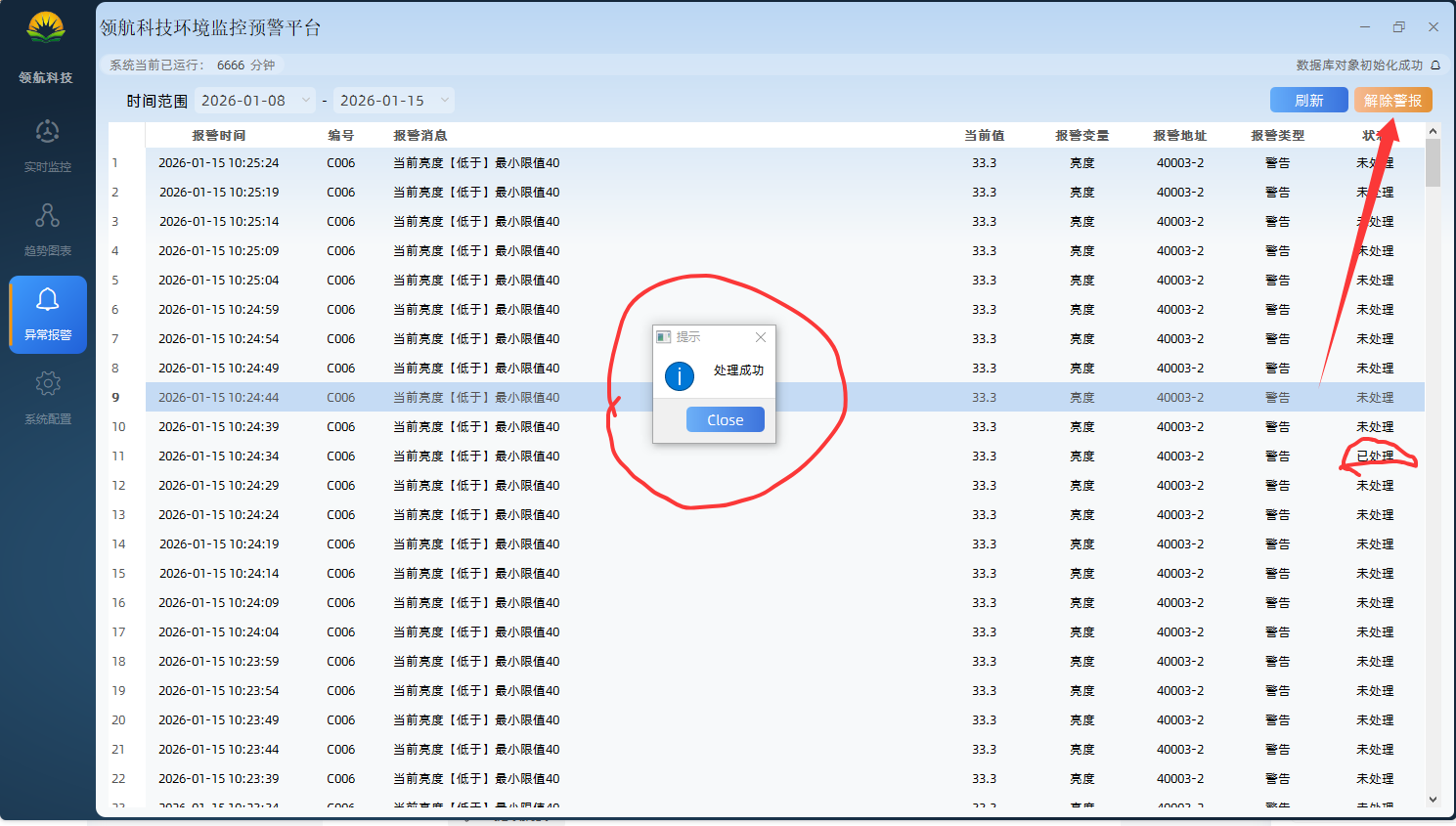
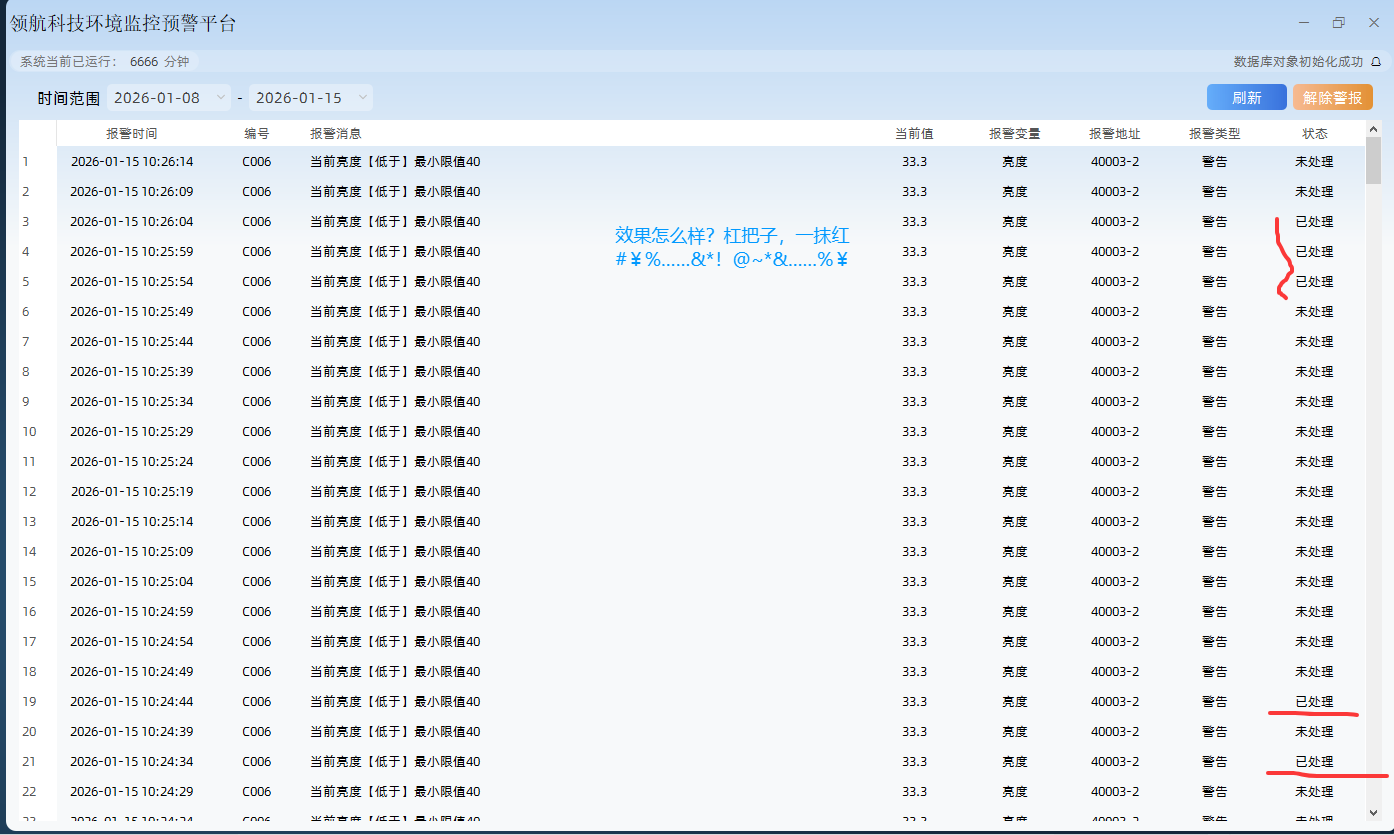
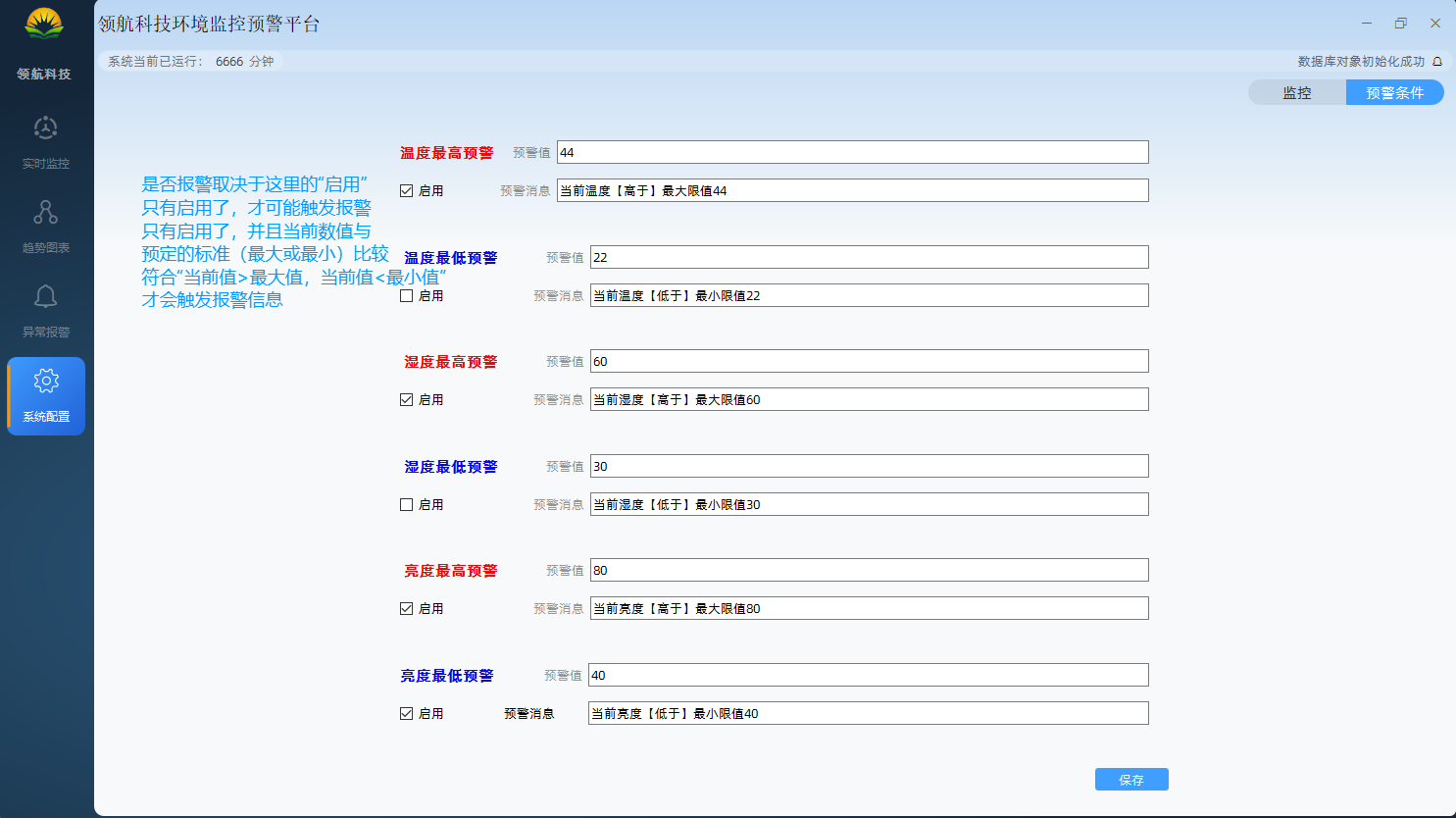
7、小结
温度报警的核心是 "传感器采集→阈值判定→分级联动"
湿度报警的核心是 "传感器采集→阈值判定→分级联动"
亮度报警的核心是 "传感器采集→阈值判定→分级联动"
原创不易,打字不易,截图不易,撸码不易,整理不易,走过路过,不要错过,欢迎点赞,收藏,转载,复制,抄袭,留言,灌水,请动动你的金手指,祝您早日实现财务自由。