邮件发送基础概念
什么是邮件发送?
邮件发送是通过网络将电子信息从一个用户发送到另一个用户的过程。在编程中,我们通常使用SMTP 协议来实现邮件发送功能。
邮件发送的基本流程
language
发件人 → SMTP服务器 → 收件人邮件服务器 → 收件人核心组成部分
1. 发件人信息:邮箱地址、显示名称
2. 收件人信息:邮箱地址(可以多个)
3. 邮件内容:主题、正文
4. 附件:可选的文件附加
5. SMTP 服务器配置:服务器地址、端口、认证信息SMTP 协议简介
什么是 SMTP?
**SMTP (Simple Mail Transfer Protocol)** 是简单邮件传输协议,是用于发送电子邮件的标准协议。常见 SMTP 服务器配置
| 服务商 | SMTP 服务器 | 端口 | SSL | ||
|---|---|---|---|---|---|
| 阿里云 | smtpdm.aliyun.com | 80/465 | 80 端口不使用 SSL,465 端口使用 SSL | ||
| 腾讯企业邮 | smtp.exmail.qq.com | 465 | 是 |
为什么需要认证?
SMTP 服务器通常需要用户名和密码认证,以防止垃圾邮件发送和未授权使用。
C# 邮件发送核心类库
System.Net.Mail 命名空间
C# 提供了专门的命名空间用于邮件发送:
language
using System.Net;
using System.Net.Mail;
using System.Net.Mime;
核心类介绍
1. MailMessage 类
用于构建邮件消息的内容和结构。
language
MailMessage mail = new MailMessage();
mail.From = new MailAddress("sender@example.com", "发件人显示名称");
mail.To.Add("recipient@example.com");
mail.Subject = "邮件主题";
mail.Body = "邮件正文内容";
mail.IsBodyHtml = true; // 是否支持HTML格式
2. SmtpClient 类
用于通过 SMTP 服务器发送邮件。
language
SmtpClient smtpClient = new SmtpClient("smtp.server.com", 587);
smtpClient.Credentials = new NetworkCredential("username", "password");
smtpClient.EnableSsl = true;
smtpClient.Send(mail);
3. Attachment 类
用于处理邮件附件。
language
Attachment attachment = new Attachment("file.txt");
mail.Attachments.Add(attachment);
基础邮件发送实现
最简单的邮件发送示例
language
using System;
using System.Net;
using System.Net.Mail;

class SimpleEmailSender
{
    static void Main(string[] args)
    {
        try
        {
            // 1. 创建邮件消息
            MailMessage mail = new MailMessage();
            mail.From = new MailAddress("your-email@example.com", "你的名称");
            mail.To.Add("recipient@example.com");
            mail.Subject = "测试邮件";
            mail.Body = "这是一封测试邮件!";
            mail.IsBodyHtml = false;

            // 2. 配置SMTP客户端
            SmtpClient smtpClient = new SmtpClient("smtp.server.com", 587);
            smtpClient.Credentials = new NetworkCredential("your-email@example.com", "your-password");
            smtpClient.EnableSsl = true;

            // 3. 发送邮件
            smtpClient.Send(mail);
            Console.WriteLine("邮件发送成功!");
        }
        catch (Exception ex)
        {
            Console.WriteLine($"邮件发送失败: {ex.Message}");
        }
    }
}关键代码解释
- MailMessage 对象创建:构建邮件的基本信息
- SmtpClient 配置:设置 SMTP 服务器信息和认证
- 异常处理:捕获可能的发送错误
业务中完整的邮件发送工具类封装
language
using System;
using System.Collections.Generic;
using System.IO;
using System.Linq;
using System.Net;
using System.Net.Mail;
using System.Net.Mime;
using System.Text;

namespace Tools.Mail
{
    /// <summary>
    /// SMTP邮件发送器,支持发送带附件的邮件
    /// </summary>
    public static class SmtpEmailHelper
    {
        #region 配置参数
        // SMTP服务器配置
        private const string SmtpServer = "  ";
        private const int SmtpPort = 80;
        private const bool EnableSsl = false;

        // 发件人信息
        private const string FromAddress = "system@example.com";
        private const string FromDisplayName = "系统通知";
        private const string SmtpUsername = "system@example.com";
        private const string SmtpPassword = "your-password";

        // 附件配置
        private const int MaxAttachmentSize = 8 * 1024 * 1024; // 单个附件最大8MB
        private const int MaxTotalAttachmentSize = 12 * 1024 * 1024; // 总附件大小限制
        #endregion

        #region 附件数据结构
        /// <summary>
        /// 邮件附件信息
        /// </summary>
        public class EmailAttachment
        {
            /// <summary>
            /// 文件名
            /// </summary>
            public string FileName { get; set; }

            /// <summary>
            /// 文件内容(字节数组)
            /// </summary>
            public byte[] Content { get; set; }

            /// <summary>
            /// 内容类型
            /// </summary>
            public string ContentType { get; set; }
        }
        #endregion

        #region 发送邮件方法
        /// <summary>
        /// 发送带附件的邮件
        /// </summary>
        /// <param name="toAddress">收件人地址(多个用逗号分隔)</param>
        /// <param name="subject">邮件主题</param>
        /// <param name="htmlBody">HTML邮件正文</param>
        /// <param name="attachments">附件列表</param>
        public static void SendEmailWithAttachments(string toAddress, string subject,
                                                  string htmlBody, List<EmailAttachment> attachments = null)
        {
            try
            {
                // 创建邮件消息
                MailMessage mail = CreateMailMessage(toAddress, subject, htmlBody);

                // 添加附件
                if (attachments != null && attachments.Any())
                {
                    AddAttachmentsToMail(mail, attachments);
                }

                // 发送邮件
                SendMail(mail);
            }
            catch (Exception ex)
            {
                Console.WriteLine($"邮件发送失败: {ex.Message}");
                throw;
            }
        }
        #endregion

        #region 邮件创建
        private static MailMessage CreateMailMessage(string toAddress, string subject, string htmlBody)
        {
            MailMessage mail = new MailMessage();

            // 发件人
            mail.From = new MailAddress(FromAddress, FromDisplayName, Encoding.UTF8);

            // 收件人
            foreach (string receiver in toAddress.Split(new[] { ',' }, StringSplitOptions.RemoveEmptyEntries))
            {
                mail.To.Add(new MailAddress(receiver.Trim()));
            }

            // 邮件主题
            mail.Subject = subject;
            mail.SubjectEncoding = Encoding.UTF8;

            // 邮件正文(HTML格式)
            mail.Body = htmlBody;
            mail.BodyEncoding = Encoding.UTF8;
            mail.IsBodyHtml = true;

            // 优先级
            mail.Priority = MailPriority.High;

            return mail;
        }
        #endregion

        #region 附件处理
        private static void AddAttachmentsToMail(MailMessage mail, List<EmailAttachment> attachments)
        {
            long totalAttachmentSize = 0;

            foreach (var attachment in attachments)
            {
                if (attachment == null || attachment.Content == null || attachment.Content.Length == 0)
                    continue;

                // 检查单个附件大小
                if (attachment.Content.Length > MaxAttachmentSize)
                {
                    Console.WriteLine($"附件 {attachment.FileName} 太大,跳过添加");
                    continue;
                }

                // 检查总附件大小
                if (totalAttachmentSize + attachment.Content.Length > MaxTotalAttachmentSize)
                {
                    Console.WriteLine($"总附件大小超出限制,跳过添加附件 {attachment.FileName}");
                    break;
                }

                try
                {
                    // 创建附件
                    Attachment mailAttachment = new Attachment(
                        new MemoryStream(attachment.Content),
                        attachment.FileName,
                        attachment.ContentType ?? "application/octet-stream"
                    );

                    // 设置附件属性
                    ContentDisposition disposition = mailAttachment.ContentDisposition;
                    disposition.CreationDate = DateTime.Now;
                    disposition.ModificationDate = DateTime.Now;
                    disposition.ReadDate = DateTime.Now;
                    disposition.FileName = attachment.FileName;
                    disposition.Size = attachment.Content.Length;
                    disposition.DispositionType = DispositionTypeNames.Attachment;

                    mail.Attachments.Add(mailAttachment);
                    totalAttachmentSize += attachment.Content.Length;

                    Console.WriteLine($"添加附件成功: {attachment.FileName}");
                }
                catch (Exception ex)
                {
                    Console.WriteLine($"添加附件 {attachment.FileName} 失败: {ex.Message}");
                }
            }
        }
        #endregion

        #region 邮件发送
        private static void SendMail(MailMessage mail)
        {
            using (SmtpClient smtpClient = new SmtpClient(SmtpServer, SmtpPort))
            {
                smtpClient.EnableSsl = EnableSsl;
                smtpClient.Credentials = new NetworkCredential(SmtpUsername, SmtpPassword);
                smtpClient.Timeout = 300000; // 5分钟超时
                smtpClient.DeliveryMethod = SmtpDeliveryMethod.Network;

                // 发送邮件
                smtpClient.Send(mail);
            }

            Console.WriteLine($"邮件发送成功,收件人: {string.Join(",", mail.To.Select(t => t.Address))}");
        }
        #endregion
    }
}封装的优势
- 职责单一:每个方法只负责一个具体功能
- 错误处理:统一的异常处理机制
- 配置集中:所有配置参数集中管理
- 易于使用:简洁的公共接口
实际业务应用
业务场景分析
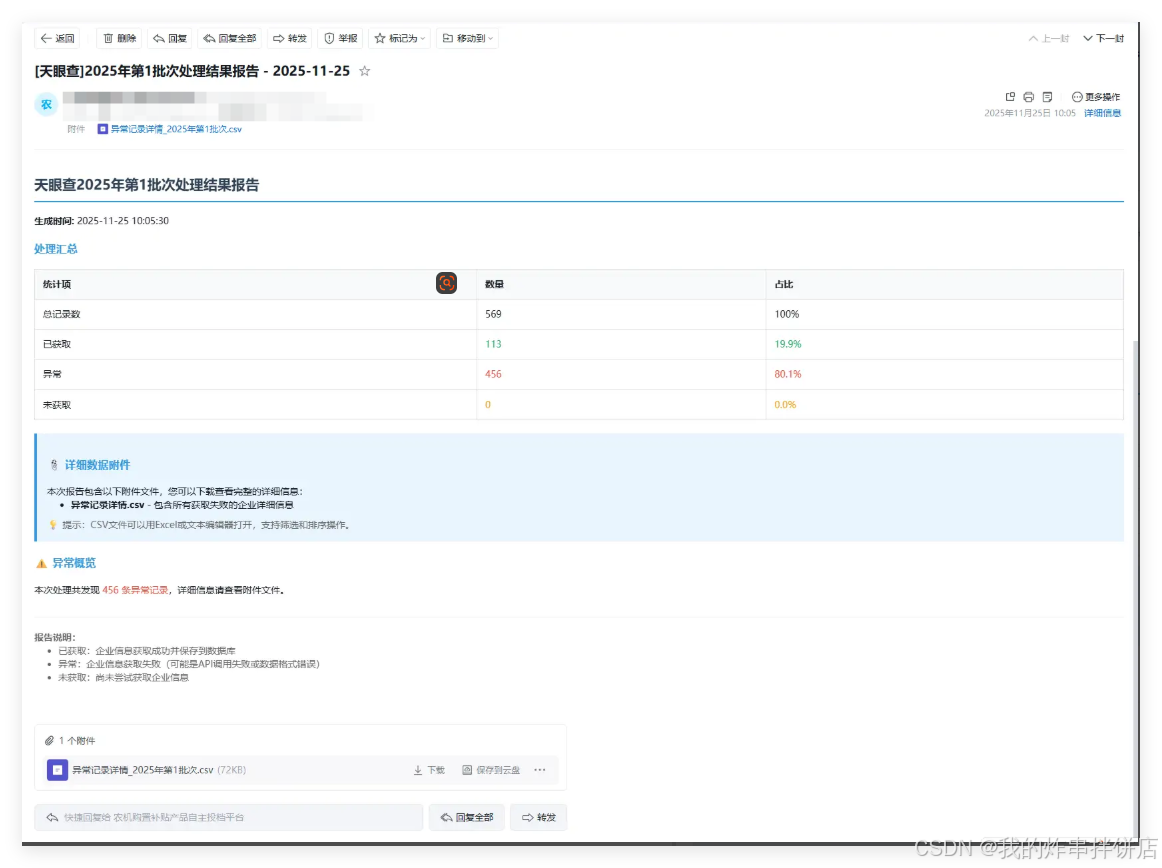
以企业批次处理报告邮件为例,我们需要:
- 准备业务数据
- 生成邮件内容
- 创建附件(报告文件)
- 发送邮件
业务数据模型设计
language
/// <summary>
/// 批次报告数据模型
/// 包含所有生成报告所需的业务数据
/// </summary>
public class BatchReportData
{
    public int Batch { get; set; }                  // 批次号
    public int Year { get; set; }                   // 年份
    public int TotalCount { get; set; }             // 总企业数
    public int SuccessCount { get; set; }           // 成功处理数
    public int ErrorCount { get; set; }             // 错误数
    public int UnobtainedCount { get; set; }        // 未获取数
    public List<BatchRecordModel> AbnormalRecords { get; set; }  // 异常记录
    public List<BatchRecordModel> UnobtainedRecords { get; set; } // 未获取记录
    public List<string> ErrorLogs { get; set; }     // 错误日志
    public string Receivers { get; set; }           // 收件人列表
    public DateTime GenerateTime { get; set; }      // 生成时间
}
业务逻辑实现
1. 数据准备
language
/// <summary>
/// 准备批次报告所需的业务数据
/// </summary>
private BatchReportData PrepareBatchReportData(int batch, List<string> errors)
{
    // 1. 获取当前年份
    int year = DateTime.Now.Year;

    // 2. 查询批次记录
    List<BatchRecordModel> batchRecords = _enterpriseProvider.GetBatchRecords(batch, year);

    if (!batchRecords.Any())
    {
        Logger.Warn($"批次{batch}年度{year}没有找到记录");
        return null;
    }

    // 3. 统计数据
    int totalCount = batchRecords.Count;
    int successCount = batchRecords.Count(r => r.Status == 1);
    int errorCount = batchRecords.Count(r => r.Status == 2);
    int unobtainedCount = batchRecords.Count(r => r.Status == 0);

    // 4. 获取异常和未获取记录
    List<BatchRecordModel> abnormalRecords = batchRecords.Where(r => r.HasAbnormalData == 1).ToList();
    List<BatchRecordModel> unobtainedRecords = batchRecords.Where(r => r.Status == 0).ToList();

    // 5. 获取收件人配置
    string receivers = _configProvider.GetEmailReceivers();

    return new BatchReportData
    {
        Batch = batch,
        Year = year,
        TotalCount = totalCount,
        SuccessCount = successCount,
        ErrorCount = errorCount,
        UnobtainedCount = unobtainedCount,
        AbnormalRecords = abnormalRecords,
        UnobtainedRecords = unobtainedRecords,
        ErrorLogs = errors ?? new List<string>(),
        Receivers = receivers,
        GenerateTime = DateTime.Now
    };
}
2. HTML 邮件内容生成
language
/// <summary>
/// 生成HTML格式的邮件正文
/// </summary>
private string GenerateEmailHtmlBody(BatchReportData reportData)
{
    StringBuilder htmlBuilder = new StringBuilder();

    htmlBuilder.AppendLine("<!DOCTYPE html>");
    htmlBuilder.AppendLine("<html lang='zh-CN'>");
    htmlBuilder.AppendLine("<head>");
    htmlBuilder.AppendLine("<meta charset='UTF-8'>");
    htmlBuilder.AppendLine("<title>批次处理结果报告</title>");
    htmlBuilder.AppendLine("<style>");
    htmlBuilder.AppendLine("body { font-family: 'Microsoft YaHei', Arial, sans-serif; line-height: 1.6; }");
    htmlBuilder.AppendLine(".container { max-width: 800px; margin: 0 auto; padding: 20px; }");
    htmlBuilder.AppendLine(".header { background-color: #f5f5f5; padding: 15px; text-align: center; border-radius: 5px; }");
    htmlBuilder.AppendLine(".content { margin: 20px 0; }");
    htmlBuilder.AppendLine(".stats { background-color: #f9f9f9; padding: 15px; border-radius: 5px; margin: 15px 0; }");
    htmlBuilder.AppendLine(".stat-item { margin: 8px 0; }");
    htmlBuilder.AppendLine(".footer { text-align: center; margin-top: 30px; color: #666; font-size: 14px; }");
    htmlBuilder.AppendLine("</style>");
    htmlBuilder.AppendLine("</head>");
    htmlBuilder.AppendLine("<body>");
    htmlBuilder.AppendLine("<div class='container'>");

    // 邮件头部
    htmlBuilder.AppendLine("<div class='header'>");
    htmlBuilder.AppendLine($"<h2>批次处理结果报告 - 批次{reportData.Batch} ({reportData.Year}年度)</h2>");
    htmlBuilder.AppendLine("</div>");

    // 处理时间
    htmlBuilder.AppendLine("<div class='content'>");
    htmlBuilder.AppendLine($"<p>报告生成时间:{reportData.GenerateTime.ToString("yyyy-MM-dd HH:mm:ss")}</p>");

    // 统计信息
    htmlBuilder.AppendLine("<div class='stats'>");
    htmlBuilder.AppendLine("<h3>处理统计</h3>");
    htmlBuilder.AppendLine($"<div class='stat-item'>总企业数:<strong>{reportData.TotalCount}</strong></div>");
    htmlBuilder.AppendLine($"<div class='stat-item'>成功处理:<strong>{reportData.SuccessCount}</strong></div>");
    htmlBuilder.AppendLine($"<div class='stat-item'>处理失败:<strong>{reportData.ErrorCount}</strong></div>");
    htmlBuilder.AppendLine($"<div class='stat-item'>未获取信息:<strong>{reportData.UnobtainedCount}</strong></div>");
    htmlBuilder.AppendLine("</div>");

    // 异常企业信息
    if (reportData.AbnormalRecords.Any())
    {
        htmlBuilder.AppendLine("<div class='stats'>");
        htmlBuilder.AppendLine($"<h3>异常企业 ({reportData.AbnormalRecords.Count}家)</h3>");
        htmlBuilder.AppendLine("<p>以下企业存在经营异常或严重违法记录,请及时处理。</p>");
        htmlBuilder.AppendLine("</div>");
    }

    // 邮件底部
    htmlBuilder.AppendLine("<div class='footer'>");
    htmlBuilder.AppendLine("<p>此邮件为系统自动发送,请勿回复。详细信息请查看附件。</p>");
    htmlBuilder.AppendLine("</div>");

    htmlBuilder.AppendLine("</div>");
    htmlBuilder.AppendLine("</div>");
    htmlBuilder.AppendLine("</body>");
    htmlBuilder.AppendLine("</html>");

    return htmlBuilder.ToString();
}
3. 附件生成
language
/// <summary>
/// 生成报告附件
/// </summary>
private List<SmtpEmailHelper.EmailAttachment> GenerateReportAttachments(BatchReportData reportData)
{
    List<SmtpEmailHelper.EmailAttachment> attachments = new List<SmtpEmailHelper.EmailAttachment>();

    // 生成CSV格式的详细报告
    byte[] csvContent = GenerateCsvReport(reportData);
    attachments.Add(new SmtpEmailHelper.EmailAttachment
    {
        FileName = $"批次{reportData.Batch}_处理报告_{reportData.GenerateTime:yyyyMMddHHmmss}.csv",
        Content = csvContent,
        ContentType = "text/csv"
    });

    // 生成错误日志文件
    if (reportData.ErrorLogs.Any())
    {
        byte[] errorLogContent = GenerateErrorLogFile(reportData);
        attachments.Add(new SmtpEmailHelper.EmailAttachment
        {
            FileName = $"批次{reportData.Batch}_错误日志_{reportData.GenerateTime:yyyyMMddHHmmss}.txt",
            Content = errorLogContent,
            ContentType = "text/plain"
        });
    }

    return attachments;
}

/// <summary>
/// 生成CSV格式报告
/// </summary>
private byte[] GenerateCsvReport(BatchReportData reportData)
{
    using (MemoryStream ms = new MemoryStream())
    using (StreamWriter writer = new StreamWriter(ms, Encoding.UTF8))
    {
        // CSV头部
        writer.WriteLine("企业名称,统一社会信用代码,处理状态,异常类型,获取时间,备注");

        // 处理数据行
        foreach (var record in reportData.AbnormalRecords)
        {
            string status = record.Status == 1 ? "成功" : record.Status == 2 ? "失败" : "未处理";
            string abnormalType = record.HasRegStatusAbnormal == 1 ? "经营异常" :
                                 record.HasIllegalData == 1 ? "严重违法" : "其他异常";

            writer.WriteLine($"{CsvEncode(record.FacName)},{CsvEncode(record.FacCode)},{status},{abnormalType},{record.UpdateTime:yyyy-MM-dd HH:mm:ss},");
        }

        writer.Flush();
        return ms.ToArray();
    }
}

/// <summary>
/// 生成错误日志文件
/// </summary>
private byte[] GenerateErrorLogFile(BatchReportData reportData)
{
    using (MemoryStream ms = new MemoryStream())
    using (StreamWriter writer = new StreamWriter(ms, Encoding.UTF8))
    {
        writer.WriteLine($"批次{reportData.Batch}错误日志");
        writer.WriteLine($"生成时间:{reportData.GenerateTime:yyyy-MM-dd HH:mm:ss}");
        writer.WriteLine($"错误总数:{reportData.ErrorLogs.Count}");
        writer.WriteLine();
        writer.WriteLine("错误详情:");
        writer.WriteLine();

        for (int i = 0; i < reportData.ErrorLogs.Count; i++)
        {
            writer.WriteLine($"错误 {i + 1}:");
            writer.WriteLine(reportData.ErrorLogs[i]);
            writer.WriteLine();
            writer.WriteLine("-".PadRight(60, '-'));
            writer.WriteLine();
        }

        writer.Flush();
        return ms.ToArray();
    }
}

/// <summary>
/// CSV编码处理
/// </summary>
private string CsvEncode(string value)
{
    if (string.IsNullOrEmpty(value))
        return string.Empty;

    // CSV编码规则:如果包含逗号、引号或换行符,需要用双引号括起来
    if (value.Contains(",") || value.Contains("\"") || value.Contains("\n") || value.Contains("\r"))
    {
        return "\"" + value.Replace("\"", "\"\"") + "\"";
    }

    return value;
}
4. 业务方法调用
language
/// <summary>
/// 发送批次处理结果邮件报告(带附件版本)
/// 业务逻辑:准备数据 -> 生成内容 -> 调用邮件发送器
/// </summary>
public void SendBatchProcessNotification(int batch, List<string> errors)
{
    try
    {
        // 1. 业务数据准备
        var reportData = PrepareBatchReportData(batch, errors);
        if (reportData == null)
        {
            Logger.Warn($"批次{batch}没有数据需要发送");
            return;
        }

        // 2. 生成邮件内容(业务逻辑)
        string emailSubject = $"批次{reportData.Batch}处理结果报告 - {reportData.Year}年度";
        string htmlBody = GenerateEmailHtmlBody(reportData);

        // 3. 生成附件(业务逻辑)
        var attachments = GenerateReportAttachments(reportData);

        // 4. 调用独立的邮件发送器(不包含业务逻辑)
        SendEmailThroughSmtp(reportData.Receivers, emailSubject, htmlBody, attachments);

        Logger.Info($"批次{batch}带附件处理结果邮件已发送");
    }
    catch (Exception ex)
    {
        Logger.Error($"发送批次{batch}带附件邮件报告失败: {ex.Message}", ex);
    }
}

/// <summary>
/// 通过SMTP发送邮件(仅负责调用,不包含业务逻辑)
/// </summary>
private void SendEmailThroughSmtp(string receivers, string subject, string htmlBody,
                                List<SmtpEmailHelper.EmailAttachment> attachments)
{
    try
    {
        // 直接调用独立的邮件发送器
        SmtpEmailHelper.SendEmailWithAttachments(receivers, subject, htmlBody, attachments);
    }
    catch (Exception ex)
    {
        Logger.Error($"SMTP邮件发送器调用失败: {ex.Message}", ex);
        throw;
    }
}
5. 最终结果