目录
- [一、App 如何访问到硬件](#一、App 如何访问到硬件)
- [二、App 端代码分析](#二、App 端代码分析)
- 三、服务端
- [四、VibratorManagerService 如何访问到 HAL 层](#四、VibratorManagerService 如何访问到 HAL 层)
- [五、HAL 层](#五、HAL 层)
- 六、补充
|-------------------|
| AIDL HAL 整体架构 |
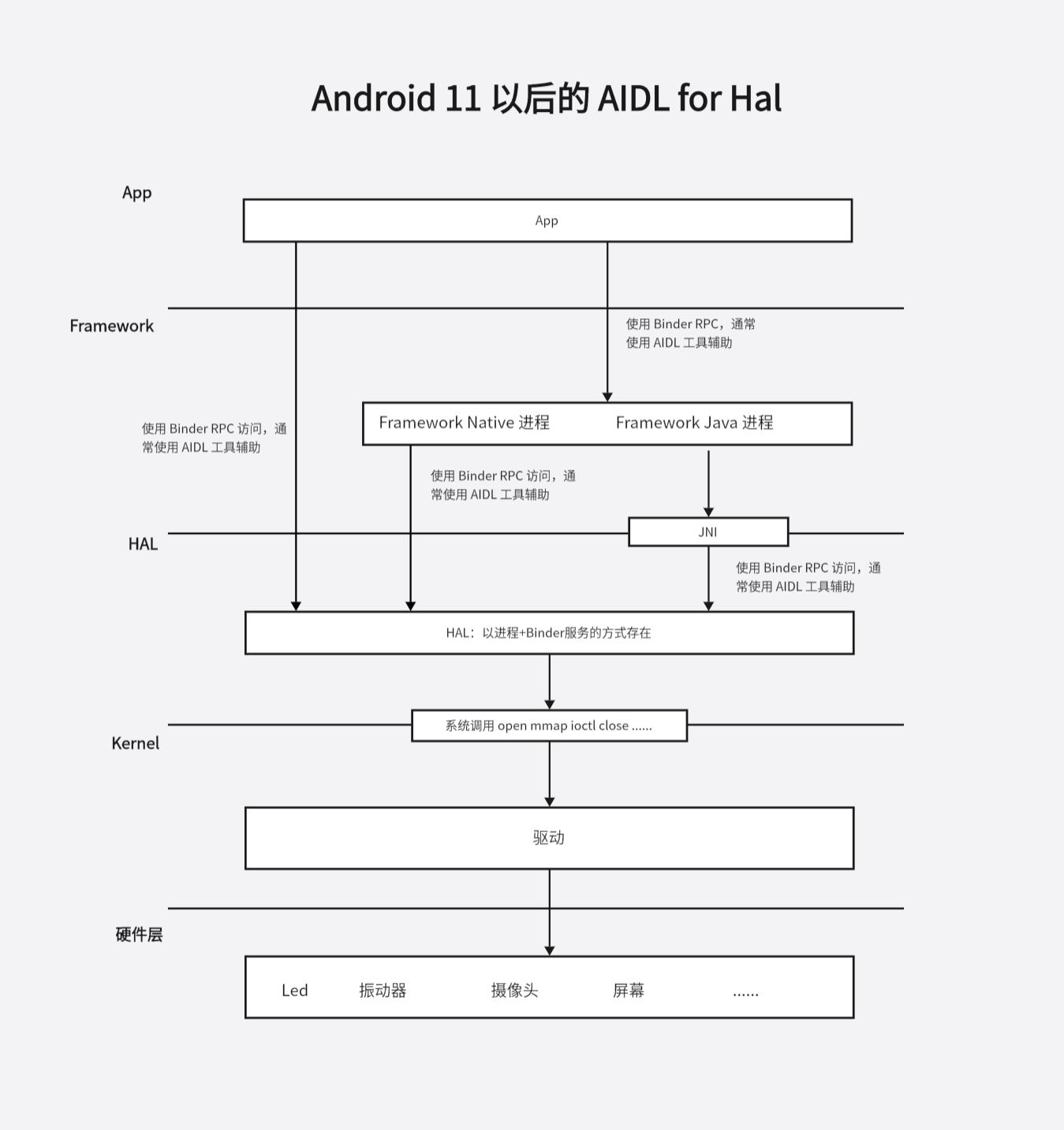
Google 在 Android11 觉得 HIDL 那一套有点多余,把 HIDL HAL 弃用了。并提供了新的 AIDL HAL。
主要有以下几点变化:
- ① 一般情况下 HAL 是一个 binder 服务,注册到 ServiceManager,通过命令 adb shell service list 中有大量的 hal binder 服务。
- ② 通常,App 作为 binder 客户端与 Framework 中的系统进程(SystemServer SurfaceFlinger 等)通信,Framework 中的系统进程会作为 hal binder 服务的客户端,访问 hal。一般情况下,App 访问 hal 要经过两次跨进程通信
- ③ 特殊情况下,比如某个硬件只有一个 App 使用,App 可以直接通过 binder 通信访问到 hal binder 服务。
- ④ 某些 hal 对性能要求高(主要是显示相关的),hal 层是一个 so 库,系统进程通过 dlopen 的方式加载。这类 hal 叫 stable-c hal
还是以振动器的调用过程为主线,来分析 振动器 HAL 的实现细节。
一、App 如何访问到硬件
Android12 及以后,App 中可以通过以下代码操作振动器:
java
 val vibratorManager = getSystemService(Context.VIBRATOR_MANAGER_SERVICE) as VibratorManager
 val vib = vibratorManager.defaultVibrator
 if (vib.hasVibrator()) {
     val vibrationEffect = VibrationEffect.createOneShot(500, VibrationEffect.DEFAULT_AMPLITUDE)
     vib.vibrate(vibrationEffect)
 }
当然执行代码之前需要在 AndroidManifest.xml 中申明振动器权限:
c
<uses-permission android:name="android.permission.VIBRATE" />二、App 端代码分析
接下来我们来分析 App 端的代码。
getSystemService 的实现如下:
java
// frameworks/base/core/java/android/app/Activity.java
@Override
public Object getSystemService(@ServiceName @NonNull String name) {
    if (getBaseContext() == null) {
        throw new IllegalStateException(
                "System services not available to Activities before onCreate()");
    }

    if (WINDOW_SERVICE.equals(name)) {
        return mWindowManager;
    } else if (SEARCH_SERVICE.equals(name)) {
        ensureSearchManager();
        return mSearchManager;
    }
    return super.getSystemService(name);
}
接着调用父类的 getSystemService 方法:
java
// frameworks/base/core/java/android/view/ContextThemeWrapper.java
@Override
public Object getSystemService(String name) {
    if (LAYOUT_INFLATER_SERVICE.equals(name)) {
        if (mInflater == null) {
            mInflater = LayoutInflater.from(getBaseContext()).cloneInContext(this);
        }
        return mInflater;
    }
    return getBaseContext().getSystemService(name);
}
getBaseContext 返回的是一个 ContextImpl 对象,这里接着调用 ContextImpl 对象的 getSystemService 方法:
java
// frameworks/base/core/java/android/app/ContextImpl.java
@Override
public Object getSystemService(String name) {
    if (vmIncorrectContextUseEnabled()) {
        // Check incorrect Context usage.
        if (WINDOW_SERVICE.equals(name) && !isUiContext()) {
            final String errorMessage = "Tried to access visual service "
                    + SystemServiceRegistry.getSystemServiceClassName(name)
                    + " from a non-visual Context:" + getOuterContext();
            final String message = "WindowManager should be accessed from Activity or other "
                    + "visual Context. Use an Activity or a Context created with "
                    + "Context#createWindowContext(int, Bundle), which are adjusted to "
                    + "the configuration and visual bounds of an area on screen.";
            final Exception exception = new IllegalAccessException(errorMessage);
            StrictMode.onIncorrectContextUsed(message, exception);
            Log.e(TAG, errorMessage + " " + message, exception);
        }
    }
    return SystemServiceRegistry.getSystemService(this, name);
}
接着调用 SystemServiceRegistry 的 static 方法 getSystemService:
java
// frameworks/base/core/java/android/app/SystemServiceRegistry.java

private static final Map<String, ServiceFetcher<?>> SYSTEM_SERVICE_FETCHERS =
        new ArrayMap<String, ServiceFetcher<?>>();


public static Object getSystemService(ContextImpl ctx, String name) {
    if (name == null) {
        return null;
    }
    final ServiceFetcher<?> fetcher = SYSTEM_SERVICE_FETCHERS.get(name);
    if (fetcher == null) {
        if (sEnableServiceNotFoundWtf) {
            Slog.wtf(TAG, "Unknown manager requested: " + name);
        }
        return null;
    }

    final Object ret = fetcher.getService(ctx);
    if (sEnableServiceNotFoundWtf && ret == null) {
        // Some services do return null in certain situations, so don't do WTF for them.
        switch (name) {
            case Context.CONTENT_CAPTURE_MANAGER_SERVICE:
            case Context.APP_PREDICTION_SERVICE:
            case Context.INCREMENTAL_SERVICE:
            case Context.ETHERNET_SERVICE:
            case Context.CONTEXTHUB_SERVICE:
            case Context.VIRTUALIZATION_SERVICE:
            case Context.VIRTUAL_DEVICE_SERVICE:
                return null;
        }
        Slog.wtf(TAG, "Manager wrapper not available: " + name);
        return null;
    }
    return ret;
}
getSystemService 方法中,会从 Map<String, ServiceFetcher<?>> SYSTEM_SERVICE_FETCHERS 获取到一个 ServiceFetcher 对象,然后调用 ServiceFetcher 对象的 getService 函数获取到服务并返回。
接下来的问题是 ServiceFetcher 对象是哪里来的?
在 SystemServiceRegistry 的静态块中,会调用 registerService 方法向 Map<String, ServiceFetcher<?>> SYSTEM_SERVICE_FETCHERS 注册 ServiceFetcher 对象。
java
// frameworks/base/core/java/android/app/SystemServiceRegistry.java
static {
//......
    registerService(Context.VIBRATOR_MANAGER_SERVICE, VibratorManager.class,
            new CachedServiceFetcher<VibratorManager>() {
                @Override
                public VibratorManager createService(ContextImpl ctx) {
                    return new SystemVibratorManager(ctx);
                }});
//......
}

private static final Map<Class<?>, String> SYSTEM_SERVICE_NAMES =
        new ArrayMap<Class<?>, String>();
private static final Map<String, ServiceFetcher<?>> SYSTEM_SERVICE_FETCHERS =
        new ArrayMap<String, ServiceFetcher<?>>();
private static final Map<String, String> SYSTEM_SERVICE_CLASS_NAMES = new ArrayMap<>();

// 参数放到 Map 中
private static <T> void registerService(@NonNull String serviceName,
        @NonNull Class<T> serviceClass, @NonNull ServiceFetcher<T> serviceFetcher) {
    SYSTEM_SERVICE_NAMES.put(serviceClass, serviceName);
    SYSTEM_SERVICE_FETCHERS.put(serviceName, serviceFetcher);
    SYSTEM_SERVICE_CLASS_NAMES.put(serviceName, serviceClass.getSimpleName());
}
这里核心是注册了一个匿名对象 CachedServiceFetcher。
getSystemService 时会先获取到 CachedServiceFetcher 对象,然后调用其 getService 方法
java
// frameworks/base/core/java/android/app/SystemServiceRegistry.java
// SystemServiceRegistry 的静态内部类
static abstract class CachedServiceFetcher<T> implements ServiceFetcher<T> {
    private final int mCacheIndex;

    CachedServiceFetcher() {
        // Note this class must be instantiated only by the static initializer of the
        // outer class (SystemServiceRegistry), which already does the synchronization,
        // so bare access to sServiceCacheSize is okay here.
        mCacheIndex = sServiceCacheSize++;
    }

    @Override
    @SuppressWarnings("unchecked")
    public final T getService(ContextImpl ctx) {
        final Object[] cache = ctx.mServiceCache;
        final int[] gates = ctx.mServiceInitializationStateArray;
        boolean interrupted = false;

        T ret = null;

        for (;;) {
            boolean doInitialize = false;
            synchronized (cache) {
                // Return it if we already have a cached instance.
                T service = (T) cache[mCacheIndex];
                if (service != null) {
                    ret = service;
                    break; // exit the for (;;)
                }

                // If we get here, there's no cached instance.

                // Grr... if gate is STATE_READY, then this means we initialized the service
                // once but someone cleared it.
                // We start over from STATE_UNINITIALIZED.
                // Similarly, if the previous attempt returned null, we'll retry again.
                if (gates[mCacheIndex] == ContextImpl.STATE_READY
                        || gates[mCacheIndex] == ContextImpl.STATE_NOT_FOUND) {
                    gates[mCacheIndex] = ContextImpl.STATE_UNINITIALIZED;
                }

                // It's possible for multiple threads to get here at the same time, so
                // use the "gate" to make sure only the first thread will call createService().

                // At this point, the gate must be either UNINITIALIZED or INITIALIZING.
                if (gates[mCacheIndex] == ContextImpl.STATE_UNINITIALIZED) {
                    doInitialize = true;
                    gates[mCacheIndex] = ContextImpl.STATE_INITIALIZING;
                }
            }

            if (doInitialize) {
                // Only the first thread gets here.

                T service = null;
                @ServiceInitializationState int newState = ContextImpl.STATE_NOT_FOUND;
                try {
                    // This thread is the first one to get here. Instantiate the service
                    // *without* the cache lock held.
                    //调用 createService 构建一个 Service 对象
                    service = createService(ctx);
                    newState = ContextImpl.STATE_READY;

                } catch (ServiceNotFoundException e) {
                    onServiceNotFound(e);

                } finally {
                    synchronized (cache) {
                        cache[mCacheIndex] = service;
                        gates[mCacheIndex] = newState;
                        cache.notifyAll();
                    }
                }
                ret = service;
                break; // exit the for (;;)
            }
            // The other threads will wait for the first thread to call notifyAll(),
            // and go back to the top and retry.
            synchronized (cache) {
                // Repeat until the state becomes STATE_READY or STATE_NOT_FOUND.
                // We can't respond to interrupts here; just like we can't in the "doInitialize"
                // path, so we remember the interrupt state here and re-interrupt later.
                while (gates[mCacheIndex] < ContextImpl.STATE_READY) {
                    try {
                        // Clear the interrupt state.
                        interrupted |= Thread.interrupted();
                        cache.wait();
                    } catch (InterruptedException e) {
                        // This shouldn't normally happen, but if someone interrupts the
                        // thread, it will.
                        Slog.w(TAG, "getService() interrupted");
                        interrupted = true;
                    }
                }
            }
        }
        if (interrupted) {
            Thread.currentThread().interrupt();
        }
        // 返回 createService 方法构建的对象
        return ret;
    }

    // 由子类实现
    public abstract T createService(ContextImpl ctx) throws ServiceNotFoundException;
}
可以看出 getService 中会调用 createService 创建服务对象并返回,createService 是一个抽象方法,由子类返回。
对于振动器服务,返回的是一个 SystemVibratorManager 对象:
java
public class SystemVibratorManager  extends VibratorManager {
    private static final String TAG = "VibratorManager";

    private final IVibratorManagerService mService;
    private final Context mContext;
    private final Binder mToken = new Binder();
    private final Object mLock = new Object();
    @GuardedBy("mLock")
    private int[] mVibratorIds;
    @GuardedBy("mLock")
    private final SparseArray<Vibrator> mVibrators = new SparseArray<>();

    @GuardedBy("mLock")
    private final ArrayMap<Vibrator.OnVibratorStateChangedListener,
            OnVibratorStateChangedListenerDelegate> mListeners = new ArrayMap<>();

    /**
     * @hide to prevent subclassing from outside of the framework
     */
    public SystemVibratorManager(Context context) {
        super(context);
        mContext = context;
        // 获取到 IVibratorManagerService 服务的客户代理端
        // 其他方法的功能都是通过 mService 来实现的
        mService = IVibratorManagerService.Stub.asInterface(
                ServiceManager.getService(Context.VIBRATOR_MANAGER_SERVICE));
    }

    @NonNull
    @Override
    public int[] getVibratorIds() {
        synchronized (mLock) {
            if (mVibratorIds != null) {
                return mVibratorIds;
            }
            try {
                if (mService == null) {
                    Log.w(TAG, "Failed to retrieve vibrator ids; no vibrator manager service.");
                } else {
                    return mVibratorIds = mService.getVibratorIds();
                }
            } catch (RemoteException e) {
                e.rethrowFromSystemServer();
            }
            return new int[0];
        }
    }

    @NonNull
    @Override
    public Vibrator getVibrator(int vibratorId) {
        synchronized (mLock) {
            Vibrator vibrator = mVibrators.get(vibratorId);
            if (vibrator != null) {
                return vibrator;
            }
            VibratorInfo info = null;
            try {
                if (mService == null) {
                    Log.w(TAG, "Failed to retrieve vibrator; no vibrator manager service.");
                } else {
                    info = mService.getVibratorInfo(vibratorId);
                }
            } catch (RemoteException e) {
                e.rethrowFromSystemServer();
            }
            if (info != null) {
                vibrator = new SingleVibrator(info);
                mVibrators.put(vibratorId, vibrator);
            } else {
                vibrator = NullVibrator.getInstance();
            }
            return vibrator;
        }
    }

    @NonNull
    @Override
    public Vibrator getDefaultVibrator() {
        return mContext.getSystemService(Vibrator.class);
    }

    @Override
    public boolean setAlwaysOnEffect(int uid, String opPkg, int alwaysOnId,
            @Nullable CombinedVibration effect, @Nullable VibrationAttributes attributes) {
        if (mService == null) {
            Log.w(TAG, "Failed to set always-on effect; no vibrator manager service.");
            return false;
        }
        try {
            return mService.setAlwaysOnEffect(uid, opPkg, alwaysOnId, effect, attributes);
        } catch (RemoteException e) {
            Log.w(TAG, "Failed to set always-on effect.", e);
        }
        return false;
    }

    @Override
    public void vibrate(int uid, String opPkg, @NonNull CombinedVibration effect,
            String reason, @Nullable VibrationAttributes attributes) {
        if (mService == null) {
            Log.w(TAG, "Failed to vibrate; no vibrator manager service.");
            return;
        }
        try {
            mService.vibrate(uid, mContext.getAssociatedDisplayId(), opPkg, effect, attributes,
                    reason, mToken);
        } catch (RemoteException e) {
            Log.w(TAG, "Failed to vibrate.", e);
        }
    }

    @Override
    public void cancel() {
        cancelVibration(VibrationAttributes.USAGE_FILTER_MATCH_ALL);
    }

    @Override
    public void cancel(int usageFilter) {
        cancelVibration(usageFilter);
    }

    private void cancelVibration(int usageFilter) {
        if (mService == null) {
            Log.w(TAG, "Failed to cancel vibration; no vibrator manager service.");
            return;
        }
        try {
            mService.cancelVibrate(usageFilter, mToken);
        } catch (RemoteException e) {
            Log.w(TAG, "Failed to cancel vibration.", e);
        }
    }

    /** Listener for vibrations on a single vibrator. */
    private static class OnVibratorStateChangedListenerDelegate extends
            IVibratorStateListener.Stub {
        private final Executor mExecutor;
        private final Vibrator.OnVibratorStateChangedListener mListener;

        OnVibratorStateChangedListenerDelegate(
                @NonNull Vibrator.OnVibratorStateChangedListener listener,
                @NonNull Executor executor) {
            mExecutor = executor;
            mListener = listener;
        }

        @Override
        public void onVibrating(boolean isVibrating) {
            mExecutor.execute(() -> mListener.onVibratorStateChanged(isVibrating));
        }
    }

    /** Controls vibrations on a single vibrator. */
    private final class SingleVibrator extends Vibrator {
        private final VibratorInfo mVibratorInfo;

        SingleVibrator(@NonNull VibratorInfo vibratorInfo) {
            mVibratorInfo = vibratorInfo;
        }

        @Override
        protected VibratorInfo getInfo() {
            return mVibratorInfo;
        }

        @Override
        public boolean hasVibrator() {
            return true;
        }

        @Override
        public boolean hasAmplitudeControl() {
            return mVibratorInfo.hasAmplitudeControl();
        }

        @Override
        public boolean setAlwaysOnEffect(int uid, String opPkg, int alwaysOnId,
                @Nullable VibrationEffect effect, @Nullable VibrationAttributes attrs) {
            CombinedVibration combined = CombinedVibration.startParallel()
                    .addVibrator(mVibratorInfo.getId(), effect)
                    .combine();
            return SystemVibratorManager.this.setAlwaysOnEffect(uid, opPkg, alwaysOnId, combined,
                    attrs);
        }

        @Override
        public void vibrate(int uid, String opPkg, @NonNull VibrationEffect vibe, String reason,
                @NonNull VibrationAttributes attributes) {
            CombinedVibration combined = CombinedVibration.startParallel()
                    .addVibrator(mVibratorInfo.getId(), vibe)
                    .combine();
            SystemVibratorManager.this.vibrate(uid, opPkg, combined, reason, attributes);
        }

        @Override
        public void cancel() {
            SystemVibratorManager.this.cancel();
        }

        @Override
        public void cancel(int usageFilter) {
            SystemVibratorManager.this.cancel(usageFilter);
        }

        @Override
        public boolean isVibrating() {
            if (mService == null) {
                Log.w(TAG, "Failed to check status of vibrator " + mVibratorInfo.getId()
                        + "; no vibrator service.");
                return false;
            }
            try {
                return mService.isVibrating(mVibratorInfo.getId());
            } catch (RemoteException e) {
                e.rethrowFromSystemServer();
            }
            return false;
        }

        @Override
        public void addVibratorStateListener(@NonNull OnVibratorStateChangedListener listener) {
            Objects.requireNonNull(listener);
            if (mContext == null) {
                Log.w(TAG, "Failed to add vibrate state listener; no vibrator context.");
                return;
            }
            addVibratorStateListener(mContext.getMainExecutor(), listener);
        }

        @Override
        public void addVibratorStateListener(
                @NonNull @CallbackExecutor Executor executor,
                @NonNull OnVibratorStateChangedListener listener) {
            Objects.requireNonNull(listener);
            Objects.requireNonNull(executor);
            if (mService == null) {
                Log.w(TAG,
                        "Failed to add vibrate state listener to vibrator " + mVibratorInfo.getId()
                                + "; no vibrator service.");
                return;
            }
            synchronized (mLock) {
                // If listener is already registered, reject and return.
                if (mListeners.containsKey(listener)) {
                    Log.w(TAG, "Listener already registered.");
                    return;
                }
                try {
                    OnVibratorStateChangedListenerDelegate delegate =
                            new OnVibratorStateChangedListenerDelegate(listener, executor);
                    if (!mService.registerVibratorStateListener(mVibratorInfo.getId(), delegate)) {
                        Log.w(TAG, "Failed to add vibrate state listener to vibrator "
                                + mVibratorInfo.getId());
                        return;
                    }
                    mListeners.put(listener, delegate);
                } catch (RemoteException e) {
                    e.rethrowFromSystemServer();
                }
            }
        }

        @Override
        public void removeVibratorStateListener(@NonNull OnVibratorStateChangedListener listener) {
            Objects.requireNonNull(listener);
            if (mService == null) {
                Log.w(TAG, "Failed to remove vibrate state listener from vibrator "
                        + mVibratorInfo.getId() + "; no vibrator service.");
                return;
            }
            synchronized (mLock) {
                // Check if the listener is registered, otherwise will return.
                if (mListeners.containsKey(listener)) {
                    OnVibratorStateChangedListenerDelegate delegate = mListeners.get(listener);
                    try {
                        if (!mService.unregisterVibratorStateListener(mVibratorInfo.getId(),
                                delegate)) {
                            Log.w(TAG, "Failed to remove vibrate state listener from vibrator "
                                    + mVibratorInfo.getId());
                            return;
                        }
                        mListeners.remove(listener);
                    } catch (RemoteException e) {
                        e.rethrowFromSystemServer();
                    }
                }
            }
        }
    }
}
在 SystemVibratorManager 构造函数中,会获取到 IVibratorManagerService binder 服务的客户端代理类对象,SystemVibratorManager 对象的对外功能都是通过这个客户端代理类对象实现的。
接下来,我们就来看看这个 binder 服务的服务端实现
三、服务端
我们先看看 IVibratorManagerService 的服务端在哪里注册的。
如果你对系统启动过程有所了解,应该知道,这类系统传感器类的服务通常在 SystemServer 的 startOtherServices 方法中完成注册
java
// frameworks/base/services/java/com/android/server/SystemServer.java

private void startOtherServices(@NonNull TimingsTraceAndSlog t) {
  // ......
        t.traceBegin("StartVibratorManagerService");
        mSystemServiceManager.startService(VibratorManagerService.Lifecycle.class);
        t.traceEnd();
  //......
}
startService 的实现如下:
java
// frameworks/base/services/core/java/com/android/server/SystemServiceManager.java
public <T extends SystemService> T startService(Class<T> serviceClass) {
    try {
        final String name = serviceClass.getName();
        Slog.i(TAG, "Starting " + name);
        Trace.traceBegin(Trace.TRACE_TAG_SYSTEM_SERVER, "StartService " + name);

        // Create the service.
        if (!SystemService.class.isAssignableFrom(serviceClass)) {
            throw new RuntimeException("Failed to create " + name
                    + ": service must extend " + SystemService.class.getName());
        }
        final T service;
        try {
            // 反射调用构造函数
            Constructor<T> constructor = serviceClass.getConstructor(Context.class);
            service = constructor.newInstance(mContext);
        } catch (InstantiationException ex) {
            throw new RuntimeException("Failed to create service " + name
                    + ": service could not be instantiated", ex);
        } catch (IllegalAccessException ex) {
            throw new RuntimeException("Failed to create service " + name
                    + ": service must have a public constructor with a Context argument", ex);
        } catch (NoSuchMethodException ex) {
            throw new RuntimeException("Failed to create service " + name
                    + ": service must have a public constructor with a Context argument", ex);
        } catch (InvocationTargetException ex) {
            throw new RuntimeException("Failed to create service " + name
                    + ": service constructor threw an exception", ex);
        }

        startService(service);
        return service;
    } finally {
        Trace.traceEnd(Trace.TRACE_TAG_SYSTEM_SERVER);
    }
}
这里使用反射调用了传入的 VibratorManagerService.Lifecycle.class 的构造函数,接着构造函数返回的对象传入另一个 startService 重载。
java
public void startService(@NonNull final SystemService service) {
    // Check if already started
    String className = service.getClass().getName();
    if (mServiceClassnames.contains(className)) {
        Slog.i(TAG, "Not starting an already started service " + className);
        return;
    }
    mServiceClassnames.add(className);

    // Register it.
    mServices.add(service);

    // Start it.
    long time = SystemClock.elapsedRealtime();
    try {
        service.onStart(); // 调用 SystemService 的 onStart 方法
    } catch (RuntimeException ex) {
        throw new RuntimeException("Failed to start service " + service.getClass().getName()
                + ": onStart threw an exception", ex);
    }
    warnIfTooLong(SystemClock.elapsedRealtime() - time, service, "onStart");
}
这里会调用传入的 SystemService 的 onStart 方法。
接下来看 VibratorManagerService.Lifecycle 类中的 onStart 方法:
java
public class VibratorManagerService extends IVibratorManagerService.Stub {
    //......
        public static class Lifecycle extends SystemService {
        private VibratorManagerService mService;

        public Lifecycle(Context context) {
            super(context);
        }

        @Override
        public void onStart() {
            mService = new VibratorManagerService(getContext(), new Injector());
            publishBinderService(Context.VIBRATOR_MANAGER_SERVICE, mService);
        }

        @Override
        public void onBootPhase(int phase) {
            if (phase == SystemService.PHASE_SYSTEM_SERVICES_READY) {
                mService.systemReady();
            }
        }
    }
    //......
}
在 onStart 中,会 new 一个 VibratorManagerService 对象,VibratorManagerService 继承自 IVibratorManagerService.Stub, 是 IVibratorManagerService binder 服务的服务端实现。接着调用 publishBinderService 方法:
java
protected final void publishBinderService(@NonNull String name, @NonNull IBinder service) {
    publishBinderService(name, service, false);
}

protected final void publishBinderService(@NonNull String name, @NonNull IBinder service,
        boolean allowIsolated) {
    publishBinderService(name, service, allowIsolated, DUMP_FLAG_PRIORITY_DEFAULT);
}

protected final void publishBinderService(String name, IBinder service,
        boolean allowIsolated, int dumpPriority) {
    ServiceManager.addService(name, service, allowIsolated, dumpPriority);
}
绕了一大圈,实际就是 addService. 向 ServiceManager 注册一个 binder 服务。
接下来的问题就是 VibratorManagerService 怎么访问到 HAL 层。
四、VibratorManagerService 如何访问到 HAL 层
先看下 VibratorManagerService 的构造函数:
java
VibratorManagerService(Context context, Injector injector) {
    // ......
    mNativeWrapper = injector.getNativeWrapper();
    mNativeWrapper.init(listener);
    // .....
}
实际代码很多,我们先关注一下 mNativeWrapper:
java
NativeWrapper getNativeWrapper() {
  // 默认构造函数
    return new NativeWrapper();
}
这里就是简单 new 一个 NativeWrapper 对象。
接会调用 NativeWrapper 对象的 init 方法:
java
public static class NativeWrapper {

    private long mNativeServicePtr = 0;

    /** Returns native pointer to newly created controller and connects with HAL service. */
    public void init(OnSyncedVibrationCompleteListener listener) {
        mNativeServicePtr = nativeInit(listener);
        // ......
    }
// ......
}
init 方法中会调用到 nativeInit 方法,nativeInit 是一个 native 方法,对应的 JNI 函数是:
java
// frameworks/base/services/core/jni/com_android_server_vibrator_VibratorManagerService.cpp
static vibrator::ManagerHalController* gManager GUARDED_BY(gManagerMutex) = nullptr;

static jlong nativeInit(JNIEnv* env, jclass /* clazz */, jobject callbackListener) {
    std::unique_ptr<NativeVibratorManagerService> service =
            std::make_unique<NativeVibratorManagerService>(env, callbackListener);
    {
        std::lock_guard<std::mutex> lock(gManagerMutex);
        gManager = service->hal();
    }
    return reinterpret_cast<jlong>(service.release());
}
初始化一个指针 NativeVibratorManagerService,然后拿到内部的 hal 成员保存在 gManager 中,最后返回 NativeVibratorManagerService 指针地址给 Java 层,Java 层把这个地址保存在 mNativeServicePtr 成员中。
接下来我们来看 NativeVibratorManagerService 的内部实现:
c
// frameworks/base/services/core/jni/com_android_server_vibrator_VibratorManagerService.cpp
class NativeVibratorManagerService {
public:
    NativeVibratorManagerService(JNIEnv* env, jobject callbackListener)
          : mHal(std::make_unique<vibrator::ManagerHalController>()),
            mCallbackListener(env->NewGlobalRef(callbackListener)) {
        LOG_ALWAYS_FATAL_IF(mHal == nullptr, "Unable to find reference to vibrator manager hal");
        LOG_ALWAYS_FATAL_IF(mCallbackListener == nullptr,
                            "Unable to create global reference to vibration callback handler");
    }

    ~NativeVibratorManagerService() {
        auto jniEnv = GetOrAttachJNIEnvironment(sJvm);
        jniEnv->DeleteGlobalRef(mCallbackListener);
    }

    vibrator::ManagerHalController* hal() const { return mHal.get(); }

    std::function<void()> createCallback(jlong vibrationId) {
        return [vibrationId, this]() {
            auto jniEnv = GetOrAttachJNIEnvironment(sJvm);
            jniEnv->CallVoidMethod(mCallbackListener, sMethodIdOnComplete, vibrationId);
        };
    }

private:
    const std::unique_ptr<vibrator::ManagerHalController> mHal;
    const jobject mCallbackListener;
};
我们重点关注成员 mHal, mHal 在构造函数中,被初始化为一个 ManagerHalController 对象。
到这里,初始化过程就分析完了,整体的类关系如下图所示:
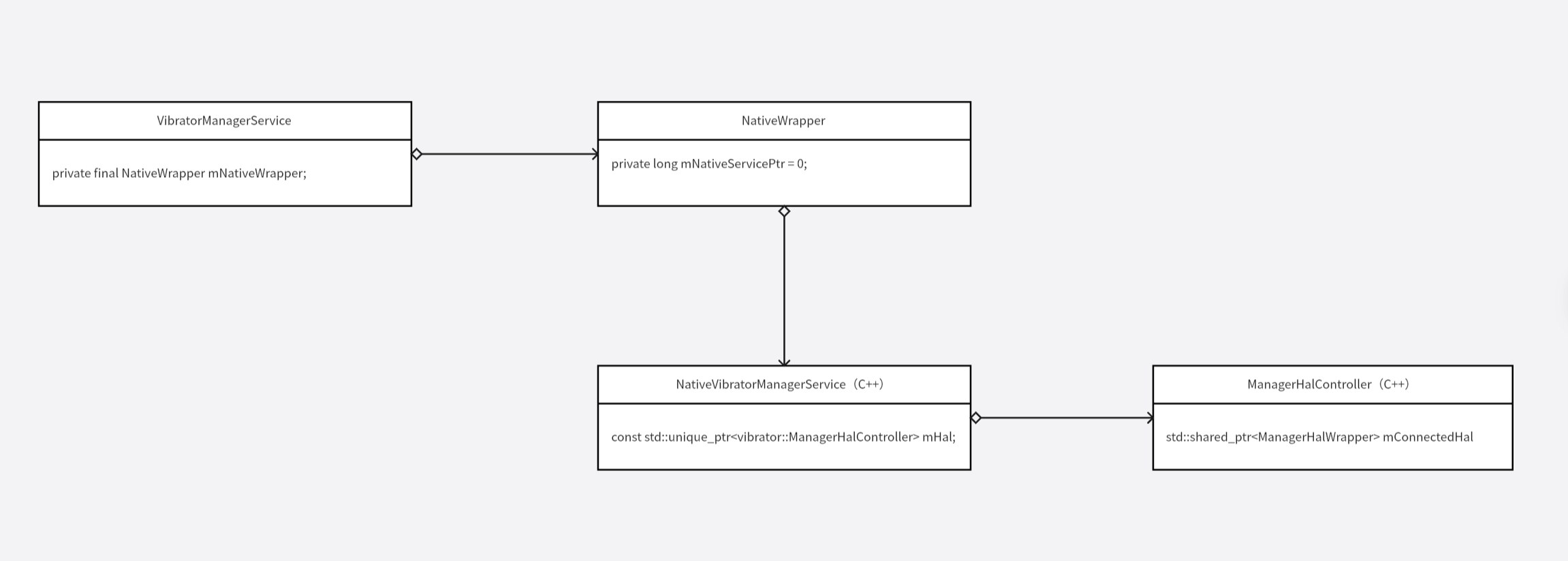
App 端振动器相关的功能最终都会调用到 ManagerHalController 中的方法,比如 getCapabilities 方法,用于获取振动器的能力范围:
c
HalResult<ManagerCapabilities> ManagerHalController::getCapabilities() {
    hal_fn<ManagerCapabilities> getCapabilitiesFn = [](std::shared_ptr<ManagerHalWrapper> hal) {
        return hal->getCapabilities();
    };
    return apply(getCapabilitiesFn, "getCapabilities");
}
构建一个 lamda 表达式然后传入 apply 方法:
c
template <typename T>
HalResult<T> ManagerHalController::apply(ManagerHalController::hal_fn<T>& halFn,
                                         const char* functionName) {
    std::shared_ptr<ManagerHalWrapper> hal = nullptr;
    {
        std::lock_guard<std::mutex> lock(mConnectedHalMutex);
        if (mConnectedHal == nullptr) {
            // Init was never called, so connect to HAL for the first time during this call.
            mConnectedHal = mConnector(mCallbackScheduler);

            if (mConnectedHal == nullptr) {
                ALOGV("Skipped %s because VibratorManager HAL is not available", functionName);
                return HalResult<T>::unsupported();
            }
        }
        hal = mConnectedHal;
    }

    HalResult<T> ret = processHalResult(halFn(hal), functionName);
    for (int i = 0; i < MAX_RETRIES && ret.isFailed(); i++) {
        ret = processHalResult(halFn(hal), functionName);
    }

    return ret;
}
先调用 mConnector 方法,mConnector 在构造函数中初始化为 connectManagerHal 函数:
ManagerHalController 构造函数:
c
ManagerHalController()
      : ManagerHalController(std::make_shared<CallbackScheduler>(), &connectManagerHal) {}

ManagerHalController(std::shared_ptr<CallbackScheduler> callbackScheduler, Connector connector)
      : mConnector(connector), mCallbackScheduler(callbackScheduler), mConnectedHal(nullptr) {}
connectManagerHal 函数的具体实现:
c
std::shared_ptr<ManagerHalWrapper> connectManagerHal(std::shared_ptr<CallbackScheduler> scheduler) {
    static bool gHalExists = true;
    if (gHalExists) {
        sp<Aidl::IVibratorManager> hal = waitForVintfService<Aidl::IVibratorManager>();
        if (hal) {
            ALOGV("Successfully connected to VibratorManager HAL AIDL service.");
            return std::make_shared<AidlManagerHalWrapper>(std::move(scheduler), hal);
        }
    }

    gHalExists = false;
    return std::make_shared<LegacyManagerHalWrapper>();
}
接着看 waitForVintfService 函数的具体实现:
c
template<typename INTERFACE>
sp<INTERFACE> waitForVintfService(
        const String16& instance = String16("default")) {
    return waitForDeclaredService<INTERFACE>(
        INTERFACE::descriptor + String16("/") + instance);
}

template<typename INTERFACE>
sp<INTERFACE> waitForDeclaredService(const String16& name) {
    const sp<IServiceManager> sm = defaultServiceManager();
    if (!sm->isDeclared(name)) return nullptr;
    return interface_cast<INTERFACE>(sm->waitForService(name));
}
实际就是调用 waitForService 获取 aidl hal 服务,返回 aidl hal 服务的客户端代理对象。
接着就会执行传入的 lamda 回调,在回调中通过 aidl hal 服务的客户端代理对象发起远程调用。
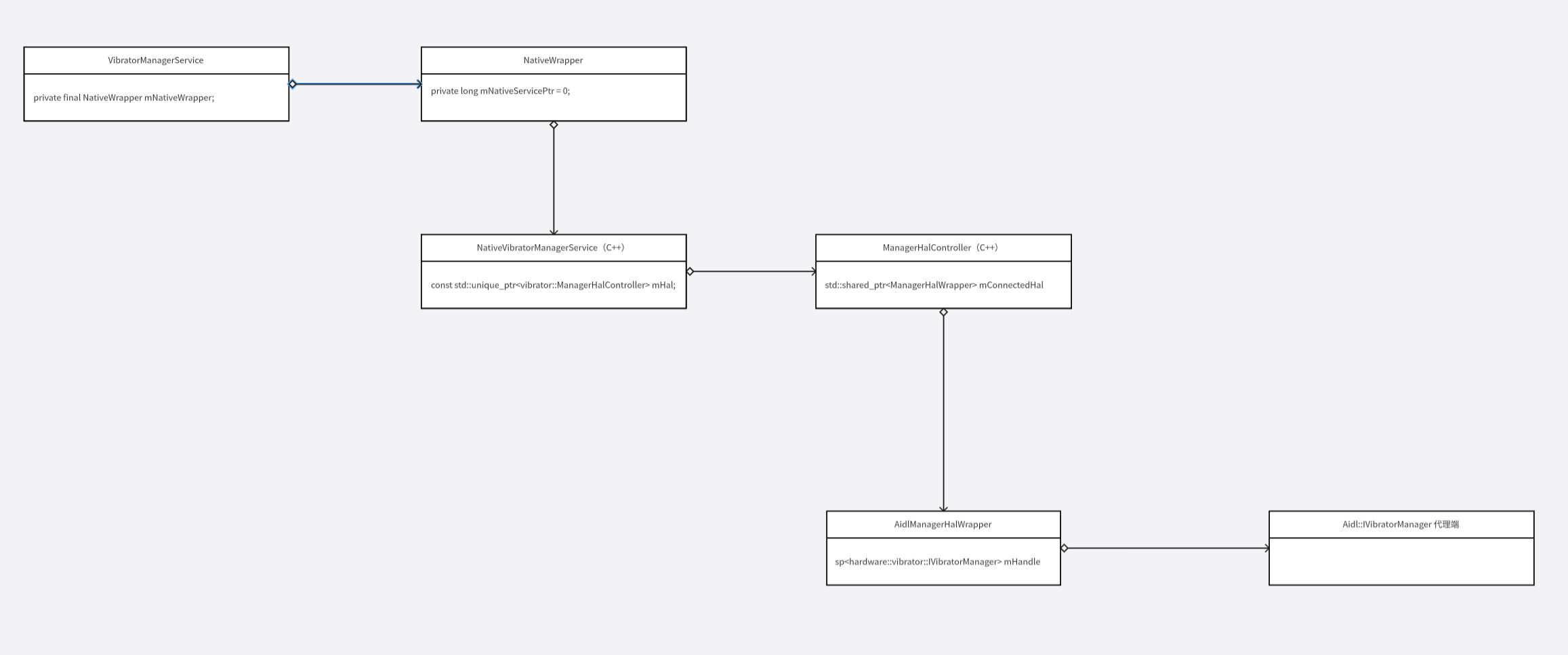
到目前为止,整体的类结构如下:
五、HAL 层
Google 给出了振动器的实现:
hardware/interfaces/vibrator
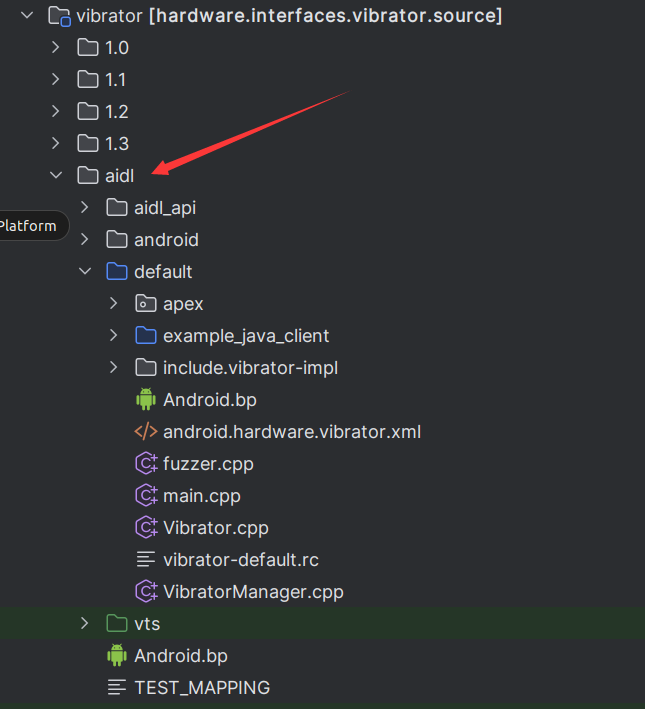
给出了 HAL 层实现的整体框架,也给出了实例,实例并没有真的访问驱动,只是返回一些假数据。
先看最顶层的 Android.bp:
java
// hardware/interfaces/vibrator/aidl/Android.bp

package {
    default_applicable_licenses: ["hardware_interfaces_license"],
}

aidl_interface {
    name: "android.hardware.vibrator",
    vendor_available: true,
    host_supported: true,
    srcs: [
        "android/hardware/vibrator/*.aidl",
    ],
    stability: "vintf",
    backend: {
        java: {
            sdk_version: "system_current",
        },
    },
    versions: [
        "1",
        "2",
    ],
}
这里定义一个 aidl_interface 类型,aidl 文件需要配置在 srcs 中。
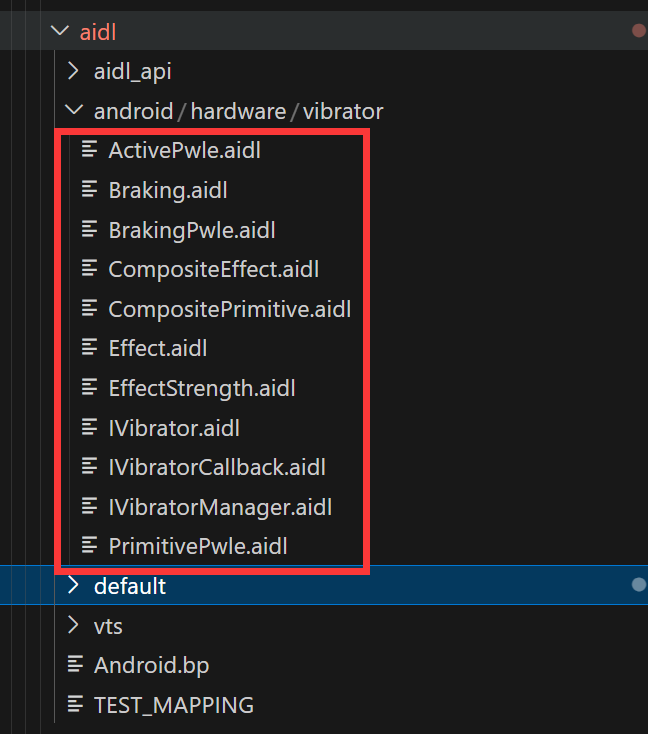
配置完成后,编译系统会帮助我们生成 C++/JAVA/NDK/RUST 四种服务端代码。
Google 推荐使用 NDK 类型的代码。
主要几点原因:
- ① HAL 使用 C++ 语言实现更方便,因为要访问驱动。
- ② C++ 类型的代码会依赖 vndk 中的 libbinder 库,Google 的文档说这个库的内部实现和对外接口都不稳定
- ③ NDK 类型的代码依赖 libbinder_ndk,这个库基于 libbinder 库构建,不同的是,它的对外接口稳定。
接着看 hardware/interfaces/vibrator/aidl/default/Android.bp:
c
package {
    // See: http://go/android-license-faq
    // A large-scale-change added 'default_applicable_licenses' to import
    // all of the 'license_kinds' from "hardware_interfaces_license"
    // to get the below license kinds:
    //   SPDX-license-identifier-Apache-2.0
    default_applicable_licenses: ["hardware_interfaces_license"],
}

cc_library_static {
    name: "libvibratorexampleimpl",
    vendor_available: true,
    host_supported: true,
    shared_libs: [
        "libbase",
        "libbinder_ndk",
        "android.hardware.vibrator-V2-ndk",
    ],
    export_include_dirs: ["include"],
    srcs: [
        "Vibrator.cpp",
        "VibratorManager.cpp",
    ],
    visibility: [
        ":__subpackages__",
        "//hardware/interfaces/tests/extension/vibrator:__subpackages__",
    ],
    target: {
        darwin: {
            enabled: false,
        },
    },
}

filegroup {
    name: "android.hardware.vibrator.xml",
    srcs: ["android.hardware.vibrator.xml"],
}

cc_binary {
    name: "android.hardware.vibrator-service.example",
    relative_install_path: "hw",
    init_rc: ["vibrator-default.rc"],
    vintf_fragments: [":android.hardware.vibrator.xml"],
    vendor: true,
    shared_libs: [
        "libbase",
        "libbinder_ndk",
        "android.hardware.vibrator-V2-ndk",
    ],
    static_libs: [
        "libvibratorexampleimpl",
    ],
    srcs: ["main.cpp"],
}

cc_fuzz {
    name: "android.hardware.vibrator-service.example_fuzzer",
    host_supported: true,
    defaults: ["service_fuzzer_defaults"],
    static_libs: [
        "android.hardware.vibrator-V2-ndk",
        "liblog",
        "libvibratorexampleimpl",
    ],
    srcs: ["fuzzer.cpp"],
    fuzz_config: {
        cc: [
            "smoreland@google.com",
        ],
    },
}
libvibratorexampleimpl 是一个静态库,包含了 Vibrator.cpp VibratorManager.cpp 源码。源码中主要是对 aidl hal 服务端对象的具体实现。
android.hardware.vibrator-service.example 是一个 native 可执行程序,源码是 main.cpp:
c
#include "vibrator-impl/Vibrator.h"
#include "vibrator-impl/VibratorManager.h"

#include <android-base/logging.h>
#include <android/binder_manager.h>
#include <android/binder_process.h>

using aidl::android::hardware::vibrator::Vibrator;
using aidl::android::hardware::vibrator::VibratorManager;

int main() {
    ABinderProcess_setThreadPoolMaxThreadCount(0);

    // make a default vibrator service
    auto vib = ndk::SharedRefBase::make<Vibrator>();
    binder_status_t status = AServiceManager_addService(
            vib->asBinder().get(), Vibrator::makeServiceName("default").c_str());
    CHECK_EQ(status, STATUS_OK);

    // make the vibrator manager service with a different vibrator
    auto managedVib = ndk::SharedRefBase::make<Vibrator>();
    auto vibManager = ndk::SharedRefBase::make<VibratorManager>(std::move(managedVib));
    status = AServiceManager_addService(vibManager->asBinder().get(),
                                        VibratorManager::makeServiceName("default").c_str());
    CHECK_EQ(status, STATUS_OK);

    ABinderProcess_joinThreadPool();
    return EXIT_FAILURE;  // should not reach
}
这里就是通过 AServiceManager_addService 函数来向 ServiceManager 注册 aidl hal 服务端。
这里注册了两个服务 Vibrator VibratorManager,Vibrator 是为了兼容老的 api,VibratorManager 是新 API 实现的基础。
六、补充
在 Google 给的 Vibrator hal 实现中,还有一个 App 端的示例:
hardware/interfaces/vibrator/aidl/default/example_java_client
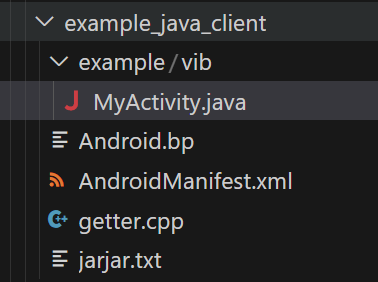
其中核心的 hardware/interfaces/vibrator/aidl/default/example_java_client/example/vib/MyActivity.java 的实现如下:
java
package example.vib;

import android.app.Activity;
import android.hardware.vibrator.IVibrator;
import android.os.Bundle;
import android.os.IBinder;
import android.os.RemoteException;

public class MyActivity extends Activity {
    private static native IBinder gimme(String name);

    @Override
    public void onCreate(Bundle b) {
        super.onCreate(b);
        System.loadLibrary("example_vib_getter");

        IVibrator v =
                IVibrator.Stub.asInterface(gimme("android.hardware.vibrator.IVibrator/default"));

        try {
            v.on(100 /*ms*/, null /*cb*/);
        } catch (RemoteException e) {
            throw new RuntimeException(e);
        }

        finish();
    }
}
可以看出在 App 中可以直接访问到 HAL 层的 aidl HAL 服务。省略 Framework 中冗长的逻辑。提供了一种全新的硬件访问方式。
这样固然更快更简单,但是硬件如果存在多个进程同时使用的情况,建议还是通过 Framework 中系统服务来使用,系统服务统一协调管理来自多个进程的访问。
App 其对应的 hardware/interfaces/vibrator/aidl/default/example_java_client/Android.bp:
c
cc_library {
    name: "libexample_vib_getter",
    srcs: ["getter.cpp"],
    product_available: true,
    vendor_available: true,
    shared_libs: [
        "liblog",
        "libbinder_ndk",
    ],
    header_libs: ["jni_headers"],
    stl: "c++_shared",
    visibility: [":__subpackages__"],
}

android_app {
    name: "ExampleVibratorJavaVendorClient",
    vendor: true,
    static_libs: ["android.hardware.vibrator-V1-java"],
    jni_libs: ["libexample_vib_getter"],
    use_embedded_native_libs: true,
    jarjar_rules: "jarjar.txt",
    stl: "c++_shared",
    srcs: ["example/vib/MyActivity.java"],
    sdk_version: "system_current",
    visibility: [":__subpackages__"],
}

android_app {
    name: "ExampleVibratorJavaProductClient",
    product_specific: true,
    static_libs: ["android.hardware.vibrator-V1-java"],
    jni_libs: ["libexample_vib_getter"],
    use_embedded_native_libs: true,
    jarjar_rules: "jarjar.txt",
    stl: "c++_shared",
    srcs: ["example/vib/MyActivity.java"],
    sdk_version: "system_current",
    visibility: [":__subpackages__"],
    // If PRODUCT_ENFORCE_PRODUCT_PARTITION_INTERFACE is not true, product apps
    // may use unstable APIs. jni_uses_platform_apis must set to use the
    // non-SDK jni libs in this case.
    // This is not required if PRODUCT_ENFORCE_PRODUCT_PARTITION_INTERFACE is
    // set to true.
    jni_uses_platform_apis: true,
}
这里给了两个 App 的构建,一个在 Vendor 分区,一个在 Product 分区。他们都需要 android.hardware.vibrator-V1-java 和 libexample_vib_getter 库的支持.
其中 libexample_vib_getter 库有依赖于 libbinder_ndk 库。android.hardware.vibrator-V1-java 是 aidl 文件生成的 java 支持。