一、Arthas Tunnel Server 核心价值
Arthas Tunnel Server 是阿里巴巴开源的 Java 诊断工具 Arthas 的云端管理中枢,通过 WebSocket 长连接实现多应用实例的集中监控与诊断。在 Kubernetes 环境中,其核心价值体现在:
- 统一入口:通过单一 Web 控制台管理所有 Pod 的诊断会话
- 动态发现:自动感知 Pod 扩缩容,无需手动维护 AgentID
- 安全审计:支持 RBAC 权限控制与操作日志记录
- 会话持久化:记录诊断过程,便于问题复盘
二、架构设计与部署方案
2.1 架构拓扑
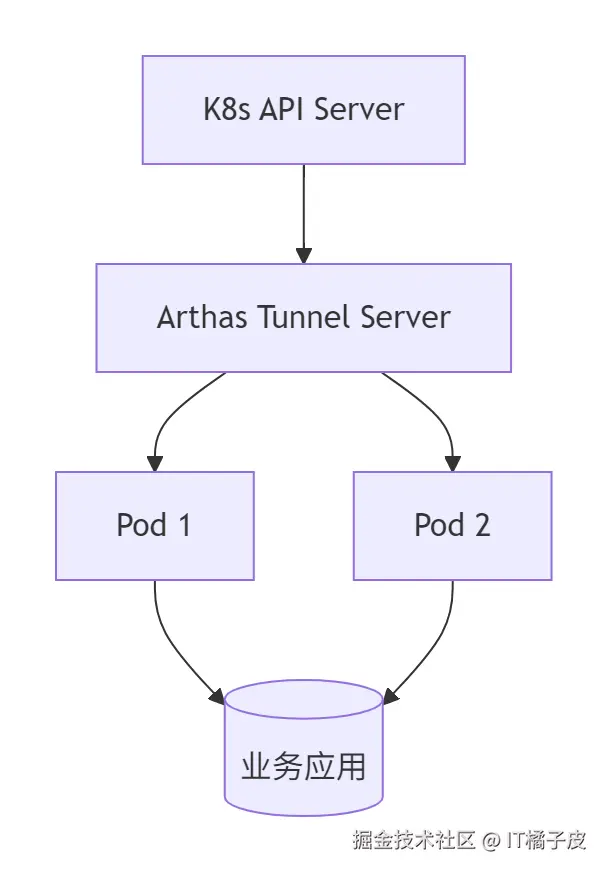
2.2 部署前准备
2.2.1 环境要求
- Kubernetes 1.18+
- Java 8+ 环境
- Redis(可选,用于集群缓存)
2.2.2 镜像构建
基于官方源码改造的增强版镜像(含权限控制):
bash
FROM openjdk:8-jdk-alpine
COPY arthas-tunnel-server-4.0.5.jar /app.jar
COPY entrypoint.sh /entrypoint.sh
RUN chmod +x /entrypoint.sh
ENV TZ=Asia/Shanghai
ENTRYPOINT ["/entrypoint.sh"]
2.3 Kubernetes 部署方案
2.3.1 StatefulSet 配置
yaml
apiVersion: apps/v1
kind: StatefulSet
metadata:
  name: arthas-tunnel
spec:
  serviceName: arthas-tunnel
  replicas: 3
  template:
    spec:
      containers:
      - name: tunnel-server
        image: registry.cn-hangzhou.aliyuncs.com/arthas/tunnel-server:v4.0.5
        ports:
        - containerPort: 8080
        - containerPort: 7777
        env:
        - name: SPRING_PROFILES_ACTIVE
          value: prod
        - name: ARTHAS_REDIS_HOST
          value: redis-cluster.monitoring.svc.cluster.local
        volumeMounts:
        - name: config-volume
          mountPath: /config/application.properties
          subPath: application.properties
      volumes:
      - name: config-volume
        configMap:
          name: arthas-tunnel-config
---
apiVersion: v1
kind: Service
metadata:
  name: arthas-tunnel
spec:
  clusterIP: None
  selector:
    app: arthas-tunnel
  ports:
  - name: http
    port: 8080
    targetPort: 8080
  - name: arthas
    port: 7777
    targetPort: 7777
2.3.2 ConfigMap 配置
ini
apiVersion: v1
kind: ConfigMap
metadata:
  name: arthas-tunnel-config
data:
  application.properties: |
    arthas.server.port=7777
    arthas.enable-detail-pages=true
    spring.security.jwt.secret=base64_encoded_secret
    spring.redis.host=redis-cluster.monitoring.svc.cluster.local
    spring.redis.port=6379
三、应用集成实战
3.1 Spring Boot 集成
3.1.1 添加依赖
xml
<dependency>
    <groupId>com.taobao.arthas</groupId>
    <artifactId>arthas-spring-boot-starter</artifactId>
    <version>3.7.2</version>
</dependency>
3.1.2 配置示例
yaml
arthas:
  enabled: true
  agent-id: ${POD_NAME}-${NAMESPACE}
  tunnel-server: ws://arthas-tunnel.monitoring.svc.cluster.local:7777/ws
  app-name: order-service
  telnet-port: -1
  http-port: -1
3.2 多环境适配策略
| 环境 | 配置特点 | 实现方式 |
|---|---|---|
| 开发环境 | 开放全量页面,禁用权限控制 | --arthas.enable-detail-pages=true |
| 测试环境 | 启用基础权限,限制操作范围 | Spring Security 角色控制 |
| 生产环境 | 强制 HTTPS,审计日志记录 | Ingress + WAF 集成 |
四、核心功能实战
4.1 线程卡顿诊断
perl
# 查看 CPU Top5 线程
thread -n 5 --state BLOCKED

# 生成线程 Dump
thread dump -n 3

# 死锁检测
thread --deadlock
4.2 接口性能分析
csharp
# 方法级追踪
trace com.example.OrderService createOrder '{params, returnObj, throwExp}' -x 3

# 火焰图生成
profiler start --event cpu --interval 1000 --output flame.html

# SQL 监控
monitor -c 5 com.example.dao.OrderDao saveOrder
4.3 动态代码热更新
bash
# 反编译类
jad com.example.OrderController > OrderController.java

# 方法替换
redefine /tmp/OrderService.class
五、安全加固方案
5.1 权限控制体系
yaml
spring:
  security:
    users:
      - name: admin
        password: $2a$10$...  # BCrypt 加密
        roles: ADMIN
      - name: dev
        password: $2a$10$...
        roles: DEV
    authorities:
      ADMIN: [diagnose:all]
      DEV: [diagnose:read]
5.2 网络隔离策略
yaml
apiVersion: networking.k8s.io/v1
kind: NetworkPolicy
metadata:
  name: arthas-tunnel-policy
spec:
  podSelector:
    matchLabels:
      app: arthas-tunnel
  policyTypes:
  - Ingress
  ingress:
  - from:
    - namespaceSelector:
        matchLabels:
          kubernetes.io/metadata.name: monitoring
    ports:
    - protocol: TCP
      port: 7777
六、性能调优指南
6.1 资源限制
yaml
resources:
  requests:
    memory: "512Mi"
    cpu: "500m"
  limits:
    memory: "1Gi"
    cpu: "1"
6.2 缓存优化
ini
# Redis 集群配置
spring.redis.cluster.nodes=10.0.0.1:6379,10.0.0.2:6379
spring.redis.timeout=2000
spring.cache.type=redis
6.3 监控指标
csharp
# 查看隧道服务器状态
kubectl get pods -l app=arthas-tunnel -o wide
kubectl logs -f arthas-tunnel-0

# Prometheus 指标端点
http://<tunnel-ip>:8080/actuator/prometheus
七、生产环境最佳实践
- 混合部署模式:与业务 Pod 混合部署,利用 K8s 服务发现自动注册
- 多活架构:跨可用区部署 3 节点 Tunnel Server 集群
- 备份策略:定期备份 Redis 缓存数据
- 版本管理:使用 Helm Chart 管理部署配置
- 审计机制:集成 ELK 堆栈记录操作日志
八、故障排查手册
| 现象 | 可能原因 | 解决方案 |
|---|---|---|
| Pod 无法注册 | 网络策略限制 | 检查 NetworkPolicy 配置 |
| 控制台空白 | WebSocket 连接失败 | 检查 Service 端口映射 |
| 命令执行超时 | 诊断会话数过多 | 调整 spring.redis.cluster 配置 |
| 权限校验失败 | JWT 密钥不一致 | 同步更新所有节点密钥 |
通过本文的完整方案,可在 Kubernetes 环境中构建高可用、安全的 Arthas 诊断体系,实现从日常监控到深度调优的全生命周期管理。建议结合 Arthas 4.0+ 的新特性(如异步线程分析、类加载溯源)持续优化诊断效率。