make_supervised_data_module函数
/src/qwen_vl/data/data_qwen.py文件中负责了模型输入数据的处理方式:
其中,make_supervised_data_module函数定义了数据集的读取以及数据的预处理方式:
preprocess_qwen_2_visual函数
这个是一个核心函数,其作用就是将数据集里面原始的text转化为input_ids(包含对images token的占位符),同时还构建了对应的label,对于输入的部分是-100,表示不计算CE loss
得到input_ids的关键函数是:preprocess_qwen_2_visual
数据集的conversations 格式:是一个数组,其中包含两个字典,分别来自human和gpt
'conversations':
[
{'from': 'human',
'value': '<image>\n<image>\n<image>\n\n
According to the images provided, we designate the **first image** as the **main viewpoint**, i.e., the observer's position.\n

Please construct a **2D Bird's-Eye View (BEV) map** in the **horizontal plane** of the world coordinate system using these rules:\n
1. The **origin** of the BEV map is at the **observer's position** (main view).\n
2. The **positive Y-axis** is the **projection of the observer's sight direction** onto the 3D space's horizontal plane.\n
3. The **positive X-axis** is perpendicular to the Y-axis, pointing **to the observer's right**.\n
4. The **unit of measurement** is in meters.\n
5. Calculate or judge based on the 3D center points of these objects.\n
For **7** objects: **Object0 (bbox0), Object1 (bbox1), Object2 (bbox2), Object3 (bbox3), Object4 (bbox4), Object5 (bbox5), and Object6 (bbox6).**, please output their **2D BEV coordinates** in the format:\n\nObject{i} {label}:(BEV_X, BEV_Y).\n
\nFor example:\n\nObject0 :(0.1,0.2).\nObject1 :(-1.0,1.0).\nObject2 :(1.1,0.9).\nObject3 :(0.1,1.1).\nObject4 :(-0.4,0.8).\n
\nPlease maintain the exact output format shown above. Include each object's name and coordinates on a separate line.\n
'},

{'from': 'gpt',
'value': 'Object0 :(0.3,2.1).\nObject1 :(0.9,1.3).\nObject2 :(0.6,1.7).\nObject3 :(0.6,1.8).\nObject4 :(0.3,2.1).\nObject5 :(0.7,1.7).\nObject6 :(0.3,2.0).\n'}
]
GPT格式的对话分为3个部分:system/user/assistant
messages = [
    {"role": "system", "content": "You are a helpful assistant."},
    {"role": "user", "content": "你好"},
    {"role": "assistant", "content": "你好,有什么可以帮你?"}
]
对于label部分,对system和user的部分都是用的IGNORE_INDEX = -100,在预测时会忽略这部分的损失
generate调用这个时,会自动在messages前加上三个token: <|im_start|>assistant\n
tokenizer.apply_chat_template(
    messages,
    add_generation_prompt=True
)
preprocess_qwen_2_visual的encode过程
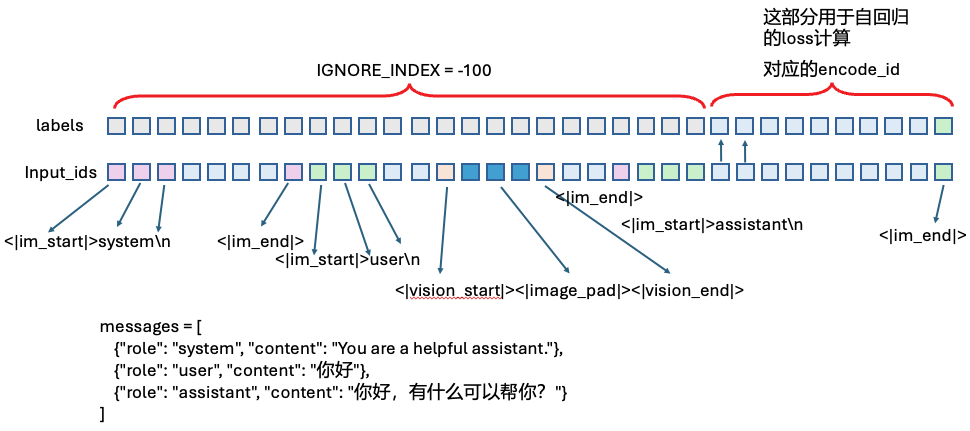
得到的就是:
    return dict(
        input_ids=input_ids,
        labels=targets,
    )