之前的版本,经过使用中测试,发现让普通使用者设置备份路径,可能有点难度。特增加了默认设置,直接读取电脑所有盘符,监控所有文件的创建和修改记录,实时备份。还增加了特殊路径忽略配置,因为有些软件生成的文件是无需备份要排除干扰的。另外还特地增加了非第三方在线编辑功能。总体功能跟新如下:
1、实时监控指定目录,或所有盘符的文件变化信息,新增、修改、删除。
2、多线程文件传输。
3、大文件分片传输,然后在服务器端自动合成。(试验了传输单个60G大文件压缩包,服务器端合成后,可正常打开)
4、一次性传输目录下所有文件。用于初始化监控时同步全部文件。
5、用户验证。(访问web接口验证用户权限)
6、文件历史版本保存。(还在考虑需不需要,需要时再做吧,升级服务器端代码就行了)
7、程序启动时,自动最小化到系统盘图标。
8、增加配置:忽略路径、忽略文件类型、只传文件类型。
9、配置文件分:个人配置,和统一配置,统一配置由服务器端获取,实现个性化监控。
10、在线编辑功能:在浏览器端查看office文件时,点击文件名可直接打开文件编辑,保存后自动上传。
这里记录一下此次重要升级,在线编辑功能的实现办法。没有考虑使用第三方的原因是,需要安装编辑服务器,这个可以后续再对接onlyoffice。我的网盘在线编辑是直接调用本地office软件进行文件编辑,原汁原味,体验更好,保存后无感知自动上传。
实现思路是在网盘python客户端实现一个web服务,接受URL传参触发文件路径比对,如果本地同路径文件存在,则直接调用office打开编辑,如果本地文件不存在,则下载保存到本地同途径,再打开编辑。保持了网络文件与本地文件一致。
WEB服务代码:

引用URL检测代码模块:
from webSrv import DocumentHandler
监控URL中的get请求。
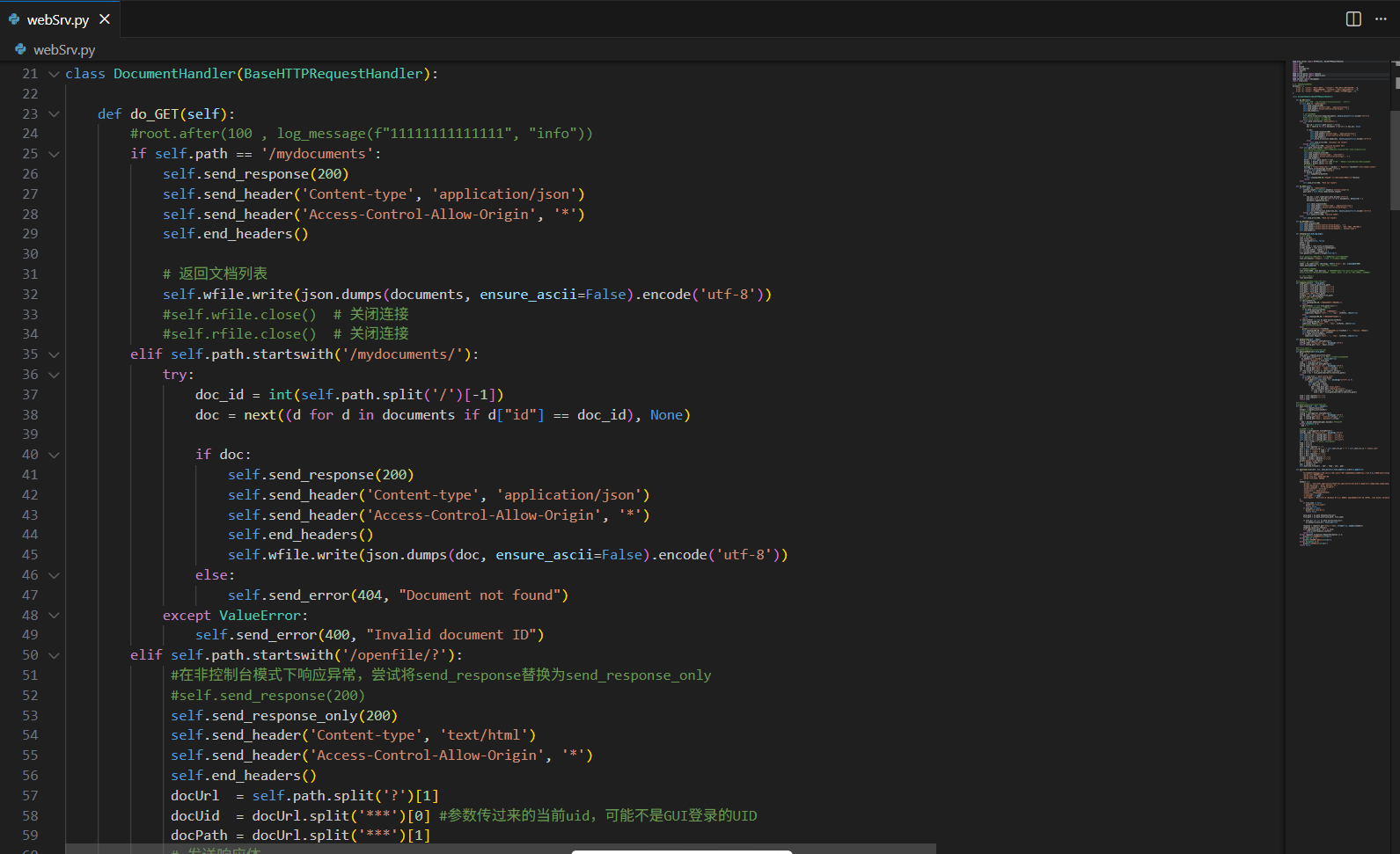
webSrv.py详细代码:
from http.server import HTTPServer, BaseHTTPRequestHandler
import json
import os
import base64
import configparser
import requests
import time
from urllib.parse import unquote
from urllib.parse import unquote_plus
import tkinter as tk
from tkinter import messagebox
import subprocess

# 全局变量存储文档数据
documents = [
    {"id": 1, "title": "项目计划书", "content": "这是项目计划书的内容..."},
    {"id": 2, "title": "技术规范文档", "content": "这里是技术规范说明..."},
    {"id": 3, "title": "用户手册", "content": "用户手册详细操作指南..."}
]

class DocumentHandler(BaseHTTPRequestHandler):

    def do_GET(self):
        #root.after(100 , log_message(f"11111111111111", "info"))
        if self.path == '/mydocuments':
            self.send_response(200)
            self.send_header('Content-type', 'application/json')
            self.send_header('Access-Control-Allow-Origin', '*')
            self.end_headers()

            # 返回文档列表
            self.wfile.write(json.dumps(documents, ensure_ascii=False).encode('utf-8'))
            #self.wfile.close()  # 关闭连接
            #self.rfile.close()  # 关闭连接
        elif self.path.startswith('/mydocuments/'):
            try:
                doc_id = int(self.path.split('/')[-1])
                doc = next((d for d in documents if d["id"] == doc_id), None)

                if doc:
                    self.send_response(200)
                    self.send_header('Content-type', 'application/json')
                    self.send_header('Access-Control-Allow-Origin', '*')
                    self.end_headers()
                    self.wfile.write(json.dumps(doc, ensure_ascii=False).encode('utf-8'))
                else:
                    self.send_error(404, "Document not found")
            except ValueError:
                self.send_error(400, "Invalid document ID")
        elif self.path.startswith('/openfile/?'):
             #在非控制台模式下响应异常,尝试将send_response替换为send_response_only
             #self.send_response(200)
             self.send_response_only(200)
             self.send_header('Content-type', 'text/html')
             self.send_header('Access-Control-Allow-Origin', '*')
             self.end_headers()
             docUrl  = self.path.split('?')[1]
             docUid  = docUrl.split('***')[0] #参数传过来的当前uid,可能不是GUI登录的UID
             docPath = docUrl.split('***')[1]
             # 发送响应体
             message = "<html><body><h1>" + docUid + " OpenFile:"+docPath+"</h1></body></html>"
             self.wfile.write(message.encode('utf-8'))
             guiuid = self.getUserCfg("userid")
             if docUid == guiuid:
                self.toOpenFile(docPath)
             else:
                self.showmsg(400,80,"电脑端备份软件登录的用户不是:"+docUid)
             return
        else:
            self.send_error(404, "Path not found")

    def do_POST(self):
        if self.path == '/mydocuments':
            content_length = int(self.headers['Content-Length'])
            post_data = self.rfile.read(content_length)

            try:
                new_doc = json.loads(post_data.decode('utf-8'))
                new_doc["id"] = max([d["id"] for d in documents], default=0) + 1
                documents.append(new_doc)

                self.send_response(201)
                self.send_header('Content-type', 'application/json')
                self.send_header('Access-Control-Allow-Origin', '*')
                self.end_headers()
                self.wfile.write(json.dumps(new_doc, ensure_ascii=False).encode('utf-8'))
            except json.JSONDecodeError:
                self.send_error(400, "Invalid JSON")
        else:
            self.send_error(404, "Path not found")

    def do_OPTIONS(self):
        self.send_response(200)
        self.send_header('Access-Control-Allow-Origin', '*')
        self.send_header('Access-Control-Allow-Methods', 'GET, POST, OPTIONS')
        self.send_header('Access-Control-Allow-Headers', 'Content-Type')
        self.end_headers()

    def showmsg(self,wid,hig,msgx):
        # 创建主窗口
        root = tk.Tk()
        root.title("提示")
        root.resizable(False, False)
        width = wid
        height= hig
        screen_width = root.winfo_screenwidth()
        screen_height = root.winfo_screenheight()
        x = (screen_width - width) // 2
        y = (screen_height - height) // 2
        root.geometry(f"{width}x{height}+{x}+{y}")

        #root.geometry("600x100")  # 设置窗口大小,根据需要调整
        root.attributes('-topmost', True)  # 确保窗口在最顶层

        # 创建一个标签显示消息
        label = tk.Label(root, text=msgx, font=('Arial', 12), wraplength=500)
        label.pack(pady=20)  # 在窗口中居中显示消息

        # 设置3秒后关闭窗口
        root.after(3000, root.destroy)  # 3000毫秒后调用root.destroy()方法关闭窗口
        #root.protocol("WM_DELETE_WINDOW", lambda: None)  # 禁止通过点击关闭按钮关闭窗口

        # 进入主事件循环
        root.mainloop()

    #file_path=/我的E盘/temp/测试.docx
    def toOpenFile(self , file_path):
        file_path = unquote_plus(file_path)
        file_path = file_path.replace("\\","/")
        file_path = file_path.replace("//","/")
        file_path = file_path.replace("//","/")
        file_path = file_path.replace("//","/")
        print("网盘路径:"+file_path)
        locPath = self.getLocatPath(file_path)
        print("本地路径:"+locPath)
        #file_path = 'example.txt'
        if len(locPath)<1:
           self.showmsg(300,80,"本地此文件夹配置不存在")
           return
        if len(locPath) > 1 and file_path[-1]=="/":
           #如果是/结尾的,表示打开本地目录
           if os.path.exists(locPath):
              self.showmsg(300,80,"打开本地文件夹中......")
              subprocess.Popen(['start', '', '/max', locPath], shell=True)
           else:
              self.showmsg(300,80,"本地此文件夹不存在")
           return
        if len(locPath) > 1 and os.path.exists(locPath):
           self.showmsg(300,80,"打开文件中......")
           subprocess.Popen(['start', '', '/max', locPath], shell=True)
           #os.startfile(locPath)
        else:
           print(">>>notfile>>>"+locPath)
           self.showmsg(600,80,"本地对应文件不存在:"+locPath + ",开始下载打开编辑。")
           self.down_file(file_path , locPath)
           if os.path.exists(locPath):
              subprocess.Popen(['start', '', '/max', locPath], shell=True)

    def getUserCfg(self , keyy):
        config = configparser.ConfigParser()
        config.read('config_user.ini' , encoding='utf-8')
        return config.get('main', keyy).strip()

    #入参file_path格式
    #/我的C盘/1222/11111/1111/2222.doc
    def getLocatPath(self,file_path):
        locd   = ""
        file_path = unquote_plus(file_path)
        if file_path.count("/") == 1: #如果是网盘根目录下的文件
          os.makedirs("c:/deskDoc", exist_ok=True)
          return "c:/deskDoc" + file_path
        rfod   = file_path.split('/')[1]
        config = configparser.ConfigParser()
        config.read('config_user.ini' , encoding='utf-8')
        loc  = config.get('main', 'locdir').strip()  # c:/
        rmt  = config.get('main', 'rmtdir').strip()
        if rfod.lower().strip() == rmt.lower().strip():
           locd = loc + file_path[len(rmt)+1:len(file_path)]
        else:
           self.json_file = "path_config.json"
           if os.path.exists(self.json_file):
              with open(self.json_file, "r", encoding="utf-8") as f:
                  datas = json.load(f)
                  self.path_cfg = datas
                  for item_data in datas:
                     phh = item_data.get('local_path')
                     rhh = item_data.get('remote_directory')
                     if rfod.lower().strip() == rhh.lower().strip():
                        locd = phh + file_path[len(rhh)+1:len(file_path)]

        locd = locd.replace("\\","/")
        locd = locd.replace("//","/")
        return locd

    #入参url格式
    #/我的C盘/1222/11111/1111/2222.doc
    def down_file(self , url , savedir):
        url     = unquote_plus(url)
        savedir = unquote_plus(savedir)
        #读取个人设置
        config = configparser.ConfigParser()
        config.read('config_user.ini' , encoding='utf-8')
        uid  = config.get('main', 'userid').strip()  # c:/
        pwd  = config.get('main', 'password').strip()
        try:
          pwd = base64.b64decode(pwd).decode() #密码解密
        except Exception as e:
          pwd = ""

        #读取服务器配置
        configs = configparser.ConfigParser()
        configs.read('config_srv.ini' , encoding='utf-8')
        self.conf_srv_ip = configs.get('main', 'srv_ip')
        self.conf_srv_pt = configs.get('main', 'srv_port')
        self.conf_srv_ur = configs.get('main', 'srv_url')
        self.conf_srv_ls = configs.get('main', 'srv_list')
        s    = url.rfind("/") #相当于lastindexof
        fodd = url[:s]
        fnam = url[s:]
        fnam = fnam.replace("/","")
        durl = self.conf_srv_ip + ":" + self.conf_srv_pt + "/" + self.conf_srv_ls + "/downx.jsp?"
        durl = durl + "file=" + fodd + "&"
        durl = durl + "name=" + fnam + ""
        durl = durl.replace("\\","/")
        durl = durl.replace("//","/")
        savedir = savedir.replace("\\","/")
        savedir = savedir.replace("//","/")
        print("【down url】"+durl)
        s    = savedir.rfind("/")
        sdir = savedir[:s]
        self.download_file(durl , sdir , fnam , uid , pwd)

    def download_file(self, url, save_dir=None,file_name=None,uid=None,pwd=None):
        """
            下载文件并保存到指定路径,从网络路径中query参数中获取文件名,例如https://127.0.0.1:8000/web/file?path=2025041616372016\\5ed63734774b40d181fd96e1c58133d2.pdf
            :param url: 文件下载URL
            :param save_dir: 文件保存路径
            :param file_name: 文件名
        """
        headers = {
            'Accept': 'text/html,application/xhtml+xml,application/xml;q=0.9,image/avif,image/webp,image/apng,*/*;q=0.8,application/signed-exchange;v=b3;q=0.7;application/json, text/javascript, */*; q=0.01',
            'Accept-Encoding': 'gzip, deflate, br',
            'Accept-Language': 'zh-CN,zh;q=0.9',
            'Cache-Control': 'no-cache',
            'Connection': 'keep-alive',
            'Cookie': '132213213213213213',
            'x-username': f'{uid}',
            'x-userpwd': f'{pwd}',
            'User-Agent': 'Mozilla/5.0 (Windows NT 6.1; WOW64) AppleWebKit/537.36 (KHTML, like Gecko) Chrome/66.0.3359.139 Safari/537.36'
        }
        try:
            if file_name is None:
               print("not file_name")
               return False
            if save_dir is None:
               print("not save_dir")
               return False

            save_path = os.path.abspath(save_dir)
            file_path = os.path.join(save_path, file_name)

            if save_dir and not os.path.exists(save_dir):
               os.makedirs(save_dir, exist_ok=True)

            response = requests.get("http://"+url, stream=True, headers=headers)
            response.raise_for_status()
            with open(file_path, 'wb') as file:
                file.write(response.content)
            return True
        except requests.exceptions.RequestException as e:
            print(f"网络请求失败:{str(e)}")
        except IOError as e:
            print(f"文件操作失败:{str(e)}")
        except Exception as e:
            print(f"未知错误:{str(e)}")
        return False
经过这段时间研究,越来越喜欢python了。生态强大资源丰富。在微服务应用上大有可为哦。
在线编辑office文件触发效果