前言
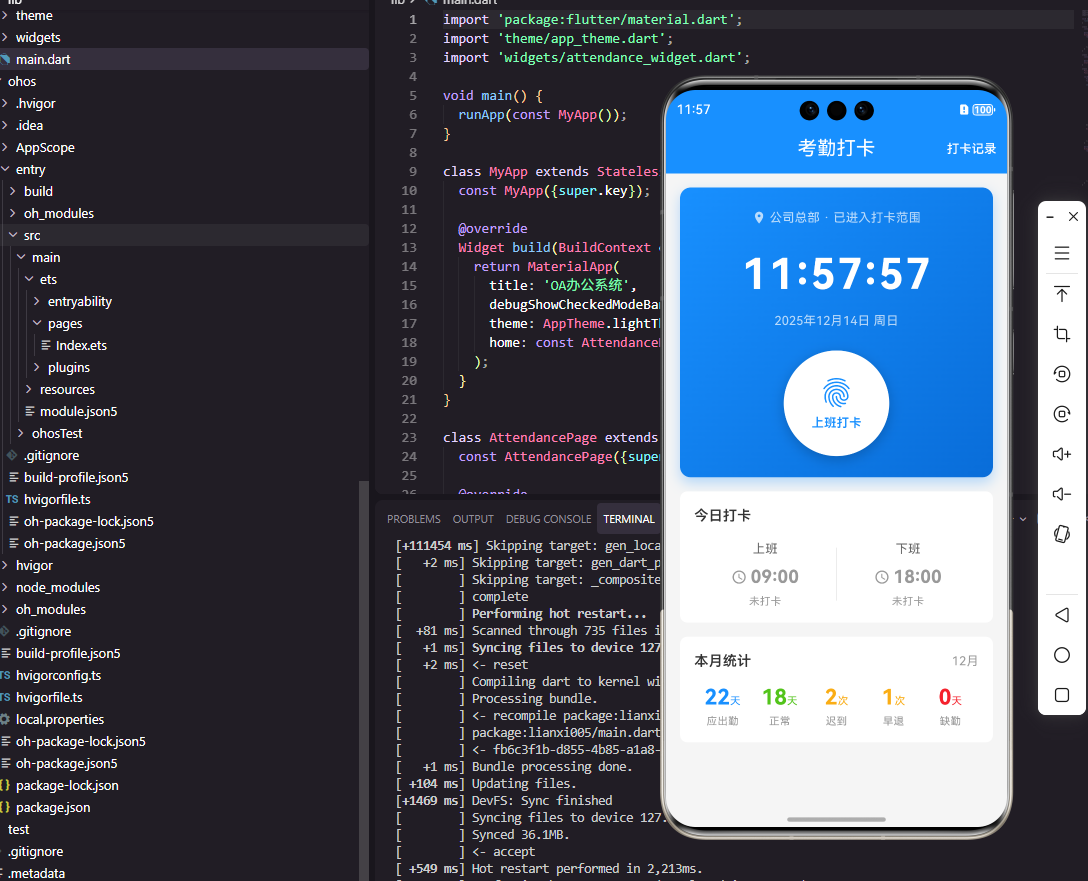
考勤管理是OA系统中的核心功能模块,打卡组件作为考勤功能的交互入口,直接影响员工的日常使用体验。本文将详细介绍如何使用Flutter框架直接开发OpenHarmony应用,实现一个功能完善的考勤打卡组件。
核心组件设计
考勤打卡组件的核心在于打卡按钮、打卡状态展示和位置定位的精准处理。组件需要根据当前时间和打卡状态动态显示不同样式,同时提供清晰的打卡范围提示和异常处理机制。
数据模型设计
Flutter端定义打卡记录数据模型:
dart
class AttendanceRecord {
  final String id;
  final DateTime time;
  final String type; // clockIn or clockOut
  final String location;
  final double latitude;
  final double longitude;
  final String status; // normal, late, early, outside

  AttendanceRecord({
    required this.id,
    required this.time,
    required this.type,
    required this.location,
    required this.latitude,
    required this.longitude,
    required this.status,
  });
}
OpenHarmony端定义打卡记录接口:
typescript
interface AttendanceRecord {
  id: string;
  time: number; // timestamp
  type: 'clockIn' | 'clockOut';
  location: string;
  latitude: number;
  longitude: number;
  status: 'normal' | 'late' | 'early' | 'outside';
}
跨平台兼容性处理
Flutter和OpenHarmony在API调用上存在差异,主要体现在定位服务、状态管理和UI构建上。为解决这些问题,我们采用以下策略:
- 定位服务抽象:创建统一的定位接口,Flutter和OpenHarmony分别实现
- 状态管理 :Flutter使用
setState,OpenHarmony使用@State - UI组件封装:将UI组件封装为通用组件,通过平台参数控制具体实现
数据流图
是
否
是
否
是
否
用户点击打卡按钮
是否已打卡
禁止点击
触发打卡流程
获取当前位置
定位成功?
判断是否在打卡范围内
显示定位失败
提交打卡请求
提示超出打卡范围
显示打卡成功
提示超出打卡范围
Flutter端实现
Flutter端的打卡组件通过StatefulWidget实现,管理打卡状态和位置信息:
dart
class AttendanceWidget extends StatefulWidget {
  final Function(AttendanceRecord) onClockIn;
  final Function(AttendanceRecord) onClockOut;

  const AttendanceWidget({
    Key? key,
    required this.onClockIn,
    required this.onClockOut,
  }) : super(key: key);

  @override
  State<AttendanceWidget> createState() => _AttendanceWidgetState();
}

class _AttendanceWidgetState extends State<AttendanceWidget> {
  AttendanceRecord? _clockInRecord;
  AttendanceRecord? _clockOutRecord;
  String _currentLocation = '正在定位...';
  bool _isInRange = false;
  bool _isLoading = false;

  @override
  void initState() {
    super.initState();
    _getCurrentLocation();
    _loadTodayRecords();
  }

  void _getCurrentLocation() async {
    // 实际开发中使用定位API
    setState(() {
      _currentLocation = '北京市海淀区中关村大街1号';
      _isInRange = true;
    });
  }

  void _loadTodayRecords() {
    // 从服务器获取打卡记录
    setState(() {
      _clockInRecord = AttendanceRecord(
        id: '1',
        time: DateTime.now(),
        type: 'clockIn',
        location: '北京市海淀区中关村大街1号',
        latitude: 39.983424,
        longitude: 116.322987,
        status: 'normal',
      );
    });
  }

  void _handleClock() {
    if (_isLoading) return;

    setState(() {
      _isLoading = true;
    });

    // 模拟网络请求
    Future.delayed(Duration(seconds: 1), () {
      final now = DateTime.now();
      final record = AttendanceRecord(
        id: now.millisecondsSinceEpoch.toString(),
        time: now,
        type: _clockInRecord == null ? 'clockIn' : 'clockOut',
        location: _currentLocation,
        latitude: 39.983424,
        longitude: 116.322987,
        status: 'normal',
      );

      if (_clockInRecord == null) {
        widget.onClockIn(record);
      } else {
        widget.onClockOut(record);
      }

      setState(() {
        _isLoading = false;
        if (_clockInRecord == null) {
          _clockInRecord = record;
        } else {
          _clockOutRecord = record;
        }
      });
    });
  }

  Widget _buildClockButton() {
    final now = DateTime.now();
    final isClockInTime = now.hour < 12;
    final hasClocked = isClockInTime ? _clockInRecord != null : _clockOutRecord != null;

    return GestureDetector(
      onTap: hasClocked ? null : _handleClock,
      child: Container(
        width: 160,
        height: 160,
        decoration: BoxDecoration(
          shape: BoxShape.circle,
          gradient: LinearGradient(
            colors: hasClocked
                ? [Colors.grey, Colors.grey.shade600]
                : [Colors.blue, Colors.blue.shade700],
            begin: Alignment.topLeft,
            end: Alignment.bottomRight,
          ),
          boxShadow: [
            BoxShadow(
              color: (hasClocked ? Colors.grey : Colors.blue).withOpacity(0.3),
              blurRadius: 20,
              offset: Offset(0, 10),
            ),
          ],
        ),
        child: Column(
          mainAxisAlignment: MainAxisAlignment.center,
          children: [
            Text(
              hasClocked ? '已打卡' : (isClockInTime ? '上班打卡' : '下班打卡'),
              style: TextStyle(color: Colors.white, fontSize: 18),
            ),
            Text(
              _formatTime(now),
              style: TextStyle(color: Colors.white.withOpacity(0.7), fontSize: 14),
            ),
          ],
        ),
      ),
    );
  }

  String _formatTime(DateTime time) {
    return '${time.hour.toString().padLeft(2, '0')}:${time.minute.toString().padLeft(2, '0')}';
  }
}关键点说明:
initState中初始化定位和加载打卡记录,确保组件显示时数据已准备- 打卡按钮根据当前时间自动切换文案(上班/下班)
- 使用渐变色和阴影创建立体效果,提升视觉体验
- 禁用已打卡状态的按钮,避免重复打卡
OpenHarmony端实现
OpenHarmony端使用ArkTS语言实现,与Flutter实现逻辑一致:
typescript
@Component
struct AttendanceWidget {
  @State clockInRecord: AttendanceRecord | null = null
  @State clockOutRecord: AttendanceRecord | null = null
  @State currentLocation: string = '正在定位...'
  @State isInRange: boolean = false
  @State isLoading: boolean = false

  private onClockIn: (record: AttendanceRecord) => void = () => {}
  private onClockOut: (record: AttendanceRecord) => void = () => {}

  private async getCurrentLocation() {
    try {
      const location = await geoLocationManager.getCurrentLocation()
      const addresses = await geoLocationManager.getAddressesFromLocation({
        latitude: location.latitude,
        longitude: location.longitude
      })

      if (addresses.length > 0) {
        this.currentLocation = addresses[0].placeName || '未知位置'
      }
      this.checkInRange(location.latitude, location.longitude)
    } catch (error) {
      this.currentLocation = '定位失败'
    }
  }

  private checkInRange(latitude: number, longitude: number) {
    const companyLat = 39.983424;
    const companyLon = 116.322987;
    const distance = Math.sqrt(
      Math.pow(latitude - companyLat, 2) +
      Math.pow(longitude - companyLon, 2)
    ) * 111;

    this.isInRange = distance <= 1.0;
  }

  private handleClock() {
    if (this.isLoading) return;

    this.isLoading = true;

    setTimeout(() => {
      const now = Date.now();
      const record: AttendanceRecord = {
        id: now.toString(),
        time: now,
        type: this.clockInRecord ? 'clockOut' : 'clockIn',
        location: this.currentLocation,
        latitude: 39.983424,
        longitude: 116.322987,
        status: 'normal'
      };

      if (!this.clockInRecord) {
        this.onClockIn(record);
      } else {
        this.onClockOut(record);
      }

      this.isLoading = false;
      if (!this.clockInRecord) {
        this.clockInRecord = record;
      } else {
        this.clockOutRecord = record;
      }
    }, 1000);
  }

  @Builder ClockButton() {
    Column() {
      Text(this.getButtonText())
        .fontSize(20)
        .fontColor(Color.White)
        .fontWeight(FontWeight.Medium)
      Text(this.getCurrentTime())
        .fontSize(14)
        .fontColor('#FFFFFFB3')
        .margin({ top: 4 })
    }
    .width(160)
    .height(160)
    .borderRadius(80)
    .linearGradient({
      angle: 135,
      colors: this.hasClocked()
        ? [[ '#9E9E9E', 0 ], [ '#757575', 1 ]]
        : [[ '#1890FF', 0 ], [ '#096DD9', 1 ]]
    })
    .shadow({
      radius: 20,
      color: this.hasClocked() ? '#4D9E9E9E' : '#4D1890FF',
      offsetY: 10
    })
    .justifyContent(FlexAlign.Center)
    .onClick(() => {
      if (!this.hasClocked()) {
        this.handleClock();
      }
    })
  }
}关键点说明:
- 使用
@State管理状态,与Flutter的setState机制类似 geoLocationManager是OpenHarmony提供的定位API,需在config.json中申请权限linearGradient属性实现渐变背景,angle设置渐变角度- 通过
checkInRange方法计算当前位置与公司位置的距离
关键问题与解决方案
-
定位权限处理
- Flutter:需要在
AndroidManifest.xml和Info.plist中添加权限声明 - OpenHarmony:需要在
config.json中添加requestPermissions - 解决方案:创建统一的权限请求函数,根据不同平台处理权限请求
- Flutter:需要在
-
时间格式化
- Flutter:使用
DateFormat,需引入intl - OpenHarmony:使用
Date对象,需手动格式化 - 解决方案:创建统一的日期格式化函数,确保跨平台一致性
- Flutter:使用
-
异常处理
- 定位失败:显示"定位失败"提示
- 超出打卡范围:显示"范围外"红色标签
- 网络错误:显示"网络异常,请重试"
API调用关系图
调用
调用
Flutter实现
OpenHarmony实现
获取位置
获取位置
返回
返回
Flutter端
定位服务
OpenHarmony端
geolocator插件
geoLocationManager
位置信息
总结
本文详细介绍了如何使用Flutter框架直接开发OpenHarmony应用,实现一个功能完善的考勤打卡组件。通过统一的数据模型、抽象的定位服务和组件封装,我们成功实现了Flutter和OpenHarmony的跨平台兼容。
希望本文能帮助开发者快速上手Flutter+OpenHarmony跨平台开发。
欢迎大家加入开源鸿蒙跨平台开发者社区,一起探索更多鸿蒙跨平台开发技术!