目录
- [一、SystemServer 中的 LightsService](#一、SystemServer 中的 LightsService)
- [二、LightsManagerBinderService 如何访问到 HAL](#二、LightsManagerBinderService 如何访问到 HAL)
- [三、发起远程调用,调用 hal 层](#三、发起远程调用,调用 hal 层)
- [四、hal 服务的实现](#四、hal 服务的实现)
|-----------------|
| 传统 HAL 整体架构 |
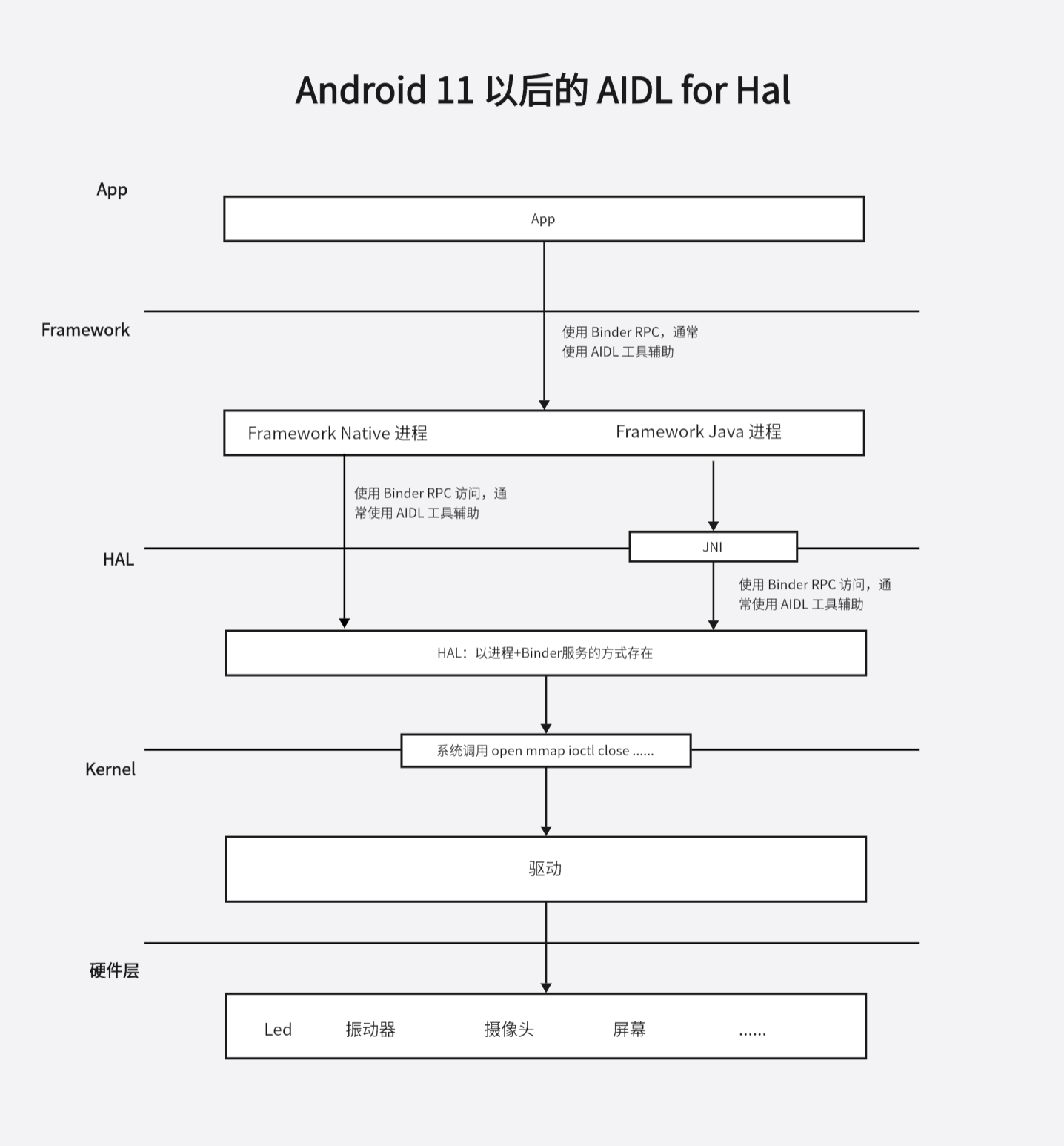
light hal 的调用流程与 Vibrator 基本移植,主要区别是 light 直接用 java 和 hal 通信,没有用 jni。接下来分析一下 SystemServer 中的 light 硬件服务与 hal 通信的过程。
整体架构如下:
一、SystemServer 中的 LightsService
在 SystemServer 的 startBootstrapServices 方法中找到 LightsService 的启动过程:
c
// frameworks/base/services/java/com/android/server/SystemServer.java
private void startBootstrapServices(@NonNull TimingsTraceAndSlog t) {
  //......
    t.traceBegin("StartLightsService");
    mSystemServiceManager.startService(LightsService.class);
    t.traceEnd();
  //......
}
接着看 LightService 的具体实现:
java
// frameworks/base/services/core/java/com/android/server/lights/LightsService.java
public class LightsService extends SystemService {
    @VisibleForTesting
    final LightsManagerBinderService mManagerService;

    private final class LightsManagerBinderService extends ILightsManager.Stub {
      // ......
    }

    @VisibleForTesting
    LightsService(Context context, Supplier<ILights> service, Looper looper) {
        super(context);
        mH = new Handler(looper);
        mVintfLights = service.get() != null ? service : null;

        populateAvailableLights(context);
        // 初始化一个 binder 服务端对象
        mManagerService = new LightsManagerBinderService();
    }
****
    @Override
    public void onStart() {
        publishLocalService(LightsManager.class, mService);
        // 向 ServiceManager 注册 LightsManagerBinderService
        publishBinderService(Context.LIGHTS_SERVICE, mManagerService);
    }
}
LightService 有一个重要成员 LightsManagerBinderService,这是一个 LightsService 中的内部类,是 ILightsManager binder 服务的服务端类实现。
其对应的协议文件 aidl 的实现如下:
c
// frameworks/base/core/java/android/hardware/lights/ILightsManager.aidl

package android.hardware.lights;

import android.hardware.lights.Light;
import android.hardware.lights.LightState;

/**
 * API to lights manager service.
 *
 * {@hide}
 */
interface ILightsManager {
  List<Light> getLights();
  LightState getLightState(int lightId);
  void openSession(in IBinder sessionToken, in int priority);
  void closeSession(in IBinder sessionToken);
  void setLightStates(in IBinder sessionToken, in int[] lightIds, in LightState[] states);
}
LightsManagerBinderService向 App 提供访问接口,接下的问题 LightsManagerBinderService 如何访问到 Hal 层。
二、LightsManagerBinderService 如何访问到 HAL
LightsService 中有一个成员 Supplier mVintfLights :
java
// frameworks/base/services/core/java/com/android/server/lights/LightsService.java
public class LightsService extends SystemService {
    @Nullable
    private final Supplier<ILights> mVintfLights;
}
ILights 是什么? 就是 Hal Binder 服务。
java
// hardware/interfaces/light/aidl/android/hardware/light/ILights.aidl
package android.hardware.light;

import android.hardware.light.HwLightState;
import android.hardware.light.HwLight;

/**
 * Allows controlling logical lights/indicators, mapped to LEDs in a
 * hardware-specific manner by the HAL implementation.
 */
@VintfStability
interface ILights {
    /**
     * Set light identified by id to the provided state.
     *
     * If control over an invalid light is requested, this method exists with
     * EX_UNSUPPORTED_OPERATION. Control over supported lights is done on a
     * device-specific best-effort basis and unsupported sub-features will not
     * be reported.
     *
     * @param id ID of logical light to set as returned by getLights()
     * @param state describes what the light should look like.
     */
    void setLightState(in int id, in HwLightState state);

    /**
     * Discover what lights are supported by the HAL implementation.
     *
     * @return List of available lights
     */
    HwLight[] getLights();
}
Hal Binder 服务代理端怎么获取到:
java
// frameworks/base/services/core/java/com/android/server/lights/LightsService.java

public class LightsService extends SystemService {
    @Nullable
    private final Supplier<ILights> mVintfLights;

    public LightsService(Context context) {
        // new 了一个 VintfHalCache 对象
        this(context, new VintfHalCache(), Looper.myLooper());
    }

    LightsService(Context context, Supplier<ILights> service, Looper looper) {
        super(context);
        mH = new Handler(looper);
        // 调用 get 方法,返回值赋值给成员
        mVintfLights = service.get() != null ? service : null;
        populateAvailableLights(context);
        mManagerService = new LightsManagerBinderService();
    }
}
接着看 VintfHalCache 中 get 方法的实现:
java
// frameworks/base/services/core/java/com/android/server/lights/LightsService.java
private static class VintfHalCache implements Supplier<ILights>, IBinder.DeathRecipient {
    @GuardedBy("this")
    private ILights mInstance = null;

    @Override
    public synchronized ILights get() {
        if (mInstance == null) {
          // 获取 hal binder 服务
            IBinder binder = Binder.allowBlocking(
                    ServiceManager.waitForDeclaredService(ILights.DESCRIPTOR + "/default"));
            if (binder != null) {
                mInstance = ILights.Stub.asInterface(binder);
                try {
                    binder.linkToDeath(this, 0);
                } catch (RemoteException e) {
                    Slog.e(TAG, "Unable to register DeathRecipient for " + mInstance);
                }
            }
        }
        return mInstance;
    }

    @Override
    public synchronized void binderDied() {
        mInstance = null;
    }
}
这里会获取到 hal binder 服务的代理端对象。
三、发起远程调用,调用 hal 层
绝大部分 light 硬件操作,最终都会调用到 setLightUnchecked 方法中
java
private void setLightUnchecked(int color, int mode, int onMS, int offMS,
        int brightnessMode) {
    Trace.traceBegin(Trace.TRACE_TAG_POWER, "setLightState(" + mHwLight.id + ", 0x"
            + Integer.toHexString(color) + ")");
    try {
        if (mVintfLights != null) {
            HwLightState lightState = new HwLightState();
            lightState.color = color;
            lightState.flashMode = (byte) mode;
            lightState.flashOnMs = onMS;
            lightState.flashOffMs = offMS;
            lightState.brightnessMode = (byte) brightnessMode;
            // 发起远程调用
            mVintfLights.get().setLightState(mHwLight.id, lightState);
        } else {
            setLight_native(mHwLight.id, color, mode, onMS, offMS, brightnessMode);
        }
    } catch (RemoteException | UnsupportedOperationException ex) {
        Slog.e(TAG, "Failed issuing setLightState", ex);
    } finally {
        Trace.traceEnd(Trace.TRACE_TAG_POWER);
    }
}
可以看出这里是直接通过 java 接口与 hal 通信。
四、hal 服务的实现
最后,我们来看看 hal 层的实现:
c
// hardware/interfaces/light/aidl/default/Lights.h
#pragma once

#include <aidl/android/hardware/light/BnLights.h>

namespace aidl {
namespace android {
namespace hardware {
namespace light {

// Default implementation that reports a few placeholder lights.
class Lights : public BnLights {
    ndk::ScopedAStatus setLightState(int id, const HwLightState& state) override;
    ndk::ScopedAStatus getLights(std::vector<HwLight>* lights) override;
};

}  // namespace light
}  // namespace hardware
}  // namespace android
}  // namespace aidl
cpp 中没有具体操作硬件,空实现。需要硬件厂商来做实现。
c
// hardware/interfaces/light/aidl/default/Lights.cpp
#include "Lights.h"

#include <android-base/logging.h>

namespace aidl {
namespace android {
namespace hardware {
namespace light {

static constexpr int kNumDefaultLights = 3;

ndk::ScopedAStatus Lights::setLightState(int id, const HwLightState& state) {
    LOG(INFO) << "Lights setting state for id=" << id << " to color " << std::hex << state.color;
    if (id <= 0 || id > kNumDefaultLights) {
        return ndk::ScopedAStatus::fromExceptionCode(EX_UNSUPPORTED_OPERATION);
    } else {
        return ndk::ScopedAStatus::ok();
    }
}

ndk::ScopedAStatus Lights::getLights(std::vector<HwLight>* lights) {
    for (int i = 1; i <= kNumDefaultLights; i++) {
        lights->push_back({i, i});
    }
    LOG(INFO) << "Lights reporting supported lights";
    return ndk::ScopedAStatus::ok();
}

}  // namespace light
}  // namespace hardware
}  // namespace android
}  // namespace aidl