- 效果展示
展示为:➜ username on D:/myworkspace/auto-epub ( master) (venv) 3.10.19
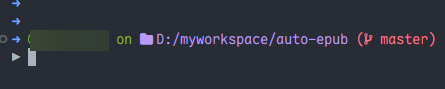

-
直接在
tokyonight_storm.omp.json基础上修改javascript{ "$schema": "https://raw.githubusercontent.com/JanDeDobbeleer/oh-my-posh/main/themes/schema.json", "console_title_template": " {{ .Folder }} :: {{if .Root}}Admin{{end}}", "palette": { "main-bg": "#24283b", "terminal-red": "#f7768e", "pistachio-green": "#9ece6a", "terminal-green": "#73daca", "terminal-yellow": "#e0af68", "terminal-blue": "#7aa2f7", "celeste-blue": "#b4f9f8", "light-sky-blue": "#7dcfff", "terminal-white": "#c0caf5", "white-blue": "#a9b1d6", "blue-bell": "#9aa5ce", "pastal-grey": "#cfc9c2", "terminal-magenta": "#bb9af7", "blue-black": "#565f89", "terminal-black": "#414868", "t-background": "p:main-bg" }, "blocks": [ { "alignment": "left", "segments": [ { "type": "text", "style": "plain", "background": "transparent", "foreground": "p:terminal-blue", "template": "\u279c " }, { "foreground": "#85b42e", "style": "plain", "template": "\ueb99 {{ .UserName }} on", "type": "session" }, { "foreground": "p:terminal-magenta", "options": { "folder_separator_icon": "/", "style": "full" }, "style": "plain", "template": " \uf07b {{ .Path }} ", "type": "path" }, { "type": "git", "style": "plain", "foreground": "p:light-sky-blue", "foreground_templates": [ "{{ if or (.Working.Changed) (.Staging.Changed) }}p:terminal-red{{ end }}", "{{ if and (gt .Ahead 0) (gt .Behind 0)}}p:light-sky-blue {{ end }}", "{{ if gt .Ahead 0 }}p:terminal-blue{{ end }}", "{{ if gt .Behind 0 }}p:celeste-blue{{ end }}" ], "template": "({{ .HEAD}})", "options": { "fetch_status": true, "branch_icon": "\ue725 " } }, { "type": "status", "style": "plain", "foreground": "p:terminal-red", "template": " \uf00d" } ], "type": "prompt" }, { "alignment": "right", "overflow": "hide", "segments": [ { "type": "node", "style": "plain", "foreground": "p:pistachio-green", "template": "\ue718 {{ .Full }} " }, { "type": "php", "style": "plain", "foreground": "p:terminal-yellow", "template": "\ue73d {{ .Full }} " }, { "type": "python", "style": "plain", "foreground": "p:terminal-blue", "background": "transparent", "leading_diamond": "(", "trailing_diamond": ")", "template": "({{ .Venv }}) \uE235 {{ .Full }} " }, { "type": "julia", "style": "plain", "foreground": "p:terminal-magenta", "template": "\uE624 {{ .Full }}" }, { "type": "ruby", "style": "plain", "foreground": "p:terminal-red", "template": "\uE791 {{ .Full}}" }, { "type": "go", "style": "plain", "foreground": "p:light-sky-blue", "template": "\uFCD1 {{ .Full}}" } ], "type": "prompt" }, { "alignment": "left", "newline": true, "segments": [ { "foreground": "transparent", "style": "plain", "template": "\u25b6", "type": "text" } ], "type": "prompt" } ], "secondary_prompt": { "background": "transparent", "foreground": "p:terminal-blue", "template": "\u279c " }, "transient_prompt": { "background": "transparent", "foreground": "p:terminal-blue", "template": "\u279c " }, "final_space": true, "version": 4, "terminal_background": "p:t-background" }-
修改
Microsoft.PowerShell_profile.ps1bash# 1. 给VSCode终端补全oh-my-posh的环境变量,防止识别不到 $env:Path += ";$HOME\AppData\Local\Programs\oh-my-posh\bin" # 2. 避免与 Python 虚拟环境默认提示符冲突的关键设置,确保 oh-my-posh 能够完全控制提示符显示。 $env:VIRTUAL_ENV_DISABLE_PROMPT = $true # 3. 加载oh-my-posh主题 oh-my-posh init pwsh --config "$env:POSH_THEMES_PATH/tokyonight_storm.omp.json" | Invoke-Expression
-