前提:产品列表,可以多选,可以添加数量,点击完成把选择的数据传到上一个页面。再次点击进入产品页面,之前选中的产品不变,
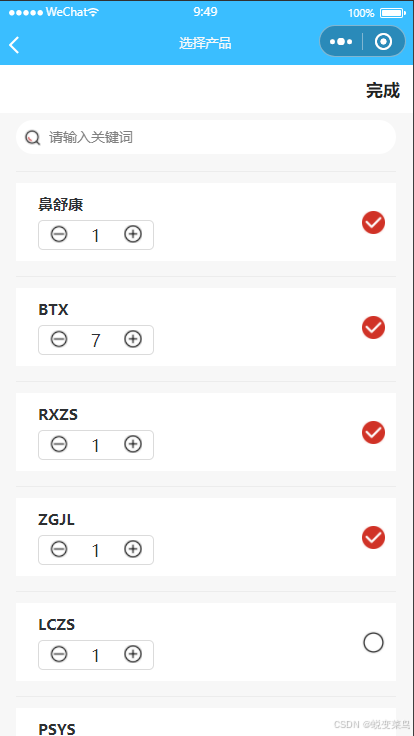
后台获取的参数
this.chosen 新数据, 参数存本地,uni.getStorageSync('chosen')
: {id: 78, title: "鼻舒康", image: "", desc: ""}
desc: ""
id: 78
image: ""
title: "鼻舒康"
that.carts:后台返回来的数据
0: {id: 78, number: 1, title: "鼻舒康"}
id: 78
number: 1
title: "鼻舒康"
1: {id: 77, number: 1, title: "BTX"}
id: 77
number: 1
title: "BTX"
用本地存储的chosen修改列表参数
if (res.data.code == 1) {
						res.data.data.data.map((item, index) => {
							that.$set(item, 'selected', false)
							that.$set(item, 'number', 1)
						})
						that.carts = [...that.carts, ...res.data.data.data]
						that.selectAll = false
						that.chosen = uni.getStorageSync('chosen') || [];
						that.chosen.forEach(chosenItem => {
						  const { id: chosenId, number: chosenNumber } = chosenItem;
						  const targetCartItem = that.carts.find(cartItem => cartItem.id === chosenId);
						  if (targetCartItem) {
						    that.$set(targetCartItem, 'number', chosenNumber);
						    that.$set(targetCartItem, 'selected', true);
						  }
						});
						// that.carts = res.data.data.data

						that.total = res.data.data.total
						console.log(that.carts, '12');
						that.islogin = true
						that.loading = false
					} else {
						uni.showToast({
							title: res.data.msg,
							duration: 1500,
							icon: 'none'
						})
					}
重要数据
that.chosen = uni.getStorageSync('chosen') || [];
						that.chosen.forEach(chosenItem => {
						  const { id: chosenId, number: chosenNumber } = chosenItem;
						  const targetCartItem = that.carts.find(cartItem => cartItem.id === chosenId);
						  if (targetCartItem) {
						    that.$set(targetCartItem, 'number', chosenNumber);
						    that.$set(targetCartItem, 'selected', true);
						  }
						});
根据id判断 是否选中,选中的数据 selected = true
点击选中需要存本地的参数,
that.carts.map((item, index1) => {
				  if (index == index1) {
				    item.selected = !item.selected;
				    if (item.selected == true) {
				      let res = {
				        id: item.id,
				        number: item.number || 1,
				        title: item.title
				      };
				      const isExist = that.chosen.some(item => item.id === res.id);
				      if (!isExist) {
				        that.chosen.push(res);
				      }
				      uni.setStorageSync('chosen', that.chosen);
				      console.log(that.chosen, 'push');
				    } else {
				      const targetIndex = that.chosen.findIndex(chosenItem => chosenItem.id === item.id);
				      if (targetIndex !== -1) {
				        that.chosen.splice(targetIndex, 1);
				      }
				      uni.setStorageSync('chosen', that.chosen);
				      console.log(that.chosen, 'push22');
				    }
				  }
				});
修改数据里面的number 并且更新到本地存储,
/**
			 * 修改商品数量
			 */
			changeNum: function(index, id, number, type) {
				console.log(index, id, number, type);
				var that = this;
				var carts = that.carts;
				var number = parseInt(carts[index].number);
				if (type == 0) {
					number = number - 1;
					if (number <= 1) {
						number = 1;
					}
				} else {
					number = number + 1;
				}

				carts[index].number = number;
				that.goods_numId = number
				that.cartId = [id]
				const targetChosenItem = that.chosen.find(item => item.id === id);
				if (targetChosenItem) {
				  targetChosenItem.number = number; // 同步更新数量
				  // 可选:如果之前有将chosen存入本地存储,这里同步更新本地存储,保证数据一致性
				  uni.setStorageSync('chosen', that.chosen);
				}

			},