源码地址:https://gitee.com/cao_wen_bin/mybatisorplus-encrypt.git
要完成的需求:
写入流程:Java 明文 → 加密 → 数据库密文
读取流程:数据库密文 → 解密 → Java 明文
1、新建两张表
这两张表除了表名称不一样,其他的字段一摸一样,
student用于测试mybatis-plus、user用于测试mybatis操作数据库是对字段加解密
sql
CREATE TABLE `student` (
  `id` int(11) NOT NULL AUTO_INCREMENT,
  `name` varchar(255) DEFAULT NULL,
  `id_no` varchar(255) DEFAULT NULL,
  `mobile` varchar(255) DEFAULT NULL,
  PRIMARY KEY (`id`)
) ENGINE=InnoDB AUTO_INCREMENT=1 DEFAULT CHARSET=utf8;

CREATE TABLE `user` (
  `id` int(11) NOT NULL AUTO_INCREMENT,
  `name` varchar(255) DEFAULT NULL,
  `id_no` varchar(255) DEFAULT NULL,
  `mobile` varchar(255) DEFAULT NULL,
  PRIMARY KEY (`id`)
) ENGINE=InnoDB AUTO_INCREMENT=1 DEFAULT CHARSET=utf8;
源码已经放到gitee了
2、自定义BaseTypeHandler
java
package com.cao.handler;

import com.cao.util.DBAesUtils;
import org.apache.ibatis.type.BaseTypeHandler;
import org.apache.ibatis.type.JdbcType;

import java.sql.CallableStatement;
import java.sql.PreparedStatement;
import java.sql.ResultSet;
import java.sql.SQLException;

/**
 * 自定义类型处理器,用于处理数据加密/解密操作
 * 对数据库中的敏感字段(如身份证号、手机号)进行加解密处理
 */
public class AesEncryptionHandler extends BaseTypeHandler<String> {

    /**
     * 设置非空参数到PreparedStatement中
     * 在插入或更新数据前对参数进行加密处理
     *
     * @param ps        PreparedStatement对象
     * @param i         参数位置索引(从1开始)
     * @param parameter 待处理的参数值
     * @param jdbcType  JDBC类型
     * @throws SQLException SQL执行异常
     */
    @Override
    public void setNonNullParameter(PreparedStatement ps, int i, String parameter, JdbcType jdbcType) throws SQLException {
        // 对传入的参数进行加密后存储到数据库
        ps.setString(i, DBAesUtils.Encrypt(parameter));
    }

    /**
     * 从ResultSet中获取可为空的结果值(通过列名获取)
     * 读取数据库数据后对结果进行解密处理
     *
     * @param rs         ResultSet结果集
     * @param columnName 列名
     * @return 解密后的字符串值
     * @throws SQLException SQL执行异常
     */
    @Override
    public String getNullableResult(ResultSet rs, String columnName) throws SQLException {
        // 从结果集中获取加密数据并进行解密
        return DBAesUtils.Decrypt(rs.getString(columnName));
    }

    /**
     * 从ResultSet中获取可为空的结果值(通过列索引获取)
     * 读取数据库数据后对结果进行解密处理
     *
     * @param rs          ResultSet结果集
     * @param columnIndex 列索引(从1开始)
     * @return 解密后的字符串值
     * @throws SQLException SQL执行异常
     */
    @Override
    public String getNullableResult(ResultSet rs, int columnIndex) throws SQLException {
        // 从结果集中按索引获取加密数据并进行解密
        return DBAesUtils.Decrypt(rs.getString(columnIndex));
    }

    /**
     * 从CallableStatement中获取可为空的结果值
     * 处理存储过程调用返回的数据
     *
     * @param cs          CallableStatement对象(用于存储过程调用)
     * @param columnIndex 列索引(从1开始)
     * @return 解密后的字符串值
     * @throws SQLException SQL执行异常
     */
    @Override
    public String getNullableResult(CallableStatement cs, int columnIndex) throws SQLException {
        // 从存储过程调用结果中获取加密数据并进行解密
        return DBAesUtils.Decrypt(cs.getString(columnIndex));
    }
}
3、加密解密工具类
java
package com.cao.util;

import lombok.extern.slf4j.Slf4j;
import org.apache.commons.codec.binary.Base64;

import javax.crypto.Cipher;
import javax.crypto.spec.SecretKeySpec;

@Slf4j
public class DBAesUtils {
    /**
     * AES 加解密密钥,请勿擅自修改!!!
     */
    public static final String key = "0123456789123456";

    /**
     * AES 加密 使用AES-128-ECB加密模式
     *
     * @param sSrc 需要加密的字段
     * @param sKey 16 位密钥
     * @return
     * @throws Exception
     */
    public static String Encrypt(String sSrc, String sKey) {
        try {
            if (sKey == null) {
                return null;
            }
            /** 判断Key是否为16位 */
            if (sKey.length() != 16) {
                return null;
            }
            byte[] raw = sKey.getBytes("utf-8");
            SecretKeySpec skeySpec = new SecretKeySpec(raw, "AES");
            /** "算法/模式/补码方式" */
            Cipher cipher = Cipher.getInstance("AES/ECB/PKCS5Padding");
            cipher.init(Cipher.ENCRYPT_MODE, skeySpec);
            byte[] encrypted = cipher.doFinal(sSrc.getBytes("utf-8"));
            /** 此处使用BASE64做转码功能,同时能起到2次加密的作用。 */
            return new Base64().encodeToString(encrypted);
        } catch (Exception e) {
            e.printStackTrace();
            return null;
        }
    }

    public static String Encrypt(String sSrc) {
        return Encrypt(sSrc, key);
    }

    /**
     * AES 解密 使用AES-128-ECB加密模式
     *
     * @param sSrc 需要解密的字段
     * @param sKey 16 位密钥
     * @return
     * @throws Exception
     */
    public static String Decrypt(String sSrc, String sKey) {
        try {
            // 判断Key是否正确
            if (sKey == null) {
                return null;
            }
            // 判断Key是否为16位
            if (sKey.length() != 16) {
                return null;
            }
            byte[] raw = sKey.getBytes("utf-8");
            SecretKeySpec skeySpec = new SecretKeySpec(raw, "AES");
            Cipher cipher = Cipher.getInstance("AES/ECB/PKCS5Padding");
            cipher.init(Cipher.DECRYPT_MODE, skeySpec);
            /** 先用base64解密 */
            byte[] encrypted1 = new Base64().decode(sSrc);
            try {
                byte[] original = cipher.doFinal(encrypted1);
                String originalString = new String(original, "utf-8");
                return originalString;
            } catch (Exception e) {
                System.out.println(e.toString());
                return null;
            }
        } catch (Exception e) {
            e.printStackTrace();
            return null;
        }
    }

    public static String Decrypt(String sSrc) {
        return Decrypt(sSrc, key);
    }
}
4、mybatis-plus实现
4.1、实体类Student
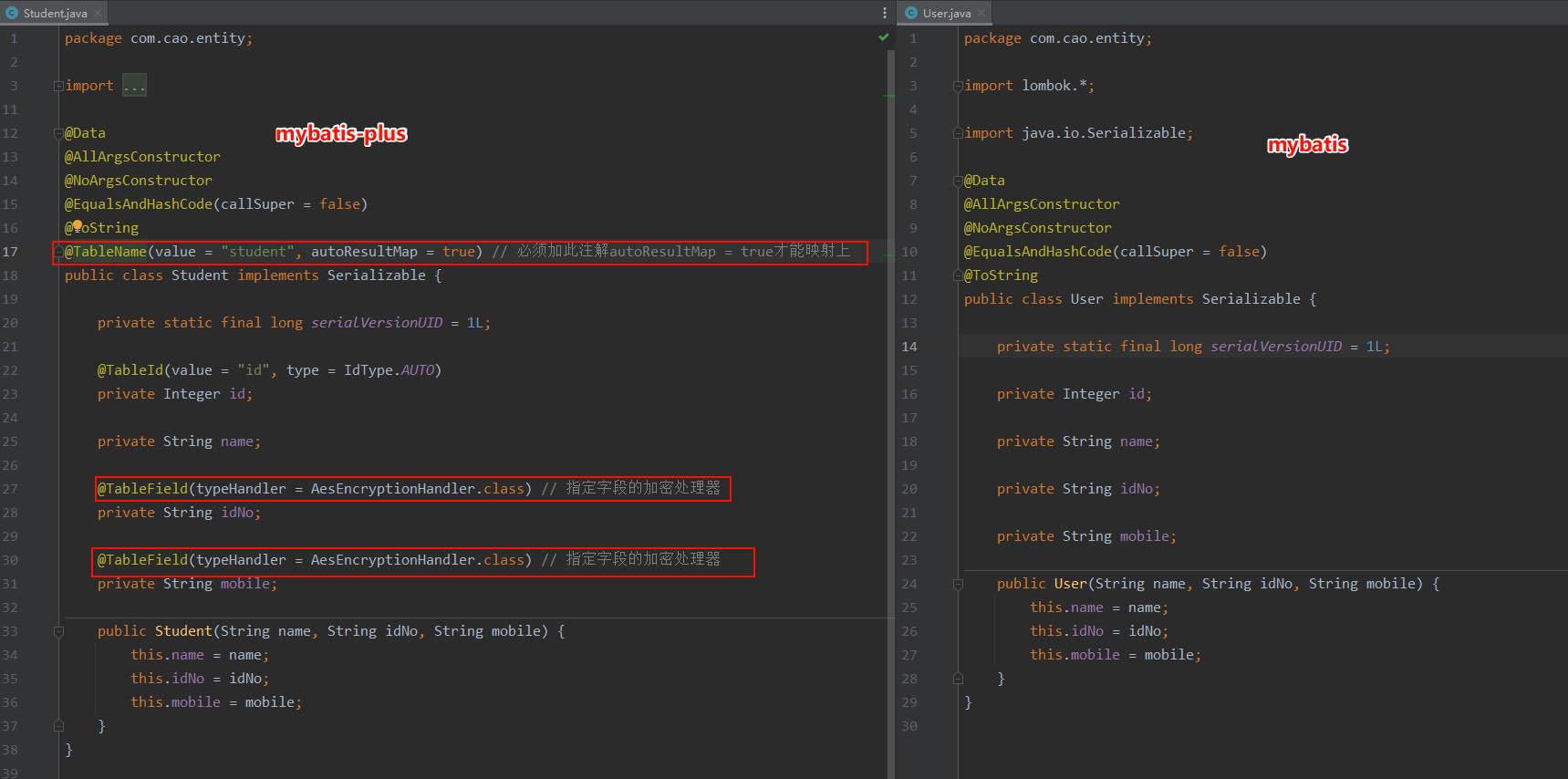
1.必须加上mybatisplus这个注解@TableName(value = "student", autoResultMap = true),并且autoResultMap = true
- 要在加解密的字段上面加上mybatisplus注解@TableField(typeHandler = AesEncryptionHandler.class) 来指定字段的typeHandler的加密处理器AesEncryptionHandler
java
package com.cao.entity;

import com.baomidou.mybatisplus.annotation.IdType;
import com.baomidou.mybatisplus.annotation.TableField;
import com.baomidou.mybatisplus.annotation.TableId;
import com.baomidou.mybatisplus.annotation.TableName;
import com.cao.handler.AesEncryptionHandler;
import lombok.*;

import java.io.Serializable;

@Data
@AllArgsConstructor
@NoArgsConstructor
@EqualsAndHashCode(callSuper = false)
@ToString
@TableName(value = "student", autoResultMap = true) // 必须加此注解autoResultMap = true才能映射上
public class Student implements Serializable {
    private static final long serialVersionUID = 1L;

    @TableId(value = "id", type = IdType.AUTO)
    private Integer id;

    private String name;

    @TableField(typeHandler = AesEncryptionHandler.class) // 指定字段的加密处理器
    private String idNo;

    @TableField(typeHandler = AesEncryptionHandler.class) // 指定字段的加密处理器
    private String mobile;

    public Student(String name, String idNo, String mobile) {
        this.name = name;
        this.idNo = idNo;
        this.mobile = mobile;
    }
}
4.2、StudentMapper和 StudentMapper.xml
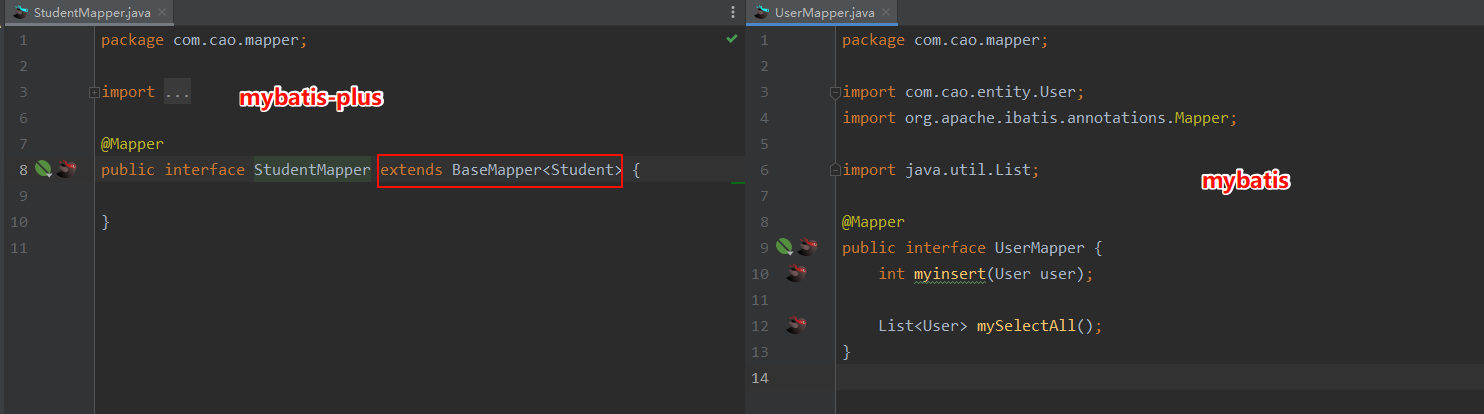
全部使用的是mybatis-plus自带的insert和selectList
java
package com.cao.mapper;

import com.baomidou.mybatisplus.core.mapper.BaseMapper;
import com.cao.entity.Student;
import org.apache.ibatis.annotations.Mapper;

@Mapper
public interface StudentMapper extends BaseMapper<Student> {

}
xml
<?xml version="1.0" encoding="UTF-8"?>
<!DOCTYPE mapper PUBLIC "-//mybatis.org//DTD Mapper 3.0//EN" "http://mybatis.org/dtd/mybatis-3-mapper.dtd">
<mapper namespace="com.cao.mapper.StudentMapper">

</mapper>
4.3、controller测试
java
package com.cao.controller;


import com.cao.entity.Student;
import com.cao.mapper.StudentMapper;
import org.springframework.beans.factory.annotation.Autowired;
import org.springframework.web.bind.annotation.RequestMapping;

import org.springframework.web.bind.annotation.RestController;

import java.util.List;

/**
 * 完全使用mybatis-plus提供的方式进行加解密
 */
@RestController
@RequestMapping("/student/student")
public class MybatisPlusStudentEncryptionController {
    @Autowired
    private StudentMapper studentMapper;

    /**
     * 使用mybatis-plus提供的insert插入数据
     * insert是mybatis-plus提供的
     */
    @RequestMapping("/insert")
    public String insert() {
        Student student = new Student("张三", "620422199707054444", "17797585366");
        studentMapper.insert(student);// 这个insert是mybatis-plus提供的
        return "成功";
    }

    /**
     * 使用mybatis-plus提供的selectList插入数据
     * selectList是mybatis-plus提供的
     */
    @RequestMapping("/selectList")
    public List<Student> selectList() {
        List<Student> students = studentMapper.selectList(null);// 这个selectList是mybatis-plus提供的
        return students;
    }
}
4.4、数据库测试结果
Java中明文,插入到数据库是密文
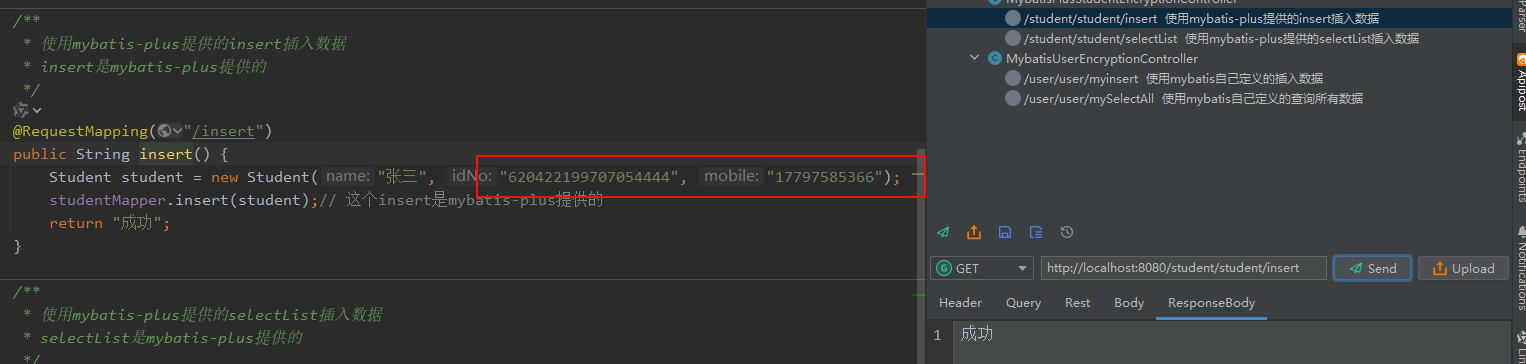

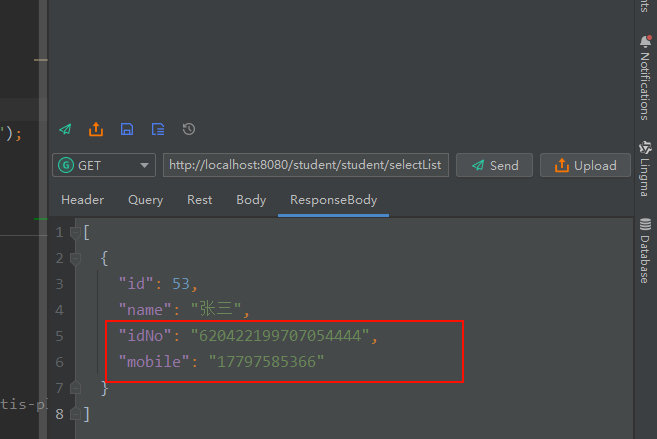
数据库是密文,查询出来是明文
5、mybatis实现
5.1、实体类User
不需要加任何额外的mybatisplus的注解
java
package com.cao.entity;

import com.baomidou.mybatisplus.annotation.IdType;
import com.baomidou.mybatisplus.annotation.TableId;
import lombok.*;

import java.io.Serializable;

@Data
@AllArgsConstructor
@NoArgsConstructor
@EqualsAndHashCode(callSuper = false)
@ToString
public class User implements Serializable {

    private static final long serialVersionUID = 1L;

    private Integer id;

    private String name;

    private String idNo;

    private String mobile;

    public User(String name, String idNo, String mobile) {
        this.name = name;
        this.idNo = idNo;
        this.mobile = mobile;
    }
}
5.2、UserMapper和 UserMapper.xml
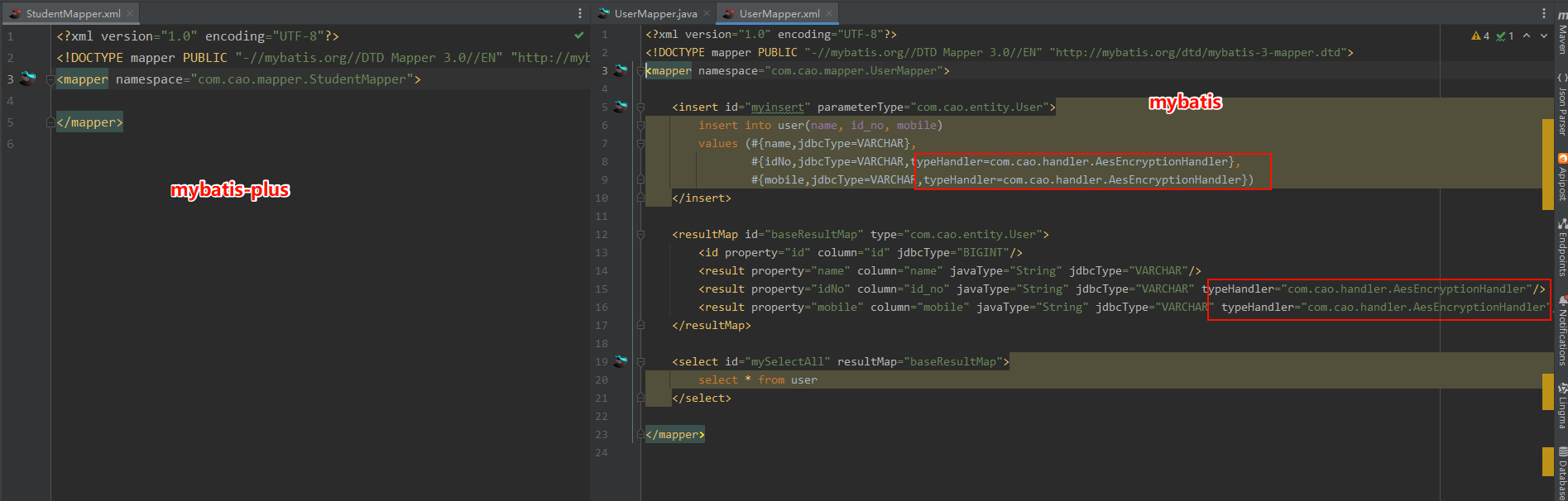
1.全部使用的是自己写的
2.在insert时候,为每个要加密的字段加上typeHandler=com.cao.handler.AesEncryptionHandler
3.查询的时候,在resultMap映射实体的时候加上typeHandler="com.cao.handler.AesEncryptionHandler"
java
package com.cao.mapper;

import com.cao.entity.User;
import org.apache.ibatis.annotations.Mapper;

import java.util.List;

@Mapper
public interface UserMapper {
    int myinsert(User user);

    List<User> mySelectAll();
}
xml
<?xml version="1.0" encoding="UTF-8"?>
<!DOCTYPE mapper PUBLIC "-//mybatis.org//DTD Mapper 3.0//EN" "http://mybatis.org/dtd/mybatis-3-mapper.dtd">
<mapper namespace="com.cao.mapper.UserMapper">

    <insert id="myinsert" parameterType="com.cao.entity.User">
        insert into user(name, id_no, mobile)
        values (#{name,jdbcType=VARCHAR},
                #{idNo,jdbcType=VARCHAR,typeHandler=com.cao.handler.AesEncryptionHandler},
                #{mobile,jdbcType=VARCHAR,typeHandler=com.cao.handler.AesEncryptionHandler})
    </insert>

    <resultMap id="baseResultMap" type="com.cao.entity.User">
        <id property="id" column="id" jdbcType="BIGINT"/>
        <result property="name" column="name" javaType="String" jdbcType="VARCHAR"/>
        <result property="idNo" column="id_no" javaType="String" jdbcType="VARCHAR" typeHandler="com.cao.handler.AesEncryptionHandler"/>
        <result property="mobile" column="mobile" javaType="String" jdbcType="VARCHAR" typeHandler="com.cao.handler.AesEncryptionHandler"/>
    </resultMap>

    <select id="mySelectAll" resultMap="baseResultMap">
        select * from user
    </select>

</mapper>
5.3、controller测试
java
package com.cao.controller;


import com.cao.entity.User;
import com.cao.mapper.UserMapper;
import org.springframework.beans.factory.annotation.Autowired;
import org.springframework.web.bind.annotation.RequestMapping;
import org.springframework.web.bind.annotation.RestController;

import java.util.List;

/**
 * 完全使用mybatis提供的方式进行加解密
 * 如果是自己定义的方法和xml,没有使用mybatis-plus提供的方法,那mybatis-plus就不会自动执行加解密的类AesEncryptionHandler
 * 即便在User上面加了@TableField(typeHandler = AesEncryptionHandler.class),也不起作用
 */
@RestController
@RequestMapping("/user/user")
public class MybatisUserEncryptionController {
    @Autowired
    private UserMapper userMapper;

    /**
     * 使用mybatis自己定义的插入数据
     * myinsert是自己在UserMapper、UserMapper.xml中写的
     */
    @RequestMapping("/myinsert")
    public String myinsert() {
        User user = new User("李四", "620422199707059999", "17797585399");
        userMapper.myinsert(user);// 这个myinsert是自己在UserMapper、UserMapper.xml中写的
        return "myinsert成功";
    }
    /**
     * 使用mybatis自己定义的查询所有数据
     * mySelectAll是自己在UserMapper、UserMapper.xml中写的
     */
    @RequestMapping("/mySelectAll")
    public List<User> mySelectAll() {
        List<User> users = userMapper.mySelectAll();// 这个mySelectAll是自己在UserMapper、UserMapper.xml中写的
        return users;
    }
}
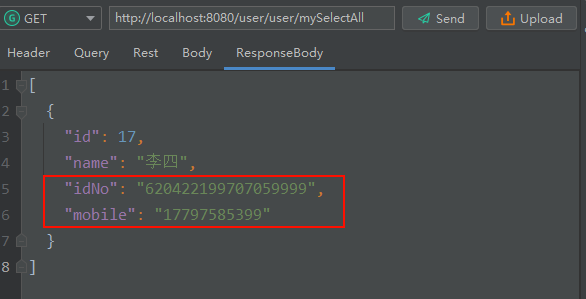
5.4、数据库测试结果
Java中明文,插入到数据库是密文
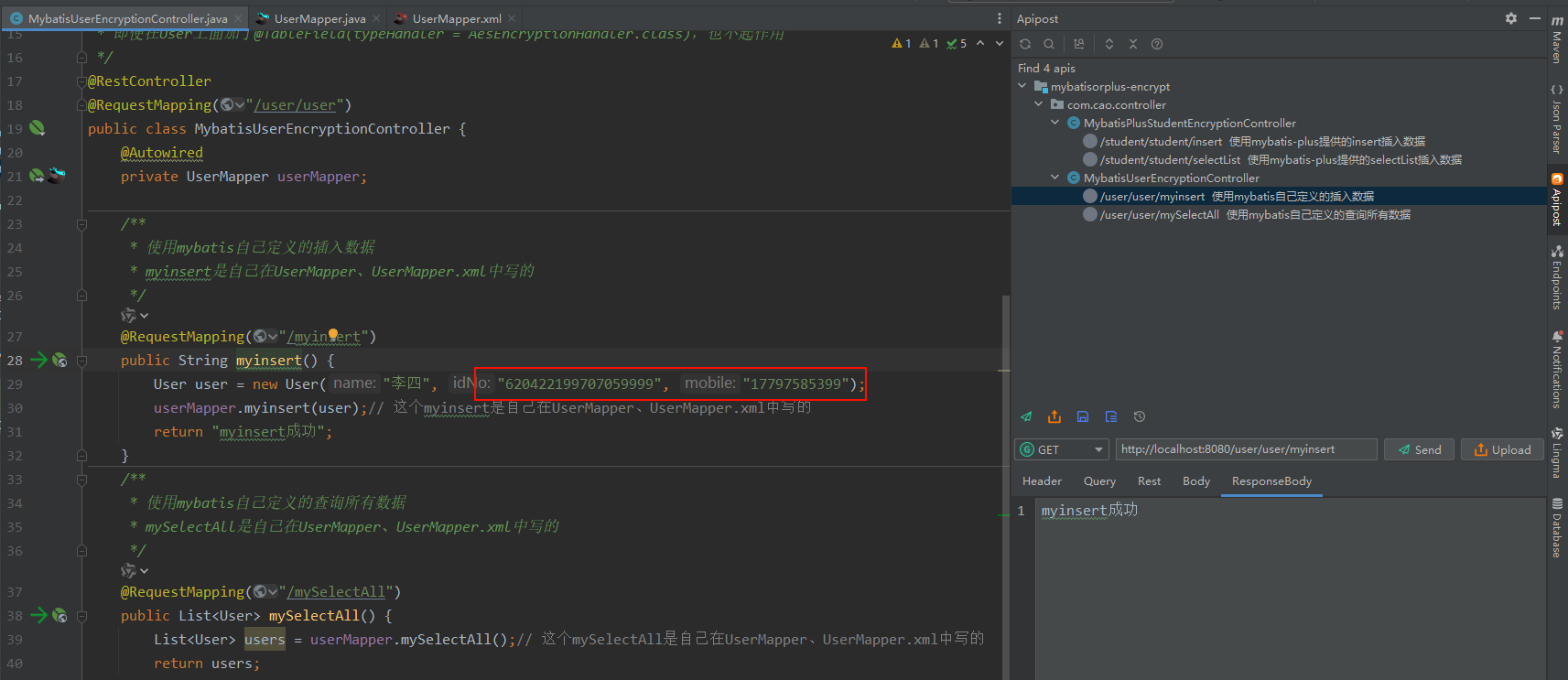

数据库是密文,查询出来是明文
6、比较
6.1、实体类比较:mybatis-plus加注解
6.2、mapper.java比较:mybatis-plus调用的是自带的方法,mybatis是自定义的方法
6.3、mapper.xml比较:mybatis-plus调用的是自带的方法,所以是空的,mybatis是自定义的方法,主要加typeHandler来指定加密的字段