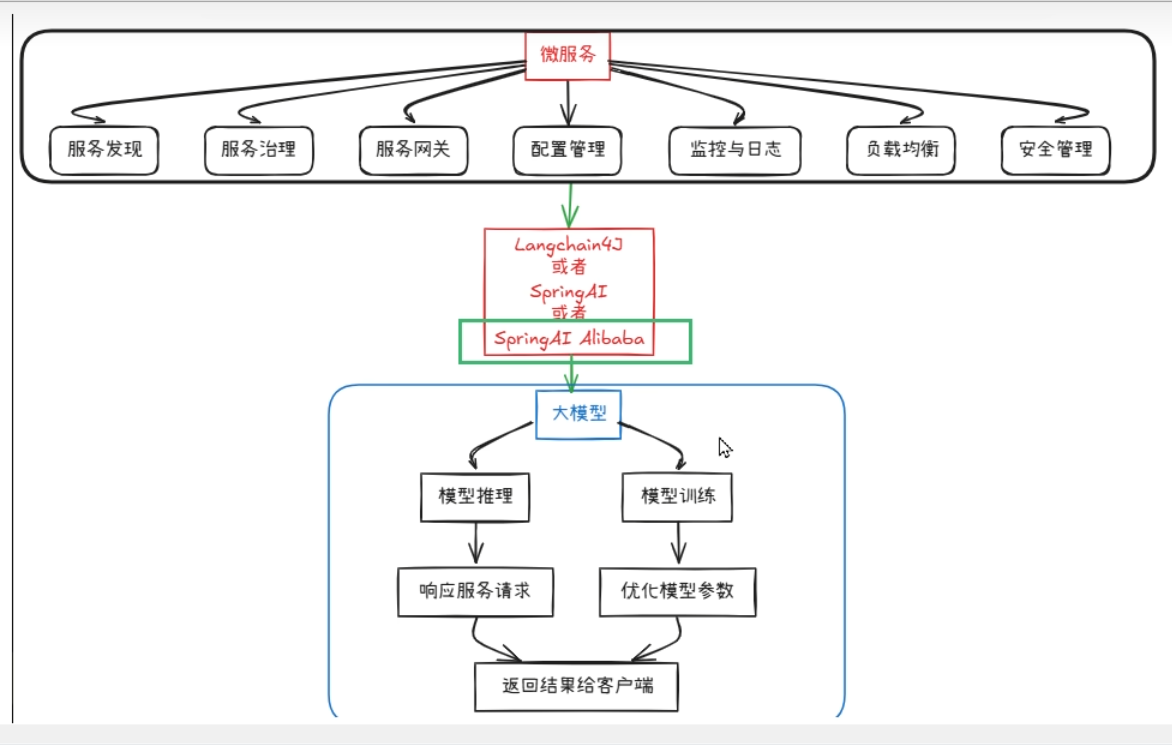
AI应用开发框架,spring ai alibaba 与阿里云百炼和通义千问有深度集成
Spring AI Alibaba 基于 Spring AI 构建,因此 SAA 继承了 SpringAI 的所有原子能力抽象并在此基础上扩充丰富了模型、向量存储、记忆、RAG 等核心组件适配,让其能够接入阿里云的 AI 生态
使用步骤:
1.获取api key
2.获取模型名称
3.获取baseUrl
4.父工程pom
<?xml version="1.0" encoding="UTF-8"?>
<project xmlns="http://maven.apache.org/POM/4.0.0" xmlns:xsi="http://www.w3.org/2001/XMLSchema-instance"
         xsi:schemaLocation="http://maven.apache.org/POM/4.0.0 https://maven.apache.org/xsd/maven-4.0.0.xsd">
    <modelVersion>4.0.0</modelVersion>
    <parent>
        <groupId>com.leot</groupId>
        <artifactId>SSA-leot</artifactId>
        <version>0.0.1-SNAPSHOT</version>
        <!-- lookup parent from repository -->
    </parent>
    <groupId>com.leot</groupId>
    <artifactId>SSA-OLLAMA</artifactId>
    <version>0.0.1-SNAPSHOT</version>
    <name>SSA-OLLAMA</name>
    <description>SSA-OLLAMA</description>

    <properties>
        <java.version>21</java.version>
    </properties>
    <dependencies>
        <dependency>
            <groupId>org.springframework.boot</groupId>
            <artifactId>spring-boot-starter</artifactId>
        </dependency>

        <dependency>
            <groupId>org.springframework.boot</groupId>
            <artifactId>spring-boot-starter-test</artifactId>
            <scope>test</scope>
        </dependency>
        <dependency>
            <groupId>org.springframework.ai</groupId>
            <artifactId>spring-ai-starter-model-ollama</artifactId>
            <version>1.0.0</version>
        </dependency>
    </dependencies>

    <build>
        <plugins>
            <plugin>
                <groupId>org.springframework.boot</groupId>
                <artifactId>spring-boot-maven-plugin</artifactId>
            </plugin>
        </plugins>
    </build>

</project>
Ollama 使用
1.依赖引入
<dependency>
            <groupId>org.springframework.ai</groupId>
            <artifactId>spring-ai-starter-model-ollama</artifactId>
            <version>1.0.0</version>
        </dependency>
2.yaml
spring:
  application:
    name: SSA-OLLAMA
  ai:
    dashscope:
        api-key: youapikey
    ollama:
      base-url: http://localhost:11434
      chat:
        model: deepseek-r1:7b
server:
  port: 8080
  servlet:
    encoding:
      charset: UTF-8
      force: true
      enabled: true
3.使用
   @Resource
    @Qualifier(value = "ollamaChatModel")
    private ChatModel chatModel;

    @GetMapping("/hello/chatmodel")
    public String hello(@RequestParam(name = "msg",defaultValue = "你是谁") String msg) {
        return chatModel.call(msg) ;
    }
    @GetMapping("/hello/streamodel")
    public Flux<String> helloa(@RequestParam(name = "msg",defaultValue = "你是谁") String msg) {
        return chatModel.stream(msg) ;
    }
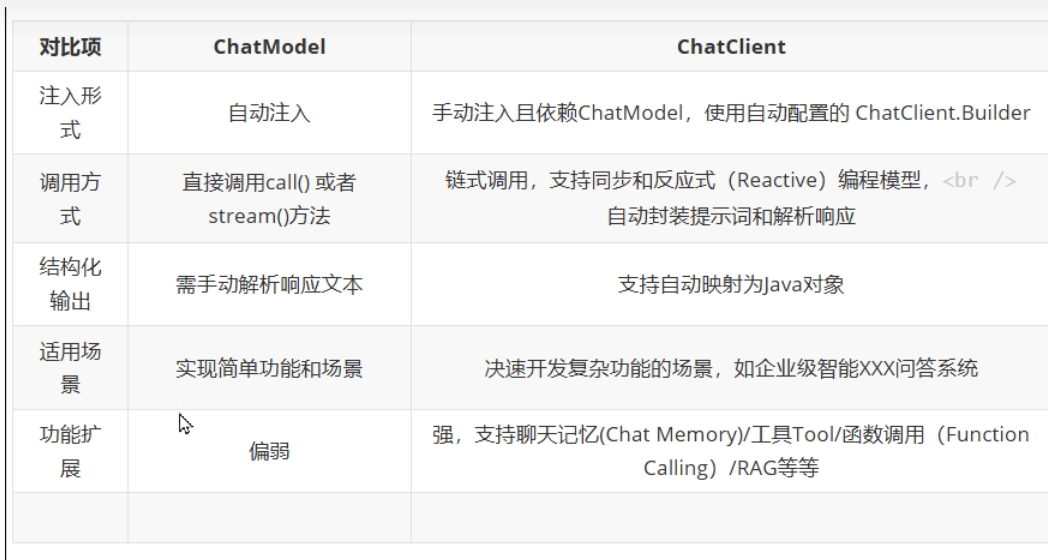
chatModel 和chatClient
ChatClient是高级封装,基于ChatModel构建,适合快速构建标准化复杂AI服务,支持同步和流式交互,集成多种高级功能。
ChatClient 不支持依赖注入 ,而chatmodel是支持依赖注入的
@RestController
public class ChatClientDemo {
    private final ChatClient dashScopechatClient;

    public ChatClientDemo(@Qualifier("dashscopeChatModel") ChatModel dashScopechatModel) {
        this.dashScopechatClient = ChatClient
                .builder(dashScopechatModel)
                .build();
    }

    @GetMapping("/hello/chatclient")
    public ChatResponse hello(@RequestParam(name = "msg",defaultValue = "你是谁") String msg) {
        return dashScopechatClient.prompt()
                .user(msg)
                .call()
                .chatResponse();
    }
}
SSE流式输出
服务器发送事件
持续推送数据片段到前端
SSE 的核心思想是:客户端发起一个请求,服务器保持这个连接打开并在有新数据时,通过这个连接将数据发送给客户端。这与传统的请求 - 响应模式(客户端请求一次,服务器响应一次,连接关闭)有本质区别。
|--------|------------------------------|---------------------------|
| 特性 | Server-Sent Events (SSE) | WebSocket |
| 通信方向 | 单向(服务器 -> 客户端) | 双向 |
| 协议 | 基于 HTTP | 独立的 ws:// 或 wss:// 协议 |
| 数据类型 | 文本 | 文本和二进制 |
| 复杂性 | 简单 | 相对复杂 |
| 连接开销 | 较低 | 较高 |
| 自动重连 | 是 | 需要手动实现 |
| 浏览器支持 | 广泛支持(除 IE) | 广泛支持 |
多模型共存
@Configuration
public class SseConfig {

    @Value("${spring.ai.dashscope.api-key}")
    private String apiKey;


    private String DEEPSEEK_MODEL="deepseek-v3.2";
    private String QWEN_MODEL="qwen3-max";

    @Bean(name = "deepseek")
    public ChatModel DeepSeekChatModel( ){
        return DashScopeChatModel.builder()
                .dashScopeApi(DashScopeApi.builder().apiKey(apiKey).build())
                .defaultOptions(DashScopeChatOptions.builder().withModel(DEEPSEEK_MODEL).build())
                .build();
    }
    @Bean(name = "qwen")
    public ChatModel QwenChatModel( ){
        return DashScopeChatModel.builder()
                .dashScopeApi(DashScopeApi.builder().apiKey(apiKey).build())
                .defaultOptions(DashScopeChatOptions.builder().withModel(QWEN_MODEL).build())
                .build();
    }
     @Bean(name = "deepSeekChatClient")
    public ChatClient chatClientdeepseek(@Qualifier("deepseek") ChatModel deepseekChatModel){
        return ChatClient.builder(deepseekChatModel) .build();
    }
    @Bean(name = "qwenChatClient")
    public ChatClient chatClientqwen(@Qualifier("qwen") ChatModel qwenChatModel){
        return ChatClient.builder(qwenChatModel) .build();
    }