Flutter实战:打造功能完整的投票器应用
前言
投票是收集意见、做出决策的重要方式。本文将带你从零开始,使用Flutter开发一个功能完整的投票器应用,支持单选/多选、匿名投票、实时统计等功能。
应用特色
- 📊 实时统计:动态显示投票结果和百分比
- ☑️ 单选/多选:支持两种投票模式
- 🎭 匿名投票:保护用户隐私
- ⏰ 截止时间:设置投票结束时间
- 📈 进度条显示:可视化投票结果
- 🔒 防重复投票:每人只能投一次
- 📱 分类显示:进行中和已结束分开
- 💾 数据持久化:本地存储所有投票
- 📊 统计分析:总票数、参与人数等
- 🌓 深色模式:自动适配系统主题
效果展示
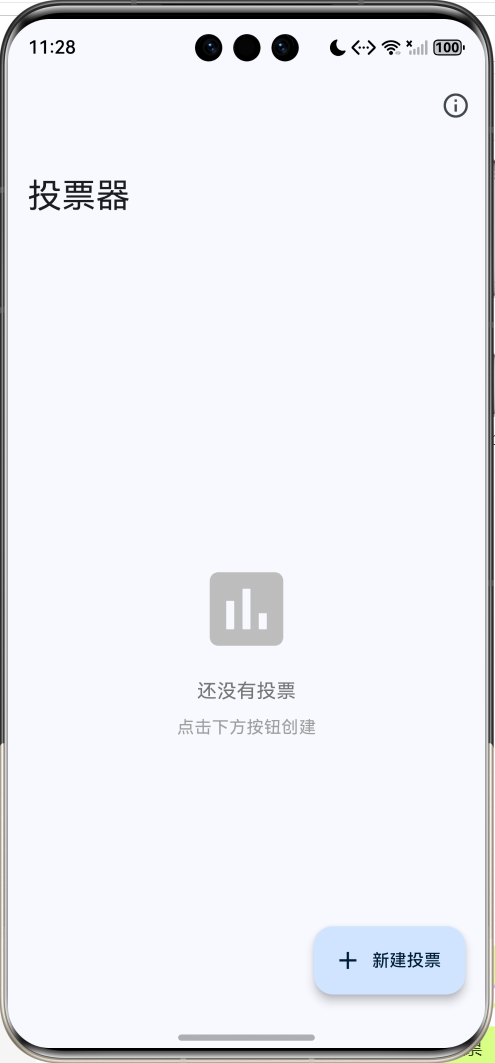
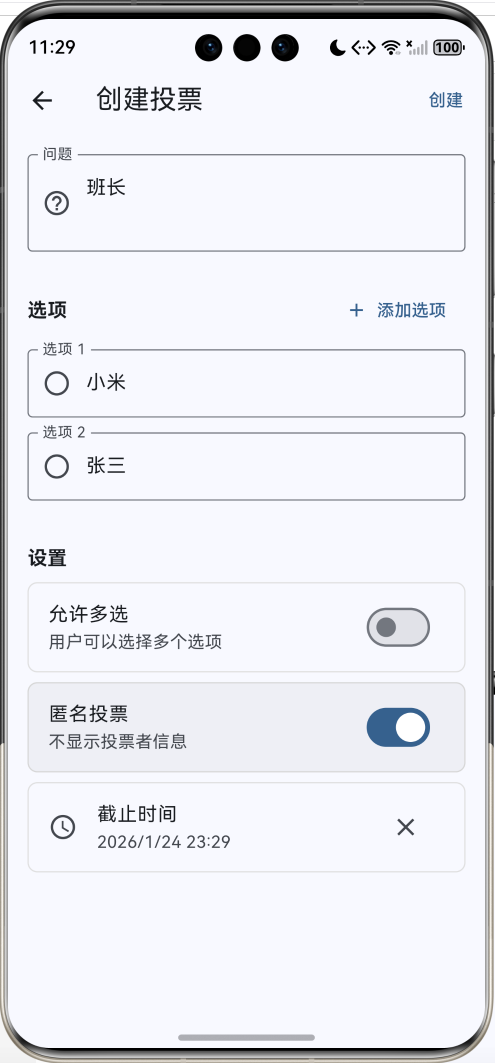
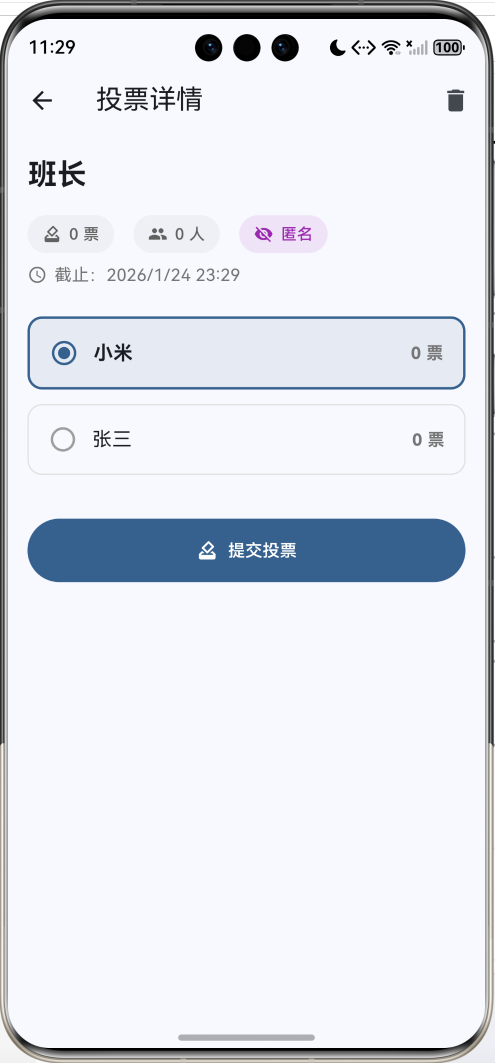
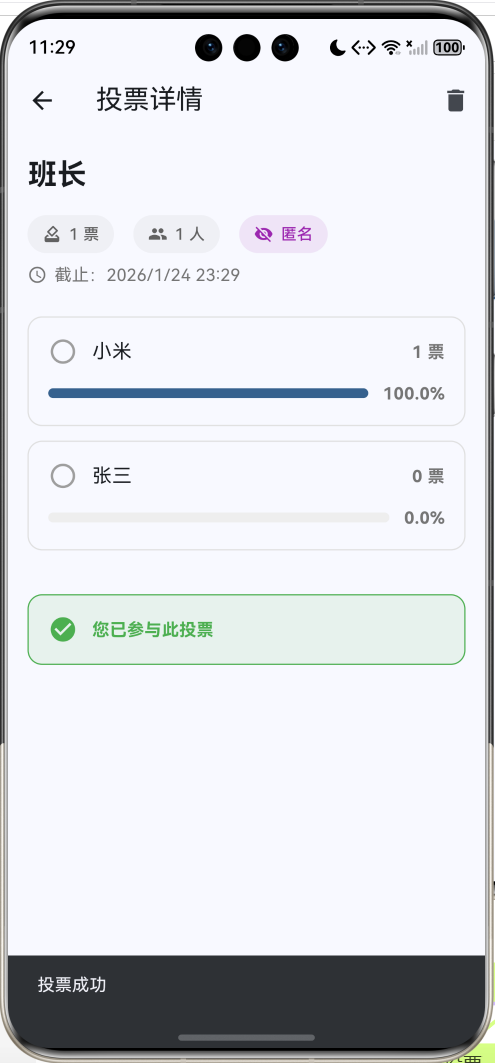
投票器
投票类型
单选投票
多选投票
匿名投票
限时投票
核心功能
创建投票
问题设置
选项管理
投票设置
参与投票
选择选项
提交投票
查看结果
结果展示
票数统计
百分比显示
进度条可视化
投票管理
查看详情
删除投票
状态管理
数据模型设计
1. 投票选项模型
dart
class PollOption {
  String id;
  String text;
  int votes;

  PollOption({
    required this.id,
    required this.text,
    this.votes = 0,
  });

  Map<String, dynamic> toJson() => {
    'id': id,
    'text': text,
    'votes': votes,
  };

  factory PollOption.fromJson(Map<String, dynamic> json) => PollOption(
    id: json['id'],
    text: json['text'],
    votes: json['votes'],
  );
}
2. 投票模型
dart
class Poll {
  String id;
  String question;
  List<PollOption> options;
  bool allowMultiple;     // 是否允许多选
  bool isAnonymous;       // 是否匿名
  DateTime createdAt;
  DateTime? endDate;      // 截止时间
  Set<String> votedUsers; // 已投票用户ID

  Poll({
    required this.id,
    required this.question,
    required this.options,
    this.allowMultiple = false,
    this.isAnonymous = true,
    required this.createdAt,
    this.endDate,
    Set<String>? votedUsers,
  }) : votedUsers = votedUsers ?? {};

  // 总票数
  int get totalVotes => options.fold(0, (sum, option) => sum + option.votes);

  // 是否进行中
  bool get isActive {
    if (endDate == null) return true;
    return DateTime.now().isBefore(endDate!);
  }
}
核心功能实现
1. 创建投票
dart
class _CreatePollPageState extends State<CreatePollPage> {
  final _questionController = TextEditingController();
  final List<TextEditingController> _optionControllers = [
    TextEditingController(),
    TextEditingController(),
  ];
  bool _allowMultiple = false;
  bool _isAnonymous = true;
  DateTime? _endDate;

  void _addOption() {
    if (_optionControllers.length < 10) {
      setState(() {
        _optionControllers.add(TextEditingController());
      });
    }
  }

  void _removeOption(int index) {
    if (_optionControllers.length > 2) {
      setState(() {
        _optionControllers[index].dispose();
        _optionControllers.removeAt(index);
      });
    }
  }

  void _save() {
    // 验证输入
    if (_questionController.text.trim().isEmpty) {
      ScaffoldMessenger.of(context).showSnackBar(
        const SnackBar(content: Text('请输入问题')),
      );
      return;
    }

    // 收集选项
    final options = _optionControllers
        .where((c) => c.text.trim().isNotEmpty)
        .map((c) => PollOption(
              id: DateTime.now().millisecondsSinceEpoch.toString() +
                  _optionControllers.indexOf(c).toString(),
              text: c.text.trim(),
            ))
        .toList();

    if (options.length < 2) {
      ScaffoldMessenger.of(context).showSnackBar(
        const SnackBar(content: Text('至少需要2个选项')),
      );
      return;
    }

    // 创建投票
    final poll = Poll(
      id: DateTime.now().millisecondsSinceEpoch.toString(),
      question: _questionController.text.trim(),
      options: options,
      allowMultiple: _allowMultiple,
      isAnonymous: _isAnonymous,
      createdAt: DateTime.now(),
      endDate: _endDate,
    );

    widget.onSave(poll);
    Navigator.pop(context);
  }
}
2. 投票逻辑
dart
class _PollDetailPageState extends State<PollDetailPage> {
  Set<String> _selectedOptions = {};

  void _vote() {
    if (_selectedOptions.isEmpty) {
      ScaffoldMessenger.of(context).showSnackBar(
        const SnackBar(content: Text('请选择至少一个选项')),
      );
      return;
    }

    // 更新投票数
    for (var option in widget.poll.options) {
      if (_selectedOptions.contains(option.id)) {
        option.votes++;
      }
    }

    // 记录用户已投票
    widget.poll.votedUsers.add(widget.currentUserId);

    widget.onVote(widget.poll);

    ScaffoldMessenger.of(context).showSnackBar(
      const SnackBar(content: Text('投票成功')),
    );

    setState(() {
      _selectedOptions.clear();
    });
  }
}
3. 选项选择
dart
InkWell(
  onTap: canVote
      ? () {
          setState(() {
            if (widget.poll.allowMultiple) {
              // 多选模式
              if (isSelected) {
                _selectedOptions.remove(option.id);
              } else {
                _selectedOptions.add(option.id);
              }
            } else {
              // 单选模式
              _selectedOptions = {option.id};
            }
          });
        }
      : null,
  child: Container(
    decoration: BoxDecoration(
      border: Border.all(
        color: isSelected
            ? Theme.of(context).colorScheme.primary
            : Colors.grey.shade300,
        width: isSelected ? 2 : 1,
      ),
      borderRadius: BorderRadius.circular(12),
    ),
    child: Row(
      children: [
        Icon(
          widget.poll.allowMultiple
              ? (isSelected
                  ? Icons.check_box
                  : Icons.check_box_outline_blank)
              : (isSelected
                  ? Icons.radio_button_checked
                  : Icons.radio_button_unchecked),
        ),
        Text(option.text),
      ],
    ),
  ),
)
4. 结果统计
dart
// 计算百分比
final percentage = widget.poll.totalVotes > 0
    ? (option.votes / widget.poll.totalVotes * 100)
    : 0.0;

// 显示进度条
Row(
  children: [
    Expanded(
      child: LinearProgressIndicator(
        value: percentage / 100,
        minHeight: 8,
        backgroundColor: Colors.grey.shade200,
      ),
    ),
    const SizedBox(width: 12),
    Text('${percentage.toStringAsFixed(1)}%'),
  ],
)
5. 防重复投票
dart
// 检查用户是否已投票
final hasVoted = widget.poll.votedUsers.contains(widget.currentUserId);

// 判断是否可以投票
final canVote = isActive && !hasVoted;

// 显示已投票提示
if (hasVoted) {
  Container(
    decoration: BoxDecoration(
      color: Colors.green.withOpacity(0.1),
      border: Border.all(color: Colors.green),
    ),
    child: const Row(
      children: [
        Icon(Icons.check_circle, color: Colors.green),
        Text('您已参与此投票'),
      ],
    ),
  );
}
UI组件设计
1. 投票卡片
dart
Widget _buildPollCard(Poll poll) {
  final hasVoted = poll.votedUsers.contains(_currentUserId);
  final isActive = poll.isActive;

  return Card(
    child: Padding(
      padding: const EdgeInsets.all(16),
      child: Column(
        crossAxisAlignment: CrossAxisAlignment.start,
        children: [
          // 问题
          Text(
            poll.question,
            style: const TextStyle(
              fontSize: 18,
              fontWeight: FontWeight.bold,
            ),
          ),
          const SizedBox(height: 12),
          // 统计信息
          Row(
            children: [
              Icon(Icons.how_to_vote, size: 16),
              Text('${poll.totalVotes} 票'),
              const SizedBox(width: 16),
              Icon(Icons.people, size: 16),
              Text('${poll.votedUsers.length} 人'),
              if (hasVoted)
                Container(
                  child: const Text('已投票'),
                ),
            ],
          ),
          // 截止时间
          if (poll.endDate != null)
            Text('截止:${_formatDate(poll.endDate!)}'),
        ],
      ),
    ),
  );
}
2. 选项卡片
dart
Widget _buildOptionCard(PollOption option) {
  final percentage = widget.poll.totalVotes > 0
      ? (option.votes / widget.poll.totalVotes * 100)
      : 0.0;
  final isSelected = _selectedOptions.contains(option.id);

  return Container(
    padding: const EdgeInsets.all(16),
    decoration: BoxDecoration(
      border: Border.all(
        color: isSelected
            ? Theme.of(context).colorScheme.primary
            : Colors.grey.shade300,
        width: isSelected ? 2 : 1,
      ),
      borderRadius: BorderRadius.circular(12),
      color: isSelected
          ? Theme.of(context).colorScheme.primary.withOpacity(0.1)
          : null,
    ),
    child: Column(
      crossAxisAlignment: CrossAxisAlignment.start,
      children: [
        // 选项文本和票数
        Row(
          children: [
            Icon(
              widget.poll.allowMultiple
                  ? (isSelected ? Icons.check_box : Icons.check_box_outline_blank)
                  : (isSelected ? Icons.radio_button_checked : Icons.radio_button_unchecked),
            ),
            const SizedBox(width: 12),
            Expanded(child: Text(option.text)),
            Text('${option.votes} 票'),
          ],
        ),
        // 进度条
        if (hasVoted || !isActive) ...[
          const SizedBox(height: 12),
          Row(
            children: [
              Expanded(
                child: LinearProgressIndicator(
                  value: percentage / 100,
                  minHeight: 8,
                ),
              ),
              const SizedBox(width: 12),
              Text('${percentage.toStringAsFixed(1)}%'),
            ],
          ),
        ],
      ],
    ),
  );
}
3. 信息标签
dart
Widget _buildInfoChip(IconData icon, String label, [Color? color]) {
  return Container(
    padding: const EdgeInsets.symmetric(horizontal: 12, vertical: 6),
    decoration: BoxDecoration(
      color: (color ?? Colors.grey).withOpacity(0.1),
      borderRadius: BorderRadius.circular(16),
    ),
    child: Row(
      mainAxisSize: MainAxisSize.min,
      children: [
        Icon(icon, size: 16, color: color ?? Colors.grey.shade700),
        const SizedBox(width: 6),
        Text(
          label,
          style: TextStyle(
            fontSize: 13,
            color: color ?? Colors.grey.shade700,
            fontWeight: FontWeight.w500,
          ),
        ),
      ],
    ),
  );
}

// 使用
Wrap(
  spacing: 16,
  children: [
    _buildInfoChip(Icons.how_to_vote, '${poll.totalVotes} 票'),
    _buildInfoChip(Icons.people, '${poll.votedUsers.length} 人'),
    if (poll.allowMultiple)
      _buildInfoChip(Icons.check_box, '多选', Colors.blue),
    if (poll.isAnonymous)
      _buildInfoChip(Icons.visibility_off, '匿名', Colors.purple),
  ],
)
4. 日期时间选择
dart
Future<void> _selectEndDate() async {
  // 选择日期
  final date = await showDatePicker(
    context: context,
    initialDate: DateTime.now().add(const Duration(days: 7)),
    firstDate: DateTime.now(),
    lastDate: DateTime.now().add(const Duration(days: 365)),
  );

  if (date != null) {
    // 选择时间
    final time = await showTimePicker(
      context: context,
      initialTime: TimeOfDay.now(),
    );

    if (time != null) {
      setState(() {
        _endDate = DateTime(
          date.year,
          date.month,
          date.day,
          time.hour,
          time.minute,
        );
      });
    }
  }
}
技术要点详解
1. Set集合使用
用于存储已投票用户和选中选项:
dart
// 定义
Set<String> votedUsers = {};
Set<String> _selectedOptions = {};

// 添加
votedUsers.add(userId);

// 删除
_selectedOptions.remove(optionId);

// 检查是否包含
if (votedUsers.contains(userId)) {
  // 已投票
}

// 清空
_selectedOptions.clear();

// 转换为列表
final list = votedUsers.toList();
2. fold累加计算
计算总票数:
dart
int get totalVotes => options.fold(0, (sum, option) => sum + option.votes);

// 等价于
int get totalVotes {
  int sum = 0;
  for (var option in options) {
    sum += option.votes;
  }
  return sum;
}
3. where过滤
筛选进行中和已结束的投票:
dart
final activePolls = _polls.where((p) => p.isActive).toList();
final endedPolls = _polls.where((p) => !p.isActive).toList();

// 筛选非空选项
final options = _optionControllers
    .where((c) => c.text.trim().isNotEmpty)
    .map((c) => PollOption(...))
    .toList();
4. LinearProgressIndicator进度条
dart
LinearProgressIndicator(
  value: percentage / 100,  // 0.0 到 1.0
  minHeight: 8,
  backgroundColor: Colors.grey.shade200,
  valueColor: AlwaysStoppedAnimation(Colors.blue),
)
功能扩展建议
1. 实时同步
使用Firebase实现多人实时投票:
dart
import 'package:cloud_firestore/cloud_firestore.dart';

class PollService {
  final FirebaseFirestore _firestore = FirebaseFirestore.instance;

  // 创建投票
  Future<void> createPoll(Poll poll) async {
    await _firestore.collection('polls').doc(poll.id).set(poll.toJson());
  }

  // 监听投票变化
  Stream<Poll> watchPoll(String pollId) {
    return _firestore
        .collection('polls')
        .doc(pollId)
        .snapshots()
        .map((doc) => Poll.fromJson(doc.data()!));
  }

  // 投票
  Future<void> vote(String pollId, String optionId, String userId) async {
    await _firestore.collection('polls').doc(pollId).update({
      'options': FieldValue.arrayUnion([
        {'id': optionId, 'votes': FieldValue.increment(1)}
      ]),
      'votedUsers': FieldValue.arrayUnion([userId]),
    });
  }
}
2. 二维码分享
生成投票二维码:
dart
import 'package:qr_flutter/qr_flutter.dart';

class QRCodeDialog extends StatelessWidget {
  final String pollId;

  @override
  Widget build(BuildContext context) {
    final url = 'https://yourapp.com/poll/$pollId';

    return AlertDialog(
      title: const Text('扫码参与投票'),
      content: QrImageView(
        data: url,
        version: QrVersions.auto,
        size: 200.0,
      ),
    );
  }
}
3. 投票提醒
设置投票截止提醒:
dart
import 'package:flutter_local_notifications/flutter_local_notifications.dart';

class NotificationService {
  static Future<void> scheduleReminder(Poll poll) async {
    if (poll.endDate == null) return;

    final notifications = FlutterLocalNotificationsPlugin();

    // 提前1小时提醒
    final reminderTime = poll.endDate!.subtract(const Duration(hours: 1));

    await notifications.zonedSchedule(
      poll.id.hashCode,
      '投票即将结束',
      poll.question,
      tz.TZDateTime.from(reminderTime, tz.local),
      const NotificationDetails(
        android: AndroidNotificationDetails(
          'poll_reminder',
          '投票提醒',
        ),
      ),
      uiLocalNotificationDateInterpretation:
          UILocalNotificationDateInterpretation.absoluteTime,
    );
  }
}
4. 导出结果
导出投票结果为CSV:
dart
import 'package:csv/csv.dart';
import 'dart:io';

Future<void> exportPollResults(Poll poll) async {
  List<List<dynamic>> rows = [
    ['选项', '票数', '百分比'],
  ];

  for (var option in poll.options) {
    final percentage = poll.totalVotes > 0
        ? (option.votes / poll.totalVotes * 100)
        : 0.0;
    rows.add([
      option.text,
      option.votes,
      '${percentage.toStringAsFixed(1)}%',
    ]);
  }

  String csv = const ListToCsvConverter().convert(rows);

  final file = File('${(await getApplicationDocumentsDirectory()).path}/poll_${poll.id}.csv');
  await file.writeAsString(csv);
}
5. 图表可视化
使用fl_chart显示结果:
dart
import 'package:fl_chart/fl_chart.dart';

class PollChart extends StatelessWidget {
  final Poll poll;

  @override
  Widget build(BuildContext context) {
    return PieChart(
      PieChartData(
        sections: poll.options.map((option) {
          final percentage = poll.totalVotes > 0
              ? (option.votes / poll.totalVotes * 100)
              : 0.0;

          return PieChartSectionData(
            value: option.votes.toDouble(),
            title: '${percentage.toStringAsFixed(1)}%',
            radius: 100,
            titleStyle: const TextStyle(
              fontSize: 16,
              fontWeight: FontWeight.bold,
              color: Colors.white,
            ),
          );
        }).toList(),
      ),
    );
  }
}
6. 评论功能
为投票添加评论:
dart
class Comment {
  String id;
  String userId;
  String userName;
  String content;
  DateTime createdAt;

  Comment({
    required this.id,
    required this.userId,
    required this.userName,
    required this.content,
    required this.createdAt,
  });
}

class Poll {
  // ... 现有字段
  List<Comment> comments;

  void addComment(Comment comment) {
    comments.add(comment);
  }
}
性能优化建议
1. 列表优化
使用ListView.builder而不是Column:
dart
ListView.builder(
  itemCount: poll.options.length,
  itemBuilder: (context, index) {
    return _buildOptionCard(poll.options[index]);
  },
)
2. 数据缓存
缓存计算结果:
dart
class Poll {
  int? _cachedTotalVotes;

  int get totalVotes {
    _cachedTotalVotes ??= options.fold(0, (sum, option) => sum + option.votes);
    return _cachedTotalVotes!;
  }

  void invalidateCache() {
    _cachedTotalVotes = null;
  }
}
3. 防抖保存
避免频繁保存:
dart
Timer? _saveTimer;

void _debouncedSave() {
  _saveTimer?.cancel();
  _saveTimer = Timer(const Duration(milliseconds: 500), () {
    _savePolls();
  });
}
常见问题解答
Q1: 如何实现投票权限控制?
A: 添加权限验证:
dart
class Poll {
  List<String> allowedUsers; // 允许投票的用户ID列表

  bool canUserVote(String userId) {
    if (allowedUsers.isEmpty) return true; // 公开投票
    return allowedUsers.contains(userId);
  }
}
Q2: 如何实现投票修改?
A: 记录用户的选择:
dart
class Poll {
  Map<String, Set<String>> userVotes; // userId -> optionIds

  void updateVote(String userId, Set<String> newOptions) {
    final oldOptions = userVotes[userId] ?? {};

    // 减少旧选项的票数
    for (var optionId in oldOptions) {
      final option = options.firstWhere((o) => o.id == optionId);
      option.votes--;
    }

    // 增加新选项的票数
    for (var optionId in newOptions) {
      final option = options.firstWhere((o) => o.id == optionId);
      option.votes++;
    }

    userVotes[userId] = newOptions;
  }
}
Q3: 如何防止刷票?
A: 多重验证:
dart
class VoteValidator {
  static bool validate(Poll poll, String userId) {
    // 1. 检查是否已投票
    if (poll.votedUsers.contains(userId)) {
      return false;
    }

    // 2. 检查投票是否进行中
    if (!poll.isActive) {
      return false;
    }

    // 3. 检查用户权限
    if (!poll.canUserVote(userId)) {
      return false;
    }

    // 4. 检查IP限制(需要后端支持)
    // ...

    return true;
  }
}
项目结构
lib/
├── main.dart                      # 主程序入口
├── models/
│   ├── poll.dart                 # 投票模型
│   ├── poll_option.dart          # 选项模型
│   └── comment.dart              # 评论模型
├── screens/
│   ├── poll_list_page.dart       # 投票列表页
│   ├── create_poll_page.dart     # 创建投票页
│   └── poll_detail_page.dart     # 投票详情页
├── widgets/
│   ├── poll_card.dart            # 投票卡片
│   ├── option_card.dart          # 选项卡片
│   ├── poll_chart.dart           # 图表组件
│   └── info_chip.dart            # 信息标签
├── services/
│   ├── storage_service.dart      # 存储服务
│   ├── poll_service.dart         # 投票服务
│   └── notification_service.dart # 通知服务
└── utils/
    ├── date_formatter.dart       # 日期格式化
    └── validators.dart           # 验证工具
总结
本文实现了一个功能完整的投票器应用,涵盖了以下核心技术:
- Set集合:存储已投票用户和选中选项
- fold累加:计算总票数
- where过滤:筛选投票状态
- LinearProgressIndicator:可视化投票结果
- 数据持久化:SharedPreferences存储
通过本项目,你不仅学会了如何实现投票应用,还掌握了Flutter中集合操作、数据统计、UI设计的核心技术。这些知识可以应用到更多场景,如问卷调查、意见收集、在线投票等领域。
投票是民主决策的重要方式,希望这个应用能帮助你更好地收集和分析意见!
欢迎加入开源鸿蒙跨平台社区:https://openharmonycrossplatform.csdn.net