高性能Java缓存框架实战,让你秒懂缓存优化
前言
在当今高并发的互联网应用中,缓存已经成为提升系统性能的关键技术之一。本文将带你从零开始,深入浅出地学习Caffeine这款高性能的Java缓存框架,并通过实际案例让你掌握缓存技术的精髓。
1. Caffeine简介
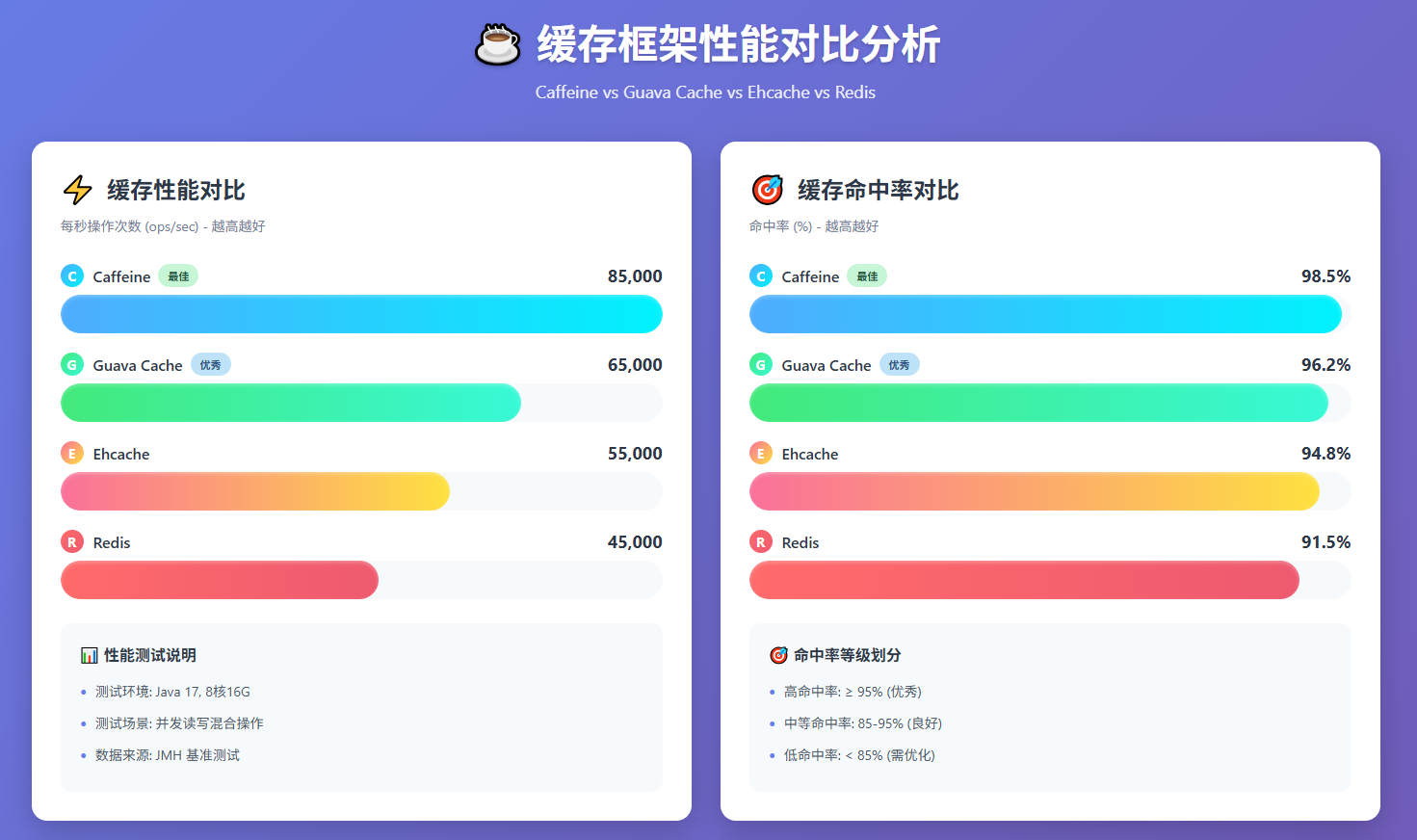
Caffeine是一个基于Java的高性能缓存库,由Google开发并开源。它被认为是Java缓存领域的王者,在性能测试中表现优异。
为什么选择Caffeine?
- 高性能:采用先进的算法,读写性能卓越
- 功能丰富:支持多种过期策略、异步加载、统计信息等
- 线程安全:并发性能优秀
- 易于使用:API设计简洁直观
- 活跃社区:持续维护和更新
架构设计
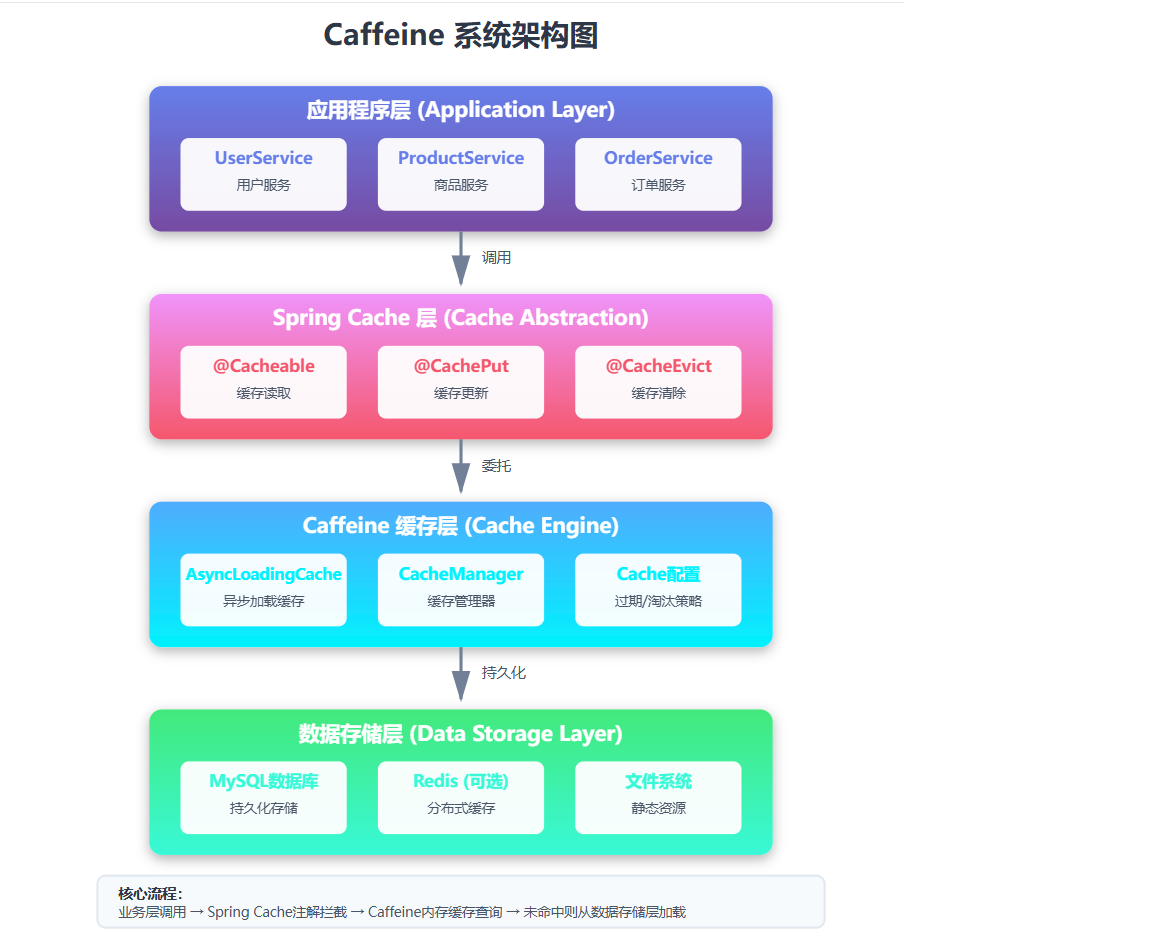
Caffeine的核心架构包括:
- 缓存容器:使用ConcurrentHashMap作为底层数据结构
- 访问策略:采用Window TinyLFU算法进行频率统计
- 淘汰策略:基于时间窗口和频率的混合淘汰策略
- 事件机制:支持监听缓存的各种事件
2. 快速入门
Maven依赖
<dependency>
    <groupId>com.github.ben-manes.caffeine</groupId>
    <artifactId>caffeine</artifactId>
    <version>3.1.8</version>
</dependency>
基础使用示例
import com.github.benmanes.caffeine.cache.Cache;
import com.github.benmanes.caffeine.cache.Caffeine;
import java.util.concurrent.TimeUnit;

public class BasicCacheExample {
    public static void main(String[] args) {
        // 创建缓存
        Cache<String, String> cache = Caffeine.newBuilder()
            .maximumSize(1000) // 最大缓存数量
            .expireAfterWrite(10, TimeUnit.MINUTES) // 写入后10分钟过期
            .build();

        // 存储数据
        cache.put("key1", "value1");

        // 获取数据
        String value = cache.getIfPresent("key1");
        System.out.println("缓存值: " + value);

        // 获取或计算
        String value2 = cache.get("key2", k -> "defaultValue");
        System.out.println("缓存值: " + value2);

        // 移除数据
        cache.invalidate("key1");
    }
}
3. 核心概念
3.1 Cache vs LoadingCache vs AsyncLoadingCache
Caffeine提供了三种缓存类型:
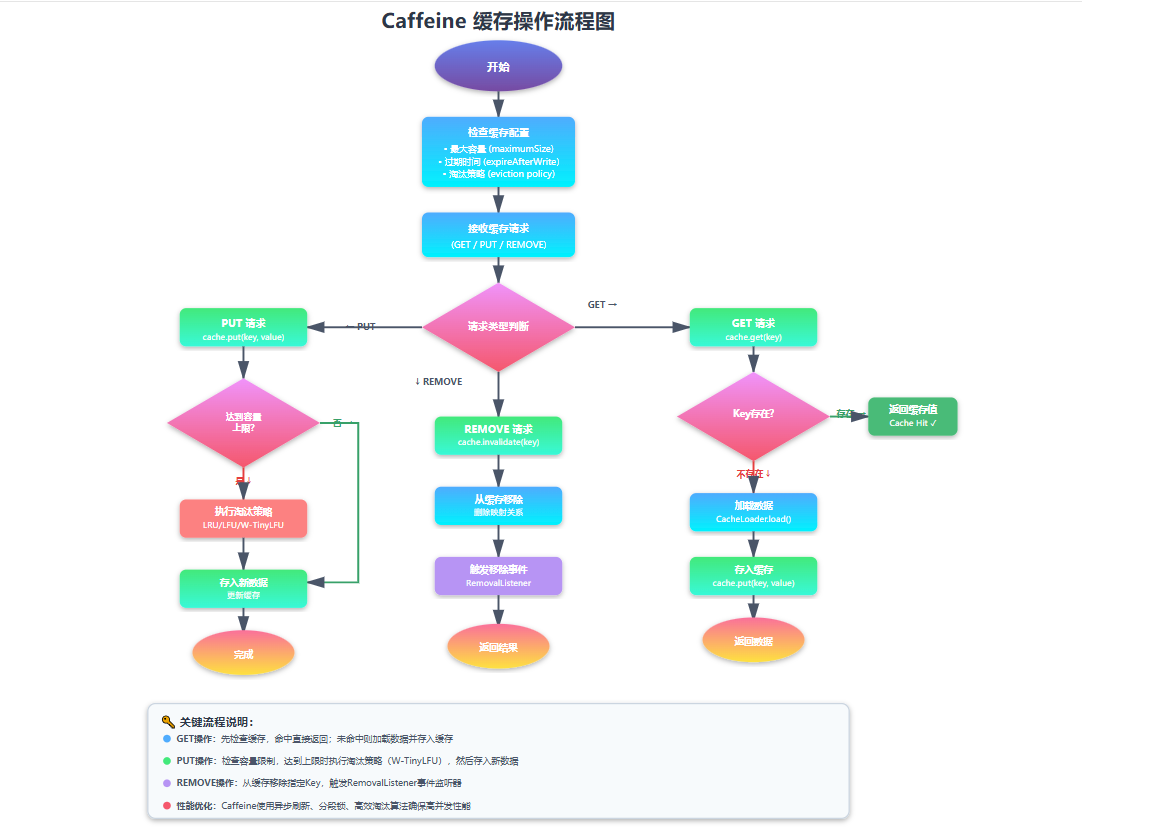
- Cache:基础缓存,需要手动管理数据
- LoadingCache:自动加载数据的缓存
- AsyncLoadingCache:异步加载数据的缓存
3.2 过期策略
Caffeine提供了三种过期策略:
Caffeine.newBuilder()
    .expireAfterWrite(10, TimeUnit.MINUTES) // 写入后过期
    .expireAfterAccess(5, TimeUnit.MINUTES)  // 最后访问后过期
    .expireAfter(30, TimeUnit.MINUTES);       // 自定义过期逻辑
3.3 淘汰策略
Caffeine.newBuilder()
    .maximumSize(1000)         // 基于数量
    .maximumWeight(10000)      // 基于权重
    .weakKeys()               // 弱引用键
    .weakValues()             // 弱引用值
    .softValues();            // 软引用值
4. 高级特性
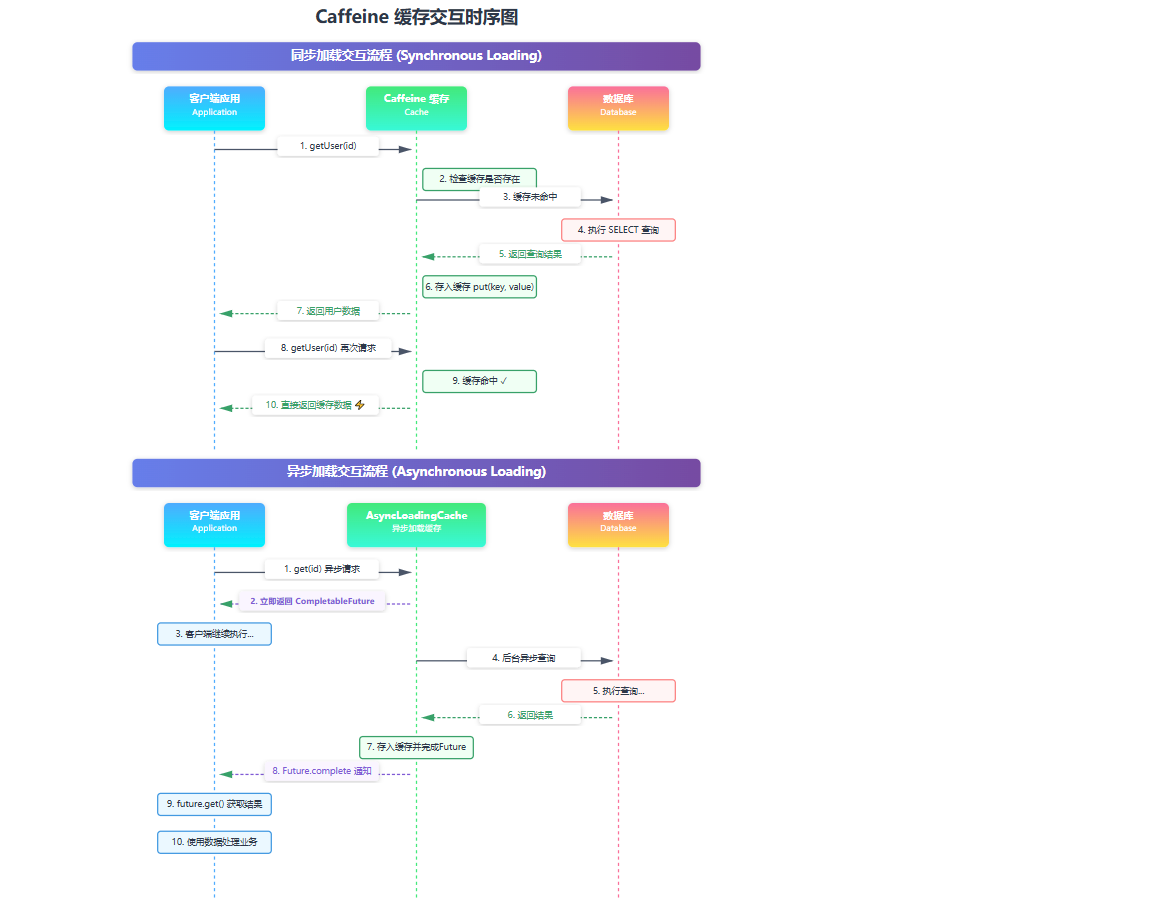
4.1 异步加载
AsyncLoadingCache<String, User> asyncCache = Caffeine.newBuilder()
    .maximumSize(1000)
    .expireAfterWrite(10, TimeUnit.MINUTES)
    .buildAsync(key -> loadUserFromDatabase(key));

// 异步获取
CompletableFuture<User> userFuture = asyncCache.get("user1");
userFuture.thenAccept(user -> {
    System.out.println("获取用户: " + user.getName());
});
4.2 事件监听
Cache<String, String> cache = Caffeine.newBuilder()
    .maximumSize(1000)
    .removalListener((key, value, cause) -> {
        System.out.println("缓存移除: " + key + " -> " + value + ", 原因: " + cause);
    })
    .build();
4.3 统计信息
Cache<String, String> cache = Caffeine.newBuilder()
    .maximumSize(1000)
    .recordStats() // 启用统计
    .build();

// 使用缓存...
cache.put("key1", "value1");
cache.getIfPresent("key1");

// 获取统计信息
CacheStats stats = cache.stats();
System.out.println("命中率: " + stats.hitRate());
System.out.println("加载时间: " + stats.averageLoadPenalty());
System.out.println("请求数: " + stats.requestCount());
5. Spring Boot集成
5.1 添加依赖
<dependency>
    <groupId>org.springframework.boot</groupId>
    <artifactId>spring-boot-starter-cache</artifactId>
</dependency>
<dependency>
    <groupId>com.github.ben-manes.caffeine</groupId>
    <artifactId>caffeine</artifactId>
</dependency>
5.2 配置类
import com.github.benmanes.caffeine.cache.Caffeine;
import org.springframework.cache.CacheManager;
import org.springframework.cache.annotation.EnableCaching;
import org.springframework.cache.caffeine.CaffeineCacheManager;
import org.springframework.context.annotation.Bean;
import org.springframework.context.annotation.Configuration;
import java.util.concurrent.TimeUnit;

@Configuration
@EnableCaching
public class CacheConfig {

    @Bean
    public CacheManager cacheManager() {
        CaffeineCacheManager cacheManager = new CaffeineCacheManager();
        cacheManager.setCaffeine(caffeineCacheBuilder());
        return cacheManager;
    }

    private Caffeine<Object, Object> caffeineCacheBuilder() {
        return Caffeine.newBuilder()
                .initialCapacity(100)
                .maximumSize(1000)
                .expireAfterWrite(10, TimeUnit.MINUTES)
                .recordStats();
    }
}
5.3 使用注解
package com.example.caffeine.demo.service;

import com.example.caffeine.demo.model.User;
import org.springframework.cache.annotation.CacheEvict;
import org.springframework.cache.annotation.CachePut;
import org.springframework.cache.annotation.Cacheable;
import org.springframework.stereotype.Service;

import java.util.*;
import java.util.concurrent.ConcurrentHashMap;
import java.util.concurrent.TimeUnit;

@Service
public class UserService {

    // 模拟数据库存储
    private final Map<Long, User> userMap = new ConcurrentHashMap<>();

    public UserService() {
        // 初始化一些测试数据
        userMap.put(1L, new User(1L, "张三", "zhangsan@example.com", "13800138000"));
        userMap.put(2L, new User(2L, "李四", "lisi@example.com", "13900139000"));
        userMap.put(3L, new User(3L, "王五", "wangwu@example.com", "13700137000"));
    }

    /**
     * 获取用户信息(带缓存)
     * @param userId 用户ID
     * @return 用户信息
     */
    @Cacheable(value = "users", key = "#userId")
    public User getUserById(Long userId) {
        // 模拟数据库查询耗时
        try {
            TimeUnit.MILLISECONDS.sleep(100);
        } catch (InterruptedException e) {
            Thread.currentThread().interrupt();
        }

        User user = userMap.get(userId);
        if (user == null) {
            throw new RuntimeException("用户不存在: " + userId);
        }
        return user;
    }

    /**
     * 获取用户信息(异步)
     */
    public CompletableFuture<User> getUserByIdAsync(Long userId) {
        return CompletableFuture.supplyAsync(() -> getUserById(userId));
    }

    /**
     * 获取所有用户信息
     */
    @Cacheable(value = "users", key = "'all'")
    public List<User> getAllUsers() {
        // 模拟数据库查询耗时
        try {
            TimeUnit.MILLISECONDS.sleep(200);
        } catch (InterruptedException e) {
            Thread.currentThread().interrupt();
        }

        return new ArrayList<>(userMap.values());
    }

    /**
     * 创建用户
     */
    @CachePut(value = "users", key = "#user.id")
    public User createUser(User user) {
        userMap.put(user.getId(), user);
        return user;
    }

    /**
     * 更新用户信息
     */
    @CachePut(value = "users", key = "#user.id")
    public User updateUser(User user) {
        if (!userMap.containsKey(user.getId())) {
            throw new RuntimeException("用户不存在: " + user.getId());
        }
        user.setUpdateTime(LocalDateTime.now());
        userMap.put(user.getId(), user);
        return user;
    }

    /**
     * 删除用户
     */
    @CacheEvict(value = "users", key = "#userId")
    public void deleteUser(Long userId) {
        User removed = userMap.remove(userId);
        if (removed == null) {
            throw new RuntimeException("用户不存在: " + userId);
        }
    }

    /**
     * 批量获取用户信息
     */
    @Cacheable(value = "users", key = "'batch:' + #userIds.hashCode()")
    public Map<Long, User> batchGetUsers(Set<Long> userIds) {
        // 模拟批量查询耗时
        try {
            TimeUnit.MILLISECONDS.sleep(150);
        } catch (InterruptedException e) {
            Thread.currentThread().interrupt();
        }

        Map<Long, User> result = new HashMap<>();
        for (Long userId : userIds) {
            User user = userMap.get(userId);
            if (user != null) {
                result.put(userId, user);
            }
        }
        return result;
    }

    /**
     * 根据用户名模糊查询
     */
    public List<User> searchUsersByUsername(String keyword) {
        List<User> result = new ArrayList<>();
        for (User user : userMap.values()) {
            if (user.getUsername().contains(keyword)) {
                result.add(user);
            }
        }
        return result;
    }

    /**
     * 清空所有缓存
     */
    @CacheEvict(value = "users", allEntries = true)
    public void clearAllCache() {
        System.out.println("清空所有用户缓存");
    }

    /**
     * 获取用户总数
     */
    public long getUserCount() {
        return userMap.size();
    }
}
6. 生产环境最佳实践
6.1 缓存雪崩与击穿
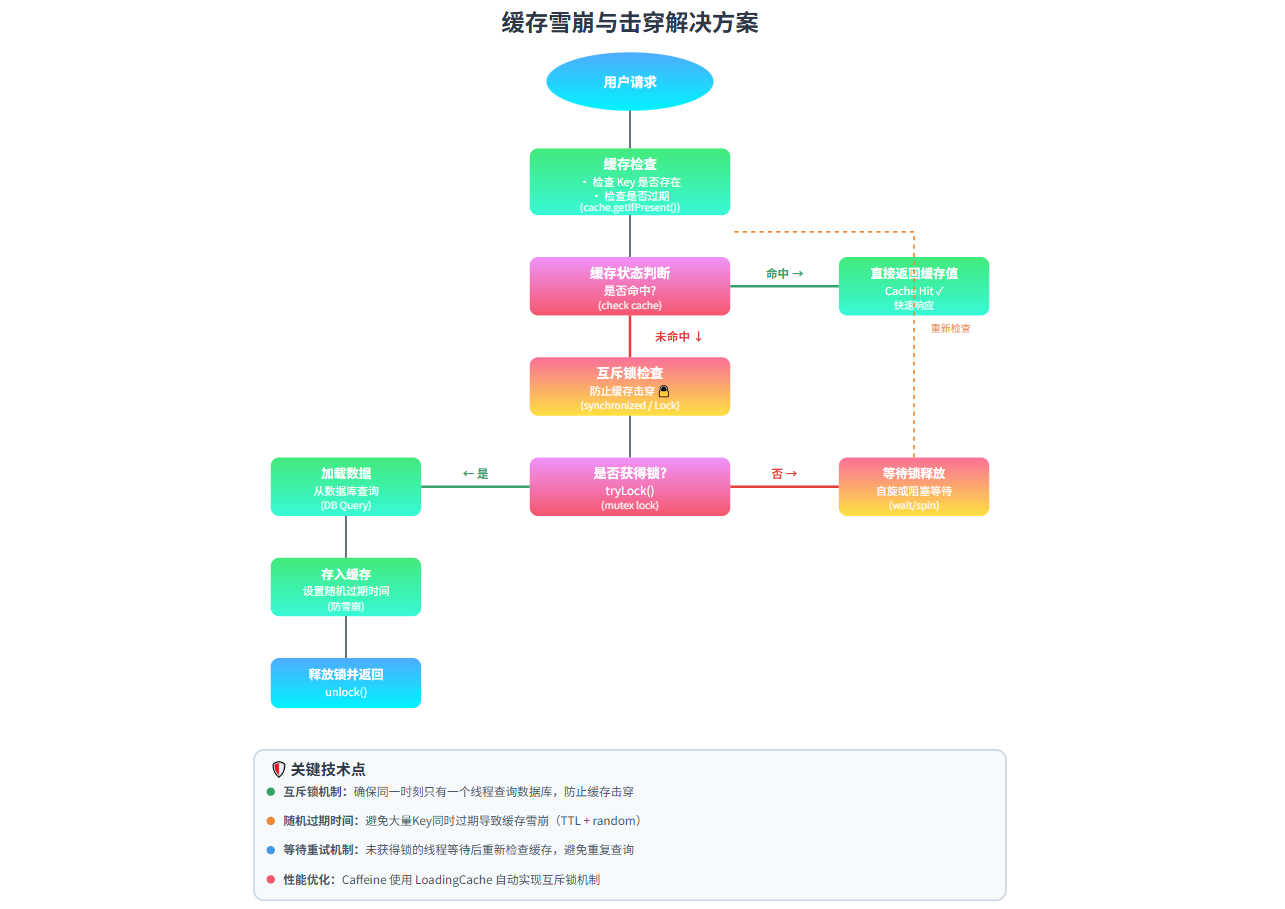
缓存雪崩解决方案
// 1. 设置随机过期时间
Caffeine.newBuilder()
    .expireAfterWrite(10 + new Random().nextInt(5), TimeUnit.MINUTES);

// 2. 使用互斥锁
private final Lock lock = new ReentrantLock();

public User getUserWithLock(Long id) {
    User user = cache.getIfPresent(id);
    if (user != null) {
        return user;
    }

    lock.lock();
    try {
        // 双重检查
        user = cache.getIfPresent(id);
        if (user != null) {
            return user;
        }

        user = userRepository.findById(id);
        cache.put(id, user);
        return user;
    } finally {
        lock.unlock();
    }
}
缓存击穿解决方案
// 使用Caffeine的异步加载
AsyncLoadingCache<Long, User> asyncCache = Caffeine.newBuilder()
    .maximumSize(1000)
    .expireAfterWrite(10, TimeUnit.MINUTES)
    .buildAsync(key -> loadUserFromDatabase(key));

public User getUser(Long id) {
    return asyncCache.get(id).join();
}
6.2 缓存预热
package com.example.caffeine.demo.cache;

import com.example.caffeine.demo.model.User;
import com.example.caffeine.demo.service.UserService;
import lombok.extern.slf4j.Slf4j;
import org.springframework.beans.factory.annotation.Autowired;
import org.springframework.boot.CommandLineRunner;
import org.springframework.stereotype.Component;

import java.util.Arrays;
import java.util.List;
import java.util.concurrent.CompletableFuture;
import java.util.concurrent.ExecutorService;
import java.util.concurrent.Executors;
import java.util.concurrent.TimeUnit;
import java.util.stream.Collectors;

/**
 * 缓存预热启动器
 *
 * 功能:
 * 1. 在应用启动时自动预热热点数据到缓存
 * 2. 支持同步和异步预热方式
 * 3. 支持批量预热
 * 4. 提供预热进度监控
 * 5. 异常处理和重试机制
 */
@Slf4j
@Component
public class CacheWarmupRunner implements CommandLineRunner {

    @Autowired
    private UserService userService;

    /**
     * 预热配置
     */
    private static class WarmupConfig {
        // 预热用户ID列表(可以根据业务需求配置)
        private static final List<Long> HOT_USER_IDS = Arrays.asList(1L, 2L, 3L, 4L, 5L);

        // 预热批次大小
        private static final int BATCH_SIZE = 3;

        // 线程池大小
        private static final int THREAD_POOL_SIZE = 2;

        // 是否启用异步预热
        private static final boolean ASYNC_WARMUP = true;

        // 最大重试次数
        private static final int MAX_RETRY_TIMES = 3;

        // 重试间隔(毫秒)
        private static final long RETRY_INTERVAL = 1000L;
    }

    @Override
    public void run(String... args) throws Exception {
        log.info("开始执行缓存预热...");
        long startTime = System.currentTimeMillis();

        try {
            if (WarmupConfig.ASYNC_WARMUP) {
                // 异步预热
                asyncWarmup();
            } else {
                // 同步预热
                syncWarmup();
            }

            long endTime = System.currentTimeMillis();
            log.info("缓存预热完成!耗时: {} ms", endTime - startTime);

        } catch (Exception e) {
            log.error("缓存预热失败!错误信息: {}", e.getMessage(), e);
        }
    }

    /**
     * 同步预热方式
     */
    private void syncWarmup() {
        log.info("使用同步方式预热缓存...");

        // 方法1:逐个预热
        log.info("逐个预热用户数据...");
        for (Long userId : WarmupConfig.HOT_USER_IDS) {
            warmupSingleUser(userId);
        }

        // 方法2:批量预热
        log.info("批量预热用户数据...");
        batchWarmupUsers(WarmupConfig.HOT_USER_IDS);

        // 方法3:预热所有用户
        log.info("预热所有用户数据...");
        warmupAllUsers();
    }

    /**
     * 异步预热方式
     */
    private void asyncWarmup() {
        log.info("使用异步方式预热缓存...");

        ExecutorService executor = Executors.newFixedThreadPool(WarmupConfig.THREAD_POOL_SIZE);

        // 创建异步预热任务
        List<CompletableFuture<Void>> futures = WarmupConfig.HOT_USER_IDS.stream()
            .map(userId -> CompletableFuture.runAsync(() -> {
                try {
                    warmupSingleUserWithRetry(userId);
                } catch (Exception e) {
                    log.error("预热用户 {} 失败: {}", userId, e.getMessage());
                }
            }, executor))
            .collect(Collectors.toList());

        // 等待所有任务完成
        CompletableFuture.allOf(futures.toArray(new CompletableFuture[0]))
            .whenComplete((result, ex) -> {
                if (ex != null) {
                    log.error("部分预热任务失败", ex);
                } else {
                    log.info("所有预热任务完成");
                }
                executor.shutdown();
            })
            .join();
    }

    /**
     * 预热单个用户数据(带重试机制)
     */
    private void warmupSingleUserWithRetry(Long userId) {
        int retryCount = 0;
        boolean success = false;

        while (retryCount < WarmupConfig.MAX_RETRY_TIMES && !success) {
            try {
                warmupSingleUser(userId);
                success = true;
                log.debug("用户 {} 预热成功,尝试次数: {}", userId, retryCount + 1);
            } catch (Exception e) {
                retryCount++;
                if (retryCount >= WarmupConfig.MAX_RETRY_TIMES) {
                    log.error("用户 {} 预热失败,已达到最大重试次数: {}", userId, e.getMessage());
                    throw new RuntimeException("预热用户 " + userId + " 失败", e);
                }
                log.warn("用户 {} 预热失败,第{}次重试。错误: {}", userId, retryCount, e.getMessage());
                try {
                    Thread.sleep(WarmupConfig.RETRY_INTERVAL);
                } catch (InterruptedException ie) {
                    Thread.currentThread().interrupt();
                    throw new RuntimeException("预热被中断", ie);
                }
            }
        }
    }

    /**
     * 预热单个用户
     */
    private void warmupSingleUser(Long userId) {
        log.info("预热用户: {}", userId);
        try {
            // 预热用户基本信息
            User user = userService.getUserById(userId);
            log.debug("用户 {} 基本信息预热完成", userId);
            // 预热相关数据(如果有)
            warmupRelatedData(user);

        } catch (Exception e) {
            log.error("预热用户 {} 失败: {}", userId, e.getMessage());
            throw e;
        }
    }

    /**
     * 批量预热用户数据
     */
    private void batchWarmupUsers(List<Long> userIds) {
        log.info("批量预热用户: {}", userIds);

        // 按批次处理
        for (int i = 0; i < userIds.size(); i += WarmupConfig.BATCH_SIZE) {
            int end = Math.min(i + WarmupConfig.BATCH_SIZE, userIds.size());
            List<Long> batch = userIds.subList(i, end);

            log.info("预热第 {} 批,用户ID: {}", (i / WarmupConfig.BATCH_SIZE) + 1, batch);

            try {
                // 批量查询
                Map<Long, User> users = userService.batchGetUsers(new HashSet<>(batch));
                log.info("批量预热完成,成功预热 {} 个用户", users.size());

                // 添加批次间间隔,避免压力过大
                if (end < userIds.size()) {
                    Thread.sleep(500);
                }

            } catch (Exception e) {
                log.error("批量预热失败: {}", e.getMessage());
                // 单个预热降级
                for (Long userId : batch) {
                    try {
                        warmupSingleUser(userId);
                    } catch (Exception ex) {
                        log.error("降级预热用户 {} 失败: {}", userId, ex.getMessage());
                    }
                }
            }
        }
    }

    /**
     * 预热所有用户
     */
    private void warmupAllUsers() {
        log.info("开始预热所有用户数据...");
        try {
            List<User> allUsers = userService.getAllUsers();
            log.info("预热所有用户完成,共 {} 个用户", allUsers.size());
            // 预热用户的其他关联数据
            for (User user : allUsers) {
                warmupRelatedData(user);
                // 添加间隔,避免一次性加载过多数据
                Thread.sleep(100);
            }
        } catch (Exception e) {
            log.error("预热所有用户失败: {}", e.getMessage());
            throw e;
        }
    }

    /**
     * 预热相关数据
     */
    private void warmupRelatedData(User user) {
        // 预热用户的行为数据
        warmupUserActivities(user.getId());
    }

    /**
     * 预热用户行为数据
     */
    private void warmupUserActivities(Long userId) {
        try {
            // 调用行为服务预热
            // activityService.warmupUserActivities(userId);
            log.debug("预热用户 {} 的行为数据", userId);
        } catch (Exception e) {
            log.warn("预热用户 {} 的行为数据失败: {}", userId, e.getMessage());
        }
    }


    /**
     * 验证预热结果
     */
    public void verifyWarmupResult() {
        log.info("验证预热结果...");
        int successCount = 0;
        int totalCount = WarmupConfig.HOT_USER_IDS.size();
        for (Long userId : WarmupConfig.HOT_USER_IDS) {
            try {
                // 测试缓存是否命中
                long startTime = System.nanoTime();
                User user = userService.getUserById(userId);
                long endTime = System.nanoTime();
                long duration = TimeUnit.NANOSECONDS.toMillis(endTime - startTime);
                if (duration < 10) { // 如果响应时间小于10ms,说明命中了缓存
                    successCount++;
                    log.debug("用户 {} 缓存预热验证成功,响应时间: {} ms", userId, duration);
                } else {
                    log.warn("用户 {} 缓存预热验证失败,响应时间: {} ms", userId, duration);
                }
            } catch (Exception e) {
                log.error("验证用户 {} 失败: {}", userId, e.getMessage());
            }
        }
        log.info("预热结果验证完成,成功率: {} / {} ({:.2f}%)",
                successCount, totalCount, (double) successCount / totalCount * 100);
    }
}
6.3 缓存监控
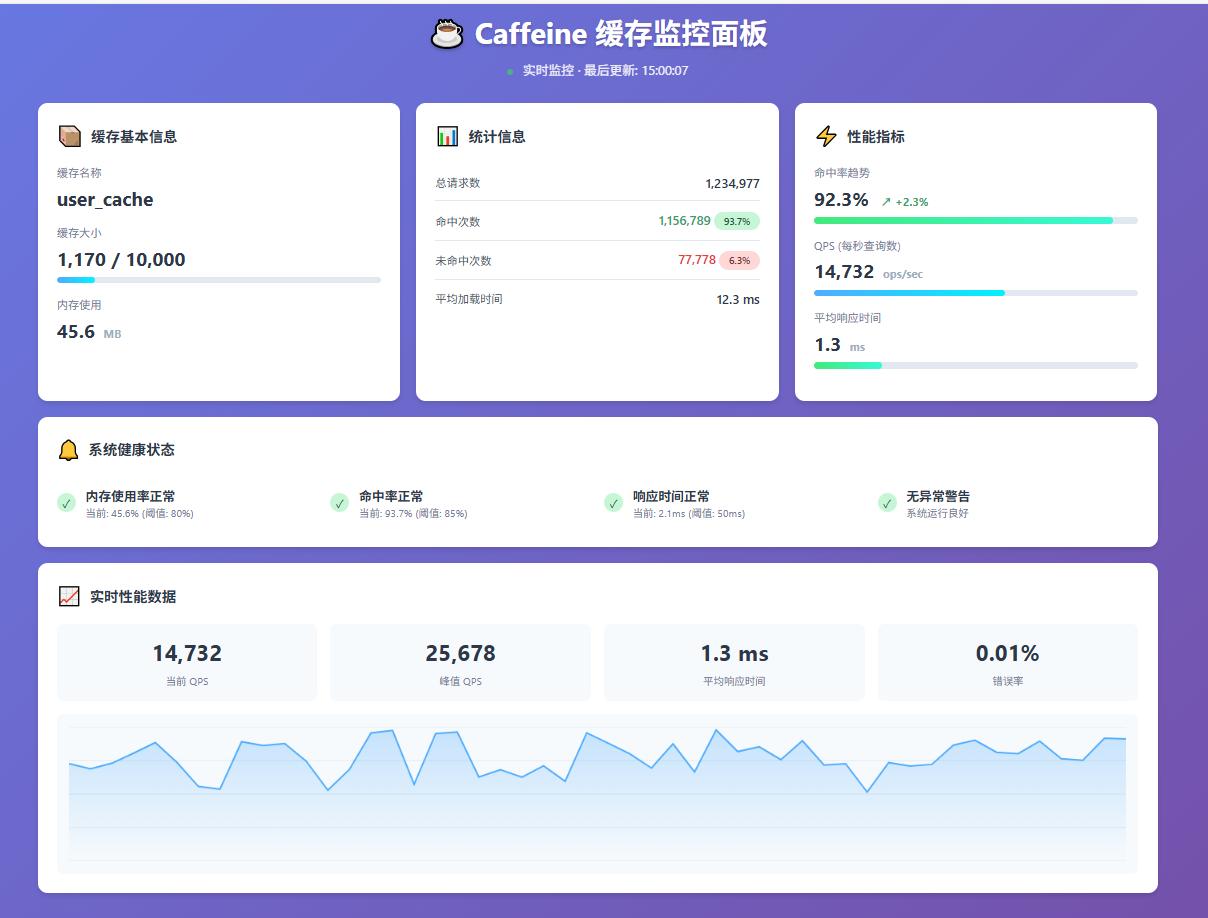
 @Autowired
    private CacheManager cacheManager;
    // 预警阈值配置
    private static class AlertThreshold {
        // 命中率阈值(低于此值发出警告)
        private static final double MIN_HIT_RATE = 0.8;
        // 平均加载时间阈值(超过此值发出警告)
        private static final long MAX_AVG_LOAD_TIME_MS = 100;
        // 内存使用率阈值
        private static final double MAX_MEMORY_USAGE_PERCENT = 80.0;
        // 错误率阈值
        private static final double MAX_ERROR_RATE = 0.01;
        // 缓存大小阈值
        private static final long MAX_CACHE_SIZE = 10000;
    }

    /**
     * 获取所有缓存的统计信息
     */
    @GetMapping("/stats")
    public ResponseEntity<Map<String, Object>> getAllCacheStats() {
        Map<String, Object> result = new LinkedHashMap<>();
        // 获取所有缓存名称
        List<String> cacheNames = cacheManager.getCacheNames();
        result.put("timestamp", LocalDateTime.now());
        result.put("cacheNames", cacheNames);
        result.put("cacheCount", cacheNames.size());
        // 统计汇总
        CacheSummary summary = new CacheSummary();
        for (String cacheName : cacheNames) {
            try {
                Map<String, Object> cacheStat = getCacheStat(cacheName);
                result.put(cacheName, cacheStat);
                // 汇总统计
                summary.aggregate(cacheStat);
            } catch (Exception e) {
                log.error("获取缓存 {} 的统计信息失败: {}", cacheName, e.getMessage());
                result.put(cacheName, "获取统计信息失败: " + e.getMessage());
            }
        }
        result.put("summary", summary);
        result.put("health", getCacheHealthStatus(summary));
        return ResponseEntity.ok(result);
    }

    /**
     * 获取指定缓存的统计信息
     */
    @GetMapping("/stats/{cacheName}")
    public ResponseEntity<Map<String, Object>> getCacheStat(@PathVariable String cacheName) {
        log.info("获取缓存 {} 的统计信息", cacheName);
        Map<String, Object> result = new HashMap<>();
        try {
            org.springframework.cache.Cache springCache = cacheManager.getCache(cacheName);
            if (springCache == null) {
                return ResponseEntity.notFound().build();
            }
            Object nativeCache = springCache.getNativeCache();
            if (nativeCache instanceof Cache) {
                Cache<?, ?> cache = (Cache<?, ?>) nativeCache;
                CacheStats stats = cache.stats();
                // 基本信息
                result.put("name", cacheName);
                result.put("size", estimateCacheSize(cache));
                result.put("estimatedMemoryUsage", estimateMemoryUsage(cache));
                // 统计数据
                result.put("requestCount", stats.requestCount());
                result.put("hitCount", stats.hitCount());
                result.put("missCount", stats.missCount());
                result.put("hitRate", stats.hitRate());
                result.put("missRate", stats.missRate());
                // 加载统计
                result.put("loadSuccessCount", stats.loadSuccessCount());
                result.put("loadFailureCount", stats.loadFailureCount());
                result.put("loadFailureRate", calculateLoadFailureRate(stats));
                result.put("totalLoadTime", stats.totalLoadTime());
                result.put("averageLoadPenalty", stats.averageLoadPenalty());
                // 淘汰统计
                result.put("evictionCount", stats.evictionCount());
                result.put("evictionWeight", stats.evictionWeight());
                // 其他统计
                result.put("rejectionCount", stats.rejectionCount());
                // 计算衍生指标
                result.put("errorRate", calculateErrorRate(stats));
                result.put("loadSuccessRate", calculateLoadSuccessRate(stats));
                // 预警信息
                result.put("alerts", checkCacheAlerts(cacheName, stats, cache.estimatedSize()));
            } else {
                result.put("error", "不支持的缓存类型: " + nativeCache.getClass().getName());
            }
        } catch (Exception e) {
            log.error("获取缓存 {} 统计信息失败: {}", cacheName, e.getMessage());
            result.put("error", e.getMessage());
        }
        result.put("timestamp", LocalDateTime.now());
        return ResponseEntity.ok(result);
    }
7. 性能优化技巧
7.1 批量加载优化
// 批量加载优化
public class BatchUserService {

    private final AsyncLoadingCache<Long, User> userCache;

    public BatchUserService() {
        this.userCache = Caffeine.newBuilder()
            .maximumSize(1000)
            .expireAfterWrite(10, TimeUnit.MINUTES)
            .buildAsync(this::batchLoadUsers);
    }

    private Map<Long, User> batchLoadUsers(Set<Long> userIds) {
        if (userIds.isEmpty()) {
            return Collections.emptyMap();
        }

        // 批量查询数据库
        List<User> users = userRepository.findAllById(userIds);

        // 转换为Map
        return users.stream()
            .collect(Collectors.toMap(User::getId, user -> user));
    }

    public Map<Long, User> getUsers(Set<Long> userIds) {
        return userCache.getAll(userIds).join();
    }
}
8. 实战案例
8.1 用户信息缓存服务
import com.github.benmanes.caffeine.cache.Cache;
import com.github.benmanes.caffeine.cache.Caffeine;
import org.springframework.stereotype.Service;

import java.util.concurrent.TimeUnit;

@Service
public class UserInfoCacheService {

    private final Cache<Long, UserInfo> userInfoCache;

    public UserInfoCacheService() {
        this.userInfoCache = Caffeine.newBuilder()
            .maximumSize(10000)
            .expireAfterWrite(30, TimeUnit.MINUTES)
            .expireAfterAccess(10, TimeUnit.MINUTES)
            .recordStats()
            .build();
    }

    /**
     * 获取用户信息
     */
    public UserInfo getUserInfo(Long userId) {
        return userInfoCache.get(userId, this::loadUserInfoFromDB);
    }

    /**
     * 批量获取用户信息
     */
    public Map<Long, UserInfo> batchGetUserInfo(Set<Long> userIds) {
        return userInfoCache.getAll(userIds, this::batchLoadUserInfoFromDB);
    }

    /**
     * 更新用户信息
     */
    public void updateUserInfo(Long userId, UserInfo userInfo) {
        userInfoCache.put(userId, userInfo);
    }

    /**
     * 删除用户信息
     */
    public void removeUserInfo(Long userId) {
        userInfoCache.invalidate(userId);
    }

    /**
     * 获取缓存统计
     */
    public CacheStats getCacheStats() {
        return userInfoCache.stats();
    }

    /**
     * 从数据库加载用户信息
     */
    private UserInfo loadUserInfoFromDB(Long userId) {
        // 模拟数据库查询
        try {
            Thread.sleep(100); // 模拟数据库查询耗时
        } catch (InterruptedException e) {
            Thread.currentThread().interrupt();
        }
        return userRepository.findById(userId);
    }

    /**
     * 批量从数据库加载用户信息
     */
    private Map<Long, UserInfo> batchLoadUserInfoFromDB(Set<Long> userIds) {
        return userRepository.findAllById(userIds).stream()
            .collect(Collectors.toMap(UserInfo::getId, Function.identity()));
    }
}
9. 总结
Caffeine作为Java缓存领域的佼佼者,凭借其出色的性能和丰富的功能,已经成为许多项目的首选缓存方案。