Flutter实战:打造安全可靠的密码生成器,支持强度检测与历史记录
在网络安全日益重要的今天,一个强密码是保护账户安全的第一道防线。本文将用Flutter实现一款功能完善的密码生成器,支持自定义长度、字符类型、强度检测、一键复制和历史记录等功能。
效果预览
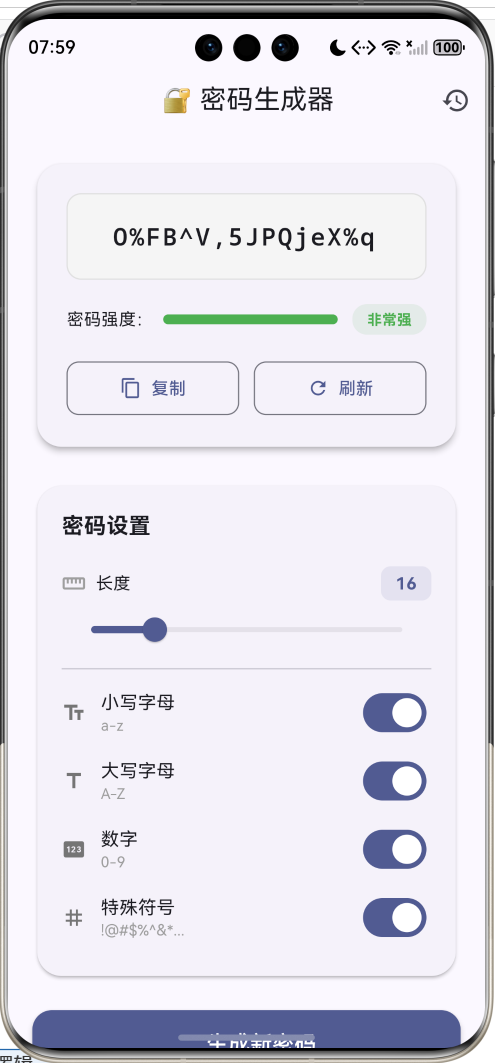
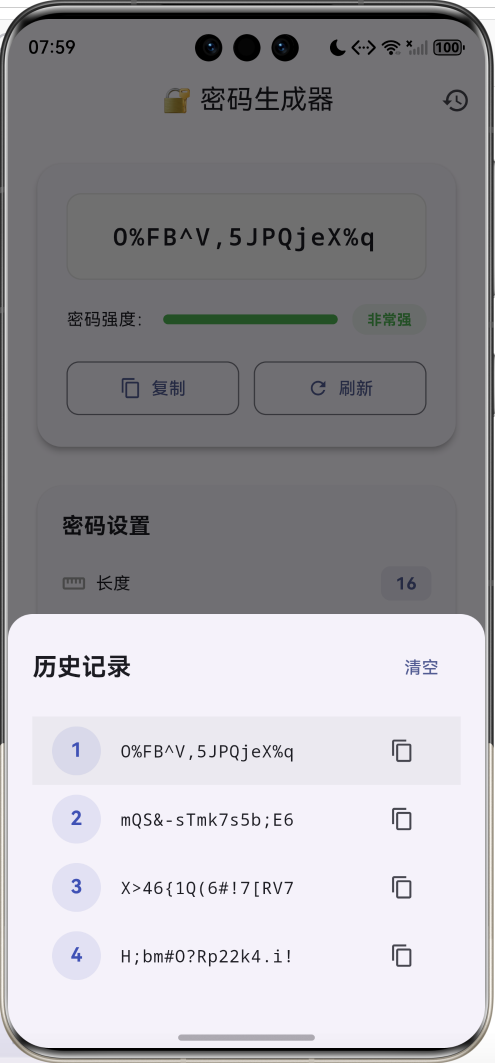
功能特性
- 🔐 安全随机 :使用
Random.secure()生成密码学安全的随机数 - 📏 自定义长度:支持 4-64 位密码长度
- 🔤 字符类型:小写字母、大写字母、数字、特殊符号自由组合
- 💪 强度检测:实时评估密码强度(弱/中等/强/非常强)
- 📋 一键复制:快速复制到剪贴板
- 📜 历史记录:保存最近10条生成记录
架构设计
输出展示
核心逻辑
用户交互
长度滑块
生成密码
字符类型开关
生成按钮
刷新按钮
构建字符池
Random.secure
确保字符多样性
打乱顺序
密码显示
强度计算
历史记录
复制功能
核心算法
安全随机数生成
普通的 Random() 使用伪随机算法,可预测性较高。密码生成必须使用 Random.secure(),它基于操作系统的密码学安全随机数生成器(CSPRNG)。
dart
final random = Random.secure(); // 密码学安全的随机数生成器密码生成策略
为了保证密码质量,采用"保证多样性 + 随机填充 + 打乱顺序"的三步策略:
选中的字符类型
每类至少取1个
随机填充剩余长度
打乱整体顺序
最终密码
dart
void _generatePassword() {
  // 1. 构建字符池
  String chars = '';
  if (_includeLowercase) chars += _lowercase;
  if (_includeUppercase) chars += _uppercase;
  if (_includeNumbers) chars += _numbers;
  if (_includeSymbols) chars += _symbols;

  if (chars.isEmpty) {
    setState(() => _password = '请至少选择一种字符类型');
    return;
  }

  final random = Random.secure();
  final length = _length.toInt();

  // 2. 确保每种选中的字符类型至少出现一次
  List<String> required = [];
  if (_includeLowercase) {
    required.add(_lowercase[random.nextInt(_lowercase.length)]);
  }
  if (_includeUppercase) {
    required.add(_uppercase[random.nextInt(_uppercase.length)]);
  }
  if (_includeNumbers) {
    required.add(_numbers[random.nextInt(_numbers.length)]);
  }
  if (_includeSymbols) {
    required.add(_symbols[random.nextInt(_symbols.length)]);
  }

  // 3. 随机填充剩余长度
  for (int i = required.length; i < length; i++) {
    required.add(chars[random.nextInt(chars.length)]);
  }

  // 4. 打乱顺序,避免固定模式
  required.shuffle(random);

  setState(() {
    _password = required.join();
  });
}
密码强度评估
密码强度由长度和字符多样性共同决定:
| 评估维度 | 条件 | 得分 |
|---|---|---|
| 长度 | ≥ 8 位 | +1 |
| 长度 | ≥ 12 位 | +1 |
| 长度 | ≥ 16 位 | +1 |
| 小写字母 | 包含 a-z | +1 |
| 大写字母 | 包含 A-Z | +1 |
| 数字 | 包含 0-9 | +1 |
| 特殊符号 | 包含 !@#$... | +1 |
强度等级划分:
强度等级={弱score≤2中等2<score≤4强4<score≤6非常强score>6 强度等级 = \begin{cases} 弱 & score \leq 2 \\ 中等 & 2 < score \leq 4 \\ 强 & 4 < score \leq 6 \\ 非常强 & score > 6 \end{cases} 强度等级=⎩ ⎨ ⎧弱中等强非常强score≤22<score≤44<score≤6score>6
dart
int _calculateStrength() {
  if (_password.isEmpty || _password.startsWith('请')) return 0;

  int score = 0;
  // 长度评分
  if (_password.length >= 8) score++;
  if (_password.length >= 12) score++;
  if (_password.length >= 16) score++;
  // 字符类型评分
  if (_includeLowercase) score++;
  if (_includeUppercase) score++;
  if (_includeNumbers) score++;
  if (_includeSymbols) score++;

  return score;  // 最高7分
}

String _getStrengthText(int strength) {
  if (strength <= 2) return '弱';
  if (strength <= 4) return '中等';
  if (strength <= 6) return '强';
  return '非常强';
}

Color _getStrengthColor(int strength) {
  if (strength <= 2) return Colors.red;
  if (strength <= 4) return Colors.orange;
  if (strength <= 6) return Colors.blue;
  return Colors.green;
}
字符集定义
应用预定义了四类字符集:
dart
static const String _lowercase = 'abcdefghijklmnopqrstuvwxyz';
static const String _uppercase = 'ABCDEFGHIJKLMNOPQRSTUVWXYZ';
static const String _numbers = '0123456789';
static const String _symbols = '!@#\$%^&*()_+-=[]{}|;:,.<>?';
字符集统计:
| 类型 | 字符数 | 熵值(每字符) |
|---|---|---|
| 小写字母 | 26 | log226≈4.7\log_2{26} \approx 4.7log226≈4.7 bits |
| 大写字母 | 26 | log226≈4.7\log_2{26} \approx 4.7log226≈4.7 bits |
| 数字 | 10 | log210≈3.3\log_2{10} \approx 3.3log210≈3.3 bits |
| 特殊符号 | 28 | log228≈4.8\log_2{28} \approx 4.8log228≈4.8 bits |
| 全部 | 90 | log290≈6.5\log_2{90} \approx 6.5log290≈6.5 bits |
一个16位包含全部字符类型的密码,理论熵值约为 16×6.5=10416 \times 6.5 = 10416×6.5=104 bits,足以抵御暴力破解。
UI组件实现
密码显示卡片
密码显示区域使用 SelectableText 支持选中复制,配合动画效果增强交互体验:
dart
Widget _buildPasswordCard(int strength) {
  return Card(
    elevation: 4,
    shape: RoundedRectangleBorder(borderRadius: BorderRadius.circular(20)),
    child: Padding(
      padding: const EdgeInsets.all(24),
      child: Column(
        children: [
          // 密码显示(带缩放动画)
          ScaleTransition(
            scale: _animation,
            child: Container(
              width: double.infinity,
              padding: const EdgeInsets.all(20),
              decoration: BoxDecoration(
                color: Colors.grey[100],
                borderRadius: BorderRadius.circular(12),
                border: Border.all(color: Colors.grey[300]!),
              ),
              child: SelectableText(
                _password,
                style: const TextStyle(
                  fontSize: 20,
                  fontFamily: 'monospace',
                  fontWeight: FontWeight.w600,
                  letterSpacing: 1.5,
                ),
                textAlign: TextAlign.center,
              ),
            ),
          ),
          const SizedBox(height: 20),
          // 强度指示器
          Row(
            children: [
              const Text('密码强度:'),
              Expanded(
                child: LinearProgressIndicator(
                  value: strength / 7,
                  backgroundColor: Colors.grey[200],
                  valueColor: AlwaysStoppedAnimation(_getStrengthColor(strength)),
                ),
              ),
              Container(
                padding: const EdgeInsets.symmetric(horizontal: 12, vertical: 4),
                decoration: BoxDecoration(
                  color: _getStrengthColor(strength).withValues(alpha: 0.1),
                  borderRadius: BorderRadius.circular(12),
                ),
                child: Text(
                  _getStrengthText(strength),
                  style: TextStyle(
                    color: _getStrengthColor(strength),
                    fontWeight: FontWeight.bold,
                  ),
                ),
              ),
            ],
          ),
        ],
      ),
    ),
  );
}
选项开关组件
每个字符类型选项包含图标、标题、示例和开关:
dart
Widget _buildOptionTile({
  required IconData icon,
  required String title,
  required String subtitle,
  required bool value,
  required ValueChanged<bool> onChanged,
}) {
  return Padding(
    padding: const EdgeInsets.symmetric(vertical: 4),
    child: Row(
      children: [
        Icon(icon, size: 20, color: Colors.grey[600]),
        const SizedBox(width: 12),
        Expanded(
          child: Column(
            crossAxisAlignment: CrossAxisAlignment.start,
            children: [
              Text(title, style: const TextStyle(fontSize: 15)),
              Text(
                subtitle,
                style: TextStyle(fontSize: 12, color: Colors.grey[500]),
              ),
            ],
          ),
        ),
        Switch(value: value, onChanged: onChanged),
      ],
    ),
  );
}
历史记录功能
使用 List 存储最近10条生成记录,支持点击恢复和复制:
dart
void _showHistory() {
  showModalBottomSheet(
    context: context,
    shape: const RoundedRectangleBorder(
      borderRadius: BorderRadius.vertical(top: Radius.circular(20)),
    ),
    builder: (context) {
      return Container(
        padding: const EdgeInsets.all(20),
        child: Column(
          mainAxisSize: MainAxisSize.min,
          children: [
            Row(
              mainAxisAlignment: MainAxisAlignment.spaceBetween,
              children: [
                const Text('历史记录', style: TextStyle(fontSize: 20)),
                if (_history.isNotEmpty)
                  TextButton(
                    onPressed: () {
                      setState(() => _history.clear());
                      Navigator.pop(context);
                    },
                    child: const Text('清空'),
                  ),
              ],
            ),
            Flexible(
              child: ListView.builder(
                shrinkWrap: true,
                itemCount: _history.length,
                itemBuilder: (context, index) {
                  return ListTile(
                    title: Text(_history[index], style: const TextStyle(fontFamily: 'monospace')),
                    trailing: IconButton(
                      icon: const Icon(Icons.copy),
                      onPressed: () {
                        Clipboard.setData(ClipboardData(text: _history[index]));
                      },
                    ),
                  );
                },
              ),
            ),
          ],
        ),
      );
    },
  );
}
剪贴板操作
Flutter 通过 Clipboard 类实现剪贴板读写:
dart
void _copyToClipboard() {
  if (_password.isNotEmpty && !_password.startsWith('请')) {
    Clipboard.setData(ClipboardData(text: _password));

    ScaffoldMessenger.of(context).showSnackBar(
      SnackBar(
        content: const Row(
          children: [
            Icon(Icons.check_circle, color: Colors.white),
            SizedBox(width: 8),
            Text('密码已复制到剪贴板'),
          ],
        ),
        backgroundColor: Colors.green,
        behavior: SnackBarBehavior.floating,
        shape: RoundedRectangleBorder(borderRadius: BorderRadius.circular(10)),
      ),
    );
  }
}
动画效果
生成新密码时添加缩放动画,增强视觉反馈:
dart
late AnimationController _animController;
late Animation<double> _animation;

@override
void initState() {
  super.initState();
  _animController = AnimationController(
    duration: const Duration(milliseconds: 300),
    vsync: this,
  );
  _animation = CurvedAnimation(
    parent: _animController,
    curve: Curves.easeOut,
  );
}

// 生成密码后触发动画
void _generatePassword() {
  // ... 生成逻辑
  _animController.forward(from: 0);  // 从头播放动画
}
状态管理流程
视图 _calculateStrength _generatePassword Slider/Switch 用户 视图 _calculateStrength _generatePassword Slider/Switch 用户 调整长度/切换选项 触发生成 构建字符池 Random.secure() 确保多样性 打乱顺序 计算强度 setState() 更新显示
安全建议
密码安全
长度
至少12位
推荐16位以上
复杂度
混合大小写
包含数字
包含符号
使用习惯
不同网站不同密码
定期更换
使用密码管理器
存储
不明文存储
不通过不安全渠道传输
扩展方向
- 密码模板:预设常用场景(银行密码纯数字、WiFi密码等)
- 可读密码:生成易记忆的单词组合密码
- 密码检测:检测已有密码是否在泄露库中
- 云同步:加密存储历史记录到云端
- 自动填充:集成系统密码自动填充服务
项目结构
lib/
└── main.dart
    ├── PasswordGeneratorApp     # 主应用组件
    ├── _generatePassword()      # 密码生成核心
    ├── _calculateStrength()     # 强度计算
    ├── _copyToClipboard()       # 复制功能
    └── _showHistory()           # 历史记录
总结
这个密码生成器虽然代码量不大,但涵盖了几个重要的技术点:
- 密码学安全随机数 :使用
Random.secure()而非普通随机数 - 多样性保证:确保每种选中的字符类型至少出现一次
- 用户体验:实时生成、动画反馈、历史记录
- 强度可视化:直观展示密码安全等级
在实际应用中,建议配合密码管理器使用,为每个账户生成独立的强密码。
欢迎加入开源鸿蒙跨平台社区:https://openharmonycrossplatform.csdn.net