一、前言
在日常报销工作中,打印大量零散的 PDF 发票既繁琐又耗材。为提升效率、降低打印成本(包括纸张与墨水消耗),并便于后续查阅,可对不同类型的发票采用针对性的合并排版策略:
1)多个PDF整合成一个PDF文件
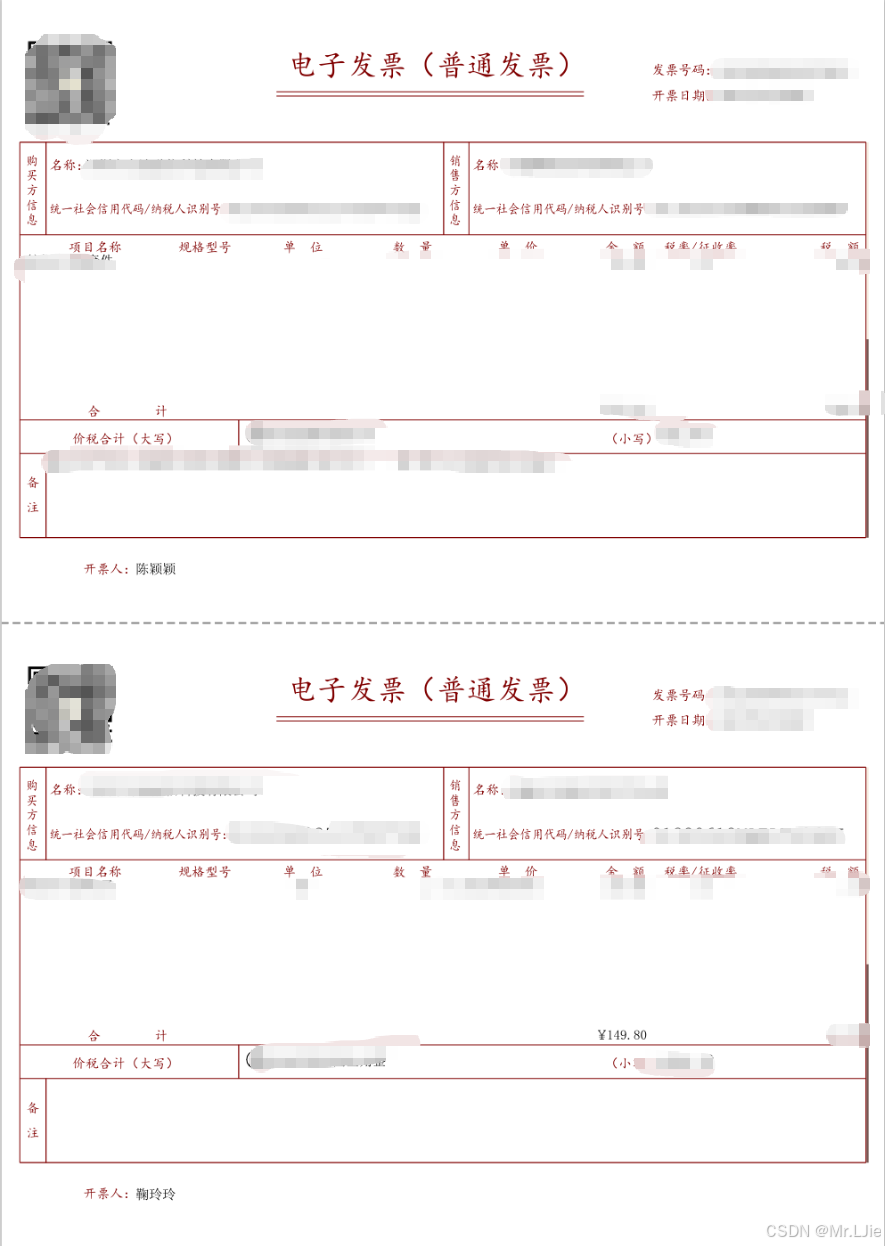
2)对于普通 PDF 发票,将其纵向上下拼接,合并至单张标准 A4 尺寸的 PDF 页面中;
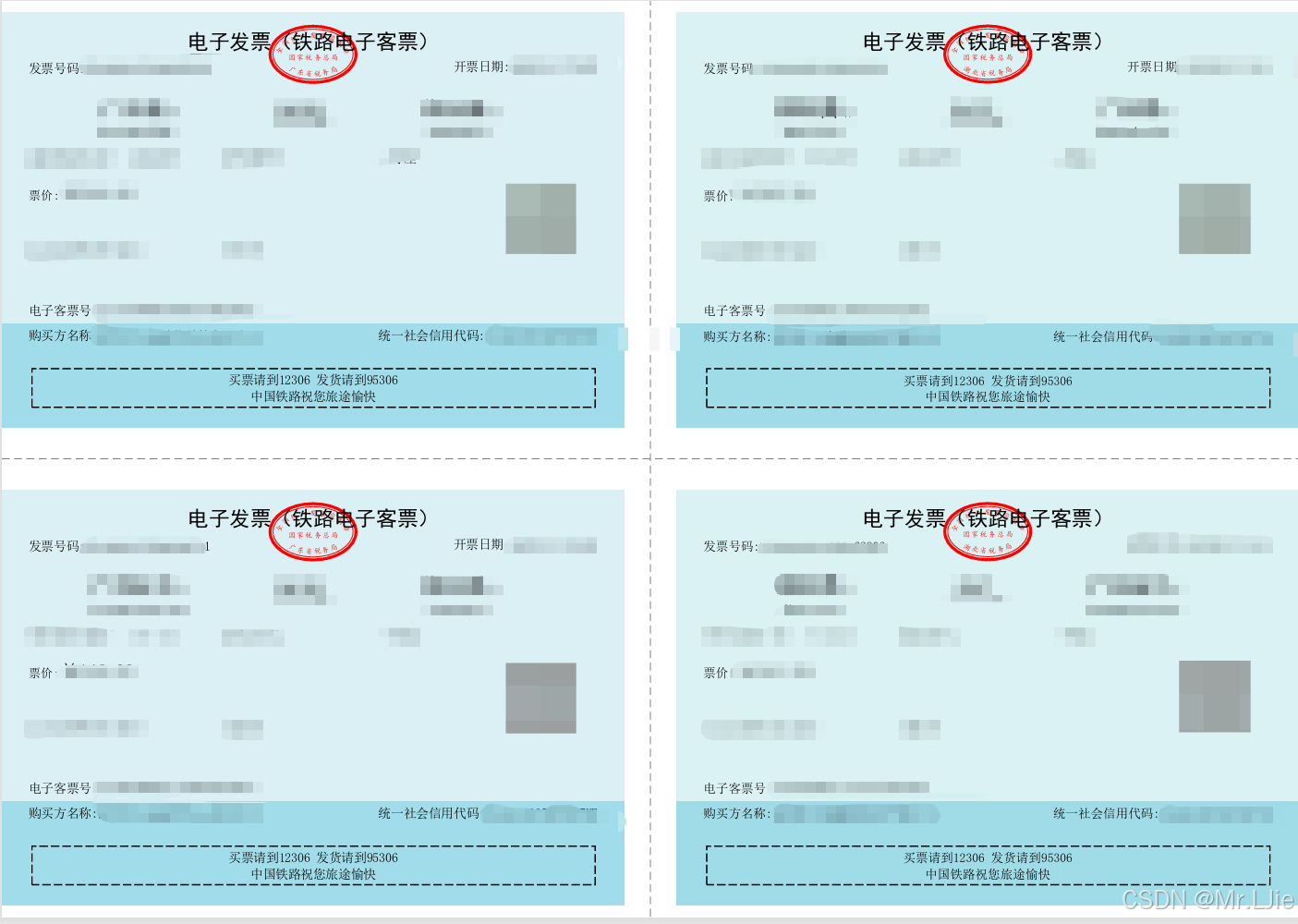
3)对于尺寸较小的火车票 PDF 发票,则采用 2×2 宫格布局,将四张票据整齐排布于一张 A4 页面。
整个合并过程需确保内容清晰可读,图像无重叠、无过度缩放,兼顾打印效果与归档便利性
二、使用JAR包
xml
<dependency>
    <groupId>com.itextpdf</groupId>
    <artifactId>itext7-core</artifactId>
    <version>7.2.0</version>
    <type>pom</type>
</dependency>
三、实现代码
java
import com.itextpdf.kernel.geom.PageSize;
import com.itextpdf.kernel.geom.Rectangle;
import com.itextpdf.kernel.pdf.*;
import com.itextpdf.kernel.pdf.canvas.PdfCanvas;
import com.itextpdf.kernel.pdf.xobject.PdfFormXObject;
import com.itextpdf.kernel.colors.ColorConstants;
import com.itextpdf.kernel.utils.PdfMerger;

import java.io.*;
import java.util.*;

public class PDFMerger {
    /**
     * 合并多个PDF文件
     *
     * @param inputPaths 输入PDF文件路径列表
     * @param outputPath 输出合并后的PDF文件路径
     * @throws IOException 当文件读写发生错误时抛出
     */
    public static void mergePdfs(List<String> inputPaths, String outputPath) throws IOException {
        // 创建输出PDF文档
        PdfDocument pdfDoc = new PdfDocument(new PdfWriter(outputPath));
        PdfMerger merger = new PdfMerger(pdfDoc);

        // 逐个合并PDF文件
        for (String path : inputPaths) {
            PdfDocument sourcePdf = new PdfDocument(new PdfReader(path));
            merger.merge(sourcePdf, 1, sourcePdf.getNumberOfPages());
            sourcePdf.close();
        }

        // 关闭输出文档
        pdfDoc.close();
    }

    /**
     * 发票合并:每 2 张合成 1 页 A4,上下排列,中间虚线
     *
     * @param srcFiles
     * @param dest
     * @throws Exception
     */
    public static void invoiceMerge(List<String> srcFiles, String dest) throws Exception {
        PdfDocument out = new PdfDocument(new PdfWriter(dest));
        out.addNewPage();
        int total = srcFiles.size();
        for (int i = 0; i < total; ) {
            // 默认已经自带一页,无需 addNewPage
            PdfCanvas canvas = new PdfCanvas(out.getPage(out.getNumberOfPages()));

            // 上半张
            String f1 = srcFiles.get(i++);
            PdfDocument doc1 = new PdfDocument(new PdfReader(f1));
            drawHalf(canvas, doc1, true);
            doc1.close();

            if (i < total) {
                String f2 = srcFiles.get(i++);
                PdfDocument doc2 = new PdfDocument(new PdfReader(f2));
                drawHalf(canvas, doc2, false);
                doc2.close();
            }

            // 如果还有文件,提前再建一页供下次循环使用
            if (i < total) {
                out.addNewPage();     // 这里才需要手动加页
            }
        }
        out.close();
    }


    private static void drawHalf(PdfCanvas canvas, PdfDocument srcDoc, boolean isTop) throws Exception {
        PdfFormXObject xobj = srcDoc.getPage(1).copyAsFormXObject(canvas.getDocument());

        Rectangle ps = PageSize.A4;
        float a4W = ps.getWidth();
        float a4H = ps.getHeight();
        float w = xobj.getWidth();
        float h = xobj.getHeight();

        float scale = Math.min(a4W / w, (a4H / 2) / h);
        float offsetX = (a4W - w * scale) / 2;
        float offsetY = isTop
                ? a4H / 2 + (a4H / 2 - h * scale) / 2
                : (a4H / 2 - h * scale) / 2;

        canvas.saveState()
                .concatMatrix(scale, 0, 0, scale, offsetX, offsetY)
                .addXObject(xobj)
                .restoreState();

        // 只在下半页画分割线
        canvas.saveState()
                .setStrokeColor(ColorConstants.GRAY)
                .setLineWidth(0.8f)
                .setLineDash(5, 3, 0)
                .moveTo(0, a4H / 2)
                .lineTo(a4W - 0, a4H / 2)
                .stroke()
                .restoreState();
    }


    /**
     * 每 4 张合成 1 页 A4,4 宫格排列
     */
    public static void trainTicketsMerge(List<String> src, String dest) throws Exception {
        PdfDocument out = new PdfDocument(new PdfWriter(dest));
        int idx = 0, total = src.size();
        final float MM = 2.834f;
        final float MARGIN = 0 * MM;      // 四周
        final float GAP_H = 9 * MM;   // 行间隙(上下) 保持不变
        final float GAP_W = 12 * MM;  // 列间隙(左右) 加宽到 10 mm

        while (idx < total) {
            /* 1. 新建横向页(7.2.0 写法) */
            PdfPage page = out.addNewPage();
            Rectangle a4Land = new Rectangle(0, 0, 842, 595);
            page.setMediaBox(a4Land);
            PdfCanvas canvas = new PdfCanvas(page);

            /* 2. 计算 2×2 宫格(含边距 + 中间间隙) */
            float usableW = a4Land.getWidth()  - 2 * MARGIN - GAP_W;   // 只减列间隙
            float usableH = a4Land.getHeight() - 2 * MARGIN - GAP_H;   // 减行间隙
            float cellW = usableW / 2f;
            float cellH = usableH / 2f;

            /* 3. 按 左上→右上→左下→右下 放票 */
            int[] map = {0,1,2,3};
            for (int pos = 0; pos < 4 && idx < total; pos++, idx++) {
                String f = src.get(idx);
                PdfDocument in = new PdfDocument(new PdfReader(f));
                PdfFormXObject xobj = in.getPage(1).copyAsFormXObject(out);

                int row = map[pos] / 2;
                int col = map[pos] % 2;
                // 坐标 = 外边距 + 列(或行) * (宫格尺寸 + 间隙)
                float x0 = MARGIN + col * (cellW + GAP_W);  // 列之间用加宽的 GAP_W
                float y0 = MARGIN + row * (cellH + GAP_H);  // 行之间用原值 GAP_H

                fitAndStamp(canvas, xobj, cellW, cellH, x0, y0);
                in.close();
            }

            /* 4. 画十字虚线(画在间隙中心) */
            drawGridWithGap(canvas, a4Land, MARGIN, GAP_H);
            if (idx < total) out.addNewPage();
        }
        out.close();
    }

    /** 等比缩放并居中盖图章 */
    private static void fitAndStamp(PdfCanvas canvas, PdfFormXObject xobj,
                                    float cellW, float cellH, float x0, float y0) {
        float w = xobj.getWidth();
        float h = xobj.getHeight();
        float scale = Math.min(cellW / w, cellH / h);
        float dx = x0 + (cellW - w * scale) / 2f;
        float dy = y0 + (cellH - h * scale) / 2f;
        canvas.saveState()
                .concatMatrix(scale, 0, 0, scale, dx, dy)
                .addXObject(xobj)
                .restoreState();
    }

    /** 画十字虚线(2×2 宫格) */
    private static void drawGridWithGap(PdfCanvas canvas, Rectangle r, float m, float g) {
        canvas.saveState()
                .setStrokeColor(ColorConstants.GRAY)
                .setLineWidth(0.5f)
                .setLineDash(5, 3, 0);
        /* 横线:间隙中心 */
        float yCenter = m + (r.getHeight() - 2 * m - g) / 2f + g / 2f;
        canvas.moveTo(m, yCenter).lineTo(r.getWidth() - m, yCenter).stroke();
        /* 竖线:间隙中心 */
        float xCenter = m + (r.getWidth() - 2 * m - g) / 2f + g / 2f;
        canvas.moveTo(xCenter, m).lineTo(xCenter, r.getHeight() - m).stroke();
        canvas.restoreState();
    }
四、测试用例
java
    public static void main(String[] args) throws Exception {
        List<String> tickets = Arrays.asList("E:\\发票\\25449123475000284731-电子发票.pdf", "E:\\发票\\25429165833000362806-电子发票.pdf");
        // PDF合并
        mergePdfs(tickets, "E:\\发票\\ticket_4in1.pdf");
        // 发票合并(上下合并在一个A4纸上)
        invoiceMerge(tickets, "E:\\发票\\ticket_4in1.pdf");
        // 火车票合并(2×2 宫格在一个A4纸上)
        trainTicketsMerge(tickets, "E:\\发票\\ticket_4in1.pdf");
    }
=
五、效果展示
PDF发票合并效果
火车票效果图