摘要
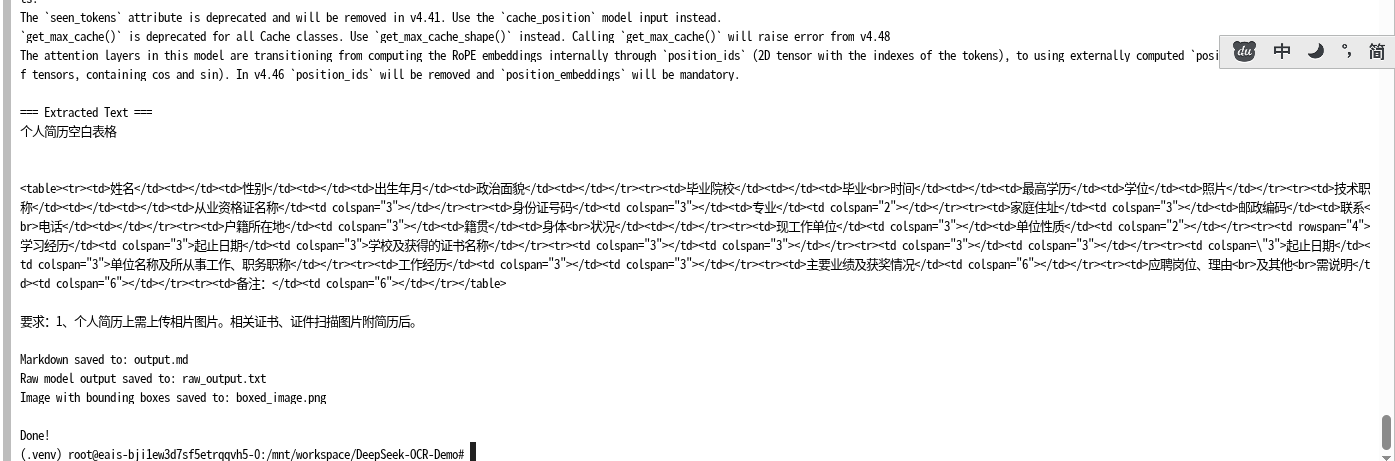
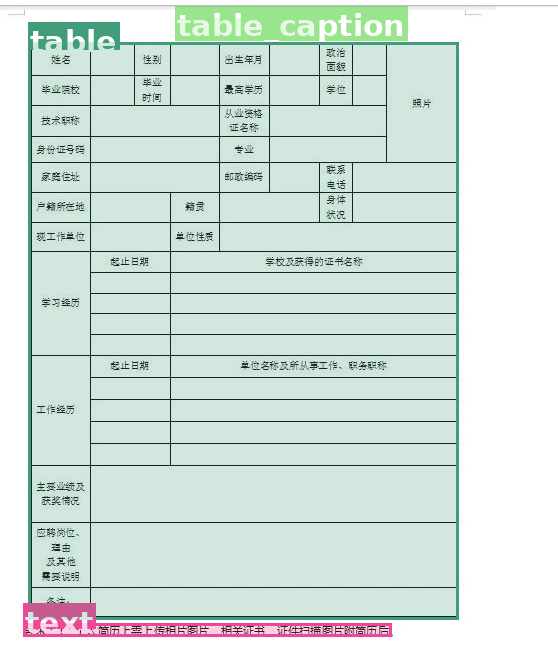
DeepSeek-OCR是一个基于深度学习的先进文档识别系统,能够准确识别文本内容并保持原文档的格式结构。本文将详细介绍DeepSeek-OCR的完整部署过程、代码实现、使用方法和最佳实践,为开发者提供一站式的技术参考。
1. 系统要求与环境准备
1.1 系统要求
-
操作系统:Linux (推荐Ubuntu 18.04或更高版本)
-
Python版本:3.10或更高版本
-
GPU支持:CUDA 11.8或更高版本(推荐)
-
内存:至少16GB RAM
-
存储:至少50GB可用空间
-
本文GPU版本 (使用魔搭免费的GPU)
Sat Jan 17 22:12:10 2026
+-----------------------------------------------------------------------------+
| NVIDIA-SMI 470.161.03 Driver Version: 470.161.03 CUDA Version: 12.1 |
|-------------------------------+----------------------+----------------------+
| GPU Name Persistence-M| Bus-Id Disp.A | Volatile Uncorr. ECC |
| Fan Temp Perf Pwr:Usage/Cap| Memory-Usage | GPU-Util Compute M. |
| | | MIG M. |
|===============================+======================+======================|
| 0 Tesla P100-PCIE... On | 00000000:00:08.0 Off | 0 |
| N/A 30C P0 28W / 250W | 0MiB / 16280MiB | 0% Default |
| | | N/A |
+-------------------------------+----------------------+----------------------++-----------------------------------------------------------------------------+
| Processes: |
| GPU GI CI PID Type Process name GPU Memory |
| ID ID Usage |
|=============================================================================|
| No running processes found |
+-----------------------------------------------------------------------------+
1.2 Python环境配置
如果系统没有Python 3.10,可按以下步骤安装:
bash
# 更新包列表
sudo apt update

# 安装Python 3.10及相关组件
sudo apt install -y python3.10 python3.10-venv python3.10-dev
1.3 创建并激活虚拟环境
bash
# 创建虚拟环境
python3.10 -m venv .venv

# 激活虚拟环境
source .venv/bin/activate

# 验证Python版本
python --version
1.4 依赖库安装
创建requirements.txt文件:
txt
torch==2.6.0
transformers==4.46.3
tokenizers==0.20.3
accelerate
einops
addict
easydict
torchvision
PyMuPDF
hf_transfer
pillow
numpy
安装依赖:
bash
# 升级pip
pip install --upgrade pip

# 安装基本依赖
pip install -r requirements.txt

# 安装Flash Attention(如果需要更好的性能)
pip install flash-attn --no-build-isolation
2. 模型下载与配置
2.1 使用ModelScope下载模型
首先,需要从ModelScope平台下载DeepSeek-OCR模型到本地:
bash
# 安装ModelScope
pip install modelscope

# 下载模型
python -c "
from modelscope.hub.snapshot_download import snapshot_download
model_dir = snapshot_download('deepseek-ai/DeepSeek-OCR', cache_dir='./models')
print(f'Model downloaded to: {model_dir}')
"
2.2 GPU环境配置
确保CUDA环境正确配置:
bash
# 检查CUDA版本
nvcc --version

# 检查PyTorch CUDA支持
python -c "import torch; print(f'CUDA available: {torch.cuda.is_available()}'); print(f'CUDA version: {torch.version.cuda}')"
3. 完整代码实现
3.1 项目依赖与导入
python
import torch
from transformers import AutoModel, AutoTokenizer
import os
import sys
import tempfile
import shutil
from PIL import Image, ImageDraw, ImageFont, ImageOps
import fitz
import re
import warnings
import numpy as np
import base64
from io import StringIO, BytesIO
import argparse

# 模型配置
MODEL_NAME = 'deepseek-ai/DeepSeek-OCR'

# 加载分词器和模型
tokenizer = AutoTokenizer.from_pretrained(MODEL_NAME, trust_remote_code=True)

model = AutoModel.from_pretrained(
    MODEL_NAME,
    torch_dtype=torch.bfloat16,
    trust_remote_code=True,
    use_safetensors=True,
    device_map="cuda",  # 直接加载到 GPU,自动管理显存
    attn_implementation="eager"  # 强制用 PyTorch 原生 attention(最兼容)
).eval()

# 预定义的处理模式配置
MODEL_CONFIGS = {
    "Gundam": {"base_size": 1024, "image_size": 640, "crop_mode": True},
    "Tiny": {"base_size": 512, "image_size": 512, "crop_mode": False},
    "Small": {"base_size": 640, "image_size": 640, "crop_mode": False},
    "Base": {"base_size": 1024, "image_size": 1024, "crop_mode": False},
    "Large": {"base_size": 1280, "image_size": 1280, "crop_mode": False}
}

# 预定义任务提示模板
TASK_PROMPTS = {
    "📋 Markdown": {"prompt": "<image>\n<|grounding|>Convert the document to markdown.", "has_grounding": True},
    "📝 Free OCR": {"prompt": "<image>\nFree OCR.", "has_grounding": False},
    "📍 Locate": {"prompt": "<image>\nLocate <|ref|>text<|/ref|> in the image.", "has_grounding": True},
    "🔍 Describe": {"prompt": "<image>\nDescribe this image in detail.", "has_grounding": False},
    "✏️ Custom": {"prompt": "", "has_grounding": False}
}
3.2 核心功能模块
3.2.1 边界框检测与绘制
python
def extract_grounding_references(text):
    """
    从模型输出中提取定位引用信息
    """
    pattern = r'(<\|ref\|>(.*?)<\|/ref\|><\|det\|>(.*?)<\|/det\|>)'
    return re.findall(pattern, text, re.DOTALL)

def draw_bounding_boxes(image, refs, extract_images=False):
    """
    在图像上绘制边界框并可选择性地提取子图像
    """
    img_w, img_h = image.size
    img_draw = image.copy()
    draw = ImageDraw.Draw(img_draw)
    overlay = Image.new('RGBA', img_draw.size, (0, 0, 0, 0))
    draw2 = ImageDraw.Draw(overlay)

    # 尝试加载合适的字体
    try:
        font = ImageFont.truetype("/usr/share/fonts/truetype/dejavu/DejaVuSans-Bold.ttf", 30)
    except:
        font = ImageFont.load_default()

    crops = []

    # 为不同标签分配颜色
    color_map = {}
    np.random.seed(42)  # 固定随机种子以保证一致性

    for ref in refs:
        label = ref[1]
        if label not in color_map:
            # 随机生成颜色
            color_map[label] = (np.random.randint(50, 255),
                               np.random.randint(50, 255),
                               np.random.randint(50, 255))
        color = color_map[label]
        coords = eval(ref[2])
        color_a = color + (60,)  # 带透明度的颜色

        for box in coords:
            # 转换坐标系
            x1, y1, x2, y2 = (int(box[0]/999*img_w),
                              int(box[1]/999*img_h),
                              int(box[2]/999*img_w),
                              int(box[3]/999*img_h))

            # 如果是图像类型,则提取子图
            if extract_images and label == 'image':
                crops.append(image.crop((x1, y1, x2, y2)))

            # 设置边框宽度
            width = 5 if label == 'title' else 3
            draw.rectangle([x1, y1, x2, y2], outline=color, width=width)
            draw2.rectangle([x1, y1, x2, y2], fill=color_a)

            # 绘制标签文本
            text_bbox = draw.textbbox((0, 0), label, font=font)
            tw, th = text_bbox[2] - text_bbox[0], text_bbox[3] - text_bbox[1]
            ty = max(0, y1 - 20)
            draw.rectangle([x1, ty, x1 + tw + 4, ty + th + 4], fill=color)
            draw.text((x1 + 2, ty + 2), label, font=font, fill=(255, 255, 255))

    # 合并覆盖层
    img_draw.paste(overlay, (0, 0), overlay)
    return img_draw, crops
3.2.2 输出处理与格式转换
python
def clean_output(text, include_images=False):
"""
清理模型输出,移除不必要的标记
"""
if not text:
return ""
# 匹配定位标记
pattern = r'(<\|ref\|>(.*?)<\|/ref\|><\|det\|>(.*?)<\|/det\|>)'
matches = re.findall(pattern, text, re.DOTALL)
img_num = 0
for match in matches:
if '<|ref|>image<|/ref|>' in match[0]:
if include_images:
text = text.replace(match[0], f'\n\n**[Figure {img_num + 1}]**\n\n', 1)
img_num += 1
else:
text = text.replace(match[0], '', 1)
else:
# 移除非图像类型的定位标记
text = re.sub(rf'(?m)^[^\n]*{re.escape(match[0])}[^\n]*\n?', '', text)
return text.strip()
def embed_images(markdown, crops):
"""
将提取的图像嵌入到Markdown中
"""
if not crops:
return markdown
for i, img in enumerate(crops):
buf = BytesIO()
img.save(buf, format="PNG")
b64 = base64.b64encode(buf.getvalue()).decode()
markdown = markdown.replace(f'**[Figure {i + 1}]**',
f'\n\n\n\n', 1)
return markdown3.2.3 图像处理主函数
python
def process_image(image, mode, task, custom_prompt):
    """
    处理单张图像的核心函数
    """
    if image is None:
        return "Error: No image provided", "", "", None, []

    if task in ["✏️ Custom", "📍 Locate"] and not custom_prompt.strip():
        return "Error: Please provide a custom prompt", "", "", None, []

    # 图像预处理
    if image.mode in ('RGBA', 'LA', 'P'):
        image = image.convert('RGB')
    image = ImageOps.exif_transpose(image)

    config = MODEL_CONFIGS[mode]

    # 根据任务类型构建提示
    if task == "✏️ Custom":
        prompt = f"<image>\n{custom_prompt.strip()}"
        has_grounding = '<|grounding|>' in custom_prompt
    elif task == "📍 Locate":
        prompt = f"<image>\nLocate <|ref|>{custom_prompt.strip()}<|/ref|> in the image."
        has_grounding = True
    else:
        prompt = TASK_PROMPTS[task]["prompt"]
        has_grounding = TASK_PROMPTS[task]["has_grounding"]

    # 临时保存图像
    tmp = tempfile.NamedTemporaryFile(delete=False, suffix='.jpg')
    image.save(tmp.name, 'JPEG', quality=95)
    tmp.close()
    out_dir = tempfile.mkdtemp()

    # 捕获模型输出
    stdout = sys.stdout
    sys.stdout = StringIO()

    # 执行模型推理
    model.infer(tokenizer=tokenizer, prompt=prompt, image_file=tmp.name, output_path=out_dir,
                base_size=config["base_size"], image_size=config["image_size"], crop_mode=config["crop_mode"])

    # 处理输出结果
    result = '\n'.join([l for l in sys.stdout.getvalue().split('\n')
                        if not any(s in l for s in ['image:', 'other:', 'PATCHES', '====', 'BASE:', '%|', 'torch.Size'])]).strip()
    sys.stdout = stdout

    # 清理临时文件
    os.unlink(tmp.name)
    shutil.rmtree(out_dir, ignore_errors=True)

    if not result:
        return "No text detected", "", "", None, []

    # 生成不同格式的输出
    cleaned = clean_output(result, False)
    markdown = clean_output(result, True)

    img_out = None
    crops = []

    # 如果需要边界框,则绘制并提取
    if has_grounding and '<|ref|>' in result:
        refs = extract_grounding_references(result)
        if refs:
            img_out, crops = draw_bounding_boxes(image, refs, True)

    # 嵌入图像到Markdown
    markdown = embed_images(markdown, crops)

    return cleaned, markdown, result, img_out, crops
3.2.4 PDF处理函数
python
def process_pdf(path, mode, task, custom_prompt, page_num):
    """
    处理PDF文档的函数
    """
    doc = fitz.open(path)
    total_pages = len(doc)
    if page_num < 1 or page_num > total_pages:
        doc.close()
        return f"Invalid page number. PDF has {total_pages} pages.", "", "", None, []

    page = doc.load_page(page_num - 1)
    pix = page.get_pixmap(matrix=fitz.Matrix(300/72, 300/72), alpha=False)
    img = Image.open(BytesIO(pix.tobytes("png")))
    doc.close()

    return process_image(img, mode, task, custom_prompt)
3.2.5 通用文件处理函数
python
def process_file(path, mode, task, custom_prompt, page_num):
    """
    处理文件(图像或PDF)的主要函数
    """
    if not path or not os.path.exists(path):
        return "Error: File not found or no file provided", "", "", None, []

    if path.lower().endswith('.pdf'):
        return process_pdf(path, mode, task, custom_prompt, page_num)
    else:
        try:
            image = Image.open(path)
            return process_image(image, mode, task, custom_prompt)
        except Exception as e:
            return f"Error opening image: {str(e)}", "", "", None, []
3.3 命令行接口
python
if __name__ == "__main__":
    parser = argparse.ArgumentParser(description="DeepSeek-OCR Command Line Tool")
    parser.add_argument("file_path", type=str, help="Path to image or PDF file")
    parser.add_argument("--mode", type=str, default="Gundam", choices=list(MODEL_CONFIGS.keys()),
                        help="Processing mode (default: Gundam)")
    parser.add_argument("--task", type=str, default="📋 Markdown", choices=list(TASK_PROMPTS.keys()),
                        help="Task type (default: 📋 Markdown)")
    parser.add_argument("--custom_prompt", type=str, default="",
                        help="Custom prompt for ✏️ Custom or 📍 Locate tasks")
    parser.add_argument("--page_num", type=int, default=1,
                        help="Page number for PDF (default: 1)")

    args = parser.parse_args()

    print(f"Processing: {args.file_path}")
    print(f"Mode: {args.mode} | Task: {args.task} | Page: {args.page_num}")
    if args.custom_prompt:
        print(f"Custom prompt: {args.custom_prompt}")

    cleaned, markdown, raw, img_out, crops = process_file(
        args.file_path, args.mode, args.task, args.custom_prompt, args.page_num)

    print("\n=== Extracted Text ===")
    print(cleaned or "No output")

    # 使用带前缀的文件名防止重复
    if markdown:
        deepseek_md_path = f"deepseek_output_markdown.md"  # 添加前缀防重复
        with open(deepseek_md_path, "w", encoding="utf-8") as f:
            f.write(markdown)
        print(f"\nMarkdown saved to: {deepseek_md_path}")

    if raw:
        deepseek_raw_path = f"deepseek_output_raw.txt"  # 添加前缀防重复
        with open(deepseek_raw_path, "w", encoding="utf-8") as f:
            f.write(raw)
        print(f"Raw model output saved to: {deepseek_raw_path}")

    if img_out is not None:
        deepseek_img_out_path = f"deepseek_output_boxed.png"  # 添加前缀防重复
        img_out.save(deepseek_img_out_path)
        print(f"Image with bounding boxes saved to: {deepseek_img_out_path}")

    if crops:
        for i, crop in enumerate(crops):
            deepseek_crop_path = f"deepseek_output_crop_{i+1}.png"  # 添加前缀防重复
            crop.save(deepseek_crop_path)
        print(f"Saved {len(crops)} cropped region(s) as deepseek_output_crop_1.png, deepseek_output_crop_2.png, ...")

    print("\nDone!")
3.4 完整代码
python
import torch
from transformers import AutoModel, AutoTokenizer
import os
import sys
import tempfile
import shutil
from PIL import Image, ImageDraw, ImageFont, ImageOps
import fitz
import re
import warnings
import numpy as np
import base64
from io import StringIO, BytesIO
import argparse
MODEL_NAME = 'deepseek-ai/DeepSeek-OCR'
tokenizer = AutoTokenizer.from_pretrained(MODEL_NAME, trust_remote_code=True)
model = AutoModel.from_pretrained(
MODEL_NAME,
torch_dtype=torch.bfloat16,
trust_remote_code=True,
use_safetensors=True,
device_map="cuda", # 直接加载到 GPU,自动管理显存
attn_implementation="eager" # 强制用 PyTorch 原生 attention(最兼容)
).eval()
MODEL_CONFIGS = {
"Gundam": {"base_size": 1024, "image_size": 640, "crop_mode": True},
"Tiny": {"base_size": 512, "image_size": 512, "crop_mode": False},
"Small": {"base_size": 640, "image_size": 640, "crop_mode": False},
"Base": {"base_size": 1024, "image_size": 1024, "crop_mode": False},
"Large": {"base_size": 1280, "image_size": 1280, "crop_mode": False}
}
TASK_PROMPTS = {
"📋 Markdown": {"prompt": "<image>\n<|grounding|>Convert the document to markdown.", "has_grounding": True},
"📝 Free OCR": {"prompt": "<image>\nFree OCR.", "has_grounding": False},
"📍 Locate": {"prompt": "<image>\nLocate <|ref|>text<|/ref|> in the image.", "has_grounding": True},
"🔍 Describe": {"prompt": "<image>\nDescribe this image in detail.", "has_grounding": False},
"✏️ Custom": {"prompt": "", "has_grounding": False}
}
def extract_grounding_references(text):
pattern = r'(<\|ref\|>(.*?)<\|/ref\|><\|det\|>(.*?)<\|/det\|>)'
return re.findall(pattern, text, re.DOTALL)
def draw_bounding_boxes(image, refs, extract_images=False):
img_w, img_h = image.size
img_draw = image.copy()
draw = ImageDraw.Draw(img_draw)
overlay = Image.new('RGBA', img_draw.size, (0, 0, 0, 0))
draw2 = ImageDraw.Draw(overlay)
try:
font = ImageFont.truetype("/usr/share/fonts/truetype/dejavu/DejaVuSans-Bold.ttf", 30)
except:
font = ImageFont.load_default()
crops = []
color_map = {}
np.random.seed(42)
for ref in refs:
label = ref[1]
if label not in color_map:
color_map[label] = (np.random.randint(50, 255), np.random.randint(50, 255), np.random.randint(50, 255))
color = color_map[label]
coords = eval(ref[2])
color_a = color + (60,)
for box in coords:
x1, y1, x2, y2 = int(box[0]/999*img_w), int(box[1]/999*img_h), int(box[2]/999*img_w), int(box[3]/999*img_h)
if extract_images and label == 'image':
crops.append(image.crop((x1, y1, x2, y2)))
width = 5 if label == 'title' else 3
draw.rectangle([x1, y1, x2, y2], outline=color, width=width)
draw2.rectangle([x1, y1, x2, y2], fill=color_a)
text_bbox = draw.textbbox((0, 0), label, font=font)
tw, th = text_bbox[2] - text_bbox[0], text_bbox[3] - text_bbox[1]
ty = max(0, y1 - 20)
draw.rectangle([x1, ty, x1 + tw + 4, ty + th + 4], fill=color)
draw.text((x1 + 2, ty + 2), label, font=font, fill=(255, 255, 255))
img_draw.paste(overlay, (0, 0), overlay)
return img_draw, crops
def clean_output(text, include_images=False):
if not text:
return ""
pattern = r'(<\|ref\|>(.*?)<\|/ref\|><\|det\|>(.*?)<\|/det\|>)'
matches = re.findall(pattern, text, re.DOTALL)
img_num = 0
for match in matches:
if '<|ref|>image<|/ref|>' in match[0]:
if include_images:
text = text.replace(match[0], f'\n\n**[Figure {img_num + 1}]**\n\n', 1)
img_num += 1
else:
text = text.replace(match[0], '', 1)
else:
text = re.sub(rf'(?m)^[^\n]*{re.escape(match[0])}[^\n]*\n?', '', text)
return text.strip()
def embed_images(markdown, crops):
if not crops:
return markdown
for i, img in enumerate(crops):
buf = BytesIO()
img.save(buf, format="PNG")
b64 = base64.b64encode(buf.getvalue()).decode()
markdown = markdown.replace(f'**[Figure {i + 1}]**', f'\n\n\n\n', 1)
return markdown
def process_image(image, mode, task, custom_prompt):
if image is None:
return "Error: No image provided", "", "", None, []
if task in ["✏️ Custom", "📍 Locate"] and not custom_prompt.strip():
return "Error: Please provide a custom prompt", "", "", None, []
if image.mode in ('RGBA', 'LA', 'P'):
image = image.convert('RGB')
image = ImageOps.exif_transpose(image)
config = MODEL_CONFIGS[mode]
if task == "✏️ Custom":
prompt = f"<image>\n{custom_prompt.strip()}"
has_grounding = '<|grounding|>' in custom_prompt
elif task == "📍 Locate":
prompt = f"<image>\nLocate <|ref|>{custom_prompt.strip()}<|/ref|> in the image."
has_grounding = True
else:
prompt = TASK_PROMPTS[task]["prompt"]
has_grounding = TASK_PROMPTS[task]["has_grounding"]
tmp = tempfile.NamedTemporaryFile(delete=False, suffix='.jpg')
image.save(tmp.name, 'JPEG', quality=95)
tmp.close()
out_dir = tempfile.mkdtemp()
stdout = sys.stdout
sys.stdout = StringIO()
model.infer(tokenizer=tokenizer, prompt=prompt, image_file=tmp.name, output_path=out_dir,
base_size=config["base_size"], image_size=config["image_size"], crop_mode=config["crop_mode"])
result = '\n'.join([l for l in sys.stdout.getvalue().split('\n')
if not any(s in l for s in ['image:', 'other:', 'PATCHES', '====', 'BASE:', '%|', 'torch.Size'])]).strip()
sys.stdout = stdout
os.unlink(tmp.name)
shutil.rmtree(out_dir, ignore_errors=True)
if not result:
return "No text detected", "", "", None, []
cleaned = clean_output(result, False)
markdown = clean_output(result, True)
img_out = None
crops = []
if has_grounding and '<|ref|>' in result:
refs = extract_grounding_references(result)
if refs:
img_out, crops = draw_bounding_boxes(image, refs, True)
markdown = embed_images(markdown, crops)
return cleaned, markdown, result, img_out, crops
def process_pdf(path, mode, task, custom_prompt, page_num):
doc = fitz.open(path)
total_pages = len(doc)
if page_num < 1 or page_num > total_pages:
doc.close()
return f"Invalid page number. PDF has {total_pages} pages.", "", "", None, []
page = doc.load_page(page_num - 1)
pix = page.get_pixmap(matrix=fitz.Matrix(300/72, 300/72), alpha=False)
img = Image.open(BytesIO(pix.tobytes("png")))
doc.close()
return process_image(img, mode, task, custom_prompt)
def process_file(path, mode, task, custom_prompt, page_num):
if not path or not os.path.exists(path):
return "Error: File not found or no file provided", "", "", None, []
if path.lower().endswith('.pdf'):
return process_pdf(path, mode, task, custom_prompt, page_num)
else:
try:
image = Image.open(path)
return process_image(image, mode, task, custom_prompt)
except Exception as e:
return f"Error opening image: {str(e)}", "", "", None, []
if __name__ == "__main__":
parser = argparse.ArgumentParser(description="DeepSeek-OCR Command Line Tool")
parser.add_argument("file_path", type=str, help="Path to image or PDF file")
parser.add_argument("--mode", type=str, default="Gundam", choices=list(MODEL_CONFIGS.keys()),
help="Processing mode (default: Gundam)")
parser.add_argument("--task", type=str, default="📋 Markdown", choices=list(TASK_PROMPTS.keys()),
help="Task type (default: 📋 Markdown)")
parser.add_argument("--custom_prompt", type=str, default="",
help="Custom prompt for ✏️ Custom or 📍 Locate tasks")
parser.add_argument("--page_num", type=int, default=1,
help="Page number for PDF (default: 1)")
args = parser.parse_args()
print(f"Processing: {args.file_path}")
print(f"Mode: {args.mode} | Task: {args.task} | Page: {args.page_num}")
if args.custom_prompt:
print(f"Custom prompt: {args.custom_prompt}")
cleaned, markdown, raw, img_out, crops = process_file(
args.file_path, args.mode, args.task, args.custom_prompt, args.page_num)
print("\n=== Extracted Text ===")
print(cleaned or "No output")
if markdown:
md_path = "output.md"
with open(md_path, "w", encoding="utf-8") as f:
f.write(markdown)
print(f"\nMarkdown saved to: {md_path}")
if raw:
raw_path = "raw_output.txt"
with open(raw_path, "w", encoding="utf-8") as f:
f.write(raw)
print(f"Raw model output saved to: {raw_path}")
if img_out is not None:
boxed_path = "boxed_image.png"
img_out.save(boxed_path)
print(f"Image with bounding boxes saved to: {boxed_path}")
if crops:
for i, crop in enumerate(crops):
crop_path = f"cropped_{i+1}.png"
crop.save(crop_path)
print(f"Saved {len(crops)} cropped region(s) as cropped_1.png, cropped_2.png, ...")
print("\nDone!")4. 使用方法
4.1 环境激活
bash
# 激活虚拟环境
source .venv/bin/activate
4.2 命令行使用示例
Gundam模式(推荐用于复杂文档)
bash
python deepseek_cli.py document.pdf --mode Gundam --task "📋 Markdown" --page_num 3Base模式(适用于普通文档)
bash
python deepseek_cli.py document.pdf --mode Base --task "📋 Markdown" --page_num 3图像处理示例
python
python deepseek_cli.py "9.jpeg" --mode "Base" --task "📋 Markdown"5 常见问题
- CUDA不可用:检查CUDA驱动和PyTorch安装
- 内存不足:减小批处理大小或使用CPU模式
- 模型加载失败:检查网络连接和模型路径
6 调试命令
bash
# 检查CUDA状态
python -c "import torch; print(torch.cuda.is_available()); print(torch.cuda.device_count()); print(torch.cuda.get_device_name(0) if torch.cuda.is_available() else 'No GPU')"

# 检查模型加载
python -c "from transformers import AutoModel, AutoTokenizer; tokenizer = AutoTokenizer.from_pretrained('deepseek-ai/DeepSeek-OCR', trust_remote_code=True); print('Tokenizer loaded successfully')"
7. 扩展与定制
7.1 模型微调
可以根据特定领域的文档特征对模型进行微调,以提高在特定类型文档上的识别精度。
7.2 功能扩展
- 添加更多输出格式支持
- 集成云存储服务
- 开发Web API接口
8. 总结
DeepSeek-OCR通过其完整的技术架构和模块化设计,为文档识别和转换提供了一个强大而灵活的解决方案。本文从环境配置到代码实现,再到部署优化,提供了全面的技术指南,帮助开发者成功部署和使用这一先进系统。
这是您需要的唯一参考文件,包含了从系统环境准备、Python版本安装、虚拟环境配置、依赖安装到模型下载和完整代码实现的全过程,是部署DeepSeek-OCR系统的权威指南。
创作不易记得点赞 收藏 加关注