Flutter消消乐游戏开发教程
项目简介
消消乐是一款经典的三消益智游戏,玩家通过交换相邻宝石,使三个或更多相同颜色的宝石连成一线即可消除并获得分数。本项目使用Flutter实现了完整的消消乐游戏,包含连击系统、动画特效、步数限制等核心玩法。
运行效果图
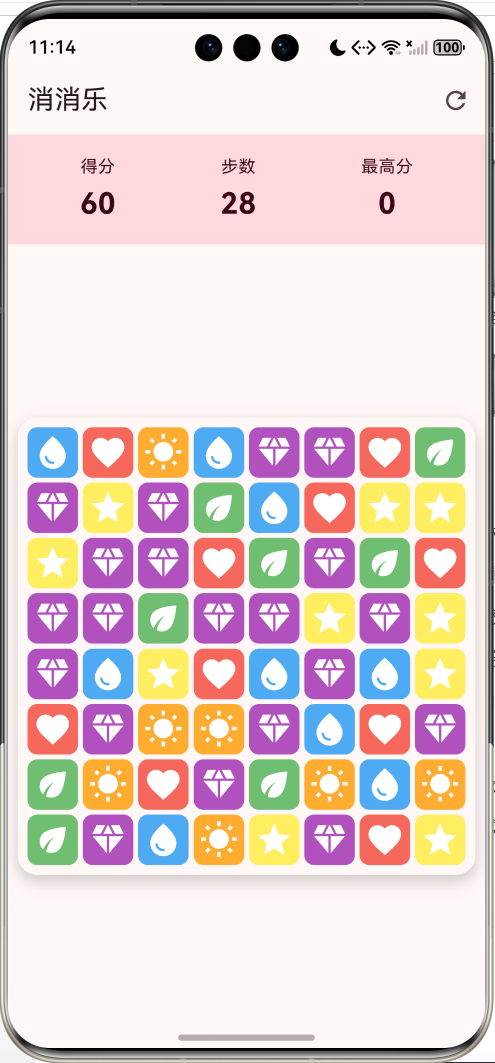
核心特性
- 8×8游戏棋盘:标准的消消乐游戏布局
- 6种宝石类型:红、蓝、绿、黄、紫、橙六种颜色宝石
- 智能匹配算法:自动检测横向和纵向的三消组合
- 流畅交换机制:支持相邻宝石交换,无效交换自动回退
- 自动下落填充:消除后宝石自动下落,顶部生成新宝石
- 连击系统:连续消除触发COMBO,额外加分
- 步数限制:30步内尽可能获得高分
- 最高分记录:使用SharedPreferences持久化存储
- 精美动画:消除动画、选中高亮、连击特效
技术架构
数据模型设计
GemType枚举
dart
enum GemType { red, blue, green, yellow, purple, orange }定义了6种宝石类型,每种类型对应不同的颜色和图标。
Gem类
dart
class Gem {
  GemType type;        // 宝石类型
  int row;             // 行坐标
  int col;             // 列坐标
  bool isMatched;      // 是否已匹配(用于消除动画)

  Color get color { ... }      // 根据类型返回颜色
  IconData get icon { ... }    // 根据类型返回图标
}
Gem类封装了宝石的所有属性和行为:
type:宝石类型,决定颜色和图标row、col:宝石在棋盘上的位置坐标isMatched:标记宝石是否已被匹配,用于播放消除动画color:根据类型返回对应的Material颜色icon:根据类型返回对应的Material图标
游戏状态管理
dart
class _GamePageState extends State<GamePage> with SingleTickerProviderStateMixin {
  static const int rows = 8;
  static const int cols = 8;

  late List<List<Gem?>> board;  // 二维数组存储棋盘
  Gem? selectedGem;             // 当前选中的宝石

  int score = 0;                // 当前得分
  int moves = 30;               // 剩余步数
  int combo = 0;                // 连击数
  int highScore = 0;            // 最高分

  bool isProcessing = false;    // 是否正在处理消除
  bool gameOver = false;        // 游戏是否结束

  late AnimationController _comboController;  // 连击动画控制器
  late Animation<double> _comboAnimation;     // 连击动画
}
核心算法详解
1. 棋盘初始化算法
dart
void _initBoard() {
  // 生成随机棋盘
  board = List.generate(
    rows,
    (row) => List.generate(
      cols,
      (col) => _createRandomGem(row, col),
    ),
  );

  // 确保初始棋盘没有可消除的组合
  while (_hasMatches()) {
    _shuffleBoard();
  }
}算法思路:
- 使用
List.generate创建8×8的二维数组 - 每个位置随机生成一个宝石
- 检查是否存在三消组合,如果存在则重新洗牌
- 重复步骤3直到没有初始可消除组合
这样可以确保游戏开始时玩家需要主动交换宝石才能消除,而不是一开始就有现成的消除组合。
2. 三消匹配算法
dart
bool _hasMatches() {
  // 检查横向匹配
  for (int row = 0; row < rows; row++) {
    for (int col = 0; col < cols - 2; col++) {
      final gem1 = board[row][col];
      final gem2 = board[row][col + 1];
      final gem3 = board[row][col + 2];

      if (gem1 != null && gem2 != null && gem3 != null) {
        if (gem1.type == gem2.type && gem2.type == gem3.type) {
          return true;
        }
      }
    }
  }

  // 检查纵向匹配
  for (int col = 0; col < cols; col++) {
    for (int row = 0; row < rows - 2; row++) {
      final gem1 = board[row][col];
      final gem2 = board[row + 1][col];
      final gem3 = board[row + 2][col];

      if (gem1 != null && gem2 != null && gem3 != null) {
        if (gem1.type == gem2.type && gem2.type == gem3.type) {
          return true;
        }
      }
    }
  }

  return false;
}算法思路:
- 横向扫描:遍历每一行,检查连续3个宝石是否类型相同
- 纵向扫描:遍历每一列,检查连续3个宝石是否类型相同
- 只要找到一个匹配就返回true,否则返回false
时间复杂度:O(rows × cols)
3. 查找所有匹配算法
dart
List<Gem> _findMatches() {
  final Set<Gem> matches = {};

  // 横向匹配(支持3个以上连续匹配)
  for (int row = 0; row < rows; row++) {
    for (int col = 0; col < cols - 2; col++) {
      final gem1 = board[row][col];
      final gem2 = board[row][col + 1];
      final gem3 = board[row][col + 2];

      if (gem1 != null && gem2 != null && gem3 != null) {
        if (gem1.type == gem2.type && gem2.type == gem3.type) {
          matches.addAll([gem1, gem2, gem3]);

          // 继续向右查找更多匹配
          for (int i = col + 3; i < cols; i++) {
            final gem = board[row][i];
            if (gem != null && gem.type == gem1.type) {
              matches.add(gem);
            } else {
              break;
            }
          }
        }
      }
    }
  }

  // 纵向匹配(同样支持3个以上)
  // ... 类似逻辑

  return matches.toList();
}算法亮点:
- 使用
Set自动去重,避免同一个宝石被重复添加 - 支持4连消、5连消等更长的匹配
- 返回所有需要消除的宝石列表
4. 宝石交换算法
dart
Future<void> _swapGems(Gem gem1, Gem gem2) async {
  setState(() { isProcessing = true; });

  // 交换坐标
  final tempRow = gem1.row;
  final tempCol = gem1.col;
  gem1.row = gem2.row;
  gem1.col = gem2.col;
  gem2.row = tempRow;
  gem2.col = tempCol;

  // 更新棋盘
  board[gem1.row][gem1.col] = gem1;
  board[gem2.row][gem2.col] = gem2;

  setState(() {});
  await Future.delayed(const Duration(milliseconds: 200));

  // 检查是否产生匹配
  if (_hasMatches()) {
    setState(() {
      selectedGem = null;
      moves--;  // 扣除步数
    });
    await _processMatches();  // 处理消除

    if (moves <= 0) {
      _endGame();  // 步数用完,游戏结束
    }
  } else {
    // 无效交换,回退
    final tempRow2 = gem1.row;
    final tempCol2 = gem1.col;
    gem1.row = gem2.row;
    gem1.col = gem2.col;
    gem2.row = tempRow2;
    gem2.col = tempCol2;

    board[gem1.row][gem1.col] = gem1;
    board[gem2.row][gem2.col] = gem2;

    setState(() { selectedGem = null; });
  }

  setState(() { isProcessing = false; });
}算法流程:
- 锁定处理状态,防止重复操作
- 交换两个宝石的坐标和棋盘位置
- 延迟200ms播放交换动画
- 检查是否产生匹配:
- 有匹配:扣除步数,处理消除
- 无匹配:回退交换,恢复原状
- 解锁处理状态
5. 下落填充算法
dart
Future<void> _dropGems() async {
  for (int col = 0; col < cols; col++) {
    int emptyRow = rows - 1;  // 从底部开始

    for (int row = rows - 1; row >= 0; row--) {
      if (board[row][col] != null) {
        if (row != emptyRow) {
          // 将宝石移动到空位
          board[emptyRow][col] = board[row][col];
          board[emptyRow][col]!.row = emptyRow;
          board[row][col] = null;
        }
        emptyRow--;  // 向上移动空位指针
      }
    }
  }
}

void _fillBoard() {
  for (int col = 0; col < cols; col++) {
    for (int row = 0; row < rows; row++) {
      if (board[row][col] == null) {
        board[row][col] = _createRandomGem(row, col);
      }
    }
  }
}算法思路:
-
下落阶段:
- 按列处理,从底部向上扫描
- 使用
emptyRow指针标记当前可填充的最底部空位 - 遇到非空宝石就移动到
emptyRow位置 - 移动后
emptyRow向上移动一格
-
填充阶段:
- 遍历整个棋盘
- 遇到空位就生成新的随机宝石
时间复杂度:O(rows × cols)
6. 连击处理算法
dart
Future<void> _processMatches() async {
  combo = 0;  // 重置连击数

  while (true) {
    final matches = _findMatches();
    if (matches.isEmpty) break;  // 没有匹配,退出循环

    combo++;  // 连击数+1

    // 标记匹配的宝石
    for (var gem in matches) {
      gem.isMatched = true;
    }

    setState(() {});
    await Future.delayed(const Duration(milliseconds: 300));

    // 计算得分
    final baseScore = matches.length * 10;
    final comboBonus = combo > 1 ? (combo - 1) * 20 : 0;
    setState(() {
      score += baseScore + comboBonus;
    });

    // 播放连击动画
    if (combo > 1) {
      _comboController.forward(from: 0);
    }

    // 移除匹配的宝石
    for (var gem in matches) {
      board[gem.row][gem.col] = null;
    }

    setState(() {});
    await Future.delayed(const Duration(milliseconds: 200));

    // 下落和填充
    await _dropGems();
    _fillBoard();

    setState(() {});
    await Future.delayed(const Duration(milliseconds: 300));
  }
}算法流程:
- 进入循环,查找所有匹配
- 如果没有匹配,退出循环
- 连击数+1,标记匹配的宝石
- 计算得分:基础分 = 消除数量 × 10,连击奖励 = (连击数-1) × 20
- 播放消除动画和连击特效
- 移除匹配的宝石
- 执行下落和填充
- 回到步骤1,继续检查是否有新的匹配
连击机制:
- 第1次消除:combo=1,得分 = n×10
- 第2次消除:combo=2,得分 = n×10 + 20
- 第3次消除:combo=3,得分 = n×10 + 40
- 以此类推,连击越高奖励越多
UI组件设计
1. 得分板
dart
Widget _buildScoreBoard() {
  return Container(
    padding: const EdgeInsets.all(16),
    decoration: BoxDecoration(
      color: Theme.of(context).colorScheme.primaryContainer,
    ),
    child: Row(
      mainAxisAlignment: MainAxisAlignment.spaceAround,
      children: [
        _buildScoreItem('得分', score.toString()),
        _buildScoreItem('步数', moves.toString()),
        _buildScoreItem('最高分', highScore.toString()),
      ],
    ),
  );
}
得分板显示三个关键信息:
- 得分:当前游戏得分
- 步数:剩余可用步数
- 最高分:历史最高分记录
2. 游戏棋盘
dart
Widget _buildBoard() {
  return Container(
    margin: const EdgeInsets.all(8),
    decoration: BoxDecoration(
      color: Theme.of(context).colorScheme.surface,
      borderRadius: BorderRadius.circular(16),
      boxShadow: [
        BoxShadow(
          color: Colors.black.withValues(alpha: 0.2),
          blurRadius: 10,
          offset: const Offset(0, 5),
        ),
      ],
    ),
    child: GridView.builder(
      padding: const EdgeInsets.all(8),
      physics: const NeverScrollableScrollPhysics(),
      gridDelegate: const SliverGridDelegateWithFixedCrossAxisCount(
        crossAxisCount: cols,
        mainAxisSpacing: 4,
        crossAxisSpacing: 4,
      ),
      itemCount: rows * cols,
      itemBuilder: (context, index) {
        final row = index ~/ cols;
        final col = index % cols;
        final gem = board[row][col];

        // 渲染宝石或空位
        // ...
      },
    ),
  );
}设计要点:
- 使用
GridView.builder创建8×8网格 AspectRatio(aspectRatio: 1)确保棋盘是正方形- 添加圆角和阴影提升视觉效果
NeverScrollableScrollPhysics禁止滚动
3. 宝石渲染
dart
GestureDetector(
  onTap: () => _onGemTap(row, col),
  child: AnimatedContainer(
    duration: const Duration(milliseconds: 200),
    decoration: BoxDecoration(
      color: gem.isMatched
          ? Colors.transparent
          : gem.color.withValues(alpha: 0.8),
      borderRadius: BorderRadius.circular(8),
      border: isSelected
          ? Border.all(color: Colors.white, width: 3)
          : null,
      boxShadow: isSelected
          ? [
              BoxShadow(
                color: gem.color.withValues(alpha: 0.5),
                blurRadius: 10,
                spreadRadius: 2,
              ),
            ]
          : null,
    ),
    child: AnimatedScale(
      duration: const Duration(milliseconds: 200),
      scale: gem.isMatched ? 0.0 : (isSelected ? 1.1 : 1.0),
      child: Icon(
        gem.icon,
        color: Colors.white,
        size: 32,
      ),
    ),
  ),
)动画效果:
AnimatedContainer:平滑过渡颜色、边框、阴影变化AnimatedScale:- 选中状态:放大到1.1倍
- 消除状态:缩小到0(消失效果)
- 正常状态:1.0倍
- 选中时添加白色边框和发光阴影
4. 连击指示器
dart
Widget _buildComboIndicator() {
  return AnimatedBuilder(
    animation: _comboAnimation,
    builder: (context, child) {
      return Transform.scale(
        scale: _comboAnimation.value,
        child: Container(
          padding: const EdgeInsets.symmetric(horizontal: 24, vertical: 12),
          margin: const EdgeInsets.only(bottom: 16),
          decoration: BoxDecoration(
            gradient: const LinearGradient(
              colors: [Colors.orange, Colors.deepOrange],
            ),
            borderRadius: BorderRadius.circular(24),
            boxShadow: [
              BoxShadow(
                color: Colors.orange.withValues(alpha: 0.5),
                blurRadius: 10,
                spreadRadius: 2,
              ),
            ],
          ),
          child: Text(
            'COMBO x$combo',
            style: const TextStyle(
              fontSize: 24,
              fontWeight: FontWeight.bold,
              color: Colors.white,
            ),
          ),
        ),
      );
    },
  );
}动画实现:
dart
_comboController = AnimationController(
  duration: const Duration(milliseconds: 500),
  vsync: this,
);

_comboAnimation = Tween<double>(begin: 1.0, end: 1.5).animate(
  CurvedAnimation(parent: _comboController, curve: Curves.elasticOut),
);- 使用
AnimationController控制动画 Tween<double>(begin: 1.0, end: 1.5):从1.0倍放大到1.5倍Curves.elasticOut:弹性曲线,产生弹跳效果- 渐变背景和发光阴影增强视觉冲击力
数据持久化
最高分存储
dart
Future<void> _loadHighScore() async {
  final prefs = await SharedPreferences.getInstance();
  setState(() {
    highScore = prefs.getInt('high_score') ?? 0;
  });
}

Future<void> _saveHighScore() async {
  if (score > highScore) {
    final prefs = await SharedPreferences.getInstance();
    await prefs.setInt('high_score', score);
    setState(() {
      highScore = score;
    });
  }
}使用shared_preferences包实现本地存储:
- 游戏启动时加载最高分
- 游戏结束时检查是否刷新最高分
- 只有当前得分超过历史最高分才更新
游戏流程图
有匹配
无匹配
否
是
否
是
否
是
是
否
否
是
是
否
游戏开始
初始化棋盘
检查初始匹配
重新洗牌
等待玩家操作
点击宝石
是否已选中
选中宝石
是否相邻
交换宝石
是否产生匹配
回退交换
扣除步数
处理消除
标记匹配宝石
播放消除动画
计算得分
移除宝石
下落填充
是否有新匹配
连击数+1
步数是否用完
游戏结束
保存最高分
显示结果
重新开始?
结束
核心算法复杂度分析
| 算法 | 时间复杂度 | 空间复杂度 | 说明 |
|---|---|---|---|
| 棋盘初始化 | O(n²) | O(n²) | n为棋盘边长(8) |
| 匹配检测 | O(n²) | O(1) | 遍历整个棋盘 |
| 查找所有匹配 | O(n²) | O(k) | k为匹配宝石数量 |
| 宝石交换 | O(1) | O(1) | 常数时间操作 |
| 下落填充 | O(n²) | O(1) | 按列处理 |
| 连击处理 | O(m·n²) | O(k) | m为连击次数 |
游戏平衡性设计
得分系统
总得分=∑i=1n(消除数量i×10+连击奖励i) \text{总得分} = \sum_{i=1}^{n} (\text{消除数量}_i \times 10 + \text{连击奖励}_i) 总得分=i=1∑n(消除数量i×10+连击奖励i)
连击奖励i={0if combo=1(combo−1)×20if combo>1 \text{连击奖励}_i = \begin{cases} 0 & \text{if combo} = 1 \\ (\text{combo} - 1) \times 20 & \text{if combo} > 1 \end{cases} 连击奖励i={0(combo−1)×20if combo=1if combo>1
步数限制
- 初始步数:30步
- 每次有效交换扣除1步
- 无效交换不扣步数
- 步数用完游戏结束
难度曲线
- 前期:棋盘随机性高,容易找到消除机会
- 中期:需要策略性思考,寻找连击机会
- 后期:步数紧张,需要精打细算
功能扩展建议
1. 道具系统
dart
enum PowerUpType {
  bomb,      // 炸弹:消除周围3×3区域
  hammer,    // 锤子:消除单个宝石
  shuffle,   // 洗牌:重新排列棋盘
  colorBomb, // 彩虹糖:消除所有同色宝石
}

class PowerUp {
  PowerUpType type;
  int count;

  void use(int row, int col) {
    switch (type) {
      case PowerUpType.bomb:
        _explodeBomb(row, col);
        break;
      case PowerUpType.hammer:
        _useHammer(row, col);
        break;
      // ...
    }
    count--;
  }
}
2. 特殊宝石
dart
enum SpecialGemType {
  striped,   // 条纹宝石:消除整行或整列
  wrapped,   // 包装宝石:消除周围3×3
  color,     // 彩色宝石:消除所有同色
}

class SpecialGem extends Gem {
  SpecialGemType specialType;

  // 4连消生成条纹宝石
  // 5连消生成彩色宝石
  // L型或T型消除生成包装宝石
}
3. 关卡模式
dart
class Level {
  int levelNumber;
  int targetScore;      // 目标分数
  int maxMoves;         // 最大步数
  List<GemType> gems;   // 可用宝石类型
  List<Obstacle> obstacles; // 障碍物

  bool isCompleted(int score) {
    return score >= targetScore;
  }
}

class Obstacle {
  int row;
  int col;
  ObstacleType type;  // 冰块、锁链等
  int health;         // 需要消除几次
}
4. 每日挑战
dart
class DailyChallenge {
  DateTime date;
  int seed;           // 随机种子,确保所有玩家相同棋盘
  int targetScore;
  List<int> rewards;  // 奖励道具

  bool isAvailable() {
    return DateTime.now().day == date.day;
  }
}
5. 成就系统
dart
class Achievement {
  String id;
  String title;
  String description;
  int progress;
  int target;
  bool isUnlocked;

  // 示例成就
  static final achievements = [
    Achievement(
      id: 'combo_master',
      title: '连击大师',
      description: '达成10连击',
      target: 10,
    ),
    Achievement(
      id: 'high_scorer',
      title: '高分玩家',
      description: '单局得分超过5000',
      target: 5000,
    ),
    Achievement(
      id: 'efficient',
      title: '效率专家',
      description: '用20步内完成游戏',
      target: 20,
    ),
  ];
}
6. 音效和震动反馈
dart
import 'package:audioplayers/audioplayers.dart';
import 'package:vibration/vibration.dart';

class SoundManager {
  final AudioPlayer _player = AudioPlayer();

  void playMatchSound() {
    _player.play(AssetSource('sounds/match.mp3'));
  }

  void playComboSound(int combo) {
    _player.play(AssetSource('sounds/combo_$combo.mp3'));
  }

  void playSwapSound() {
    _player.play(AssetSource('sounds/swap.mp3'));
  }
}

class HapticManager {
  void lightImpact() {
    Vibration.vibrate(duration: 50);
  }

  void mediumImpact() {
    Vibration.vibrate(duration: 100);
  }

  void heavyImpact() {
    Vibration.vibrate(duration: 200);
  }
}
7. 排行榜系统
dart
class Leaderboard {
  List<LeaderboardEntry> entries;

  Future<void> submitScore(int score) async {
    // 提交到云端排行榜
    await FirebaseFirestore.instance
        .collection('leaderboard')
        .add({
      'score': score,
      'userId': currentUserId,
      'timestamp': FieldValue.serverTimestamp(),
    });
  }

  Future<List<LeaderboardEntry>> getTopScores(int limit) async {
    final snapshot = await FirebaseFirestore.instance
        .collection('leaderboard')
        .orderBy('score', descending: true)
        .limit(limit)
        .get();

    return snapshot.docs
        .map((doc) => LeaderboardEntry.fromJson(doc.data()))
        .toList();
  }
}

class LeaderboardEntry {
  String userId;
  String username;
  int score;
  DateTime timestamp;
}
性能优化建议
1. 对象池模式
dart
class GemPool {
  final List<Gem> _pool = [];

  Gem obtain(GemType type, int row, int col) {
    if (_pool.isNotEmpty) {
      final gem = _pool.removeLast();
      gem.type = type;
      gem.row = row;
      gem.col = col;
      gem.isMatched = false;
      return gem;
    }
    return Gem(type: type, row: row, col: col);
  }

  void recycle(Gem gem) {
    _pool.add(gem);
  }
}
2. 减少setState调用
dart
// 不好的做法
for (var gem in matches) {
  gem.isMatched = true;
  setState(() {});  // 每次循环都重建UI
}

// 好的做法
for (var gem in matches) {
  gem.isMatched = true;
}
setState(() {});  // 只调用一次
3. 使用const构造函数
dart
// 减少不必要的重建
const SizedBox(height: 8)
const Text('得分')
const Icon(Icons.refresh)
4. 延迟加载资源
dart
class AssetPreloader {
  static Future<void> preloadAssets() async {
    await Future.wait([
      precacheImage(AssetImage('assets/images/gem_red.png'), context),
      precacheImage(AssetImage('assets/images/gem_blue.png'), context),
      // ...
    ]);
  }
}
测试用例设计
单元测试
dart
void main() {
  group('Gem Tests', () {
    test('Gem color should match type', () {
      final gem = Gem(type: GemType.red, row: 0, col: 0);
      expect(gem.color, Colors.red);
    });

    test('Gem icon should match type', () {
      final gem = Gem(type: GemType.blue, row: 0, col: 0);
      expect(gem.icon, Icons.water_drop);
    });
  });

  group('Match Detection Tests', () {
    test('Should detect horizontal match', () {
      final board = [
        [Gem(type: GemType.red, row: 0, col: 0),
         Gem(type: GemType.red, row: 0, col: 1),
         Gem(type: GemType.red, row: 0, col: 2)],
      ];
      expect(hasHorizontalMatch(board, 0, 0), true);
    });

    test('Should detect vertical match', () {
      final board = [
        [Gem(type: GemType.blue, row: 0, col: 0)],
        [Gem(type: GemType.blue, row: 1, col: 0)],
        [Gem(type: GemType.blue, row: 2, col: 0)],
      ];
      expect(hasVerticalMatch(board, 0, 0), true);
    });

    test('Should not detect match with only 2 gems', () {
      final board = [
        [Gem(type: GemType.green, row: 0, col: 0),
         Gem(type: GemType.green, row: 0, col: 1),
         Gem(type: GemType.red, row: 0, col: 2)],
      ];
      expect(hasHorizontalMatch(board, 0, 0), false);
    });
  });

  group('Swap Tests', () {
    test('Should detect adjacent gems', () {
      final gem1 = Gem(type: GemType.red, row: 0, col: 0);
      final gem2 = Gem(type: GemType.blue, row: 0, col: 1);
      expect(isAdjacent(gem1, gem2), true);
    });

    test('Should not detect non-adjacent gems', () {
      final gem1 = Gem(type: GemType.red, row: 0, col: 0);
      final gem2 = Gem(type: GemType.blue, row: 2, col: 2);
      expect(isAdjacent(gem1, gem2), false);
    });
  });

  group('Score Calculation Tests', () {
    test('Should calculate base score correctly', () {
      final matches = List.generate(3, (i) =>
        Gem(type: GemType.red, row: 0, col: i));
      expect(calculateScore(matches, 1), 30); // 3 * 10
    });

    test('Should calculate combo bonus correctly', () {
      final matches = List.generate(3, (i) =>
        Gem(type: GemType.red, row: 0, col: i));
      expect(calculateScore(matches, 2), 50); // 3*10 + 20
      expect(calculateScore(matches, 3), 70); // 3*10 + 40
    });
  });
}
Widget测试
dart
void main() {
  testWidgets('Should display score board', (tester) async {
    await tester.pumpWidget(const MyApp());

    expect(find.text('得分'), findsOneWidget);
    expect(find.text('步数'), findsOneWidget);
    expect(find.text('最高分'), findsOneWidget);
  });

  testWidgets('Should display 8x8 grid', (tester) async {
    await tester.pumpWidget(const MyApp());

    expect(find.byType(GridView), findsOneWidget);
    // 验证有64个宝石格子
  });

  testWidgets('Should show combo indicator on combo', (tester) async {
    await tester.pumpWidget(const MyApp());

    // 模拟连击
    // ...

    expect(find.textContaining('COMBO'), findsOneWidget);
  });

  testWidgets('Should show game over dialog when moves run out',
      (tester) async {
    await tester.pumpWidget(const MyApp());

    // 模拟步数用完
    // ...

    await tester.pumpAndSettle();
    expect(find.text('游戏结束'), findsOneWidget);
    expect(find.text('重新开始'), findsOneWidget);
  });
}
调试技巧
1. 打印棋盘状态
dart
void _printBoard() {
  print('=== Board State ===');
  for (int row = 0; row < rows; row++) {
    String line = '';
    for (int col = 0; col < cols; col++) {
      final gem = board[row][col];
      if (gem == null) {
        line += '- ';
      } else {
        line += '${gem.type.toString().split('.').last[0]} ';
      }
    }
    print(line);
  }
  print('Score: $score, Moves: $moves, Combo: $combo');
}
2. 匹配可视化
dart
void _highlightMatches() {
  final matches = _findMatches();
  print('Found ${matches.length} matches:');
  for (var gem in matches) {
    print('  ${gem.type} at (${gem.row}, ${gem.col})');
  }
}
3. 性能监控
dart
void _measurePerformance(String operation, Function fn) {
  final stopwatch = Stopwatch()..start();
  fn();
  stopwatch.stop();
  print('$operation took ${stopwatch.elapsedMilliseconds}ms');
}

// 使用
_measurePerformance('Process Matches', () {
  _processMatches();
});
常见问题解决
1. 宝石不下落
问题 :消除后宝石没有下落
原因 :下落算法中没有正确更新宝石的row属性
解决:
dart
board[emptyRow][col]!.row = emptyRow; // 必须更新row2. 无限循环
问题 :连击处理陷入无限循环
原因 :填充新宝石后立即产生匹配
解决:添加循环次数限制或改进填充算法
dart
int maxIterations = 10;
while (maxIterations-- > 0) {
  final matches = _findMatches();
  if (matches.isEmpty) break;
  // ...
}
3. 动画卡顿
问题 :消除动画不流畅
原因 :setState调用过于频繁
解决:合并setState调用,使用AnimatedWidget
dart
// 使用AnimatedBuilder减少重建
AnimatedBuilder(
  animation: _animation,
  builder: (context, child) {
    return Transform.scale(scale: _animation.value, child: child);
  },
  child: Icon(gem.icon),  // child不会重建
)
4. 内存泄漏
问题 :长时间游戏后内存占用增加
原因 :AnimationController未释放
解决:
dart
@override
void dispose() {
  _comboController.dispose();
  super.dispose();
}
项目结构建议
lib/
├── main.dart
├── models/
│   ├── gem.dart              # 宝石模型
│   ├── level.dart            # 关卡模型
│   └── achievement.dart      # 成就模型
├── screens/
│   ├── game_page.dart        # 游戏主页面
│   ├── menu_page.dart        # 菜单页面
│   └── leaderboard_page.dart # 排行榜页面
├── widgets/
│   ├── game_board.dart       # 游戏棋盘组件
│   ├── gem_widget.dart       # 宝石组件
│   ├── score_board.dart      # 得分板组件
│   └── combo_indicator.dart  # 连击指示器组件
├── services/
│   ├── game_logic.dart       # 游戏逻辑服务
│   ├── sound_manager.dart    # 音效管理
│   └── storage_service.dart  # 数据存储服务
└── utils/
    ├── constants.dart        # 常量定义
    └── helpers.dart          # 辅助函数
依赖包说明
yaml
dependencies:
  flutter:
    sdk: flutter
  shared_preferences: ^2.2.2  # 本地数据存储

  # 可选扩展
  audioplayers: ^6.0.0        # 音效播放
  vibration: ^1.8.4           # 震动反馈
  firebase_core: ^2.24.2      # Firebase核心
  cloud_firestore: ^4.14.0    # 云端排行榜
总结
本项目实现了一个功能完整的消消乐游戏,包含以下核心技术点:
- 算法设计:三消匹配、下落填充、连击计算
- 动画系统:AnimationController、AnimatedContainer、AnimatedScale
- 状态管理:使用setState管理游戏状态
- 数据持久化:SharedPreferences存储最高分
- UI设计:Material Design 3风格,流畅的交互体验
通过本教程,你可以学习到:
- 二维数组的操作和算法
- Flutter动画系统的使用
- 游戏逻辑的设计和实现
- 性能优化的技巧
- 代码组织和架构设计
这个项目可以作为学习Flutter游戏开发的起点,通过扩展功能可以打造更加丰富的游戏体验。
欢迎加入开源鸿蒙跨平台社区:https://openharmonycrossplatform.csdn.net