目录
一、项目简介
使用软件
DevEco Studio 6.0.1 Release
SDK
最低 5.0.4(16)
使用语言
ArkTs、ArkUI
数据库
第三方服务器数据库
项目页面
登录页面、首页、商品详情、菜单、购物袋、我的、个人资料、我的订单、我的收藏、地址管理、安全中心
关键技术点
持久化数据PersistentStorage、http请求、@CustomDialog、Stack、Tabs......
二、设计详情(部分)
首页
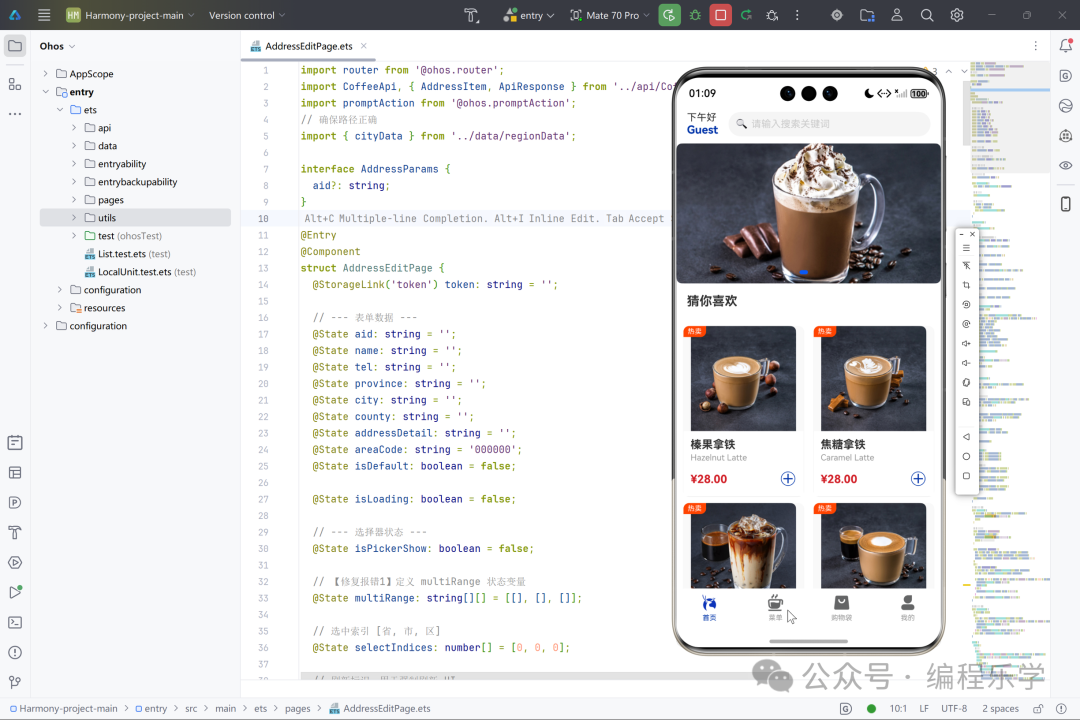
- 页面结构
首页采用经典的垂直滚动布局结构,整体划分为三个主要层级:顶部用户信息与搜索栏、中部轮播图展示区、底部商品推荐网格。顶部区域包含用户问候语和搜索功能入口,采用沉浸式设计风格,通过动态显示用户昵称增强个性化体验。中部轮播图采用全宽设计,支持自动播放和手动切换功能,每个轮播图项都可点击进入商品详情页。底部商品推荐区采用两列网格布局,每个商品卡片包含图片、名称、英文名、价格和添加标识等核心信息,布局紧凑且视觉层次分明。
页面整体采用白色背景配合品牌蓝色调点缀,保持视觉简洁性。滚动区域采用无滚动条设计提升美观度,加载状态时显示进度提示。页面各区块之间通过适当的间距和圆角处理实现视觉分隔,营造出现代化的卡片式设计风格。结构上充分考虑移动端操作习惯,重要交互元素都具备足够点击区域,确保用户体验流畅性。
- 使用到的技术
页面采用ArkTS声明式开发范式,结合HarmonyOS的UI组件体系构建。核心技术包括状态管理机制,通过@State装饰器管理轮播图数据和热卖商品数据的响应式更新,@StorageLink实现用户信息的跨页面状态同步。数据获取方面采用异步编程模式,通过async/await处理API请求,实现非阻塞数据加载。图片展示使用Image组件并配合ImageFit.Cover模式确保图片适配,同时设置备用图片提升容错性。
布局技术方面综合运用Flex弹性布局和相对定位,轮播图采用Swiper组件实现滑动效果,商品网格采用Flex的Wrap属性实现自适应两列布局。动画效果通过animateTo实现搜索页面的平滑过渡。路由跳转使用router模块实现页面导航,参数传递支持商品ID等数据。性能优化方面包括图片懒加载、数据缓存机制和错误边界处理,确保页面运行流畅性和稳定性。
- 页面详细介绍
首页作为应用的门户页面,承担着品牌展示、核心功能引导和商品推广三重功能。页面设计以咖啡文化为核心视觉语言,通过暖色调图片和简洁排版营造温馨舒适的氛围。用户信息区域不仅展示个性化问候,还通过存储机制实现跨会话用户状态保持,增强用户归属感。搜索功能虽仅提供入口跳转,但通过拟物化设计引导用户发现更多商品。
轮播图区域作为视觉焦点,采用高质量产品图片展示最新促销活动和主打产品,点击交互直接关联商品详情,缩短用户购买路径。热卖推荐区基于用户行为数据和销售数据智能生成,每个商品卡片都精心设计价格标签和热卖标识,刺激购买欲望。页面整体交互设计遵循最小化原则,减少不必要操作步骤,让用户能够快速找到目标商品并完成初步选购意向。
加载策略上采用分阶段加载技术,优先展示页面框架和用户信息,异步加载图片和数据内容,最大限度减少用户等待时间。错误处理机制完善,网络异常或数据获取失败时会显示友好提示并保持页面可用性。页面还深度集成后端API服务,实现数据动态更新和个性化推荐,为后续的购物流程奠定坚实基础。
javascript
// --- 组件:首页 ---
@Component
struct HomePage {
  onSearchClick: () => void = () => {};

  @StorageLink('userInfo') userInfoStr: string = '{}';

  get user(): UserInfo {
    const defaultUser: UserInfo = { userId: '', nickName: 'Guest', userImg: '' };
    if (!this.userInfoStr || this.userInfoStr === '{}') {
      return defaultUser;
    }
    try {
      const parsed = JSON.parse(this.userInfoStr) as UserInfo;
      return parsed ? parsed : defaultUser;
    } catch {
      return defaultUser;
    }
  }

  @State banners: BannerItem[] = [];
  @State hotProducts: Product[] = [];

  aboutToAppear() {


    this.fetchBanners();
    this.fetchHotProducts();
  }

  async fetchBanners() {
    try {
      const res = await CoffeeApi.getBanner();
      if (res.data && Array.isArray(res.data)) {
        this.banners = res.data;
      }
    } catch (err) {
      console.error('[HomePage] Banner 获取失败');
    }
  }

  // ✅ 修改后的 fetchHotProducts
  async fetchHotProducts() {
    console.info('【Debug】开始调用 getHotProducts 接口...');
    try {
      const res = await CoffeeApi.getHotProducts();

      if (res && res.data && Array.isArray(res.data)) {
        this.hotProducts = res.data.map((item: ProductItem) => {
          return {
            id: item.pid,         // ❌ 去掉 parseInt(),直接赋值字符串
            name: item.name,
            enName: item.enname,
            price: parseFloat(item.price), // 价格通常是数字字符串,保留 parseFloat
            isHot: true,
            category: '热卖推荐',
            smallImg: item.smallImg
          } as Product;
        });
        console.info('【Debug】数据转换成功,首个商品ID:', this.hotProducts[0]?.id);
      }
    } catch (err) {
      console.error('【Debug】热卖商品请求异常: ' + JSON.stringify(err));
    }
  }

  build() {
    Column() {
      // 顶部用户信息栏 (保持不变)
      Row() {
        Column() {
          Text('下午好').fontSize(14).fontColor('#333')
          Text(this.user?.nickName ?? 'Guest')
            .fontSize(16).fontWeight(FontWeight.Bold).fontColor('#0035AA')
        }
        .alignItems(HorizontalAlign.Start).margin({ right: 15 })

        Row() {
          Text('🔍').fontSize(14).fontColor('#999').margin({ left: 10, right: 5 })
          Text('请输入搜索关键词').fontSize(14).fontColor('#CCC')
        }
        .layoutWeight(1).height(35).backgroundColor('#F5F5F5').borderRadius(18)
        .onClick(() => { this.onSearchClick(); })
      }
      .width('100%').padding({ left: 15, right: 15, top: 10, bottom: 10 }).backgroundColor(Color.White)

      // 位置:HomePage 组件 -> build() -> Scroll() 内部
      Scroll() {
        Column() {
          // --- Banner 轮播修改 ---
          if (this.banners.length > 0) {
            Swiper() {
              ForEach(this.banners, (item: BannerItem) => {
                Image(item.bannerImg)
                  .width('100%').height(200).backgroundColor('#F0F0F0')
                  .borderRadius(8).objectFit(ImageFit.Cover)
                // ✅ 新增:点击 Banner 跳转详情页
                  .onClick(() => {
                    if (item.pid) {
                      router.pushUrl({
                        url: 'pages/ProductDetailPage',
                        params: { pid: item.pid }
                      })
                    }
                  })
              }, (item: BannerItem, index: number) => item.pid ? `${item.pid}` : `${index}`)
            }
            .width('100%').height(200).autoPlay(true).indicator(true)
          } else {
            Row().width('100%').height(200).backgroundColor('#F0F0F0').borderRadius(8)
          }

          Text('猜你喜欢').fontSize(18).fontWeight(FontWeight.Bold).width('100%').padding(15)

          // 列表渲染 (保持不变,逻辑在 ProductGrid 中修改)
          if (this.hotProducts.length > 0) {
            ProductGrid({ products: this.hotProducts })
          } else {
            Column() {
              LoadingProgress().width(40).height(40).color('#0035AA')
              Text('加载数据中...').fontSize(12).fontColor('#999').margin({ top: 10 })
            }.width('100%').padding(20).justifyContent(FlexAlign.Center)
          }
        }
      }
      .layoutWeight(1).scrollBar(BarState.Off)
    }
    .width('100%').height('100%').backgroundColor(Color.White)
  }
}
商品详情
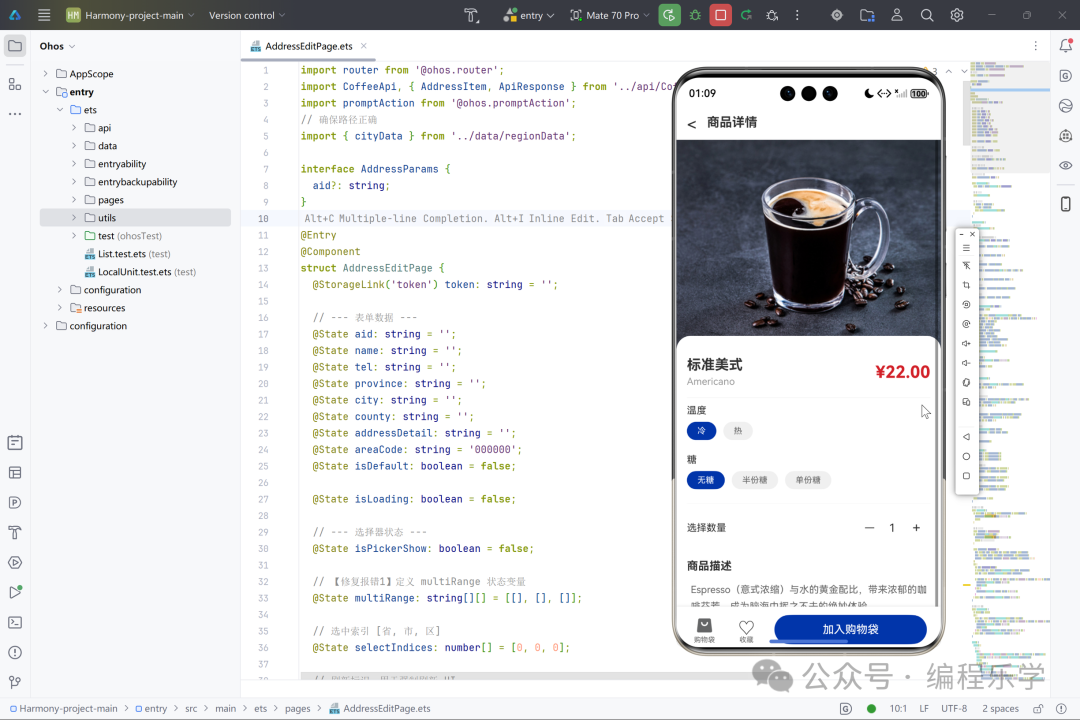
- 页面的结构
产品详情页采用经典的三段式垂直布局结构,顶部为固定导航栏,中部为可滚动的内容展示区,底部为悬浮操作栏。导航栏简洁明了,包含返回按钮和页面标题,确保用户在浏览过程中能够随时返回上级页面。内容展示区采用垂直滚动设计,依次展示产品大图、基本信息、规格选项、数量选择和详细描述等模块。
规格选择区域采用分类标签式设计,每个规格类别独立成块,选项以胶囊式按钮横向排列,用户可直观选择温度、糖度、奶油等个性化定制。底部操作栏采用左右分区的悬浮设计,左侧集成购物袋和收藏功能入口,右侧放置主要的"加入购物袋"操作按钮。这种结构设计确保了产品信息的完整展示与用户操作便利性的完美平衡。
- 使用到的技术
详情页基于HarmonyOS ArkUI框架构建,运用了多种装饰器管理状态数据。通过@State装饰器管理产品的动态规格状态、购买数量、收藏状态等关键数据,@StorageLink装饰器实现用户登录状态的全局同步。页面生命周期方法aboutToAppear和onPageShow确保了数据的及时加载与更新。
交互层面,页面集成了复杂的API调用逻辑,包括商品详情获取、购物车状态查询、收藏状态检测等异步操作。规格选择组件通过@Link装饰器实现父子组件间的双向数据绑定。底部操作栏采用Stack层叠布局实现购物袋角标效果,结合条件渲染指令动态显示数量提示。路由跳转机制实现了页面间的平滑过渡与参数传递。
- 页面详细介绍
产品详情页是用户深入了解商品信息并进行购买决策的核心界面。页面打开时首先加载高清产品大图,为用户提供直观的视觉印象。紧随其后的是产品的核心信息区域,包含中英文名称和醒目的价格展示,帮助用户快速建立产品认知。规格定制区域是本页面的重点功能模块,用户可以根据个人偏好选择饮品的温度、糖度、奶油和牛奶类型,实现个性化定制。
数量选择器采用简洁的加减按钮设计,方便用户调整购买数量。页面底部还提供了详细的商品描述文本,帮助用户全面了解产品特色与制作工艺。底部操作栏的购物袋图标实时显示当前购物车中的商品数量,为用户提供即时反馈。收藏功能允许用户标记心仪商品,方便后续查找。整个页面设计注重用户体验的流畅性,从信息浏览到购买决策形成完整的闭环,有效促进了用户的购买转化。
javascript
@Entry
@Component
struct ProductDetailPage {
  @State pid: string = '';
  @State product: ProductDetailFull | null = null;
  @State isLoading: boolean = true;

  // 动态规格状态
  @State currentTemp: string = '';
  @State currentSugar: string = '';
  @State currentCream: string = '';
  @State currentMilk: string = '';
  @State buyCount: number = 1;

  // 收藏状态
  @State isLiked: boolean = false;
  // 购物车数量
  @State cartCount: number = 0;

  // 用户Token
  @StorageLink('token') token: string = '';

  aboutToAppear() {
    const params = router.getParams() as Record<string, string>;
    if (params && params['pid']) {
      this.pid = params.pid;
      this.loadData();
    } else {
      promptAction.showToast({ message: '参数错误' });
      router.back();
    }
  }

  onPageShow() {
    if (this.token) {
      this.updateCartCount();
    }
  }

  async loadData() {
    this.isLoading = true;
    try {
      const detailPromise = CoffeeApi.getProductDetail(this.pid);

      if (this.token) {
        this.checkLikeStatus();
        this.updateCartCount();
      }

      const res = await detailPromise;

      if ((res.code === 200 || res.code === '200') && res.data) {
        if (Array.isArray(res.data) && res.data.length > 0) {
          this.product = res.data[0] as ProductDetailFull;
          this.initSpecs();
        }
      }
    } catch (err) {
      console.error('详情加载失败', JSON.stringify(err));
      promptAction.showToast({ message: '商品加载失败' });
    } finally {
      this.isLoading = false;
    }
  }

  async updateCartCount() {
    if (!this.token) return;
    try {
      const res: ApiResponse<ShopCartItem[]> = await CoffeeApi.findAllShopcart(this.token);
      if ((res.code === 200 || res.code === '200') && res.data) {
        this.cartCount = res.data.length;
      }
    } catch (err) {
      console.error('购物车数量获取失败', JSON.stringify(err));
    }
  }

  async checkLikeStatus() {
    if (!this.token) return;
    try {
      const res: ApiResponse<ProductItem[]> = await CoffeeApi.findLike(this.token, this.pid);

      if ((res.code === 200 || res.code === '200') &&
      res.data &&
      Array.isArray(res.data) &&
        res.data.length > 0) {
        this.isLiked = true;
      } else {
        this.isLiked = false;
      }
    } catch (err) {
      this.isLiked = false;
    }
  }

  initSpecs() {
    if (!this.product) return;
    if (this.product.tem) this.currentTemp = this.product.tem.split('/')[0];
    if (this.product.sugar) this.currentSugar = this.product.sugar.split('/')[0];
    if (this.product.cream) this.currentCream = this.product.cream.split('/')[0];
    if (this.product.milk) this.currentMilk = this.product.milk.split('/')[0];
  }

  getRuleString(): string {
    const rules: string[] = [];
    if (this.currentTemp) rules.push(this.currentTemp);
    if (this.currentSugar) rules.push(this.currentSugar);
    if (this.currentCream) rules.push(this.currentCream);
    if (this.currentMilk) rules.push(this.currentMilk);
    return rules.join('/');
  }

  async toggleLike() {
    if (!this.checkLogin()) return;
    const previousState = this.isLiked;
    this.isLiked = !this.isLiked;

    try {
      if (this.isLiked) {
        await CoffeeApi.like(this.token, this.pid);
        promptAction.showToast({ message: '收藏成功' });
      } else {
        await CoffeeApi.notLike(this.token, this.pid);
        promptAction.showToast({ message: '已取消收藏' });
      }
    } catch (err) {
      this.isLiked = previousState;
      promptAction.showToast({ message: '网络请求失败' });
    }
  }

  async handleAddToCart() {
    if (!this.checkLogin()) return;

    const rule = this.getRuleString();

    try {
      const res = await CoffeeApi.addShopcart(this.token, this.pid, this.buyCount, rule);
      if (res.code === 200 || res.code === '200' || res.code === 'B001' || res.code === 3000 || res.msg === 'Success') {
        promptAction.showToast({ message: '已加入购物袋 🛍️' });
        this.updateCartCount();
      } else {
        promptAction.showToast({ message: res.msg || '添加失败' });
      }
    } catch (err) {
      promptAction.showToast({ message: '网络请求失败' });
    }
  }

  checkLogin(): boolean {
    if (!this.token) {
      promptAction.showToast({ message: '请先登录' });
      router.pushUrl({ url: 'pages/LoginPage' });
      return false;
    }
    return true;
  }

  build() {
    Column() {
      // 1. 顶部导航栏
      Row() {
        Text('<').fontSize(24).padding(15).onClick(() => router.back())
        Text('商品详情').fontSize(18).fontWeight(FontWeight.Bold)
        Blank()
        Text(' ').width(40)
      }
      .width('100%').height(50).backgroundColor(Color.White).zIndex(10)

      if (this.isLoading) {
        Column() {
          LoadingProgress().width(50).height(50).color('#0035AA')
          Text('加载美味中...').fontSize(14).fontColor('#999').margin({ top: 10 })
        }.layoutWeight(1).justifyContent(FlexAlign.Center)
      } else if (this.product) {
        Stack({ alignContent: Alignment.Bottom }) {
          // 2. 滚动内容区
          Scroll() {
            Column() {
              // 商品大图
              Image(this.product.large_img)
                .width('100%').height(300).objectFit(ImageFit.Cover).backgroundColor('#F5F5F5')

              Column() {
                // 标题和价格
                Row() {
                  Column() {
                    Text(this.product.name).fontSize(20).fontWeight(FontWeight.Bold).fontColor('#333')
                    Text(this.product.enname).fontSize(14).fontColor('#999').margin({ top: 4 })
                  }.alignItems(HorizontalAlign.Start)

                  Blank()
                  Text(`¥${Number(this.product.price).toFixed(2)}`).fontSize(24).fontWeight(FontWeight.Bold).fontColor('#D22028')
                }
                .width('100%').margin({ top: 15, bottom: 15 })

                Divider().color('#EEE')

                // 动态规格
                if (this.product.tem) {
                  SpecView({
                    title: this.product.tem_desc || '温度',
                    options: this.product.tem.split('/'),
                    selected: $currentTemp
                  })
                }

                if (this.product.sugar) {
                  SpecView({
                    title: this.product.sugar_desc || '糖度',
                    options: this.product.sugar.split('/'),
                    selected: $currentSugar
                  })
                }

                if (this.product.cream) {
                  SpecView({
                    title: this.product.cream_desc || '奶油',
                    options: this.product.cream.split('/'),
                    selected: $currentCream
                  })
                }

                if (this.product.milk) {
                  SpecView({
                    title: this.product.milk_desc || '奶',
                    options: this.product.milk.split('/'),
                    selected: $currentMilk
                  })
                }

                Divider().color('#EEE').margin({ top: 10, bottom: 10 })

                // 数量选择
                Row() {
                  Text('选择数量').fontSize(14).fontColor('#333')
                  Blank()
                  Row() {
                    Text('-').fontSize(15).padding(10).onClick(() => { if (this.buyCount > 1) this.buyCount-- })
                    Text(this.buyCount.toString()).fontSize(16).margin({ left: 10, right: 10 })
                    Text('+').fontSize(20).padding(10).onClick(() => this.buyCount++)
                  }
                }.width('100%').height(50)

                // 商品描述
                Text('商品描述').fontSize(16).fontWeight(FontWeight.Bold).margin({ top: 20, bottom: 10 }).width('100%')
                Text(this.product.desc || '暂无描述').fontSize(14).fontColor('#666').lineHeight(24)

                Blank().height(80)
              }
              .padding(15)
              .backgroundColor(Color.White)
              .borderRadius({ topLeft: 20, topRight: 20 })
              .margin({ top: -20 })
            }
          }.width('100%').height('100%')

          // 3. 底部操作栏 (重点优化区域)
          Row() {
            // 左侧:购物袋 + 收藏
            Row() {
              // --- 1. 购物袋模块 ---
              Column() {
                // 图标层 (使用 Stack 固定高度,确保与旁边收藏对齐)
                Stack({ alignContent: Alignment.TopEnd }) {
                  Image($r('app.media.shopbag'))
                    .width(24)
                    .height(24)
                    .objectFit(ImageFit.Contain)

                  // 红色数量角标
                  if (this.cartCount > 0) {
                    Text(this.cartCount > 99 ? '99+' : this.cartCount.toString())
                      .fontSize(8)
                      .fontColor(Color.White)
                      .backgroundColor('#FF0000')
                      .borderRadius(8)
                      .padding({ left: 3, right: 3 })
                      .height(14)
                      .constraintSize({ minWidth: 14 })
                      .textAlign(TextAlign.Center)
                      .offset({ x: 5, y: -5 }) // 微调角标位置
                  }
                }
                .width(30)
                .height(30) // 固定高度 30
                .alignContent(Alignment.Center)

                // 文字层
                Text('购物袋')
                  .fontSize(10)
                  .fontColor('#666')
                  .margin({ top: 0 }) // 紧贴图标
              }
              .justifyContent(FlexAlign.Center)
              .alignItems(HorizontalAlign.Center)
              .width(50)
              .height('100%')
              .onClick(() => {
                // ✅ 修改:跳转到首页 (MainPage 通常包含购物袋Tab)
                // 跳转到主页,并传递 index: 2 以便切换到购物袋 Tab
                router.pushUrl({
                  url: 'pages/MainPage',
                  params: { index: 2 }
                });
              })

              // --- 2. 收藏模块 ---
              Column() {
                // 图标层 (同样固定高度 30)
                Stack({ alignContent: Alignment.Center }) {
                  Text(this.isLiked ? '♥' : '♡')
                    .fontSize(24)
                    .fontColor(this.isLiked ? '#D22028' : '#333')
                    .fontWeight(this.isLiked ? FontWeight.Bold : FontWeight.Normal)
                    .textAlign(TextAlign.Center)
                }
                .width(30)
                .height(30) // 确保与左边高度一致

                // 文字层
                Text('收藏')
                  .fontSize(10)
                  .fontColor('#666')
                  .margin({ top: 0 })
              }
              .justifyContent(FlexAlign.Center)
              .alignItems(HorizontalAlign.Center)
              .width(50)
              .height('100%')
              .onClick(() => this.toggleLike())
              .margin({ left: 10 })
            }
            .padding({ left: 15 })

            // 右侧:加购按钮
            Button('加入购物袋', { type: ButtonType.Normal })
              .layoutWeight(1)
              .height(42) // 按钮高度
              .backgroundColor('#0035AA')
              .borderRadius(21)
              .fontSize(16)
              .margin({ left: 15, right: 20 })
              .onClick(() => this.handleAddToCart())
          }
          .width('100%')
          .height(80) // ✅ 增加高度,防止被切
          .padding({ bottom: 15 }) // ✅ 底部内边距,抬高内容
          .backgroundColor(Color.White)
          .shadow({ radius: 10, color: '#1A000000', offsetY: -2 })
        }
        .width('100%').height('100%')
      }
    }
    .width('100%').height('100%').backgroundColor('#F9F9F9')
  }
}
菜单
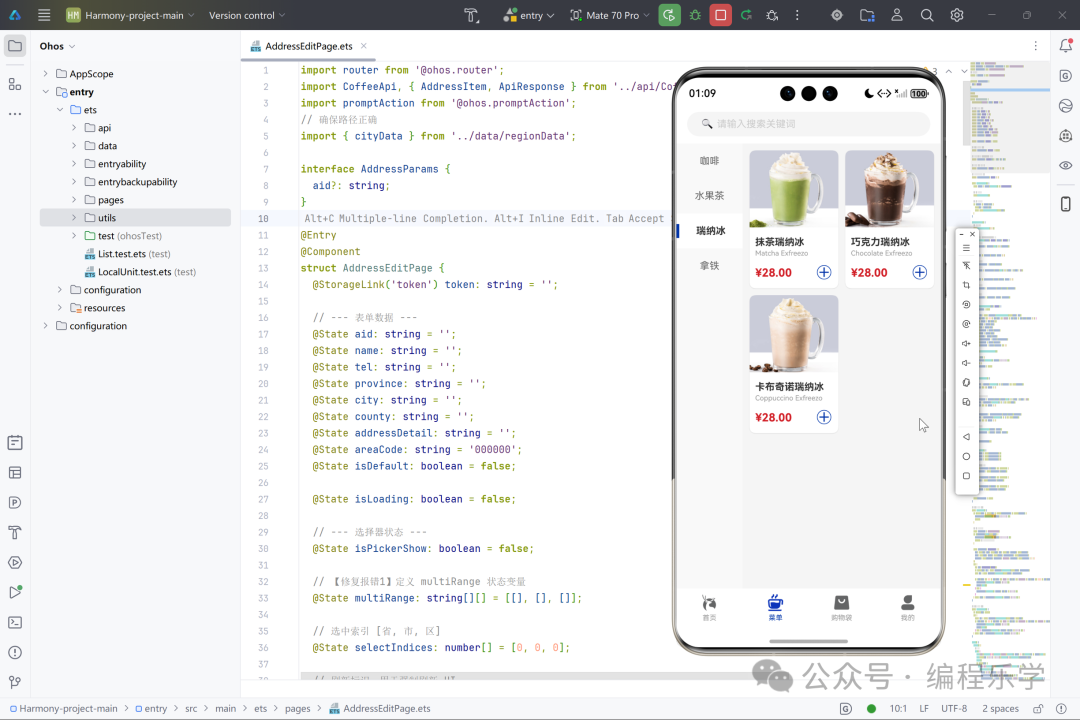
- 页面的结构
菜单页采用经典的移动端导航结构,顶部为全局统一的搜索栏区域,中部为分类导航与商品展示的主体部分。整体布局层次清晰,顶部搜索栏采用简约设计,用户可快速触发搜索功能。分类导航区采用横向滚动布局,支持左右滑动浏览多个产品类别,当前选中分类会通过高亮色块进行视觉强化。
商品展示区采用瀑布流式网格布局,商品卡片以两列形式整齐排列,每个卡片包含产品图片、名称、英文名和价格等核心信息。页面底部通过标签页导航栏实现与其他模块的切换,保持应用整体导航一致性。这种结构设计确保了用户在浏览不同类别商品时的流畅体验,同时保持了页面的视觉平衡与信息密度。
- 使用到的技术
菜单页基于HarmonyOS的ArkUI框架开发,采用声明式UI范式构建界面。通过@Component装饰器定义可复用的自定义组件,利用@State和@Prop装饰器管理组件内部状态与属性传递。布局实现上,综合运用了Flex弹性布局、Grid网格系统以及Stack层叠布局,以构建响应式界面。
数据展示方面,结合ForEach循环渲染指令动态生成商品列表,并配合条件渲染指令控制不同状态的UI显示。交互层面,通过手势事件绑定实现分类切换和商品点击跳转,并利用路由模块实现页面间的无缝导航。此外,还运用了资源引用机制管理图片与文本资源,确保多设备适配与性能优化。
- 页面详细介绍
菜单页作为咖啡应用的核心商品浏览界面,主要承担着展示全品类产品和引导用户选购的功能。页面启动时会自动加载默认分类的商品列表,用户可以通过顶部的分类导航栏快速切换至拿铁、美式、瑞纳冰等不同饮品类别。每个分类切换都会触发对应的数据更新,实时展示该类别下的所有商品。
商品卡片设计注重信息可视化,每张卡片都突出显示产品的高清图片、中文名称、英文译名以及醒目价格,热销商品还带有特殊标识。点击任意商品卡片会跳转至产品详情页,让用户进一步了解产品规格并完成加购操作。页面整体采用浅色背景与卡片式设计,营造出轻盈现代的视觉风格,符合年轻用户的审美偏好,同时确保了操作的高效性与浏览的愉悦感。
五、项目源码
👇👇👇👇👇快捷方式👇👇👇👇👇