引言:那个让我重写三遍的继承链
还记得两年前维护一个电商系统时,遇到了这样的继承噩梦:
kotlin
// 继承地狱
open class BaseUser {
    open fun login() { }
    open fun logout() { }
}

open class PremiumUser : BaseUser() {
    override fun login() { /* 增强登录 */ }
    open fun accessPremiumFeatures() { }
}

class VIPUser : PremiumUser() {
    override fun login() { /* VIP登录 */ }
    override fun accessPremiumFeatures() { /* VIP特权 */ }
    fun getDiscount() { }
}

// 新需求:临时会员(需要登录增强,但不是Premium)
class TemporaryUser : BaseUser() {  // ❌ 无法复用PremiumUser的login
    override fun login() {
        // 只能复制粘贴PremiumUser的login代码
    }
}
问题 :需要复用PremiumUser的登录增强功能,但又不想继承整个Premium体系。这时候我才理解了 "组合优于继承" 的智慧。
后来用委托模式重构:
kotlin
// 接口 + 委托
interface LoginBehavior {
    fun login()
}

class EnhancedLogin : LoginBehavior {
    override fun login() {
        println("增强登录逻辑")
    }
}

// 使用委托
class TemporaryUser(
    loginBehavior: LoginBehavior
) : LoginBehavior by loginBehavior  // 委托!

val tempUser = TemporaryUser(EnhancedLogin())
tempUser.login()  // 调用EnhancedLogin的实现
代码量减少70%,灵活性提升100%! 这就是Kotlin委托的威力。
今天,我们就来深入探索Kotlin的委托机制,看看如何用"组合"的思想优雅地解决继承的问题。
委托模式:设计模式的基石
什么是委托
委托(Delegation) 是一种设计模式:一个对象将某些操作委托给另一个对象来处理。
类比:就像老板(委托者)把具体工作委托给助理(被委托者)完成,老板只需要下达指令。
kotlin
// 不使用委托:老板事必躬亲
class Boss {
fun scheduleMeeting() {
// 老板自己安排会议
println("查看日历...")
println("发送邀请...")
println("预定会议室...")
}
}
// 使用委托:老板委托给助理
interface MeetingScheduler {
fun scheduleMeeting()
}
class Assistant : MeetingScheduler {
override fun scheduleMeeting() {
println("助理安排会议...")
}
}
class Boss(private val assistant: MeetingScheduler) {
fun scheduleMeeting() {
assistant.scheduleMeeting() // 委托给助理
}
}委托 vs 继承
| 对比维度 | 继承 | 委托 |
|---|---|---|
| 关系 | is-a(是一个) | has-a(有一个) |
| 耦合度 | 高(父子强耦合) | 低(通过接口) |
| 灵活性 | 低(编译时确定) | 高(运行时可变) |
| 复用性 | 单继承限制 | 可组合多个 |
| 修改影响 | 父类变化影响子类 | 隔离变化 |
继承的问题:
kotlin
// ❌ 继承的限制
open class Bird {
    open fun fly() { println("Flying...") }
}

class Penguin : Bird() {
    override fun fly() {
        throw UnsupportedOperationException("Penguins can't fly!")
    }
}

// 企鹅不会飞,但继承了fly方法,违反里氏替换原则委托的解决方案:
kotlin
// ✅ 用委托解决
interface Flyable {
    fun fly()
}

class FlyingBehavior : Flyable {
    override fun fly() { println("Flying...") }
}

class NoFlyBehavior : Flyable {
    override fun fly() { println("Can't fly") }
}

class Bird(private val flyBehavior: Flyable) : Flyable by flyBehavior

val sparrow = Bird(FlyingBehavior())
sparrow.fly()  // "Flying..."

val penguin = Bird(NoFlyBehavior())
penguin.fly()  // "Can't fly"
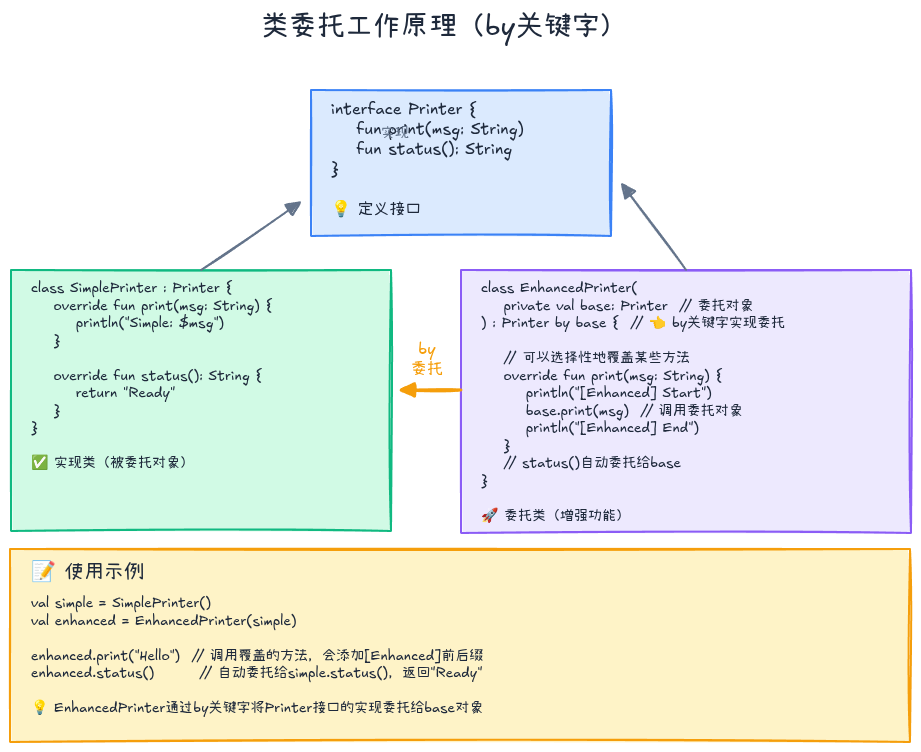
Kotlin的类委托:by关键字
基本用法
Kotlin通过by关键字原生支持委托模式:
kotlin
interface Printer {
    fun print(message: String)
    fun getStatus(): String
}

class ConsolePrinter : Printer {
    override fun print(message: String) {
        println("Console: $message")
    }

    override fun getStatus(): String = "Console Printer Ready"
}

// 使用by委托
class LoggingPrinter(
    private val printer: Printer
) : Printer by printer {  // 委托所有方法给printer

    // 可以选择性覆盖某些方法
    override fun print(message: String) {
        println("[LOG] Printing...")
        printer.print(message)  // 调用被委托对象的方法
    }
}

val printer = LoggingPrinter(ConsolePrinter())
printer.print("Hello")     // 覆盖的方法
println(printer.getStatus()) // 委托的方法工作原理:
kotlin
// 编译器生成的代码(简化版)
class LoggingPrinter(private val printer: Printer) : Printer {
    override fun print(message: String) {
        println("[LOG] Printing...")
        printer.print(message)
    }

    // 编译器自动生成
    override fun getStatus(): String {
        return printer.getStatus()
    }
}
多接口委托
可以同时委托多个接口:
kotlin
interface Clickable {
    fun click()
}

interface Focusable {
    fun focus()
    fun blur()
}

class ClickHandler : Clickable {
    override fun click() { println("Clicked") }
}

class FocusHandler : Focusable {
    override fun focus() { println("Focused") }
    override fun blur() { println("Blurred") }
}

// 委托多个接口
class Button(
    clickHandler: Clickable,
    focusHandler: Focusable
) : Clickable by clickHandler,
    Focusable by focusHandler {

    fun render() {
        println("Rendering button")
    }
}

val button = Button(ClickHandler(), FocusHandler())
button.click()  // 委托给ClickHandler
button.focus()  // 委托给FocusHandler
button.render()  // Button自己的方法
实战案例:装饰器模式
使用委托实现装饰器模式:
kotlin
interface DataSource {
    fun readData(): String
    fun writeData(data: String)
}

class FileDataSource(private val filename: String) : DataSource {
    override fun readData(): String {
        println("Reading from file: $filename")
        return "file content"
    }

    override fun writeData(data: String) {
        println("Writing to file: $filename")
    }
}

// 加密装饰器
class EncryptionDecorator(
    private val dataSource: DataSource
) : DataSource by dataSource {

    override fun readData(): String {
        val data = dataSource.readData()
        return decrypt(data)
    }

    override fun writeData(data: String) {
        val encrypted = encrypt(data)
        dataSource.writeData(encrypted)
    }

    private fun encrypt(data: String) = "encrypted($data)"
    private fun decrypt(data: String) = data.removePrefix("encrypted(").removeSuffix(")")
}

// 压缩装饰器
class CompressionDecorator(
    private val dataSource: DataSource
) : DataSource by dataSource {

    override fun readData(): String {
        val data = dataSource.readData()
        return decompress(data)
    }

    override fun writeData(data: String) {
        val compressed = compress(data)
        dataSource.writeData(compressed)
    }

    private fun compress(data: String) = "compressed($data)"
    private fun decompress(data: String) = data.removePrefix("compressed(").removeSuffix(")")
}

// 组合使用
val dataSource = CompressionDecorator(
    EncryptionDecorator(
        FileDataSource("data.txt")
    )
)

dataSource.writeData("Hello World")
// 输出:Writing to file: data.txt
// 数据经过加密和压缩

val data = dataSource.readData()
// 读取并解压、解密
**委托的优势**: - 减少样板代码:编译器自动生成转发方法 - 灵活组合:可以运行时替换委托对象 - 选择性覆盖:只重写需要定制的方法 - 遵循开闭原则:对扩展开放,对修改封闭
属性委托:懒加载与可观察属性
什么是属性委托
属性委托允许将属性的get和set操作委托给另一个对象:
kotlin
class Example {
    var property: String by Delegate()  // 属性委托
}

class Delegate {
    operator fun getValue(thisRef: Any?, property: KProperty<*>): String {
        return "$thisRef, thank you for delegating '${property.name}' to me!"
    }

    operator fun setValue(thisRef: Any?, property: KProperty<*>, value: String) {
        println("$value has been assigned to '${property.name}' in $thisRef.")
    }
}工作原理:
kotlin
// 编译器生成的代码
class Example {
    private val property$delegate = Delegate()

    var property: String
        get() = property$delegate.getValue(this, ::property)
        set(value) {
            property$delegate.setValue(this, ::property, value)
        }
}
标准委托:lazy
懒加载:只在第一次访问时初始化,后续返回缓存值。
kotlin
// 基本用法
class HeavyObject {
    val expensiveData: String by lazy {
        println("Computing expensive data...")
        Thread.sleep(1000)  // 模拟耗时操作
        "Computed Result"
    }
}

val obj = HeavyObject()
println("Object created")
println(obj.expensiveData)  // 第一次访问:计算并缓存
println(obj.expensiveData)  // 第二次访问:直接返回缓存

// 输出:
// Object created
// Computing expensive data...
// Computed Result
// Computed Resultlazy的模式:
kotlin
// 1. SYNCHRONIZED(默认):线程安全
val lazyValue: String by lazy {
    println("Computed once")
    "Value"
}

// 2. PUBLICATION:可能被多次初始化,但只有一个值会被使用
val lazyPublic: String by lazy(LazyThreadSafetyMode.PUBLICATION) {
    "Value"
}

// 3. NONE:不加锁,非线程安全(性能最优)
val lazyUnsafe: String by lazy(LazyThreadSafetyMode.NONE) {
    "Value"
}实际应用:
kotlin
class UserRepository {
    // 延迟初始化数据库连接
    private val database: Database by lazy {
        println("Initializing database connection...")
        Database.connect()
    }

    // 延迟初始化API客户端
    private val apiClient: ApiClient by lazy {
        println("Creating API client...")
        ApiClient(endpoint = "https://api.example.com")
    }

    fun getUser(id: String): User {
        return database.queryUser(id)  // 首次访问时才初始化database
    }

    fun fetchUser(id: String): User {
        return apiClient.getUser(id)  // 首次访问时才初始化apiClient
    }
}
标准委托:observable
可观察属性:属性值变化时触发回调。
kotlin
class User {
    var name: String by Delegates.observable("<no name>") { prop, old, new ->
        println("${prop.name}: $old -> $new")
    }

    var age: Int by Delegates.observable(0) { _, old, new ->
        println("Age changed: $old -> $new")
    }
}

val user = User()
user.name = "Alice"  // name: <no name> -> Alice
user.name = "Bob"    // name: Alice -> Bob
user.age = 25 // Age changed: 0 -> 25实际应用:MVVM模式:
kotlin
class UserViewModel {
    // 可观察属性,变化时自动通知UI
    var username: String by Delegates.observable("") { _, _, newValue ->
        notifyUI("username", newValue)
    }

    var isLoading: Boolean by Delegates.observable(false) { _, _, newValue ->
        notifyUI("isLoading", newValue)
    }

    private fun notifyUI(propertyName: String, value: Any) {
        println("Notify UI: $propertyName = $value")
        // 实际项目中会通知LiveData或StateFlow
    }

    fun login(username: String) {
        isLoading = true  // 自动通知UI显示加载状态
        this.username = username  // 自动通知UI更新用户名
        // ... 登录逻辑
        isLoading = false  // 自动通知UI隐藏加载状态
    }
}
标准委托:vetoable
可否决属性:在设置新值前进行验证,可以拒绝修改。
kotlin
class Product {
    var price: Double by Delegates.vetoable(0.0) { _, oldValue, newValue ->
        // 返回true接受新值,返回false拒绝修改
        newValue >= 0  // 价格不能为负数
    }

    var stock: Int by Delegates.vetoable(0) { _, _, newValue ->
        newValue >= 0  // 库存不能为负数
    }
}

val product = Product()
product.price = 99.99  // ✅ 接受
println(product.price)  // 99.99

product.price = -10.0  // ❌ 拒绝
println(product.price)  // 99.99(保持不变)

product.stock = 100    // ✅ 接受
product.stock = -5     // ❌ 拒绝
println(product.stock) // 100实际应用:表单验证:
kotlin
class RegistrationForm {
    var email: String by Delegates.vetoable("") { _, _, newValue ->
        isValidEmail(newValue)
    }

    var password: String by Delegates.vetoable("") { _, _, newValue ->
        newValue.length >= 8  // 密码至少8位
    }

    var age: Int by Delegates.vetoable(0) { _, _, newValue ->
        newValue in 18..120  // 年龄在18-120之间
    }

    private fun isValidEmail(email: String): Boolean {
        return email.contains("@") && email.contains(".")
    }

    fun isValid(): Boolean {
        return email.isNotEmpty() && password.isNotEmpty() && age >= 18
    }
}

val form = RegistrationForm()
form.email = "invalid"       // ❌ 拒绝
form.email = "user@test.com" // ✅ 接受
form.password = "123"        // ❌ 拒绝(太短)
form.password = "securepass123"  // ✅ 接受
form.age = 15                // ❌ 拒绝(未成年)
form.age = 25                // ✅ 接受
标准委托:notNull
非空延迟初始化 :比lateinit更灵活,支持基本类型。
kotlin
class Config {
    // lateinit只能用于var,且不支持基本类型
    // lateinit var port: Int  // ❌ 编译错误

    // notNull支持所有类型
    var port: Int by Delegates.notNull()
    var host: String by Delegates.notNull()

    fun initialize() {
        port = 8080
        host = "localhost"
    }
}

val config = Config()
// println(config.port)  // ❌ 抛出IllegalStateException
config.initialize()
println(config.port)  // ✅ 8080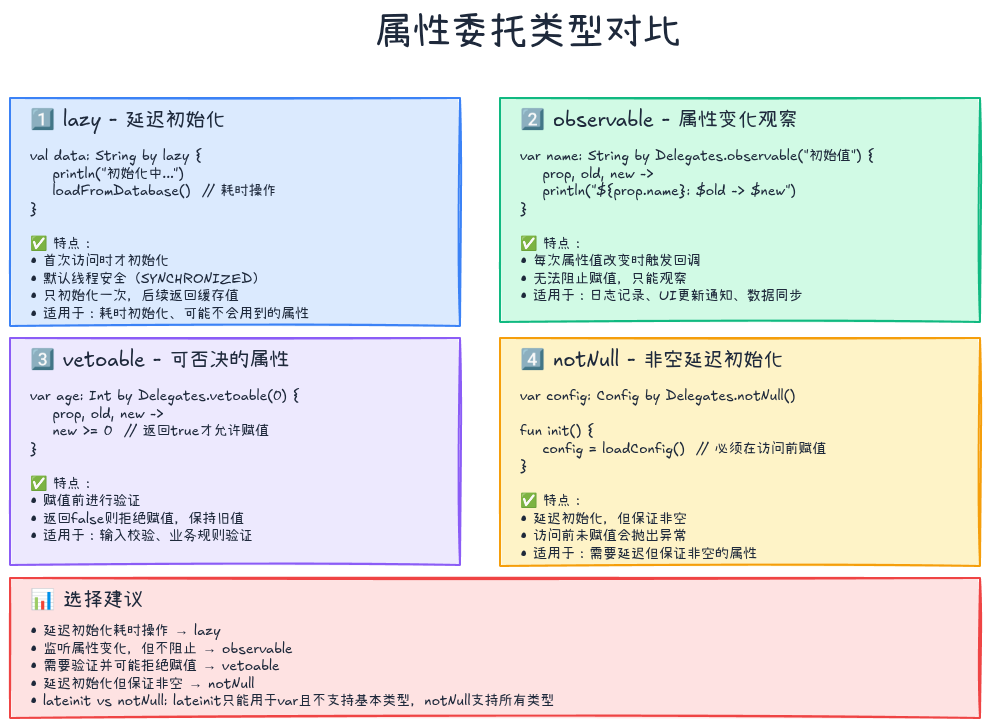
自定义委托:构建可复用的属性行为
实现自定义委托
kotlin
// 只读属性委托(只需要getValue)
class ReadOnlyDelegate(private val value: String) {
    operator fun getValue(thisRef: Any?, property: KProperty<*>): String {
        return value
    }
}

// 读写属性委托(需要getValue和setValue)
class MutableDelegate(private var value: String) {
    operator fun getValue(thisRef: Any?, property: KProperty<*>): String {
        return value
    }

    operator fun setValue(thisRef: Any?, property: KProperty<*>, newValue: String) {
        value = newValue
    }
}

class Example {
    val readOnly: String by ReadOnlyDelegate("constant")
    var mutable: String by MutableDelegate("initial")
}
实战案例1:SharedPreferences委托
kotlin
// Android SharedPreferences委托
class PreferenceDelegate<T>(
    private val key: String,
    private val defaultValue: T
) {
    operator fun getValue(thisRef: Any?, property: KProperty<*>): T {
        val prefs = getSharedPreferences()  // 获取SharedPreferences
        return when (defaultValue) {
            is String -> prefs.getString(key, defaultValue as String) as T
            is Int -> prefs.getInt(key, defaultValue as Int) as T
            is Boolean -> prefs.getBoolean(key, defaultValue as Boolean) as T
            is Float -> prefs.getFloat(key, defaultValue as Float) as T
            is Long -> prefs.getLong(key, defaultValue as Long) as T
            else -> throw IllegalArgumentException("Unsupported type")
        }
    }

    operator fun setValue(thisRef: Any?, property: KProperty<*>, value: T) {
        val editor = getSharedPreferences().edit()
        when (value) {
            is String -> editor.putString(key, value)
            is Int -> editor.putInt(key, value)
            is Boolean -> editor.putBoolean(key, value)
            is Float -> editor.putFloat(key, value)
            is Long -> editor.putLong(key, value)
            else -> throw IllegalArgumentException("Unsupported type")
        }
        editor.apply()
    }
}

// 使用
class AppSettings {
    var username: String by PreferenceDelegate("username", "")
    var isLoggedIn: Boolean by PreferenceDelegate("is_logged_in", false)
    var fontSize: Int by PreferenceDelegate("font_size", 14)
}

val settings = AppSettings()
settings.username = "Alice"  // 自动保存到SharedPreferences
println(settings.username)   // 自动从SharedPreferences读取
实战案例2:带范围验证的委托
kotlin
class RangeDelegate<T : Comparable<T>>(
    private var value: T,
    private val range: ClosedRange<T>
) {
    operator fun getValue(thisRef: Any?, property: KProperty<*>): T {
        return value
    }

    operator fun setValue(thisRef: Any?, property: KProperty<*>, newValue: T) {
        if (newValue in range) {
            value = newValue
        } else {
            throw IllegalArgumentException(
                "${property.name} must be in range $range, but got $newValue"
            )
        }
    }
}

// 扩展函数简化使用
fun <T : Comparable<T>> range(initial: T, range: ClosedRange<T>) =
    RangeDelegate(initial, range)

class GameCharacter {
    var health: Int by range(100, 0..100)
    var level: Int by range(1, 1..100)
    var experience: Int by range(0, 0..Int.MAX_VALUE)
}

val character = GameCharacter()
character.health = 80   // ✅
// character.health = 150  // ❌ 抛出异常
character.level = 10    // ✅
println("Character: HP=${character.health}, Level=${character.level}")
实战案例3:带历史记录的委托
kotlin
class HistoryDelegate<T>(initialValue: T) {
    private val history = mutableListOf(initialValue)

    operator fun getValue(thisRef: Any?, property: KProperty<*>): T {
        return history.last()
    }

    operator fun setValue(thisRef: Any?, property: KProperty<*>, value: T) {
        history.add(value)
    }

    fun getHistory(): List<T> = history.toList()

    fun undo(): T? {
        return if (history.size > 1) {
            history.removeLast()
            history.last()
        } else {
            null
        }
    }
}

class TextEditor {
    private val contentDelegate = HistoryDelegate("")
    var content: String by contentDelegate

    fun undo() {
        contentDelegate.undo()
    }

    fun showHistory() {
        println("Edit history:")
        contentDelegate.getHistory().forEachIndexed { index, value ->
            println("  $index: $value")
        }
    }
}

val editor = TextEditor()
editor.content = "Hello"
editor.content = "Hello World"
editor.content = "Hello Kotlin"
editor.showHistory()
// Edit history:
//   0:
//   1: Hello
//   2: Hello World
//   3: Hello Kotlin

editor.undo()
println(editor.content)  // "Hello World"
Map委托:将Map用作属性存储
Kotlin标准库提供了将Map用作属性委托的功能:
kotlin
class User(map: Map<String, Any?>) {
    val name: String by map
    val age: Int by map
    val email: String? by map  // 可空属性
}

val userMap = mapOf(
    "name" to "Alice",
    "age" to 25,
    "email" to "alice@example.com"
)

val user = User(userMap)
println(user.name)   // Alice
println(user.age)    // 25
println(user.email) // alice@example.com可变Map委托:
kotlin
class MutableUser(map: MutableMap<String, Any?>) {
    var name: String by map
    var age: Int by map
}

val userMap = mutableMapOf<String, Any?>()
val user = MutableUser(userMap)

user.name = "Bob"
user.age = 30

println(userMap) // {name=Bob, age=30}实际应用:JSON解析:
kotlin
// 简化JSON对象的属性访问
class JsonObject(private val map: Map<String, Any?>) {
    val id: String by map
    val title: String by map
    val userId: Int by map
    val completed: Boolean by map
}

val json = mapOf(
    "id" to "1",
    "title" to "Task 1",
    "userId" to 123,
    "completed" to false
)

val obj = JsonObject(json)
println("${obj.title} by user ${obj.userId}")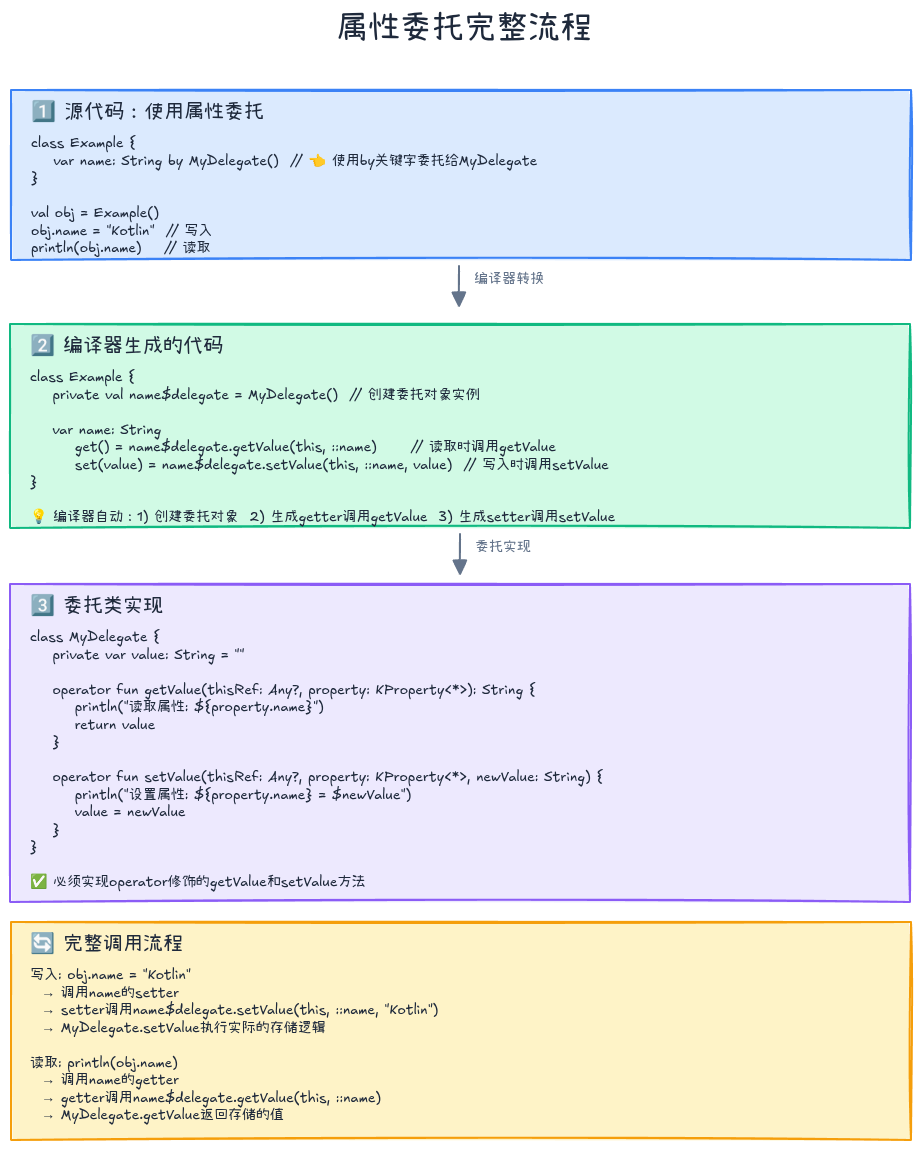
委托的最佳实践
1. 优先使用委托而非继承
kotlin
// ❌ 不好:使用继承
open class Logger {
    open fun log(message: String) {
        println("[LOG] $message")
    }
}

class NetworkLogger : Logger() {
    override fun log(message: String) {
        super.log("Network: $message")
    }
}

// ✅ 好:使用委托
interface Logger {
    fun log(message: String)
}

class ConsoleLogger : Logger {
    override fun log(message: String) {
        println("[LOG] $message")
    }
}

class NetworkLogger(
    private val logger: Logger
) : Logger by logger {
    override fun log(message: String) {
        logger.log("Network: $message")
    }
}
2. 合理使用lazy提升性能
kotlin
// ✅ 好:懒加载重对象
class ViewModel {
    private val repository: Repository by lazy {
        createRepository()  // 只在需要时创建
    }

    private val analytics: Analytics by lazy {
        Analytics.initialize()
    }
}

// ❌ 不好:立即初始化所有对象
class ViewModel {
    private val repository = createRepository()  // 即使不用也会创建
    private val analytics = Analytics.initialize()
}
3. 自定义委托要考虑线程安全
kotlin
// ❌ 不安全:没有同步
class UnsafeDelegate<T>(private var value: T) {
    operator fun getValue(thisRef: Any?, property: KProperty<*>): T = value
    operator fun setValue(thisRef: Any?, property: KProperty<*>, newValue: T) {
        value = newValue  // 多线程不安全
    }
}

// ✅ 安全:使用同步
class SafeDelegate<T>(private var value: T) {
    private val lock = Any()

    operator fun getValue(thisRef: Any?, property: KProperty<*>): T {
        synchronized(lock) {
            return value
        }
    }

    operator fun setValue(thisRef: Any?, property: KProperty<*>, newValue: T) {
        synchronized(lock) {
            value = newValue
        }
    }
}
4. 使用扩展函数简化委托创建
kotlin
// 创建便捷的工厂函数
fun <T> cached(compute: () -> T): Lazy<T> = lazy(compute)

fun <T : Comparable<T>> rangeValidated(initial: T, range: ClosedRange<T>) =
    RangeDelegate(initial, range)

// 使用
class Config {
    val heavyConfig by cached {
        loadConfigFromFile()
    }

    var port by rangeValidated(8080, 1024..65535)
}
常见问题解答
Q1: lazy和lateinit有什么区别?
A:
| 特性 | lazy | lateinit |
|---|---|---|
| 初始化时机 | 首次访问 | 手动初始化 |
| 线程安全 | 默认安全 | 需自行保证 |
| 支持类型 | 所有类型 | 非空引用类型 |
| 只读/可变 | 只读(val) | 可变(var) |
| 初始化逻辑 | lambda表达式 | 赋值语句 |
kotlin
class Example {
    // lazy:自动初始化,线程安全
    val config: Config by lazy {
        Config.load()
    }

    // lateinit:手动初始化
    lateinit var database: Database

    fun init() {
        database = Database.connect()
    }

    // lateinit不支持基本类型
    // lateinit var count: Int  // ❌ 编译错误

    // lazy支持所有类型
    val count: Int by lazy { 0 }  // ✅
}
Q2: 委托会影响性能吗?
A: 影响很小,几乎可以忽略:
kotlin
// 委托版本
class Delegated(printer: Printer) : Printer by printer

// 等价的手写版本
class Manual(private val printer: Printer) : Printer {
    override fun print(msg: String) = printer.print(msg)
}

// 性能差异:委托只是多了一次方法调用,现代JVM会内联优化建议:
- 属性委托在访问时有轻微开销(getter/setter调用)
- lazy首次访问有同步开销,后续访问直接返回缓存值
- 不要在性能关键路径上过度使用委托
Q3: 何时使用类委托,何时使用属性委托?
A:
类委托:整个接口的行为需要委托
kotlin
// 整个Printer接口的行为都委托
class LoggingPrinter(printer: Printer) : Printer by printer属性委托:单个属性的访问逻辑需要委托
kotlin
// 只有属性的get/set需要特殊处理
class User {
    var name: String by observable("") { _, _, new ->
        println("Name changed to $new")
    }
}
Q4: 可以链式委托吗?
A: 可以,委托可以多层嵌套:
kotlin
interface Logger {
    fun log(message: String)
}

class ConsoleLogger : Logger {
    override fun log(message: String) {
        println(message)
    }
}

class TimestampLogger(private val logger: Logger) : Logger by logger {
    override fun log(message: String) {
        logger.log("[${System.currentTimeMillis()}] $message")
    }
}

class PrefixLogger(private val logger: Logger, private val prefix: String) : Logger by logger {
    override fun log(message: String) {
        logger.log("$prefix: $message")
    }
}

// 链式组合
val logger = PrefixLogger(
    TimestampLogger(
        ConsoleLogger()
    ),
    "APP"
)

logger.log("Hello")
// 输出:APP: [1642384920123] Hello
练习题
练习1:实现线程安全的单例委托
kotlin
// TODO: 实现一个线程安全的单例委托
class SingletonDelegate<T>(private val initializer: () -> T) {
    // 实现 getValue
}

// 使用
class DatabaseManager {
    companion object {
        val instance: DatabaseManager by SingletonDelegate {
            DatabaseManager()
        }
    }
}
练习2:实现带过期时间的缓存委托
kotlin
// TODO: 实现一个带过期时间的缓存委托
// 提示:保存值和时间戳,超过ttl返回null并重新计算

class CachedDelegate<T>(
    private val ttlMillis: Long,
    private val compute: () -> T
) {
    // 实现 getValue
}

// 使用
class DataService {
    val cachedData: String by CachedDelegate(5000) {
        // 5秒缓存
        fetchDataFromNetwork()
    }
}
练习3:实现可撤销修改的委托
kotlin
// TODO: 实现支持commit和rollback的委托
class TransactionalDelegate<T>(initialValue: T) {
    // 实现 getValue, setValue, commit, rollback
}

// 使用
class Form {
    private val nameDelegate = TransactionalDelegate("")
    var name: String by nameDelegate

    fun save() {
        nameDelegate.commit()
    }

    fun cancel() {
        nameDelegate.rollback()
    }
}
总结
Kotlin的委托机制是实现"组合优于继承"设计原则的强大工具。
核心要点回顾
-
类委托(by关键字)
- 将接口实现委托给其他对象
- 减少样板代码,提高代码复用
- 支持选择性覆盖方法
-
属性委托
- 标准委托:
lazy、observable、vetoable、notNull - 自定义委托:实现
getValue和setValue - Map委托:将Map用作属性存储
- 标准委托:
-
委托 vs 继承
- 委托更灵活:运行时可变,支持组合多个行为
- 继承更简单:编译时确定,单继承限制
- 优先使用委托,除非真的是"is-a"关系
最佳实践
- ✅ 优先使用委托而非继承
- ✅ 使用
lazy延迟初始化重对象 - ✅ 使用
observable实现响应式属性 - ✅ 自定义委托时考虑线程安全
- ✅ 用扩展函数简化委托创建
- ✅ Map委托简化JSON/配置对象
委托的设计哲学
委托体现了Kotlin的三个核心理念:
- 简洁性 - 用
by关键字消除样板代码 - 安全性 - 编译期检查委托契约
- 实用性 - 提供标准委托解决常见问题
相关资料
系列文章导航:
- 👉 上一篇: 泛型进阶:从型变到具体化类型参数的类型安全之旅
如果这篇文章对你有帮助,欢迎点赞、收藏、分享!有任何问题或建议,欢迎在评论区留言讨论。让我们一起学习,一起成长!
也欢迎访问我的个人主页发现更多宝藏资源