python
# opencv已经实现了的追踪算法
OPENCV_OBJECT_TRACKERS = {
    "csrt": cv2.TrackerCSRT_create,
    "kcf": cv2.TrackerKCF_create,
    "boosting": cv2.TrackerBoosting_create,
    "mil": cv2.TrackerMIL_create,
    "tld": cv2.TrackerTLD_create,
    "medianflow": cv2.TrackerMedianFlow_create,
    "mosse": cv2.TrackerMOSSE_create
}
kcf就是画一个框,然后去追踪,缺点就是人消失了就没有办法追踪了 。一开始起源是相关滤波(CF)也就是目标追踪的核心思路,
CF 原理就是:
必须手动框选第一帧里要追踪的目标位置,这是追踪的起点。
然后对框选的目标区域做padding 填充,加入周边背景信息,方便模型学习。
构建正样本和负样本:正样本是手动框选的目标,负样本是目标周边偏移的区域。
训练滤波 矩阵:这个矩阵的作用是计算图像各区域的响应值,目标区域的响应值会最高。
那么,为什么叫滤波?
在 CF/KCF 算法里,"滤波" 的核心是训练一个 "匹配模板"(也就是滤波矩阵) 。这个矩阵的作用不是去噪,而是在每一帧图像里,筛选出和初始目标最相似的区域。
KCF做的改进(2014年论文)
KCF 的全称是核相关滤波,在 CF 的基础上做了两个关键优化,解决了速度慢的问题:
第一个是样本扩增, 用变换矩阵对现有样本做变换,生成更多样本。这样不需要额外采集样本,就能提升模型的泛化能力。第二个是:运算提速, 把原本耗时的卷积运算,通过傅里叶变换 转换成简单的乘法运算。大幅降低计算复杂度,实现实时追踪。第三个是:引入 核函数核函数能把低维空间里线性不可分的数据,映射到高维空间变成线性可分。提升目标识别的准确率,同时不会显著增加计算量。
视频流追踪代码
python
# 实例化OpenCV's multi-object tracker
trackers = cv2.MultiTracker_create()
vs = cv2.VideoCapture(args["video"])

# 视频流
while True:
    # 取当前帧
    frame = vs.read()
    # (true, data)
    frame = frame[1]
    # 到头了就结束
    if frame is None:
        break

    # resize每一帧,原始的图是很大的
    (h, w) = frame.shape[:2]
    width=600
    r = width / float(w)
    dim = (width, int(h * r))
    frame = cv2.resize(frame, dim, interpolation=cv2.INTER_AREA)

    # 追踪结果
    (success, boxes) = trackers.update(frame)

    # 绘制区域
    for box in boxes:
        (x, y, w, h) = [int(v) for v in box]
        cv2.rectangle(frame, (x, y), (x + w, y + h), (0, 255, 0), 2)

    # 显示
    cv2.imshow("Frame", frame)
    key = cv2.waitKey(100) & 0xFF

    if key == ord("s"):
        # 选择一个区域,按s
        box = cv2.selectROI("Frame", frame, fromCenter=False,
            showCrosshair=True)

        # 创建一个新的追踪器
        tracker = OPENCV_OBJECT_TRACKERS[args["tracker"]]()
        trackers.add(tracker, frame, box)

    # 退出
    elif key == 27:
        break
vs.release()
cv2.destroyAllWindows()
上面的代码是在视频中框出一个人,然后通过这一帧检测学习下一帧,但是如果存在遮挡现象,那么久会出现目标丢失。
接下来思考,如果没有手动框出一个人,那么模型是否先识别到人,然后再进行追踪?
基于dlib与ssd的追踪
dlib 机器学习的实现方法,直接调用就可以使用了。
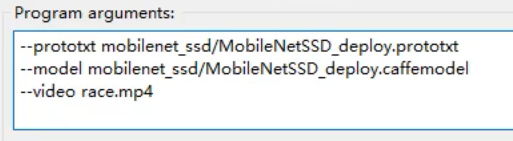
运行下面代码需要指定参数;
检测框架学习路线:
Faster-RCNN (2015)基础 5fps
SSD,Single shot detection 30+fps
YOLO 速度快
Mask-RCNN 更通用的,检测的知识,过一遍
python
#导入工具包
from utils import FPS
import numpy as np
import argparse
import dlib
import cv2
"""
--prototxt mobilenet_ssd/MobileNetSSD_deploy.prototxt
--model mobilenet_ssd/MobileNetSSD_deploy.caffemodel
--video race.mp4
"""
# 参数
ap = argparse.ArgumentParser()
ap.add_argument("-p", "--prototxt", required=True,
    help="path to Caffe 'deploy' prototxt file")
ap.add_argument("-m", "--model", required=True,
    help="path to Caffe pre-trained model")
ap.add_argument("-v", "--video", required=True,
    help="path to input video file")
ap.add_argument("-o", "--output", type=str,
    help="path to optional output video file")
ap.add_argument("-c", "--confidence", type=float, default=0.2,
    help="minimum probability to filter weak detections")
args = vars(ap.parse_args())

# SSD标签
CLASSES = ["background", "aeroplane", "bicycle", "bird", "boat",
    "bottle", "bus", "car", "cat", "chair", "cow", "diningtable",
    "dog", "horse", "motorbike", "person", "pottedplant", "sheep",
    "sofa", "train", "tvmonitor"]

# 读取网络模型
print("[INFO] loading model...")
net = cv2.dnn.readNetFromCaffe(args["prototxt"], args["model"])

# 初始化
print("[INFO] starting video stream...")
vs = cv2.VideoCapture(args["video"])
writer = None

# 一会要追踪多个目标
trackers = []
labels = []

# 计算FPS
fps = FPS().start()

while True:
    # 读取一帧
    (grabbed, frame) = vs.read()

    # 是否是最后了
    if frame is None:
        break

    # 预处理操作
    (h, w) = frame.shape[:2]
    width=600
    r = width / float(w)
    dim = (width, int(h * r))
    frame = cv2.resize(frame, dim, interpolation=cv2.INTER_AREA)
    rgb = cv2.cvtColor(frame, cv2.COLOR_BGR2RGB)

    # 如果要将结果保存的话
    if args["output"] is not None and writer is None:
        fourcc = cv2.VideoWriter_fourcc(*"MJPG")
        writer = cv2.VideoWriter(args["output"], fourcc, 30,
            (frame.shape[1], frame.shape[0]), True)

    # 先检测 再追踪
    if len(trackers) == 0:
        # 获取blob数据
        (h, w) = frame.shape[:2]
        blob = cv2.dnn.blobFromImage(frame, 0.007843, (w, h), 127.5)

        # 得到检测结果
        net.setInput(blob)
        detections = net.forward()

        # 遍历得到的检测结果
        for i in np.arange(0, detections.shape[2]):
            # 能检测到多个结果,只保留概率高的
            confidence = detections[0, 0, i, 2]

            # 过滤
            if confidence > args["confidence"]:
                # extract the index of the class label from the
                # detections list
                idx = int(detections[0, 0, i, 1])
                label = CLASSES[idx]

                # 只保留人的,其他的标签跳过
                if CLASSES[idx] != "person":
                    continue

                # 得到BBOX
                #print (detections[0, 0, i, 3:7])  还原成图像中的相对的数值
                box = detections[0, 0, i, 3:7] * np.array([w, h, w, h])
                (startX, startY, endX, endY) = box.astype("int")

                # 使用dlib来进行目标追踪
                #http://dlib.net/python/index.html#dlib.correlation_tracker
                t = dlib.correlation_tracker()
                rect = dlib.rectangle(int(startX), int(startY), int(endX), int(endY))
                t.start_track(rgb, rect)

                # 保存结果
                labels.append(label)
                trackers.append(t)

                # 绘图
                cv2.rectangle(frame, (startX, startY), (endX, endY),
                    (0, 255, 0), 2)
                cv2.putText(frame, label, (startX, startY - 15),
                    cv2.FONT_HERSHEY_SIMPLEX, 0.45, (0, 255, 0), 2)

    # 如果已经有了框,就可以直接追踪了
    else:
        # 每一个追踪器都要进行更新
        for (t, l) in zip(trackers, labels):
            t.update(rgb)
            pos = t.get_position()

            # 得到位置
            startX = int(pos.left())
            startY = int(pos.top())
            endX = int(pos.right())
            endY = int(pos.bottom())

            # 画出来
            cv2.rectangle(frame, (startX, startY), (endX, endY),
                (0, 255, 0), 2)
            cv2.putText(frame, l, (startX, startY - 15),
                cv2.FONT_HERSHEY_SIMPLEX, 0.45, (0, 255, 0), 2)

    # 也可以把结果保存下来
    if writer is not None:
        writer.write(frame)

    # 显示
    cv2.imshow("Frame", frame)
    key = cv2.waitKey(1) & 0xFF

    # 退出
    if key == 27:
        break

    # 计算FPS
    fps.update()

fps.stop()
print("[INFO] elapsed time: {:.2f}".format(fps.elapsed()))
print("[INFO] approx. FPS: {:.2f}".format(fps.fps()))

if writer is not None:
    writer.release()

cv2.destroyAllWindows()
vs.release()
多进程目标追踪
思路:每一个追踪器追踪代码封装成一个函数。然后用multiprocessing 处理每一追踪器。
python
from utils import FPS
import multiprocessing
import numpy as np
import argparse
import dlib
import cv2
#perfmon

def start_tracker(box, label, rgb, inputQueue, outputQueue):
    t = dlib.correlation_tracker()
    rect = dlib.rectangle(int(box[0]), int(box[1]), int(box[2]), int(box[3]))
    t.start_track(rgb, rect)

    while True:
        # 获取下一帧
        rgb = inputQueue.get()

        # 非空就开始处理
        if rgb is not None:
            # 更新追踪器
            t.update(rgb)
            pos = t.get_position()

            startX = int(pos.left())
            startY = int(pos.top())
            endX = int(pos.right())
            endY = int(pos.bottom())

            # 把结果放到输出q
            outputQueue.put((label, (startX, startY, endX, endY)))

ap = argparse.ArgumentParser()
ap.add_argument("-p", "--prototxt", required=True,
    help="path to Caffe 'deploy' prototxt file")
ap.add_argument("-m", "--model", required=True,
    help="path to Caffe pre-trained model")
ap.add_argument("-v", "--video", required=True,
    help="path to input video file")
ap.add_argument("-o", "--output", type=str,
    help="path to optional output video file")
ap.add_argument("-c", "--confidence", type=float, default=0.2,
    help="minimum probability to filter weak detections")
args = vars(ap.parse_args())

# 一会要放多个追踪器
inputQueues = []
outputQueues = []

CLASSES = ["background", "aeroplane", "bicycle", "bird", "boat",
    "bottle", "bus", "car", "cat", "chair", "cow", "diningtable",
    "dog", "horse", "motorbike", "person", "pottedplant", "sheep",
    "sofa", "train", "tvmonitor"]

print("[INFO] loading model...")
net = cv2.dnn.readNetFromCaffe(args["prototxt"], args["model"])

print("[INFO] starting video stream...")
vs = cv2.VideoCapture(args["video"])
writer = None

fps = FPS().start()

if __name__ == '__main__':

    while True:
        (grabbed, frame) = vs.read()

        if frame is None:
            break

        (h, w) = frame.shape[:2]
        width=600
        r = width / float(w)
        dim = (width, int(h * r))
        frame = cv2.resize(frame, dim, interpolation=cv2.INTER_AREA)
        rgb = cv2.cvtColor(frame, cv2.COLOR_BGR2RGB)

        if args["output"] is not None and writer is None:
            fourcc = cv2.VideoWriter_fourcc(*"MJPG")
            writer = cv2.VideoWriter(args["output"], fourcc, 30,
                (frame.shape[1], frame.shape[0]), True)

        #首先检测位置
        if len(inputQueues) == 0:
            (h, w) = frame.shape[:2]
            blob = cv2.dnn.blobFromImage(frame, 0.007843, (w, h), 127.5)
            net.setInput(blob)
            detections = net.forward()
            for i in np.arange(0, detections.shape[2]):
                confidence = detections[0, 0, i, 2]
                if confidence > args["confidence"]:
                    idx = int(detections[0, 0, i, 1])
                    label = CLASSES[idx]
                    if CLASSES[idx] != "person":
                        continue
                    box = detections[0, 0, i, 3:7] * np.array([w, h, w, h])
                    (startX, startY, endX, endY) = box.astype("int")
                    bb = (startX, startY, endX, endY)

                    # 创建输入q和输出q
                    iq = multiprocessing.Queue()
                    oq = multiprocessing.Queue()
                    inputQueues.append(iq)
                    outputQueues.append(oq)

                    # 多核
                    p = multiprocessing.Process(
                        target=start_tracker,
                        args=(bb, label, rgb, iq, oq))
                    p.daemon = True
                    p.start()

                    cv2.rectangle(frame, (startX, startY), (endX, endY),
                        (0, 255, 0), 2)
                    cv2.putText(frame, label, (startX, startY - 15),
                        cv2.FONT_HERSHEY_SIMPLEX, 0.45, (0, 255, 0), 2)

        else:
            # 多个追踪器处理的都是相同输入
            for iq in inputQueues:
                iq.put(rgb)

            for oq in outputQueues:
                # 得到更新结果
                (label, (startX, startY, endX, endY)) = oq.get()

                # 绘图
                cv2.rectangle(frame, (startX, startY), (endX, endY),
                    (0, 255, 0), 2)
                cv2.putText(frame, label, (startX, startY - 15),
                    cv2.FONT_HERSHEY_SIMPLEX, 0.45, (0, 255, 0), 2)

        if writer is not None:
            writer.write(frame)

        cv2.imshow("Frame", frame)
        key = cv2.waitKey(1) & 0xFF

        if key == 27:
            break

        fps.update()
    fps.stop()
    print("[INFO] elapsed time: {:.2f}".format(fps.elapsed()))
    print("[INFO] approx. FPS: {:.2f}".format(fps.fps()))

    if writer is not None:
        writer.release()

    cv2.destroyAllWindows()
    vs.release()