前言
我现在将Flutter从3.24.4升级到3.38.3后,运行以前的安装项目出现下面的错误
FAILURE: Build failed with an exception.

* Where:
Script '/Users/macbook/development/flutter/packages/flutter_tools/gradle/app_plugin_loader.gradle' line: 9

* What went wrong:
A problem occurred evaluating script.
> You are applying Flutter's app_plugin_loader Gradle plugin imperatively using the apply script method, which is not possible anymore. Migrate to applying Gradle plugins with the declarative plugins block: https://flutter.dev/to/flutter-gradle-plugin-apply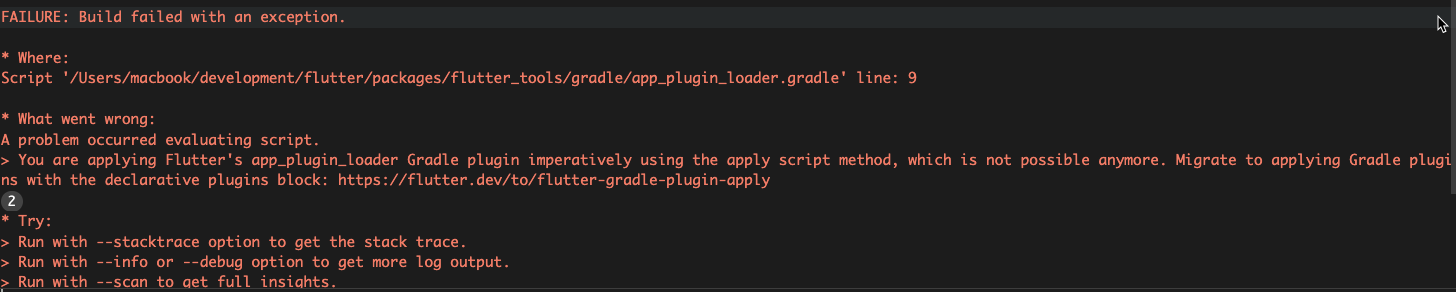
问题原因
新版的Flutter必须将声明式 迁移成 插件式, 官网参考样式:https://docs.flutter.dev/release/breaking-changes/flutter-gradle-plugin-apply#summary
解决方式
1.进入到android/build.gradle文件中,找到com.android.tools.build:gradle和ext.kotlin_version的版本号,以下面的代码为例:
buildscript {
    // ext.kotlin_version = '1.7.10'
    ext.kotlin_version = '1.9.0'

    repositories {
        google()
        mavenCentral()
    }

    dependencies {
        // START: FlutterFire Configuration
        classpath 'com.google.gms:google-services:4.3.15'
        // END: FlutterFire Configuration
        // classpath 'com.android.tools.build:gradle:7.2.0'
        classpath "org.jetbrains.kotlin:kotlin-gradle-plugin:$kotlin_version"

        //这是通知添加
        // classpath 'com.android.tools.build:gradle:7.3.1'
        //  classpath "com.android.tools.build:gradle:8.1.0"
        classpath 'com.android.tools.build:gradle:8.3.1'


    }
}

allprojects {
    repositories {
        google()
        mavenCentral()
    }
}

rootProject.buildDir = '../build'
subprojects {
    project.buildDir = "${rootProject.buildDir}/${project.name}"
}
subprojects {
    project.evaluationDependsOn(':app')
}

tasks.register("clean", Delete) {
    delete rootProject.buildDir
}
我们能够得到
-
ext.kotlin_version的版本是1.9.0
-
com.android.tools.build:gradle的版本是8.3.1
2.修改android/build.gradle为下面内容,并替换
{com.android.tools.build:gradle版本}和{ext.kotlin_version版本}为上一步我们得到的版本号
pluginManagement {
    def flutterSdkPath = {
        def properties = new Properties()
        file("local.properties").withInputStream { properties.load(it) }
        def flutterSdkPath = properties.getProperty("flutter.sdk")
        assert flutterSdkPath != null, "flutter.sdk not set in local.properties"
        return flutterSdkPath
    }()

    includeBuild("$flutterSdkPath/packages/flutter_tools/gradle")

    repositories {
        google()
        mavenCentral()
        gradlePluginPortal()
    }
}

plugins {
    id "dev.flutter.flutter-plugin-loader" version "1.0.0" // apply true
    id "com.android.application" version "{com.android.tools.build:gradle版本}" apply false
    id "org.jetbrains.kotlin.android" version "{ext.kotlin_version版本}" apply false
}

include ":app"
我们可以看到plugins中的内容其实是和第一步中的dependencies相对应的。但是第一步中还有classpath 'com.google.gms:google-services:4.3.15'这个Google服务
这里我们就要在
pluginManagement→plugins中添加对应的Google服务
全部代码为
// 管理 Android/Kotlin/Google Services 插件来源(替代旧的 buildscript)
pluginManagement {
    def flutterSdkPath = {
        def properties = new Properties()
        file("local.properties").withInputStream { properties.load(it) }
        def flutterSdkPath = properties.getProperty("flutter.sdk")
        assert flutterSdkPath != null, "flutter.sdk not set in local.properties"
        return flutterSdkPath
    }()

    includeBuild("$flutterSdkPath/packages/flutter_tools/gradle")

    repositories {
        google()
        mavenCentral()
        gradlePluginPortal()
    }
    plugins {

        // Google Services Plugin(替代旧的 classpath 'com.google.gms:google-services')
        id("com.google.gms.google-services") version "4.3.15"


    }

}
plugins {
          // Flutter 插件加载器(必须)
        id("dev.flutter.flutter-plugin-loader") version "1.0.0" // apply true
        // Android Gradle Plugin(Flutter 推荐的管理方式)
        id("com.android.application") version "8.3.1" apply false

        // Kotlin Gradle Plugin(替代旧的 classpath 写法)
        id("org.jetbrains.kotlin.android") version "1.9.0" apply false


    }


include ":app"
3.修改android/build.gradle,删除下面的内容
buildscript {
    ext.kotlin_version = '{kotlinVersion}'
    repositories {
        google()
        mavenCentral()
    }

    dependencies {
        classpath "org.jetbrains.kotlin:gradle-plugin:$kotlin_version"
    }
}
最终的代码为
allprojects {
    repositories {
        google()
        mavenCentral()
    }
}

rootProject.buildDir = '../build'
subprojects {
    project.buildDir = "${rootProject.buildDir}/${project.name}"
}
subprojects {
    project.evaluationDependsOn(':app')
}

tasks.register("clean", Delete) {
    delete rootProject.buildDir
}
4.修改android/app/build.gradle文件
首先删除下面内容
def flutterRoot = localProperties.getProperty('flutter.sdk')
if (flutterRoot == null) {
    throw new GradleException("Flutter SDK not found. Define location with flutter.sdk in the local.properties file.")
}
然后注释下面的apply,如果还额外引入过其他apply也一并注释,
// apply plugin: 'com.android.application'
// apply plugin: 'kotlin-android'
// apply from: "$flutterRoot/packages/flutter_tools/gradle/flutter.gradle"

// apply plugin: 'com.google.gms.google-services'
在顶部插入如下内容:
plugins {
    id "com.android.application"
    id "kotlin-android"
    id "dev.flutter.flutter-gradle-plugin"
    // 其他额外依赖
    id "com.google.gms.google-services"
}
完整代码为
// ======================================================
// ❗❗ 新规范:使用 declarative plugins {},替代 apply plugin
// ======================================================
plugins {
    id "com.android.application"                     // 原 apply plugin: 'com.android.application'
    id "org.jetbrains.kotlin.android"          // ⚠ 这里不写 version,使用 settings.gradle 中的版本
    // id "kotlin-android"
    id "com.google.gms.google-services"              // 原 apply plugin: 'com.google.gms.google-services'
    id "dev.flutter.flutter-gradle-plugin" // 🚀 Flutter 3.38.3 支持
}


def localProperties = new Properties()
def localPropertiesFile = rootProject.file('local.properties')
if (localPropertiesFile.exists()) {
    localPropertiesFile.withReader('UTF-8') { reader ->
        localProperties.load(reader)
    }
}

// def flutterRoot = localProperties.getProperty('flutter.sdk')
// if (flutterRoot == null) {
//     throw new GradleException("Flutter SDK not found. Define location with flutter.sdk in the local.properties file.")
// }

def flutterVersionCode = localProperties.getProperty('flutter.versionCode')
if (flutterVersionCode == null) {
    flutterVersionCode = '1'
}

def flutterVersionName = localProperties.getProperty('flutter.versionName')
if (flutterVersionName == null) {
    flutterVersionName = '1.0'
}

// ⚠️ 旧写法(必须删除,否则报错)
// apply plugin: 'com.android.application'
// // START: FlutterFire Configuration
// apply plugin: 'com.google.gms.google-services'
// // END: FlutterFire Configuration
// apply plugin: 'kotlin-android'
// apply from: "$flutterRoot/packages/flutter_tools/gradle/flutter.gradle"


// 配置签名

def keystoreProperties = new Properties()
def keystorePropertiesFile = rootProject.file('key.properties')
if (keystorePropertiesFile.exists()) {
    keystoreProperties.load(new FileInputStream(keystorePropertiesFile))
}


android {
    namespace  "com.homedots"


    // compileSdkVersion 33
    compileSdkVersion 36
    ndkVersion flutter.ndkVersion

    compileOptions {
        sourceCompatibility JavaVersion.VERSION_1_8
        targetCompatibility JavaVersion.VERSION_1_8

        // 启用对新语言API的支持的标志   这是通知添加
        coreLibraryDesugaringEnabled true
    }

    kotlinOptions {
        jvmTarget = '1.8'
    }

    sourceSets {
        main.java.srcDirs += 'src/main/kotlin'
    }

    defaultConfig {
        // TODO: Specify your own unique Application ID (https://developer.android.com/studio/build/application-id.html).
        applicationId "com.homedots"
        // You can update the following values to match your application needs.
        // For more information, see: https://docs.flutter.dev/deployment/android#reviewing-the-gradle-build-configuration.
        // minSdkVersion flutter.minSdkVersion
        minSdkVersion flutter.minSdkVersion
        // targetSdkVersion flutter.targetSdkVersion
        targetSdkVersion 35

        versionCode flutterVersionCode.toInteger()
        versionName flutterVersionName
        //这是通知添加
         multiDexEnabled true
    }
    signingConfigs {
       release {
           keyAlias keystoreProperties['keyAlias']
           keyPassword keystoreProperties['keyPassword']
           storeFile keystoreProperties['storeFile'] ? file(keystoreProperties['storeFile']) : null
           storePassword keystoreProperties['storePassword']
       }
    }

    buildTypes {
        release {
            // TODO: Add your own signing config for the release build.
            // Signing with the debug keys for now, so `flutter run --release` works.
             signingConfig signingConfigs.release
            // signingConfig signingConfigs.debug
            //解决了flutter_blue_plus打包后无效的问题
            shrinkResources false
            minifyEnabled false
        }
    }
}

flutter {
    source '../..'
}

dependencies {
    // implementation "org.jetbrains.kotlin:kotlin-stdlib-jdk7:$kotlin_version"
     //这是通知添加
     coreLibraryDesugaring 'com.android.tools:desugar_jdk_libs:1.2.2'
     implementation 'androidx.window:window:1.0.0'
     implementation 'androidx.window:window-java:1.0.0'

}