如何离线安装dify
如何离线安装dify
思路是:在可以联网的服务器上运行Dify,使用docker ps指令查看dify运行后启动的哪些容器(不同的Dify版本依赖的镜像版本也不同,根据实际情况):

| 容器 | 镜像 |
|---|---|
| docker-nginx-1 | nginx:latest |
| docker-worker-1 | langgenius/dify-api:1.11.3 |
| docker-worker_beat-1 | langgenius/dify-api:1.11.3 |
| docker-api-1 | langgenius/dify-api:1.11.3 |
| docker-plugin_daemon-1 | langgenius/dify-plugin-daemon:0.5.2-local |
| docker-web-1 | langgenius/dify-web:1.11.3 |
| docker-ssrf_proxy-1 | ubuntu/squid:latest |
| docker-weaviate-1 | semitechnologies/weaviate:1.27.0 |
| docker-redis-1 | redis:6-alpine |
| docker-sandbox-1 | langgenius/dify-sandbox:0.2.12 |
python
docker save \
  -o dify-1.11.3-images.tar \
  langgenius/dify-api:1.11.3 \
  langgenius/dify-web:1.11.3 \
  langgenius/dify-plugin-daemon:0.5.2-local \
  langgenius/dify-sandbox:0.2.12 \
  semitechnologies/weaviate:1.27.0 \
  redis:6-alpine \
  nginx:latest \
  ubuntu/squid:latest
得到如下文件:

在另一台离线机器上如何恢复
python
docker load -i dify-1.11.3-images.tar查看
然后去该网站下载相关的依赖插件:
python
https://marketplace.dify.ai/将要下载的插件保存到本地!!!
2、停止服务和备份数据
python
cd dify/docker
docker compose down
python
# 拷贝相关的配置文件与dify数据
cp docker-compose.yaml docker-compose.yaml.$(date +%s).bak  #备份yaml 文件
cp .env .env.$(date +%s).bak
tar -cvf volumes-$(date +%s).tgz volumes #备份dify 数据,数据在volums 目录然后去Dify官网下载要升级版本的dify源码:
python
https://github.com/langgenius/dify/releases/tag/1.11.33、数据还原到新分支目录下
python
unzip dify-1.11.3.zip
cd dify-1.11.3/docker/
# 拷贝数据配置.env 文件
cp /root/dify-main/docker/.env /root/dify-1.11.3/docker/.env
# 数据拷贝从之前备份的1.6.0版本的volumes拷贝到1.7.1版本的docker目录并解压覆盖volumes
cp /root/dify-main/docker/volumes-1754288506.tgz /root/dify-1.11.3/docker
tar -xvf volumes-1754288506.tgz volumes
4、启动验证服务
python
docker compose up #拉取升级后的相关镜像自己备忘录:
Dify1.11.3版本还需要修改.env文件:
由:
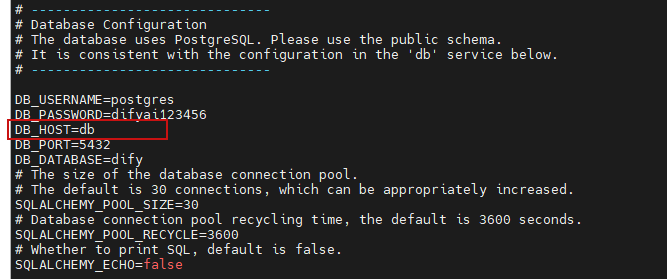
改为:
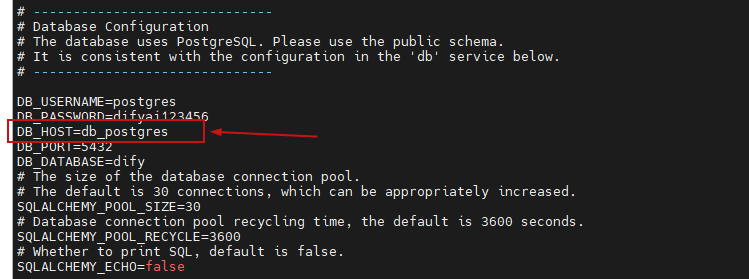
python
# ------------------------------
# Database Configuration
# The database uses PostgreSQL. Please use the public schema.
# It is consistent with the configuration in the 'db' service below.
# ------------------------------

DB_USERNAME=postgres
DB_PASSWORD=difyai123456
DB_HOST=db_postgres
DB_PORT=5432
DB_DATABASE=dify
# The size of the database connection pool.
# The default is 30 connections, which can be appropriately increased.
SQLALCHEMY_POOL_SIZE=30
# Database connection pool recycling time, the default is 3600 seconds.
SQLALCHEMY_POOL_RECYCLE=3600
# Whether to print SQL, default is false.
SQLALCHEMY_ECHO=false
如果在启动时发现有漏打的镜像依赖,可以通过如下指令查询:
python
docker-compose --profile postgresql config | grep image
python
docker compose --profile postgresql up -d
python
docker compose logs -f dify-api