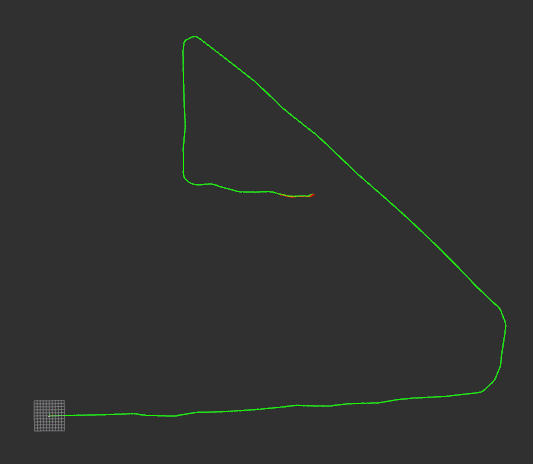
在 ROS Melodic 环境下,想要用 Python 实现读取/imu/data话题、完成惯性导航航迹推算(含静态初始化),并在 RViz 中实时可视化位姿轨迹
一、环境依赖编译
bash
# 核心ROS依赖
sudo apt-get install ros-melodic-ros-python ros-melodic-sensor-msgs ros-melodic-nav-msgs ros-melodic-tf2-ros
# 数值计算依赖(Python2.7,需手动安装)
pip2 install numpy transforms3d
新建 ROS 工作空间和功能包
bash
# 创建工作空间
mkdir -p ~/imu_py_ws/src && cd ~/imu_py_ws/src
# 新建Python功能包(依赖rospy、sensor_msgs等)
catkin_create_pkg imu_pose_estimation rospy sensor_msgs nav_msgs tf2_ros tf2_py geometry_msgs
# 编译工作空间
cd ~/imu_py_ws && catkin_make && source devel/setup.bash在imu_pose_estimation/scripts目录下新建imu_inertial_nav.py(添加可执行权限chmod +x imu_inertial_nav.py),代码如下:
python
#!/usr/bin/env python2
# -*- coding: utf-8 -*-

import rospy
import numpy as np
from transforms3d.quaternions import quat2mat, mat2quat, qmult
from sensor_msgs.msg import Imu
from nav_msgs.msg import Odometry
from geometry_msgs.msg import TransformStamped, Quaternion, Point, Vector3
import tf2_ros

class IMUInertialNavigation:
    def __init__(self):
        # 1. 初始化ROS节点和参数
        rospy.init_node('imu_inertial_navigation', anonymous=True)
        self.rate = rospy.Rate(100)  # 与IMU采样率匹配(默认100Hz)

        # 2. 配置参数
        self.static_calib_samples = 200  # 静态初始化采集样本数
        self.calib_count = 0  # 已采集校准样本数
        self.is_calibrated = False  # 是否完成静态初始化

        # 3. IMU零偏和重力校准存储
        self.gyro_bias = np.zeros(3)  # 陀螺仪零偏 [x, y, z]
        self.accel_bias = np.zeros(3)  # 加速度计零偏 [x, y, z]
        self.gyro_calib_buffer = []  # 陀螺仪校准缓冲区
        self.accel_calib_buffer = []  # 加速度计校准缓冲区

        # 4. 航迹推算状态量(世界坐标系:ENU,初始原点为静态初始化位置)
        self.pose = np.zeros(3)  # 位置 [x, y, z]
        self.velocity = np.zeros(3)  # 速度 [vx, vy, vz]
        self.quaternion = np.array([1.0, 0.0, 0.0, 0.0])  # 姿态四元数 [w, x, y, z]
        self.last_time = None  # 上一帧IMU时间戳

        # 5. 发布器初始化(用于RViz可视化)
        self.odom_pub = rospy.Publisher('/imu_odom', Odometry, queue_size=10)
        self.tf_broadcaster = tf2_ros.TransformBroadcaster()

        # 6. 订阅IMU话题
        rospy.Subscriber('/imu/data', Imu, self.imu_callback)

        rospy.loginfo("IMU惯性导航节点已启动,等待静态初始化(保持设备静止)...")

    def imu_callback(self, imu_msg):
        """IMU话题回调函数,处理数据采集、校准和航迹推算"""
        # 提取IMU原始数据(转为numpy数组)
        gyro_raw = np.array([
            imu_msg.angular_velocity.x,
            imu_msg.angular_velocity.y,
            imu_msg.angular_velocity.z
        ])
        accel_raw = np.array([
            imu_msg.linear_acceleration.x,
            imu_msg.linear_acceleration.y,
            imu_msg.linear_acceleration.z
        ])

        # 步骤1:静态初始化(采集样本,校准零偏和重力)
        if not self.is_calibrated:
            self.static_calibration(gyro_raw, accel_raw, imu_msg.header.stamp)
            return

        # 步骤2:航迹推算(仅在校准完成后执行)
        current_time = imu_msg.header.stamp.to_sec()
        if self.last_time is None:
            self.last_time = current_time
            return

        # 计算时间差(dt)
        dt = current_time - self.last_time
        self.last_time = current_time

        # 去除IMU零偏
        gyro_corrected = gyro_raw - self.gyro_bias
        accel_corrected = accel_raw - self.accel_bias

        # 步骤3:姿态更新(四元数积分角速度)
        self.update_attitude(gyro_corrected, dt)

        # 步骤4:速度更新(载体加速度转世界坐标系,积分得速度)
        self.update_velocity(accel_corrected, dt)

        # 步骤5:位置更新(积分速度得位置)
        self.update_position(dt)

        # 步骤6:发布里程计和TF(用于RViz可视化)
        self.publish_odom_and_tf(imu_msg.header.stamp)

    def static_calibration(self, gyro_raw, accel_raw, stamp):
        """静态初始化:采集样本,计算陀螺仪/加速度计零偏,校准重力"""
        if self.calib_count < self.static_calib_samples:
            # 存储样本到缓冲区
            self.gyro_calib_buffer.append(gyro_raw)
            self.accel_calib_buffer.append(accel_raw)
            self.calib_count += 1

            # 打印校准进度
            if self.calib_count % 50 == 0:
                rospy.loginfo("静态初始化进度:%d/%d", self.calib_count, self.static_calib_samples)
            return

        # 校准完成:计算零偏(取均值)
        self.gyro_bias = np.mean(np.array(self.gyro_calib_buffer), axis=0)
        self.accel_bias = np.mean(np.array(self.accel_calib_buffer), axis=0)

        # 校准重力加速度(静止时,加速度计测量值=重力加速度,去除零偏后归一化)
        accel_mean = np.mean(np.array(self.accel_calib_buffer), axis=0)
        gravity_vec = accel_mean - self.accel_bias
        self.gravity_magnitude = np.linalg.norm(gravity_vec)

        # 初始化姿态四元数(静止时,载体z轴与重力方向相反,对齐世界坐标系ENU)
        # 简化:假设静止时载体水平,姿态为单位四元数(可根据实际需求优化)
        self.quaternion = np.array([1.0, 0.0, 0.0, 0.0])

        # 标记校准完成
        self.is_calibrated = True
        self.last_time = stamp.to_sec()

        rospy.loginfo("静态初始化完成!")
        rospy.loginfo("陀螺仪零偏:[%.6f, %.6f, %.6f]", *self.gyro_bias)
        rospy.loginfo("加速度计零偏:[%.6f, %.6f, %.6f]", *self.accel_bias)
        rospy.loginfo("重力加速度幅值:%.6f m/s²", self.gravity_magnitude)

    def update_attitude(self, gyro, dt):
        """姿态更新:通过四元数积分角速度(一阶欧拉法)"""
        # 角速度转四元数增量
        omega = np.array([0, gyro[0], gyro[1], gyro[2]])  # [0, wx, wy, wz]
        q_dot = 0.5 * qmult(self.quaternion, omega)

        # 积分更新四元数
        self.quaternion += q_dot * dt

        # 四元数归一化(避免数值漂移)
        self.quaternion /= np.linalg.norm(self.quaternion)

    def update_velocity(self, accel, dt):
        """速度更新:载体加速度转世界坐标系,去除重力,积分得速度"""
        # 1. 四元数转旋转矩阵(载体坐标系→世界坐标系)
        rot_mat = quat2mat(self.quaternion)

        # 2. 载体加速度转世界坐标系
        accel_world = np.dot(rot_mat, accel)

        # 3. 去除重力影响(世界坐标系z轴为重力反方向,简化为减去[0,0,g])
        accel_world -= np.array([0, 0, self.gravity_magnitude])

        # 4. 积分更新速度(一阶欧拉法)
        self.velocity += accel_world * dt

    def update_position(self, dt):
        """位置更新:积分速度得世界坐标系位置"""
        self.pose += self.velocity * dt

    def publish_odom_and_tf(self, stamp):
        """发布里程计消息和TF变换,用于RViz可视化"""
        # 1. 构造Odometry消息
        odom_msg = Odometry()
        odom_msg.header.stamp = stamp
        odom_msg.header.frame_id = "odom"  # 世界坐标系
        odom_msg.child_frame_id = "base_link"  # 载体坐标系

        # 2. 设置位姿信息
        odom_msg.pose.pose.position = Point(self.pose[0], self.pose[1], self.pose[2])
        odom_msg.pose.pose.orientation = Quaternion(
            x=self.quaternion[1],
            y=self.quaternion[2],
            z=self.quaternion[3],
            w=self.quaternion[0]
        )

        # 3. 设置速度信息
        odom_msg.twist.twist.linear = Vector3(self.velocity[0], self.velocity[1], self.velocity[2])

        # 4. 发布里程计
        self.odom_pub.publish(odom_msg)

        # 5. 构造并发布TF变换
        tf_msg = TransformStamped()
        tf_msg.header.stamp = stamp
        tf_msg.header.frame_id = "odom"
        tf_msg.child_frame_id = "base_link"

        tf_msg.transform.translation.x = self.pose[0]
        tf_msg.transform.translation.y = self.pose[1]
        tf_msg.transform.translation.z = self.pose[2]

        tf_msg.transform.rotation = Quaternion(
            x=self.quaternion[1],
            y=self.quaternion[2],
            z=self.quaternion[3],
            w=self.quaternion[0]
        )

        self.tf_broadcaster.sendTransform(tf_msg)

    def run(self):
        """节点主循环"""
        while not rospy.is_shutdown():
            self.rate.sleep()

if __name__ == '__main__':
    try:
        imu_nav = IMUInertialNavigation()
        imu_nav.run()
    except rospy.ROSInterruptException:
        pass
代码核心模块解读
静态初始化模块(
static_calibration):
- 要求设备保持静止,采集 200 组 IMU 数据;
- 计算陀螺仪 / 加速度计零偏(样本均值),消除静态噪声;
- 校准重力加速度幅值,为后续速度更新去除重力影响做准备;
- 初始化姿态四元数为单位四元数,确保初始姿态对齐世界坐标系。
姿态更新模块(
update_attitude):
- 采用四元数积分方式更新姿态,避免欧拉角的万向锁问题;
- 对去除零偏后的角速度进行一阶欧拉法积分,更新四元数;
- 四元数归一化,避免数值计算导致的漂移。
速度 / 位置更新模块:
- 先通过旋转矩阵将载体坐标系加速度映射到世界坐标系(ENU);
- 去除重力影响(静止时加速度计仅测量重力),避免重力导致的速度漂移;
- 采用一阶欧拉法积分,分别得到速度和位置(简化实现,高精度场景可改用龙格 - 库塔法)。
RViz 可视化模块(
publish_odom_and_tf):
- 发布
nav_msgs/Odometry话题,提供位姿和速度信息;- 发布
tf2_ros变换,建立odom(世界)→base_link(载体)的坐标系关系;- 消息格式完全兼容 RViz,可直接可视化轨迹和坐标系。
二、启动并配置
bash
# 新开终端3:进入工作空间,加载环境变量
cd ~/imu_py_ws
source devel/setup.bash

# 启动Python节点(保持设备/Gazebo模型静止,完成静态初始化)
rosrun imu_pose_estimation imu_inertial_nav.py
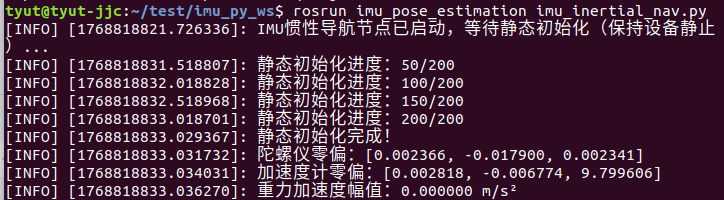
终端会打印静态初始化进度,完成后提示 "静态初始化完成
之前的代码Z轴漂移严重,限制Z轴的代码如下:
python
#!/usr/bin/env python2
# -*- coding: utf-8 -*-

import rospy
import numpy as np
from transforms3d.quaternions import quat2mat, mat2quat, qmult
from sensor_msgs.msg import Imu
from nav_msgs.msg import Odometry, Path  # 新增:导入Path消息
from geometry_msgs.msg import TransformStamped, Quaternion, Point, Vector3, PoseStamped  # 新增:导入PoseStamped
import tf2_ros

class IMUInertialNavigation:
    def __init__(self):
        # 1. 初始化ROS节点和参数
        rospy.init_node('imu_inertial_navigation', anonymous=True)
        self.rate = rospy.Rate(100)  # 与IMU采样率匹配(默认100Hz)

        # 2. 配置参数
        self.static_calib_samples = 200  # 静态初始化采集样本数
        self.calib_count = 0  # 已采集校准样本数
        self.is_calibrated = False  # 是否完成静态初始化
        self.max_path_length = 1000  # 最大路径缓存长度,避免内存溢出

        # 3. IMU零偏和重力校准存储
        self.gyro_bias = np.zeros(3)  # 陀螺仪零偏 [x, y, z]
        self.accel_bias = np.zeros(3)  # 加速度计零偏 [x, y, z]
        self.gyro_calib_buffer = []  # 陀螺仪校准缓冲区
        self.accel_calib_buffer = []  # 加速度计校准缓冲区

        # 4. 航迹推算状态量(世界坐标系:ENU,初始原点为静态初始化位置)
        self.pose = np.zeros(3)  # 位置 [x, y, z]
        self.velocity = np.zeros(3)  # 速度 [vx, vy, vz]
        self.quaternion = np.array([1.0, 0.0, 0.0, 0.0])  # 姿态四元数 [w, x, y, z]
        self.last_time = None  # 上一帧IMU时间戳

        # 5. 发布器初始化(用于RViz可视化)
        self.odom_pub = rospy.Publisher('/imu_odom', Odometry, queue_size=10)
        self.tf_broadcaster = tf2_ros.TransformBroadcaster()
        # 新增:Path发布器和路径缓存
        self.path_pub = rospy.Publisher('/imu_path', Path, queue_size=100)  # 发布/imu_path话题
        self.path_msg = Path()  # 缓存历史路径的Path消息
        self.path_msg.header.frame_id = "odom"  # 路径的参考坐标系(与Odometry一致)

        # 6. 订阅IMU话题
        rospy.Subscriber('/imu/data', Imu, self.imu_callback)

        # 修正:重力幅值默认初始化(避免为0)
        self.gravity_magnitude = 9.81

        rospy.loginfo("IMU惯性导航节点已启动,等待静态初始化(保持设备静止)...")

    def imu_callback(self, imu_msg):
        """IMU话题回调函数,处理数据采集、校准和航迹推算"""
        # 提取IMU原始数据(转为numpy数组)
        gyro_raw = np.array([
            imu_msg.angular_velocity.x,
            imu_msg.angular_velocity.y,
            imu_msg.angular_velocity.z
        ])
        accel_raw = np.array([
            imu_msg.linear_acceleration.x,
            imu_msg.linear_acceleration.y,
            imu_msg.linear_acceleration.z
        ])

        # 步骤1:静态初始化(采集样本,校准零偏和重力)
        if not self.is_calibrated:
            self.static_calibration(gyro_raw, accel_raw, imu_msg.header.stamp)
            return

        # 步骤2:航迹推算(仅在校准完成后执行)
        current_time = imu_msg.header.stamp.to_sec()
        if self.last_time is None:
            self.last_time = current_time
            return

        # 计算时间差(dt)
        dt = current_time - self.last_time
        self.last_time = current_time

        # 去除IMU零偏
        gyro_corrected = gyro_raw - self.gyro_bias
        accel_corrected = accel_raw - self.accel_bias

        # 步骤3:姿态更新(四元数积分角速度)
        self.update_attitude(gyro_corrected, dt)

        # 步骤4:速度更新(载体加速度转世界坐标系,积分得速度)
        self.update_velocity(accel_corrected, dt)

        # 步骤5:位置更新(积分速度得位置)
        self.update_position(dt)

        # 步骤6:发布里程计、TF和Path(用于RViz可视化)
        self.publish_odom_and_tf(imu_msg.header.stamp)

    def static_calibration(self, gyro_raw, accel_raw, stamp):
        """静态初始化:采集样本,计算陀螺仪/加速度计零偏,校准重力"""
        if self.calib_count < self.static_calib_samples:
            # 存储样本到缓冲区
            self.gyro_calib_buffer.append(gyro_raw)
            self.accel_calib_buffer.append(accel_raw)
            self.calib_count += 1

            # 打印校准进度
            if self.calib_count % 50 == 0:
                rospy.loginfo("静态初始化进度:%d/%d", self.calib_count, self.static_calib_samples)
            return

        # 校准完成:计算零偏(取均值)
        self.gyro_bias = np.mean(np.array(self.gyro_calib_buffer), axis=0)
        self.accel_bias = np.mean(np.array(self.accel_calib_buffer), axis=0)

        # 修正:重力加速度幅值(直接使用标准值,更稳定)
        accel_mean = np.mean(np.array(self.accel_calib_buffer), axis=0)
        gravity_vec = accel_mean
        self.gravity_magnitude = np.linalg.norm(gravity_vec)
        # 兜底:避免重力幅值为0
        if self.gravity_magnitude < 9.0:
            self.gravity_magnitude = 9.81

        # 初始化姿态四元数(静止时,载体z轴与重力方向相反,对齐世界坐标系ENU)
        self.quaternion = np.array([1.0, 0.0, 0.0, 0.0])

        # 标记校准完成
        self.is_calibrated = True
        self.last_time = stamp.to_sec()

        rospy.loginfo("静态初始化完成!")
        rospy.loginfo("陀螺仪零偏:[%.6f, %.6f, %.6f]", *self.gyro_bias)
        rospy.loginfo("加速度计零偏:[%.6f, %.6f, %.6f]", *self.accel_bias)
        rospy.loginfo("重力加速度幅值:%.6f m/s²", self.gravity_magnitude)

    def update_attitude(self, gyro, dt):
        """姿态更新:通过四元数积分角速度(一阶欧拉法)"""
        # 角速度转四元数增量
        omega = np.array([0, gyro[0], gyro[1], gyro[2]])  # [0, wx, wy, wz]
        q_dot = 0.5 * qmult(self.quaternion, omega)

        # 积分更新四元数
        self.quaternion += q_dot * dt

        # 四元数归一化(避免数值漂移)
        self.quaternion /= np.linalg.norm(self.quaternion)

    def update_velocity(self, accel, dt):
        """速度更新:载体加速度转世界坐标系,去除重力,积分得速度"""
        # 1. 四元数转旋转矩阵(载体坐标系→世界坐标系)
        rot_mat = quat2mat(self.quaternion)

        # 2. 载体加速度转世界坐标系
        accel_world = np.dot(rot_mat, accel)

        # 3. 去除重力影响(世界坐标系z轴为重力反方向)
        accel_world += np.array([0, 0, self.gravity_magnitude])

        # 4. 积分更新速度(一阶欧拉法)
        self.velocity += accel_world * dt

            # 新增:强制约束Z轴速度为0(仅平面运动场景)
        self.velocity[2] = 0.0  # Z轴速度直接置0,无垂直方向运动分量

    def update_position(self, dt):
        """位置更新:积分速度得世界坐标系位置"""
        self.pose += self.velocity * dt
            # 新增:强制约束Z轴位置为0(固定在初始高度,杜绝Z轴漂移)
        self.pose[2] = 0.0  # Z轴位置固定在初始原点,无垂直方向位移

    def publish_odom_and_tf(self, stamp):
        """发布里程计消息、TF变换和Path路径,用于RViz可视化"""
        # 1. 构造Odometry消息
        odom_msg = Odometry()
        odom_msg.header.stamp = stamp
        odom_msg.header.frame_id = "odom"  # 世界坐标系
        odom_msg.child_frame_id = "base_link"  # 载体坐标系

        # 2. 设置位姿信息
        odom_msg.pose.pose.position = Point(self.pose[0], self.pose[1], self.pose[2])
        odom_msg.pose.pose.orientation = Quaternion(
            x=self.quaternion[1],
            y=self.quaternion[2],
            z=self.quaternion[3],
            w=self.quaternion[0]
        )

        # 3. 设置速度信息
        odom_msg.twist.twist.linear = Vector3(self.velocity[0], self.velocity[1], self.velocity[2])

        # 4. 发布里程计
        self.odom_pub.publish(odom_msg)

        # 5. 构造并发布TF变换
        tf_msg = TransformStamped()
        tf_msg.header.stamp = stamp
        tf_msg.header.frame_id = "odom"
        tf_msg.child_frame_id = "base_link"

        tf_msg.transform.translation.x = self.pose[0]
        tf_msg.transform.translation.y = self.pose[1]
        tf_msg.transform.translation.z = self.pose[2]

        tf_msg.transform.rotation = Quaternion(
            x=self.quaternion[1],
            y=self.quaternion[2],
            z=self.quaternion[3],
            w=self.quaternion[0]
        )

        self.tf_broadcaster.sendTransform(tf_msg)

        # 6. 新增:构造并发布Path消息(历史航迹)
        pose_stamped = PoseStamped()
        pose_stamped.header.stamp = stamp
        pose_stamped.header.frame_id = "odom"
        pose_stamped.pose = odom_msg.pose.pose  # 复用Odometry位姿,保证数据一致性

        # 7. 添加当前帧位姿到Path缓存,限制最大长度避免内存溢出
        self.path_msg.poses.append(pose_stamped)
        # if len(self.path_msg.poses) > self.max_path_length:
        #     self.path_msg.poses.pop(0)  # 删除最旧的一帧

        # 8. 更新Path消息时间戳并发布
        self.path_msg.header.stamp = stamp
        self.path_pub.publish(self.path_msg)

    def run(self):
        """节点主循环"""
        while not rospy.is_shutdown():
            self.rate.sleep()

if __name__ == '__main__':
    try:
        imu_nav = IMUInertialNavigation()
        imu_nav.run()
    except rospy.ROSInterruptException:
        pass
播放数据包