更换Python依赖包下载源
-
- [1. 下载时指定源](#1. 下载时指定源)
- [2. 通过修改配置文件设置下载源](#2. 通过修改配置文件设置下载源)
- [3. 常见国内源](#3. 常见国内源)
python默认的下载源就是 PyPI(Python Package Index),下面将介绍Linux和Windows如何配置
1. 下载时指定源
Linux和Windows通用
pip install -i https://mirrors.aliyun.com/pypi/simple sphinx如果
pip不存在安装:dnf install -y python3-pip
-i/--index-url:指定下载源sphinx:你要下载的Python 包名称
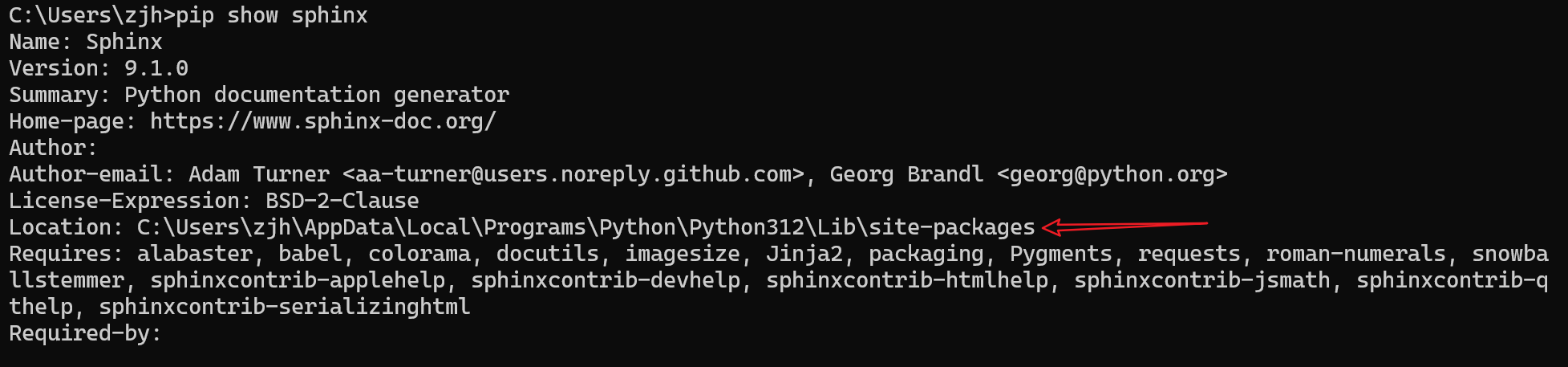
默认是全局下载,可以通过 --user 指定下载到用户家目录,下载位置可以通过 pip show 包名 查看
2. 通过修改配置文件设置下载源
Linux:
[root@k8s-master ~]# cat /etc/pip.conf
clike
[global]
index-url = https://mirrors.aliyun.com/pypi/simple pip3 config list -v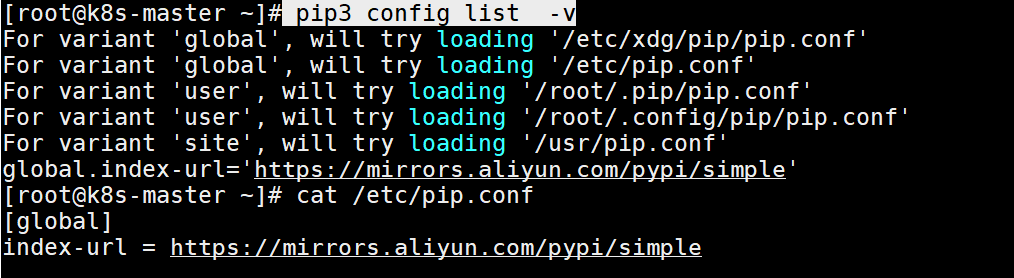
-v/--verbose:(详细模式)
clike
# 全局配置文件,所有用户生效
For variant 'global', will try loading '/etc/xdg/pip/pip.conf'
For variant 'global', will try loading '/etc/pip.conf'
# 当前用户生效
For variant 'user', will try loading '/root/.pip/pip.conf'
For variant 'user', will try loading '/root/.config/pip/pip.conf'
# 虚拟环境级(venv)配置文件的查找路径(仅激活的虚拟环境生效)
For variant 'site', will try loading '/usr/pip.conf'Windows:
type C:\ProgramData\pip\pip.ini
clike
[global]
index-url = https://mirrors.aliyun.com/pypi/simple
3. 常见国内源
阿里云:https://mirrors.aliyun.com/pypi/simple