Flutter虚拟骰子应用开发教程
项目简介
这是一款功能完整的虚拟骰子应用,为用户提供逼真的骰子投掷体验。应用采用Material Design 3设计风格,支持多种骰子类型、投掷动画、历史记录、统计分析等功能,界面精美生动,操作简单有趣。
运行效果图
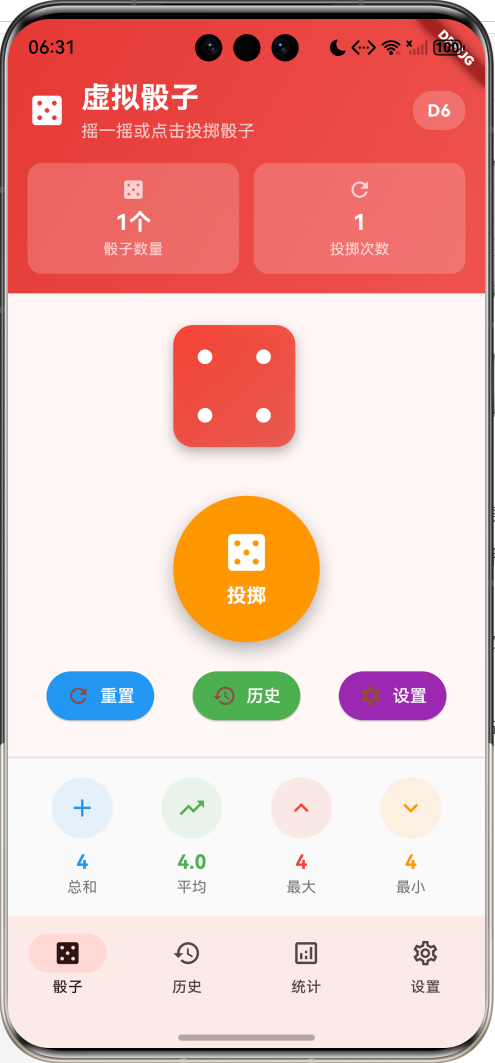
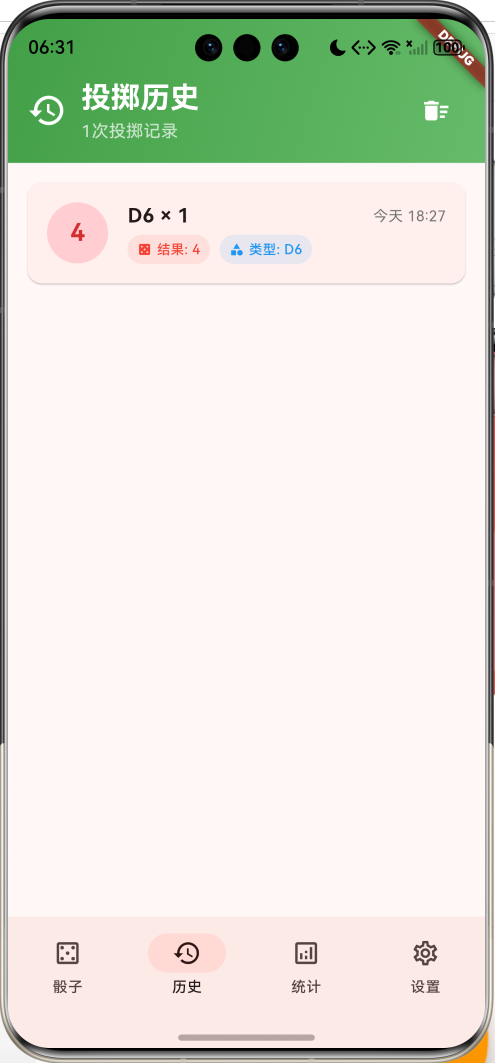
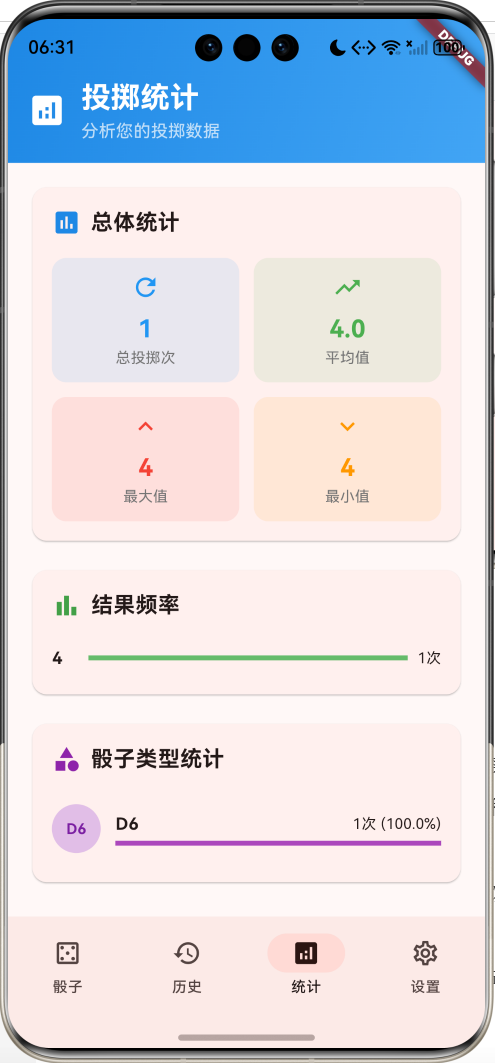
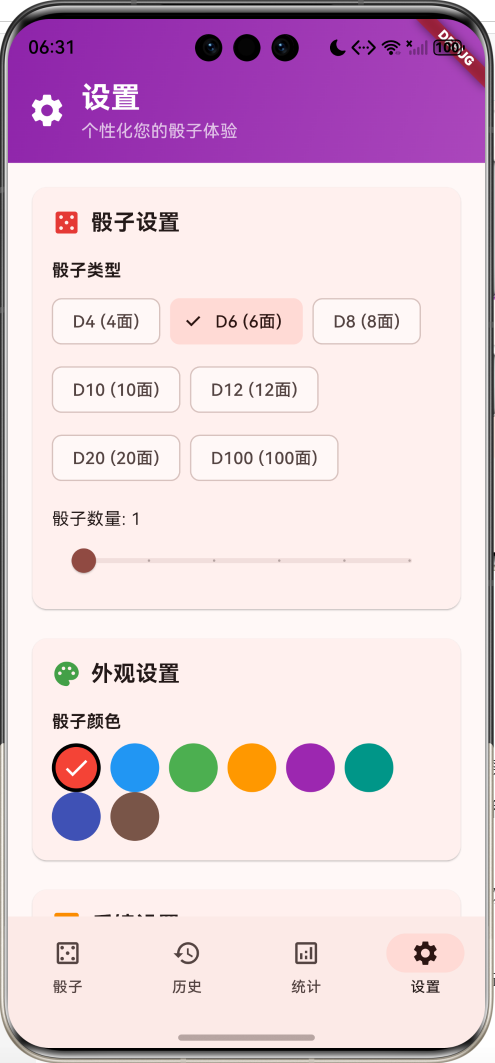
核心特性
- 多种骰子类型:支持D4、D6、D8、D10、D12、D20、D100等7种骰子
- 多骰子投掷:支持同时投掷1-6个骰子
- 逼真动画:摇摆和投掷动画效果,增强真实感
- 投掷历史:记录所有投掷结果,支持查看和清除
- 统计分析:详细的投掷统计和频率分析
- 个性化设置:自定义骰子颜色、数量、反馈方式
- 触觉反馈:震动和声音反馈增强体验
- 投掷模式:支持摇一摇和点击两种投掷方式
- 精美界面:渐变设计和流畅动画
技术栈
- Flutter 3.x
- Material Design 3
- 动画控制器(AnimationController)
- 自定义绘制(CustomPainter)
- 手势识别
- 触觉反馈(HapticFeedback)
项目架构
DiceHomePage
DicePage
HistoryPage
StatisticsPage
SettingsPage
DiceDisplay
RollButton
QuickActions
CurrentResult
SingleDice
DiceFace
D6Face
HistoryList
HistoryItem
OverallStats
FrequencyChart
DiceTypeStats
DiceSettings
AppearanceSettings
FeedbackSettings
RollModeSettings
DiceResult
DiceSettings
AnimationController
数据模型设计
DiceResult(投掷结果模型)
dart
class DiceResult {
  final int value;                   // 投掷结果值
  final DateTime timestamp;          // 投掷时间
  final String diceType;             // 骰子类型(D4、D6等)
  final int diceCount;               // 骰子数量
}设计要点:
- value存储投掷总和
- timestamp用于历史记录排序
- diceType和diceCount用于统计分析
DiceSettings(骰子设置模型)
dart
class DiceSettings {
  final int diceCount;               // 骰子数量(1-6个)
  final String diceType;             // 骰子类型
  final bool soundEnabled;           // 声音开关
  final bool vibrationEnabled;       // 震动开关
  final bool animationEnabled;       // 动画开关
  final Color diceColor;             // 骰子颜色
  final String rollMode;             // 投掷模式(shake/tap)
}
骰子类型配置
| 类型 | 面数 | 用途 | 特点 |
|---|---|---|---|
| D4 | 4面 | 简单随机 | 四面体,结果1-4 |
| D6 | 6面 | 标准骰子 | 立方体,经典点数显示 |
| D8 | 8面 | 桌游 | 八面体,结果1-8 |
| D10 | 10面 | 百分比 | 十面体,结果1-10 |
| D12 | 12面 | 角色扮演 | 十二面体,结果1-12 |
| D20 | 20面 | RPG游戏 | 二十面体,结果1-20 |
| D100 | 100面 | 百分比 | 虚拟百面,结果1-100 |
核心功能实现
1. 骰子显示与动画
实现逼真的骰子显示和投掷动画效果。
dart
Widget _buildDiceDisplay() {
  return AnimatedBuilder(
    animation: _rollAnimation,
    builder: (context, child) {
      return AnimatedBuilder(
        animation: _shakeAnimation,
        builder: (context, child) {
          return Transform.translate(
            offset: Offset(_shakeAnimation.value, 0),
            child: Transform.scale(
              scale: 1.0 + (_rollAnimation.value * 0.2),
              child: Wrap(
                alignment: WrapAlignment.center,
                spacing: 20,
                runSpacing: 20,
                children: _currentValues.asMap().entries.map((entry) {
                  final index = entry.key;
                  final value = entry.value;
                  return _buildSingleDice(value, index);
                }).toList(),
              ),
            ),
          );
        },
      );
    },
  );
}动画设计:
- 摇摆动画:水平摇摆模拟真实摇骰子
- 缩放动画:投掷时骰子放大效果
- 弹性曲线:使用elasticOut曲线增加真实感
2. 单个骰子绘制
根据骰子类型绘制不同的骰子面。
dart
Widget _buildSingleDice(int value, int index) {
  return Container(
    width: 100,
    height: 100,
    decoration: BoxDecoration(
      color: _settings.diceColor,
      borderRadius: BorderRadius.circular(16),
      boxShadow: [
        BoxShadow(
          color: Colors.black.withValues(alpha: 0.3),
          blurRadius: 8,
          offset: const Offset(0, 4),
        ),
      ],
      gradient: LinearGradient(
        colors: [
          _settings.diceColor,
          _settings.diceColor.withValues(alpha: 0.8),
        ],
        begin: Alignment.topLeft,
        end: Alignment.bottomRight,
      ),
    ),
    child: _isRolling
        ? const Center(
            child: Icon(Icons.refresh, color: Colors.white, size: 40),
          )
        : _buildDiceFace(value),
  );
}
3. D6骰子点数绘制
为标准六面骰子绘制传统点数。
dart
Widget _buildD6Face(int value) {
  final dotPositions = _getDotPositions(value);

  return Stack(
    children: dotPositions.map((position) {
      return Positioned(
        left: position.dx,
        top: position.dy,
        child: Container(
          width: 12,
          height: 12,
          decoration: const BoxDecoration(
            color: Colors.white,
            shape: BoxShape.circle,
          ),
        ),
      );
    }).toList(),
  );
}

List<Offset> _getDotPositions(int value) {
  const double size = 100;
  const double dotSize = 12;
  const double margin = 20;

  switch (value) {
    case 1:
      return [Offset((size - dotSize) / 2, (size - dotSize) / 2)];
    case 2:
      return [
        Offset(margin, margin),
        Offset(size - margin - dotSize, size - margin - dotSize),
      ];
    case 3:
      return [
        Offset(margin, margin),
        Offset((size - dotSize) / 2, (size - dotSize) / 2),
        Offset(size - margin - dotSize, size - margin - dotSize),
      ];
    case 4:
      return [
        Offset(margin, margin),
        Offset(size - margin - dotSize, margin),
        Offset(margin, size - margin - dotSize),
        Offset(size - margin - dotSize, size - margin - dotSize),
      ];
    case 5:
      return [
        Offset(margin, margin),
        Offset(size - margin - dotSize, margin),
        Offset((size - dotSize) / 2, (size - dotSize) / 2),
        Offset(margin, size - margin - dotSize),
        Offset(size - margin - dotSize, size - margin - dotSize),
      ];
    case 6:
      return [
        Offset(margin, margin),
        Offset(size - margin - dotSize, margin),
        Offset(margin, (size - dotSize) / 2),
        Offset(size - margin - dotSize, (size - dotSize) / 2),
        Offset(margin, size - margin - dotSize),
        Offset(size - margin - dotSize, size - margin - dotSize),
      ];
    default:
      return [];
  }
}
4. 投掷逻辑实现
核心的骰子投掷功能,包含动画和反馈。
dart
Future<void> _rollDice() async {
  if (_isRolling) return;

  setState(() {
    _isRolling = true;
  });

  // 播放动画
  if (_settings.animationEnabled) {
    _shakeController.forward().then((_) => _shakeController.reverse());
    await _rollController.forward();
  }

  // 生成随机结果
  final random = Random();
  final maxValue = _diceTypes[_settings.diceType]!;

  setState(() {
    _currentValues = List.generate(_settings.diceCount, (index) {
      return random.nextInt(maxValue) + 1;
    });
  });

  // 添加到历史记录
  final total = _currentValues.reduce((a, b) => a + b);
  final result = DiceResult(
    value: total,
    timestamp: DateTime.now(),
    diceType: _settings.diceType,
    diceCount: _settings.diceCount,
  );

  setState(() {
    _rollHistory.add(result);
    _totalRolls++;
    _isRolling = false;
  });

  _updateFrequency();

  // 触觉反馈
  if (_settings.vibrationEnabled) {
    HapticFeedback.mediumImpact();
  }

  // 重置动画
  if (_settings.animationEnabled) {
    _rollController.reset();
  }
}投掷流程:
- 检查是否正在投掷
- 播放摇摆和缩放动画
- 生成随机数结果
- 更新界面显示
- 保存历史记录
- 提供触觉反馈
- 重置动画状态
5. 动画控制器初始化
设置投掷和摇摆动画的控制器。
dart
@override
void initState() {
  super.initState();

  // 初始化动画控制器
  _rollController = AnimationController(
    duration: const Duration(milliseconds: 1500),
    vsync: this,
  );

  _shakeController = AnimationController(
    duration: const Duration(milliseconds: 500),
    vsync: this,
  );

  _rollAnimation = Tween<double>(begin: 0, end: 1).animate(
    CurvedAnimation(parent: _rollController, curve: Curves.elasticOut),
  );

  _shakeAnimation = Tween<double>(begin: -10, end: 10).animate(
    CurvedAnimation(parent: _shakeController, curve: Curves.elasticInOut),
  );

  _initializeDice();
}
6. 投掷结果显示
实时显示当前投掷的统计信息。
dart
Widget _buildCurrentResult() {
  if (_currentValues.isEmpty) return const SizedBox.shrink();

  final total = _currentValues.reduce((a, b) => a + b);
  final average = total / _currentValues.length;

  return Container(
    padding: const EdgeInsets.all(16),
    decoration: BoxDecoration(
      color: Colors.grey.shade50,
      border: Border(top: BorderSide(color: Colors.grey.shade300)),
    ),
    child: Column(
      children: [
        Row(
          mainAxisAlignment: MainAxisAlignment.spaceAround,
          children: [
            _buildResultItem('总和', '$total', Icons.add, Colors.blue),
            _buildResultItem('平均', average.toStringAsFixed(1), Icons.trending_up, Colors.green),
            _buildResultItem('最大', '${_currentValues.reduce(max)}', Icons.keyboard_arrow_up, Colors.red),
            _buildResultItem('最小', '${_currentValues.reduce(min)}', Icons.keyboard_arrow_down, Colors.orange),
          ],
        ),
        if (_currentValues.length > 1) ...[
          const SizedBox(height: 12),
          Text(
            '各骰子结果: ${_currentValues.join(', ')}',
            style: TextStyle(fontSize: 14, color: Colors.grey.shade600),
          ),
        ],
      ],
    ),
  );
}
7. 历史记录管理
保存和显示所有投掷历史。
dart
Widget _buildHistoryItem(DiceResult result, int index) {
  return Card(
    margin: const EdgeInsets.only(bottom: 12),
    child: Padding(
      padding: const EdgeInsets.all(16),
      child: Row(
        children: [
          Container(
            width: 50,
            height: 50,
            decoration: BoxDecoration(
              color: Colors.red.shade100,
              borderRadius: BorderRadius.circular(25),
            ),
            child: Center(
              child: Text(
                '${result.value}',
                style: TextStyle(
                  fontSize: 20,
                  fontWeight: FontWeight.bold,
                  color: Colors.red.shade700,
                ),
              ),
            ),
          ),
          const SizedBox(width: 16),
          Expanded(
            child: Column(
              crossAxisAlignment: CrossAxisAlignment.start,
              children: [
                Row(
                  children: [
                    Text(
                      '${result.diceType} × ${result.diceCount}',
                      style: const TextStyle(fontSize: 16, fontWeight: FontWeight.bold),
                    ),
                    const Spacer(),
                    Text(
                      _formatTime(result.timestamp),
                      style: TextStyle(fontSize: 12, color: Colors.grey.shade600),
                    ),
                  ],
                ),
                const SizedBox(height: 4),
                Row(
                  children: [
                    _buildHistoryTag('结果', '${result.value}', Icons.casino, Colors.red),
                    const SizedBox(width: 8),
                    _buildHistoryTag('类型', result.diceType, Icons.category, Colors.blue),
                  ],
                ),
              ],
            ),
          ),
        ],
      ),
    ),
  );
}
8. 统计分析功能
提供详细的投掷数据分析。
dart
Widget _buildOverallStats() {
  if (_rollHistory.isEmpty) return const SizedBox.shrink();

  final allValues = _rollHistory.map((r) => r.value).toList();
  final total = allValues.reduce((a, b) => a + b);
  final average = total / allValues.length;
  final maxValue = allValues.reduce(max);
  final minValue = allValues.reduce(min);

  return Card(
    child: Padding(
      padding: const EdgeInsets.all(16),
      child: Column(
        crossAxisAlignment: CrossAxisAlignment.start,
        children: [
          Row(
            children: [
              Icon(Icons.assessment, color: Colors.blue.shade600),
              const SizedBox(width: 8),
              const Text('总体统计', style: TextStyle(fontSize: 18, fontWeight: FontWeight.bold)),
            ],
          ),
          const SizedBox(height: 16),
          Row(
            children: [
              Expanded(child: _buildStatCard('总投掷', '$_totalRolls', '次', Icons.refresh, Colors.blue)),
              const SizedBox(width: 12),
              Expanded(child: _buildStatCard('平均值', average.toStringAsFixed(1), '', Icons.trending_up, Colors.green)),
            ],
          ),
          const SizedBox(height: 12),
          Row(
            children: [
              Expanded(child: _buildStatCard('最大值', '$maxValue', '', Icons.keyboard_arrow_up, Colors.red)),
              const SizedBox(width: 12),
              Expanded(child: _buildStatCard('最小值', '$minValue', '', Icons.keyboard_arrow_down, Colors.orange)),
            ],
          ),
        ],
      ),
    ),
  );
}
9. 频率分析图表
显示各个结果的出现频率。
dart
Widget _buildFrequencyChart() {
  if (_valueFrequency.isEmpty) return const SizedBox.shrink();

  final maxFreq = _valueFrequency.values.reduce(max);
  final sortedEntries = _valueFrequency.entries.toList()
    ..sort((a, b) => a.key.compareTo(b.key));

  return Card(
    child: Padding(
      padding: const EdgeInsets.all(16),
      child: Column(
        crossAxisAlignment: CrossAxisAlignment.start,
        children: [
          Row(
            children: [
              Icon(Icons.bar_chart, color: Colors.green.shade600),
              const SizedBox(width: 8),
              const Text('结果频率', style: TextStyle(fontSize: 18, fontWeight: FontWeight.bold)),
            ],
          ),
          const SizedBox(height: 16),
          ...sortedEntries.map((entry) {
            final percentage = entry.value / maxFreq;
            return Padding(
              padding: const EdgeInsets.symmetric(vertical: 4),
              child: Column(
                children: [
                  Row(
                    children: [
                      SizedBox(
                        width: 30,
                        child: Text('${entry.key}', style: const TextStyle(fontWeight: FontWeight.bold)),
                      ),
                      Expanded(
                        child: LinearProgressIndicator(
                          value: percentage,
                          backgroundColor: Colors.grey.shade200,
                          valueColor: AlwaysStoppedAnimation(Colors.green.shade400),
                        ),
                      ),
                      const SizedBox(width: 8),
                      Text('${entry.value}次', style: const TextStyle(fontSize: 12)),
                    ],
                  ),
                ],
              ),
            );
          }),
        ],
      ),
    ),
  );
}
10. 设置页面实现
提供丰富的个性化设置选项。
dart
Widget _buildSettingsPage() {
  return Column(
    children: [
      _buildSettingsHeader(),
      Expanded(
        child: ListView(
          padding: const EdgeInsets.all(16),
          children: [
            // 骰子设置
            Card(
              child: Padding(
                padding: const EdgeInsets.all(16),
                child: Column(
                  crossAxisAlignment: CrossAxisAlignment.start,
                  children: [
                    Row(
                      children: [
                        Icon(Icons.casino, color: Colors.red.shade600),
                        const SizedBox(width: 8),
                        const Text('骰子设置', style: TextStyle(fontSize: 18, fontWeight: FontWeight.bold)),
                      ],
                    ),
                    const SizedBox(height: 16),
                    const Text('骰子类型', style: TextStyle(fontWeight: FontWeight.bold)),
                    const SizedBox(height: 8),
                    Wrap(
                      spacing: 8,
                      runSpacing: 8,
                      children: _diceTypes.keys.map((type) {
                        final isSelected = type == _settings.diceType;
                        return FilterChip(
                          label: Text('$type (${_diceTypes[type]}面)'),
                          selected: isSelected,
                          onSelected: (selected) {
                            if (selected) {
                              setState(() {
                                _settings = _settings.copyWith(diceType: type);
                                _initializeDice();
                              });
                            }
                          },
                        );
                      }).toList(),
                    ),
                    const SizedBox(height: 16),
                    Text('骰子数量: ${_settings.diceCount}'),
                    Slider(
                      value: _settings.diceCount.toDouble(),
                      min: 1, max: 6, divisions: 5,
                      label: '${_settings.diceCount}个',
                      onChanged: (value) {
                        setState(() {
                          _settings = _settings.copyWith(diceCount: value.toInt());
                          _initializeDice();
                        });
                      },
                    ),
                  ],
                ),
              ),
            ),

            const SizedBox(height: 16),

            // 外观设置
            Card(
              child: Padding(
                padding: const EdgeInsets.all(16),
                child: Column(
                  crossAxisAlignment: CrossAxisAlignment.start,
                  children: [
                    Row(
                      children: [
                        Icon(Icons.palette, color: Colors.green.shade600),
                        const SizedBox(width: 8),
                        const Text('外观设置', style: TextStyle(fontSize: 18, fontWeight: FontWeight.bold)),
                      ],
                    ),
                    const SizedBox(height: 16),
                    const Text('骰子颜色', style: TextStyle(fontWeight: FontWeight.bold)),
                    const SizedBox(height: 8),
                    Wrap(
                      spacing: 8,
                      children: [Colors.red, Colors.blue, Colors.green, Colors.orange, Colors.purple, Colors.teal, Colors.indigo, Colors.brown].map((color) {
                        final isSelected = color.value == _settings.diceColor.value;
                        return GestureDetector(
                          onTap: () { setState(() { _settings = _settings.copyWith(diceColor: color); }); },
                          child: Container(
                            width: 40, height: 40,
                            decoration: BoxDecoration(
                              color: color, shape: BoxShape.circle,
                              border: isSelected ? Border.all(color: Colors.black, width: 3) : null,
                            ),
                            child: isSelected ? const Icon(Icons.check, color: Colors.white) : null,
                          ),
                        );
                      }).toList(),
                    ),
                  ],
                ),
              ),
            ),

            const SizedBox(height: 16),

            // 反馈设置
            Card(
              child: Padding(
                padding: const EdgeInsets.all(16),
                child: Column(
                  crossAxisAlignment: CrossAxisAlignment.start,
                  children: [
                    Row(
                      children: [
                        Icon(Icons.feedback, color: Colors.orange.shade600),
                        const SizedBox(width: 8),
                        const Text('反馈设置', style: TextStyle(fontSize: 18, fontWeight: FontWeight.bold)),
                      ],
                    ),
                    const SizedBox(height: 16),
                    SwitchListTile(
                      title: const Text('声音效果'),
                      subtitle: const Text('投掷时播放声音'),
                      value: _settings.soundEnabled,
                      onChanged: (value) { setState(() { _settings = _settings.copyWith(soundEnabled: value); }); },
                    ),
                    SwitchListTile(
                      title: const Text('震动反馈'),
                      subtitle: const Text('投掷时提供触觉反馈'),
                      value: _settings.vibrationEnabled,
                      onChanged: (value) { setState(() { _settings = _settings.copyWith(vibrationEnabled: value); }); },
                    ),
                    SwitchListTile(
                      title: const Text('动画效果'),
                      subtitle: const Text('启用投掷动画'),
                      value: _settings.animationEnabled,
                      onChanged: (value) { setState(() { _settings = _settings.copyWith(animationEnabled: value); }); },
                    ),
                  ],
                ),
              ),
            ),
          ],
        ),
      ),
    ],
  );
}
UI组件设计
1. 渐变头部组件
dart
Widget _buildDiceHeader() {
  return Container(
    padding: const EdgeInsets.fromLTRB(16, 48, 16, 16),
    decoration: BoxDecoration(
      gradient: LinearGradient(
        colors: [Colors.red.shade600, Colors.red.shade400],
        begin: Alignment.topLeft,
        end: Alignment.bottomRight,
      ),
    ),
    child: Column(
      children: [
        Row(
          children: [
            const Icon(Icons.casino, color: Colors.white, size: 32),
            const SizedBox(width: 12),
            const Expanded(
              child: Column(
                crossAxisAlignment: CrossAxisAlignment.start,
                children: [
                  Text('虚拟骰子', style: TextStyle(fontSize: 24, fontWeight: FontWeight.bold, color: Colors.white)),
                  Text('摇一摇或点击投掷骰子', style: TextStyle(fontSize: 14, color: Colors.white70)),
                ],
              ),
            ),
            Container(
              padding: const EdgeInsets.symmetric(horizontal: 12, vertical: 6),
              decoration: BoxDecoration(color: Colors.white.withValues(alpha: 0.2), borderRadius: BorderRadius.circular(16)),
              child: Text(_settings.diceType, style: const TextStyle(color: Colors.white, fontWeight: FontWeight.bold)),
            ),
          ],
        ),
        const SizedBox(height: 16),
        Row(
          children: [
            Expanded(child: _buildHeaderCard('骰子数量', '${_settings.diceCount}个', Icons.casino)),
            const SizedBox(width: 12),
            Expanded(child: _buildHeaderCard('投掷次数', '$_totalRolls', Icons.refresh)),
          ],
        ),
      ],
    ),
  );
}
2. 投掷按钮
dart
Widget _buildRollButton() {
  return GestureDetector(
    onTap: _isRolling ? null : _rollDice,
    child: AnimatedContainer(
      duration: const Duration(milliseconds: 200),
      width: 120, height: 120,
      decoration: BoxDecoration(
        color: _isRolling ? Colors.grey : Colors.orange,
        shape: BoxShape.circle,
        boxShadow: [
          BoxShadow(color: Colors.black.withValues(alpha: 0.3), blurRadius: 12, offset: const Offset(0, 6)),
        ],
      ),
      child: Center(
        child: _isRolling
            ? const CircularProgressIndicator(color: Colors.white)
            : const Column(
                mainAxisAlignment: MainAxisAlignment.center,
                children: [
                  Icon(Icons.casino, color: Colors.white, size: 40),
                  SizedBox(height: 4),
                  Text('投掷', style: TextStyle(color: Colors.white, fontSize: 16, fontWeight: FontWeight.bold)),
                ],
              ),
      ),
    ),
  );
}
3. 统计卡片
dart
Widget _buildStatCard(String label, String value, String unit, IconData icon, Color color) {
  return Container(
    padding: const EdgeInsets.all(12),
    decoration: BoxDecoration(color: color.withValues(alpha: 0.1), borderRadius: BorderRadius.circular(12)),
    child: Column(
      children: [
        Icon(icon, color: color, size: 24),
        const SizedBox(height: 8),
        Text(value, style: TextStyle(fontSize: 20, fontWeight: FontWeight.bold, color: color)),
        Text('$label$unit', style: TextStyle(fontSize: 12, color: Colors.grey.shade600)),
      ],
    ),
  );
}
4. NavigationBar底部导航
dart
NavigationBar(
  selectedIndex: _selectedIndex,
  onDestinationSelected: (index) { setState(() { _selectedIndex = index; }); },
  destinations: const [
    NavigationDestination(icon: Icon(Icons.casino_outlined), selectedIcon: Icon(Icons.casino), label: '骰子'),
    NavigationDestination(icon: Icon(Icons.history_outlined), selectedIcon: Icon(Icons.history), label: '历史'),
    NavigationDestination(icon: Icon(Icons.analytics_outlined), selectedIcon: Icon(Icons.analytics), label: '统计'),
    NavigationDestination(icon: Icon(Icons.settings_outlined), selectedIcon: Icon(Icons.settings), label: '设置'),
  ],
)
功能扩展建议
1. 3D骰子渲染
dart
class Dice3DRenderer {
  // 使用Flutter的3D变换实现立体骰子
  Widget build3DDice(int value, Color color, double rotationX, double rotationY) {
    return Transform(
      alignment: Alignment.center,
      transform: Matrix4.identity()
        ..setEntry(3, 2, 0.001) // 透视效果
        ..rotateX(rotationX)
        ..rotateY(rotationY),
      child: Container(
        width: 100, height: 100,
        decoration: BoxDecoration(
          color: color,
          borderRadius: BorderRadius.circular(8),
          boxShadow: [
            BoxShadow(color: Colors.black.withValues(alpha: 0.3), blurRadius: 10, offset: const Offset(5, 5)),
          ],
        ),
        child: _buildDiceFace(value),
      ),
    );
  }

  // 3D旋转动画
  void animate3DRoll() {
    final random = Random();
    final rotationXController = AnimationController(duration: const Duration(seconds: 2), vsync: this);
    final rotationYController = AnimationController(duration: const Duration(seconds: 2), vsync: this);

    final rotationXAnimation = Tween<double>(
      begin: 0,
      end: random.nextDouble() * 4 * pi,
    ).animate(CurvedAnimation(parent: rotationXController, curve: Curves.elasticOut));

    final rotationYAnimation = Tween<double>(
      begin: 0,
      end: random.nextDouble() * 4 * pi,
    ).animate(CurvedAnimation(parent: rotationYController, curve: Curves.elasticOut));

    rotationXController.forward();
    rotationYController.forward();
  }
}
2. 物理引擎集成
dart
class PhysicsDiceSimulation {
  // 使用物理引擎模拟真实骰子投掷
  void simulatePhysicsRoll() {
    final world = World(Vector2(0, 9.8)); // 重力

    // 创建骰子刚体
    final diceBody = Body()
      ..position = Vector2(0, -5)
      ..angularVelocity = (Random().nextDouble() - 0.5) * 10
      ..linearVelocity = Vector2((Random().nextDouble() - 0.5) * 5, -2);

    // 添加碰撞检测
    final shape = PolygonShape()..setAsBox(0.5, 0.5);
    final fixtureDef = FixtureDef(shape)
      ..density = 1.0
      ..friction = 0.3
      ..restitution = 0.6;

    diceBody.createFixture(fixtureDef);
    world.createBody(diceBody);

    // 模拟物理步进
    Timer.periodic(const Duration(milliseconds: 16), (timer) {
      world.step(1/60, 10, 10);

      // 更新骰子位置和旋转
      _updateDiceTransform(diceBody.position, diceBody.angle);

      // 检查是否静止
      if (diceBody.linearVelocity.length < 0.1 && diceBody.angularVelocity.abs() < 0.1) {
        timer.cancel();
        _finalizeDiceResult();
      }
    });
  }
}
3. 声音效果系统
dart
class DiceSoundSystem {
  late AudioPlayer _audioPlayer;

  void initializeSounds() {
    _audioPlayer = AudioPlayer();
  }

  // 投掷声音
  Future<void> playRollSound() async {
    await _audioPlayer.play(AssetSource('sounds/dice_roll.mp3'));
  }

  // 碰撞声音
  Future<void> playBounceSound() async {
    await _audioPlayer.play(AssetSource('sounds/dice_bounce.mp3'));
  }

  // 结果声音
  Future<void> playResultSound(int value) async {
    if (value == 1) {
      await _audioPlayer.play(AssetSource('sounds/low_result.mp3'));
    } else if (value >= 6) {
      await _audioPlayer.play(AssetSource('sounds/high_result.mp3'));
    } else {
      await _audioPlayer.play(AssetSource('sounds/normal_result.mp3'));
    }
  }

  // 音效设置
  Widget buildSoundSettings() {
    return Card(
      child: Column(
        children: [
          SwitchListTile(
            title: const Text('投掷音效'),
            value: _rollSoundEnabled,
            onChanged: (value) => setState(() => _rollSoundEnabled = value),
          ),
          SwitchListTile(
            title: const Text('碰撞音效'),
            value: _bounceSoundEnabled,
            onChanged: (value) => setState(() => _bounceSoundEnabled = value),
          ),
          ListTile(
            title: const Text('音量'),
            subtitle: Slider(
              value: _soundVolume,
              onChanged: (value) {
                setState(() => _soundVolume = value);
                _audioPlayer.setVolume(value);
              },
            ),
          ),
        ],
      ),
    );
  }
}
4. 多人游戏模式
dart
class MultiplayerDiceGame {
  List<Player> players = [];
  int currentPlayerIndex = 0;

  // 添加玩家
  void addPlayer(String name) {
    players.add(Player(name: name, id: players.length + 1));
  }

  // 轮流投掷
  Widget buildPlayerTurnIndicator() {
    final currentPlayer = players[currentPlayerIndex];

    return Card(
      color: Colors.blue.shade50,
      child: Padding(
        padding: const EdgeInsets.all(16),
        child: Row(
          children: [
            CircleAvatar(
              backgroundColor: Colors.blue,
              child: Text('${currentPlayer.id}', style: const TextStyle(color: Colors.white)),
            ),
            const SizedBox(width: 12),
            Expanded(
              child: Column(
                crossAxisAlignment: CrossAxisAlignment.start,
                children: [
                  Text('当前玩家', style: TextStyle(fontSize: 12, color: Colors.grey.shade600)),
                  Text(currentPlayer.name, style: const TextStyle(fontSize: 18, fontWeight: FontWeight.bold)),
                ],
              ),
            ),
            ElevatedButton(
              onPressed: _rollForCurrentPlayer,
              child: const Text('投掷'),
            ),
          ],
        ),
      ),
    );
  }

  // 玩家投掷
  void _rollForCurrentPlayer() async {
    final result = await _rollDice();
    players[currentPlayerIndex].addScore(result);

    // 切换到下一个玩家
    currentPlayerIndex = (currentPlayerIndex + 1) % players.length;

    // 检查游戏结束条件
    _checkGameEnd();
  }

  // 排行榜
  Widget buildLeaderboard() {
    final sortedPlayers = List<Player>.from(players)
      ..sort((a, b) => b.totalScore.compareTo(a.totalScore));

    return Card(
      child: Column(
        children: [
          const Text('排行榜', style: TextStyle(fontSize: 18, fontWeight: FontWeight.bold)),
          ...sortedPlayers.asMap().entries.map((entry) {
            final rank = entry.key + 1;
            final player = entry.value;

            return ListTile(
              leading: CircleAvatar(
                backgroundColor: rank == 1 ? Colors.gold : (rank == 2 ? Colors.silver : Colors.bronze),
                child: Text('$rank'),
              ),
              title: Text(player.name),
              trailing: Text('${player.totalScore}分', style: const TextStyle(fontWeight: FontWeight.bold)),
            );
          }),
        ],
      ),
    );
  }
}

class Player {
  final String name;
  final int id;
  List<int> scores = [];

  Player({required this.name, required this.id});

  int get totalScore => scores.fold(0, (sum, score) => sum + score);
  double get averageScore => scores.isEmpty ? 0 : totalScore / scores.length;

  void addScore(int score) {
    scores.add(score);
  }
}
5. 自定义骰子设计器
dart
class CustomDiceDesigner {
  // 自定义骰子面
  Widget buildDiceFaceEditor(int faceIndex) {
    return Card(
      child: Column(
        children: [
          Text('第${faceIndex + 1}面设计'),
          Container(
            width: 150, height: 150,
            decoration: BoxDecoration(
              border: Border.all(color: Colors.grey),
              borderRadius: BorderRadius.circular(8),
            ),
            child: GridView.builder(
              gridDelegate: const SliverGridDelegateWithFixedCrossAxisCount(crossAxisCount: 3),
              itemCount: 9,
              itemBuilder: (context, index) {
                return GestureDetector(
                  onTap: () => _toggleDot(faceIndex, index),
                  child: Container(
                    margin: const EdgeInsets.all(2),
                    decoration: BoxDecoration(
                      color: _isDotActive(faceIndex, index) ? Colors.black : Colors.transparent,
                      shape: BoxShape.circle,
                    ),
                  ),
                );
              },
            ),
          ),
          Row(
            mainAxisAlignment: MainAxisAlignment.spaceEvenly,
            children: [
              ElevatedButton(onPressed: () => _clearFace(faceIndex), child: const Text('清空')),
              ElevatedButton(onPressed: () => _randomizeFace(faceIndex), child: const Text('随机')),
            ],
          ),
        ],
      ),
    );
  }

  // 保存自定义骰子
  void saveCustomDice(String name, List<List<bool>> facePatterns) {
    final customDice = CustomDice(
      name: name,
      faces: facePatterns,
      createdAt: DateTime.now(),
    );

    // 保存到本地存储
    _saveToStorage(customDice);
  }

  // 自定义骰子库
  Widget buildCustomDiceLibrary() {
    return ListView.builder(
      itemCount: _customDiceList.length,
      itemBuilder: (context, index) {
        final dice = _customDiceList[index];
        return Card(
          child: ListTile(
            leading: _buildMiniDicePreview(dice),
            title: Text(dice.name),
            subtitle: Text('创建于 ${_formatDate(dice.createdAt)}'),
            trailing: Row(
              mainAxisSize: MainAxisSize.min,
              children: [
                IconButton(onPressed: () => _useDice(dice), icon: const Icon(Icons.play_arrow)),
                IconButton(onPressed: () => _editDice(dice), icon: const Icon(Icons.edit)),
                IconButton(onPressed: () => _deleteDice(dice), icon: const Icon(Icons.delete)),
              ],
            ),
          ),
        );
      },
    );
  }
}
6. 游戏模式扩展
dart
class DiceGameModes {
  // 猜大小游戏
  Widget buildGuessGame() {
    return Card(
      child: Column(
        children: [
          const Text('猜大小', style: TextStyle(fontSize: 18, fontWeight: FontWeight.bold)),
          const SizedBox(height: 16),
          Row(
            mainAxisAlignment: MainAxisAlignment.spaceEvenly,
            children: [
              ElevatedButton(
                onPressed: () => _makeGuess('small'),
                child: const Text('小 (1-3)'),
              ),
              ElevatedButton(
                onPressed: () => _makeGuess('big'),
                child: const Text('大 (4-6)'),
              ),
            ],
          ),
          const SizedBox(height: 16),
          Text('连胜: $_winStreak 次', style: const TextStyle(fontWeight: FontWeight.bold)),
          Text('胜率: ${(_winRate * 100).toStringAsFixed(1)}%'),
        ],
      ),
    );
  }

  // 点数累积游戏
  Widget buildAccumulationGame() {
    return Card(
      child: Column(
        children: [
          const Text('点数累积', style: TextStyle(fontSize: 18, fontWeight: FontWeight.bold)),
          const SizedBox(height: 16),
          Text('目标: $_targetScore 分', style: const TextStyle(fontSize: 16)),
          Text('当前: $_currentScore 分', style: TextStyle(fontSize: 20, fontWeight: FontWeight.bold, color: Colors.blue)),
          const SizedBox(height: 16),
          LinearProgressIndicator(
            value: _currentScore / _targetScore,
            backgroundColor: Colors.grey.shade300,
            valueColor: const AlwaysStoppedAnimation(Colors.blue),
          ),
          const SizedBox(height: 16),
          Row(
            mainAxisAlignment: MainAxisAlignment.spaceEvenly,
            children: [
              ElevatedButton(onPressed: _rollForAccumulation, child: const Text('投掷')),
              ElevatedButton(onPressed: _resetAccumulation, child: const Text('重置')),
            ],
          ),
        ],
      ),
    );
  }

  // 幸运数字游戏
  Widget buildLuckyNumberGame() {
    return Card(
      child: Column(
        children: [
          const Text('幸运数字', style: TextStyle(fontSize: 18, fontWeight: FontWeight.bold)),
          const SizedBox(height: 16),
          Text('今日幸运数字: $_luckyNumber', style: const TextStyle(fontSize: 24, fontWeight: FontWeight.bold, color: Colors.gold)),
          const SizedBox(height: 16),
          Text('投掷 $_luckyNumber 的次数: $_luckyHits'),
          Text('幸运指数: ${(_luckyHits / max(_totalRolls, 1) * 100).toStringAsFixed(1)}%'),
          const SizedBox(height: 16),
          ElevatedButton(
            onPressed: _generateNewLuckyNumber,
            child: const Text('生成新幸运数字'),
          ),
        ],
      ),
    );
  }
}
7. 数据导出与分享
dart
class DiceDataManager {
  // 导出统计数据
  Future<void> exportStatistics() async {
    final data = {
      'totalRolls': _totalRolls,
      'rollHistory': _rollHistory.map((r) => r.toJson()).toList(),
      'valueFrequency': _valueFrequency,
      'settings': _settings.toJson(),
      'exportDate': DateTime.now().toIso8601String(),
    };

    final jsonString = jsonEncode(data);

    // 保存到文件
    final directory = await getApplicationDocumentsDirectory();
    final file = File('${directory.path}/dice_statistics.json');
    await file.writeAsString(jsonString);

    // 分享文件
    await Share.shareFiles([file.path], text: '我的骰子统计数据');
  }

  // 生成统计报告
  Future<void> generateReport() async {
    final pdf = pw.Document();

    pdf.addPage(
      pw.Page(
        build: (pw.Context context) {
          return pw.Column(
            crossAxisAlignment: pw.CrossAxisAlignment.start,
            children: [
              pw.Text('骰子投掷统计报告', style: pw.TextStyle(fontSize: 24, fontWeight: pw.FontWeight.bold)),
              pw.SizedBox(height: 20),
              pw.Text('生成时间: ${DateTime.now().toString()}'),
              pw.SizedBox(height: 20),

              // 基本统计
              pw.Text('基本统计', style: pw.TextStyle(fontSize: 18, fontWeight: pw.FontWeight.bold)),
              pw.Text('总投掷次数: $_totalRolls'),
              pw.Text('平均值: ${_calculateAverage().toStringAsFixed(2)}'),
              pw.Text('最大值: ${_getMaxValue()}'),
              pw.Text('最小值: ${_getMinValue()}'),

              pw.SizedBox(height: 20),

              // 频率分析
              pw.Text('结果频率', style: pw.TextStyle(fontSize: 18, fontWeight: pw.FontWeight.bold)),
              ...._valueFrequency.entries.map((entry) {
                return pw.Text('${entry.key}: ${entry.value}次 (${(entry.value / _totalRolls * 100).toStringAsFixed(1)}%)');
              }),
            ],
          );
        },
      ),
    );

    final bytes = await pdf.save();
    final directory = await getApplicationDocumentsDirectory();
    final file = File('${directory.path}/dice_report.pdf');
    await file.writeAsBytes(bytes);

    await Share.shareFiles([file.path], text: '骰子统计报告');
  }

  // 社交分享
  void shareResult(DiceResult result) {
    final text = '我刚刚投掷了${result.diceType}骰子,结果是${result.value}!'
        '\n\n使用虚拟骰子应用,体验真实的投掷乐趣!';

    Share.share(text);
  }

  // 成就系统
  Widget buildAchievements() {
    final achievements = [
      Achievement('初次投掷', '完成第一次投掷', _totalRolls >= 1),
      Achievement('投掷新手', '完成10次投掷', _totalRolls >= 10),
      Achievement('投掷专家', '完成100次投掷', _totalRolls >= 100),
      Achievement('投掷大师', '完成1000次投掷', _totalRolls >= 1000),
      Achievement('幸运儿', '连续投出3个6', _checkLuckyStreak()),
      Achievement('收集家', '使用过所有类型的骰子', _checkAllDiceTypes()),
    ];

    return ListView.builder(
      itemCount: achievements.length,
      itemBuilder: (context, index) {
        final achievement = achievements[index];
        return Card(
          child: ListTile(
            leading: Icon(
              achievement.isUnlocked ? Icons.star : Icons.star_border,
              color: achievement.isUnlocked ? Colors.gold : Colors.grey,
            ),
            title: Text(achievement.title),
            subtitle: Text(achievement.description),
            trailing: achievement.isUnlocked
                ? const Icon(Icons.check, color: Colors.green)
                : null,
          ),
        );
      },
    );
  }
}

class Achievement {
  final String title;
  final String description;
  final bool isUnlocked;

  Achievement(this.title, this.description, this.isUnlocked);
}
8. AR增强现实模式
dart
class ARDiceMode {
  // AR相机预览
  Widget buildARView() {
    return Stack(
      children: [
        CameraPreview(_cameraController),

        // AR骰子覆盖层
        Positioned.fill(
          child: CustomPaint(
            painter: ARDicePainter(_arDicePosition, _arDiceRotation),
          ),
        ),

        // AR控制界面
        Positioned(
          bottom: 50,
          left: 20,
          right: 20,
          child: _buildARControls(),
        ),
      ],
    );
  }

  // AR控制按钮
  Widget _buildARControls() {
    return Row(
      mainAxisAlignment: MainAxisAlignment.spaceEvenly,
      children: [
        FloatingActionButton(
          onPressed: _throwARDice,
          child: const Icon(Icons.casino),
        ),
        FloatingActionButton(
          onPressed: _resetARDice,
          child: const Icon(Icons.refresh),
        ),
        FloatingActionButton(
          onPressed: _captureARPhoto,
          child: const Icon(Icons.camera),
        ),
      ],
    );
  }

  // AR骰子投掷
  void _throwARDice() {
    // 使用ARCore/ARKit检测平面
    // 在检测到的平面上放置虚拟骰子
    // 应用物理引擎模拟投掷
  }

  // AR骰子绘制器
  class ARDicePainter extends CustomPainter {
    final Offset position;
    final double rotation;

    ARDicePainter(this.position, this.rotation);

    @override
    void paint(Canvas canvas, Size size) {
      // 绘制3D骰子在AR空间中
      final paint = Paint()
        ..color = Colors.red
        ..style = PaintingStyle.fill;

      // 应用3D变换
      canvas.save();
      canvas.translate(position.dx, position.dy);
      canvas.rotate(rotation);

      // 绘制骰子各个面
      _drawDiceFaces(canvas, paint);

      canvas.restore();
    }

    @override
    bool shouldRepaint(covariant CustomPainter oldDelegate) => true;
  }
}
性能优化建议
1. 动画性能优化
dart
class OptimizedAnimations {
  // 使用RepaintBoundary减少重绘
  Widget buildOptimizedDice() {
    return RepaintBoundary(
      child: AnimatedBuilder(
        animation: _rollAnimation,
        builder: (context, child) {
          return Transform.scale(
            scale: 1.0 + (_rollAnimation.value * 0.2),
            child: child,
          );
        },
        child: _buildStaticDiceContent(), // 静态内容不重复构建
      ),
    );
  }

  // 批量动画更新
  void batchAnimationUpdates() {
    SchedulerBinding.instance.addPostFrameCallback((_) {
      // 批量更新所有动画状态
      setState(() {
        // 更新多个动画值
      });
    });
  }
}
2. 内存管理
dart
class MemoryOptimizedDice {
  // 限制历史记录数量
  static const int maxHistorySize = 1000;

  void addToHistory(DiceResult result) {
    _rollHistory.add(result);

    if (_rollHistory.length > maxHistorySize) {
      _rollHistory.removeAt(0);
    }
  }

  @override
  void dispose() {
    _rollController.dispose();
    _shakeController.dispose();
    _rollHistory.clear();
    _valueFrequency.clear();
    super.dispose();
  }
}
测试建议
1. 单元测试
dart
// test/dice_test.dart
import 'package:flutter_test/flutter_test.dart';
import 'package:dice_app/models/dice_result.dart';

void main() {
  group('DiceResult Tests', () {
    test('should create dice result correctly', () {
      final result = DiceResult(
        value: 6,
        timestamp: DateTime.now(),
        diceType: 'D6',
        diceCount: 1,
      );

      expect(result.value, equals(6));
      expect(result.diceType, equals('D6'));
      expect(result.diceCount, equals(1));
    });
  });

  group('Dice Logic Tests', () {
    test('should generate valid random values', () {
      for (int i = 0; i < 100; i++) {
        final value = Random().nextInt(6) + 1;
        expect(value, greaterThanOrEqualTo(1));
        expect(value, lessThanOrEqualTo(6));
      }
    });
  });
}
2. Widget测试
dart
// test/widget_test.dart
import 'package:flutter/material.dart';
import 'package:flutter_test/flutter_test.dart';
import 'package:dice_app/main.dart';

void main() {
  group('Dice App Widget Tests', () {
    testWidgets('should display dice and roll button', (WidgetTester tester) async {
      await tester.pumpWidget(const DiceApp());

      expect(find.text('虚拟骰子'), findsOneWidget);
      expect(find.text('投掷'), findsOneWidget);
      expect(find.byType(NavigationBar), findsOneWidget);
    });

    testWidgets('should roll dice when button pressed', (WidgetTester tester) async {
      await tester.pumpWidget(const DiceApp());

      // 点击投掷按钮
      await tester.tap(find.text('投掷'));
      await tester.pumpAndSettle();

      // 验证结果显示
      expect(find.text('总和'), findsOneWidget);
    });
  });
}
部署指南
1. Android部署
bash
# 构建APK
flutter build apk --release

# 构建App Bundle
flutter build appbundle --release
2. iOS部署
bash
# 构建iOS应用
flutter build ios --release
3. 应用图标配置
yaml
# pubspec.yaml
dev_dependencies:
  flutter_launcher_icons: ^0.13.1

flutter_icons:
  android: true
  ios: true
  image_path: "assets/icon/dice_icon.png"
  adaptive_icon_background: "#D32F2F"
  adaptive_icon_foreground: "assets/icon/dice_foreground.png"
项目总结
这个虚拟骰子应用展示了Flutter在游戏类应用开发中的强大能力。通过精美的动画效果、丰富的功能设置和详细的统计分析,为用户提供了完整的虚拟骰子体验。
技术亮点
- 流畅动画系统:摇摆和投掷动画增强真实感
- 多种骰子支持:从D4到D100的完整骰子类型
- 智能统计分析:频率分析和数据可视化
- 个性化设置:丰富的自定义选项
- 触觉反馈集成:震动和声音增强体验
学习价值
- 动画控制器的高级应用
- 自定义绘制技巧
- 数据统计和可视化
- 触觉反馈的使用
- 游戏类应用的设计模式
这个项目为Flutter开发者提供了一个完整的游戏应用开发案例,涵盖了动画、交互、数据管理等多个方面,是学习Flutter游戏开发的优秀参考。
欢迎加入开源鸿蒙跨平台社区:https://openharmonycrossplatform.csdn.net