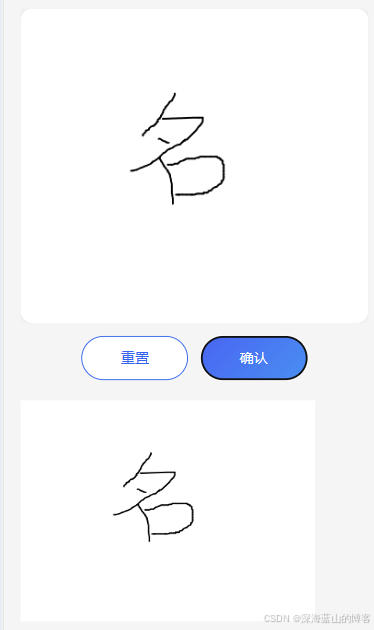
说明
基于Tarojs+NutUI做移动签名时,发现原生Signature组件无法兼容UI的设计要求,事件无法自定义处理,同时又要兼容微信小程序和H5的展示。于是重新使用Canvas来生成签名。
代码示例
独立一个签名组件,实现基本的签名、重置、图片生成,需要使用的地方通过组件引用的方式使用。
签名组件代码如下:
javascript
<template>
  <view class="canvas-signature" @catchtouchmove.stop.prevent>
    <canvas
      :canvas-id="canvasId"
      :id="canvasId"
      :width="canvasWidth"
      :height="canvasHeight"
      class="signature-canvas"
      :style="{ width: displayWidth + 'px', height: displayHeight + 'px' }"
      @touchstart.stop="handleTouchStart"
      @touchmove.stop="handleTouchMove"
      @touchend.stop="handleTouchEnd"
      disable-scroll
      @catchtouchmove.stop.prevent
    ></canvas>
  </view>
</template>

<script setup lang="ts">
import { ref, onMounted, nextTick, computed, watch } from 'vue';
import Taro from '@tarojs/taro';

interface Props {
  width?: number;
  height?: number;
  lineWidth?: number;
  lineColor?: string;
}

const props = withDefaults(defineProps<Props>(), {
  width: 0, // 0表示自适应
  height: 0, // 0表示自适应
  lineWidth: 2,
  lineColor: '#000000',
});

const emit = defineEmits<{
  confirm: [data: string];
  clear: [];
}>();

const canvasId = ref(`signatureCanvas_${Date.now()}`);
const canvasWidth = ref(props.width || 750); // canvas实际绘制宽度(默认与展示一致)
const canvasHeight = ref(props.height || 344); // canvas实际绘制高度(默认与展示一致)
const displayWidth = ref(props.width || 750); // canvas显示宽度
const displayHeight = ref(props.height || 344); // canvas显示高度
const ctx = ref<any>(null);
const isDrawing = ref(false);
const lastPoint = ref<{ x: number; y: number } | null>(null);
const paths = ref<Array<Array<{ x: number; y: number }>>>([]); // 用于撤销功能
let drawTimer: any = null; // 用于节流draw调用
const normalizedLineWidth = computed(() => Math.max(1, props.lineWidth));
const hasStartedDrawing = ref(false); // 标记是否已经开始签名

// 初始化canvas
const initCanvas = () => {
  nextTick(() => {
    // 获取 canvas 尺寸(用 canvas 自身而不是外层容器,避免 padding 导致导出缩放/错位)
    const query = Taro.createSelectorQuery();
    query
      .select(`#${canvasId.value}`)
      .boundingClientRect((rect: any) => {
        if (rect && rect.width > 0 && rect.height > 0) {
          // 设置显示尺寸(单位为 px,保证 DOM 展示尺寸明确)
          displayWidth.value = props.width && props.width > 0 ? props.width : rect.width;
          displayHeight.value = props.height && props.height > 0 ? props.height : rect.height;

          // 内部绘制尺寸与显示尺寸一致,避免实际绘图被缩放
          canvasWidth.value = Math.max(1, Math.round(displayWidth.value));
          canvasHeight.value = Math.max(1, Math.round(displayHeight.value));

          // 更新canvas位置缓存
          canvasRect = {
            left: rect.left,
            top: rect.top,
            width: displayWidth.value,
            height: displayHeight.value,
          };
        }

        // 初始化canvas上下文
        try {
          ctx.value = Taro.createCanvasContext(canvasId.value);
          if (ctx.value) {
            // 先设置白色背景(这是画布的底色,不会被clearRect清除)
            ctx.value.setFillStyle('#ffffff');
            ctx.value.fillRect(0, 0, canvasWidth.value, canvasHeight.value);

            // 设置绘制样式
            ctx.value.setStrokeStyle(props.lineColor);
            ctx.value.setLineWidth(normalizedLineWidth.value);
            ctx.value.setLineCap('round');
            ctx.value.setLineJoin('round');
            ctx.value.setLineDash([]);

            // 绘制提示文字
            drawHintText();

            ctx.value.draw(true);
            console.log('Canvas初始化成功', {
              width: canvasWidth.value,
              height: canvasHeight.value,
              displayWidth: displayWidth.value,
              displayHeight: displayHeight.value,
            });
          }
        } catch (error) {
          console.error('Canvas初始化失败:', error);
        }
      })
      .exec();
  });
};

watch(
  () => [props.width, props.height],
  ([width, height], [prevWidth, prevHeight]) => {
    const shouldResize = (width && width > 0 && width !== prevWidth) || (height && height > 0 && height !== prevHeight);
    if (!shouldResize) {
      return;
    }

    if (width && width > 0) {
      displayWidth.value = width;
      canvasWidth.value = Math.max(1, Math.round(width));
    }
    if (height && height > 0) {
      displayHeight.value = height;
      canvasHeight.value = Math.max(1, Math.round(height));
    }

    nextTick(() => {
      initCanvas();
    });
  },
);

// 缓存canvas的位置信息,避免频繁查询
let canvasRect: { left: number; top: number; width: number; height: number } | null = null;

// 绘制提示文字
const drawHintText = () => {
  if (!ctx.value || hasStartedDrawing.value) return;

  const text = '请在此处手写签名';
  const fontSize = Math.min(canvasWidth.value / 15, 16); // 根据画布宽度自适应字体大小,最大20px

  ctx.value.setFillStyle('#666666'); // 浅灰色提示文字
  ctx.value.setFontSize(fontSize);
  ctx.value.setTextAlign('center');
  ctx.value.setTextBaseline('middle');

  // 在画布中心绘制文字
  const centerX = canvasWidth.value / 2;
  const centerY = canvasHeight.value / 2;
  ctx.value.fillText(text, centerX, centerY);
};

// 清除提示文字
const clearHintText = () => {
  if (!ctx.value) return;

  // 重新填充白色背景,清除提示文字
  ctx.value.setFillStyle('#ffffff');
  ctx.value.fillRect(0, 0, canvasWidth.value, canvasHeight.value);

  // 重新设置绘制样式
  ctx.value.setStrokeStyle(props.lineColor);
  ctx.value.setLineWidth(normalizedLineWidth.value);
  ctx.value.setLineCap('round');
  ctx.value.setLineJoin('round');
};

// 说明:canvasRect 在 initCanvas 中已基于 canvas 节点一次性设置;如后续需要支持旋转/布局变化,可再加更新逻辑

// 获取触摸点坐标(同步版本,提高性能)
// 关键:weapp 真机下优先用 touches[0].x/y(通常已是 canvas 内坐标),并在缺失时使用 pageX/pageY - rect 兜底。
const getTouchPointSync = (e: any): { x: number; y: number } | null => {
  const t = e.touches?.[0] || e.changedTouches?.[0];

  // weapp:优先使用 x/y(很多机型/版本直接给 canvas 内坐标)
  if (process.env.TARO_ENV === 'weapp') {
    if (t && typeof t.x === 'number' && typeof t.y === 'number') {
      // 若 x/y 看起来已经是 canvas 内坐标,则直接用
      if (t.x >= 0 && t.y >= 0 && t.x <= canvasWidth.value && t.y <= canvasHeight.value) {
        return {
          x: Math.max(0, Math.min(canvasWidth.value, t.x)),
          y: Math.max(0, Math.min(canvasHeight.value, t.y)),
        };
      }
      return {
        x: Math.max(0, Math.min(canvasWidth.value, t.x)),
        y: Math.max(0, Math.min(canvasHeight.value, t.y)),
      };
    }
    if (e.detail && typeof e.detail.x === 'number' && typeof e.detail.y === 'number') {
      return {
        x: Math.max(0, Math.min(canvasWidth.value, e.detail.x)),
        y: Math.max(0, Math.min(canvasHeight.value, e.detail.y)),
      };
    }
    // 兜底:用 pageX/pageY(或 clientX/clientY)减 rect(得到的是显示坐标 px)
    if (canvasRect && canvasRect.width > 0 && canvasRect.height > 0 && t) {
      const pageX = (t.pageX ?? t.clientX ?? 0) as number;
      const pageY = (t.pageY ?? t.clientY ?? 0) as number;
      const relativeX = pageX - canvasRect.left;
      const relativeY = pageY - canvasRect.top;
      return {
        x: Math.max(0, Math.min(canvasWidth.value, relativeX)),
        y: Math.max(0, Math.min(canvasHeight.value, relativeY)),
      };
    }
    return null;
  }

  // H5:用 client 坐标 + rect 转换
  const clientX = (t?.clientX ?? t?.x ?? 0) as number;
  const clientY = (t?.clientY ?? t?.y ?? 0) as number;
  if (canvasRect && canvasRect.width > 0 && canvasRect.height > 0) {
    const relativeX = clientX - canvasRect.left;
    const relativeY = clientY - canvasRect.top;
    return {
      x: Math.max(0, Math.min(canvasWidth.value, relativeX)),
      y: Math.max(0, Math.min(canvasHeight.value, relativeY)),
    };
  }
  return null;
};

// 获取触摸点坐标(异步版本,仅在必要时使用)
const getTouchPoint = (e: any): Promise<{ x: number; y: number }> => {
  const syncPoint = getTouchPointSync(e);
  if (syncPoint) {
    return Promise.resolve(syncPoint);
  }

  // 如果没有缓存,查询并返回
  let x = 0;
  let y = 0;
  if (e.detail && typeof e.detail.x === 'number' && typeof e.detail.y === 'number') {
    x = e.detail.x;
    y = e.detail.y;
  } else {
    const touch = e.touches?.[0] || e.changedTouches?.[0];
    if (touch) {
      x = touch.clientX || touch.x || 0;
      y = touch.clientY || touch.y || 0;
    }
  }

  return new Promise<{ x: number; y: number }>(resolve => {
    const query = Taro.createSelectorQuery();
    query
      .select(`#${canvasId.value}`)
      .boundingClientRect((rect: any) => {
        if (rect && rect.width > 0 && rect.height > 0) {
          canvasRect = {
            left: rect.left,
            top: rect.top,
            width: rect.width,
            height: rect.height,
          };
          const relativeX = x - rect.left;
          const relativeY = y - rect.top;
          const scaleX = canvasWidth.value / rect.width;
          const scaleY = canvasHeight.value / rect.height;
          resolve({
            x: Math.max(0, Math.min(canvasWidth.value, relativeX * scaleX)),
            y: Math.max(0, Math.min(canvasHeight.value, relativeY * scaleY)),
          });
        } else {
          resolve({ x, y });
        }
      })
      .exec();
  });
};

// 触摸开始
const handleTouchStart = (e: any) => {
  e.preventDefault();
  isDrawing.value = true;

  // 如果是第一次开始签名,清除提示文字
  if (!hasStartedDrawing.value && ctx.value) {
    clearHintText();
    hasStartedDrawing.value = true;
    ctx.value.draw(true);
  }

  // 优先使用同步方法获取坐标
  const point = getTouchPointSync(e);
  if (point) {
    // 起笔在画布外:直接不开始绘制
    if (point.x < 0 || point.y < 0 || point.x > canvasWidth.value || point.y > canvasHeight.value) {
      isDrawing.value = false;
      lastPoint.value = null;
      return;
    }
    lastPoint.value = point;
    // 开始新的路径
    paths.value.push([point]);
    if (ctx.value) {
      // 画一个"起始点",保证轻微移动/单击也能看到笔迹
      drawLine(point, point);
    }
  } else {
    // 如果缓存不存在,异步获取
    getTouchPoint(e).then(p => {
      if (isDrawing.value && ctx.value) {
        // 如果是第一次开始签名,清除提示文字
        if (!hasStartedDrawing.value) {
          clearHintText();
          hasStartedDrawing.value = true;
          ctx.value.draw(true);
        }
        lastPoint.value = p;
        paths.value.push([p]);
        ctx.value.beginPath();
        ctx.value.moveTo(p.x, p.y);
      }
    });
  }
};

// 计算两点之间的距离
const getDistance = (p1: { x: number; y: number }, p2: { x: number; y: number }) => {
  const dx = p2.x - p1.x;
  const dy = p2.y - p1.y;
  return Math.sqrt(dx * dx + dy * dy);
};

// 触摸移动(优化版本,使用同步获取坐标和节流绘制)
const handleTouchMove = (e: any) => {
  e.preventDefault();
  if (!isDrawing.value || !lastPoint.value || !ctx.value) return;

  // 使用同步方法获取坐标,避免异步延迟
  const point = getTouchPointSync(e);
  if (!point) {
    // 如果缓存不存在,异步获取(这种情况应该很少)
    getTouchPoint(e).then(p => {
      if (isDrawing.value && lastPoint.value && ctx.value) {
        drawLine(lastPoint.value, p);
        lastPoint.value = p;
        if (paths.value.length > 0) {
          paths.value[paths.value.length - 1].push(p);
        }
      }
    });
    return;
  }

  // 手指滑出画布:停止本次会话(防止继续绘制/保存异常)
  if (point.x < 0 || point.y < 0 || point.x > canvasWidth.value || point.y > canvasHeight.value) {
    handleTouchEnd(e);
    return;
  }

  // 绘制线条
  if (lastPoint.value) {
    drawLine(lastPoint.value, point);
  }

  // 更新当前路径
  if (paths.value.length > 0) {
    paths.value[paths.value.length - 1].push(point);
  }

  lastPoint.value = point;
};

// 绘制线条(优化版本,减少draw调用频率)
const drawLine = (from: { x: number; y: number }, to: { x: number; y: number }) => {
  if (!ctx.value) return;

  // 小程序 createCanvasContext:每次 draw() 后当前 path 会被清空
  // 所以必须每次都 beginPath + moveTo,再 lineTo + stroke
  ctx.value.beginPath();
  ctx.value.moveTo(from.x, from.y);

  const distance = getDistance(from, to);

  // 轻微移动也要出线:只要 distance > 0 就 lineTo;插值阈值降低,提高跟手
  if (distance > 1) {
    const steps = Math.min(Math.ceil(distance / 2), 12); // 每2像素一个点,最多12步
    for (let i = 1; i <= steps; i++) {
      const ratio = i / steps;
      const interpolatedX = from.x + (to.x - from.x) * ratio;
      const interpolatedY = from.y + (to.y - from.y) * ratio;
      ctx.value.lineTo(interpolatedX, interpolatedY);
    }
  } else {
    ctx.value.lineTo(to.x, to.y);
  }

  ctx.value.stroke();

  // 使用节流,减少 draw 调用频率(每 16ms 最多一次),但不"反复重置计时器"(否则手指一直动会延迟到最后才 draw)
  if (drawTimer) return;
  drawTimer = setTimeout(() => {
    drawTimer = null;
    if (ctx.value) ctx.value.draw(true);
  }, 16);
};

// 触摸结束
const handleTouchEnd = (e: any) => {
  e.preventDefault();

  // 清除节流定时器
  if (drawTimer) {
    clearTimeout(drawTimer);
    drawTimer = null;
  }

  // 确保最后一点也被绘制
  if (isDrawing.value && ctx.value && lastPoint.value) {
    ctx.value.draw(true);
  }

  isDrawing.value = false;
  lastPoint.value = null;
};

// 清空画布(只清空绘制内容,保留白色背景)
const clear = () => {
  if (ctx.value) {
    // 重新填充白色背景(clearRect会清空所有内容,包括背景色)
    ctx.value.setFillStyle('#ffffff');
    ctx.value.fillRect(0, 0, canvasWidth.value, canvasHeight.value);

    // 重新设置绘制样式
    ctx.value.setStrokeStyle(props.lineColor);
    ctx.value.setLineWidth(normalizedLineWidth.value);
    ctx.value.setLineCap('round');
    ctx.value.setLineJoin('round');

    // 重置绘制状态,重新绘制提示文字
    hasStartedDrawing.value = false;
    drawHintText();

    ctx.value.draw(true);
  }
  paths.value = [];
  emit('clear');
};

// 撤销上一步
const undo = () => {
  if (paths.value.length === 0) {
    Taro.showToast({
      title: '没有可撤销的操作',
      icon: 'none',
    });
    return;
  }

  // 移除最后一条路径
  paths.value.pop();

  // 清空画布并重绘所有路径(保留白色背景)
  if (ctx.value) {
    // 先填充白色背景
    ctx.value.setFillStyle('#ffffff');
    ctx.value.fillRect(0, 0, canvasWidth.value, canvasHeight.value);
    // 再清空绘制内容
    ctx.value.clearRect(0, 0, canvasWidth.value, canvasHeight.value);
    // 重新设置绘制样式
    ctx.value.setStrokeStyle(props.lineColor);
    ctx.value.setLineWidth(normalizedLineWidth.value);
    ctx.value.setLineCap('round');
    ctx.value.setLineJoin('round');

    // 重绘所有路径
    paths.value.forEach(path => {
      if (path.length > 0) {
        ctx.value.beginPath();
        ctx.value.moveTo(path[0].x, path[0].y);
        path.forEach(point => {
          ctx.value.lineTo(point.x, point.y);
        });
        ctx.value.stroke();
      }
    });

    // 如果撤销后没有路径了,重新显示提示文字
    if (paths.value.length === 0) {
      hasStartedDrawing.value = false;
      drawHintText();
    }

    ctx.value.draw(true);
  }
};

// 保存为图片(返回base64或临时文件路径)
const saveAsImage = async (format: 'base64' | 'tempFilePath' = 'base64'): Promise<string> => {
  return new Promise((resolve, reject) => {
    if (!ctx.value) {
      reject(new Error('Canvas未初始化'));
      return;
    }

    // 检查是否有绘制内容
    if (paths.value.length === 0) {
      // Taro.showToast({
      //   title: '请先绘制签名',
      //   icon: 'error',
      // });
      reject(new Error('没有绘制内容'));
      return;
    }

    // 导出时保持导出尺寸与显示尺寸一致,避免放大/缩小
    const exportDestWidth = canvasWidth.value;
    const exportDestHeight = canvasHeight.value;

    if (format === 'base64') {
      // 使用 canvasToTempFilePath 然后读取为 base64
      Taro.canvasToTempFilePath({
        canvasId: canvasId.value,
        x: 0,
        y: 0,
        width: canvasWidth.value,
        height: canvasHeight.value,
        destWidth: exportDestWidth,
        destHeight: exportDestHeight,
        fileType: 'png',
        success: res => {
          // 在小程序中,需要读取临时文件并转换为base64
          if (process.env.TARO_ENV === 'weapp') {
            try {
              const fs = Taro.getFileSystemManager();
              fs.readFile({
                filePath: res.tempFilePath,
                encoding: 'base64',
                success: (fileRes: any) => {
                  const base64 = `data:image/png;base64,${fileRes.data}`;
                  resolve(base64);
                },
                fail: reject,
              });
            } catch (error) {
              reject(error);
            }
          } else {
            // H5环境,tempFilePath 通常已经是 base64
            if (res.tempFilePath && res.tempFilePath.startsWith('data:')) {
              resolve(res.tempFilePath);
            } else {
              // 兜底方案:如果不是 base64,尝试通过 selectorQuery 获取节点(注意:H5下可能需要特定处理)
              const query = Taro.createSelectorQuery();
              query
                .select(`#${canvasId.value}`)
                .node((nodeRes: any) => {
                  const canvas = nodeRes?.node;
                  if (canvas && canvas.toDataURL) {
                    const base64 = canvas.toDataURL('image/png');
                    resolve(base64);
                  } else {
                    // 再次兜底:尝试直接通过原生 DOM 获取(仅 H5)
                    const nativeCanvas = document.getElementById(canvasId.value) as HTMLCanvasElement;
                    if (nativeCanvas && nativeCanvas.toDataURL) {
                      resolve(nativeCanvas.toDataURL('image/png'));
                    } else {
                      reject(new Error('无法获取canvas节点'));
                    }
                  }
                })
                .exec();
            }
          }
        },
        fail: reject,
      });
    } else {
      // 返回临时文件路径
      Taro.canvasToTempFilePath({
        canvasId: canvasId.value,
        x: 0,
        y: 0,
        width: canvasWidth.value,
        height: canvasHeight.value,
        destWidth: exportDestWidth,
        destHeight: exportDestHeight,
        fileType: 'png',
        success: res => {
          resolve(res.tempFilePath);
        },
        fail: reject,
      });
    }
  });
};

// 确认并返回图片数据
const confirm = async () => {
  try {
    const imageData = await saveAsImage('base64');
    emit('confirm', imageData);
    return imageData;
  } catch (error) {
    console.error('保存签名失败:', error);
    // Taro.showToast({
    //   title: '保存失败',
    //   icon: 'error',
    // });
    throw error;
  }
};

// 暴露方法给父组件
defineExpose({
  clear,
  undo,
  saveAsImage,
  confirm,
});

onMounted(() => {
  initCanvas();
});
</script>

<style lang="scss" scoped>
.canvas-signature {
  width: 100%;
  height: 100%;
  padding: 2px;
  background: #fff;
  border-radius: 0.6rem;
  box-shadow: 0rem 0rem 0.25rem 0rem rgba(207, 207, 207, 0.5);
  display: flex;
  align-items: center;
  justify-content: center;
  overflow: hidden;
  position: relative;
  touch-action: none; // 阻止触摸默认行为

  .signature-canvas {
    width: 100%;
    height: 100%;
    touch-action: none; // 阻止触摸默认行为
    border-radius: 0.6rem;
    position: relative;
  }
}
</style>
主页面示例:
javascript
<template>
  <view class="signature_page bg" @catchtouchmove.stop.prevent>
    <page-nav title="我的签名"></page-nav>
    <view class="signature_content" @catchtouchmove.stop.prevent>
      <view class="signature_canvas" id="signature_canvas_container" @catchtouchmove.stop.prevent>
        <CanvasSignature
          :width="canvasWidth"
          :height="canvasHeight"
          ref="signatureRef"
          class="signImg"
        ></CanvasSignature>
      </view>
      <view class="signature_btns">
        <nut-button type="primary" @click="handleClear" class="signature_btn" plain>重置</nut-button>
        <nut-button type="info" @click="handleConfirm" class="signature_btn signature_save">确认</nut-button>
      </view>
      <image v-show="imageUrl" :src="imageUrl" class="signImg" />
    </view>
  </view>
</template>

<script setup lang="ts">
import { onMounted, ref } from 'vue';
import Taro from '@tarojs/taro';
import CanvasSignature from './CanvasSignature.vue';

const canvasHeight = ref(300);
const canvasWidth = ref(0);

// 获取签名组件实例
const signatureRef = ref<InstanceType<typeof CanvasSignature> | null>(null);
const imageUrl = ref('');


onMounted(() => {});

//手动触发重置按钮点击事件
const handleClear = () => {
  if (signatureRef.value) {
    signatureRef.value.clear();
  }
};

//手动触发确认按钮点击事件
const handleConfirm = async () => {
  if (!signatureRef.value) {
    return;
  }
  try {
    const base64Data = await signatureRef.value.confirm();
    if (!base64Data) {
      Taro.showToast({
        title: '没有签名内容',
        icon: 'error',
      });
      return;
    }
    imageUrl.value = base64Data;
    console.log('签名数据:', base64Data);
  } catch (error) {
    console.error('确认签名失败:', error);
    Taro.showToast({
      title: '请先录入签名',
      icon: 'error',
    });
    return;
  }
};
</script>

<style lang="scss">
.signature_page {
  height: 100vh;
  height: 100%;
  display: flex;
  flex-direction: column;
  overflow: hidden; // 防止页面滚动
  position: fixed;
  width: 100%;
  top: 0;
  left: 0;
  touch-action: none; // 阻止触摸默认行为

  .signature_content {
    flex: 1;
    margin: 24px 32px;
    display: flex;
    flex-direction: column;
    min-height: 0; // 防止flex子元素溢出
    overflow: hidden; // 防止内容区域滚动
    touch-action: none; // 阻止触摸默认行为
    .signature_canvas {
      flex-shrink: 0;
      height: 620px; // 减小高度
      position: relative;
      overflow: hidden; // 防止canvas区域滚动
      touch-action: none; // 阻止触摸默认行为
      .signImg {
        padding: 2px;
        width: 100%;
        height: 100%;
        background: #fff;
        border-radius: 0.6rem;
        box-shadow: 0rem 0rem 0.25rem 0rem rgba(207, 207, 207, 0.5);
      }
    }
  }
  .signature_btns {
    flex-shrink: 0;
    padding: 24px 32px 40px;
    display: flex;
    align-items: center;
    justify-content: center;
    gap: 24px;
    .signature_btn {
      width: 210px;
      height: 88px;
      font-size: 28px;
    }
    .signature_save {
      view view {
        color: #fff;
      }
    }
  }
}
</style>
页面效果