Flutter倒计时秒表:打造多功能计时工具
项目简介
倒计时秒表是一款集倒计时、秒表和快速计时器于一体的多功能计时应用。通过简洁直观的界面和丰富的功能,满足用户在不同场景下的计时需求,如工作专注、运动计时、烹饪提醒等。
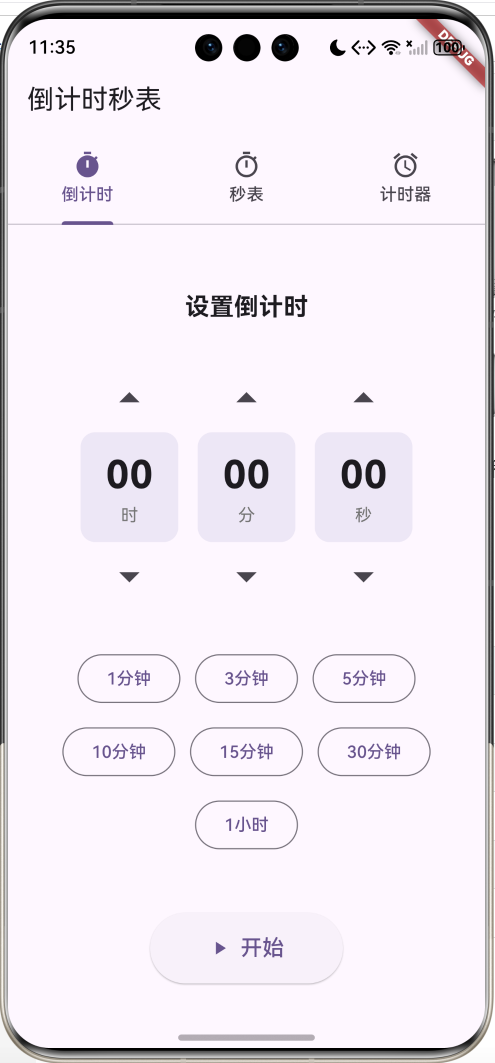
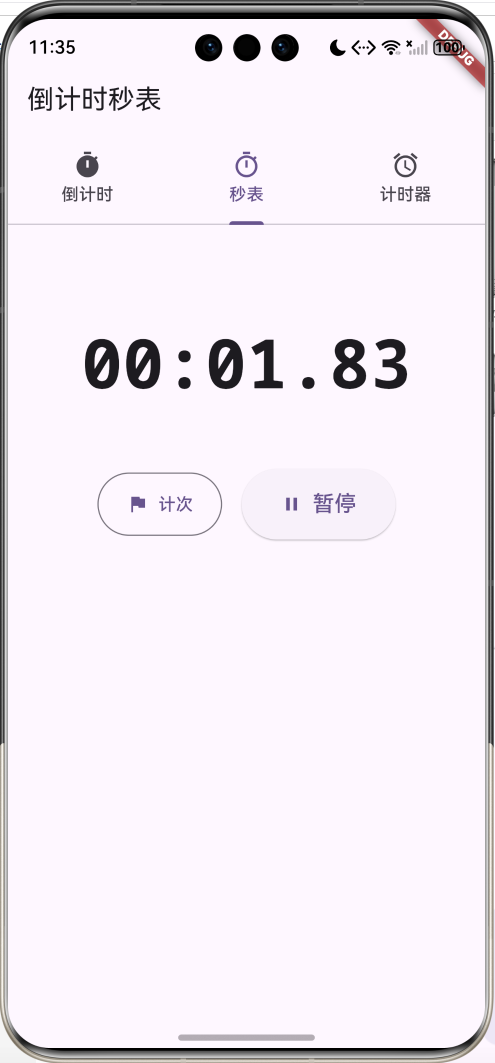
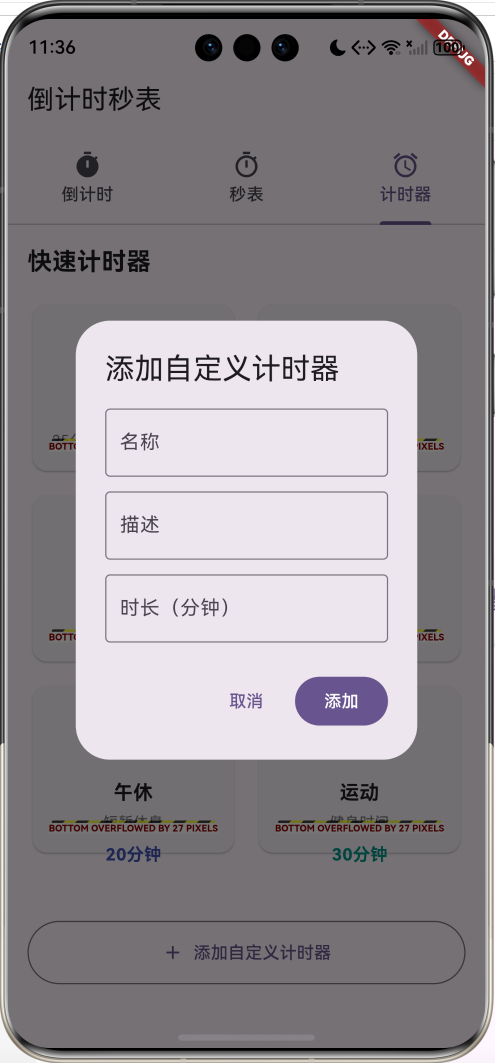
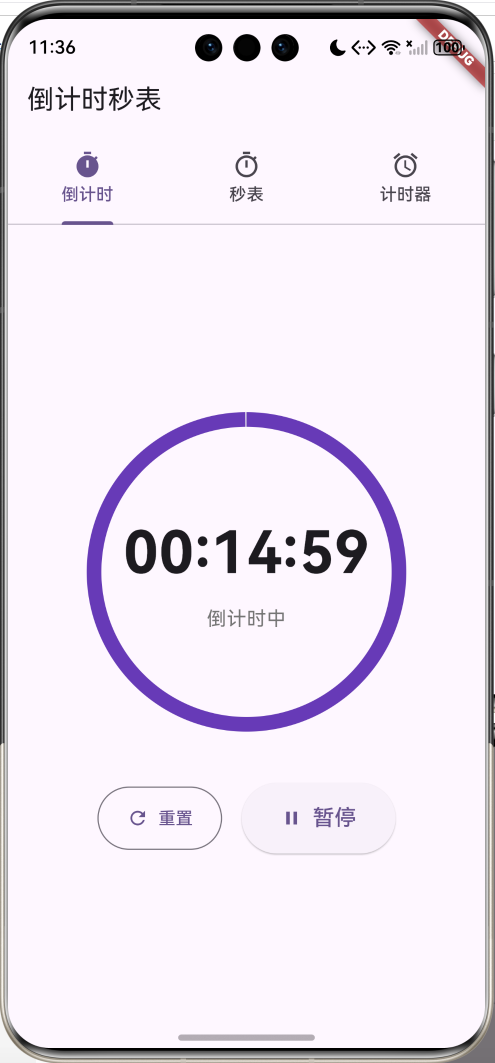
运行效果图
核心功能
- 倒计时器:自定义时间倒计时,支持暂停和重置
- 秒表计时:精确到10毫秒,支持计次功能
- 快速计时器:预设常用场景,一键启动
应用特色
| 特色 | 说明 |
|---|---|
| 三合一设计 | 倒计时、秒表、预设计时器 |
| 可视化进度 | 圆形进度条直观展示 |
| 快捷设置 | 常用时长一键选择 |
| 计次功能 | 秒表支持多次计次记录 |
| 场景预设 | 番茄工作法、煮蛋、泡茶等 |
功能架构
倒计时秒表
倒计时器
秒表
快速计时器
时间设置
快捷按钮
圆形进度
暂停/继续
重置功能
开始/暂停
计次记录
重置功能
毫秒精度
预设场景
自定义添加
一键启动
场景图标
核心功能详解
1. 倒计时器
倒计时器支持自定义时间设置,适用于各种需要定时提醒的场景。
功能特点:
- 时分秒独立设置
- 上下箭头调节
- 快捷时间按钮(1分钟、3分钟、5分钟等)
- 圆形进度条显示
- 暂停/继续功能
- 时间到提醒
时间选择器实现:
dart
Widget _buildTimePicker(String label, int value, Function(int) onChanged) {
  return Column(
    children: [
      IconButton(
        icon: const Icon(Icons.arrow_drop_up, size: 40),
        onPressed: () {
          if (label == '时' && value < 23) onChanged(value + 1);
          if (label == '分' && value < 59) onChanged(value + 1);
          if (label == '秒' && value < 59) onChanged(value + 1);
        },
      ),
      Container(
        width: 80,
        padding: const EdgeInsets.symmetric(vertical: 12),
        decoration: BoxDecoration(
          color: Colors.deepPurple[50],
          borderRadius: BorderRadius.circular(12),
        ),
        child: Column(
          children: [
            Text(
              value.toString().padLeft(2, '0'),
              style: const TextStyle(
                fontSize: 32,
                fontWeight: FontWeight.bold
              ),
            ),
            Text(label,
              style: TextStyle(
                fontSize: 14,
                color: Colors.grey[600]
              )),
          ],
        ),
      ),
      IconButton(
        icon: const Icon(Icons.arrow_drop_down, size: 40),
        onPressed: () {
          if (value > 0) onChanged(value - 1);
        },
      ),
    ],
  );
}
倒计时逻辑:
dart
void _startCountdown() {
  setState(() {
    _totalSeconds = _hours * 3600 + _minutes * 60 + _seconds;
    _remainingSeconds = _totalSeconds;
    _isRunning = true;
  });

  _timer = Timer.periodic(const Duration(seconds: 1), (timer) {
    setState(() {
      if (_remainingSeconds > 0) {
        _remainingSeconds--;
      } else {
        _timer?.cancel();
        _isRunning = false;
        _showCompletionDialog();
      }
    });
  });
}
进度显示:
dart
final progress = _totalSeconds > 0
  ? _remainingSeconds / _totalSeconds
  : 0.0;

CircularProgressIndicator(
  value: progress,
  strokeWidth: 12,
  backgroundColor: Colors.grey[200],
  valueColor: AlwaysStoppedAnimation<Color>(
    _isPaused ? Colors.orange : Colors.deepPurple,
  ),
)
2. 秒表功能
秒表提供精确到10毫秒的计时,支持计次记录。
功能特点:
- 10毫秒精度
- 开始/暂停/重置
- 计次功能
- 计次时间差显示
- 等宽字体显示
秒表计时实现:
dart
void _start() {
  setState(() => _isRunning = true);
  _timer = Timer.periodic(
    const Duration(milliseconds: 10),
    (timer) {
      setState(() => _milliseconds += 10);
    }
  );
}

void _lap() {
  setState(() {
    _laps.insert(0, _milliseconds);
  });
}
时间格式化:
dart
String _formatTime(int ms) {
  final hours = ms ~/ 3600000;
  final minutes = (ms % 3600000) ~/ 60000;
  final seconds = (ms % 60000) ~/ 1000;
  final millis = (ms % 1000) ~/ 10;

  if (hours > 0) {
    return '${hours.toString().padLeft(2, '0')}:'
           '${minutes.toString().padLeft(2, '0')}:'
           '${seconds.toString().padLeft(2, '0')}.'
           '${millis.toString().padLeft(2, '0')}';
  }
  return '${minutes.toString().padLeft(2, '0')}:'
         '${seconds.toString().padLeft(2, '0')}.'
         '${millis.toString().padLeft(2, '0')}';
}
计次记录显示:
dart
ListView.builder(
  itemCount: _laps.length,
  itemBuilder: (context, index) {
    final lapTime = index == 0
      ? _laps[0]
      : _laps[index] - _laps[index - 1];

    return Card(
      child: ListTile(
        leading: CircleAvatar(
          child: Text('${_laps.length - index}'),
        ),
        title: Text(_formatTime(_laps[index])),
        trailing: Text(
          '+${_formatTime(lapTime)}',
          style: TextStyle(color: Colors.grey[600]),
        ),
      ),
    );
  },
)
3. 快速计时器
预设常用场景的计时器,一键启动。
预设场景:
- 番茄工作法(25分钟)
- 煮鸡蛋(6分钟)
- 泡茶(3分钟)
- 面膜(15分钟)
- 午休(20分钟)
- 运动(30分钟)
预设模型:
dart
class TimerPreset {
  final String id;
  final String name;
  final String description;
  final int duration;      // 秒
  final IconData icon;
  final Color color;

  TimerPreset({
    required this.id,
    required this.name,
    required this.description,
    required this.duration,
    required this.icon,
    required this.color,
  });
}
预设卡片:
dart
Widget _buildPresetCard(TimerPreset preset) {
  return Card(
    child: InkWell(
      onTap: () => _startPresetTimer(preset),
      child: Column(
        mainAxisAlignment: MainAxisAlignment.center,
        children: [
          Icon(preset.icon, size: 48, color: preset.color),
          const SizedBox(height: 12),
          Text(
            preset.name,
            style: const TextStyle(
              fontSize: 16,
              fontWeight: FontWeight.bold
            ),
          ),
          Text(
            preset.description,
            style: TextStyle(
              fontSize: 12,
              color: Colors.grey[600]
            ),
          ),
          Text(
            _formatDuration(preset.duration),
            style: TextStyle(
              fontSize: 14,
              color: preset.color,
              fontWeight: FontWeight.bold
            ),
          ),
        ],
      ),
    ),
  );
}
界面设计要点
1. Tab导航
使用TabBar实现三个功能切换:
dart
TabBar(
  controller: _tabController,
  tabs: const [
    Tab(icon: Icon(Icons.timer), text: '倒计时'),
    Tab(icon: Icon(Icons.timer_outlined), text: '秒表'),
    Tab(icon: Icon(Icons.alarm), text: '计时器'),
  ],
)
2. 圆形进度条
视觉化展示倒计时进度:
dart
Stack(
  alignment: Alignment.center,
  children: [
    SizedBox(
      width: 250,
      height: 250,
      child: CircularProgressIndicator(
        value: progress,
        strokeWidth: 12,
        backgroundColor: Colors.grey[200],
      ),
    ),
    Column(
      children: [
        Text(
          '00:00:00',
          style: TextStyle(
            fontSize: 48,
            fontWeight: FontWeight.bold
          ),
        ),
        Text('倒计时中'),
      ],
    ),
  ],
)
3. 按钮设计
统一的按钮样式:
dart
// 主要操作按钮
ElevatedButton.icon(
  onPressed: _start,
  icon: const Icon(Icons.play_arrow),
  label: const Text('开始'),
  style: ElevatedButton.styleFrom(
    padding: const EdgeInsets.symmetric(
      horizontal: 32,
      vertical: 16
    ),
  ),
)

// 次要操作按钮
OutlinedButton.icon(
  onPressed: _reset,
  icon: const Icon(Icons.refresh),
  label: const Text('重置'),
)
4. 颜色方案
| 场景 | 颜色 | 说明 |
|---|---|---|
| 主色调 | Deep Purple | 专业、稳重 |
| 暂停状态 | Orange | 警示、注意 |
| 番茄工作法 | Red | 专注、热情 |
| 煮蛋 | Orange | 温暖 |
| 泡茶 | Green | 清新 |
| 面膜 | Pink | 温柔 |
| 午休 | Indigo | 宁静 |
| 运动 | Teal | 活力 |
核心代码实现
倒计时完成提醒
dart
void _showCompletionDialog() {
  showDialog(
    context: context,
    builder: (context) => AlertDialog(
      title: const Text('倒计时结束'),
      content: const Text('时间到!'),
      actions: [
        TextButton(
          onPressed: () {
            Navigator.pop(context);
            _resetCountdown();
          },
          child: const Text('确定'),
        ),
      ],
    ),
  );
}
快捷时间按钮
dart
Widget _buildQuickButtons() {
  return Wrap(
    spacing: 12,
    runSpacing: 12,
    alignment: WrapAlignment.center,
    children: [
      _buildQuickButton('1分钟', 0, 1, 0),
      _buildQuickButton('3分钟', 0, 3, 0),
      _buildQuickButton('5分钟', 0, 5, 0),
      _buildQuickButton('10分钟', 0, 10, 0),
      _buildQuickButton('15分钟', 0, 15, 0),
      _buildQuickButton('30分钟', 0, 30, 0),
      _buildQuickButton('1小时', 1, 0, 0),
    ],
  );
}

Widget _buildQuickButton(String label, int h, int m, int s) {
  return OutlinedButton(
    onPressed: () {
      setState(() {
        _hours = h;
        _minutes = m;
        _seconds = s;
      });
    },
    child: Text(label),
  );
}
预设计时器运行页面
dart
class PresetTimerPage extends StatefulWidget {
  final TimerPreset preset;

  const PresetTimerPage({super.key, required this.preset});

  @override
  State<PresetTimerPage> createState() => _PresetTimerPageState();
}

class _PresetTimerPageState extends State<PresetTimerPage> {
  Timer? _timer;
  late int _remainingSeconds;
  bool _isPaused = false;

  @override
  void initState() {
    super.initState();
    _remainingSeconds = widget.preset.duration;
    _startTimer();
  }

  void _startTimer() {
    setState(() => _isPaused = false);

    _timer = Timer.periodic(const Duration(seconds: 1), (timer) {
      if (mounted) {
        setState(() {
          if (_remainingSeconds > 0) {
            _remainingSeconds--;
          } else {
            _timer?.cancel();
            _showCompletionDialog();
          }
        });
      }
    });
  }

  @override
  Widget build(BuildContext context) {
    final minutes = _remainingSeconds ~/ 60;
    final seconds = _remainingSeconds % 60;
    final progress = _remainingSeconds / widget.preset.duration;

    return Scaffold(
      appBar: AppBar(title: Text(widget.preset.name)),
      body: Column(
        mainAxisAlignment: MainAxisAlignment.center,
        children: [
          Icon(widget.preset.icon,
            size: 80,
            color: widget.preset.color),
          const SizedBox(height: 48),
          Stack(
            alignment: Alignment.center,
            children: [
              CircularProgressIndicator(
                value: progress,
                strokeWidth: 12,
                valueColor: AlwaysStoppedAnimation<Color>(
                  widget.preset.color
                ),
              ),
              Text(
                '${minutes.toString().padLeft(2, '0')}:'
                '${seconds.toString().padLeft(2, '0')}',
                style: const TextStyle(
                  fontSize: 56,
                  fontWeight: FontWeight.bold
                ),
              ),
            ],
          ),
        ],
      ),
    );
  }
}
功能扩展建议
1. 声音提醒
添加倒计时结束的声音提醒:
dart
import 'package:audioplayers/audioplayers.dart';

class SoundService {
  final AudioPlayer _player = AudioPlayer();

  Future<void> playAlarm() async {
    await _player.play(AssetSource('sounds/alarm.mp3'));
  }

  Future<void> playTick() async {
    await _player.play(AssetSource('sounds/tick.mp3'));
  }

  Future<void> stop() async {
    await _player.stop();
  }
}

// 使用
void _showCompletionDialog() {
  SoundService().playAlarm();
  showDialog(...);
}
2. 振动反馈
使用vibration插件添加振动:
dart
import 'package:vibration/vibration.dart';

class VibrationService {
  Future<void> vibrate() async {
    final hasVibrator = await Vibration.hasVibrator();
    if (hasVibrator == true) {
      Vibration.vibrate(duration: 500);
    }
  }

  Future<void> vibratePattern() async {
    // 振动模式:振动500ms,停止500ms,重复3次
    Vibration.vibrate(
      pattern: [500, 500, 500, 500, 500, 500],
    );
  }
}

// 倒计时结束时振动
void _onCountdownComplete() {
  VibrationService().vibratePattern();
  _showCompletionDialog();
}
3. 后台运行
使用flutter_background_service实现后台计时:
dart
import 'package:flutter_background_service/flutter_background_service.dart';

class BackgroundTimerService {
  Future<void> initializeService() async {
    final service = FlutterBackgroundService();

    await service.configure(
      androidConfiguration: AndroidConfiguration(
        onStart: onStart,
        autoStart: false,
        isForegroundMode: true,
      ),
      iosConfiguration: IosConfiguration(
        autoStart: false,
        onForeground: onStart,
        onBackground: onIosBackground,
      ),
    );
  }

  @pragma('vm:entry-point')
  static void onStart(ServiceInstance service) async {
    // 后台计时逻辑
    Timer.periodic(const Duration(seconds: 1), (timer) {
      // 更新计时
    });
  }

  @pragma('vm:entry-point')
  static bool onIosBackground(ServiceInstance service) {
    return true;
  }
}
4. 数据持久化
保存用户的计时记录:
dart
import 'package:shared_preferences/shared_preferences.dart';
import 'dart:convert';

class TimerHistory {
  final String id;
  final String type; // countdown, stopwatch, preset
  final int duration;
  final DateTime startTime;
  final DateTime? endTime;

  TimerHistory({
    required this.id,
    required this.type,
    required this.duration,
    required this.startTime,
    this.endTime,
  });

  Map<String, dynamic> toJson() => {
    'id': id,
    'type': type,
    'duration': duration,
    'startTime': startTime.toIso8601String(),
    'endTime': endTime?.toIso8601String(),
  };

  factory TimerHistory.fromJson(Map<String, dynamic> json) {
    return TimerHistory(
      id: json['id'],
      type: json['type'],
      duration: json['duration'],
      startTime: DateTime.parse(json['startTime']),
      endTime: json['endTime'] != null
        ? DateTime.parse(json['endTime'])
        : null,
    );
  }
}

class HistoryService {
  Future<void> saveHistory(TimerHistory history) async {
    final prefs = await SharedPreferences.getInstance();
    final histories = await loadHistories();
    histories.add(history);

    final jsonList = histories.map((h) => h.toJson()).toList();
    await prefs.setString('timer_histories', jsonEncode(jsonList));
  }

  Future<List<TimerHistory>> loadHistories() async {
    final prefs = await SharedPreferences.getInstance();
    final jsonStr = prefs.getString('timer_histories');
    if (jsonStr == null) return [];

    final jsonList = jsonDecode(jsonStr) as List;
    return jsonList.map((json) =>
      TimerHistory.fromJson(json)
    ).toList();
  }
}
5. 统计分析
添加使用统计功能:
dart
class TimerStatistics {
  final int totalCountdowns;
  final int totalStopwatches;
  final int totalPresets;
  final int totalDuration; // 秒
  final Map<String, int> presetUsage;

  TimerStatistics({
    required this.totalCountdowns,
    required this.totalStopwatches,
    required this.totalPresets,
    required this.totalDuration,
    required this.presetUsage,
  });
}

class StatisticsService {
  Future<TimerStatistics> getStatistics() async {
    final histories = await HistoryService().loadHistories();

    int countdowns = 0;
    int stopwatches = 0;
    int presets = 0;
    int totalDuration = 0;
    Map<String, int> presetUsage = {};

    for (var history in histories) {
      switch (history.type) {
        case 'countdown':
          countdowns++;
          break;
        case 'stopwatch':
          stopwatches++;
          break;
        case 'preset':
          presets++;
          presetUsage[history.id] =
            (presetUsage[history.id] ?? 0) + 1;
          break;
      }
      totalDuration += history.duration;
    }

    return TimerStatistics(
      totalCountdowns: countdowns,
      totalStopwatches: stopwatches,
      totalPresets: presets,
      totalDuration: totalDuration,
      presetUsage: presetUsage,
    );
  }
}

// 统计页面
class StatisticsPage extends StatelessWidget {
  final TimerStatistics stats;

  const StatisticsPage({required this.stats});

  @override
  Widget build(BuildContext context) {
    return Scaffold(
      appBar: AppBar(title: const Text('使用统计')),
      body: ListView(
        padding: const EdgeInsets.all(16),
        children: [
          _buildStatCard('倒计时次数', '${stats.totalCountdowns}次'),
          _buildStatCard('秒表次数', '${stats.totalStopwatches}次'),
          _buildStatCard('预设计时', '${stats.totalPresets}次'),
          _buildStatCard('总计时长',
            '${(stats.totalDuration / 3600).toStringAsFixed(1)}小时'),
        ],
      ),
    );
  }

  Widget _buildStatCard(String label, String value) {
    return Card(
      child: ListTile(
        title: Text(label),
        trailing: Text(
          value,
          style: const TextStyle(
            fontSize: 20,
            fontWeight: FontWeight.bold
          ),
        ),
      ),
    );
  }
}
6. 主题定制
支持多种主题颜色:
dart
class ThemeService {
  static const themes = {
    'purple': Colors.deepPurple,
    'blue': Colors.blue,
    'green': Colors.green,
    'orange': Colors.orange,
    'pink': Colors.pink,
  };

  Future<void> saveTheme(String themeName) async {
    final prefs = await SharedPreferences.getInstance();
    await prefs.setString('theme', themeName);
  }

  Future<String> loadTheme() async {
    final prefs = await SharedPreferences.getInstance();
    return prefs.getString('theme') ?? 'purple';
  }
}

// 在MaterialApp中使用
class TimerApp extends StatefulWidget {
  @override
  State<TimerApp> createState() => _TimerAppState();
}

class _TimerAppState extends State<TimerApp> {
  String _themeName = 'purple';

  @override
  void initState() {
    super.initState();
    _loadTheme();
  }

  Future<void> _loadTheme() async {
    final theme = await ThemeService().loadTheme();
    setState(() => _themeName = theme);
  }

  @override
  Widget build(BuildContext context) {
    return MaterialApp(
      theme: ThemeData(
        colorScheme: ColorScheme.fromSeed(
          seedColor: ThemeService.themes[_themeName]!
        ),
        useMaterial3: true,
      ),
      home: HomePage(),
    );
  }
}
7. 番茄工作法增强
完整的番茄工作法实现:
dart
class PomodoroTimer {
  final int workDuration = 25 * 60; // 25分钟
  final int shortBreak = 5 * 60;    // 5分钟
  final int longBreak = 15 * 60;    // 15分钟
  final int cyclesBeforeLongBreak = 4;

  int currentCycle = 0;
  bool isWorkTime = true;

  int getNextDuration() {
    if (isWorkTime) {
      return workDuration;
    } else {
      if (currentCycle % cyclesBeforeLongBreak == 0) {
        return longBreak;
      } else {
        return shortBreak;
      }
    }
  }

  void completeSession() {
    if (isWorkTime) {
      currentCycle++;
    }
    isWorkTime = !isWorkTime;
  }

  String getCurrentPhase() {
    if (isWorkTime) {
      return '工作时间 (${currentCycle + 1}/4)';
    } else {
      if (currentCycle % cyclesBeforeLongBreak == 0) {
        return '长休息';
      } else {
        return '短休息';
      }
    }
  }
}

// 番茄工作法页面
class PomodoroPage extends StatefulWidget {
  @override
  State<PomodoroPage> createState() => _PomodoroPageState();
}

class _PomodoroPageState extends State<PomodoroPage> {
  final PomodoroTimer _pomodoro = PomodoroTimer();
  Timer? _timer;
  late int _remainingSeconds;
  bool _isRunning = false;

  @override
  void initState() {
    super.initState();
    _remainingSeconds = _pomodoro.getNextDuration();
  }

  void _startTimer() {
    setState(() => _isRunning = true);

    _timer = Timer.periodic(const Duration(seconds: 1), (timer) {
      setState(() {
        if (_remainingSeconds > 0) {
          _remainingSeconds--;
        } else {
          _timer?.cancel();
          _isRunning = false;
          _onSessionComplete();
        }
      });
    });
  }

  void _onSessionComplete() {
    _pomodoro.completeSession();
    _remainingSeconds = _pomodoro.getNextDuration();

    showDialog(
      context: context,
      builder: (context) => AlertDialog(
        title: Text('${_pomodoro.getCurrentPhase()}'),
        content: Text(_pomodoro.isWorkTime
          ? '开始工作吧!'
          : '休息一下吧!'),
        actions: [
          TextButton(
            onPressed: () {
              Navigator.pop(context);
              _startTimer();
            },
            child: const Text('开始'),
          ),
        ],
      ),
    );
  }

  @override
  Widget build(BuildContext context) {
    return Scaffold(
      appBar: AppBar(title: const Text('番茄工作法')),
      body: Center(
        child: Column(
          mainAxisAlignment: MainAxisAlignment.center,
          children: [
            Text(
              _pomodoro.getCurrentPhase(),
              style: const TextStyle(fontSize: 24),
            ),
            const SizedBox(height: 32),
            Text(
              '${(_remainingSeconds ~/ 60).toString().padLeft(2, '0')}:'
              '${(_remainingSeconds % 60).toString().padLeft(2, '0')}',
              style: const TextStyle(
                fontSize: 72,
                fontWeight: FontWeight.bold
              ),
            ),
            const SizedBox(height: 48),
            ElevatedButton(
              onPressed: _isRunning ? null : _startTimer,
              child: const Text('开始'),
            ),
          ],
        ),
      ),
    );
  }
}
项目结构
lib/
├── main.dart                    # 应用入口
├── pages/                       # 页面
│   ├── home_page.dart          # 主页(Tab导航)
│   ├── countdown_page.dart     # 倒计时页面
│   ├── stopwatch_page.dart     # 秒表页面
│   ├── timer_presets_page.dart # 预设计时器
│   ├── preset_timer_page.dart  # 预设运行页面
│   ├── pomodoro_page.dart      # 番茄工作法
│   └── statistics_page.dart    # 统计页面
├── models/                      # 数据模型
│   ├── timer_preset.dart       # 预设模型
│   ├── timer_history.dart      # 历史记录
│   └── timer_statistics.dart   # 统计数据
├── services/                    # 服务
│   ├── sound_service.dart      # 声音服务
│   ├── vibration_service.dart  # 振动服务
│   ├── history_service.dart    # 历史服务
│   ├── statistics_service.dart # 统计服务
│   └── theme_service.dart      # 主题服务
└── widgets/                     # 组件
    ├── time_picker.dart        # 时间选择器
    ├── circular_timer.dart     # 圆形计时器
    └── preset_card.dart        # 预设卡片
使用指南
倒计时器使用
-
设置时间
- 点击上下箭头调节时分秒
- 或点击快捷按钮选择常用时长
-
开始倒计时
- 点击"开始"按钮
- 观察圆形进度条
-
暂停/继续
- 点击"暂停"按钮暂停
- 点击"继续"按钮恢复
-
重置
- 点击"重置"按钮清零
秒表使用
-
开始计时
- 点击"开始"按钮
-
计次
- 点击"计次"按钮记录当前时间
- 查看计次列表
-
暂停
- 点击"暂停"按钮停止
-
重置
- 暂停后点击"重置"清零
快速计时器使用
-
选择预设
- 浏览预设场景
- 点击卡片启动
-
自定义添加
- 点击"添加自定义计时器"
- 填写名称、描述、时长
- 保存使用
常见问题
Q1: 如何添加更多预设场景?
在TimerPresetsPage中添加:
dart
_presets.add(TimerPreset(
  id: '7',
  name: '冥想',
  description: '放松身心',
  duration: 10 * 60,
  icon: Icons.self_improvement,
  color: Colors.purple,
));
Q2: 如何实现锁屏显示?
使用wakelock插件保持屏幕常亮:
dart
import 'package:wakelock/wakelock.dart';

void _startCountdown() {
  Wakelock.enable(); // 保持屏幕常亮
  // 开始倒计时
}

void _stopCountdown() {
  Wakelock.disable(); // 允许屏幕休眠
  // 停止倒计时
}
Q3: 如何导出计时记录?
dart
import 'package:share_plus/share_plus.dart';
import 'dart:io';
import 'package:path_provider/path_provider.dart';

Future<void> exportHistory() async {
  final histories = await HistoryService().loadHistories();
  final csv = _convertToCSV(histories);

  final directory = await getTemporaryDirectory();
  final file = File('${directory.path}/timer_history.csv');
  await file.writeAsString(csv);

  await Share.shareXFiles([XFile(file.path)]);
}

String _convertToCSV(List<TimerHistory> histories) {
  final buffer = StringBuffer();
  buffer.writeln('类型,时长,开始时间,结束时间');

  for (var history in histories) {
    buffer.writeln(
      '${history.type},'
      '${history.duration},'
      '${history.startTime},'
      '${history.endTime}'
    );
  }

  return buffer.toString();
}
Q4: 如何实现倒计时结束后自动重复?
dart
class RepeatCountdown {
  int repeatCount = 0;
  int maxRepeats = 3;

  void onComplete() {
    if (repeatCount < maxRepeats) {
      repeatCount++;
      _startCountdown();
    } else {
      _showFinalCompletion();
    }
  }
}
Q5: 如何添加语音播报?
使用flutter_tts:
dart
import 'package:flutter_tts/flutter_tts.dart';

class TTSService {
  final FlutterTts _tts = FlutterTts();

  Future<void> speak(String text) async {
    await _tts.setLanguage('zh-CN');
    await _tts.setPitch(1.0);
    await _tts.speak(text);
  }

  Future<void> announceTime(int seconds) async {
    final minutes = seconds ~/ 60;
    final secs = seconds % 60;

    if (minutes > 0) {
      await speak('还剩$minutes分钟');
    } else if (secs <= 10) {
      await speak('$secs');
    }
  }
}
性能优化
1. Timer优化
dart
// 使用mounted检查避免内存泄漏
_timer = Timer.periodic(const Duration(seconds: 1), (timer) {
  if (mounted) {
    setState(() {
      // 更新状态
    });
  }
});

// 及时取消Timer
@override
void dispose() {
  _timer?.cancel();
  super.dispose();
}
2. 状态管理优化
使用Provider管理全局状态:
dart
class TimerProvider extends ChangeNotifier {
  int _remainingSeconds = 0;
  bool _isRunning = false;

  int get remainingSeconds => _remainingSeconds;
  bool get isRunning => _isRunning;

  void updateTime(int seconds) {
    _remainingSeconds = seconds;
    notifyListeners();
  }

  void setRunning(bool running) {
    _isRunning = running;
    notifyListeners();
  }
}
总结
倒计时秒表是一款功能全面的计时工具应用,具有以下特点:
核心优势
- 三合一设计:倒计时、秒表、预设计时器
- 界面简洁:Material Design 3现代化设计
- 功能完整:暂停、重置、计次等
- 场景丰富:预设多种常用场景
技术亮点
- 精确计时:秒表精确到10毫秒
- 可视化进度:圆形进度条直观展示
- 状态管理:合理的状态控制
- 扩展性强:易于添加新功能
应用价值
- 提高工作效率(番茄工作法)
- 辅助日常生活(烹饪、运动)
- 时间管理工具
- 专注力训练
通过持续优化和功能扩展,这款应用可以成为用户日常生活中不可或缺的时间管理助手。
欢迎加入开源鸿蒙跨平台社区:https://openharmonycrossplatform.csdn.net