Vue2/Vue3 迁移头秃?Renderless 架构让组件 "无缝穿梭"
-
- 前言:当组件需要跨版本复用
- 一、传统组件开发的痛点
- [二、Renderless 架构:UI 与逻辑的完美解耦](#二、Renderless 架构:UI 与逻辑的完美解耦)
- 三、基础准备:@opentiny/vue-common
-
- [核心 API 速览](#核心 API 速览)
- [关键原理:API 兼容层](#关键原理:API 兼容层)
- 四、实战:三文件架构详解
-
- 文件结构
- [1. 入口文件:index.ts](#1. 入口文件:index.ts)
- [2. 逻辑层:renderless.ts](#2. 逻辑层:renderless.ts)
- [3. 模板层:pc.vue](#3. 模板层:pc.vue)
- 五、进阶技巧:让组件更强大
-
- [1. 逻辑模块化](#1. 逻辑模块化)
- [2. 处理异步场景](#2. 处理异步场景)
- [3. 访问 DOM 元素](#3. 访问 DOM 元素)
- 六、最佳实践与避坑指南
-
- [✅ 推荐做法](#✅ 推荐做法)
- [⚠️ 常见问题](#⚠️ 常见问题)
- 七、适用场景评估
-
- [✅ 推荐使用](#✅ 推荐使用)
- [⚠️ 谨慎使用](#⚠️ 谨慎使用)
- 八、总结
- 学习资源
- 互动讨论
前言:当组件需要跨版本复用
大家好,我是木斯佳,是 OpenTiny 开源社区的布道师和华为云 HDE 认证专家,最近在重构公司组件库时,遇到了一个棘手问题:如何在 Vue 2 和 Vue 3 之间实现组件无缝迁移?传统方案往往需要维护两套代码,不仅开发成本高,测试和维护更是噩梦。
今天要介绍的 Renderless 架构,完美解决了这个问题。它让「一次编写,到处运行」在 Vue 生态中成为现实!我结合官方的教程博文进行二次创作,带大家一起动手实践一下
一、传统组件开发的痛点
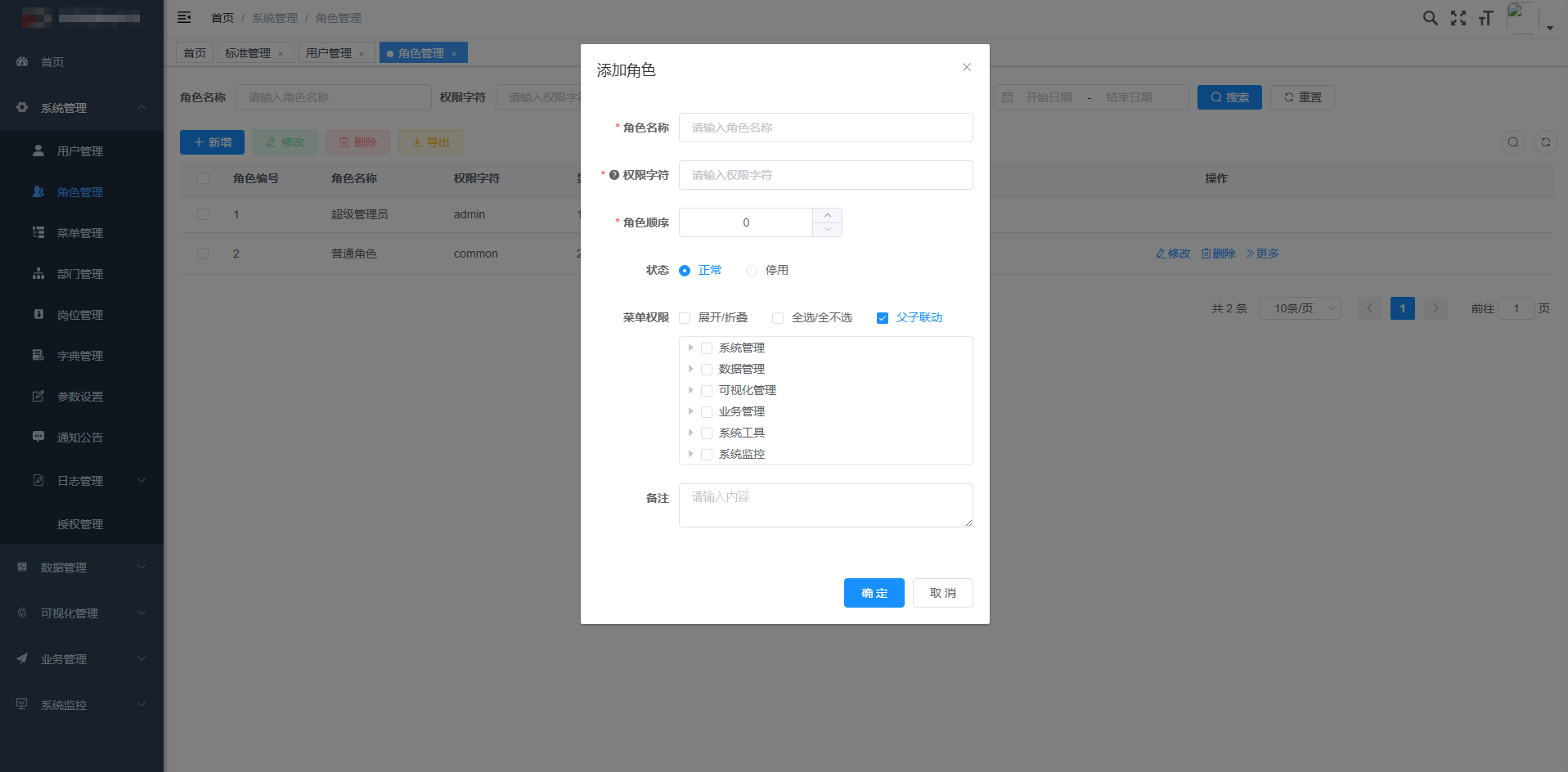
我们之前有一个甲方项目,原方案是基于ruoyi的vue2管理后端,已经交付了好几年了,在二期开发中,我们又陆续基于数据池为甲方做了vue3的可视化大屏。近期的需求中要求几个功能进行打通,两个项目要集成,在实际开发中大屏有很多定制化组件,如果集成到管理后端的看板中,集成难度比较大。
问题来了:
- 这个组件只能在 Vue 3 项目中使用
- 如果公司既有 Vue 2 老项目,又有 Vue 3 新项目怎么办?
- 难道要为每个版本都维护一套代码?
二、Renderless 架构:UI 与逻辑的完美解耦
Renderless 的核心思想很简单:将 UI 展示与业务逻辑彻底分离。
┌─────────────────────────┐
│     模板层 (pc.vue)     │ ← 只负责渲染,不关心逻辑
└─────────────────────────┘
            ↓
┌─────────────────────────┐
│  逻辑层 (renderless.ts) │ ← 处理所有业务逻辑,纯函数
└─────────────────────────┘
            ↓
┌─────────────────────────┐
│    入口层 (index.ts)    │ ← 统一出口,适配不同框架
└─────────────────────────┘
架构优势对比
| 特性 | 传统组件 | Renderless 组件 |
|---|---|---|
| Vue 2 支持 | ❌ 需要适配 | ✅ 天然支持 |
| Vue 3 支持 | ✅ | ✅ |
| 逻辑复用性 | 困难 | 优秀 |
| 测试友好度 | 一般 | 极佳 |
| 代码维护性 | 耦合度高 | 高度解耦 |
三、基础准备:@opentiny/vue-common

在深入 Renderless 之前,我们要学习一下 @opentiny/vue-common的实现。这是实现跨版本兼容的「翻译官」。
核心 API 速览
typescript
import {
  defineComponent,  // 统一组件定义
  setup,           // 连接 renderless
  $props,          // 通用 props
  $prefix,         // 组件名前缀
  isVue2,          // 版本检测
  isVue3
} from '@opentiny/vue-common'
关键原理:API 兼容层
vue-common 在底层做了智能适配:
typescript
// 在 Vue 2 环境下
if (isVue2) {
  // 使用 @vue/composition-api 提供响应式 API
  return Vue.extend(options)
}

// 在 Vue 3 环境下
if (isVue3) {
  // 直接使用 Vue 3 原生 API
  return defineComponent(options)
}
四、实战:三文件架构详解
文件结构
counter/
├── index.ts          # 组件入口
├── pc.vue            # 纯 UI 模板
└── renderless.ts     # 业务逻辑
1. 入口文件:index.ts
typescript
import { $props, $prefix, defineComponent } from '@opentiny/vue-common'
import template from './pc.vue'

// 定义 Props
export const counterProps = {
  ...$props,  // 继承通用属性
  initialValue: { type: Number, default: 0 },
  step: { type: Number, default: 1 }
}

// 导出组件
export default defineComponent({
  name: $prefix + 'Counter',  // → TinyCounter
  props: counterProps,
  ...template
})
2. 逻辑层:renderless.ts
typescript
export const api = ['count', 'increment', 'decrement', 'isEven']

export const renderless = (
  props,                      // 组件 props
  { reactive, computed, watch, onMounted }, // Vue hooks
  { emit, vm }               // 上下文
) => {
  const api = {} as any

  // 响应式状态
  const state = reactive({
    count: props.initialValue
  })

  // 业务方法
  const increment = () => {
    state.count += props.step
    emit('change', state.count)
  }

  const decrement = () => {
    state.count -= props.step
    emit('change', state.count)
  }

  // 计算属性
  const isEven = computed(() => state.count % 2 === 0)

  // 生命周期
  onMounted(() => {
    console.log('Counter mounted')
  })

  // 暴露给模板
  Object.assign(api, {
    count: state.count,
    increment,
    decrement,
    isEven
  })

  return api
}
3. 模板层:pc.vue
vue
<template>
  <div class="tiny-counter">
    <div class="display" :class="{ even: isEven }">
      {{ count }}
      <small>{{ isEven ? '(偶数)' : '(奇数)' }}</small>
    </div>
    <div class="controls">
      <button @click="decrement">-</button>
      <button @click="increment">+</button>
    </div>
  </div>
</template>

<script lang="ts">
import { defineComponent, setup, $props } from '@opentiny/vue-common'
import { renderless, api } from './renderless'

export default defineComponent({
  props: { ...$props, initialValue: Number, step: Number },
  emits: ['change'],
  setup(props, context) {
    // 关键连接点
    return setup({ props, context, renderless, api })
  }
})
</script>
五、进阶技巧:让组件更强大
1. 逻辑模块化
typescript
// composables/useCounter.ts
export function useCounter({ state, props, emit }) {
  const methods = {
    increment: () => {
      state.count += props.step
      emit('update:count', state.count)
    },
    decrement: () => {
      state.count -= props.step
      emit('update:count', state.count)
    }
  }

  return methods
}

// 在 renderless 中组合使用
export const renderless = (props, hooks, context) => {
  const state = reactive({ count: props.initialValue })
  const { increment, decrement } = useCounter({ state, props, emit: context.emit })
  // ... 其他逻辑
}
2. 处理异步场景
typescript
export const renderless = (props, { nextTick }, { emit }) => {
  const loadData = async () => {
    state.loading = true
    try {
      const data = await fetchData(props.url)
      state.data = data
      await nextTick() // 等待 DOM 更新
      emit('loaded', data)
    } catch (error) {
      emit('error', error)
    } finally {
      state.loading = false
    }
  }
}
3. 访问 DOM 元素
typescript
export const renderless = (props, hooks, { vm }) => {
  const focusInput = () => {
    // 兼容 Vue 2/Vue 3 的 refs 访问
    const inputRef = vm?.$refs?.input || vm?.refs?.input
    inputRef?.focus()
  }

  return { focusInput }
}
六、最佳实践与避坑指南
✅ 推荐做法
-
统一使用 vue-common API
typescript// ✅ 正确 import { defineComponent } from '@opentiny/vue-common' // ❌ 错误 import { defineComponent } from 'vue' // 不兼容 Vue 2 -
明确声明暴露的 API
typescriptexport const api = ['visible', 'show', 'hide', 'toggle'] -
善用 TypeScript 类型提示
typescriptinterface CounterState { count: number history: number[] } const state: CounterState = reactive({ count: 0, history: [] })
⚠️ 常见问题
Q:响应式数据不更新?
typescript
// ❌ 错误:直接暴露整个 state
return { state }

// ✅ 正确:展开 state 或使用 computed
return {
  count: state.count,
  doubleCount: computed(() => state.count * 2)
}
Q:如何调试?
typescript
export const renderless = (props, hooks, context) => {
  console.log('[Renderless] Props:', props)
  console.log('[Renderless] Context:', context)

  // 使用 Vue DevTools 查看状态
  const state = reactive({
    count: 0,
    _debug: true // 调试标记
  })
}
七、适用场景评估
✅ 推荐使用
- 需要同时支持 Vue 2/3 的组件库
- 复杂业务逻辑的组件
- 需要多端适配(PC/移动/小程序)
- 对测试覆盖率要求高的项目
⚠️ 谨慎使用
- 简单展示型组件(可能过度设计)
- 个人小项目(学习成本 vs 收益)
- 已经确定只用单一 Vue 版本的项目
八、总结
Renderless 架构通过 关注点分离 的思想,将组件拆分为:
- UI 层:专注视觉呈现
- 逻辑层:处理所有业务逻辑
- 适配层:抹平框架差异
这种架构带来的好处是显而易见的:
- 🚀 开发效率:一套代码,多版本运行
- 🧪 可测试性:纯函数逻辑,易于单元测试
- 🔧 可维护性:逻辑与 UI 解耦,修改互不影响
- 📦 可复用性:逻辑层可跨组件、跨项目复用
学习资源
互动讨论
你所在的项目是否面临 Vue 2/3 迁移问题?在评论区分享你的经验和困惑,一起探讨最佳实践!
如果觉得本文有帮助,欢迎点赞收藏🌟
关注我,获取更多前端架构实践干货!
技术永不眠,架构无止境。选择适合的,而不是最潮的。