引言:异步数据流的烦恼
假设你正在开发一个股票交易应用,需要实时显示股票价格:
kotlin
// 传统方式:轮询 + 回调
class StockMonitor {
    fun startMonitoring(symbol: String, callback: (Double) -> Unit) {
        timer.scheduleAtFixedRate(object : TimerTask() {
            override fun run() {
                val price = fetchStockPrice(symbol)
                callback(price)
            }
        }, 0, 1000)  // 每秒查询一次
    }
}

// 使用时
stockMonitor.startMonitoring("AAPL") { price ->
    runOnUiThread {
        updateUI(price)
    }
}
这种方式有什么问题?
- 资源浪费:即使价格没变化也要轮询
- 内存泄漏:忘记取消timer
- 线程混乱:需要手动切换线程
- 难以组合:监听多个股票?处理数据流?
Kotlin Flow优雅地解决了这些问题:
kotlin
// 使用Flow:响应式数据流
fun stockPriceFlow(symbol: String): Flow<Double> = flow {
    while (true) {
        val price = fetchStockPrice(symbol)
        emit(price)  // 发射数据
        delay(1000)  // 挂起1秒
    }
}

// 使用时
lifecycleScope.launch {
    stockPriceFlow("AAPL")
        .filter { it > 150.0 }  // 过滤
        .map { "$$it" }         // 转换
        .collect { price ->     // 收集
            updateUI(price)
        }
} // 自动取消,无需手动管理优势明显:
- ✅ 自动生命周期管理
- ✅ 线程自动切换
- ✅ 函数式操作符
- ✅ 背压处理
本文将深入讲解Flow和Channel,让你彻底掌握协程的异步数据流处理。
Flow基础:响应式数据流
什么是Flow?
Flow 是Kotlin协程提供的异步数据流API,类似于RxJava的Observable,但:
- 基于协程:天然支持挂起函数
- 冷流:只有收集时才开始执行
- 结构化并发:自动管理生命周期
- 背压支持:内置背压处理机制
创建Flow
kotlin
import kotlinx.coroutines.flow.*

// 1. flow构建器 - 最基础的方式
fun simpleFlow(): Flow<Int> = flow {
    println("Flow开始")
    for (i in 1..3) {
        delay(1000)
        emit(i)  // 发射数据
    }
}

// 2. flowOf - 固定数据
val numbersFlow = flowOf(1, 2, 3, 4, 5)

// 3. asFlow - 集合转Flow
val listFlow = listOf(1, 2, 3).asFlow()

// 4. channelFlow - 支持并发发射
fun concurrentFlow(): Flow<Int> = channelFlow {
    launch {
        repeat(3) {
            delay(1000)
            send(it)  // 使用send而非emit
        }
    }
}
收集Flow
kotlin
fun main() = runBlocking {
    val flow = simpleFlow()

    // 收集方式1: collect - 最基础
    flow.collect { value ->
        println("收到: $value")
    }

    // 收集方式2: toList - 收集到列表
    val list = flow.toList()
    println("列表: $list")

    // 收集方式3: first - 只取第一个
    val first = flow.first()
    println("第一个: $first")

    // 收集方式4: reduce - 聚合
    val sum = flow.reduce { acc, value -> acc + value }
    println("总和: $sum")
}

// 输出:
// Flow开始
// 收到: 1
// 收到: 2
// 收到: 3
Flow是冷流
Flow是冷流(Cold Stream),意味着:
kotlin
fun main() = runBlocking {
    val flow = flow {
        println("Flow开始执行")
        emit(1)
        emit(2)
    }

    println("Flow创建完成")
    delay(1000)
    println("准备收集")

    flow.collect { println("值: $it") }
}

// 输出:
// Flow创建完成
// 准备收集(1秒后)
// Flow开始执行  ← 注意:这里才开始执行
// 值: 1
// 值: 2冷流特点:
- 只有调用
collect才开始执行 - 每次收集都重新执行
- 不同收集器互不影响
kotlin
fun main() = runBlocking {
    val flow = flow {
        println("Flow执行")
        emit(Random.nextInt())
    }

    // 两次收集,Flow执行两次
    flow.collect { println("收集器1: $it") }
    flow.collect { println("收集器2: $it") }
}

// 输出:
// Flow执行
// 收集器1: 12345
// Flow执行  ← 再次执行
// 收集器2: 67890
Flow操作符
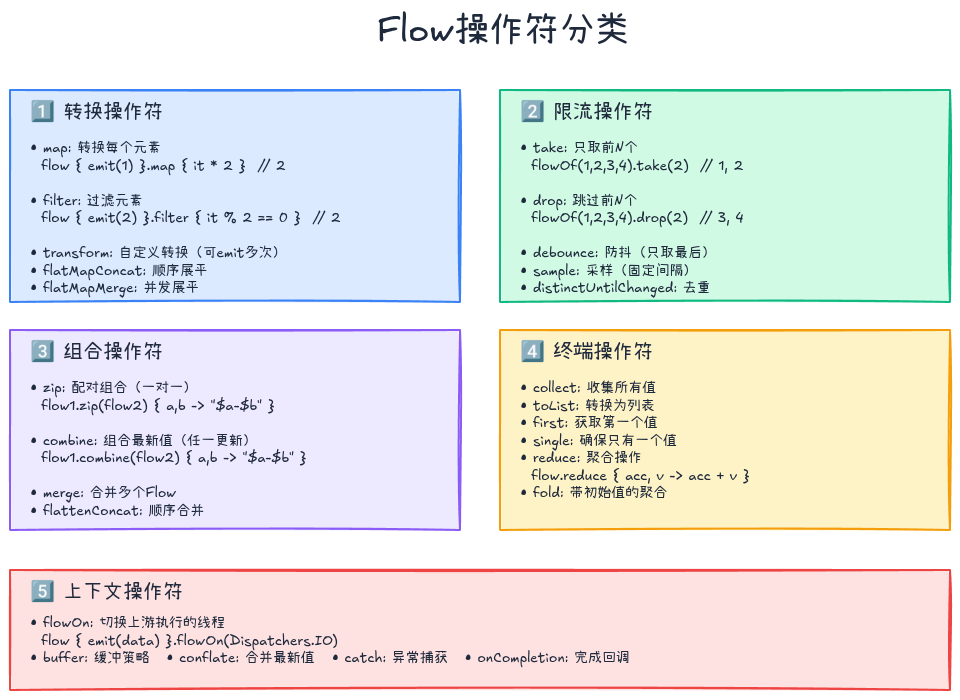
转换操作符
kotlin
// map - 转换每个元素
flow {
    emit(1)
    emit(2)
    emit(3)
}.map { it * 2 }
 .collect { println(it) }  // 2, 4, 6

// filter - 过滤
flow {
    emit(1)
    emit(2)
    emit(3)
}.filter { it % 2 == 0 }
 .collect { println(it) }  // 2

// transform - 自定义转换(可以emit多次)
flow {
    emit(1)
    emit(2)
}.transform { value ->
    emit("开始: $value")
    delay(100)
    emit("结束: $value")
}.collect { println(it) }
// 输出:
// 开始: 1
// 结束: 1
// 开始: 2
// 结束: 2

// flatMapConcat - 顺序展平
flowOf(1, 2, 3)
    .flatMapConcat { value ->
        flow {
            emit("$value-a")
            delay(100)
            emit("$value-b")
        }
    }
    .collect { println(it) }
// 输出:1-a, 1-b, 2-a, 2-b, 3-a, 3-b

// flatMapMerge - 并发展平(最多并发数)
flowOf(1, 2, 3)
    .flatMapMerge(concurrency = 2) { value ->
        flow {
            delay(100)
            emit("$value")
        }
    }
    .collect { println(it) }
// 输出顺序不定(并发执行)
限流操作符
kotlin
// take - 只取前N个
flowOf(1, 2, 3, 4, 5)
    .take(3)
    .collect { println(it) }  // 1, 2, 3

// drop - 跳过前N个
flowOf(1, 2, 3, 4, 5)
    .drop(2)
    .collect { println(it) }  // 3, 4, 5

// debounce - 防抖(只取最后一个)
flow {
    emit(1)
    delay(90)
    emit(2)
    delay(90)
    emit(3)
    delay(1000)
    emit(4)
}.debounce(100)  // 100ms内的连续emit,只保留最后一个
 .collect { println(it) }  // 3, 4

// sample - 采样(固定时间取一个)
flow {
    repeat(10) {
        emit(it)
        delay(110)
    }
}.sample(300)  // 每300ms采样一个
 .collect { println(it) }  // 0, 2, 5, 8
组合操作符
kotlin
// zip - 配对组合
val flow1 = flowOf(1, 2, 3)
val flow2 = flowOf("A", "B", "C")
flow1.zip(flow2) { a, b -> "$a-$b" }
    .collect { println(it) }  // 1-A, 2-B, 3-C

// combine - 组合最新值(任一更新都emit)
val numbers = flow {
    emit(1)
    delay(100)
    emit(2)
}
val strings = flow {
    emit("A")
    delay(150)
    emit("B")
}
numbers.combine(strings) { num, str -> "$num-$str" }
    .collect { println(it) }
// 输出:1-A, 2-A, 2-B
展平操作符对比
kotlin
// flatMapConcat - 顺序执行
// Flow1 → [a, b] → Flow2 → [c, d]
// 结果: a, b, c, d(顺序)

// flatMapMerge - 并发执行
// Flow1 → [a, b]
// Flow2 → [c, d]  并发
// 结果: a, c, b, d(乱序)

// flatMapLatest - 只保留最新
// Flow1 → [a, b]
// Flow2 → [c, d]  ← 新Flow取消旧Flow
// 结果: a, c, d(b被取消)
异常处理
catch操作符
kotlin
flow {
    emit(1)
    emit(2)
    throw RuntimeException("出错了!")
    emit(3)  // 不会执行
}.catch { e ->
    println("捕获异常: ${e.message}")
    emit(-1)  // 可以发射默认值
}.collect { println(it) }

// 输出:
// 1
// 2
// 捕获异常: 出错了!
// -1
注意 :catch只能捕获上游的异常:
kotlin
flow {
    emit(1)
    emit(2)
}.catch { e ->
    println("不会执行")
}.collect { value ->
    throw RuntimeException("这个异常catch捕获不到")
}
onCompletion
kotlin
flow {
    emit(1)
    emit(2)
}.onCompletion { cause ->
    if (cause != null) {
        println("Flow异常完成: $cause")
    } else {
        println("Flow正常完成")
    }
}.collect { println(it) }

// 输出:
// 1
// 2
// Flow正常完成
retry与retryWhen
kotlin
var attempts = 0

flow {
    attempts++
    println("尝试 $attempts")
    if (attempts < 3) {
        throw IOException("网络错误")
    }
    emit("成功")
}.retry(3) { cause ->
    (cause is IOException).also {
        if (it) delay(1000)  // 重试前等待1秒
    }
}.collect { println(it) }

// 输出:
// 尝试 1
// 尝试 2
// 尝试 3
// 成功
线程切换与上下文
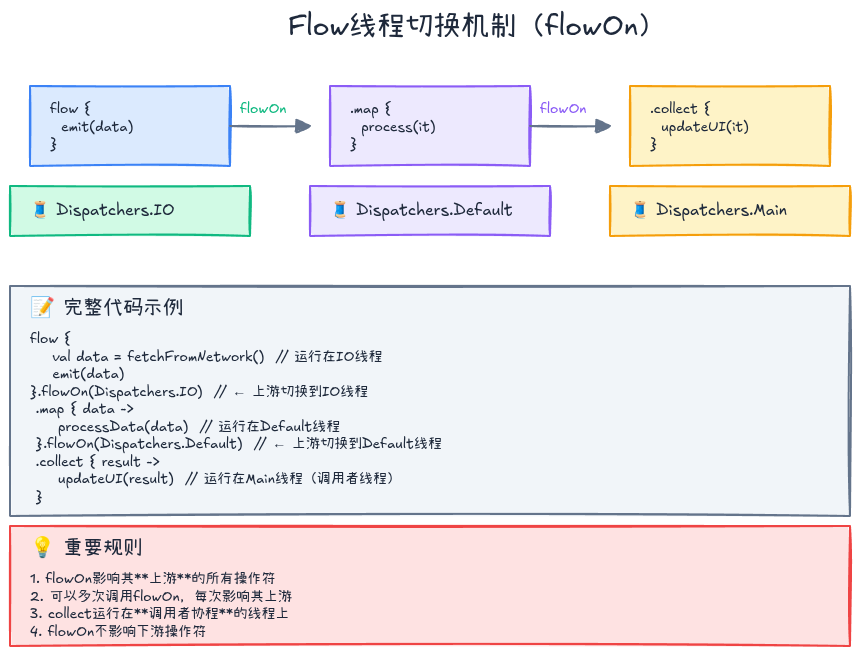
flowOn操作符
kotlin
fun loadData(): Flow<String> = flow {
    println("Flow运行在: ${Thread.currentThread().name}")
    emit(fetchFromNetwork())
}.flowOn(Dispatchers.IO)  // ← 上游运行在IO线程

fun main() = runBlocking {
    loadData()
        .map { data ->
            println("map运行在: ${Thread.currentThread().name}")
            data.uppercase()
        }
        .flowOn(Dispatchers.Default)  // ← map运行在Default线程
        .collect { data ->
            println("collect运行在: ${Thread.currentThread().name}")
            updateUI(data)
        }  // collect运行在Main线程
}重要规则:
flowOn影响上游操作符- 可以多次调用
flowOn切换不同上下文 collect运行在调用协程的上下文
StateFlow:可观察状态
StateFlow vs Flow
StateFlow是Flow的特殊版本,特点:
- 热流:始终有值,立即发射当前状态
- 状态保持:保存最新值
- 去重:相同值不会重复发射
- 线程安全:可以从多个协程读写
kotlin
// StateFlow示例
class CounterViewModel {
    private val _count = MutableStateFlow(0)
    val count: StateFlow<Int> = _count.asStateFlow()

    fun increment() {
        _count.value++  // 更新状态
    }
}

// 使用
val viewModel = CounterViewModel()

// 收集器1
launch {
    viewModel.count.collect { count ->
        println("收集器1: $count")
    }
}

// 收集器2
launch {
    viewModel.count.collect { count ->
        println("收集器2: $count")
    }
}

viewModel.increment()  // 两个收集器都会收到更新
StateFlow的特点
kotlin
val stateFlow = MutableStateFlow("初始值")

// 1. 立即发射当前值
launch {
    stateFlow.collect { println(it) }  // 立即输出:初始值
}

// 2. 去重(相同值不会重复emit)
stateFlow.value = "新值"   // ✅ emit
stateFlow.value = "新值"   // ❌ 不emit(值相同)
stateFlow.value = "更新值" // ✅ emit

// 3. 获取当前值
println("当前值: ${stateFlow.value}")
StateFlow实战:用户状态管理
kotlin
sealed class UserState {
    object Loading : UserState()
    data class Success(val user: User) : UserState()
    data class Error(val message: String) : UserState()
}

class UserRepository {
    private val _userState = MutableStateFlow<UserState>(UserState.Loading)
    val userState: StateFlow<UserState> = _userState.asStateFlow()

    suspend fun loadUser(userId: String) {
        _userState.value = UserState.Loading

        try {
            val user = api.fetchUser(userId)
            _userState.value = UserState.Success(user)
        } catch (e: Exception) {
            _userState.value = UserState.Error(e.message ?: "未知错误")
        }
    }
}

// ViewModel
class UserViewModel(
    private val repository: UserRepository
) : ViewModel() {
    val userState = repository.userState
        .stateIn(
            scope = viewModelScope,
            started = SharingStarted.WhileSubscribed(5000),
            initialValue = UserState.Loading
        )

    fun loadUser(userId: String) {
        viewModelScope.launch {
            repository.loadUser(userId)
        }
    }
}

// UI收集
lifecycleScope.launch {
    viewModel.userState.collect { state ->
        when (state) {
            is UserState.Loading -> showLoading()
            is UserState.Success -> showUser(state.user)
            is UserState.Error -> showError(state.message)
        }
    }
}
SharedFlow:事件广播
SharedFlow vs StateFlow
| 特性 | StateFlow | SharedFlow |
|---|---|---|
| 保存值 | ✅ 保存最新值 | ❌ 可配置(replay) |
| 立即发射 | ✅ 新收集器立即收到当前值 | ❌ 只收到新事件 |
| 去重 | ✅ 相同值不重复emit | ❌ 不去重 |
| 适用场景 | 状态管理 | 事件通知 |
kotlin
// SharedFlow示例
class EventBus {
    private val _events = MutableSharedFlow<String>()
    val events: SharedFlow<String> = _events.asSharedFlow()

    suspend fun sendEvent(event: String) {
        _events.emit(event)
    }
}

val eventBus = EventBus()

// 收集器1
launch {
    eventBus.events.collect { event ->
        println("收集器1收到: $event")
    }
}

delay(100)

// 收集器2(稍后订阅)
launch {
    eventBus.events.collect { event ->
        println("收集器2收到: $event")
    }
}

eventBus.sendEvent("事件1")  // 两个收集器都收到
SharedFlow配置
kotlin
val sharedFlow = MutableSharedFlow<Int>(
    replay = 2,        // 保留最近2个值给新订阅者
    extraBufferCapacity = 10,  // 额外缓冲容量
    onBufferOverflow = BufferOverflow.DROP_OLDEST  // 缓冲满时丢弃最旧的
)

// 发射5个值
repeat(5) { sharedFlow.emit(it) }

// 新订阅者会收到最近2个值(3和4)
sharedFlow.collect { println(it) }  // 3, 4, ...
SharedFlow实战:Toast通知
kotlin
class ToastManager {
    private val _toastMessages = MutableSharedFlow<String>(
        replay = 0,  // 不保留历史消息
        extraBufferCapacity = 10,
        onBufferOverflow = BufferOverflow.DROP_OLDEST
    )
    val toastMessages: SharedFlow<String> = _toastMessages.asSharedFlow()

    fun showToast(message: String) {
        // tryEmit不挂起,适合从非协程代码调用
        _toastMessages.tryEmit(message)
    }
}

// Activity中收集
class MainActivity : AppCompatActivity() {
    private val toastManager = ToastManager()

    override fun onCreate(savedInstanceState: Bundle?) {
        super.onCreate(savedInstanceState)

        lifecycleScope.launch {
            toastManager.toastMessages.collect { message ->
                Toast.makeText(this@MainActivity, message, Toast.LENGTH_SHORT).show()
            }
        }
    }
}
Channel:协程间通信
Channel基础
Channel是协程之间通信的管道,类似于阻塞队列:
kotlin
val channel = Channel<Int>()

// 发送方协程
launch {
    for (x in 1..5) {
        println("发送: $x")
        channel.send(x)  // 挂起直到有接收方
    }
    channel.close()  // 关闭通道
}

// 接收方协程
launch {
    for (x in channel) {  // 迭代接收
        println("接收: $x")
        delay(1000)  // 模拟处理
    }
}
Channel类型
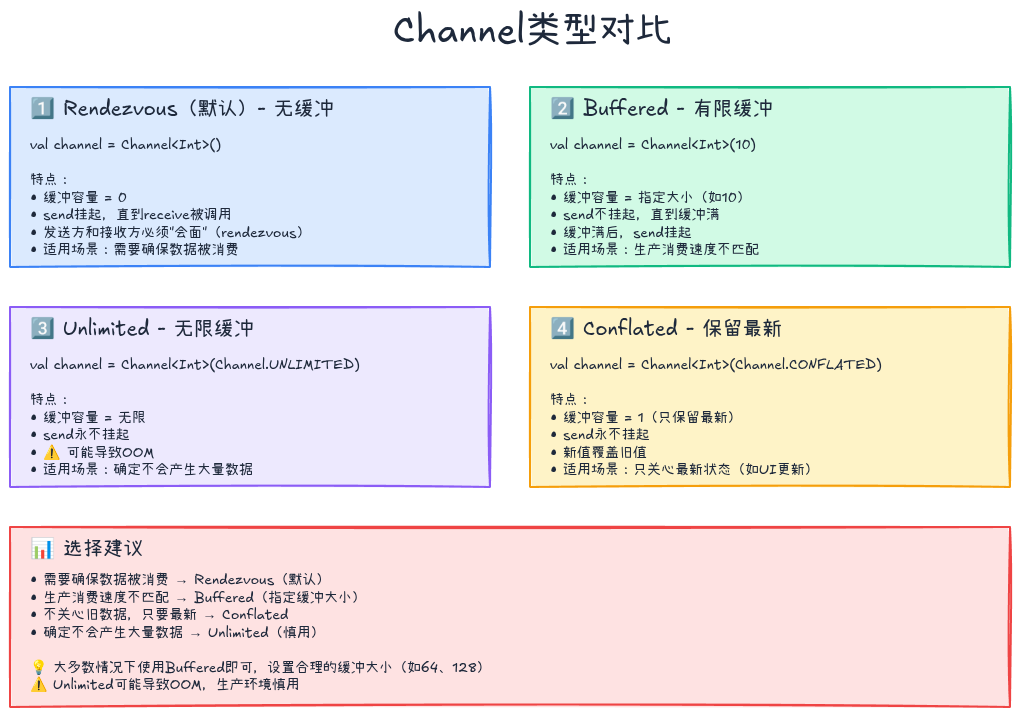
kotlin
// 1. Rendezvous(默认)- 无缓冲
val channel1 = Channel<Int>()
// 发送方挂起,直到接收方ready

// 2. Buffered - 有缓冲
val channel2 = Channel<Int>(10)
// 缓冲未满时不挂起

// 3. Unlimited - 无限缓冲
val channel3 = Channel<Int>(Channel.UNLIMITED)
// send永不挂起(可能OOM)

// 4. Conflated - 保留最新
val channel4 = Channel<Int>(Channel.CONFLATED)
// 只保留最新值,旧值被覆盖
Channel vs Flow
kotlin
// Channel示例
val channel = Channel<Int>()
launch {
    channel.send(1)
    channel.send(2)
}
launch {
    println(channel.receive())  // 1
}
launch {
    println(channel.receive())  // 2(被另一个协程接收)
}

// Flow示例
val flow = flowOf(1, 2)
launch {
    flow.collect { println(it) }  // 1, 2
}
launch {
    flow.collect { println(it) }  // 1, 2(每个收集器独立)
}对比:
| 特性 | Channel | Flow |
|---|---|---|
| 消费 | 热流,多消费者竞争 | 冷流,每个收集器独立 |
| 背压 | 通过缓冲和挂起 | 内置背压处理 |
| 关闭 | 需要手动关闭 | 自动管理 |
| 适用场景 | 协程间通信 | 数据流处理 |
Channel实战:生产者消费者
kotlin
// 生产者
fun produceNumbers() = produce<Int> {
    var x = 1
    while (true) {
        send(x++)
        delay(100)
    }
}

// 消费者
fun CoroutineScope.squareNumbers(numbers: ReceiveChannel<Int>) = produce<Int> {
    for (x in numbers) {
        send(x * x)
    }
}

// 使用
fun main() = runBlocking {
    val numbers = produceNumbers()
    val squares = squareNumbers(numbers)

    repeat(5) {
        println(squares.receive())
    }

    coroutineContext.cancelChildren()  // 取消所有
}

// 输出:1, 4, 9, 16, 25
管道模式
kotlin
// 管道函数
fun CoroutineScope.pipeline(
    input: ReceiveChannel<Int>
) = produce<String> {
    for (num in input) {
        send("Processed: $num")
    }
}

// 使用管道
fun main() = runBlocking {
    val numbers = produce {
        repeat(5) { send(it) }
    }

    val processed = pipeline(numbers)

    for (result in processed) {
        println(result)
    }
}
背压处理
什么是背压?
背压(Backpressure):生产者速度快于消费者时的处理策略。
kotlin
// 问题:生产快,消费慢
flow {
    repeat(100) {
        println("发射: $it")
        emit(it)
        delay(10)  // 快速发射
    }
}.collect { value ->
    println("收集: $value")
    delay(100)  // 慢速收集
}
Flow的背压策略
1. buffer - 缓冲
kotlin
flow {
    repeat(100) {
        emit(it)
        delay(10)
    }
}.buffer(50)  // 缓冲50个元素
 .collect { value ->
     delay(100)
     println(value)
 }
2. conflate - 合并(只保留最新)
kotlin
flow {
    repeat(100) {
        emit(it)
        delay(10)
    }
}.conflate()  // 消费慢时,跳过中间值
 .collect { value ->
     delay(100)
     println(value)
 }
// 输出可能是:0, 10, 20, ..., 90(跳过中间值)
3. collectLatest - 只处理最新
kotlin
flow {
    repeat(100) {
        emit(it)
        delay(10)
    }
}.collectLatest { value ->
    println("开始处理: $value")
    delay(100)
    println("处理完成: $value")  // 可能被中断
}
// 输出:只有最后几个值被完整处理
对比三种策略
kotlin
// buffer:缓冲所有,按顺序处理
flow {
    (1..5).forEach {
        delay(100)
        emit(it)
    }
}.buffer()
 .collect {
     delay(300)
     println(it)  // 1, 2, 3, 4, 5(全部处理)
 }

// conflate:跳过中间值
flow {
    (1..5).forEach {
        delay(100)
        emit(it)
    }
}.conflate()
 .collect {
     delay(300)
     println(it)  // 1, 4, 5(跳过2, 3)
 }

// collectLatest:只处理最新值
flow {
    (1..5).forEach {
        delay(100)
        emit(it)
    }
}.collectLatest {
    println("开始: $it")
    delay(300)
    println("完成: $it")  // 只有5完成
}
实战案例:实时搜索
让我们构建一个实时搜索功能,结合debounce和distinctUntilChanged:
kotlin
class SearchViewModel : ViewModel() {
    private val _searchQuery = MutableStateFlow("")

    // 搜索结果Flow
    val searchResults: StateFlow<List<String>> = _searchQuery
        .debounce(300)  // 防抖:300ms内的连续输入只取最后一次
        .distinctUntilChanged()  // 去重:相同查询不重复搜索
        .filter { it.length >= 2 }  // 过滤:至少2个字符
        .flatMapLatest { query ->  // 切换:新查询取消旧查询
            flow {
                emit(emptyList())  // 先清空结果
                emit(performSearch(query))  // 执行搜索
            }
        }
        .catch { e ->
            emit(emptyList())  // 错误时返回空列表
        }
        .stateIn(
            scope = viewModelScope,
            started = SharingStarted.WhileSubscribed(5000),
            initialValue = emptyList()
        )

    fun updateQuery(query: String) {
        _searchQuery.value = query
    }

    private suspend fun performSearch(query: String): List<String> {
        delay(500)  // 模拟网络请求
        return listOf("$query - 结果1", "$query - 结果2")
    }
}

// UI层
class SearchActivity : AppCompatActivity() {
    private val viewModel: SearchViewModel by viewModels()

    override fun onCreate(savedInstanceState: Bundle?) {
        super.onCreate(savedInstanceState)

        // 监听输入
        searchEditText.addTextChangedListener { text ->
            viewModel.updateQuery(text.toString())
        }

        // 收集结果
        lifecycleScope.launch {
            viewModel.searchResults.collect { results ->
                updateSearchResults(results)
            }
        }
    }
}这个实现的优势:
- 防抖:避免频繁搜索
- 去重:相同查询不重复
- 取消旧请求:新查询自动取消旧请求
- 异常处理:错误时返回空列表
- 自动管理:生命周期自动管理
高级技巧
1. 组合多个Flow
kotlin
// 场景:用户信息 + 好友列表 + 帖子列表
class ProfileViewModel : ViewModel() {
    private val userId = MutableStateFlow("user123")

    val profileData = combine(
        userId.flatMapLatest { id -> loadUser(id) },
        userId.flatMapLatest { id -> loadFriends(id) },
        userId.flatMapLatest { id -> loadPosts(id) }
    ) { user, friends, posts ->
        ProfileData(user, friends, posts)
    }.stateIn(
        scope = viewModelScope,
        started = SharingStarted.WhileSubscribed(5000),
        initialValue = ProfileData.Loading
    )
}
2. Flow的测试
kotlin
class FlowTest {
    @Test
    fun `test flow emissions`() = runTest {
        val flow = flow {
            emit(1)
            delay(100)
            emit(2)
            delay(100)
            emit(3)
        }

        val results = flow.toList()
        assertEquals(listOf(1, 2, 3), results)
    }

    @Test
    fun `test StateFlow`() = runTest {
        val stateFlow = MutableStateFlow(0)

        val job = launch {
            stateFlow.emit(1)
            delay(100)
            stateFlow.emit(2)
        }

        val results = stateFlow.take(3).toList()
        assertEquals(listOf(0, 1, 2), results)

        job.cancel()
    }
}
3. 自定义操作符
kotlin
// 自定义操作符:mapNotNull
fun <T, R> Flow<T>.mapNotNull(
    transform: suspend (T) -> R?
): Flow<R> = transform { value ->
    transform(value)?.let { emit(it) }
}

// 使用
flowOf(1, 2, 3, 4, 5)
    .mapNotNull { if (it % 2 == 0) it * 2 else null }
    .collect { println(it) }  // 4, 8
常见陷阱与最佳实践
❌ 陷阱1:在collect中调用emit
kotlin
// ❌ 错误:collect中不能调用emit
flow {
    emit(1)
}.collect { value ->
    emit(value * 2)  // ❌ 编译错误
}

// ✅ 正确:使用transform
flow {
    emit(1)
}.transform { value ->
    emit(value * 2)  // ✅ transform中可以
}.collect { println(it) }
❌ 陷阱2:忘记切换线程
kotlin
// ❌ 错误:IO操作在Main线程
fun loadData(): Flow<String> = flow {
    val data = fetchFromNetwork()  // ❌ 阻塞Main线程
    emit(data)
}

// ✅ 正确:使用flowOn切换线程
fun loadData(): Flow<String> = flow {
    val data = fetchFromNetwork()
    emit(data)
}.flowOn(Dispatchers.IO)  // ✅ IO操作在IO线程
❌ 陷阱3:StateFlow不会emit相同值
kotlin
val stateFlow = MutableStateFlow(1)

stateFlow.value = 2  // ✅ emit
stateFlow.value = 2  // ❌ 不emit(值相同)

// 解决方案1:使用SharedFlow
val sharedFlow = MutableSharedFlow<Int>()
sharedFlow.emit(2)  // ✅ emit
sharedFlow.emit(2)  // ✅ 仍然emit

// 解决方案2:强制更新
data class State(val value: Int, val timestamp: Long = System.currentTimeMillis())
val stateFlow = MutableStateFlow(State(1))
stateFlow.value = State(2)  // ✅ emit(timestamp不同)
✅ 最佳实践1:使用sealed class表示状态
kotlin
sealed class UiState<out T> {
    object Loading : UiState<Nothing>()
    data class Success<T>(val data: T) : UiState<T>()
    data class Error(val message: String) : UiState<Nothing>()
}

class ViewModel {
    private val _uiState = MutableStateFlow<UiState<User>>(UiState.Loading)
    val uiState: StateFlow<UiState<User>> = _uiState.asStateFlow()

    fun loadUser() {
        viewModelScope.launch {
            _uiState.value = UiState.Loading
            try {
                val user = repository.loadUser()
                _uiState.value = UiState.Success(user)
            } catch (e: Exception) {
                _uiState.value = UiState.Error(e.message ?: "未知错误")
            }
        }
    }
}
✅ 最佳实践2:使用stateIn转换Flow为StateFlow
kotlin
// ❌ 避免:每次collect都重新执行
fun loadUsers(): Flow<List<User>> = flow {
    emit(repository.getUsers())  // 每次collect都查询数据库
}

// ✅ 推荐:使用stateIn共享结果
val users: StateFlow<List<User>> = loadUsers()
    .stateIn(
        scope = viewModelScope,
        started = SharingStarted.WhileSubscribed(5000),
        initialValue = emptyList()
    )
✅ 最佳实践3:使用shareIn实现热流
kotlin
// 场景:多个订阅者共享同一个网络请求
val sharedData: SharedFlow<Data> = flow {
    val data = fetchFromNetwork()  // 只执行一次
    emit(data)
}.shareIn(
    scope = viewModelScope,
    started = SharingStarted.WhileSubscribed(),
    replay = 1  // 新订阅者会收到最后一个值
)
性能优化
1. 选择合适的Flow类型
kotlin
// 状态 → StateFlow
val userState: StateFlow<User> = ...

// 事件 → SharedFlow
val clickEvents: SharedFlow<Unit> = ...

// 一次性数据流 → Flow
fun loadData(): Flow<Data> = flow { ... }
2. 使用buffer提高吞吐量
kotlin
// 无buffer:生产者等待消费者
flow {
    repeat(100) {
        emit(it)
        println("发射: $it")
    }
}.collect { value ->
    delay(10)
    println("收集: $value")
}
// 总耗时:约1000ms(100 * 10ms)

// 有buffer:生产者不等待
flow {
    repeat(100) {
        emit(it)
        println("发射: $it")
    }
}.buffer(10)
 .collect { value ->
     delay(10)
     println("收集: $value")
 }
// 总耗时:约100ms(并发执行)
3. 避免不必要的操作符
kotlin
// ❌ 避免:多次map
flowOf(1, 2, 3)
    .map { it * 2 }
    .map { it + 1 }
    .map { it.toString() }

// ✅ 推荐:合并操作
flowOf(1, 2, 3)
    .map { (it * 2 + 1).toString() }
小结
本文深入讲解了Kotlin协程的高级特性Flow和Channel:
核心概念
- Flow:冷流,异步数据流,支持丰富的操作符
- StateFlow:热流,可观察状态,去重,线程安全
- SharedFlow:热流,事件广播,支持多订阅者
- Channel:协程间通信管道,支持多种缓冲策略
关键技能
- 创建Flow:flow、flowOf、asFlow、channelFlow
- 转换操作符:map、filter、transform、flatMap
- 异常处理:catch、onCompletion、retry
- 背压处理:buffer、conflate、collectLatest
- 线程切换:flowOn切换上下文
- 状态管理:StateFlow保存状态
最佳实践
- ✅ 使用sealed class表示UI状态
- ✅ 使用stateIn/shareIn共享Flow
- ✅ 合理选择Flow类型(StateFlow vs SharedFlow)
- ✅ 使用flowOn切换线程
- ✅ 使用catch处理异常
- ✅ 合理使用背压策略
下期预告
下一篇文章《函数式编程在Kotlin中的实践》将介绍:
- 高阶函数:函数作为参数和返回值
- Lambda表达式:简洁的函数式编程
- 扩展函数:增强类的能力
- 内联函数:性能优化
- 函数式集合操作:map、filter、reduce
练习题
基础练习
练习1:实现一个倒计时Flow
kotlin
fun countdownFlow(from: Int): Flow<Int> {
    // TODO: 从from倒数到0,每秒发射一个值
}练习2:实现一个温度转换Flow
kotlin
fun celsiusToFahrenheit(celsius: Flow<Double>): Flow<Double> {
    // TODO: 将摄氏度转换为华氏度
}
进阶练习
练习3:实现一个带重试的网络请求Flow
kotlin
fun <T> flowWithRetry(
    maxRetries: Int = 3,
    delayMillis: Long = 1000,
    block: suspend () -> T
): Flow<T> {
    // TODO: 失败时自动重试
}练习4:实现一个聊天消息管理器
kotlin
class ChatManager {
    // TODO: 使用StateFlow管理消息列表
    // TODO: 使用SharedFlow广播新消息事件
}
参考资料
系列文章导航:
- 👉 上一篇: 协程原理与实战(上):结构化并发让异步编程不再是噩梦
如果这篇文章对你有帮助,欢迎点赞、收藏、分享!有任何问题或建议,欢迎在评论区留言讨论。让我们一起学习,一起成长!
也欢迎访问我的个人主页发现更多宝藏资源