图:
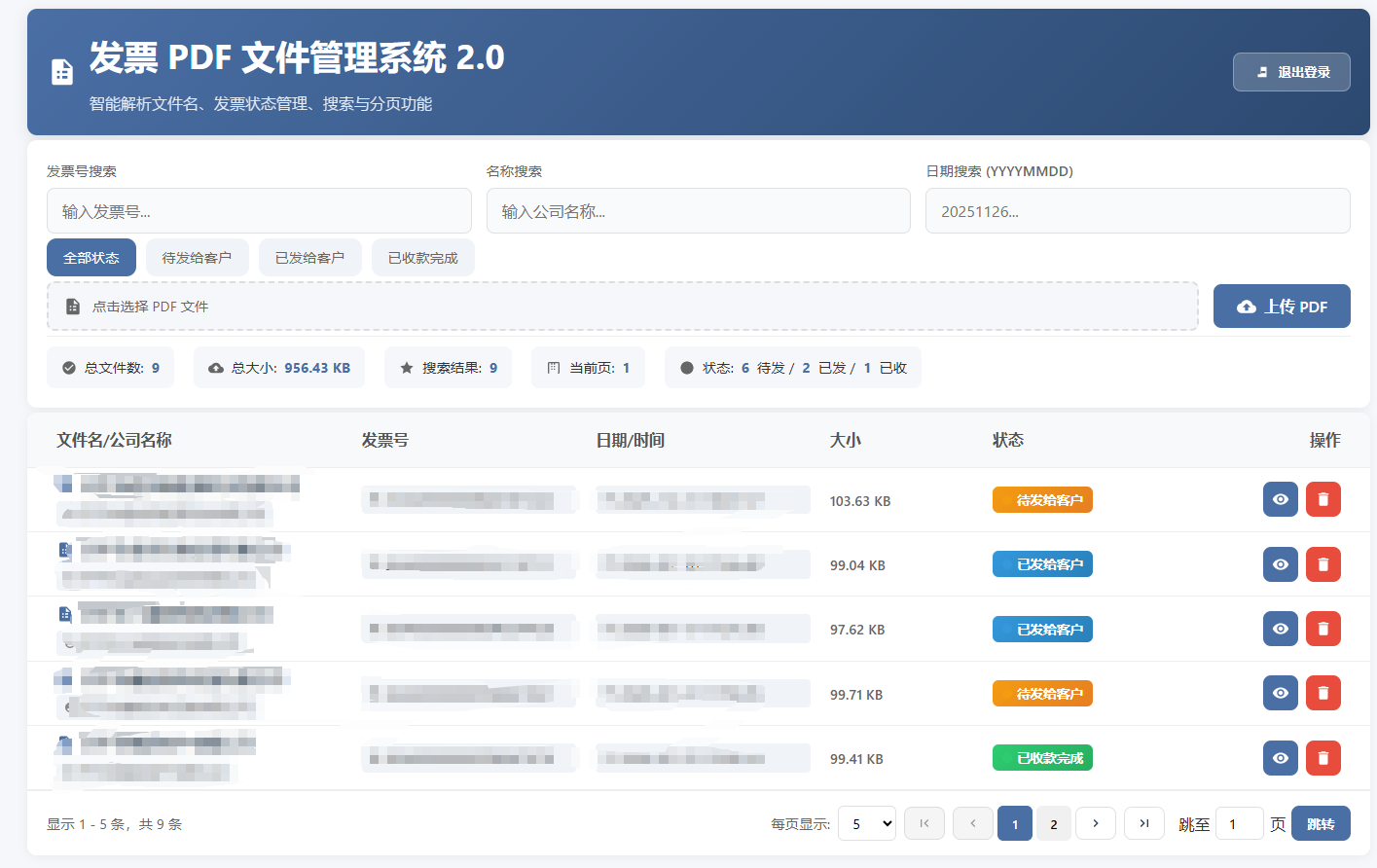
发票PDF文件管理系统 2.0
📋 项目简介
一个功能完善的发票PDF文件管理系统,支持发票状态跟踪、智能文件名解析、多条件搜索、分页浏览等高级功能。适用于企业发票管理和追踪。
✨ 主要功能特性
1. 智能发票管理
-
自动解析发票文件名:自动从文件名中提取发票号、公司名称、日期等信息
-
支持标准格式 :
dzfp_发票号_公司名称_日期时间.pdf -
多种状态管理:待发给客户 → 已发给客户 → 已收款完成
2. 高级搜索功能
-
🔍 发票号搜索:快速定位特定发票
-
🏢 公司名称搜索:按客户公司筛选
-
📅 日期搜索:按创建日期筛选 (支持YYYYMMDD格式)
-
🏷️ 状态筛选:按发票处理状态筛选
3. 发票状态跟踪
-
三种状态:
-
🔶 待发给客户 (默认状态)
-
🔵 已发给客户
-
✅ 已收款完成
-
-
状态历史记录:记录每次状态变更的时间、操作人员和备注
-
一键状态修改:点击状态标签即可快速修改
4. 文件管理
-
📤 安全上传:支持PDF文件上传,禁止重复上传
-
👁️ 在线预览:直接在浏览器中查看PDF文件
-
🗑️ 安全删除:二次确认防止误删
-
📊 实时统计:显示文件数量、大小、状态分布等统计信息
5. 用户体验
-
🔐 密码保护:简单密码验证保护系统访问
-
📱 响应式设计:完美适配桌面和移动设备
-
🔄 实时更新:文件列表自动刷新
-
📄 分页浏览:支持自定义每页显示数量
-
🎨 美观界面:现代化UI设计,状态颜色区分
🚀 快速开始
环境要求
-
Python 3.7+
-
FastAPI
-
Uvicorn
-
现代浏览器(Chrome/Firefox/Edge等)
安装步骤
- 安装依赖
pip install fastapi uvicorn
- 运行程序
# 启动后端服务器
python main.py
- 访问系统
打开浏览器访问:
http://localhost:8026默认密码:
123
项目结构
invoice-pdf-manager/
├── main.py              # 后端FastAPI服务器
├── index.html          # 前端界面
├── pdf_files/          # PDF文件存储目录
├── invoice_status.json # 发票状态数据库
└── README.md           # 说明文档
📁 文件命名规范
推荐格式
dzfp_发票号_公司名称_日期时间.pdf
示例
dzfp_25442000000xxxxxx_开xxxxx有限公司_20261226182551.pdf
解析规则
前缀 :
dzfp_(电子发票)发票号 :
25442000000xxxxxx公司名称 :
开xxxxxx有限公司日期时间 :
20261226182551(2026年12月26日 18:25:51)
🎮 使用指南
1. 登录系统
-
访问
http://localhost:8026 -
输入默认密码
123 -
登录成功后进入主界面
2. 上传发票
-
点击"点击选择PDF文件"区域
-
选择PDF文件(支持标准命名格式)
-
点击"上传PDF"按钮
-
系统会自动解析文件名并设置初始状态为"待发给客户"
3. 管理发票状态
-
在文件列表中找到目标发票
-
点击状态标签(橙色/蓝色/绿色按钮)
-
在弹出的对话框中选择新状态
-
可添加备注说明(可选)
-
点击"保存状态"完成更新
4. 搜索发票
-
发票号搜索:输入完整或部分发票号
-
公司名称搜索:输入公司名称关键字
-
日期搜索:输入YYYYMMDD格式日期
-
状态筛选:点击状态筛选器按钮
5. 查看发票
-
点击"查看"按钮(👁️ 图标)
-
系统会在新窗口中打开PDF文件
-
支持缩放、打印、下载等操作
6. 删除发票
-
点击"删除"按钮(🗑️ 图标)
-
系统会弹出确认对话框
-
确认后文件将被永久删除
-
同时删除对应的状态记录
🔧 技术特点
后端技术 (FastAPI)
-
RESTful API:标准的API设计
-
自动文档 :内置API文档(访问
/docs) -
异步处理:高性能异步IO
-
JSON存储:轻量级数据持久化
-
错误处理:完善的错误提示机制
前端技术 (原生HTML/CSS/JS)
-
无框架依赖:纯原生技术栈
-
响应式布局:适配各种屏幕尺寸
-
现代CSS:CSS3 Grid/Flexbox布局
-
原生JavaScript:ES6+语法,无第三方依赖
-
模块化设计:清晰的代码结构
数据持久化
-
文件存储 :PDF文件保存在
pdf_files/目录(不用上传也可,把文件复制这就可以) -
状态数据库 :状态信息保存在
invoice_status.json -
自动备份:状态变更自动保存
-
历史记录:完整的状态变更历史
📊 状态管理流程
上传发票 → 待发给客户 → 已发给客户 → 已收款完成
     ↓          ↓           ↓          ↓
  初始状态   手动修改     手动修改    最终状态
🛡️ 安全特性
-
访问控制:简单密码验证
-
文件验证:只允许PDF格式文件
-
重复检测:防止重复上传相同文件
-
删除确认:二次确认防止误删
-
数据备份:状态信息自动保存
🔍 高级功能
智能筛选
-
多条件组合搜索
-
实时筛选结果
-
高亮显示匹配内容
-
搜索结果统计
批量管理
-
分页显示大量文件
-
自定义每页数量
-
快速页码跳转
-
首尾页导航
统计信息
-
文件总数统计
-
文件总大小统计
-
状态分布统计
-
搜索结果统计
📱 移动端支持
系统完全支持移动设备:
-
✅ 触摸友好的界面
-
✅ 自适应布局
-
✅ 移动端优化操作
-
✅ 小屏幕适配
🐛 故障排除
常见问题
-
无法上传文件
-
检查文件是否为PDF格式
-
检查文件名是否已存在
-
检查文件大小是否过大
-
-
状态无法保存
-
检查网络连接
-
刷新页面重试
-
查看后端日志
-
-
搜索无结果
-
检查搜索条件是否正确
-
确认文件命名格式
-
尝试清除搜索条件
-
-
无法登录
-
确认密码是否正确(默认:123)
-
清除浏览器缓存
-
重启服务器
-
日志查看
# 查看服务器日志
python main.py
🔄 更新日志
v2.0 (当前版本)
-
✅ 新增发票状态管理功能
-
✅ 添加状态筛选器
-
✅ 增加状态变更历史
-
✅ 改进用户界面
-
✅ 添加状态统计信息
v1.0
-
✅ 基础文件上传/下载
-
✅ 智能文件名解析
-
✅ 多条件搜索
-
✅ 分页显示
-
✅ 密码保护
提示 :定期备份 invoice_status.json 文件以防数据丢失。
后端代码:
python
import os
import shutil
import threading
import time
import webbrowser
import json
from fastapi import FastAPI, UploadFile, File, HTTPException
from fastapi.responses import FileResponse, HTMLResponse
from fastapi.staticfiles import StaticFiles
from pydantic import BaseModel
from typing import Optional
import uvicorn
from datetime import datetime

app = FastAPI()
PDF_DIR = "pdf_files"
STATUS_FILE = "invoice_status.json"

# 发票状态定义
INVOICE_STATUS = {
    "pending": "待发给客户",
    "sent": "已发给客户",
    "paid": "已收款完成"
}

# 创建存储 PDF 的目录
os.makedirs(PDF_DIR, exist_ok=True)

# 挂载静态文件服务
app.mount("/pdfs", StaticFiles(directory=PDF_DIR), name="pdfs")

class StatusUpdate(BaseModel):
    filename: str
    status: str
    notes: Optional[str] = None

def load_status_data():
    """加载状态数据"""
    if os.path.exists(STATUS_FILE):
        try:
            with open(STATUS_FILE, 'r', encoding='utf-8') as f:
                return json.load(f)
        except (json.JSONDecodeError, IOError):
            return {}
    return {}

def save_status_data(data):
    """保存状态数据"""
    try:
        with open(STATUS_FILE, 'w', encoding='utf-8') as f:
            json.dump(data, f, ensure_ascii=False, indent=2)
        return True
    except IOError:
        return False

def update_file_status(filename, status, notes=None):
    """更新文件状态"""
    data = load_status_data()

    # 如果没有记录,创建新记录
    if filename not in data:
        data[filename] = {
            "status": status,
            "notes": notes or "",
            "created_at": datetime.now().isoformat(),
            "updated_at": datetime.now().isoformat(),
            "history": []
        }
    else:
        # 保存历史记录
        old_status = data[filename].get("status", "unknown")
        if old_status != status:
            history_entry = {
                "from": old_status,
                "to": status,
                "timestamp": datetime.now().isoformat(),
                "notes": notes or ""
            }
            data[filename]["history"].append(history_entry)

        # 更新当前状态
        data[filename]["status"] = status
        data[filename]["updated_at"] = datetime.now().isoformat()
        if notes is not None:
            data[filename]["notes"] = notes

    return save_status_data(data)

def get_file_status(filename):
    """获取文件状态"""
    data = load_status_data()
    if filename in data:
        return data[filename]
    return {
        "status": "pending",  # 默认状态
        "notes": "",
        "created_at": datetime.now().isoformat(),
        "updated_at": datetime.now().isoformat(),
        "history": []
    }

@app.get("/", response_class=HTMLResponse)
async def get_html():
    """返回前端 HTML 页面"""
    with open("index.html", "r", encoding="utf-8") as f:
        return f.read()

@app.get("/api/files")
async def list_files():
    """获取所有 PDF 文件列表"""
    files = []
    for filename in os.listdir(PDF_DIR):
        if filename.lower().endswith(".pdf"):
            file_path = os.path.join(PDF_DIR, filename)

            # 获取文件状态
            status_info = get_file_status(filename)

            files.append({
                "name": filename,
                "size": os.path.getsize(file_path),
                "status": status_info["status"],
                "status_text": INVOICE_STATUS.get(status_info["status"], "未知状态"),
                "notes": status_info.get("notes", ""),
                "updated_at": status_info.get("updated_at", "")
            })
    # 按文件名排序
    files.sort(key=lambda x: x["name"])
    return {"files": files}

@app.post("/api/upload")
async def upload_file(file: UploadFile = File(...)):
    """上传新 PDF 文件"""
    if not file.filename.lower().endswith(".pdf"):
        raise HTTPException(status_code=400, detail="只允许上传 PDF 文件")

    file_path = os.path.join(PDF_DIR, file.filename)

    # 检查文件是否已存在
    if os.path.exists(file_path):
        raise HTTPException(
            status_code=409,
            detail=f"文件 '{file.filename}' 已存在,不能重复上传"
        )

    # 保存文件
    with open(file_path, "wb") as buffer:
        shutil.copyfileobj(file.file, buffer)

    # 为新文件创建默认状态记录
    update_file_status(file.filename, "pending", "新上传的发票")

    return {"message": "文件上传成功", "filename": file.filename}

@app.delete("/api/delete/{filename}")
async def delete_file(filename: str):
    """删除指定 PDF 文件"""
    file_path = os.path.join(PDF_DIR, filename)
    if not os.path.exists(file_path):
        raise HTTPException(status_code=404, detail="文件不存在")

    os.remove(file_path)

    # 从状态文件中移除记录
    data = load_status_data()
    if filename in data:
        del data[filename]
        save_status_data(data)

    return {"message": "文件删除成功"}

@app.put("/api/status")
async def update_status(status_update: StatusUpdate):
    """更新发票状态"""
    # 验证文件是否存在
    file_path = os.path.join(PDF_DIR, status_update.filename)
    if not os.path.exists(file_path):
        raise HTTPException(status_code=404, detail="文件不存在")

    # 验证状态是否有效
    if status_update.status not in INVOICE_STATUS:
        raise HTTPException(status_code=400, detail="无效的状态")

    # 更新状态
    if update_file_status(status_update.filename, status_update.status, status_update.notes):
        return {"message": "状态更新成功", "status": status_update.status}
    else:
        raise HTTPException(status_code=500, detail="状态更新失败")

@app.get("/api/status/options")
async def get_status_options():
    """获取所有可用的状态选项"""
    return {"status_options": INVOICE_STATUS}

@app.get("/api/status/{filename}")
async def get_status(filename: str):
    """获取指定文件的状态信息"""
    file_path = os.path.join(PDF_DIR, filename)
    if not os.path.exists(file_path):
        raise HTTPException(status_code=404, detail="文件不存在")

    status_info = get_file_status(filename)
    status_info["status_text"] = INVOICE_STATUS.get(status_info["status"], "未知状态")

    return status_info

def open_browser():
    """打开浏览器"""
    time.sleep(1)  # 等待服务器启动
    webbrowser.open("http://localhost:8026")

if __name__ == "__main__":
    # 启动浏览器线程
    threading.Thread(target=open_browser, daemon=True).start()

    print("=" * 50)
    print("PDF 文件管理系统 (带发票状态管理)")
    print("=" * 50)
    print("服务器正在启动...")
    print("密码: 123")
    print("状态文件:", STATUS_FILE)
    print("=" * 50)
    uvicorn.run(app, host="0.0.0.0", port=8026)
前端代码:
html
<!DOCTYPE html>
<html lang="zh-CN">
<head>
<meta charset="UTF-8">
<meta name="viewport" content="width=device-width, initial-scale=1.0">
<title>发票PDF文件管理系统 2.0</title>
<style>
:root {
--primary: #4a6fa5;
--primary-light: #6a8fc5;
--danger: #e74c3c;
--warning: #f39c12;
--success: #2ecc71;
--light: #f5f7fa;
--dark: #2c3e50;
--border: #e0e0e0;
--shadow: 0 2px 10px rgba(0,0,0,0.05);
--radius: 10px;
}
* {
margin: 0;
padding: 0;
box-sizing: border-box;
font-family: 'Segoe UI', 'PingFang SC', 'Microsoft YaHei', sans-serif;
}
body {
background-color: #f5f7fa;
color: #333;
line-height: 1.6;
min-height: 100vh;
}
/* 登录界面样式 */
.login-container {
position: fixed;
top: 0;
left: 0;
width: 100%;
height: 100%;
background: linear-gradient(135deg, #1e3c72 0%, #2a5298 100%);
display: flex;
justify-content: center;
align-items: center;
z-index: 10000;
}
.login-card {
background: white;
border-radius: 15px;
box-shadow: 0 20px 60px rgba(0,0,0,0.3);
padding: 40px;
width: 90%;
max-width: 400px;
text-align: center;
animation: fadeIn 0.5s ease-out;
}
.login-header {
margin-bottom: 30px;
}
.login-header h2 {
font-size: 1.8rem;
color: var(--dark);
margin-bottom: 10px;
}
.login-header p {
color: #666;
font-size: 0.95rem;
}
.login-logo {
width: 80px;
height: 80px;
background: linear-gradient(135deg, var(--primary), #2c4970);
border-radius: 50%;
display: flex;
align-items: center;
justify-content: center;
margin: 0 auto 20px;
color: white;
font-size: 2rem;
font-weight: bold;
box-shadow: 0 10px 30px rgba(74, 111, 165, 0.3);
}
.login-form {
margin-top: 20px;
}
.form-group {
margin-bottom: 20px;
text-align: left;
}
.form-group label {
display: block;
margin-bottom: 8px;
font-weight: 500;
color: #555;
}
.form-group input {
width: 100%;
padding: 14px 15px;
border: 1px solid var(--border);
border-radius: 8px;
font-size: 1rem;
transition: all 0.3s;
background: #f9fafc;
}
.form-group input:focus {
outline: none;
border-color: var(--primary);
background: white;
box-shadow: 0 0 0 3px rgba(74, 111, 165, 0.1);
}
.form-group input::placeholder {
color: #999;
}
.password-input-group {
position: relative;
}
.toggle-password {
position: absolute;
right: 12px;
top: 50%;
transform: translateY(-50%);
background: none;
border: none;
cursor: pointer;
color: #666;
padding: 5px;
display: flex;
align-items: center;
}
.toggle-password svg {
width: 20px;
height: 20px;
fill: currentColor;
}
.login-btn {
width: 100%;
background: linear-gradient(135deg, var(--primary), #2c4970);
color: white;
border: none;
padding: 14px;
border-radius: 8px;
font-size: 1.1rem;
font-weight: 600;
cursor: pointer;
transition: all 0.3s;
margin-top: 10px;
display: flex;
align-items: center;
justify-content: center;
gap: 10px;
}
.login-btn:hover {
transform: translateY(-2px);
box-shadow: 0 10px 25px rgba(74, 111, 165, 0.4);
}
.login-btn:active {
transform: translateY(0);
}
.login-btn:disabled {
background: #ccc;
cursor: not-allowed;
transform: none;
box-shadow: none;
}
.login-error {
background: #fff5f5;
border: 1px solid var(--danger);
color: var(--danger);
padding: 10px;
border-radius: 8px;
margin-bottom: 15px;
font-size: 0.9rem;
display: none;
}
.login-success {
background: #f0fff4;
border: 1px solid var(--success);
color: var(--success);
padding: 10px;
border-radius: 8px;
margin-bottom: 15px;
font-size: 0.9rem;
display: none;
}
.login-footer {
margin-top: 25px;
font-size: 0.85rem;
color: #888;
padding-top: 15px;
border-top: 1px solid #eee;
}
.login-footer a {
color: var(--primary);
text-decoration: none;
}
.login-footer a:hover {
text-decoration: underline;
}
.loading-spinner {
width: 20px;
height: 20px;
border: 3px solid rgba(255,255,255,0.3);
border-top-color: white;
border-radius: 50%;
animation: spin 1s linear infinite;
display: none;
}
.loading-spinner.show {
display: inline-block;
}
/* 主应用界面样式 */
.main-app {
display: none;
}
.container {
max-width: 1400px;
margin: 0 auto;
padding: 10px;
}
.header {
background: linear-gradient(135deg, var(--primary), #2c4970);
color: white;
padding: 20px;
border-radius: var(--radius);
margin-bottom: 5px;
box-shadow: 0 4px 15px rgba(0,0,0,0.1);
display: flex;
justify-content: space-between;
align-items: center;
}
.header-title {
display: flex;
align-items: center;
gap: 12px;
}
.header-title h1 {
font-size: 2.2rem;
margin-bottom: 0.5rem;
}
.header-title svg {
width: 32px;
height: 32px;
fill: white;
}
.logout-btn {
background: rgba(255,255,255,0.2);
color: white;
border: 1px solid rgba(255,255,255,0.3);
padding: 10px 20px;
border-radius: 8px;
cursor: pointer;
font-weight: 600;
transition: all 0.3s;
display: flex;
align-items: center;
gap: 8px;
}
.logout-btn:hover {
background: rgba(255,255,255,0.3);
transform: translateY(-2px);
}
.logout-btn svg {
width: 18px;
height: 18px;
fill: currentColor;
}
.subtitle {
opacity: 0.9;
font-weight: 300;
font-size: 1rem;
}
.controls {
background: white;
border-radius: var(--radius);
padding: 20px;
margin-bottom: 5px;
box-shadow: var(--shadow);
}
.search-bar {
display: flex;
gap: 15px;
margin-bottom: 5px;
flex-wrap: wrap;
}
.search-group {
flex: 1;
min-width: 250px;
}
.search-group label {
display: block;
margin-bottom: 6px;
font-size: 0.9rem;
color: #666;
font-weight: 500;
}
.search-input {
width: 100%;
padding: 12px 15px;
border: 1px solid var(--border);
border-radius: 8px;
font-size: 1rem;
transition: all 0.3s;
background: #f9fafc;
}
.search-input:focus {
outline: none;
border-color: var(--primary);
background: white;
box-shadow: 0 0 0 3px rgba(74, 111, 165, 0.1);
}
.upload-section {
display: flex;
gap: 15px;
align-items: center;
flex-wrap: wrap;
}
.file-input-wrapper {
position: relative;
flex: 1;
min-width: 300px;
}
.file-input {
width: 100%;
padding: 12px 15px;
border: 2px dashed #ddd;
border-radius: 8px;
background: var(--light);
cursor: pointer;
transition: all 0.3s;
display: flex;
align-items: center;
gap: 10px;
font-size: 0.9rem;
color: #666;
}
.file-input:hover {
border-color: var(--primary);
background: #eef4ff;
}
.file-input.has-file {
border-style: solid;
border-color: var(--success);
background: #f0fff4;
color: var(--success);
}
.file-input.has-duplicate {
border-style: solid;
border-color: var(--danger);
background: #fff5f5;
color: var(--danger);
}
.btn {
background: var(--primary);
color: white;
border: none;
padding: 12px 24px;
border-radius: 8px;
cursor: pointer;
font-weight: 600;
transition: all 0.3s;
display: inline-flex;
align-items: center;
justify-content: center;
gap: 8px;
font-size: 1rem;
}
.btn:hover {
background: var(--primary-light);
transform: translateY(-2px);
box-shadow: 0 4px 12px rgba(74, 111, 165, 0.2);
}
.btn:active {
transform: translateY(0);
}
.btn:disabled {
background: #ccc;
cursor: not-allowed;
transform: none;
box-shadow: none;
}
.btn-danger {
background: var(--danger);
}
.btn-danger:hover {
background: #c0392b;
}
.btn-warning {
background: var(--warning);
}
.btn-warning:hover {
background: #e67e22;
}
.btn-sm {
padding: 8px 16px;
font-size: 0.9rem;
}
.btn-icon {
padding: 8px;
width: 36px;
height: 36px;
display: inline-flex;
align-items: center;
justify-content: center;
}
.btn-page {
padding: 8px 12px;
min-width: 40px;
font-weight: 500;
background: white;
color: var(--dark);
border: 1px solid var(--border);
}
.btn-page:hover {
background: var(--light);
border-color: var(--primary);
color: var(--primary);
transform: none;
box-shadow: none;
}
.btn-page.active {
background: var(--primary);
color: white;
border-color: var(--primary);
}
.btn-page:disabled {
background: #f5f5f5;
color: #999;
border-color: #ddd;
cursor: not-allowed;
}
.stats {
display: flex;
gap: 20px;
margin-top: 5px;
padding-top: 10px;
border-top: 1px solid #eee;
flex-wrap: wrap;
}
.stat-item {
background: var(--light);
padding: 10px 15px;
border-radius: 8px;
font-size: 0.9rem;
display: flex;
align-items: center;
gap: 8px;
}
.stat-value {
font-weight: 700;
color: var(--primary);
}
.file-list {
background: white;
border-radius: var(--radius);
overflow: hidden;
box-shadow: var(--shadow);
}
.file-list-header {
display: flex;
padding: 15px 20px;
background: #f8f9fa;
border-bottom: 1px solid #eee;
font-weight: 600;
color: #555;
}
.header-cell {
padding: 0 10px;
flex: 1;
display: flex;
align-items: center;
gap: 5px;
}
.header-cell:nth-child(1) { flex: 2; }
.header-cell:nth-child(2) { flex: 1.5; }
.header-cell:nth-child(3) { flex: 1.5; }
.header-cell:nth-child(4) { flex: 1; }
.header-cell:nth-child(5) { flex: 1.5; }
.header-cell:nth-child(6) { flex: 0.8; justify-content: flex-end; }
.file-item {
display: flex;
padding: 5px 20px;
border-bottom: 1px solid #eee;
transition: all 0.2s;
align-items: center;
}
.file-item:hover {
background-color: #f9fafc;
}
.file-cell {
padding: 0 10px;
flex: 1;
word-break: break-word;
}
.file-cell:nth-child(1) { flex: 2; }
.file-cell:nth-child(2) { flex: 1.5; }
.file-cell:nth-child(3) { flex: 1.5; }
.file-cell:nth-child(4) { flex: 1; }
.file-cell:nth-child(5) { flex: 1.5; }
.file-cell:nth-child(6) { flex: 0.8; display: flex; justify-content: flex-end; }
.file-name {
font-weight: 600;
color: var(--dark);
margin-bottom: 4px;
display: flex;
align-items: center;
gap: 8px;
}
.file-name svg {
width: 18px;
height: 18px;
fill: var(--primary);
flex-shrink: 0;
}
.file-meta {
display: flex;
gap: 12px;
font-size: 0.85rem;
color: #777;
flex-wrap: wrap;
}
.meta-item {
background: #f0f4f8;
padding: 2px 8px;
border-radius: 4px;
display: flex;
align-items: center;
gap: 4px;
}
.meta-item svg {
width: 12px;
height: 12px;
fill: #888;
flex-shrink: 0;
}
.file-size {
color: #666;
font-weight: 500;
font-size: 0.9rem;
}
.file-actions {
display: flex;
gap: 8px;
justify-content: flex-end;
}
.empty-state {
text-align: center;
padding: 60px 20px;
color: #888;
}
.empty-state svg {
width: 64px;
height: 64px;
fill: #ddd;
margin-bottom: 15px;
}
.empty-state p {
margin-top: 10px;
font-size: 1.1rem;
}
.hidden {
display: none !important;
}
.loading {
text-align: center;
padding: 40px;
color: var(--primary);
font-weight: 500;
}
.loading svg {
width: 24px;
height: 24px;
fill: var(--primary);
animation: spin 1s linear infinite;
margin-right: 10px;
}
@keyframes spin {
100% { transform: rotate(360deg); }
}
@keyframes fadeIn {
from { opacity: 0; transform: translateY(20px); }
to { opacity: 1; transform: translateY(0); }
}
.pdf-viewer {
position: fixed;
top: 0;
left: 0;
width: 100%;
height: 100%;
background: rgba(0,0,0,0.8);
display: none;
z-index: 1000;
}
.viewer-content {
position: absolute;
top: 50%;
left: 50%;
transform: translate(-50%, -50%);
width: 90%;
height: 90%;
background: white;
border-radius: var(--radius);
overflow: hidden;
display: flex;
flex-direction: column;
box-shadow: 0 10px 40px rgba(0,0,0,0.3);
}
.viewer-header {
background: var(--dark);
color: white;
padding: 12px 20px;
display: flex;
justify-content: space-between;
align-items: center;
}
.viewer-title {
font-weight: 600;
font-size: 1.1rem;
display: flex;
align-items: center;
gap: 10px;
flex: 1;
overflow: hidden;
text-overflow: ellipsis;
white-space: nowrap;
}
.viewer-body {
flex-grow: 1;
overflow: auto;
background: #525659;
padding: 20px;
display: flex;
justify-content: center;
align-items: center;
}
#pdf-frame {
width: 100%;
height: 100%;
border: none;
background: white;
border-radius: 4px;
min-height: 500px;
}
.close-btn {
background: transparent;
border: none;
color: white;
font-size: 1.5rem;
cursor: pointer;
padding: 5px 10px;
display: flex;
align-items: center;
justify-content: center;
width: 36px;
height: 36px;
border-radius: 50%;
transition: background 0.2s;
}
.close-btn:hover {
background: rgba(255,255,255,0.1);
}
.toast {
position: fixed;
bottom: 20px;
right: 20px;
background: var(--dark);
color: white;
padding: 14px 24px;
border-radius: 8px;
box-shadow: 0 4px 12px rgba(0,0,0,0.15);
transform: translateY(100px);
opacity: 0;
transition: all 0.3s;
z-index: 2000;
display: flex;
align-items: center;
gap: 10px;
max-width: 400px;
}
.toast.show {
transform: translateY(0);
opacity: 1;
}
.toast.error {
background: var(--danger);
}
.toast.warning {
background: var(--warning);
}
.toast.success {
background: var(--success);
}
.toast svg {
width: 20px;
height: 20px;
fill: white;
flex-shrink: 0;
}
.filter-info {
font-size: 0.9rem;
color: #666;
padding: 10px 20px;
background: #f8f9fa;
border-bottom: 1px solid #eee;
display: flex;
align-items: center;
gap: 8px;
justify-content: space-between;
flex-wrap: wrap;
}
.filter-info svg {
width: 16px;
height: 16px;
fill: var(--primary);
}
.highlight {
background: #fff3cd;
padding: 2px 4px;
border-radius: 3px;
font-weight: 600;
}
.duplicate-warning {
background: #fff5f5;
border: 1px solid var(--danger);
border-radius: 8px;
padding: 10px 15px;
margin-top: 10px;
display: flex;
align-items: center;
gap: 10px;
color: var(--danger);
font-weight: 500;
}
.duplicate-warning svg {
width: 20px;
height: 20px;
fill: var(--danger);
}
/* 分页控件样式 */
.pagination-container {
display: flex;
justify-content: space-between;
align-items: center;
padding: 15px 20px;
background: white;
border-top: 1px solid #eee;
flex-wrap: wrap;
gap: 15px;
}
.pagination-info {
font-size: 0.9rem;
color: #666;
}
.pagination-controls {
display: flex;
align-items: center;
gap: 8px;
flex-wrap: wrap;
}
.pagination-group {
display: flex;
align-items: center;
gap: 8px;
}
.pagination-label {
font-size: 0.9rem;
color: #666;
}
.pagination-select {
padding: 6px 10px;
border: 1px solid var(--border);
border-radius: 6px;
background: white;
font-size: 0.9rem;
min-width: 60px;
cursor: pointer;
}
.pagination-select:focus {
outline: none;
border-color: var(--primary);
box-shadow: 0 0 0 2px rgba(74, 111, 165, 0.1);
}
.pagination-pages {
display: flex;
gap: 4px;
align-items: center;
}
.page-numbers {
display: flex;
gap: 4px;
}
.page-number {
min-width: 36px;
height: 36px;
display: flex;
align-items: center;
justify-content: center;
border-radius: 6px;
cursor: pointer;
font-weight: 500;
transition: all 0.2s;
border: 1px solid transparent;
}
.page-number:hover:not(.active):not(:disabled) {
background: var(--light);
border-color: var(--border);
}
.page-number.active {
background: var(--primary);
color: white;
border-color: var(--primary);
}
.page-number:disabled {
color: #999;
cursor: not-allowed;
background: #f5f5f5;
border-color: #ddd;
}
.page-ellipsis {
padding: 8px 4px;
color: #999;
font-weight: 500;
}
.page-input-group {
display: flex;
align-items: center;
gap: 6px;
margin-left: 10px;
}
.page-input {
width: 50px;
padding: 6px 8px;
border: 1px solid var(--border);
border-radius: 6px;
text-align: center;
font-size: 0.9rem;
}
.page-input:focus {
outline: none;
border-color: var(--primary);
box-shadow: 0 0 0 2px rgba(74, 111, 165, 0.1);
}
/* 状态标签样式 */
.status-badge {
padding: 4px 10px;
border-radius: 6px;
font-size: 0.85rem;
font-weight: 600;
display: inline-flex;
align-items: center;
gap: 5px;
cursor: pointer;
transition: all 0.2s;
border: none;
color: white;
min-width: 100px;
justify-content: center;
}
.status-badge:hover {
transform: translateY(-1px);
box-shadow: 0 3px 8px rgba(0,0,0,0.2);
}
.status-pending {
background: linear-gradient(135deg, #f39c12, #e67e22);
}
.status-sent {
background: linear-gradient(135deg, #3498db, #2980b9);
}
.status-paid {
background: linear-gradient(135deg, #2ecc71, #27ae60);
}
.status-unknown {
background: linear-gradient(135deg, #95a5a6, #7f8c8d);
}
.status-dropdown {
position: relative;
display: inline-block;
}
.status-options {
position: absolute;
top: 100%;
left: 0;
background: white;
border: 1px solid var(--border);
border-radius: 8px;
box-shadow: 0 4px 20px rgba(0,0,0,0.15);
z-index: 1000;
min-width: 160px;
display: none;
flex-direction: column;
}
.status-option {
padding: 10px 15px;
cursor: pointer;
display: flex;
align-items: center;
gap: 10px;
border-bottom: 1px solid #f0f0f0;
transition: all 0.2s;
}
.status-option:last-child {
border-bottom: none;
}
.status-option:hover {
background: #f8f9fa;
}
.status-indicator {
width: 10px;
height: 10px;
border-radius: 50%;
flex-shrink: 0;
}
.status-indicator.pending { background: #f39c12; }
.status-indicator.sent { background: #3498db; }
.status-indicator.paid { background: #2ecc71; }
.status-notes {
font-size: 0.85rem;
color: #666;
margin-top: 5px;
padding: 8px;
background: #f8f9fa;
border-radius: 6px;
border-left: 3px solid var(--primary);
display: none;
}
.status-history {
font-size: 0.8rem;
color: #777;
margin-top: 5px;
padding-top: 5px;
border-top: 1px dashed #eee;
}
.status-history-item {
padding: 3px 0;
display: flex;
justify-content: space-between;
align-items: center;
}
.status-from-to {
display: flex;
align-items: center;
gap: 5px;
}
.status-change-arrow {
color: #999;
font-size: 0.9rem;
}
.status-timestamp {
color: #999;
font-size: 0.75rem;
}
.status-dialog {
position: fixed;
top: 0;
left: 0;
width: 100%;
height: 100%;
background: rgba(0,0,0,0.5);
display: none;
z-index: 2000;
justify-content: center;
align-items: center;
}
.status-dialog-content {
background: white;
border-radius: 12px;
width: 90%;
max-width: 500px;
max-height: 90vh;
overflow-y: auto;
box-shadow: 0 10px 40px rgba(0,0,0,0.2);
}
.status-dialog-header {
background: linear-gradient(135deg, var(--primary), #2c4970);
color: white;
padding: 20px;
border-radius: 12px 12px 0 0;
display: flex;
justify-content: space-between;
align-items: center;
}
.status-dialog-body {
padding: 20px;
}
.status-form-group {
margin-bottom: 20px;
}
.status-form-group label {
display: block;
margin-bottom: 8px;
font-weight: 500;
color: #555;
}
.status-form-group select,
.status-form-group textarea {
width: 100%;
padding: 10px;
border: 1px solid var(--border);
border-radius: 6px;
font-size: 1rem;
}
.status-form-group textarea {
min-height: 100px;
resize: vertical;
}
.status-history-container {
margin-top: 20px;
max-height: 300px;
overflow-y: auto;
}
.status-history-title {
font-weight: 600;
margin-bottom: 10px;
color: #555;
padding-bottom: 5px;
border-bottom: 2px solid var(--primary);
}
.status-history-list {
display: flex;
flex-direction: column;
gap: 10px;
}
.status-history-item-card {
background: #f8f9fa;
padding: 10px;
border-radius: 6px;
border-left: 4px solid var(--primary);
}
/* 状态筛选器样式 */
.status-filter {
display: flex;
gap: 10px;
margin-top: 5px;
margin-bottom: 5px;
flex-wrap: wrap;
}
.filter-badge {
padding: 6px 15px;
border-radius: 10px;
background: #f0f4f8;
color: #666;
cursor: pointer;
transition: all 0.2s;
border: 2px solid transparent;
font-size: 0.9rem;
font-weight: 500;
}
.filter-badge:hover {
background: #e8eef5;
}
.filter-badge.active {
border-color: var(--primary);
background: #e8eef5;
color: var(--primary);
}
.filter-badge.all {
background: var(--primary);
color: white;
}
.filter-badge.all:hover {
background: var(--primary-light);
}
.filter-badge.all.active {
border-color: var(--primary);
background: var(--primary);
}
@media (max-width: 768px) {
.file-list-header, .file-item {
flex-direction: column;
align-items: flex-start;
gap: 10px;
}
.file-cell {
width: 100%;
padding: 0;
}
.file-cell:nth-child(1),
.file-cell:nth-child(2),
.file-cell:nth-child(3),
.file-cell:nth-child(4),
.file-cell:nth-child(5),
.file-cell:nth-child(6) {
flex: none;
width: 100%;
}
.file-actions {
width: 100%;
justify-content: flex-start;
}
.header-cell:nth-child(6) {
display: none;
}
.search-bar {
flex-direction: column;
}
.search-group {
width: 100%;
min-width: 100%;
}
.upload-section {
flex-direction: column;
align-items: stretch;
}
.file-input-wrapper {
min-width: 100%;
}
.stats {
flex-wrap: wrap;
}
.pagination-container {
flex-direction: column;
align-items: flex-start;
}
.pagination-controls {
width: 100%;
justify-content: space-between;
}
.pagination-pages {
width: 100%;
justify-content: center;
}
.page-input-group {
margin-left: 0;
}
.header {
flex-direction: column;
gap: 15px;
text-align: center;
}
.logout-btn {
width: 100%;
justify-content: center;
}
.status-badge {
min-width: auto;
width: 100%;
justify-content: center;
}
.status-filter {
justify-content: center;
}
}
</style>
</head>
<body>
<!-- 登录界面 -->
<div id="login-container" class="login-container">
<div class="login-card">
<div class="login-logo">PDF</div>
<div class="login-header">
<h2>发票 PDF 文件管理系统</h2>
<p>请输入密码登录系统</p>
</div>
<div id="login-error" class="login-error">
<svg viewBox="0 0 24 24" style="width: 16px; height: 16px; fill: currentColor; vertical-align: middle; margin-right: 5px;">
<path d="M12 2C6.48 2 2 6.48 2 12s4.48 10 10 10 10-4.48 10-10S17.52 2 12 2zm1 15h-2v-2h2v2zm0-4h-2V7h2v6z"/>
</svg>
<span id="error-text">密码错误,请重试</span>
</div>
<div id="login-success" class="login-success">
<svg viewBox="0 0 24 24" style="width: 16px; height: 16px; fill: currentColor; vertical-align: middle; margin-right: 5px;">
<path d="M9 16.17L4.83 12l-1.42 1.41L9 19 21 7l-1.41-1.41L9 16.17z"/>
</svg>
<span>登录成功!正在进入系统...</span>
</div>
<form id="login-form" class="login-form">
<div class="form-group">
<!-- <label for="password">密码</label> -->
<div class="password-input-group">
<input type="password" id="password" class="form-control" placeholder="请输入密码" required>
<button type="button" class="toggle-password" id="toggle-password" title="显示/隐藏密码">
<svg viewBox="0 0 24 24" id="eye-icon">
<path d="M12 4.5C7 4.5 2.73 7.61 1 12c1.73 4.39 6 7.5 11 7.5s9.27-3.11 11-7.5c-1.73-4.39-6-7.5-11-7.5zM12 17c-2.76 0-5-2.24-5-5s2.24-5 5-5 5 2.24 5 5-2.24 5-5 5zm0-8c-1.66 0-3 1.34-3 3s1.34 3 3 3 3-1.34 3-3-1.34-3-3-3z"/>
</svg>
</button>
</div>
</div>
<button type="submit" class="login-btn" id="login-btn">
<span>登录</span>
<div class="loading-spinner" id="login-spinner"></div>
</button>
</form>
<!-- <div class="login-footer">
<p>默认密码:<strong>123</strong></p>
<p>这是一个简单的演示系统,请勿用于生产环境</p>
</div> -->
</div>
</div>
<!-- 主应用界面 -->
<div id="main-app" class="main-app">
<div class="container">
<div class="header">
<div class="header-title">
<svg viewBox="0 0 24 24">
<path d="M14,2H6A2,2 0 0,0 4,4V20A2,2 0 0,0 6,22H18A2,2 0 0,0 20,20V8L14,2M13,9V3.5L18.5,9H13M12,17H8V15H12V17M12,13H8V11H12V13M16,17H10V15H16V17M16,13H10V11H16V13Z"/>
</svg>
<div>
<h1>发票 PDF 文件管理系统 2.0</h1>
<p class="subtitle">智能解析文件名、发票状态管理、搜索与分页功能</p>
</div>
</div>
<button class="logout-btn" id="logout-btn">
<svg viewBox="0 0 24 24">
<path d="M10 9V15H6V19H18V5H10V9M10.5 10.5H16.5V13.5H10.5V10.5Z"/>
</svg>
退出登录
</button>
</div>
<div class="controls">
<div class="search-bar">
<div class="search-group">
<label for="search-invoice">发票号搜索</label>
<input type="text" id="search-invoice" class="search-input" placeholder="输入发票号...">
</div>
<div class="search-group">
<label for="search-name">名称搜索</label>
<input type="text" id="search-name" class="search-input" placeholder="输入公司名称...">
</div>
<div class="search-group">
<label for="search-date">日期搜索 (YYYYMMDD)</label>
<input type="text" id="search-date" class="search-input" placeholder="20251126...">
</div>
</div>
<!-- 状态筛选器 -->
<div class="status-filter" id="status-filter">
<div class="filter-badge all active" data-status="all">全部状态</div>
<div class="filter-badge" data-status="pending">待发给客户</div>
<div class="filter-badge" data-status="sent">已发给客户</div>
<div class="filter-badge" data-status="paid">已收款完成</div>
</div>
<div class="upload-section">
<div class="file-input-wrapper">
<input type="file" id="file-input" accept=".pdf" style="display: none;">
<div class="file-input" id="file-input-display">
<svg viewBox="0 0 24 24" style="width: 20px; height: 20px; fill: #666;">
<path d="M14,2H6A2,2 0 0,0 4,4V20A2,2 0 0,0 6,22H18A2,2 0 0,0 20,20V8L14,2M13,9V3.5L18.5,9H13M12,17H8V15H12V17M12,13H8V11H12V13M16,17H10V15H16V17M16,13H10V11H16V13Z"/>
</svg>
<span>点击选择 PDF 文件</span>
</div>
<div id="duplicate-warning" class="duplicate-warning hidden">
<svg viewBox="0 0 24 24">
<path d="M12 2C6.48 2 2 6.48 2 12s4.48 10 10 10 10-4.48 10-10S17.52 2 12 2zm1 15h-2v-2h2v2zm0-4h-2V7h2v6z"/>
</svg>
<span id="duplicate-text">文件已存在,不能重复上传</span>
</div>
</div>
<button id="upload-btn" class="btn">
<svg viewBox="0 0 24 24" style="width: 20px; height: 20px; fill: white;">
<path d="M19.35 10.04C18.67 6.59 15.64 4 12 4 9.11 4 6.6 5.64 5.35 8.04 2.34 8.36 0 10.91 0 14c0 3.31 2.69 6 6 6h13c2.76 0 5-2.24 5-5 0-2.64-2.05-4.78-4.65-4.96zM14 13v4h-4v-4H7l5-5 5 5h-3z"/>
</svg>
上传 PDF
</button>
</div>
<div class="stats">
<div class="stat-item">
<svg viewBox="0 0 24 24" style="width: 16px; height: 16px; fill: #666;">
<path d="M12 2C6.48 2 2 6.48 2 12s4.48 10 10 10 10-4.48 10-10S17.52 2 12 2zm-2 15l-5-5 1.41-1.41L10 14.17l7.59-7.59L19 8l-9 9z"/>
</svg>
总文件数: <span class="stat-value" id="stat-count">0</span>
</div>
<div class="stat-item">
<svg viewBox="0 0 24 24" style="width: 16px; height: 16px; fill: #666;">
<path d="M19.35 10.04C18.67 6.59 15.64 4 12 4 9.11 4 6.6 5.64 5.35 8.04 2.34 8.36 0 10.91 0 14c0 3.31 2.69 6 6 6h13c2.76 0 5-2.24 5-5 0-2.64-2.05-4.78-4.65-4.96zM14 13v4h-4v-4H7l5-5 5 5h-3z"/>
</svg>
总大小: <span class="stat-value" id="stat-size">0 KB</span>
</div>
<div class="stat-item">
<svg viewBox="0 0 24 24" style="width: 16px; height: 16px; fill: #666;">
<path d="M12 2l3.09 6.26L22 9.27l-5 4.87 1.18 6.88L12 17.77l-6.18 3.25L7 14.14 2 9.27l6.91-1.01L12 2z"/>
</svg>
搜索结果: <span class="stat-value" id="stat-filtered">0</span>
</div>
<div class="stat-item">
<svg viewBox="0 0 24 24" style="width: 16px; height: 16px; fill: #666;">
<path d="M19 3H5c-1.1 0-2 .9-2 2v14c0 1.1.9 2 2 2h14c1.1 0 2-.9 2-2V5c0-1.1-.9-2-2-2zm-7 2h2v2h-2V5zm0 4h2v2h-2V9zm0 4h2v2h-2v-2zm-4-8h2v2H8V5zm0 4h2v2H8V9zm0 4h2v2H8v-2zm10 8H5V5h14v14z"/>
</svg>
当前页: <span class="stat-value" id="stat-current-page">1</span>
</div>
<div class="stat-item">
<svg viewBox="0 0 24 24" style="width: 16px; height: 16px; fill: #666;">
<path d="M12 2C6.48 2 2 6.48 2 12s4.48 10 10 10 10-4.48 10-10S17.52 2 12 2z"/>
</svg>
状态:
<span class="stat-value" id="stat-pending">0</span>待发 /
<span class="stat-value" id="stat-sent">0</span>已发 /
<span class="stat-value" id="stat-paid">0</span>已收
</div>
</div>
</div>
<div class="file-list">
<div class="file-list-header">
<div class="header-cell">文件名/公司名称</div>
<div class="header-cell">发票号</div>
<div class="header-cell">日期/时间</div>
<div class="header-cell">大小</div>
<div class="header-cell">状态</div>
<div class="header-cell">操作</div>
</div>
<div id="files-container">
<div class="empty-state">
<svg viewBox="0 0 24 24">
<path d="M14,2H6A2,2 0 0,0 4,4V20A2,2 0 0,0 6,22H18A2,2 0 0,0 20,20V8L14,2M13,9V3.5L18.5,9H13M12,17H8V15H12V17M12,13H8V11H12V13M16,17H10V15H16V17M16,13H10V11H16V13Z"/>
</svg>
<p>暂无 PDF 文件</p>
<p>请上传文件以开始管理</p>
</div>
</div>
<!-- 分页控件 -->
<div id="pagination-container" class="pagination-container hidden">
<div class="pagination-info">
<span id="pagination-info-text">显示 0 - 0 条,共 0 条</span>
</div>
<div class="pagination-controls">
<div class="pagination-group">
<span class="pagination-label">每页显示:</span>
<select id="page-size-select" class="pagination-select">
<option value="5" selected>5</option>
<option value="10" >10</option>
<option value="20">20</option>
<option value="50">50</option>
</select>
</div>
<div class="pagination-pages">
<div class="pagination-group">
<button id="first-page-btn" class="btn btn-page" title="首页">
<svg viewBox="0 0 24 24" style="width: 16px; height: 16px; fill: currentColor;">
<path d="M18.41 16.59L13.82 12l4.59-4.59L17 6l-6 6 6 6zM6 6h2v12H6z"/>
</svg>
</button>
<button id="prev-page-btn" class="btn btn-page" title="上一页">
<svg viewBox="0 0 24 24" style="width: 16px; height: 16px; fill: currentColor;">
<path d="M15.41 7.41L14 6l-6 6 6 6 1.41-1.41L10.83 12z"/>
</svg>
</button>
</div>
<div class="page-numbers" id="page-numbers"></div>
<div class="pagination-group">
<button id="next-page-btn" class="btn btn-page" title="下一页">
<svg viewBox="0 0 24 24" style="width: 16px; height: 16px; fill: currentColor;">
<path d="M10 6L8.59 7.41 13.17 12l-4.58 4.59L10 18l6-6z"/>
</svg>
</button>
<button id="last-page-btn" class="btn btn-page" title="末页">
<svg viewBox="0 0 24 24" style="width: 16px; height: 16px; fill: currentColor;">
<path d="M5.59 7.41L10.18 12l-4.59 4.59L7 18l6-6-6-6zM16 6h2v12h-2z"/>
</svg>
</button>
</div>
<div class="page-input-group">
<span>跳至</span>
<input type="number" id="page-input" class="page-input" min="1" value="1">
<span>页</span>
<button id="go-to-page-btn" class="btn btn-sm">跳转</button>
</div>
</div>
</div>
</div>
</div>
</div>
</div>
<!-- PDF 查看器模态框 -->
<div id="pdf-viewer" class="pdf-viewer">
<div class="viewer-content">
<div class="viewer-header">
<div class="viewer-title">
<svg viewBox="0 0 24 24" style="width: 20px; height: 20px; fill: white;">
<path d="M14,2H6A2,2 0 0,0 4,4V20A2,2 0 0,0 6,22H18A2,2 0 0,0 20,20V8L14,2M13,9V3.5L18.5,9H13M12,17H8V15H12V17M12,13H8V11H12V13M16,17H10V15H16V17M16,13H10V11H16V13Z"/>
</svg>
<span id="viewer-title">PDF 查看器</span>
</div>
<button class="close-btn" id="close-viewer">
<svg viewBox="0 0 24 24" style="width: 24px; height: 24px; fill: white;">
<path d="M19,6.41L17.59,5L12,10.59L6.41,5L5,6.41L10.59,12L5,17.59L6.41,19L12,13.41L17.59,19L19,17.59L13.41,12L19,6.41Z"/>
</svg>
</button>
</div>
<div class="viewer-body">
<iframe id="pdf-frame" title="PDF 查看器"></iframe>
</div>
</div>
</div>
<!-- 状态管理对话框 -->
<div id="status-dialog" class="status-dialog">
<div class="status-dialog-content">
<div class="status-dialog-header">
<h3 id="status-dialog-title">修改发票状态</h3>
<button class="close-btn" id="close-status-dialog">
<svg viewBox="0 0 24 24" style="width: 24px; height: 24px; fill: white;">
<path d="M19,6.41L17.59,5L12,10.59L6.41,5L5,6.41L10.59,12L5,17.59L6.41,19L12,13.41L17.59,19L19,17.59L13.41,12L19,6.41Z"/>
</svg>
</button>
</div>
<div class="status-dialog-body">
<div class="status-form-group">
<label for="status-select">选择状态:</label>
<select id="status-select" class="status-select">
<option value="pending">待发给客户</option>
<option value="sent">已发给客户</option>
<option value="paid">已收款完成</option>
</select>
</div>
<div class="status-form-group">
<label for="status-notes">备注说明 (可选):</label>
<textarea id="status-notes" placeholder="输入状态变更备注..."></textarea>
</div>
<div id="status-history-container" class="status-history-container">
<div class="status-history-title">状态变更历史</div>
<div id="status-history-list" class="status-history-list"></div>
</div>
<div style="display: flex; gap: 10px; margin-top: 20px;">
<button id="save-status-btn" class="btn" style="flex: 1;">
<svg viewBox="0 0 24 24" style="width: 20px; height: 20px; fill: white;">
<path d="M17 3H5c-1.11 0-2 .9-2 2v14c0 1.1.89 2 2 2h14c1.1 0 2-.9 2-2V7l-4-4zm-5 16c-1.66 0-3-1.34-3-3s1.34-3 3-3 3 1.34 3 3-1.34 3-3 3zm3-10H5V5h10v4z"/>
</svg>
保存状态
</button>
<button id="cancel-status-btn" class="btn btn-warning" style="flex: 1;">
取消
</button>
</div>
</div>
</div>
</div>
<!-- Toast 通知 -->
<div id="toast" class="toast"></div>
<script>
// ==================== 登录相关变量 ====================
const CORRECT_PASSWORD = "123";
const loginContainer = document.getElementById('login-container');
const mainApp = document.getElementById('main-app');
const loginForm = document.getElementById('login-form');
const passwordInput = document.getElementById('password');
const loginBtn = document.getElementById('login-btn');
const loginError = document.getElementById('login-error');
const loginSuccess = document.getElementById('login-success');
const loginSpinner = document.getElementById('login-spinner');
const togglePasswordBtn = document.getElementById('toggle-password');
const logoutBtn = document.getElementById('logout-btn');
// ==================== 主应用变量 ====================
const fileInput = document.getElementById('file-input');
const fileInputDisplay = document.getElementById('file-input-display');
const uploadBtn = document.getElementById('upload-btn');
const filesContainer = document.getElementById('files-container');
const pdfViewer = document.getElementById('pdf-viewer');
const closeViewerBtn = document.getElementById('close-viewer');
const pdfFrame = document.getElementById('pdf-frame');
const viewerTitle = document.getElementById('viewer-title');
const toast = document.getElementById('toast');
// 搜索输入框
const searchInvoice = document.getElementById('search-invoice');
const searchName = document.getElementById('search-name');
const searchDate = document.getElementById('search-date');
// 统计元素
const statCount = document.getElementById('stat-count');
const statSize = document.getElementById('stat-size');
const statFiltered = document.getElementById('stat-filtered');
const statCurrentPage = document.getElementById('stat-current-page');
// 分页控件元素
const paginationContainer = document.getElementById('pagination-container');
const paginationInfoText = document.getElementById('pagination-info-text');
const pageSizeSelect = document.getElementById('page-size-select');
const firstPageBtn = document.getElementById('first-page-btn');
const prevPageBtn = document.getElementById('prev-page-btn');
const nextPageBtn = document.getElementById('next-page-btn');
const lastPageBtn = document.getElementById('last-page-btn');
const pageNumbersContainer = document.getElementById('page-numbers');
const pageInput = document.getElementById('page-input');
const goToPageBtn = document.getElementById('go-to-page-btn');
// 重复上传警告
const duplicateWarning = document.getElementById('duplicate-warning');
const duplicateText = document.getElementById('duplicate-text');
// ==================== 状态管理变量 ====================
const statusDialog = document.getElementById('status-dialog');
const closeStatusDialogBtn = document.getElementById('close-status-dialog');
const statusSelect = document.getElementById('status-select');
const statusNotes = document.getElementById('status-notes');
const saveStatusBtn = document.getElementById('save-status-btn');
const cancelStatusBtn = document.getElementById('cancel-status-btn');
const statusHistoryList = document.getElementById('status-history-list');
let currentStatusFile = '';
let currentStatusData = null;
let statusFilter = 'all'; // 当前状态筛选
// ==================== 全局变量 ====================
let allFiles = []; // 存储所有文件数据(解析后)
let filteredFiles = []; // 存储过滤后的文件数据
let currentFileName = ''; // 当前选择的文件名
// 分页状态
let currentPage = 1;
let pageSize = 5;
let totalPages = 1;
// 状态选项常量
const INVOICE_STATUS = {
"pending": "待发给客户",
"sent": "已发给客户",
"paid": "已收款完成"
};
// ==================== 登录功能 ====================
// 显示主应用界面
function showMainApp() {
loginContainer.style.display = 'none';
mainApp.style.display = 'block';
document.body.style.overflow = 'auto';
// 加载文件列表
loadFiles();
}
// 显示登录界面
function showLogin() {
mainApp.style.display = 'none';
loginContainer.style.display = 'flex';
passwordInput.value = '';
loginError.style.display = 'none';
loginSuccess.style.display = 'none';
loginBtn.disabled = false;
loginBtn.innerHTML = '<span>登录</span><div class="loading-spinner" id="login-spinner"></div>';
document.body.style.overflow = 'hidden';
}
// 处理登录
function handleLogin(e) {
e.preventDefault();
const password = passwordInput.value.trim();
if (!password) {
showLoginError('请输入密码');
return;
}
// 显示加载状态
loginBtn.disabled = true;
loginSpinner.classList.add('show');
loginError.style.display = 'none';
// 模拟网络延迟
setTimeout(() => {
if (password === CORRECT_PASSWORD) {
// 登录成功
loginSuccess.style.display = 'block';
loginError.style.display = 'none';
// 保存登录状态(简单方式)
sessionStorage.setItem('pdf_manager_logged_in', 'true');
// 延迟跳转
setTimeout(() => {
showMainApp();
}, 1000);
} else {
// 登录失败
loginSuccess.style.display = 'none';
showLoginError('密码错误,请重试');
loginBtn.disabled = false;
loginSpinner.classList.remove('show');
}
}, 500);
}
// 显示登录错误
function showLoginError(message) {
loginError.style.display = 'block';
document.getElementById('error-text').textContent = message;
}
// 切换密码显示/隐藏
function togglePasswordVisibility() {
const type = passwordInput.getAttribute('type');
const newType = type === 'password' ? 'text' : 'password';
passwordInput.setAttribute('type', newType);
// 更新图标
const eyeIcon = document.getElementById('eye-icon');
if (newType === 'text') {
// 显示隐藏图标
eyeIcon.innerHTML = '<path d="M12 7c2.76 0 5 2.24 5 5 0 .65-.13 1.26-.36 1.83l2.92 2.92c1.51-1.26 2.7-2.89 3.43-4.75-1.73-4.39-6-7.5-11-7.5-1.4 0-2.74.25-3.98.7l2.16 2.16C10.74 7.13 11.35 7 12 7zM2 4.27l2.28 2.28.46.46C3.08 8.3 1.78 10.02 1 12c1.73 4.39 6 7.5 11 7.5 1.55 0 3.03-.3 4.38-.84l.42.42L19.73 22 21 20.73 3.27 3 2 4.27zM7.53 9.8l1.55 1.55c-.05.21-.08.43-.08.65 0 1.66 1.34 3 3 3 .22 0 .44-.03.65-.08l1.55 1.55c-.67.33-1.41.53-2.2.53-2.76 0-5-2.24-5-5 0-.79.2-1.53.53-2.2zm4.31-.78l3.15 3.15.02-.16c0-1.66-1.34-3-3-3l-.17.01z"/>';
} else {
// 显示显示图标
eyeIcon.innerHTML = '<path d="M12 4.5C7 4.5 2.73 7.61 1 12c1.73 4.39 6 7.5 11 7.5s9.27-3.11 11-7.5c-1.73-4.39-6-7.5-11-7.5zM12 17c-2.76 0-5-2.24-5-5s2.24-5 5-5 5 2.24 5 5-2.24 5-5 5zm0-8c-1.66 0-3 1.34-3 3s1.34 3 3 3 3-1.34 3-3-1.34-3-3-3z"/>';
}
}
// 退出登录
function handleLogout() {
// 清除登录状态
sessionStorage.removeItem('pdf_manager_logged_in');
// 显示确认对话框
if (confirm('确定要退出登录吗?')) {
showLogin();
}
}
// 检查登录状态
function checkLoginStatus() {
const isLoggedIn = sessionStorage.getItem('pdf_manager_logged_in');
if (isLoggedIn === 'true') {
showMainApp();
} else {
showLogin();
}
}
// ==================== 主应用功能 ====================
// 设置事件监听器
function setupEventListeners() {
// 登录相关
loginForm.addEventListener('submit', handleLogin);
togglePasswordBtn.addEventListener('click', togglePasswordVisibility);
logoutBtn.addEventListener('click', handleLogout);
// 文件选择
fileInputDisplay.addEventListener('click', () => fileInput.click());
fileInput.addEventListener('change', handleFileSelect);
uploadBtn.addEventListener('click', handleUpload);
// 搜索功能
searchInvoice.addEventListener('input', debounce(() => {
currentPage = 1; // 搜索时重置到第一页
applyFilters();
}, 300));
searchName.addEventListener('input', debounce(() => {
currentPage = 1; // 搜索时重置到第一页
applyFilters();
}, 300));
searchDate.addEventListener('input', debounce(() => {
currentPage = 1; // 搜索时重置到第一页
applyFilters();
}, 300));
// 分页控件
pageSizeSelect.addEventListener('change', () => {
pageSize = parseInt(pageSizeSelect.value);
currentPage = 1; // 改变每页数量时重置到第一页
renderFiles();
});
firstPageBtn.addEventListener('click', () => goToPage(1));
prevPageBtn.addEventListener('click', () => goToPage(currentPage - 1));
nextPageBtn.addEventListener('click', () => goToPage(currentPage + 1));
lastPageBtn.addEventListener('click', () => goToPage(totalPages));
goToPageBtn.addEventListener('click', () => {
const pageNum = parseInt(pageInput.value);
if (pageNum >= 1 && pageNum <= totalPages) {
goToPage(pageNum);
} else {
showToast('请输入有效的页码', 'warning');
}
});
pageInput.addEventListener('keypress', (e) => {
if (e.key === 'Enter') {
const pageNum = parseInt(pageInput.value);
if (pageNum >= 1 && pageNum <= totalPages) {
goToPage(pageNum);
} else {
showToast('请输入有效的页码', 'warning');
}
}
});
// 查看器
closeViewerBtn.addEventListener('click', closePdfViewer);
// 点击模态框外部关闭
pdfViewer.addEventListener('click', (e) => {
if (e.target === pdfViewer) closePdfViewer();
});
// 状态对话框事件
closeStatusDialogBtn.addEventListener('click', closeStatusDialog);
cancelStatusBtn.addEventListener('click', closeStatusDialog);
saveStatusBtn.addEventListener('click', saveStatus);
// 状态筛选器事件
document.querySelectorAll('.filter-badge').forEach(badge => {
badge.addEventListener('click', () => {
applyStatusFilter(badge.dataset.status);
});
});
// 点击模态框外部关闭状态对话框
statusDialog.addEventListener('click', (e) => {
if (e.target === statusDialog) closeStatusDialog();
});
// 键盘快捷键
document.addEventListener('keydown', (e) => {
if (e.key === 'Escape') {
if (pdfViewer.style.display === 'block') {
closePdfViewer();
} else if (statusDialog.style.display === 'flex') {
closeStatusDialog();
}
}
});
}
// 防抖函数
function debounce(func, wait) {
let timeout;
return function executedFunction(...args) {
const later = () => {
clearTimeout(timeout);
func(...args);
};
clearTimeout(timeout);
timeout = setTimeout(later, wait);
};
}
// 处理文件选择
function handleFileSelect(e) {
const file = e.target.files[0];
if (file) {
currentFileName = file.name;
fileInputDisplay.innerHTML = `
<svg viewBox="0 0 24 24" style="width: 20px; height: 20px; fill: #666;">
<path d="M14,2H6A2,2 0 0,0 4,4V20A2,2 0 0,0 6,22H18A2,2 0 0,0 20,20V8L14,2M13,9V3.5L18.5,9H13M12,17H8V15H12V17M12,13H8V11H12V13M16,17H10V15H16V17M16,13H10V11H16V13Z"/>
</svg>
<span>${file.name}</span>
`;
// 检查文件是否已存在
const isDuplicate = allFiles.some(f => f.original === file.name);
if (isDuplicate) {
fileInputDisplay.classList.add('has-duplicate');
fileInputDisplay.classList.remove('has-file');
duplicateWarning.classList.remove('hidden');
duplicateText.textContent = `文件 "${file.name}" 已存在,不能重复上传`;
uploadBtn.disabled = true;
} else {
fileInputDisplay.classList.add('has-file');
fileInputDisplay.classList.remove('has-duplicate');
duplicateWarning.classList.add('hidden');
uploadBtn.disabled = false;
}
}
}
// 解析文件名
function parseFilename(filename) {
const nameWithoutExt = filename.replace('.pdf', '');
const parts = nameWithoutExt.split('_');
// dzfp_25442000000744689684_开平立群医院有限公司_20251126182549
if (parts.length >= 4) {
const prefix = parts[0];
const invoiceNumber = parts[1];
const name = parts[2];
const dateStr = parts[3];
// 解析日期时间
let formattedDate = '';
if (dateStr.length >= 8) {
const year = dateStr.substr(0, 4);
const month = dateStr.substr(4, 2);
const day = dateStr.substr(6, 2);
formattedDate = `${year}-${month}-${day}`;
if (dateStr.length >= 14) {
const hour = dateStr.substr(8, 2);
const minute = dateStr.substr(10, 2);
const second = dateStr.substr(12, 2);
formattedDate += ` ${hour}:${minute}:${second}`;
}
}
return {
prefix,
invoiceNumber,
name,
date: dateStr,
formattedDate,
original: filename,
isValid: true
};
}
// 如果不符合标准格式,返回原文件名
return {
prefix: '',
invoiceNumber: '',
name: nameWithoutExt,
date: '',
formattedDate: '',
original: filename,
isValid: false
};
}
// 格式化文件大小
function formatFileSize(bytes) {
if (bytes === 0) return '0 B';
const k = 1024;
const sizes = ['B', 'KB', 'MB', 'GB'];
const i = Math.floor(Math.log(bytes) / Math.log(k));
return parseFloat((bytes / Math.pow(k, i)).toFixed(2)) + ' ' + sizes[i];
}
// 显示通知
function showToast(message, type = 'info') {
const icons = {
success: '<svg viewBox="0 0 24 24"><path d="M9 16.17L4.83 12l-1.42 1.41L9 19 21 7l-1.41-1.41L9 16.17z"/></svg>',
error: '<svg viewBox="0 0 24 24"><path d="M12 2C6.48 2 2 6.48 2 12s4.48 10 10 10 10-4.48 10-10S17.52 2 12 2zm1 15h-2v-2h2v2zm0-4h-2V7h2v6z"/></svg>',
warning: '<svg viewBox="0 0 24 24"><path d="M1 21h22L12 2 1 21zm12-3h-2v-2h2v2zm0-4h-2v-4h2v4z"/></svg>',
info: '<svg viewBox="0 0 24 24"><path d="M12 2C6.48 2 2 6.48 2 12s4.48 10 10 10 10-4.48 10-10S17.52 2 12 2zm1 15h-2v-6h2v6zm0-8h-2V7h2v2z"/></svg>'
};
toast.innerHTML = (icons[type] || '') + `<span>${message}</span>`;
toast.className = 'toast ' + type;
toast.classList.add('show');
setTimeout(() => {
toast.classList.remove('show');
}, 3000);
}
// 上传文件
async function handleUpload() {
const file = fileInput.files[0];
if (!file) {
showToast('请选择 PDF 文件', 'error');
return;
}
if (!file.name.toLowerCase().endsWith('.pdf')) {
showToast('只允许上传 PDF 文件', 'error');
return;
}
// 再次检查文件是否已存在(双重保险)
const isDuplicate = allFiles.some(f => f.original === file.name);
if (isDuplicate) {
showToast(`文件 "${file.name}" 已存在,不能重复上传`, 'error');
return;
}
const formData = new FormData();
formData.append('file', file);
try {
uploadBtn.disabled = true;
uploadBtn.textContent = '上传中...';
const response = await fetch('/api/upload', {
method: 'POST',
body: formData
});
const result = await response.json();
if (!response.ok) {
// 处理后端返回的重复上传错误
if (response.status === 409) {
showToast(result.detail, 'error');
// 更新UI显示文件已存在
fileInputDisplay.classList.add('has-duplicate');
fileInputDisplay.classList.remove('has-file');
duplicateWarning.classList.remove('hidden');
duplicateText.textContent = result.detail;
uploadBtn.disabled = true;
} else {
throw new Error(result.detail || '上传失败');
}
return;
}
showToast('文件上传成功!', 'success');
// 重置表单
fileInput.value = '';
currentFileName = '';
fileInputDisplay.innerHTML = `
<svg viewBox="0 0 24 24" style="width: 20px; height: 20px; fill: #666;">
<path d="M14,2H6A2,2 0 0,0 4,4V20A2,2 0 0,0 6,22H18A2,2 0 0,0 20,20V8L14,2M13,9V3.5L18.5,9H13M12,17H8V15H12V17M12,13H8V11H12V13M16,17H10V15H16V17M16,13H10V11H16V13Z"/>
</svg>
<span>点击选择 PDF 文件</span>
`;
fileInputDisplay.classList.remove('has-file', 'has-duplicate');
duplicateWarning.classList.add('hidden');
uploadBtn.disabled = false;
// 重新加载文件列表
await loadFiles();
} catch (error) {
showToast('上传失败: ' + error.message, 'error');
} finally {
uploadBtn.disabled = false;
uploadBtn.innerHTML = `
<svg viewBox="0 0 24 24" style="width: 20px; height: 20px; fill: white;">
<path d="M19.35 10.04C18.67 6.59 15.64 4 12 4 9.11 4 6.6 5.64 5.35 8.04 2.34 8.36 0 10.91 0 14c0 3.31 2.69 6 6 6h13c2.76 0 5-2.24 5-5 0-2.64-2.05-4.78-4.65-4.96zM14 13v4h-4v-4H7l5-5 5 5h-3z"/>
</svg>
上传 PDF
`;
}
}
// 加载文件列表
async function loadFiles() {
filesContainer.innerHTML = `
<div class="loading">
<svg viewBox="0 0 24 24">
<path d="M12 4V2A10 10 0 0 0 2 12h2a8 8 0 0 1 8-8z"/>
</svg>
加载中...
</div>
`;
try {
const response = await fetch('/api/files');
const data = await response.json();
// 解析文件名并存储
allFiles = data.files.map(file => {
const parsed = parseFilename(file.name);
return {
...parsed,
size: file.size,
formattedSize: formatFileSize(file.size),
status: file.status,
status_text: file.status_text,
notes: file.notes,
updated_at: file.updated_at
};
});
// 应用搜索过滤(如果有搜索词)
applyFilters();
// 检查当前选择的文件是否已存在
if (currentFileName) {
const isDuplicate = allFiles.some(f => f.original === currentFileName);
if (isDuplicate) {
fileInputDisplay.classList.add('has-duplicate');
fileInputDisplay.classList.remove('has-file');
duplicateWarning.classList.remove('hidden');
duplicateText.textContent = `文件 "${currentFileName}" 已存在,不能重复上传`;
uploadBtn.disabled = true;
} else {
fileInputDisplay.classList.add('has-file');
fileInputDisplay.classList.remove('has-duplicate');
duplicateWarning.classList.add('hidden');
uploadBtn.disabled = false;
}
}
} catch (error) {
showToast('加载文件失败: ' + error.message, 'error');
}
}
// 应用搜索过滤
function applyFilters() {
const invoiceFilter = searchInvoice.value.toLowerCase().trim();
const nameFilter = searchName.value.toLowerCase().trim();
const dateFilter = searchDate.value.toLowerCase().trim();
filteredFiles = allFiles.filter(file => {
// 应用状态筛选
if (statusFilter !== 'all' && file.status !== statusFilter) {
return false;
}
// 如果没有其他过滤条件,显示所有匹配状态的文件
if (!invoiceFilter && !nameFilter && !dateFilter) {
return true;
}
// 检查发票号
if (invoiceFilter && !file.invoiceNumber.toLowerCase().includes(invoiceFilter)) {
return false;
}
// 检查名称
if (nameFilter && !file.name.toLowerCase().includes(nameFilter)) {
return false;
}
// 检查日期
if (dateFilter && !file.date.toLowerCase().includes(dateFilter)) {
return false;
}
return true;
});
// 更新统计
updateStats();
// 渲染文件列表
renderFiles();
}
// 应用状态筛选
function applyStatusFilter(status) {
statusFilter = status;
// 更新筛选器按钮状态
document.querySelectorAll('.filter-badge').forEach(badge => {
if (badge.dataset.status === status) {
badge.classList.add('active');
} else {
badge.classList.remove('active');
}
});
// 重新应用所有筛选
applyFilters();
}
// 更新统计信息
function updateStats() {
// 总文件数
statCount.textContent = allFiles.length;
// 状态统计
const pendingCount = allFiles.filter(f => f.status === 'pending').length;
const sentCount = allFiles.filter(f => f.status === 'sent').length;
const paidCount = allFiles.filter(f => f.status === 'paid').length;
document.getElementById('stat-pending').textContent = pendingCount;
document.getElementById('stat-sent').textContent = sentCount;
document.getElementById('stat-paid').textContent = paidCount;
// 总大小
const totalSize = allFiles.reduce((sum, file) => sum + file.size, 0);
statSize.textContent = formatFileSize(totalSize);
// 搜索结果数
statFiltered.textContent = filteredFiles.length;
// 当前页
statCurrentPage.textContent = currentPage;
}
// 渲染文件列表
function renderFiles() {
// 计算总页数
totalPages = Math.ceil(filteredFiles.length / pageSize) || 1;
// 确保当前页在有效范围内
if (currentPage > totalPages) {
currentPage = totalPages;
}
if (currentPage < 1) {
currentPage = 1;
}
// 获取当前页的数据
const startIndex = (currentPage - 1) * pageSize;
const endIndex = Math.min(startIndex + pageSize, filteredFiles.length);
const pageFiles = filteredFiles.slice(startIndex, endIndex);
// 更新分页控件状态
updatePaginationControls();
if (pageFiles.length === 0) {
const hasFilter = searchInvoice.value || searchName.value || searchDate.value || statusFilter !== 'all';
if (hasFilter) {
filesContainer.innerHTML = `
<div class="empty-state">
<svg viewBox="0 0 24 24">
<path d="M12 2C6.48 2 2 6.48 2 12s4.48 10 10 10 10-4.48 10-10S17.52 2 12 2zm0 18c-4.42 0-8-3.58-8-8s3.58-8 8-8 8 3.58 8 8-3.58 8-8 8zm-1-13h2v6h-2zm0 8h2v2h-2z"/>
</svg>
<p>没有找到匹配的文件</p>
<p>请调整搜索条件</p>
</div>
`;
} else {
filesContainer.innerHTML = `
<div class="empty-state">
<svg viewBox="0 0 24 24">
<path d="M14,2H6A2,2 0 0,0 4,4V20A2,2 0 0,0 6,22H18A2,2 0 0,0 20,20V8L14,2M13,9V3.5L18.5,9H13M12,17H8V15H12V17M12,13H8V11H12V13M16,17H10V15H16V17M16,13H10V11H16V13Z"/>
</svg>
<p>暂无 PDF 文件</p>
<p>请上传文件以开始管理</p>
</div>
`;
}
// 隐藏分页控件
paginationContainer.classList.add('hidden');
return;
}
// 显示分页控件
paginationContainer.classList.remove('hidden');
// 显示过滤信息
const hasFilter = searchInvoice.value || searchName.value || searchDate.value || statusFilter !== 'all';
let filterInfo = '';
if (hasFilter) {
filterInfo = `
<div class="filter-info">
<div style="display: flex; align-items: center; gap: 8px;">
<svg viewBox="0 0 24 24">
<path d="M10,18h4v-2h-4v2zM3,6v2h18V6H3zm3,7h12v-2H6v2z"/>
</svg>
搜索结果: ${filteredFiles.length} 个文件
${statusFilter !== 'all' ? `(状态: ${INVOICE_STATUS[statusFilter]})` : ''}
</div>
</div>
`;
}
// 渲染文件列表
const filesHTML = pageFiles.map(file => {
// 高亮搜索词
let displayName = file.name;
let displayInvoice = file.invoiceNumber;
let displayDate = file.formattedDate || file.date;
if (hasFilter) {
if (searchName.value) {
const regex = new RegExp(`(${escapeRegExp(searchName.value)})`, 'gi');
displayName = displayName.replace(regex, '<span class="highlight">$1</span>');
}
if (searchInvoice.value) {
const regex = new RegExp(`(${escapeRegExp(searchInvoice.value)})`, 'gi');
displayInvoice = displayInvoice.replace(regex, '<span class="highlight">$1</span>');
}
if (searchDate.value) {
const regex = new RegExp(`(${escapeRegExp(searchDate.value)})`, 'gi');
displayDate = displayDate.replace(regex, '<span class="highlight">$1</span>');
}
}
// 如果文件名不符合标准格式,显示原文件名
if (!file.isValid) {
displayName = file.original;
}
return `
<div class="file-item">
<div class="file-cell">
<div class="file-name">
<svg viewBox="0 0 24 24">
<path d="M14,2H6A2,2 0 0,0 4,4V20A2,2 0 0,0 6,22H18A2,2 0 0,0 20,20V8L14,2M13,9V3.5L18.5,9H13M12,17H8V15H12V17M12,13H8V11H12V13M16,17H10V15H16V17M16,13H10V11H16V13Z"/>
</svg>
${displayName}
</div>
${file.isValid ? `
<div class="file-meta">
<span class="meta-item">
<svg viewBox="0 0 24 24"><path d="M12 2C6.48 2 2 6.48 2 12s4.48 10 10 10 10-4.48 10-10S17.52 2 12 2zm0 3c1.66 0 3 1.34 3 3s-1.34 3-3 3-3-1.34-3-3 1.34-3 3-3zm0 14.2c-2.5 0-4.71-1.28-6-3.22.03-1.99 4-3.08 6-3.08 1.99 0 5.97 1.09 6 3.08-1.29 1.94-3.5 3.22-6 3.22z"/></svg>
${file.name}
</span>
</div>
` : ''}
</div>
<div class="file-cell">
${file.isValid ? `
<span class="meta-item">
<svg viewBox="0 0 24 24"><path d="M14,2H6A2,2 0 0,0 4,4V20A2,2 0 0,0 6,22H18A2,2 0 0,0 20,20V8L14,2M13,9V3.5L18.5,9H13M12,17H8V15H12V17M12,13H8V11H12V13M16,17H10V15H16V17M16,13H10V11H16V13Z"/></svg>
${displayInvoice}
</span>
` : '-'}
</div>
<div class="file-cell">
${file.isValid ? `
<span class="meta-item">
<svg viewBox="0 0 24 24"><path d="M19 3h-1V1h-2v2H8V1H6v2H5c-1.11 0-2 .9-2 2v14c0 1.1.89 2 2 2h14c1.1 0 2-.9 2-2V5c0-1.1-.9-2-2-2zm0 16H5V8h14v11zM7 10h5v5H7z"/></svg>
${displayDate}
</span>
` : '-'}
</div>
<div class="file-cell">
<span class="file-size">${file.formattedSize}</span>
</div>
<div class="file-cell">
<div class="status-dropdown">
<button class="status-badge status-${file.status}"
onclick="openStatusDialog('${file.original}', '${file.status}', '${escapeHtml(file.notes || '')}')"
title="点击修改状态">
<span class="status-indicator ${file.status}"></span>
${file.status_text}
</button>
${file.notes ? `<div class="status-notes">${escapeHtml(file.notes)}</div>` : ''}
</div>
</div>
<div class="file-cell">
<div class="file-actions">
<button class="btn btn-sm btn-icon" onclick="viewFile('${file.original}')" title="查看">
<svg viewBox="0 0 24 24" style="width: 18px; height: 18px; fill: white;">
<path d="M12 4.5C7 4.5 2.73 7.61 1 12c1.73 4.39 6 7.5 11 7.5s9.27-3.11 11-7.5c-1.73-4.39-6-7.5-11-7.5zM12 17c-2.76 0-5-2.24-5-5s2.24-5 5-5 5 2.24 5 5-2.24 5-5 5zm0-8c-1.66 0-3 1.34-3 3s1.34 3 3 3 3-1.34 3-3-1.34-3-3-3z"/>
</svg>
</button>
<button class="btn btn-sm btn-danger btn-icon" onclick="deleteFile('${file.original}')" title="删除">
<svg viewBox="0 0 24 24" style="width: 18px; height: 18px; fill: white;">
<path d="M6 19c0 1.1.9 2 2 2h8c1.1 0 2-.9 2-2V7H6v12zM19 4h-3.5l-1-1h-5l-1 1H5v2h14V4z"/>
</svg>
</button>
</div>
</div>
</div>
`;
}).join('');
filesContainer.innerHTML = filterInfo + filesHTML;
}
// 更新分页控件
function updatePaginationControls() {
// 更新显示信息
const startItem = (currentPage - 1) * pageSize + 1;
const endItem = Math.min(currentPage * pageSize, filteredFiles.length);
paginationInfoText.textContent = `显示 ${startItem} - ${endItem} 条,共 ${filteredFiles.length} 条`;
// 更新按钮状态
firstPageBtn.disabled = currentPage === 1;
prevPageBtn.disabled = currentPage === 1;
nextPageBtn.disabled = currentPage === totalPages;
lastPageBtn.disabled = currentPage === totalPages;
// 更新页码输入框
pageInput.value = currentPage;
// 渲染页码按钮
renderPageNumbers();
}
// 渲染页码按钮
function renderPageNumbers() {
pageNumbersContainer.innerHTML = '';
if (totalPages <= 7) {
// 如果总页数少,显示所有页码
for (let i = 1; i <= totalPages; i++) {
const btn = createPageNumberButton(i);
pageNumbersContainer.appendChild(btn);
}
} else {
// 显示分页省略号
const btns = [];
// 总是显示第一页
btns.push(createPageNumberButton(1));
if (currentPage > 4) {
btns.push(createEllipsis());
}
// 显示当前页附近的页码
const start = Math.max(2, currentPage - 1);
const end = Math.min(totalPages - 1, currentPage + 1);
for (let i = start; i <= end; i++) {
btns.push(createPageNumberButton(i));
}
if (currentPage < totalPages - 3) {
btns.push(createEllipsis());
}
// 总是显示最后一页
if (totalPages > 1) {
btns.push(createPageNumberButton(totalPages));
}
// 添加到容器
btns.forEach(btn => pageNumbersContainer.appendChild(btn));
}
}
// 创建页码按钮
function createPageNumberButton(page) {
const btn = document.createElement('button');
btn.className = 'page-number';
btn.textContent = page;
btn.title = `跳转到第 ${page} 页`;
if (page === currentPage) {
btn.classList.add('active');
}
btn.addEventListener('click', () => goToPage(page));
return btn;
}
// 创建省略号
function createEllipsis() {
const span = document.createElement('span');
span.className = 'page-ellipsis';
span.textContent = '...';
return span;
}
// 跳转到指定页
function goToPage(page) {
if (page >= 1 && page <= totalPages && page !== currentPage) {
currentPage = page;
renderFiles();
}
}
// 转义正则表达式特殊字符
function escapeRegExp(string) {
return string.replace(/[.*+?^${}()|[\]\\]/g, '\\$&');
}
// 转义 HTML
function escapeHtml(text) {
const div = document.createElement('div');
div.textContent = text;
return div.innerHTML;
}
// 格式化日期时间
function formatDateTime(isoString) {
const date = new Date(isoString);
return date.toLocaleString('zh-CN', {
year: 'numeric',
month: '2-digit',
day: '2-digit',
hour: '2-digit',
minute: '2-digit',
second: '2-digit'
});
}
// 查看文件
function viewFile(filename) {
// 查找文件信息
const file = allFiles.find(f => f.original === filename);
const displayName = file ? file.name : filename;
viewerTitle.textContent = displayName;
pdfFrame.src = `/pdfs/${encodeURIComponent(filename)}`;
pdfViewer.style.display = 'block';
document.body.style.overflow = 'hidden';
}
// 关闭 PDF 查看器
function closePdfViewer() {
pdfViewer.style.display = 'none';
document.body.style.overflow = 'auto';
pdfFrame.src = '';
}
// 删除文件
async function deleteFile(filename) {
// 查找文件信息
const file = allFiles.find(f => f.original === filename);
const displayName = file ? file.name : filename;
if (!confirm(`确定要删除 "${displayName}" 吗?`)) {
return;
}
try {
const response = await fetch(`/api/delete/${encodeURIComponent(filename)}`, {
method: 'DELETE'
});
const result = await response.json();
if (!response.ok) {
throw new Error(result.detail || '删除失败');
}
showToast('文件已删除', 'success');
// 如果删除的是当前选择的文件,重置选择
if (currentFileName === filename) {
currentFileName = '';
fileInput.value = '';
fileInputDisplay.innerHTML = `
<svg viewBox="0 0 24 24" style="width: 20px; height: 20px; fill: #666;">
<path d="M14,2H6A2,2 0 0,0 4,4V20A2,2 0 0,0 6,22H18A2,2 0 0,0 20,20V8L14,2M13,9V3.5L18.5,9H13M12,17H8V15H12V17M12,13H8V11H12V13M16,17H10V15H16V17M16,13H10V11H16V13Z"/>
</svg>
<span>点击选择 PDF 文件</span>
`;
fileInputDisplay.classList.remove('has-file', 'has-duplicate');
duplicateWarning.classList.add('hidden');
uploadBtn.disabled = false;
}
// 重新加载文件列表
await loadFiles();
} catch (error) {
showToast('删除失败: ' + error.message, 'error');
}
}
// ==================== 状态管理功能 ====================
// 打开状态对话框
async function openStatusDialog(filename, currentStatus, notes = '') {
currentStatusFile = filename;
try {
// 获取文件详细信息
const response = await fetch(`/api/status/${encodeURIComponent(filename)}`);
const data = await response.json();
if (response.ok) {
currentStatusData = data;
// 设置对话框标题
document.getElementById('status-dialog-title').textContent = `修改状态 - ${filename}`;
// 设置当前状态
statusSelect.value = currentStatus;
statusNotes.value = notes || '';
// 加载状态历史
renderStatusHistory(data.history || []);
// 显示对话框
statusDialog.style.display = 'flex';
document.body.style.overflow = 'hidden';
} else {
showToast('获取状态信息失败', 'error');
}
} catch (error) {
showToast('获取状态信息失败: ' + error.message, 'error');
}
}
// 渲染状态历史
function renderStatusHistory(history) {
if (!history || history.length === 0) {
statusHistoryList.innerHTML = '<div style="text-align: center; color: #999; padding: 20px;">暂无状态变更记录</div>';
return;
}
// 按时间倒序排列
const sortedHistory = [...history].sort((a, b) =>
new Date(b.timestamp) - new Date(a.timestamp)
);
const historyHTML = sortedHistory.map(record => `
<div class="status-history-item-card">
<div class="status-from-to">
<span class="status-badge status-${record.from}" style="padding: 2px 8px; font-size: 0.8rem;">
${INVOICE_STATUS[record.from] || record.from}
</span>
<span class="status-change-arrow">→</span>
<span class="status-badge status-${record.to}" style="padding: 2px 8px; font-size: 0.8rem;">
${INVOICE_STATUS[record.to] || record.to}
</span>
</div>
<div class="status-timestamp">
${formatDateTime(record.timestamp)}
</div>
${record.notes ? `<div style="margin-top: 5px; color: #666; font-size: 0.85rem;">备注: ${escapeHtml(record.notes)}</div>` : ''}
</div>
`).join('');
statusHistoryList.innerHTML = historyHTML;
}
// 保存状态
async function saveStatus() {
if (!currentStatusFile) return;
const status = statusSelect.value;
const notes = statusNotes.value.trim();
try {
saveStatusBtn.disabled = true;
saveStatusBtn.innerHTML = `
<svg viewBox="0 0 24 24" style="width: 20px; height: 20px; fill: white;">
<path d="M12 4V2A10 10 0 0 0 2 12h2a8 8 0 0 1 8-8z"/>
</svg>
保存中...
`;
const response = await fetch('/api/status', {
method: 'PUT',
headers: {
'Content-Type': 'application/json'
},
body: JSON.stringify({
filename: currentStatusFile,
status: status,
notes: notes
})
});
const result = await response.json();
if (response.ok) {
showToast('状态更新成功', 'success');
closeStatusDialog();
// 重新加载文件列表以更新显示
await loadFiles();
} else {
throw new Error(result.detail || '状态更新失败');
}
} catch (error) {
showToast('状态更新失败: ' + error.message, 'error');
} finally {
saveStatusBtn.disabled = false;
saveStatusBtn.innerHTML = `
<svg viewBox="0 0 24 24" style="width: 20px; height: 20px; fill: white;">
<path d="M17 3H5c-1.11 0-2 .9-2 2v14c0 1.1.89 2 2 2h14c1.1 0 2-.9 2-2V7l-4-4zm-5 16c-1.66 0-3-1.34-3-3s1.34-3 3-3 3 1.34 3 3-1.34 3-3 3zm3-10H5V5h10v4z"/>
</svg>
保存状态
`;
}
}
// 关闭状态对话框
function closeStatusDialog() {
statusDialog.style.display = 'none';
document.body.style.overflow = 'auto';
currentStatusFile = '';
currentStatusData = null;
statusNotes.value = '';
}
// ==================== 初始化 ====================
// 页面加载时检查登录状态
document.addEventListener('DOMContentLoaded', () => {
checkLoginStatus();
setupEventListeners();
});
</script>
</body>
</html>