场景介绍:最近博主更新博客频率变少了 因为周末都在沉迷风光摄影,随着照片拍的越来越多 诞生了写一个简易安卓应用的想法。摄影和移动端应用是如何发生碰撞的呢?因为拍的照片多,照片后期+拍摄技巧 感觉到了一定的瓶颈 再往上可能就要换镜头了,所以博主想知道自己使用什么焦段频率最多 根据自己的拍摄习惯再决定要不要换其它焦段的镜头。
所以很明显 本期的实战内容为:读取手机相册内的照片焦段信息,并统计什么焦段用的最多,逻辑很简单 读取后分组count即可,给不懂摄影的同学解释一下,不用在意什么是焦段 你理解成图片的一个信息即可 例如图片的创建时间,总之就是一个统计而已。
熟悉博主的同学可能知道,博主是java开发,并不是安卓开发,所以本篇安卓教程会按照初学者角度来描述。
文章目录
创建一个安卓工程
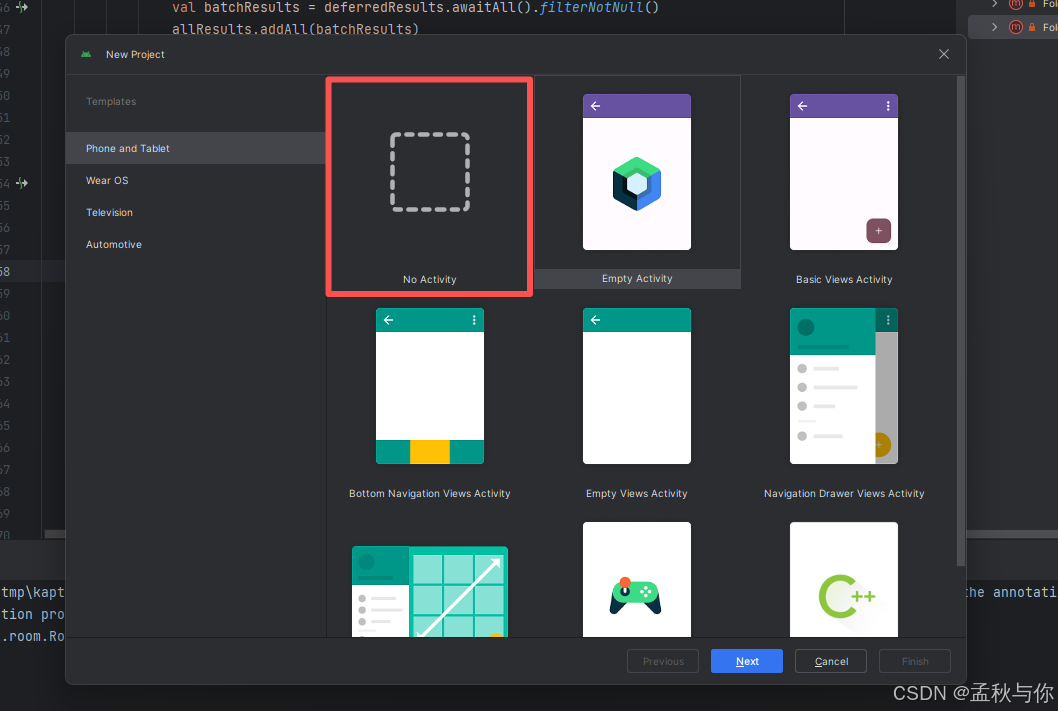
在Android studio中新建一个工程
因为是个简易的apk 没写什么布局 所以博主这里选择的是no activity
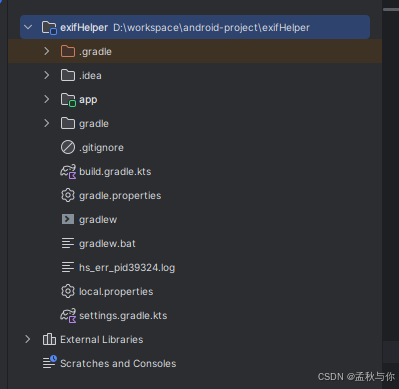
目录结构如下:
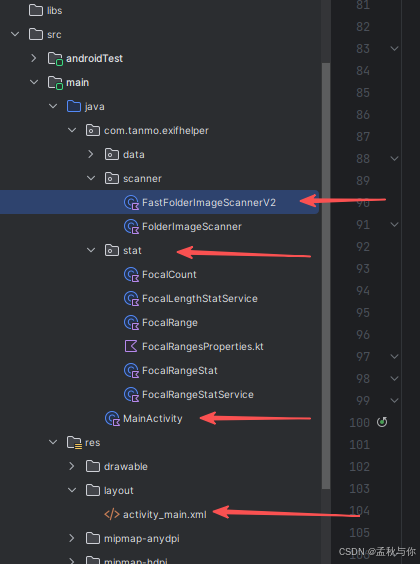
按照以下命名创建:(注意是创建kotlin class非java class)

工程源码
核心代码解释:FastFolderImageScannerV2类 ,读取到图片后 调用Exif库获取焦段信息, 代码中有个 val buffer = ByteArray(65536) 是因为exif信息一般就在流前面,不需要往后读取那么多了 节省效率,读取完之后stat方法就类似java的stream流分组统计。
kotlin
package com.tanmo.exifhelper.scanner

import android.content.Context
import android.net.Uri
import androidx.documentfile.provider.DocumentFile
import com.drew.imaging.ImageMetadataReader
import com.drew.metadata.exif.ExifSubIFDDirectory
import com.tanmo.exifhelper.data.FocalPhoto
import kotlinx.coroutines.*
import java.io.ByteArrayInputStream

class FastFolderImageScannerV2(
    private val context: Context
) {

    companion object {
        private const val CONCURRENT_READERS = 4
        private const val BATCH_SIZE = 50
    }

    suspend fun scan(folderUri: Uri): List<FocalPhoto> = withContext(Dispatchers.IO) {
        val root = DocumentFile.fromTreeUri(context, folderUri) ?: return@withContext emptyList()

        val imageFiles = collectAllImageFiles(root)
        println("找到 ${imageFiles.size} 个图片文件")

        // 使用专用EXIF库并行处理
        return@withContext processWithMetadataExtractor(imageFiles)
    }

    private suspend fun processWithMetadataExtractor(files: List<DocumentFile>): List<FocalPhoto> =
        coroutineScope {
            // 分批处理
            val chunks = files.chunked(BATCH_SIZE)
            val allResults = mutableListOf<FocalPhoto>()

            chunks.forEach { chunk ->
                // 并行处理当前批次
                val deferredResults = chunk.map { file ->
                    async {
                        readFocalWithMetadataExtractor(file)
                    }
                }

                // 等待当前批次完成
                val batchResults = deferredResults.awaitAll().filterNotNull()
                allResults.addAll(batchResults)
            }

            allResults
        }

    private suspend fun readFocalWithMetadataExtractor(file: DocumentFile): FocalPhoto? =
        withContext(Dispatchers.IO) {
            return@withContext try {
                context.contentResolver.openInputStream(file.uri)?.use { input ->
                    // 只读取前64KB
                    val buffer = ByteArray(65536)
                    val bytesRead = input.read(buffer)

                    if (bytesRead > 0) {
                        ByteArrayInputStream(buffer, 0, bytesRead).use { bais ->
                            try {
                                val metadata = ImageMetadataReader.readMetadata(bais)
                                val directory = metadata.getFirstDirectoryOfType(ExifSubIFDDirectory::class.java)

                                directory?.getDoubleObject(ExifSubIFDDirectory.TAG_FOCAL_LENGTH)?.toDouble()
                                    ?.takeIf { it > 0 }
                                    ?.let { focal ->
                                        FocalPhoto(
                                            focal = focal,
                                            uri = file.uri.toString()
                                        )
                                    }
                            } catch (e: Exception) {
                                null
                            }
                        }
                    } else {
                        null
                    }
                }
            } catch (e: Exception) {
                null
            }
        }

    /**
     * 收集所有图片文件
     */
    private fun collectAllImageFiles(root: DocumentFile): List<DocumentFile> {
        val files = mutableListOf<DocumentFile>()
        traverseForFiles(root, files)
        return files
    }

    private fun traverseForFiles(dir: DocumentFile, fileList: MutableList<DocumentFile>) {
        for (file in dir.listFiles()) {
            when {
                file.isDirectory -> traverseForFiles(file, fileList)
                isImageFile(file) -> fileList.add(file)
            }
        }
    }

    private fun isImageFile(file: DocumentFile): Boolean {
        return file.type?.startsWith("image/") == true ||
                file.name?.lowercase()?.let { name ->
                    name.endsWith(".jpg") || name.endsWith(".jpeg") ||
                            name.endsWith(".png") || name.endsWith(".heic") ||
                            name.endsWith(".webp") || name.endsWith(".bmp") ||
                            name.endsWith(".tiff") || name.endsWith(".gif")
                } == true
    }}
kotlin
package com.tanmo.exifhelper.stat


data class FocalCount(
    val focal: Float,
    val count: Int
)
kotlin
package com.tanmo.exifhelper.stat

class FocalLengthStatService {

    fun stat(focals: List<Double>): List<FocalCount> {
        return focals
            .groupingBy { it }
            .eachCount()
            .toSortedMap()
            .map { FocalCount(it.key.toFloat(), it.value) }
    }
}
kotlin
package com.tanmo.exifhelper.stat

data class FocalRange(
    val min: Double?,
    val max: Double?,
    val label: String
) {
    fun match(value: Double): Boolean {
        return when {
            min == null -> value <= max!!
            max == null -> value > min
            else -> value >= min && value <= max
        }
    }
}
FocalRangesProperties.kt 文件 (注意是.kt结尾 )
这个可以根据自己想统计的焦段范围调整
kotlin
package com.tanmo.exifhelper.stat

val FOCAL_RANGES = listOf(
    FocalRange(null, 18.0, "≤18mm"),
    FocalRange(19.0, 23.0, "19--23mm"),
    FocalRange(24.0, 50.0, "24--50mm"),
    FocalRange(51.0, 74.0, "51--74mm"),
    FocalRange(75.0, 120.0, "75--120mm"),
    FocalRange(121.0, 139.0, "121--139mm"),
    FocalRange(140.0, 200.0, "140--200mm"),
    FocalRange(201.0, 250.0, "201--250mm"),
    FocalRange(250.0, null, ">250mm")
)
kotlin
package com.tanmo.exifhelper.stat

data class FocalRangeStat(
    val range: FocalRange,
    val count: Int,
    val percent: Float)
kotlin
package com.tanmo.exifhelper.stat

class FocalRangeStatService {

    /**
     * @param focals  扫描得到的焦段列表
     * @param uris    和 focals 一一对应的图片 uri(后面点进去用)
     */
    fun stat(
        focals: List<Double>,
    ): List<FocalRangeStat> {

        val total = focals.size
        if (total == 0) return emptyList()

        return FOCAL_RANGES.map { range ->
            val matched = focals.withIndex()
                .filter { range.match(it.value) }

            FocalRangeStat(
                range = range,
                count = matched.size,
                percent = matched.size.toFloat() / total,
            )
        }.filter { it.count > 0 }
    }
}
kotlin
package com.tanmo.exifhelper

import android.content.Intent
import android.net.Uri
import android.os.Bundle
import android.view.View
import android.widget.Button
import android.widget.TextView
import android.widget.Toast
import androidx.activity.result.contract.ActivityResultContracts
import androidx.appcompat.app.AlertDialog
import androidx.appcompat.app.AppCompatActivity
import androidx.lifecycle.lifecycleScope
import com.tanmo.exifhelper.data.FocalPhoto
import com.tanmo.exifhelper.scanner.FastFolderImageScannerV2
import com.tanmo.exifhelper.stat.FocalLengthStatService
import com.tanmo.exifhelper.stat.FocalRangeStatService
import kotlinx.coroutines.launch

class MainActivity : AppCompatActivity() {

    private lateinit var btnPickFolder: Button
    private lateinit var btnReselect: Button
    private lateinit var btnRangeStat: Button
    private lateinit var tvStatus: TextView
    private lateinit var tvResult: TextView
    private var cachedFocals: List<Double> = emptyList()


    /** SAF 文件夹选择 */
    private val pickFolderLauncher =
        registerForActivityResult(ActivityResultContracts.OpenDocumentTree()) { uri: Uri? ->
            if (uri != null) {
                contentResolver.takePersistableUriPermission(
                    uri,
                    Intent.FLAG_GRANT_READ_URI_PERMISSION
                )
                startScan(uri)
            }
        }

    override fun onCreate(savedInstanceState: Bundle?) {
        super.onCreate(savedInstanceState)
        setContentView(R.layout.activity_main)

        btnPickFolder = findViewById(R.id.btnPickFolder)
        btnReselect = findViewById(R.id.btnReselect)
        btnRangeStat = findViewById(R.id.btnRangeStat)
        tvStatus = findViewById(R.id.tvStatus)
        tvResult = findViewById(R.id.tvResult)

        btnPickFolder.setOnClickListener {
            pickFolderLauncher.launch(null)
        }

        btnReselect.setOnClickListener {
            resetUI()
        }

        btnRangeStat.setOnClickListener {
            showRangeStatDialog()
        }
    }

    private fun startScan(folderUri: Uri) {
        tvStatus.text = "正在扫描,请稍候..."
        tvResult.text = ""
        btnPickFolder.isEnabled = false
        btnRangeStat.visibility = View.GONE

        lifecycleScope.launch {
            try {
                val scanner = FastFolderImageScannerV2(this@MainActivity)

                // 扫描焦段
                // 1️⃣ 扫描
                val focalPhotoList = scanner.scan(folderUri)

                val statService = FocalLengthStatService()
                val focalList = focalPhotoList.map(FocalPhoto::focal)
                val result = statService.stat(focalList)
                cachedFocals = focalList;

                val total = focalList.size

                val resultText = buildString {
                    append("总照片数:$total 张\n\n")
                    append("【具体焦段统计】\n")
                    result.forEach { item ->
                        val percent =
                            if (total > 0) String.format("%.2f", item.count * 100.0 / total)
                            else "0.00"
                        append("${item.focal} mm :${item.count} 张($percent%)\n")
                    }
                }

                showResult(resultText)

            } catch (e: Exception) {
                Toast.makeText(this@MainActivity, e.message, Toast.LENGTH_LONG).show()
                resetUI()
            }
        }
    }

    private fun showResult(text: String) {
        tvStatus.text = "扫描完成"
        tvResult.text = text
        btnPickFolder.visibility = View.GONE
        btnReselect.visibility = View.VISIBLE
        btnRangeStat.visibility = View.VISIBLE
    }

    private fun resetUI() {
        tvStatus.text = ""
        tvResult.text = ""
        cachedFocals = emptyList()

        btnPickFolder.visibility = View.VISIBLE
        btnPickFolder.isEnabled = true
        btnReselect.visibility = View.GONE
        btnRangeStat.visibility = View.GONE
    }

    /**
     * 弹窗展示【焦段范围统计】
     * 不跳页面、不影响当前统计
     */
    private fun showRangeStatDialog() {
        if (cachedFocals.isEmpty()) {
            Toast.makeText(this, "请先扫描文件夹", Toast.LENGTH_SHORT).show()
            return
        }

        val rangeService = FocalRangeStatService()
        val rangeStats = rangeService.stat(cachedFocals)

        val total = cachedFocals.size

        val message = buildString {
            rangeStats.forEach {
                val percent =
                    if (total > 0) String.format("%.2f", it.count * 100.0 / total)
                    else "0.00"
                append("${it.range.label} :${it.count} 张($percent%)\n")
            }
        }

        AlertDialog.Builder(this)
            .setTitle("焦段范围统计")
            .setMessage(message)
            .setPositiveButton("关闭", null)
            .show()
    }
}
/res/layout xml文件:
xml
<?xml version="1.0" encoding="utf-8"?>
<LinearLayout xmlns:android="http://schemas.android.com/apk/res/android"
    android:orientation="vertical"
    android:padding="16dp"
    android:layout_width="match_parent"
    android:layout_height="match_parent">

    <Button
        android:id="@+id/btnPickFolder"
        android:layout_width="match_parent"
        android:layout_height="wrap_content"
        android:text="选择文件夹并扫描焦段"/>

    <Button
        android:id="@+id/btnReselect"
        android:layout_width="match_parent"
        android:layout_height="wrap_content"
        android:text="重新选择文件夹"
        android:visibility="gone"
        android:layout_marginTop="8dp"/>

    <TextView
        android:id="@+id/tvStatus"
        android:layout_width="match_parent"
        android:layout_height="wrap_content"
        android:text=""
        android:textSize="16sp"
        android:layout_marginTop="12dp"/>

    <ScrollView
        android:layout_width="match_parent"
        android:layout_height="0dp"
        android:layout_weight="1"
        android:layout_marginTop="12dp">

        <TextView
            android:id="@+id/tvResult"
            android:layout_width="match_parent"
            android:layout_height="wrap_content"
            android:textSize="15sp"/>
    </ScrollView>

	<Button
    android:id="@+id/btnRangeStat"
    android:layout_width="match_parent"
    android:layout_height="wrap_content"
    android:text="查看焦段范围统计"
    android:layout_marginTop="8dp"
    android:visibility="gone"/>


</LinearLayout>
最后是data文件夹 一些和sqlite有关的数据库操作,因为项目并不是博主想要的完全体效果 所以看起来会有一些"脏代码" (没用上的) 这里都贴上 以防项目跑不起来:
kotlin
package com.tanmo.exifhelper.data

import android.content.Context
import androidx.room.Database
import androidx.room.Room
import androidx.room.RoomDatabase

@Database(entities = [ImageMetaEntity::class], version = 1)
abstract class AppDatabase : RoomDatabase() {


    abstract fun imageMetaDao(): ImageMetaDao


    companion object {
        @Volatile private var INSTANCE: AppDatabase? = null


        fun get(context: Context): AppDatabase =
            INSTANCE ?: synchronized(this) {
                INSTANCE ?: Room.databaseBuilder(
                    context.applicationContext,
                    AppDatabase::class.java,
                    "image_meta.db"
                ).build().also { INSTANCE = it }
            }
    }
}
kotlin
package com.tanmo.exifhelper.data

import androidx.room.Dao
import androidx.room.Insert
import androidx.room.OnConflictStrategy
import androidx.room.Query

@Dao
interface FocalCacheDao {

    @Query("SELECT * FROM focal_cache WHERE uri = :uri AND lastModified = :lastModified LIMIT 1")
    suspend fun find(uri: String, lastModified: Long): FocalCacheEntity?

    @Insert(onConflict = OnConflictStrategy.REPLACE)
    suspend fun insert(entity: FocalCacheEntity)
}
kotlin
package com.tanmo.exifhelper.data

import android.content.Context
import androidx.room.Database
import androidx.room.Room
import androidx.room.RoomDatabase

@Database(
    entities = [FocalCacheEntity::class],
    version = 1,
    exportSchema = false
)
abstract class FocalCacheDatabase : RoomDatabase() {

    abstract fun dao(): FocalCacheDao

    companion object {
        @Volatile
        private var INSTANCE: FocalCacheDatabase? = null

        fun get(context: Context): FocalCacheDatabase =
            INSTANCE ?: synchronized(this) {
                INSTANCE ?: Room.databaseBuilder(
                    context.applicationContext,
                    FocalCacheDatabase::class.java,
                    "focal_cache.db"
                ).build().also { INSTANCE = it }
            }
    }
}
kotlin
package com.tanmo.exifhelper.data


import androidx.room.Entity
import androidx.room.PrimaryKey

@Entity(tableName = "focal_cache")
data class FocalCacheEntity(
    @PrimaryKey
    val uri: String,

    val lastModified: Long,

    val focalLength: Double
)
kotlin
package com.tanmo.exifhelper.data

data class FocalPhoto(
    val focal: Double,
    val uri: String
)
kotlin
package com.tanmo.exifhelper.data

import androidx.room.Dao
import androidx.room.Insert
import androidx.room.OnConflictStrategy
import androidx.room.Query
import com.tanmo.exifhelper.stat.FocalCount

@Dao
interface ImageMetaDao {


    @Insert(onConflict = OnConflictStrategy.REPLACE)
    suspend fun insert(entity: ImageMetaEntity)


    @Query("DELETE FROM image_meta WHERE path = :path")
    suspend fun deleteByPath(path: String)


    @Query("SELECT COUNT(*) FROM image_meta WHERE focalLength = :value")
    suspend fun countByValue(value: Float): Int


    @Query("SELECT COUNT(*) FROM image_meta WHERE focalLength BETWEEN :min AND :max")
    suspend fun countByRange(min: Float, max: Float): Int

    @Query("""
    SELECT focalLength AS focal, COUNT(*) AS count
    FROM image_meta
    GROUP BY focalLength
    ORDER BY focalLength ASC
""")
    suspend fun countGroupByFocal(): List<FocalCount>
}
kotlin
package com.tanmo.exifhelper.data

import androidx.room.Entity
import androidx.room.Index
import androidx.room.PrimaryKey

@Entity(
    tableName = "image_meta",
    indices = [Index(value = ["path"], unique = true)]
)
data class ImageMetaEntity(
    @PrimaryKey(autoGenerate = true)
    val id: Long = 0,


    val path: String,


    /** mm */
    val focalLength: Float,


    val lastModified: Long
)
项目根目录下的gradle文件(注意 是项目根目录 不是app里面)
build.gradle.kts
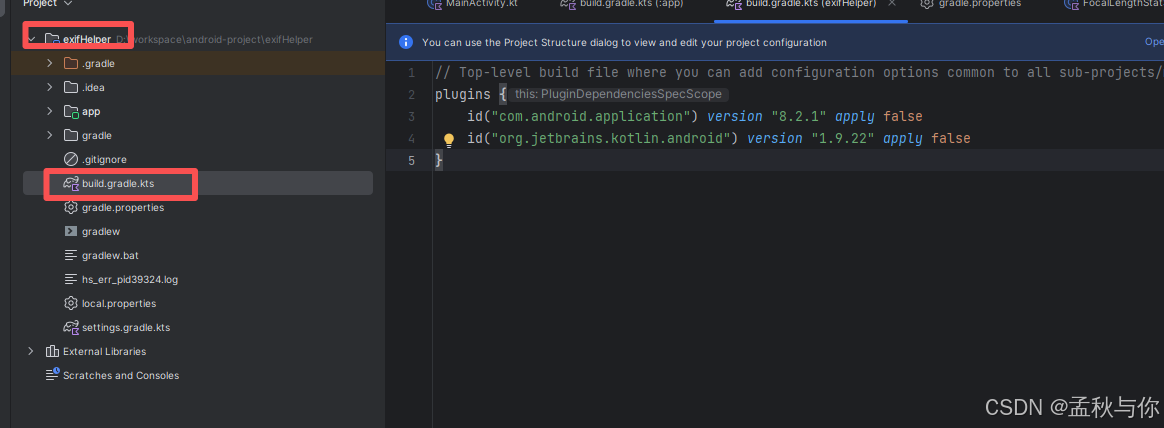
plugins {
    id("com.android.application") version "8.2.1" apply false
    id("org.jetbrains.kotlin.android") version "1.9.22" apply false
}
gradle.properties
一般用默认的就可以了,博主这里在最后一行手动指定了gradle java home
org.gradle.java.home=D:\dev-software\AndroidStudio\jbr (务必替换成自己的)
# Project-wide Gradle settings.
# IDE (e.g. Android Studio) users:
# Gradle settings configured through the IDE *will override*
# any settings specified in this file.
# For more details on how to configure your build environment visit
# http://www.gradle.org/docs/current/userguide/build_environment.html
# Specifies the JVM arguments used for the daemon process.
# The setting is particularly useful for tweaking memory settings.
org.gradle.jvmargs=-Xmx2048m -Dfile.encoding=UTF-8
# When configured, Gradle will run in incubating parallel mode.
# This option should only be used with decoupled projects. More details, visit
# http://www.gradle.org/docs/current/userguide/multi_project_builds.html#sec:decoupled_projects
# org.gradle.parallel=true
# AndroidX package structure to make it clearer which packages are bundled with the
# Android operating system, and which are packaged with your app's APK
# https://developer.android.com/topic/libraries/support-library/androidx-rn
android.useAndroidX=true
# Kotlin code style for this project: "official" or "obsolete":
kotlin.code.style=official
# Enables namespacing of each library's R class so that its R class includes only the
# resources declared in the library itself and none from the library's dependencies,
# thereby reducing the size of the R class for that library
android.nonTransitiveRClass=true
# 如果手动指定 务必替换成自己的
org.gradle.java.home=D\:\\dev-software\\AndroidStudio\\jbr
app目录下的build.gradle.kts,这个文件里面配置的是依赖信息 类似maven的pom.xml
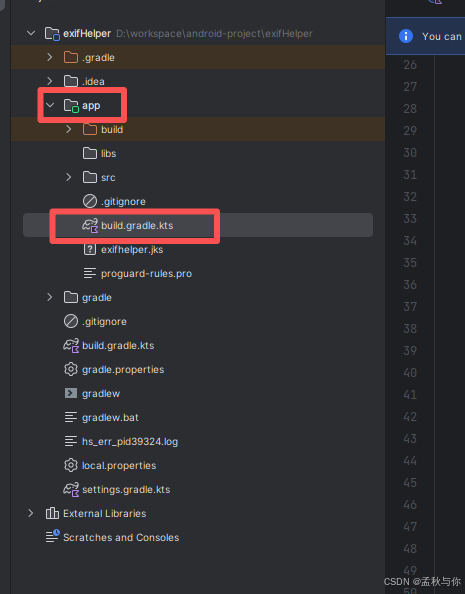
plugins {
    id("com.android.application")
    id("org.jetbrains.kotlin.android")
    id("kotlin-kapt") // 在这里添加 kapt 插件
}

android {
    namespace = "com.tanmo.exifhelper"
    compileSdk = 34

    defaultConfig {
        applicationId = "com.tanmo.exifhelper"
        minSdk = 26
        targetSdk = 34
        versionCode = 1
        versionName = "1.0"

        testInstrumentationRunner = "androidx.test.runner.AndroidJUnitRunner"
    }

    buildTypes {
        release {
            isMinifyEnabled = false
            proguardFiles(
                getDefaultProguardFile("proguard-android-optimize.txt"),
                "proguard-rules.pro"
            )
        }
    }
    compileOptions {
        sourceCompatibility = JavaVersion.VERSION_17
        targetCompatibility = JavaVersion.VERSION_17
    }
    kotlinOptions {
        jvmTarget = "17"
    }
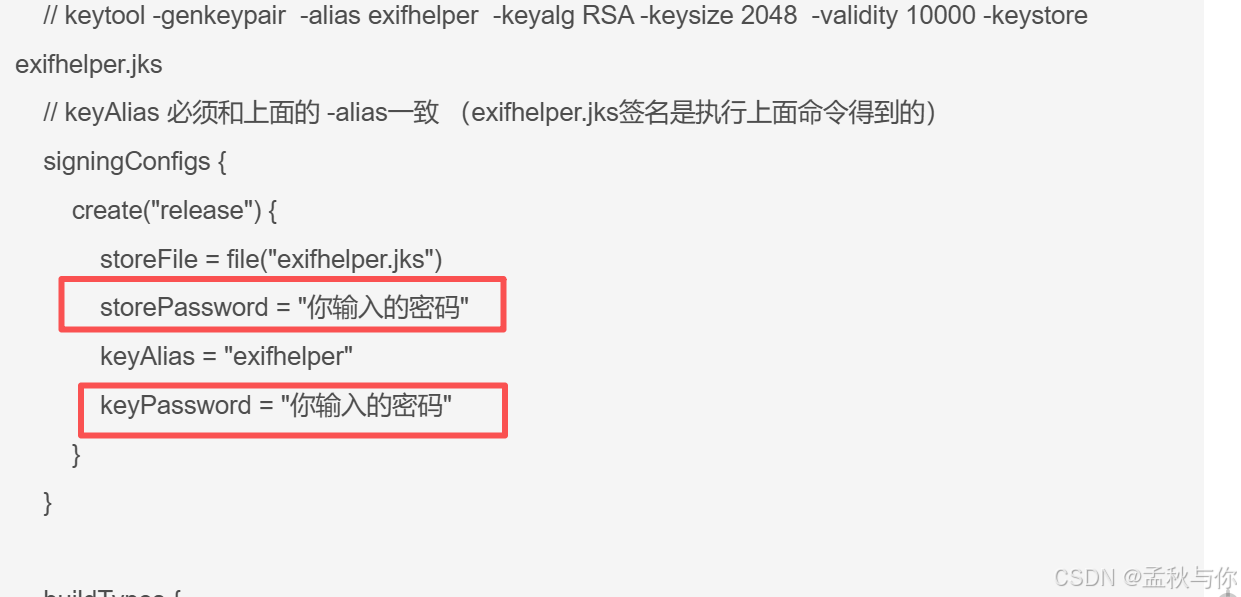
    // keytool -genkeypair  -alias exifhelper  -keyalg RSA -keysize 2048  -validity 10000 -keystore exifhelper.jks
    // keyAlias 必须和上面的 -alias一致 (exifhelper.jks签名是执行上面命令得到的)
    signingConfigs {
        create("release") {
            storeFile = file("exifhelper.jks")
            storePassword = "你输入的密码"
            keyAlias = "exifhelper"
            keyPassword = "你输入的密码"
        }
    }

    buildTypes {
        release {
            isMinifyEnabled = false
            signingConfig = signingConfigs.getByName("release")
        }
        debug {
            // debug
        }
    }

    kotlinOptions {
        jvmTarget = "17"
    }
}

dependencies {

    testImplementation("junit:junit:4.13.2")
    androidTestImplementation("androidx.test.ext:junit:1.1.5")
    androidTestImplementation("androidx.test.espresso:espresso-core:3.5.1")

    implementation ("androidx.core:core-ktx:1.12.0")
    implementation ("androidx.appcompat:appcompat:1.6.1")
    implementation ("com.google.android.material:material:1.11.0")


	// EXIF
    implementation ("androidx.exifinterface:exifinterface:1.3.7")
    // EXIF v2 scanner  当前用的依赖
    implementation ("com.drewnoakes:metadata-extractor:2.18.0")


// Room
    implementation ("androidx.room:room-runtime:2.6.1")
    implementation ("androidx.room:room-ktx:2.6.1")
    kapt("androidx.room:room-compiler:2.6.1")


// 协程(后台扫描)
    implementation ("org.jetbrains.kotlinx:kotlinx-coroutines-android:1.7.3")
}
项目环境
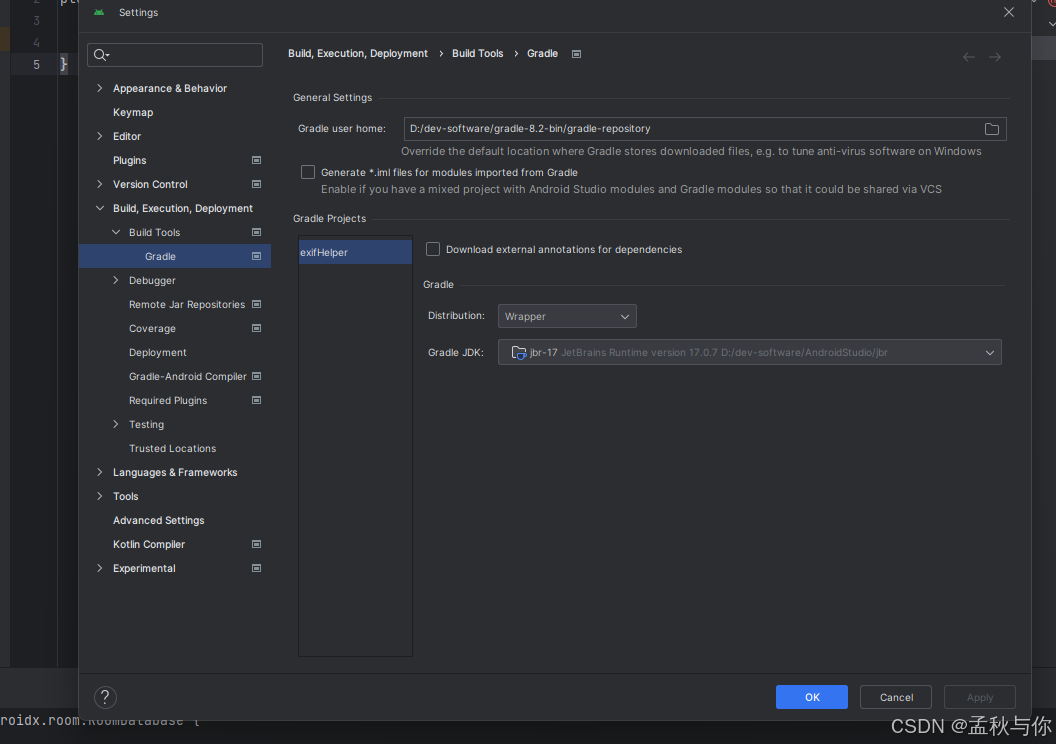
gradle用的是8.2 ,jdk版本是17 ( 通过配置文件也可以看出)
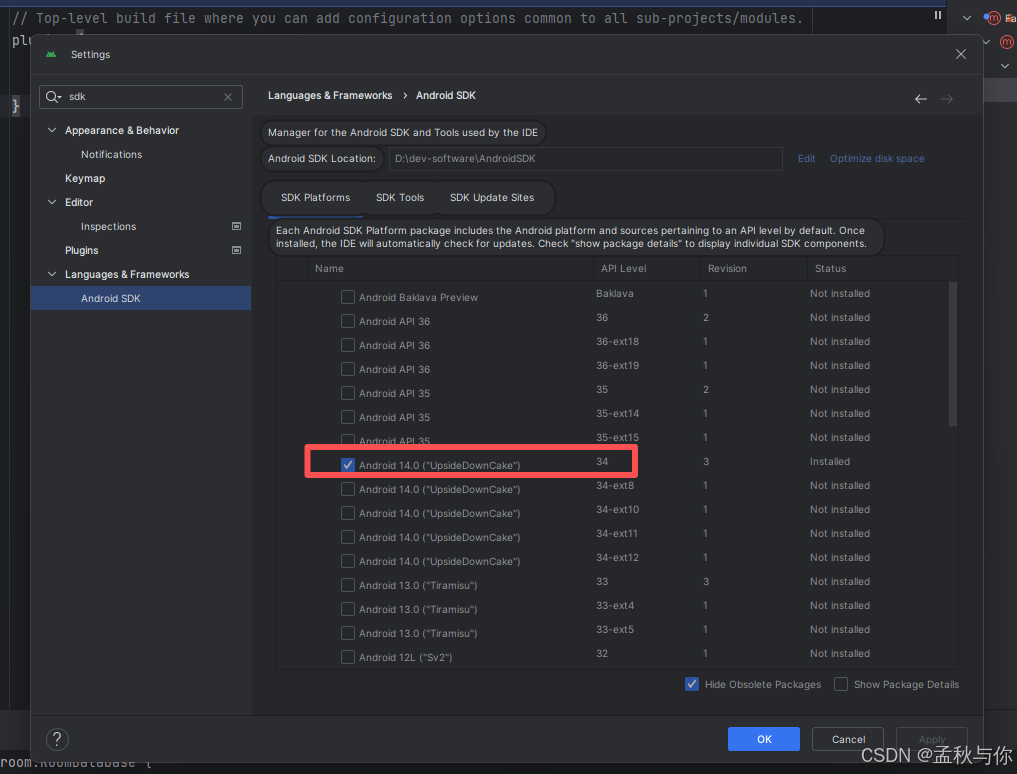
安卓sdk用的是 android 14 (api :34)
(这个可能需要根据自己手机系统来调整 一般都能向下兼容,比如安卓16的手机 用Android 14对应的api level 没问题;但是反过来就不行了;如果是比较早的安卓系统,那jdk版本可能也要降 版本对应关系自行网上查找)
打包
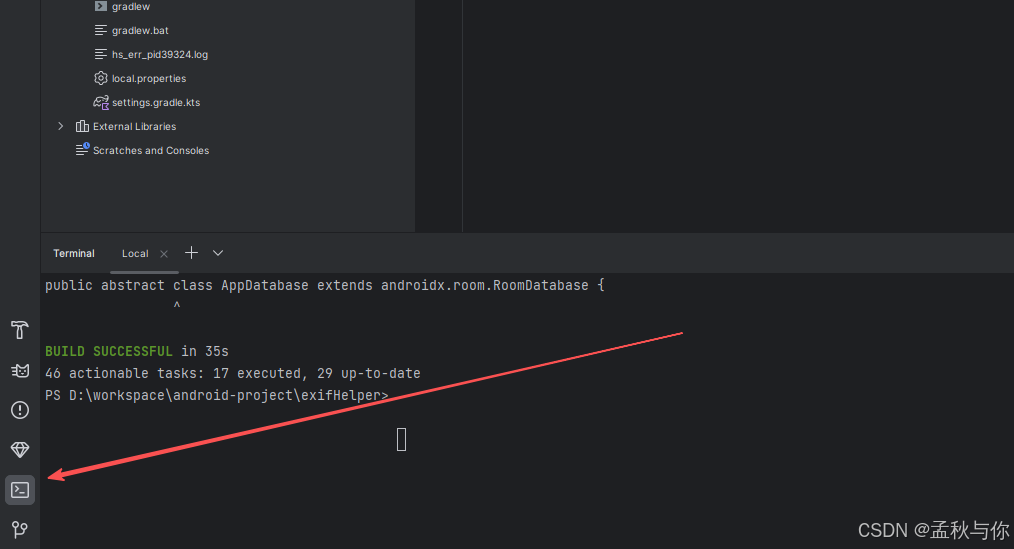
- 首先需要在控制台输入:
shell
keytool -genkeypair -alias exifhelper -keyalg RSA -keysize 2048 -validity 10000 -keystore exifhelper.jks这个是创建证书的,如果apk没有证书,很多手机是无法安装/运行软件的 根据提示自己设置密码、城市信息即可
拿到证书文件后 将证书复制到/app 的根目录下
最后 回到app目录下的build.gradle.kts 修改成设置的密码
- 打包命令
shell
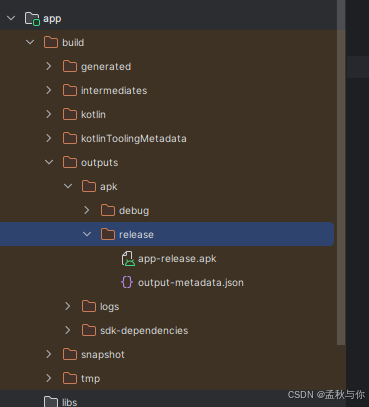
./gradlew assembleRelease 路径: