大型语言模型(LLM)虽能生成高度拟真的文本,但其知识本质上受限于训练数据集,难以获取实时信息、企业内部数据或高度专业化的知识细节。检索增强生成(RAG)技术正是为解决这一固有瓶颈而生的方案。它通过赋予LLM访问和整合外部知识源(如实时数据、特定领域文档和上下文信息)的能力,从而大幅提升其生成内容的准确性、相关性和事实依据。
对于AI Agent而言,这一技术至关重要。它使Agent能够摆脱静态知识的束缚,转而依据实时、可验证的外部数据进行推理和工作。由此,Agent得以可靠地执行诸如"查询最新公司政策以回答员工提问"或"在确认实时库存后才处理订单"等复杂任务。通过RAG技术的整合,AI Agent得以从一个受限于训练数据的对话引擎,进化为一个能够基于真实世界数据执行有效操作的、真正具有生产力的智能体。
知识检索(RAG)模式概述
RAG(检索增强生成)模式从根本上扩展了大型语言模型的能力边界。它使LLM能够突破自身训练数据的限制,转而像人类一样主动"查阅资料"------在生成答案前,先从外部知识库中检索相关信息,从而显著提升响应的时效性、准确性与事实依据。
其工作流程可分解为以下关键步骤:
| 步骤 | 核心操作 | 类比 |
|---|---|---|
| 检索 | 系统首先理解用户查询的语义,并在外部知识库(文档、数据库等)中搜索最相关的信息片段。 | 如同一位研究员在图书馆中根据问题主题查找相关书籍与段落。 |
| 增强 | 检索到的信息片段被整合到原始问题中,共同构成一个富含上下文的新提示。 | 研究员将找到的关键资料标注出来,附在自己的研究笔记里。 |
| 生成 | LLM 基于这个"增强后"的提示生成最终回答,确保内容紧扣检索到的已知事实。 | 研究员结合原始问题和找到的资料,撰写一份有据可查的报告。 |
RAG 的核心优势在于:
-
知识实时性:模型可获取训练截止日期后的新信息。
-
事实可靠性:答案基于可查证的外部数据,极大减少了"幻觉"(即模型臆造信息)。
-
领域适应性:可便捷地接入企业知识库、专业文档等私有数据源。
-
答案可溯源:生成回答时可附带引用来源,增强可信度与透明度。
为深入理解其机制,需掌握几个关键技术概念:
-
嵌入(Embeddings)
嵌入是将文本(词、句、段)转换为数值向量(即一系列数字)的技术。这些向量在高维空间中表征文本的语义,语义相近的文本,其向量在空间中的位置也越接近。例如,"猫"和"猫咪"的向量距离会很近,而"猫"和"汽车"的向量则相距较远。这为计算机"理解"语义相似性提供了数学基础。
-
语义相似度
这是衡量两段文本在含义上(而非仅表面词汇)接近程度的指标。RAG 正是利用嵌入向量来计算用户查询与知识库中文本片段的语义相似度,从而精准找到最相关的内容。例如,对于"法国的首都是哪?"和"法国首都叫什么?",尽管措辞不同,但语义相似度会很高,从而被检索到相同的答案材料。
-
语义相似度和距离
-
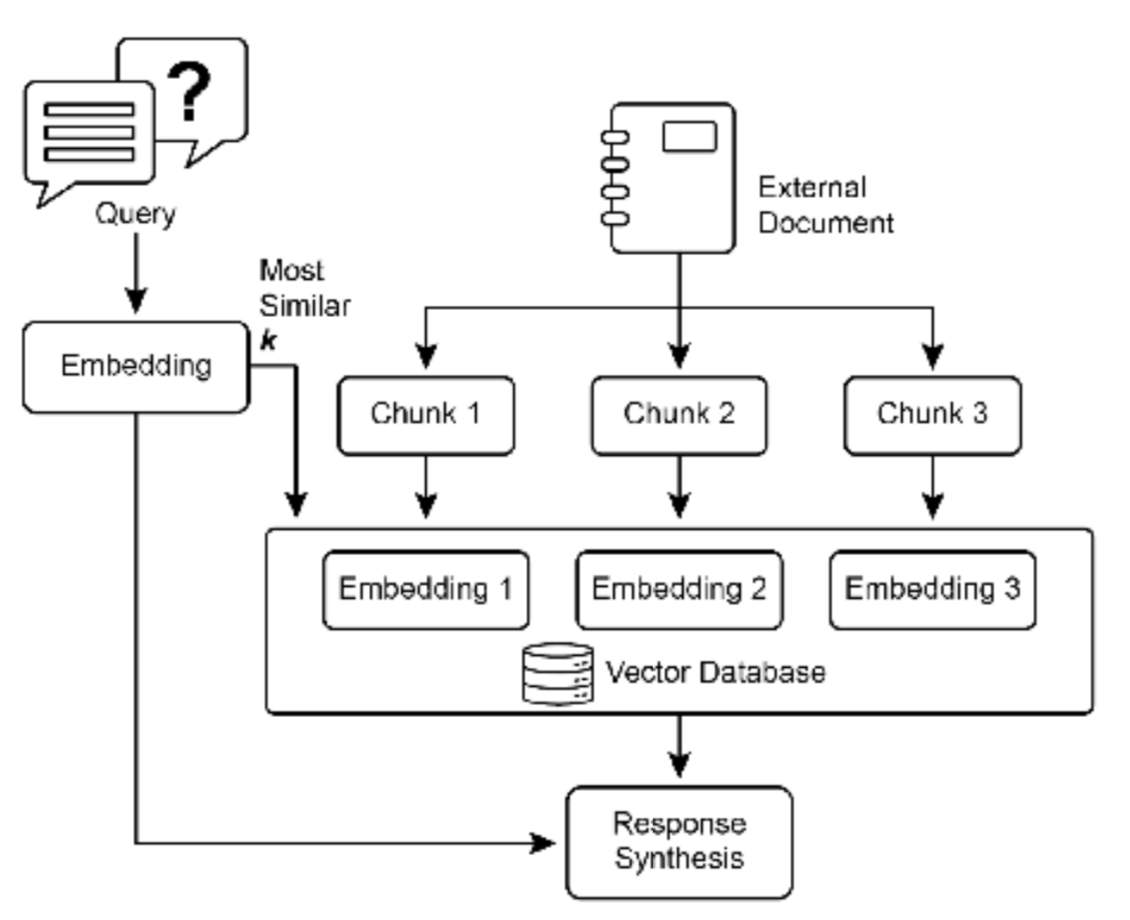
语义相似度是文本相似度的一种更高级形式,它纯粹关注文本的含义和上下文,而不仅 仅是使用的单词。其目标是理解两段文本是否传达相同的概念或想法。语义距离则是语义相似度的反义词; 高语义相似度意味着低语义距离,反之亦然。在 RAG 中,语义搜索依赖于查找与用户查询语义距离最小的 文档。例如,短语"a furry feline companion"和"a domestic cat"除了冠词"a"外没有共同的单词。然 而,能够理解语义相似度的模型会识别出它们指的是同一事物,并认为它们高度相似。这是因为它们的嵌入 在向量空间中非常接近,表明语义距离很小。这就是 RAG 能够找到相关信息的"智能搜索"机制,即使用户 的措辞与知识库中的文本不完全匹配。
-
-
图 1:RAG 核心概念:分块、嵌入和向量数据库
-
文档分块
-
分块是将大型文档分解为更小、更易于管理的片段或"块"的过程。为了使 RAG 系统高效工作, 它不能将整个大型文档直接输入 LLM,而是处理这些更小的块。文档分块的方式对于保持信息的上下文和含 义至关重要。例如,与其将 50 页的用户手册视为单个文本块,分块策略可能会将其分解为章节、段落甚至 句子。这样,"故障排除"部分就可以与"安装指南"分开作为独立的块。当用户询问特定问题时,RAG 系统 可以检索最相关的故障排除块,而不是整个手册。这使得检索过程更快,提供给 LLM 的信息更加集中,更符 合用户的直接需求。一旦文档被分块,RAG 系统必须使用检索技术来找到给定查询的最相关片段。主要方法 是向量搜索,它利用嵌入和语义距离来查找概念上与用户问题相似的块。另一种较旧但仍然有价值的技术是 BM25,这是一种基于关键字的算法,根据词频对块进行排名,但不理解语义含义。为了获得两全其美的效 果,通常使用混合搜索方法,将 BM25 的关键字精度与语义搜索的上下文理解相结合。这种融合实现了更强 大和准确的检索,能够捕获字面匹配和概念相关性。
向量数据库
向量数据库是一种专门设计用于高效存储和查询嵌入的专用数据库类型。在文档被分块并 转 换为嵌入后,这些高维向量被存储在向量数据库中。传统的检索技术,如基于关键字的搜索,非常擅长查 找包含查询中确切单词的文档,但缺乏对语言的深入理解。它们无法识别"furry feline companion"意味 着"cat"。这就是向量数据库的优势所在。它们专门为语义搜索而构建。通过将文本存储为数值向量,它们 可以基于概念含义而不仅仅是关键字重叠来查找结果。当用户的查询也被转换为向量时,数据库使用高度优 化的算法(如 HNSW ‐ 分层可导航小世界)快速搜索数百万个向量,并找到在含义上"最接近"的向量。这种方法对于 RAG 来说要优越得多,因为即使用户的措辞与源文档完全不同,它也能发现相关上下文。本质 上,虽然其他技术搜索单词,向量数据库搜索含义。这项技术以各种形式实现,从托管数据库如 Pinecone 和 Weaviate,到开源解决方案如 Chroma DB、Milvus 和 Qdrant。甚至现有数据库也可以增强向量搜索功 能,如 Redis、Elasticsearch 和 Postgres(使用 pgvector 扩展)。核心检索机制通常由 Meta AI 的 FAISS 或 Google Research 的 ScaNN 等库提供支持,这些库对这些系统的效率至关重要。
简言之,RAG 模式通过"先检索,后生成"的架构,将LLM从一个依赖静态知识的文本生成器,升级为一个能够主动利用外部知识、提供精准可靠答案的"信息处理系统"。
RAG 的挑战
尽管功能强大,RAG 模式并非没有挑战。一个主要问题出现在回答查询所需的信息不局限于单 个块,而是分散在文档的多个部分甚至多个文档中时。在这种情况下,检索器可能无法收集所有必要的上下文,导致答案不完整或不准确。系统的有效性还高度依赖于分块和检索过程的质量;如果检索到不相关的块, 可能会引入噪声并混淆 LLM。此外,有效综合来自潜在矛盾来源的信息仍然是这些系统的一个重大障碍。除 此之外,另一个挑战是 RAG 需要将整个知识库预处理并存储在专门的数据库中,如向量或图数据库,这是一 项相当大的工作。因此,这些知识需要定期协调以保持最新,这在处理不断演变的来源(如公司维基)时是 一项关键任务。整个过程可能对性能产生明显影响,增加延迟、运营成本和最终提示中使用的 token 数量。
总之,检索增强生成(RAG)模式代表了使 AI 更加知识渊博和可靠的重大飞跃。通过将外部知识检索步骤无 缝集成到生成过程中,RAG 解决了独立 LLM 的一些核心局限。嵌入和语义相似度的基础概念,结合关键字 和混合搜索等检索技术,允许系统智能地找到相关信息,通过战略性分块使其可管理。这整个检索过程由专 门的向量数据库提供支持,这些数据库旨在大规模存储和高效查询数百万个嵌入。虽然检索碎片化或矛盾信 息的挑战仍然存在,RAG 使 LLM 能够产生不仅在上下文上适当而且建立在可验证事实基础上的答案,从而 在 AI 中培养更大的信任和实用性。
图 RAG(Graph RAG):GraphRAG 是检索增强生成的一种高级形式,它利用知识图谱而不是简单的向量数 据库进行信息检索。它通过导航这个结构化知识库中数据实体(节点)之间的明确关系(边)来回答复杂查 询。一个关键优势是它能够综合来自多个文档的碎片化信息的答案,这是传统 RAG 的常见失败之处。通过 理解这些连接,GraphRAG 提供更多上下文准确和细致的响应。
用例包括复杂的金融分析,将公司与市场事件联系起来,以及用于发现基因和疾病之间关系的科学研究。然 而,主要缺点是构建和维护高质量知识图谱所需的显著复杂性、成本和专业知识。与更简单的向量搜索系统 相比,这种设置也不太灵活,并且可能引入更高的延迟。系统的有效性完全取决于底层图结构的质量和完整 性。因此,GraphRAG 为复杂问题提供了卓越的上下文推理,但实施和维护成本要高得多。总之,在深度、 互联的洞察比标准 RAG 的速度和简单性更重要的情况下,它表现出色。
Agentic RAG
这种模式的演进,被称为 Agentic RAG(见图 2),引入了一个推理和决策层,以显著增强 信息提取的可靠性。Agentic RAG 不仅仅是检索和增强,一个"agent"------一个专门的 AI 组件------充当知识 的关键守门人和精炼者。这个 agent 不是被动地接受最初检索的数据,而是主动质疑其质量、相关性和完整 性,如以下场景所示。
首先,agent 擅长反思和源验证。如果用户问:"我们公司的远程工作政策是什么?"标准 RAG 可能会提取 2020 年的博客文章和官方的 2025 年政策文档。然而,agent 会分析文档的元数据,识别 2025 年政策为最 新和最权威的来源,并在将正确的上下文发送到 LLM 以获得精确答案之前丢弃过时的博客文章。
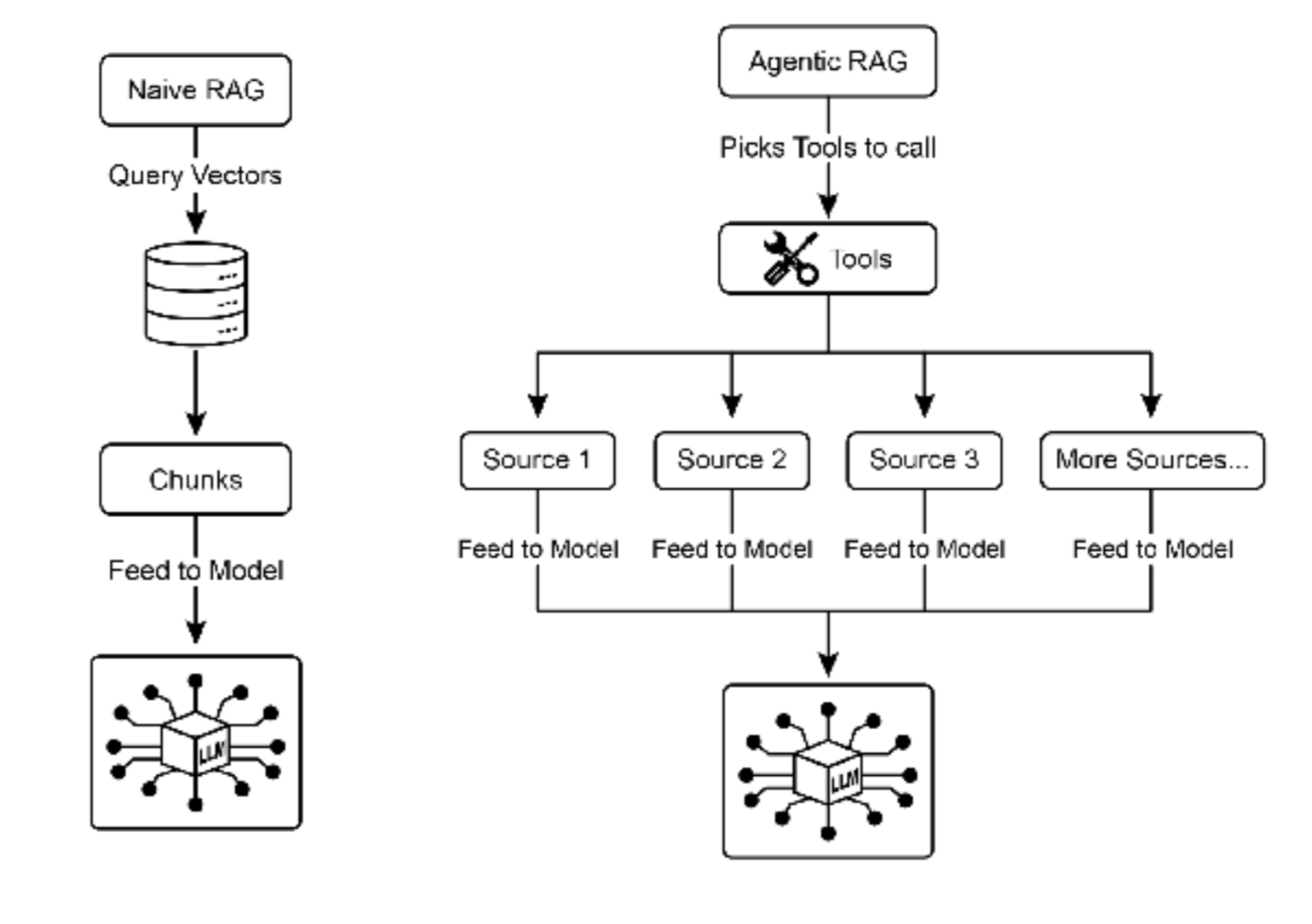
图 2:Agentic RAG 引入了一个推理 agent,它主动评估、协调和精炼检索的信息,以确保更准确和可信的 最终响应。
其次,agent 擅长协调知识冲突。想象一位金融分析师问:"Alpha 项目的第一季度预算是多少?"系统检 索到两个文档:一个初始提案说明预算为 50,000 欧元,一个最终的财务报告列出为 65,000 欧元。Agentic RAG 会识别这种矛盾,将财务报告优先作为更可靠的来源,并向 LLM 提供经过验证的数字,确保最终答案 基于最准确的数据。
第三,agent 可以执行多步推理来综合复杂答案。如果用户问:"我们产品的功能和定价与竞争对手 X 相比 如何?"agent 会将此分解为单独的子查询。它会为自己产品的功能、定价、竞争对手 X 的功能和竞争对手 X 的定价启动不同的搜索。在收集这些单独的信息片段后,agent 会将它们综合成结构化的比较上下文,然后 再将其提供给 LLM,从而实现简单检索无法产生的全面响应。
第四,agent 可以识别知识差距并使用外部工具。假设用户问:"市场对我们昨天推出的新产品的即时反应 如何?"agent 搜索每周更新的内部知识库,没有找到相关信息。识别到这个差距,它可以激活一个工具------ 例如实时网络搜索 API------来查找最近的新闻文章和社交媒体情绪。然后 agent 使用这些新收集的外部信息 来提供最新的答案,克服其静态内部数据库的限制。
Agentic RAG 的挑战:虽然功能强大,但 agentic 层引入了其自身的一系列挑战。主要缺点是复杂性和成本 的显著增加。设计、实施和维护 agent 的决策逻辑和工具集成需要大量的工程工作,并增加了计算费用。这 种复杂性也可能导致延迟增加,因为 agent 的反思、工具使用和多步推理循环比标准的直接检索过程需要更 多时间。此外,agent 本身可能成为新的错误来源;有缺陷的推理过程可能导致它陷入无用的循环,误解任 务,或不当丢弃相关信息,最终降低最终响应的质量。
总结: Agentic RAG 代表了标准检索模式的复杂演进,将其从被动的数据管道转变为主动 的、解决问题的框架。通过嵌入一个可以评估来源、协调冲突、分解复杂问题和使用外部 工具的推理层,agent 显著提高了生成答案的可靠性和深度。这一进步使 AI 更加可信和有 能力,尽管它带来了必须仔细管理的系统复杂性、延迟和成本方面的重要权衡。
实际应用和用例
RAG(检索增强生成)技术正驱动着大型语言模型(LLM)在各行各业的深度应用转型,使其从通用对话工具演变为可接入专属知识的智能系统,从而大幅提升了响应的准确性与情境贴合度。
其核心价值在于,通过让LLM实时"查阅"外部知识源,它已广泛应用于以下关键场景:
| 应用领域 | RAG 的核心作用 | 带来的直接价值 |
|---|---|---|
| 企业内部知识助手 | 连接企业内部的HR政策、技术手册、产品文档等非结构化数据,构建可问答的智能知识库。 | 员工能快速获取准确的公司内部信息,打破信息孤岛,提升运营与决策效率。 |
| 智能客户支持 | 基于最新的产品手册、FAQ和支持历史记录,自动生成精准、一致的答复。 | 大幅提升客服效率与质量,降低人工处理常规问题的负担,确保信息一致性。 |
| 个性化推荐引擎 | 依据用户历史行为与偏好进行语义匹配,从海量内容中检索并推荐最相关的文章、产品或服务。 | 超越传统关键词匹配,提供更智能、更贴近用户真实意图的个性化体验。 |
| 实时信息整合与摘要 | 接入新闻流、市场报告等实时数据源,为查询提供基于最新事实的摘要与分析。 | 使LLM能够突破训练数据的时间限制,提供有时效性的洞察,辅助动态决策。 |
通过将外部知识库与LLM的生成能力相结合,RAG从根本上拓展了AI的应用边界------使其从一个优秀的"对话者",转变为一个能够处理、整合并活化知识的"生产力工具",从而释放出更大的实用价值。
概览
是什么
LLM 在文本生成方面具有令人印象深刻的能力,但其知识从根本上受到训练数据的限制。这些知 识是静态的,意味着它不包括实时信息或私有的、特定领域的数据。因此,LLM 的响应可能过时、不准确或 缺乏专业任务所需的特定上下文。这一局限性限制了它们在需要当前和事实答案的应用中的可靠性。
为什么
检索增强生成(RAG)模式通过将 LLM 连接到外部知识源提供了标准化的解决方案。当收到查询时,系统首先从指定的知识库中检索相关信息片段。然后将这些片段附加到原始提示中,用及时和特定的上下文 丰富它。最后,这个增强的提示被发送到 LLM,使其能够生成准确、可验证且基于外部数据的响应。这个过 程有效地将 LLM 从闭卷推理者转变为开卷推理者,显著增强其实用性和可信度。
经验法则
当您需要 LLM 基于特定的、最新的或专有信息(不属于其原始训练数据)回答问题或生成内容 时,使用此模式。它非常适合在内部文档上构建问答系统、客户支持机器人,以及需要可验证的、基于事实 的响应和引用的应用程序。
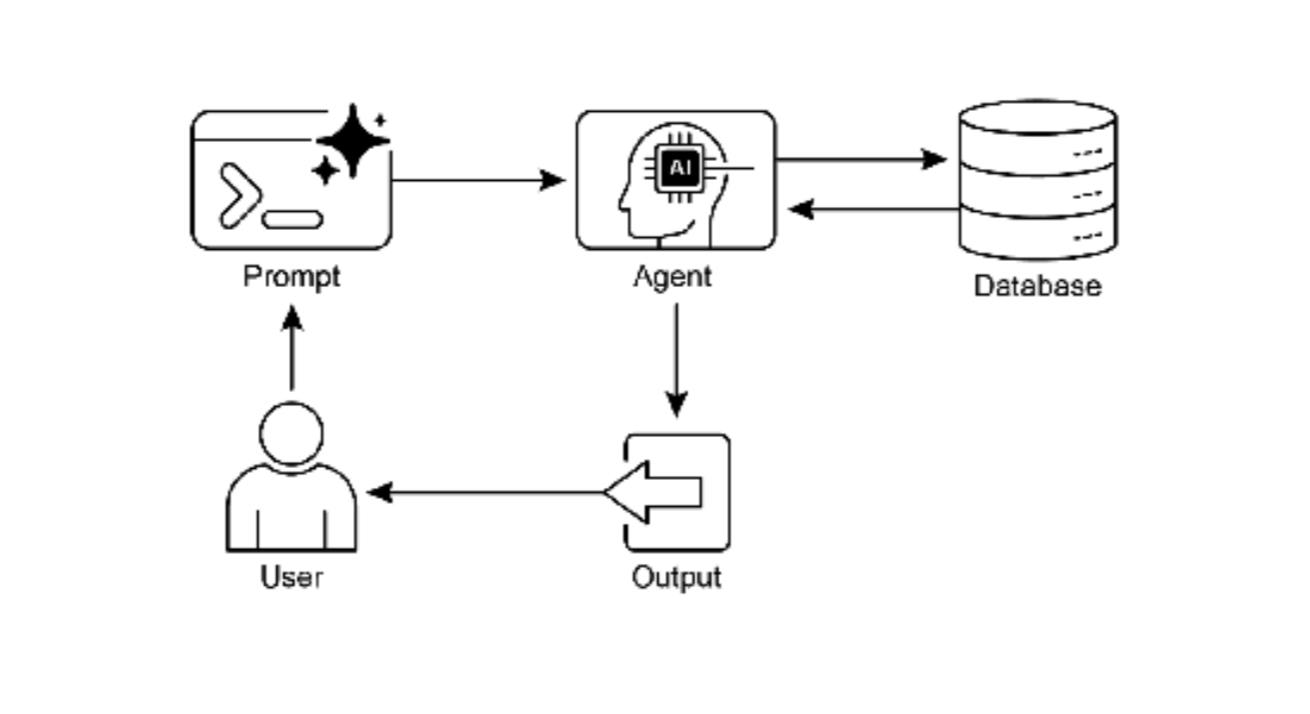
图 2:知识检索模式:AI agent 从结构化数据库查询和检索信息
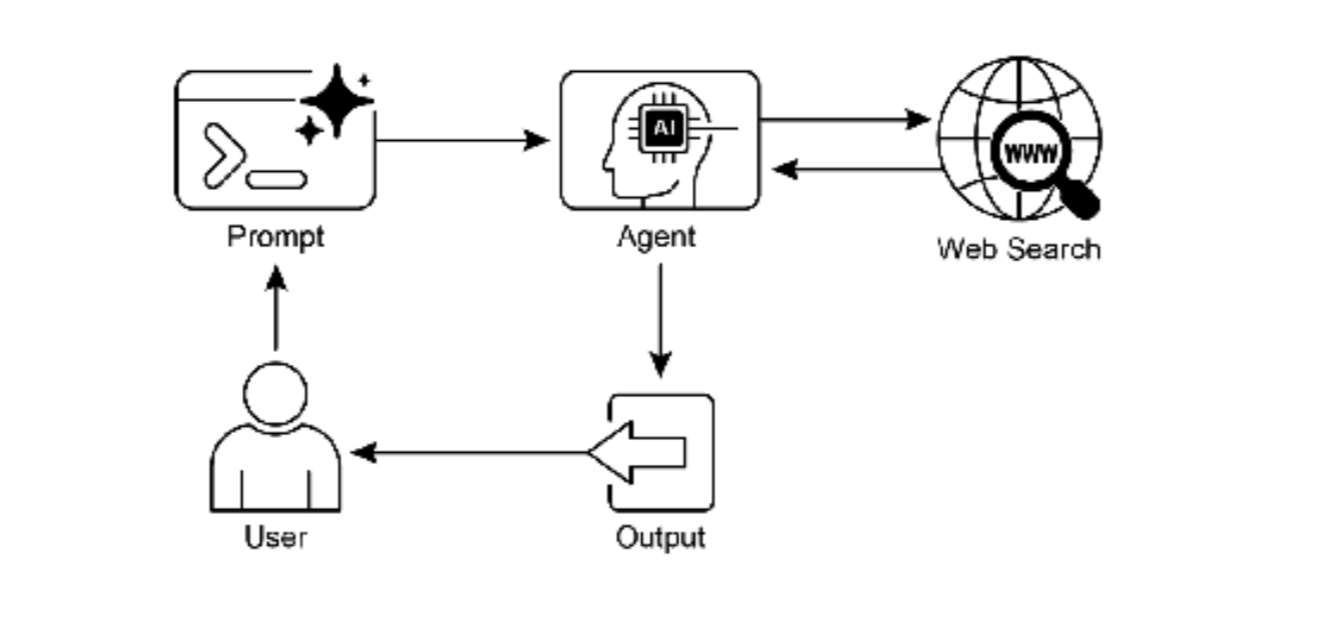
图 3:知识检索模式:AI agent 响应用户查询,从公共互联网查找和综合信息。
关键要点
-
・ 知识检索(RAG)通过允许LLM访问外部的、最新的和特定的信息来增强它们。
-
・ 该过程涉及检索(在知识库中搜索相关片段)和增强(将这些片段添加到LLM的提示中)。
-
・ RAG帮助LLM克服过时训练数据等局限,减少"幻觉",并实现特定领域知识集成。
-
・ RAG允许可归因的答案,因为LLM的响应基于检索的来源。
-
・ GraphRAG 利用知识图谱来理解不同信息片段之间的关系,允许它回答需要从多个来源综合数据的复
杂问题。
-
・ Agentic RAG 超越了简单的信息检索,使用智能 agent 主动推理、验证和精炼外部知识,确保更准确
和可靠的答案。
-
・ 实际应用涵盖企业搜索、客户支持、法律研究和个性化推荐。
用例代码示例
我们将使用LangChain4j中实现一个简单的RAG系统,展示如何构建一个能够从外部知识库检索信息并生成答案的AI应用。
由于RAG系统涉及多个组件,我们将分步骤构建:
-
1、文档加载与分割:从外部源加载文档,并将它们分割成小块以便于检索。
-
2、嵌入与向量存储:将文档块转换为嵌入向量,并存储到向量数据库中。
-
3、检索:根据用户查询,从向量数据库中检索最相关的文档块。
-
4、增强生成:将检索到的文档块和原始查询组合成增强提示,然后由LLM生成答案。
我们将使用一个简单的示例,假设我们有一个包含一些文本文件的目录,我们将基于这些文件构建一个问答系统。
注意:为了运行此示例,你需要有可用的LLM模型(例如OpenAI的API)和嵌入模型(同样可以使用OpenAI的嵌入模型)。
由于LangChain4j仍在快速发展中,以下代码基于0.28.0版本,并假设使用OpenAI的模型。
步骤:
-
1、添加依赖(在pom.xml或build.gradle中)
-
2、准备文档(例如,将文档放在resources/documents目录下)
-
3、编写代码
由于代码较长,我们将分部分说明。
以下是基于LangChain4j框架的RAG(检索增强生成)模式实现示例,展示了在不同行业场景中的应用:
1. RAG基础框架实现
java
import dev.langchain4j.data.document.Document;
import dev.langchain4j.data.document.DocumentSplitter;
import dev.langchain4j.data.document.parser.TextDocumentParser;
import dev.langchain4j.data.document.splitter.DocumentSplitters;
import dev.langchain4j.data.embedding.Embedding;
import dev.langchain4j.data.message.AiMessage;
import dev.langchain4j.data.segment.TextSegment;
import dev.langchain4j.model.chat.ChatLanguageModel;
import dev.langchain4j.model.embedding.EmbeddingModel;
import dev.langchain4j.model.openai.OpenAiChatModel;
import dev.langchain4j.model.openai.OpenAiEmbeddingModel;
import dev.langchain4j.retriever.EmbeddingStoreRetriever;
import dev.langchain4j.store.embedding.EmbeddingStore;
import dev.langchain4j.store.embedding.EmbeddingStoreIngestor;
import dev.langchain4j.store.embedding.inmemory.InMemoryEmbeddingStore;
import lombok.extern.slf4j.Slf4j;

import java.nio.file.Path;
import java.nio.file.Paths;
import java.util.List;

@Slf4j
public class RAGBaseFramework {

    private final EmbeddingModel embeddingModel;
    private final EmbeddingStore<TextSegment> embeddingStore;
    private final ChatLanguageModel chatModel;
    private final EmbeddingStoreRetriever retriever;

    public RAGBaseFramework() {
        // 初始化嵌入模型
        this.embeddingModel = OpenAiEmbeddingModel.builder()
            .apiKey(System.getenv("OPENAI_API_KEY"))
            .modelName("text-embedding-ada-002")
            .build();

        // 初始化向量存储(使用内存存储,生产环境可使用Pinecone、Weaviate等)
        this.embeddingStore = new InMemoryEmbeddingStore<>();

        // 初始化检索器
        this.retriever = EmbeddingStoreRetriever.from(embeddingStore, embeddingModel);

        // 初始化对话模型
        this.chatModel = OpenAiChatModel.builder()
            .apiKey(System.getenv("OPENAI_API_KEY"))
            .modelName("gpt-4")
            .temperature(0.1)
            .maxTokens(1000)
            .build();
    }

    /**
     * 向知识库添加文档
     */
    public void ingestDocument(String filePath) {
        try {
            Document document = DocumentLoader.loadDocument(
                Paths.get(filePath),
                new TextDocumentParser()
            );

            // 文档分割
            DocumentSplitter splitter = DocumentSplitters.recursive(
                500, // 块大小
                100  // 重叠大小
            );

            // 嵌入并存储
            EmbeddingStoreIngestor ingestor = EmbeddingStoreIngestor.builder()
                .documentSplitter(splitter)
                .embeddingModel(embeddingModel)
                .embeddingStore(embeddingStore)
                .build();

            ingestor.ingest(document);
            log.info("文档已成功添加到知识库: {}", filePath);

        } catch (Exception e) {
            log.error("添加文档失败: {}", filePath, e);
            throw new RuntimeException("文档处理失败", e);
        }
    }

    /**
     * 批量添加文档
     */
    public void ingestDocuments(List<String> filePaths) {
        for (String filePath : filePaths) {
            ingestDocument(filePath);
        }
    }

    /**
     * 基础RAG查询
     */
    public RAGResponse query(String question) {
        // 步骤1: 检索相关文档片段
        List<TextSegment> relevantSegments = retriever.findRelevant(question, 5);

        // 步骤2: 构建增强提示
        String context = buildContextFromSegments(relevantSegments);
        String enhancedPrompt = buildEnhancedPrompt(question, context);

        // 步骤3: 生成回答
        String answer = chatModel.generate(enhancedPrompt);

        // 步骤4: 构建响应
        return RAGResponse.builder()
            .answer(answer)
            .sourceSegments(relevantSegments)
            .context(context)
            .build();
    }

    /**
     * 构建检索上下文
     */
    private String buildContextFromSegments(List<TextSegment> segments) {
        StringBuilder contextBuilder = new StringBuilder();
        contextBuilder.append("基于以下参考资料:\n\n");

        for (int i = 0; i < segments.size(); i++) {
            TextSegment segment = segments.get(i);
            contextBuilder.append(String.format("[参考%d]: %s\n\n", i + 1, segment.text()));
        }

        return contextBuilder.toString();
    }

    /**
     * 构建增强提示
     */
    private String buildEnhancedPrompt(String question, String context) {
        return String.format(
            "%s\n\n" +
            "请基于以上参考资料回答问题。如果参考资料中未包含相关信息,请明确说明。\n" +
            "问题:%s\n" +
            "回答:",
            context,
            question
        );
    }

    /**
     * RAG响应类
     */
    @Data
    @Builder
    public static class RAGResponse {
        private String answer;
        private List<TextSegment> sourceSegments;
        private String context;
        private List<String> citations;
    }
}
2. 企业搜索和问答系统
java
import dev.langchain4j.data.document.Metadata;
import dev.langchain4j.model.output.Response;
import dev.langchain4j.service.AiServices;
import dev.langchain4j.service.SystemMessage;
import dev.langchain4j.service.UserMessage;
import lombok.extern.slf4j.Slf4j;

import java.util.*;

@Slf4j
public class EnterpriseKnowledgeAssistant {

    interface KnowledgeAssistant {
        @SystemMessage("""
            你是一个企业知识助手,专门回答员工关于公司政策、流程和文档的问题。
            请基于提供的参考资料回答问题,并注明信息来源。
            如果参考资料中没有相关信息,请如实告知,并提供建议的咨询渠道。
            """)
        @UserMessage("{{question}}")
        String answerQuestion(String question);
    }

    private final RAGBaseFramework ragFramework;
    private final KnowledgeAssistant assistant;
    private final Map<String, DocumentMetadata> documentMetadata;

    public EnterpriseKnowledgeAssistant() {
        this.ragFramework = new RAGBaseFramework();
        this.documentMetadata = new HashMap<>();

        // 初始化AI服务
        this.assistant = AiServices.builder(KnowledgeAssistant.class)
            .chatLanguageModel(OpenAiChatModel.builder()
                .apiKey(System.getenv("OPENAI_API_KEY"))
                .build())
            .build();
    }

    /**
     * 加载企业知识库
     */
    public void loadEnterpriseKnowledgeBase() {
        log.info("开始加载企业知识库...");

        // 模拟企业文档
        List<String> documentPaths = Arrays.asList(
            "knowledge/hr-policies.md",
            "knowledge/technical-manuals.md",
            "knowledge/product-specs.md",
            "knowledge/company-handbook.md",
            "knowledge/security-guidelines.md"
        );

        // 为每个文档添加元数据
        documentMetadata.put("hr-policies.md",
            DocumentMetadata.builder()
                .documentType("HR政策")
                .department("人力资源部")
                .effectiveDate("2024-01-01")
                .build()
        );

        // 加载文档到RAG系统
        for (String path : documentPaths) {
            try {
                ragFramework.ingestDocument(path);
                log.info("已加载文档: {}", path);
            } catch (Exception e) {
                log.warn("加载文档失败: {}", path, e);
            }
        }

        log.info("企业知识库加载完成,共加载 {} 个文档", documentPaths.size());
    }

    /**
     * 员工问答服务
     */
    public EmployeeAnswer answerEmployeeQuestion(String employeeId, String question) {
        log.info("员工 {} 提问: {}", employeeId, question);

        // 步骤1: 使用RAG框架查询
        RAGBaseFramework.RAGResponse ragResponse = ragFramework.query(question);

        // 步骤2: 使用AI助手生成回答
        String promptWithContext = buildPromptWithCitations(question, ragResponse.getContext());
        String aiAnswer = assistant.answerQuestion(promptWithContext);

        // 步骤3: 提取引用来源
        List<String> citations = extractCitations(ragResponse.getSourceSegments());

        // 步骤4: 记录查询
        QueryLog logEntry = QueryLog.builder()
            .employeeId(employeeId)
            .question(question)
            .answer(aiAnswer)
            .timestamp(new Date())
            .citations(citations)
            .build();

        queryLogRepository.save(logEntry);

        return EmployeeAnswer.builder()
            .answer(aiAnswer)
            .citations(citations)
            .confidence(calculateConfidence(ragResponse.getSourceSegments()))
            .timestamp(new Date())
            .build();
    }

    /**
     * 多轮对话问答
     */
    public ConversationResponse handleConversation(ConversationSession session, String currentQuestion) {
        // 结合对话历史进行检索
        String enrichedQuery = enrichQueryWithHistory(currentQuestion, session.getHistory());

        // 执行RAG查询
        RAGBaseFramework.RAGResponse response = ragFramework.query(enrichedQuery);

        // 生成回答
        String answer = generateAnswerWithHistory(response, session);

        // 更新对话历史
        session.addMessage(new ConversationMessage("user", currentQuestion));
        session.addMessage(new ConversationMessage("assistant", answer));

        return ConversationResponse.builder()
            .answer(answer)
            .sourceSegments(response.getSourceSegments())
            .sessionId(session.getSessionId())
            .build();
    }

    /**
     * 文档更新监控
     */
    @Scheduled(fixedDelay = 3600000) // 每小时检查一次
    public void monitorDocumentUpdates() {
        log.info("检查文档更新...");

        // 检查文档版本或最后修改时间
        documentMetadata.forEach((docId, metadata) -> {
            if (isDocumentUpdated(docId, metadata.getLastChecked())) {
                log.info("检测到文档更新: {}", docId);
                updateDocumentInRAG(docId);
                metadata.setLastChecked(new Date());
            }
        });
    }

    private String buildPromptWithCitations(String question, String context) {
        return String.format(
            "参考资料:\n%s\n\n" +
            "问题: %s\n\n" +
            "请基于参考资料回答问题。如果参考资料中没有相关信息,请说'根据现有资料,没有找到相关信息。'。\n" +
            "在回答中,请注明引用来源,例如:[参考1],[参考2]。",
            context,
            question
        );
    }

    private List<String> extractCitations(List<TextSegment> segments) {
        List<String> citations = new ArrayList<>();

        for (int i = 0; i < segments.size(); i++) {
            TextSegment segment = segments.get(i);
            Metadata metadata = segment.metadata();
            String source = metadata.getString("source");
            String citation = String.format("[参考%d] 来源: %s", i + 1, source);
            citations.add(citation);
        }

        return citations;
    }

    // 数据类
    @Data
    @Builder
    public static class EmployeeAnswer {
        private String answer;
        private List<String> citations;
        private double confidence;
        private Date timestamp;
        private String suggestedContact; // 建议的联系人或部门
    }

    @Data
    @Builder
    public static class DocumentMetadata {
        private String documentType;
        private String department;
        private String effectiveDate;
        private Date lastChecked;
        private String version;
    }
}
3. 客户支持RAG系统
java
import dev.langchain4j.data.document.DocumentLoader;
import dev.langchain4j.data.document.DocumentSource;
import dev.langchain4j.data.document.UrlDocumentSource;
import dev.langchain4j.model.chat.ChatLanguageModel;
import dev.langchain4j.retriever.Retriever;
import dev.langchain4j.service.AiServices;
import dev.langchain4j.service.MemoryId;
import dev.langchain4j.service.SystemMessage;
import lombok.extern.slf4j.Slf4j;

import java.net.URL;
import java.util.*;

@Slf4j
public class CustomerSupportRAGSystem {

    interface SupportChatBot {
        @SystemMessage("""
            你是一个专业的客户支持助手。请基于产品文档和支持历史回答问题。
            回答时要准确、专业、有帮助。
            对于不确定的问题,建议联系人工客服。
            请注明信息出处,方便用户核实。
            """)
        String answerCustomerQuery(@MemoryId String customerId, String question);
    }

    private final RAGBaseFramework ragFramework;
    private final SupportChatBot supportBot;
    private final SupportTicketService ticketService;

    // 支持的知识源
    private final List<KnowledgeSource> knowledgeSources = Arrays.asList(
        new KnowledgeSource("产品手册", "knowledge/product-manual.pdf"),
        new KnowledgeSource("FAQ", "knowledge/faq.md"),
        new KnowledgeSource("故障排除指南", "knowledge/troubleshooting.md"),
        new KnowledgeSource("保修政策", "knowledge/warranty-policy.md")
    );

    public CustomerSupportRAGSystem() {
        this.ragFramework = new RAGBaseFramework();
        this.ticketService = new SupportTicketService();

        // 加载知识源
        loadKnowledgeSources();

        // 初始化支持机器人
        this.supportBot = AiServices.builder(SupportChatBot.class)
            .chatLanguageModel(OpenAiChatModel.builder()
                .apiKey(System.getenv("OPENAI_API_KEY"))
                .build())
            .build();
    }

    /**
     * 加载所有知识源
     */
    private void loadKnowledgeSources() {
        log.info("加载客户支持知识库...");

        for (KnowledgeSource source : knowledgeSources) {
            try {
                ragFramework.ingestDocument(source.getPath());
                log.info("已加载知识源: {}", source.getName());
            } catch (Exception e) {
                log.error("加载知识源失败: {}", source.getName(), e);
            }
        }
    }

    /**
     * 处理客户查询
     */
    public SupportResponse handleCustomerQuery(String customerId, String query) {
        log.info("处理客户 {} 的查询: {}", customerId, query);

        // 分析查询类型
        QueryType queryType = analyzeQueryType(query);

        // 根据查询类型优化检索
        String optimizedQuery = optimizeQueryForType(query, queryType);

        // 执行RAG检索
        RAGBaseFramework.RAGResponse ragResponse = ragFramework.query(optimizedQuery);

        // 获取AI生成的回答
        String aiResponse = supportBot.answerCustomerQuery(customerId, buildPrompt(query, ragResponse.getContext()));

        // 检查是否需要人工介入
        boolean needsHuman = checkIfNeedsHuman(aiResponse, ragResponse.getSourceSegments());

        if (needsHuman) {
            log.info("查询需要人工介入,创建支持工单");
            SupportTicket ticket = createSupportTicket(customerId, query, aiResponse);

            return SupportResponse.builder()
                .answer(aiResponse + "\n\n我已为您创建了支持工单 #" + ticket.getId() + ",我们的客服代表将很快联系您。")
                .needsHumanIntervention(true)
                .ticketId(ticket.getId())
                .confidence(0.3) // 低置信度
                .sources(extractSources(ragResponse.getSourceSegments()))
                .build();
        } else {
            // 记录成功回答
            recordSuccessfulResponse(customerId, query, aiResponse);

            return SupportResponse.builder()
                .answer(aiResponse)
                .needsHumanIntervention(false)
                .confidence(0.9) // 高置信度
                .sources(extractSources(ragResponse.getSourceSegments()))
                .build();
        }
    }

    /**
     * 批量处理常见问题
     */
    public List<FAQEntry> generateFAQFromKnowledgeBase() {
        List<FAQEntry> faqEntries = new ArrayList<>();

        // 从知识库中提取常见问题模式
        Map<String, String> qaPairs = extractQAPairsFromDocuments();

        for (Map.Entry<String, String> entry : qaPairs.entrySet()) {
            FAQEntry faq = FAQEntry.builder()
                .question(entry.getKey())
                .answer(entry.getValue())
                .confidence(0.95)
                .sourceDocument("自动生成")
                .build();

            faqEntries.add(faq);
        }

        return faqEntries;
    }

    /**
     * 实时知识库更新
     */
    public void updateKnowledgeBaseFromTickets(List<SupportTicket> resolvedTickets) {
        log.info("从已解决的工单更新知识库...");

        for (SupportTicket ticket : resolvedTickets) {
            if (ticket.isResolved() && ticket.getSolution() != null) {
                // 创建新文档片段
                String newKnowledge = String.format(
                    "问题: %s\n解决方案: %s\n类别: %s",
                    ticket.getDescription(),
                    ticket.getSolution(),
                    ticket.getCategory()
                );

                // 添加到知识库
                addDocumentFragment(newKnowledge, "support-ticket-" + ticket.getId());
            }
        }
    }

    private QueryType analyzeQueryType(String query) {
        // 简单的关键词分析
        if (query.toLowerCase().contains("how to") || query.contains("步骤")) {
            return QueryType.TUTORIAL;
        } else if (query.contains("error") || query.contains("问题") || query.contains("故障")) {
            return QueryType.TROUBLESHOOTING;
        } else if (query.contains("price") || query.contains("价格") || query.contains("cost")) {
            return QueryType.PRICING;
        } else if (query.contains("warranty") || query.contains("保修")) {
            return QueryType.WARRANTY;
        } else {
            return QueryType.GENERAL;
        }
    }

    private String optimizeQueryForType(String query, QueryType type) {
        switch (type) {
            case TROUBLESHOOTING:
                return query + " 故障排除 解决方案";
            case TUTORIAL:
                return query + " 教程 步骤指南";
            case PRICING:
                return query + " 价格 费用 成本";
            case WARRANTY:
                return query + " 保修 政策 条款";
            default:
                return query;
        }
    }

    private boolean checkIfNeedsHuman(String response, List<TextSegment> sources) {
        // 判断逻辑
        if (sources.isEmpty()) {
            return true; // 没有找到相关信息
        }

        if (response.contains("不确定") || response.contains("请联系人工客服")) {
            return true;
        }

        // 检查置信度
        double confidence = calculateResponseConfidence(response, sources);
        return confidence < 0.7;
    }

    private String buildPrompt(String query, String context) {
        return String.format(
            "上下文信息:\n%s\n\n" +
            "客户问题: %s\n\n" +
            "请基于上下文信息回答问题。如果信息不足,请如实告知并建议联系人工客服。",
            context,
            query
        );
    }

    // 数据类
    @Data
    @Builder
    public static class SupportResponse {
        private String answer;
        private boolean needsHumanIntervention;
        private String ticketId;
        private double confidence;
        private List<String> sources;
        private List<String> suggestedActions;
    }

    @Data
    @Builder
    public static class FAQEntry {
        private String question;
        private String answer;
        private double confidence;
        private String sourceDocument;
        private Date lastUpdated;
    }

    enum QueryType {
        GENERAL, TROUBLESHOOTING, TUTORIAL, PRICING, WARRANTY
    }
}
4. 个性化内容推荐引擎
java
import dev.langchain4j.data.embedding.Embedding;
import dev.langchain4j.model.embedding.EmbeddingModel;
import dev.langchain4j.store.embedding.EmbeddingMatch;
import dev.langchain4j.store.embedding.EmbeddingStore;
import lombok.extern.slf4j.Slf4j;

import java.util.*;
import java.util.stream.Collectors;

@Slf4j
public class PersonalizedRecommendationEngine {

    private final EmbeddingModel embeddingModel;
    private final EmbeddingStore<ContentItem> contentStore;
    private final UserProfileService userProfileService;

    public PersonalizedRecommendationEngine() {
        this.embeddingModel = OpenAiEmbeddingModel.builder()
            .apiKey(System.getenv("OPENAI_API_KEY"))
            .modelName("text-embedding-ada-002")
            .build();

        this.contentStore = new InMemoryEmbeddingStore<>();
        this.userProfileService = new UserProfileService();

        // 初始化内容库
        initializeContentLibrary();
    }

    /**
     * 为用户生成个性化推荐
     */
    public RecommendationResult recommendForUser(String userId, int maxRecommendations) {
        // 获取用户画像
        UserProfile profile = userProfileService.getUserProfile(userId);

        // 构建查询向量
        String queryText = buildQueryFromProfile(profile);
        Embedding queryEmbedding = embeddingModel.embed(queryText).content();

        // 检索相关内容
        List<EmbeddingMatch<ContentItem>> matches = contentStore.findRelevant(
            queryEmbedding,
            maxRecommendations * 2 // 检索更多,然后过滤
        );

        // 过滤和排序
        List<ContentItem> recommendations = filterAndRankRecommendations(
            matches, profile, maxRecommendations
        );

        // 记录推荐
        recordRecommendation(userId, recommendations);

        return RecommendationResult.builder()
            .userId(userId)
            .recommendations(recommendations)
            .generatedAt(new Date())
            .explanation(generateExplanation(profile, recommendations))
            .build();
    }

    /**
     * 基于实时交互更新推荐
     */
    public void updateRecommendationsBasedOnInteraction(String userId,
                                                        String contentId,
                                                        InteractionType interaction) {
        log.info("基于用户交互更新推荐: 用户={}, 内容={}, 交互类型={}",
            userId, contentId, interaction);

        // 更新用户画像
        userProfileService.updateUserProfile(userId, contentId, interaction);

        // 如果用户喜欢某个内容,寻找类似内容
        if (interaction == InteractionType.LIKE || interaction == InteractionType.VIEW) {
            ContentItem item = contentRepository.findById(contentId);
            if (item != null) {
                List<ContentItem> similarItems = findSimilarItems(item, 5);
                updateRecommendationCache(userId, similarItems);
            }
        }
    }

    /**
     * 混合推荐(结合多种策略)
     */
    public List<ContentItem> hybridRecommendation(String userId) {
        List<ContentItem> recommendations = new ArrayList<>();

        // 1. 基于内容的推荐
        recommendations.addAll(contentBasedRecommendation(userId));

        // 2. 协同过滤推荐
        recommendations.addAll(collaborativeFilteringRecommendation(userId));

        // 3. 热门内容推荐
        recommendations.addAll(popularContentRecommendation());

        // 去重和排序
        return deduplicateAndRank(recommendations, userId);
    }

    /**
     * 基于RAG的语义搜索推荐
     */
    public List<ContentItem> semanticSearchRecommendation(String query, String userId) {
        // 将查询转换为向量
        Embedding queryEmbedding = embeddingModel.embed(query).content();

        // 在内容库中搜索
        List<EmbeddingMatch<ContentItem>> matches = contentStore.findRelevant(
            queryEmbedding,
            10
        );

        // 结合用户偏好过滤
        UserProfile profile = userProfileService.getUserProfile(userId);

        return matches.stream()
            .map(EmbeddingMatch::embedded)
            .filter(item -> matchesUserPreferences(item, profile))
            .limit(5)
            .collect(Collectors.toList());
    }

    private void initializeContentLibrary() {
        log.info("初始化内容库...");

        // 从数据库或其他源加载内容
        List<ContentItem> allContent = contentRepository.findAll();

        for (ContentItem item : allContent) {
            try {
                // 为内容生成嵌入向量
                String textForEmbedding = buildTextForEmbedding(item);
                Embedding embedding = embeddingModel.embed(textForEmbedding).content();

                // 存储到向量数据库
                contentStore.add(embedding, item);

            } catch (Exception e) {
                log.error("处理内容失败: {}", item.getId(), e);
            }
        }

        log.info("内容库初始化完成,共加载 {} 个内容项", allContent.size());
    }

    private String buildQueryFromProfile(UserProfile profile) {
        StringBuilder query = new StringBuilder();

        // 基于用户兴趣
        query.append("用户感兴趣的主题: ");
        query.append(String.join(", ", profile.getInterests()));
        query.append("\n");

        // 基于浏览历史
        if (!profile.getBrowsingHistory().isEmpty()) {
            query.append("最近浏览的内容: ");
            profile.getBrowsingHistory().stream()
                .limit(3)
                .forEach(content -> query.append(content.getTitle()).append("; "));
            query.append("\n");
        }

        // 基于人口统计信息
        query.append("用户属性: ");
        query.append(profile.getDemographics().toString());

        return query.toString();
    }

    private List<ContentItem> filterAndRankRecommendations(List<EmbeddingMatch<ContentItem>> matches,
                                                           UserProfile profile,
                                                           int maxItems) {
        return matches.stream()
            .map(EmbeddingMatch::embedded)
            .filter(item -> !profile.hasConsumed(item.getId())) // 过滤已消费内容
            .filter(item -> matchesUserPreferences(item, profile))
            .sorted((a, b) -> Double.compare(
                calculateRelevanceScore(b, profile),
                calculateRelevanceScore(a, profile)
            ))
            .limit(maxItems)
            .collect(Collectors.toList());
    }

    private double calculateRelevanceScore(ContentItem item, UserProfile profile) {
        double score = 0.0;

        // 1. 语义相似度(来自向量匹配)
        score += item.getEmbeddingSimilarity() * 0.6;

        // 2. 兴趣匹配度
        score += calculateInterestMatch(item, profile) * 0.2;

        // 3. 新鲜度(新内容加分)
        score += calculateFreshnessScore(item) * 0.1;

        // 4. 流行度
        score += calculatePopularityScore(item) * 0.1;

        return score;
    }

    private boolean matchesUserPreferences(ContentItem item, UserProfile profile) {
        // 检查内容是否适合用户
        if (profile.getPreferences().containsKey("exclude_categories")) {
            List<String> excluded = profile.getPreferences().get("exclude_categories");
            if (excluded.contains(item.getCategory())) {
                return false;
            }
        }

        // 检查年龄适宜性
        if (item.getAgeRating() != null && profile.getAge() != null) {
            if (profile.getAge() < item.getAgeRating()) {
                return false;
            }
        }

        return true;
    }

    // 数据类
    @Data
    @Builder
    public static class ContentItem {
        private String id;
        private String title;
        private String description;
        private String content;
        private String category;
        private List<String> tags;
        private Date publishDate;
        private Integer ageRating;
        private Double popularityScore;
        private Double embeddingSimilarity; // 与查询的相似度
    }

    @Data
    @Builder
    public static class RecommendationResult {
        private String userId;
        private List<ContentItem> recommendations;
        private Date generatedAt;
        private String explanation;
        private Map<String, Double> relevanceScores;
    }

    enum InteractionType {
        VIEW, LIKE, SHARE, SAVE, PURCHASE, RATE
    }
}
5. 实时新闻摘要系统
java
import dev.langchain4j.data.document.Document;
import dev.langchain4j.data.document.DocumentSource;
import dev.langchain4j.data.document.parser.TextDocumentParser;
import dev.langchain4j.data.segment.TextSegment;
import dev.langchain4j.model.chat.ChatLanguageModel;
import dev.langchain4j.model.openai.OpenAiChatModel;
import dev.langchain4j.retriever.Retriever;
import dev.langchain4j.service.AiServices;
import dev.langchain4j.service.SystemMessage;
import dev.langchain4j.service.UserMessage;
import lombok.extern.slf4j.Slf4j;

import java.io.IOException;
import java.net.URL;
import java.time.LocalDateTime;
import java.util.*;
import java.util.concurrent.*;

@Slf4j
public class NewsSummarizationSystem {

    interface NewsSummarizer {
        @SystemMessage("""
            你是一个专业的新闻编辑。请基于提供的新闻内容生成简洁、准确的摘要。
            摘要应包含:
            1. 主要事件或发现
            2. 关键事实和数据
            3. 涉及的各方
            4. 时间、地点等关键信息
            5. 事件的意义或影响

            请保持客观中立,避免个人观点。
            最后注明新闻来源。
            """)
        @UserMessage("请摘要以下新闻内容:\n{{newsContent}}")
        String summarizeNews(String newsContent);
    }

    private final RAGBaseFramework ragFramework;
    private final NewsSummarizer summarizer;
    private final NewsFetcher newsFetcher;
    private final ScheduledExecutorService scheduler;

    // 新闻源配置
    private final Map<String, NewsSource> newsSources = new HashMap<>();

    public NewsSummarizationSystem() {
        this.ragFramework = new RAGBaseFramework();
        this.newsFetcher = new NewsFetcher();
        this.scheduler = Executors.newScheduledThreadPool(3);

        // 初始化新闻源
        initializeNewsSources();

        // 初始化摘要模型
        this.summarizer = AiServices.builder(NewsSummarizer.class)
            .chatLanguageModel(OpenAiChatModel.builder()
                .apiKey(System.getenv("OPENAI_API_KEY"))
                .build())
            .build();

        // 启动定期更新任务
        startScheduledUpdates();
    }

    /**
     * 实时新闻摘要查询
     */
    public NewsSummary queryLatestNews(String query, int maxArticles) {
        log.info("查询最新新闻: {}", query);

        // 步骤1: 获取最新新闻
        List<NewsArticle> latestArticles = fetchLatestNews(query, maxArticles * 2);

        // 步骤2: 将新闻添加到RAG知识库(临时)
        for (NewsArticle article : latestArticles) {
            addArticleToTemporaryKnowledge(article);
        }

        // 步骤3: 使用RAG检索相关信息
        RAGBaseFramework.RAGResponse ragResponse = ragFramework.query(query);

        // 步骤4: 生成摘要
        String summary = generateComprehensiveSummary(ragResponse.getSourceSegments(), query);

        // 步骤5: 清理临时知识
        clearTemporaryKnowledge();

        return NewsSummary.builder()
            .query(query)
            .summary(summary)
            .articles(latestArticles.subList(0, Math.min(maxArticles, latestArticles.size())))
            .generatedAt(LocalDateTime.now())
            .sources(extractArticleSources(ragResponse.getSourceSegments()))
            .build();
    }

    /**
     * 主题跟踪和持续更新
     */
    public TopicTracker trackTopic(String topic, String userId) {
        log.info("开始跟踪主题: {}", topic);

        // 创建跟踪任务
        TopicTracker tracker = TopicTracker.builder()
            .topic(topic)
            .userId(userId)
            .startTime(LocalDateTime.now())
            .build();

        // 定期检查更新
        scheduler.scheduleAtFixedRate(() -> {
            checkForTopicUpdates(tracker);
        }, 0, 30, TimeUnit.MINUTES); // 每30分钟检查一次

        return tracker;
    }

    /**
     * 多新闻源对比分析
     */
    public ComparativeAnalysis compareNewsSources(String topic) {
        Map<String, List<NewsArticle>> articlesBySource = new HashMap<>();

        // 从不同新闻源获取报道
        for (NewsSource source : newsSources.values()) {
            if (source.isEnabled()) {
                List<NewsArticle> articles = newsFetcher.fetchFromSource(source, topic, 5);
                articlesBySource.put(source.getName(), articles);
            }
        }

        // 生成对比分析
        return generateComparativeAnalysis(articlesBySource, topic);
    }

    /**
     * 自动生成新闻简报
     */
    public NewsDigest generateDailyDigest(String userId) {
        log.info("为用户 {} 生成每日新闻简报", userId);

        // 获取用户兴趣偏好
        UserPreferences preferences = userPreferenceService.getPreferences(userId);

        // 为每个兴趣主题获取新闻
        Map<String, NewsSummary> summariesByTopic = new HashMap<>();

        for (String interest : preferences.getInterests()) {
            NewsSummary summary = queryLatestNews(interest, 3);
            summariesByTopic.put(interest, summary);
        }

        // 生成简报
        return NewsDigest.builder()
            .userId(userId)
            .date(LocalDateTime.now().toLocalDate())
            .summariesByTopic(summariesByTopic)
            .topStories(identifyTopStories(summariesByTopic))
            .personalizedInsights(generatePersonalizedInsights(userId, summariesByTopic))
            .build();
    }

    private void initializeNewsSources() {
        // 配置新闻源
        newsSources.put("rss-tech", new NewsSource(
            "科技新闻",
            "https://example.com/tech/rss",
            NewsSourceType.RSS
        ));

        newsSources.put("api-news", new NewsSource(
            "综合新闻",
            "https://newsapi.org/v2",
            NewsSourceType.API
        ));

        newsSources.put("web-scrape", new NewsSource(
            "财经新闻",
            "https://finance.example.com",
            NewsSourceType.WEB_SCRAPE
        ));
    }

    private void startScheduledUpdates() {
        // 每15分钟更新一次新闻库
        scheduler.scheduleAtFixedRate(() -> {
            try {
                updateNewsKnowledgeBase();
            } catch (Exception e) {
                log.error("更新新闻库失败", e);
            }
        }, 0, 15, TimeUnit.MINUTES);
    }

    private List<NewsArticle> fetchLatestNews(String query, int count) {
        List<NewsArticle> allArticles = new ArrayList<>();

        // 从各新闻源并行获取
        List<CompletableFuture<List<NewsArticle>>> futures = new ArrayList<>();

        for (NewsSource source : newsSources.values()) {
            if (source.isEnabled()) {
                CompletableFuture<List<NewsArticle>> future = CompletableFuture.supplyAsync(
                    () -> newsFetcher.fetchFromSource(source, query, count / newsSources.size())
                );
                futures.add(future);
            }
        }

        // 等待所有结果
        CompletableFuture.allOf(futures.toArray(new CompletableFuture[0])).join();

        for (CompletableFuture<List<NewsArticle>> future : futures) {
            try {
                allArticles.addAll(future.get());
            } catch (Exception e) {
                log.error("获取新闻失败", e);
            }
        }

        // 按时间排序
        allArticles.sort((a, b) -> b.getPublishDate().compareTo(a.getPublishDate()));

        return allArticles.stream()
            .limit(count)
            .collect(Collectors.toList());
    }

    private void addArticleToTemporaryKnowledge(NewsArticle article) {
        // 创建文档
        Document document = Document.from(
            String.format("标题: %s\n发布时间: %s\n内容: %s\n来源: %s",
                article.getTitle(),
                article.getPublishDate(),
                article.getContent(),
                article.getSource()),
            Metadata.metadata()
                .add("source", article.getSource())
                .add("publish_date", article.getPublishDate().toString())
                .add("category", article.getCategory())
        );

        // 添加到RAG系统(临时存储)
        ragFramework.ingestDocument(document);
    }

    private String generateComprehensiveSummary(List<TextSegment> segments, String query) {
        // 合并相关片段
        StringBuilder allContent = new StringBuilder();
        allContent.append("以下是与查询'").append(query).append("'相关的最新新闻报道:\n\n");

        for (int i = 0; i < segments.size(); i++) {
            TextSegment segment = segments.get(i);
            allContent.append(String.format("[报道%d]:\n%s\n\n", i + 1, segment.text()));
        }

        // 使用AI生成摘要
        return summarizer.summarizeNews(allContent.toString());
    }

    // 数据类
    @Data
    @Builder
    public static class NewsSummary {
        private String query;
        private String summary;
        private List<NewsArticle> articles;
        private LocalDateTime generatedAt;
        private List<String> sources;
        private List<String> keyPoints;
    }

    @Data
    @Builder
    public static class NewsArticle {
        private String id;
        private String title;
        private String content;
        private String source;
        private LocalDateTime publishDate;
        private String category;
        private String url;
        private String author;
        private Double relevanceScore;
    }

    @Data
    @Builder
    public static class NewsDigest {
        private String userId;
        private LocalDate date;
        private Map<String, NewsSummary> summariesByTopic;
        private List<NewsArticle> topStories;
        private String personalizedInsights;
    }
}
6. RAG配置示例
XML
# application-rag.yml
rag:
  # 嵌入模型配置
  embedding:
    model: "text-embedding-ada-002"
    dimensions: 1536
    batch-size: 100
    timeout: 30s

  # 向量存储配置
  vector-store:
    type: "in-memory" # 生产环境可改为: pinecone, weaviate, pgvector
    pinecone:
      api-key: "${PINECONE_API_KEY}"
      environment: "us-east-1"
      index-name: "knowledge-base"
    weaviate:
      url: "http://localhost:8080"
      api-key: "${WEAVIATE_API_KEY}"

  # 文档处理配置
  document:
    chunk-size: 500
    chunk-overlap: 50
    splitter: "recursive"
    supported-formats:
      - ".pdf"
      - ".txt"
      - ".md"
      - ".docx"
      - ".html"

  # 检索配置
  retrieval:
    max-results: 5
    similarity-threshold: 0.7
    reranker-enabled: true
    reranker-model: "cross-encoder/ms-marco-MiniLM-L-6-v2"

  # 生成配置
  generation:
    model: "gpt-4"
    temperature: 0.1
    max-tokens: 1000
    include-citations: true
    citation-format: "[来源{index}]"

  # 缓存配置
  cache:
    enabled: true
    ttl: 3600 # 1小时
    max-size: 1000
7. 使用示例
java
public class RAGDemo {
    public static void main(String[] args) {
        log.info("=== RAG系统演示开始 ===");

        // 1. 企业知识问答演示
        System.out.println("=== 企业知识问答 ===");
        EnterpriseKnowledgeAssistant enterpriseAssistant = new EnterpriseKnowledgeAssistant();
        enterpriseAssistant.loadEnterpriseKnowledgeBase();

        EmployeeAnswer answer = enterpriseAssistant.answerEmployeeQuestion(
            "EMP001",
            "我们公司的年假政策是什么?"
        );
        System.out.println("回答: " + answer.getAnswer());
        System.out.println("引用来源: " + answer.getCitations());

        // 2. 客户支持演示
        System.out.println("\n=== 客户支持演示 ===");
        CustomerSupportRAGSystem supportSystem = new CustomerSupportRAGSystem();

        SupportResponse supportResponse = supportSystem.handleCustomerQuery(
            "CUST123",
            "我的设备无法开机,应该如何解决?"
        );
        System.out.println("支持回答: " + supportResponse.getAnswer());
        System.out.println("需要人工介入: " + supportResponse.isNeedsHumanIntervention());

        // 3. 个性化推荐演示
        System.out.println("\n=== 个性化推荐 ===");
        PersonalizedRecommendationEngine recommendationEngine =
            new PersonalizedRecommendationEngine();

        RecommendationResult recommendations =
            recommendationEngine.recommendForUser("USER456", 5);

        System.out.println("为您推荐的5个内容:");
        recommendations.getRecommendations().forEach(item -> {
            System.out.println("- " + item.getTitle() + " (相关性: " +
                item.getEmbeddingSimilarity() + ")");
        });

        // 4. 新闻摘要演示
        System.out.println("\n=== 实时新闻摘要 ===");
        NewsSummarizationSystem newsSystem = new NewsSummarizationSystem();

        NewsSummary newsSummary = newsSystem.queryLatestNews("人工智能最新发展", 3);
        System.out.println("新闻摘要: " + newsSummary.getSummary());
        System.out.println("来源文章数量: " + newsSummary.getArticles().size());

        log.info("=== RAG系统演示结束 ===");
    }
}
关键实现特性总结
-
1、模块化架构:
-
清晰的检索、增强、生成分离
-
支持多种向量存储后端
-
可插拔的文档处理流水线
-
-
2、性能优化:
-
文档分块和重叠处理
-
相似度阈值过滤
-
结果重排序(Reranking)
-
查询缓存机制
-
-
3、生产就绪特性:
-
错误处理和重试机制
-
监控和日志记录
-
配置化管理
-
定期知识库更新
-
-
4、LangChain4j集成优势:
-
统一的API接口
-
内置的嵌入和检索功能
-
与现有Java生态的无缝集成
-
多模型支持(OpenAI、本地模型等)
-
这个RAG实现展示了如何在实际应用中构建知识增强的AI系统,使LLM能够访问和利用外部知识源,提供更准确、更有价值的响应。
结论
检索增强生成(RAG)有效解决了大型语言模型(LLM)依赖静态训练数据的根本性局限,其核心在于为模型建立了连接外部实时知识源的"查证"机制。该模式通过"检索-增强-生成"的标准流程运行:首先从知识库中语义检索相关信息片段,随后将这些片段作为上下文注入用户原始问题,最终引导LLM生成基于事实、紧扣语境的回答。
这一流程依赖于嵌入技术、语义搜索和向量数据库等基础,使得系统能够依据文本的深层含义(而非表面关键词)进行智能匹配。通过将输出锚定于可验证的外部数据,RAG 显著降低了模型"幻觉"风险,并使其能够安全地利用专有信息,同时通过提供引用来源增强了回答的可信度与可追溯性。
RAG 范式正在向更高级的形态演进。例如,智能体化RAG 引入了主动推理层,能够对检索结果进行验证、协调与综合,从而大幅提升回答的可靠性和复杂性。而像 GraphRAG 这类专门化方法,则利用知识图谱来解析明确的数据关系网络,使系统能够回答高度复杂、相互关联的问题。这些进阶智能体可以处理矛盾信息、执行多步骤查询,并调用外部工具补全缺失数据。尽管它们带来了额外的复杂性与延迟,但也显著提升了回答的深度与权威性。
从企业知识库问答到个性化内容推荐,RAG 及其演进模式正在重塑多个行业的AI应用。尽管存在挑战,它无疑是使AI变得更博学、更可靠、更实用的关键模式。本质上,RAG 将LLM从一个依赖记忆的"闭卷"对话者,转变为了一个能够主动查阅、推理并综合知识的"开卷"分析系统。
参考文献
1、Lewis,P.,etal.(2020).Retrieval‐AugmentedGenerationforKnowledge‐IntensiveNLPTasks.https: //arxiv.org/abs/2005.11401
2、Google AI for Developers Documentation. Retrieval Augmented Generation ‐ https://cloud.goog le.com/vertex‐ai/generative‐ai/docs/rag‐engine/rag‐overview
3、Retrieval‐AugmentedGenerationwithGraphs(GraphRAG),https://arxiv.org/abs/2501.00309
4、LangChain and LangGraph: Leonie Monigatti, "Retrieval‐Augmented Generation (RAG): From Theory to LangChain Implementation,"https://medium.com/data‐science/retrieval‐augmented‐generation‐rag‐from‐theory‐to‐langchain‐implementation‐4e9bd5f6a4f2
5、Google Cloud Vertex AI RAG Corpus https://cloud.google.com/vertex‐ai/generative‐ai/docs/rag‐engine/manage‐your‐rag‐corpus#corpus‐management