一、基本信息
1.API鉴权了解 https://iot.10086.cn/doc/aiot/fuse/detail/1464
主要有三种 需要根据不同范围使用不同的 鉴权
2.新增设备API https://iot.10086.cn/doc/aiot/fuse/detail/1465
二、python 生成token 和时间戳自动创建设备
token目录下两个文件 config.json 和 onenet_token.py这两个文件
config.json
{
  "product_id": "产品ID",
  "access_key": "产品密钥"
}
onenet_token.py
import base64
import hmac
import time
import json
from urllib.parse import quote
import requests
import os


def generate_onenet_token(product_id: str, access_key: str, debug: bool = False) -> str:
    """
    生成 OneNET 平台的鉴权Token(用于创建设备等API调用)

    Args:
        product_id: 产品ID
        access_key: 产品级 Access Key
        debug: 是否输出调试信息

    Returns:
        生成的鉴权Token字符串
    """
    version = '2018-10-31'  # OneNET 平台使用此版本
    resource = f'products/{product_id}'  # 产品级资源格式
    expiration_time = str(int(time.time()) + 3600)  # 1小时后过期
    method = 'sha1'

    # 对 Access Key 进行 base64 解码
    decoded_key = base64.b64decode(access_key)

    # 构造签名字符串 (按 et, method, res, version 顺序)
    signature_string = f'{expiration_time}\n{method}\n{resource}\n{version}'

    # 使用 HMAC-SHA1 算法计算签名
    signature_bytes = hmac.new(decoded_key, signature_string.encode(), method)
    signature_raw = base64.b64encode(signature_bytes.digest()).decode()

    # 对签名进行 URL 编码
    signature_encoded = quote(signature_raw, safe='')
    resource_encoded = quote(resource, safe='')

    # 组装最终的 Token
    token = f'version={version}&res={resource_encoded}&et={expiration_time}&method={method}&sign={signature_encoded}'

    if debug:
        print('=== OneNET 平台 Token 生成信息 ===')
        print(f'产品ID: {product_id}')
        print(f'资源路径: {resource}')
        print(f'版本: {version}')
        print(f'过期时间: {expiration_time}')
        print(f'签名方法: {method}')
        print(f'签名字符串: {repr(signature_string)}')
        print(f'原始签名: {signature_raw}')
        print(f'最终 Token: {token}')

    return token


def create_device_request(product_id: str, access_key: str, device_name: str, desc: str = ""):
    """
    创建设备的完整请求示例
    """
    print("=== 创建设备请求示例 ===")

    # 生成鉴权 Token
    token = generate_onenet_token(product_id, access_key, debug=True)

    # 请求地址
    url = "https://iot-api.heclouds.com/device/create"

    # 请求头
    headers = {
        "Content-Type": "application/json",
        "Authorization": token
    }

    # 请求体
    payload = {
        "product_id": product_id,
        "device_name": device_name,
        "desc": desc
    }

    print(f"\n请求地址: {url}")
    print(f"请求方法: POST")
    print(f"请求头: {headers}")
    print(f"请求体: {json.dumps(payload, indent=4, ensure_ascii=False)}")

    return url, headers, payload


def send_create_device_request(product_id: str, access_key: str, device_name: str, desc: str = ""):
    """
    发送创建设备的实际请求(需要网络连接)
    """
    try:
        # 生成鉴权 Token
        token = generate_onenet_token(product_id, access_key)

        # 请求地址
        url = "https://iot-api.heclouds.com/device/create"

        # 请求头
        headers = {
            "Content-Type": "application/json",
            "Authorization": token
        }

        # 请求体
        payload = {
            "product_id": product_id,
            "device_name": device_name,
            "desc": desc
        }

        print(f"正在发送请求到: {url}")
        print(f"Headers: {headers}")
        print(f"Payload: {payload}")

        # 发送请求
        response = requests.post(url, headers=headers, json=payload)

        print(f"响应状态码: {response.status_code}")

        # 解析响应
        try:
            result = response.json()
            print(f"响应内容: {json.dumps(result, indent=2, ensure_ascii=False)}")

            # 检查请求是否成功
            if result.get("code") == 0:
                data = result.get("data", {})
                print("\n=== 创建成功 ===")
                print(f"设备ID (did): {data.get('did')}")
                print(f"设备名称: {data.get('name')}")
                print(f"设备描述: {data.get('desc')}")
                print(f"设备安全密钥 (sec_key): {data.get('sec_key')}")
                print(f"产品ID: {data.get('pid')}")
                print(f"设备状态: {data.get('status')} (0-离线, 1-在线, 2-未激活)")
                print(f"创建时间: {data.get('create_time')}")
            else:
                print(f"\n=== 错误信息 ===")
                print(f"错误码: {result.get('code')}")
                print(f"错误消息: {result.get('msg')}")

        except json.JSONDecodeError:
            print(f"响应内容 (非JSON): {response.text}")

        return response

    except Exception as e:
        print(f"请求发生错误: {str(e)}")
        return None


def load_config(config_file='config.json'):
    """
    从配置文件加载产品ID和Access Key
    """
    if os.path.exists(config_file):
        with open(config_file, 'r', encoding='utf-8') as f:
            config = json.load(f)
            return config['product_id'], config['access_key']
    else:
        # 如果配置文件不存在,返回None
        return None, None


def save_config(product_id, access_key, config_file='config.json'):
    """
    保存产品ID和Access Key到配置文件
    """
    config = {
        'product_id': product_id,
        'access_key': access_key
    }
    with open(config_file, 'w', encoding='utf-8') as f:
        json.dump(config, f, indent=2, ensure_ascii=False)
    print(f"配置已保存到 {config_file}")


if __name__ == '__main__':
    print('=== OneNET 平台 - 产品级鉴权(创建设备使用)===')

    # 尝试从配置文件加载产品信息
    product_id, product_access_key = load_config()

    if product_id and product_access_key:
        print(f"从配置文件加载产品ID: {product_id}")
    else:
        # 如果配置文件不存在,提示用户输入并保存
        print("配置文件不存在,请输入产品信息:")
        product_id = input("请输入产品ID: ").strip()
        product_access_key = input("请输入产品Access Key: ").strip()

        # 询问是否保存到配置文件
        save_choice = input("是否保存配置到文件? (y/n): ").strip().lower()
        if save_choice == 'y':
            save_config(product_id, product_access_key)

    # 为了避免设备名称重复,添加时间戳
    import datetime
    timestamp = datetime.datetime.now().strftime("%H%M%S")
    device_name = f'test_device_{timestamp}'
    device_desc = '测试设备'

    print(f"使用产品ID: {product_id}")
    print(f"使用设备名称: {device_name}")

    # 生成请求示例
    create_device_request(product_id, product_access_key, device_name, device_desc)

    print("\n" + "="*60)
    print("注意:要真正发送请求,请取消下面代码的注释")
    print("="*60)

    # 如果要实际发送请求,请取消下面的注释
    response = send_create_device_request(product_id, product_access_key, device_name, device_desc)
运行python
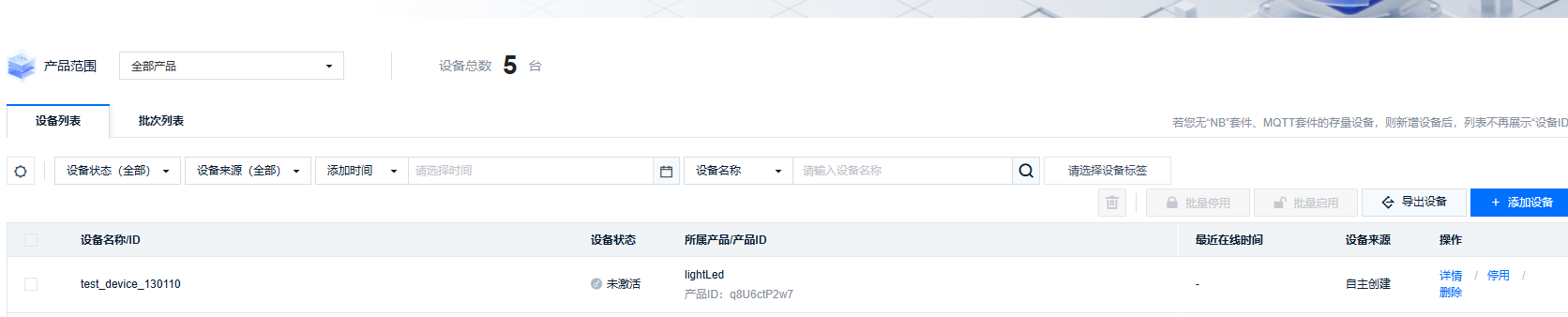
python onenet_token.py新增设备成功
=== OneNET 平台 - 产品级鉴权(创建设备使用)===
从配置文件加载产品ID: **
使用产品ID: **
使用设备名称: test_device_130110
=== 创建设备请求示例 ===
=== OneNET 平台 Token 生成信息 ===
产品ID: **
资源路径: products/**
版本: 2018-10-31
过期时间: 1769148070
签名方法: sha1
签名字符串: '1769148070\nsha1\nproducts/**\n2018-10-31'
原始签名: xx
最终 Token: token
请求地址: https://iot-api.heclouds.com/device/create
请求方法: POST
请求头: {'Content-Type': 'application/json', 'Authorization': 'token'}
请求体: {
    "product_id": "**",
    "device_name": "test_device_130110",
    "desc": "测试设备"
}


============================================================
注意:要真正发送请求,请取消下面代码的注释
============================================================
正在发送请求到: https://iot-api.heclouds.com/device/create
Headers: {'Content-Type': 'application/json', 'Authorization': 'token'}
Payload: {'product_id': '**', 'device_name': 'test_device_130110', 'desc': '测试设备'}
响应状态码: 200
响应内容: {
  "code": 0,
  "data": {
    "did": 2536174570,
    "pid": "**",
    "access_pt": 2,
    "auth_info": "test_device_130110",
    "data_pt": 1,
    "name": "test_device_130110",
    "desc": "测试设备",
    "status": 2,
    "create_time": "2026-01-23T13:01:11.907318222+08:00",
    "activate_time": "0001-01-01T00:00:00Z",
    "last_time": "0001-01-01T00:00:00Z",
    "imsi": "",
    "imei": "",
    "psk": "",
    "group_id": "",
    "enable_status": true,
    "tags": null,
    "lat": "",
    "lon": "",
    "auth_code": "",
    "sec_key": "##=",
    "chip": 0,
    "obsv": false,
    "obsv_st": false,
    "private": false,
    "imsi_old": [
      ""
    ],
    "imsi_mt": "0001-01-01T00:00:00Z",
    "intelligent_way": 1,
    "viot_protocol": 1
  },
  "msg": "succ",
  "request_id": "08d262e58847445aafaaa3d925de1d66"
}

=== 创建成功 ===
设备ID (did): 2536174570
设备名称: test_device_130110
设备描述: 测试设备
设备安全密钥 (sec_key): ##
产品ID: **
设备状态: 2 (0-离线, 1-在线, 2-未激活)
创建时间: 2026-01-23T13:01:11.907318222+08:00