摘要
Impress.js是一个基于CSS3变换和过渡的演示框架,它彻底改变了传统幻灯片演示的方式。通过利用现代浏览器的3D变换能力,Impress.js允许开发者创建出令人惊叹的3D演示效果。本文将深入探讨Impress.js的核心概念、使用方式,并通过两个完整的实战案例(3D旋转画廊和交互式时间线)来展示如何创建引人入胜的交互式演示。
1. Impress.js核心概念解析
1.1 设计哲学与架构
Impress.js的设计理念来源于Prezi的"无限画布"概念,但采用了完全不同的技术实现路径。与传统的幻灯片工具不同,Impress.js将演示内容放置在一个巨大的3D空间中,通过3D变换在内容之间进行导航。

1.2 坐标系系统
Impress.js使用三维笛卡尔坐标系,其中:
-
X轴:水平方向,正方向向右
-
Y轴:垂直方向,正方向向下
-
Z轴:深度方向,正方向向屏幕内
javascript
// 基本坐标变换示例
<div class="step"
     data-x="1000"     // 水平位置
     data-y="0"        // 垂直位置
     data-z="-1000"    // 深度位置
     data-rotate-x="45" // X轴旋转
     data-rotate-y="45" // Y轴旋转
     data-rotate-z="0"  // Z轴旋转
     data-scale="2">    // 缩放比例
     内容
</div>
1.3 变换属性详解
Impress.js支持多种变换属性,这些属性共同作用创建出复杂的3D效果:
| 属性 | 说明 | 默认值 | 示例 |
|---|---|---|---|
| data-x | X轴位置(像素) | 0 | 1000 |
| data-y | Y轴位置(像素) | 0 | 500 |
| data-z | Z轴位置(像素) | 0 | -1000 |
| data-rotate-x | X轴旋转角度(度) | 0 | 45 |
| data-rotate-y | Y轴旋转角度(度) | 0 | -30 |
| data-rotate-z | Z轴旋转角度(度) | 0 | 15 |
| data-scale | 缩放比例 | 1 | 2.5 |
| data-rotate | 简写旋转(已弃用) | 0 | 90 |
2. 3D旋转画廊案例深度解析
2.1 项目架构设计
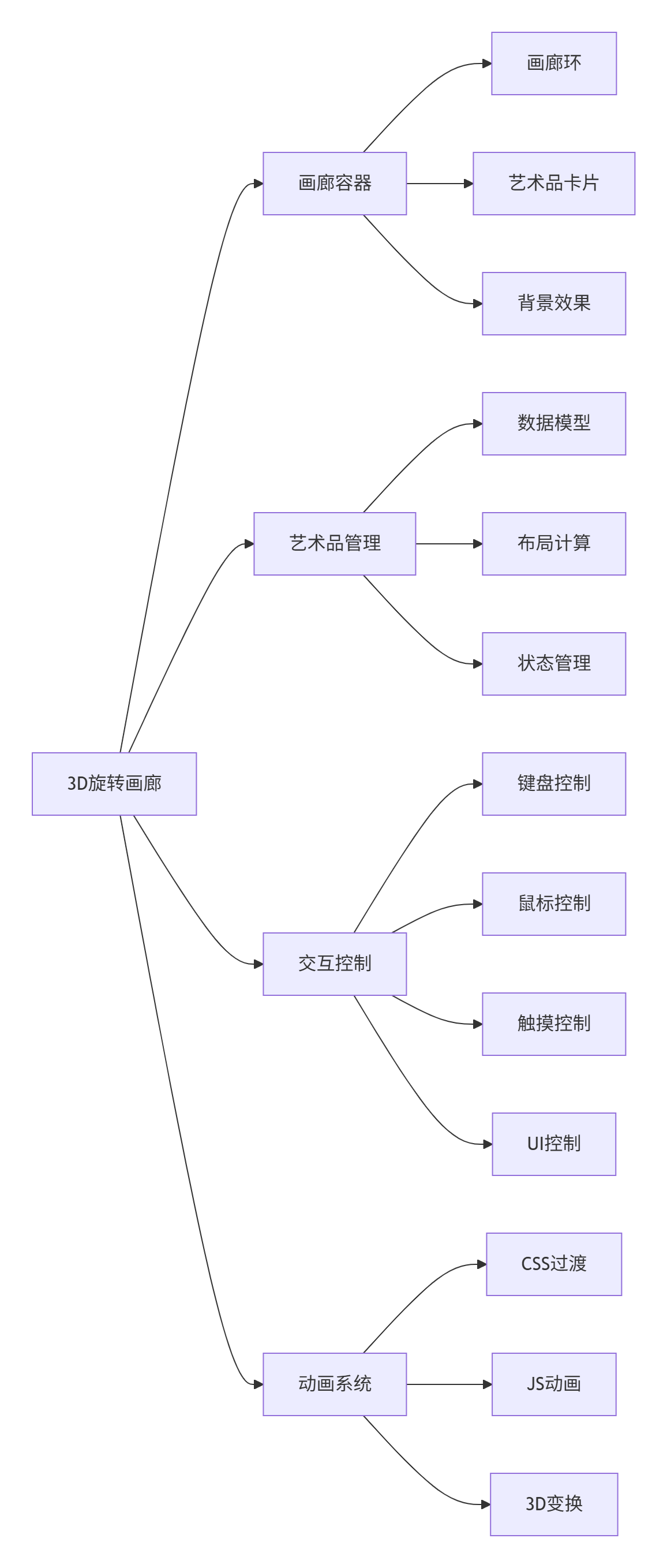
2.2 核心实现代码分析
2.2.1 画廊初始化
javascript
function initGallery() {
    const ring = document.getElementById('galleryRing');
    const radius = 300; // 画廊半径
    const count = artworkData.length;

    artworkData.forEach((artwork, index) => {
        // 计算每个艺术品在3D空间中的位置
        const angle = (index / count) * Math.PI * 2;
        const x = Math.cos(angle) * radius;
        const z = Math.sin(angle) * radius;

        // 创建艺术品元素
        const artworkElement = createArtworkElement(artwork, index, angle, x, z);
        ring.appendChild(artworkElement);
    });
}
2.2.2 3D布局算法
javascript
// 计算艺术品在环形布局中的位置
function calculateArtworkPosition(index, total, radius) {
    const angle = (index / total) * 2 * Math.PI;
    return {
        x: Math.cos(angle) * radius,
        z: Math.sin(angle) * radius,
        rotationY: (angle * 180 / Math.PI) - 90
    };
}

// 更新画廊旋转
function rotateGallery(direction) {
    const artworks = document.querySelectorAll('.artwork');
    const count = artworkData.length;

    // 更新当前索引
    currentIndex = direction === 'next'
        ? (currentIndex + 1) % count
        : (currentIndex - 1 + count) % count;

    // 计算新的布局
    artworks.forEach((artwork, index) => {
        const relativeIndex = (index - currentIndex + count) % count;
        const newAngle = (relativeIndex / count) * 2 * Math.PI;

        // 应用3D变换
        apply3DTransform(artwork, newAngle);
    });
}
2.2.3 CSS 3D变换详解
javascript
/* 画廊环容器 */
.gallery-ring {
    transform-style: preserve-3d; /* 启用3D变换 */
    transition: transform 0.8s cubic-bezier(0.34, 1.56, 0.64, 1);
}

/* 单个艺术品 */
.artwork {
    position: absolute;
    transform-style: preserve-3d;
    transition: all 0.8s cubic-bezier(0.34, 1.56, 0.64, 1);

    /* 基础变换 */
    transform:
        translate3d(var(--x), 0, var(--z)) /* 3D位置 */
        rotateY(var(--rotateY))            /* 面向中心 */
        scale(var(--scale));               /* 缩放比例 */

    /* 3D效果增强 */
    backface-visibility: hidden;           /* 隐藏背面 */
    perspective: 1000px;                   /* 透视距离 */
}
2.3 交互系统设计
2.3.1 键盘控制实现
javascript
class KeyboardController {
    constructor(gallery) {
        this.gallery = gallery;
        this.keyStates = new Set();
        this.setupListeners();
    }

    setupListeners() {
        document.addEventListener('keydown', (e) => {
            this.keyStates.add(e.key);
            this.handleKeys();
        });

        document.addEventListener('keyup', (e) => {
            this.keyStates.delete(e.key);
        });
    }

    handleKeys() {
        if (this.keyStates.has('ArrowLeft') || this.keyStates.has('a')) {
            this.gallery.rotate('prev');
        }
        if (this.keyStates.has('ArrowRight') || this.keyStates.has('d')) {
            this.gallery.rotate('next');
        }
        if (this.keyStates.has(' ')) {
            this.gallery.viewCurrent();
        }
    }
}
2.3.2 鼠标交互增强
javascript
class MouseController {
    constructor(gallery) {
        this.gallery = gallery;
        this.mouseX = 0;
        this.mouseY = 0;
        this.setupListeners();
    }

    setupListeners() {
        // 鼠标移动跟踪
        document.addEventListener('mousemove', (e) => {
            this.mouseX = (e.clientX / window.innerWidth) * 2 - 1;
            this.mouseY = -(e.clientY / window.innerHeight) * 2 + 1;
            this.updateRingRotation();
        });

        // 鼠标滚轮控制
        document.addEventListener('wheel', (e) => {
            e.preventDefault();
            if (e.deltaY > 0) {
                this.gallery.rotate('next');
            } else {
                this.gallery.rotate('prev');
            }
        }, { passive: false });
    }

    updateRingRotation() {
        const ring = document.getElementById('galleryRing');
        const rotateY = this.mouseX * 20;  // 水平旋转
        const rotateX = -this.mouseY * 10; // 垂直旋转

        ring.style.transform = `
            translate(-50%, -50%)
            rotateX(${rotateX}deg)
            rotateY(${rotateY}deg)
        `;
    }
}
2.4 动画系统优化
2.4.1 高性能动画实现
javascript
class AnimationSystem {
    constructor() {
        this.animations = new Map();
        this.isAnimating = false;
        this.rafId = null;
    }

    // 添加动画
    addAnimation(id, element, config) {
        const animation = {
            element,
            startTime: null,
            duration: config.duration || 1000,
            easing: config.easing || 'easeOutCubic',
            from: config.from,
            to: config.to,
            onUpdate: config.onUpdate,
            onComplete: config.onComplete
        };

        this.animations.set(id, animation);

        if (!this.isAnimating) {
            this.startAnimationLoop();
        }
    }

    // 动画循环
    startAnimationLoop() {
        this.isAnimating = true;

        const animate = (timestamp) => {
            if (!this.animations.size) {
                this.isAnimating = false;
                return;
            }

            this.animations.forEach((anim, id) => {
                if (!anim.startTime) anim.startTime = timestamp;

                const elapsed = timestamp - anim.startTime;
                const progress = Math.min(elapsed / anim.duration, 1);
                const easedProgress = this.easingFunctions[anim.easing](progress);

                // 计算当前值
                const current = this.interpolate(
                    anim.from,
                    anim.to,
                    easedProgress
                );

                // 更新元素
                anim.onUpdate(current);

                // 动画完成
                if (progress >= 1) {
                    if (anim.onComplete) anim.onComplete();
                    this.animations.delete(id);
                }
            });

            this.rafId = requestAnimationFrame(animate);
        };

        this.rafId = requestAnimationFrame(animate);
    }

    // 缓动函数
    easingFunctions = {
        linear: t => t,
        easeInCubic: t => t * t * t,
        easeOutCubic: t => 1 - Math.pow(1 - t, 3),
        easeInOutCubic: t => t < 0.5
            ? 4 * t * t * t
            : 1 - Math.pow(-2 * t + 2, 3) / 2
    };

    // 插值计算
    interpolate(from, to, progress) {
        if (typeof from === 'number') {
            return from + (to - from) * progress;
        }
        // 处理复杂对象的插值
        return this.interpolateObject(from, to, progress);
    }
}
2.4.2 3D变换优化技巧
css
/* 1. 启用GPU加速 */
.artwork {
    transform: translate3d(0, 0, 0);
    will-change: transform;
}

/* 2. 优化合成层 */
.gallery-ring {
    isolation: isolate; /* 创建新的堆叠上下文 */
    backface-visibility: hidden;
}

/* 3. 减少重绘 */
.artwork img {
    transform: translateZ(0); /* 强制GPU加速 */
    image-rendering: -webkit-optimize-contrast;
}

/* 4. 优化过渡性能 */
.artwork {
    transition:
        transform 0.8s cubic-bezier(0.34, 1.56, 0.64, 1),
        opacity 0.8s ease;
    /* 分别指定不同的过渡函数 */
}
3. 交互式时间线案例深度解析
3.1 时间线架构设计

3.2 时间线渲染引擎
3.2.1 动态布局系统
javascript
class TimelineRenderer {
    constructor(container, data) {
        this.container = container;
        this.data = data;
        this.currentDecade = 2000;
        this.eventsContainer = null;
    }

    render() {
        // 清空容器
        this.container.innerHTML = '';

        // 创建时间轴轨道
        this.createTrack();

        // 创建事件容器
        this.eventsContainer = this.createEventsContainer();

        // 渲染当前年代的事件
        this.renderEvents();

        // 创建连接线
        this.createConnections();
    }

    createTrack() {
        const track = document.createElement('div');
        track.className = 'timeline-track';

        const progress = document.createElement('div');
        progress.className = 'timeline-progress';
        progress.id = 'timelineProgress';

        track.appendChild(progress);
        this.container.appendChild(track);
    }

    renderEvents() {
        // 筛选当前年代的事件
        const decadeEvents = this.data.filter(event =>
            event.year >= this.currentDecade &&
            event.year <= this.currentDecade + 9
        );

        if (decadeEvents.length === 0) {
            this.showEmptyMessage();
            return;
        }

        // 计算时间范围
        const minYear = Math.min(...decadeEvents.map(e => e.year));
        const maxYear = Math.max(...decadeEvents.map(e => e.year));
        const yearSpan = maxYear - minYear || 1;

        // 渲染每个事件
        decadeEvents.forEach((event, index) => {
            const eventElement = this.createEventElement(event, index, minYear, yearSpan);
            this.eventsContainer.appendChild(eventElement);
        });
    }

    createEventElement(event, index, minYear, yearSpan) {
        const element = document.createElement('div');
        element.className = 'timeline-event';
        element.dataset.id = event.id;

        // 计算水平位置(基于年份)
        const position = ((event.year - minYear) / yearSpan) * 80 + 10;
        element.style.left = `${position}%`;

        // 计算垂直位置(波浪效果)
        const waveOffset = Math.sin(position * 0.1) * 150;
        element.style.top = `calc(50% + ${waveOffset}px)`;

        // 创建事件卡片
        element.innerHTML = `
            <div class="event-card">
                <div class="event-date">${event.year}</div>
                <h3 class="event-title">${event.title}</h3>
                <p class="event-desc">${event.description}</p>
            </div>
            <div class="event-marker" id="marker-${event.id}"></div>
        `;

        return element;
    }
}
3.2.2 波浪动画系统
javascript
class WaveAnimation {
    constructor(timeline) {
        this.timeline = timeline;
        this.time = 0;
        this.animationId = null;
        this.isAnimating = false;
    }

    start() {
        this.isAnimating = true;
        this.animate();
    }

    stop() {
        this.isAnimating = false;
        if (this.animationId) {
            cancelAnimationFrame(this.animationId);
        }
    }

    animate() {
        if (!this.isAnimating) return;

        this.time += 0.01;
        const events = document.querySelectorAll('.timeline-event');

        events.forEach((event, index) => {
            const position = parseFloat(event.style.left);

            // 计算波浪偏移
            const waveOffset = Math.sin(this.time + position * 0.01) * 150;
            event.style.top = `calc(50% + ${waveOffset}px)`;

            // 根据位置调整透明度
            const opacity = 0.7 + Math.abs(Math.sin(this.time + position * 0.01)) * 0.3;
            event.style.opacity = opacity;

            // 添加轻微旋转
            const rotation = Math.sin(this.time + index * 0.5) * 2;
            event.style.transform = `translate(-50%, -50%) rotate(${rotation}deg)`;
        });

        // 更新连接线
        this.updateConnections();

        this.animationId = requestAnimationFrame(() => this.animate());
    }

    updateConnections() {
        const connections = document.querySelectorAll('.connection-line');
        const events = document.querySelectorAll('.timeline-event');

        connections.forEach((line, index) => {
            if (index < events.length - 1) {
                const event1 = events[index];
                const event2 = events[index + 1];

                if (event1 && event2) {
                    const rect1 = event1.getBoundingClientRect();
                    const rect2 = event2.getBoundingClientRect();

                    const x1 = rect1.left + rect1.width / 2;
                    const y1 = rect1.top + rect1.height / 2;
                    const x2 = rect2.left + rect2.width / 2;
                    const y2 = rect2.top + rect2.height / 2;

                    const dx = x2 - x1;
                    const dy = y2 - y1;
                    const length = Math.sqrt(dx * dx + dy * dy);
                    const angle = Math.atan2(dy, dx) * 180 / Math.PI;

                    line.style.left = `${x1}px`;
                    line.style.top = `${y1}px`;
                    line.style.width = `${length}px`;
                    line.style.transform = `rotate(${angle}deg)`;
                }
            }
        });
    }
}
3.3 交互系统设计
3.3.1 年代导航系统
javascript
class DecadeNavigator {
    constructor(timeline) {
        this.timeline = timeline;
        this.decades = [2000, 2010, 2020];
        this.currentDecadeIndex = 0;
        this.init();
    }

    init() {
        this.createNavigation();
        this.setupEventListeners();
    }

    createNavigation() {
        const navContainer = document.createElement('div');
        navContainer.className = 'decade-navigation';

        this.decades.forEach(decade => {
            const button = document.createElement('button');
            button.className = 'decade-btn';
            button.textContent = `${decade}s`;
            button.dataset.decade = decade;

            if (decade === this.decades[this.currentDecadeIndex]) {
                button.classList.add('active');
            }

            navContainer.appendChild(button);
        });

        document.body.appendChild(navContainer);
    }

    setupEventListeners() {
        document.addEventListener('click', (e) => {
            if (e.target.classList.contains('decade-btn')) {
                const decade = parseInt(e.target.dataset.decade);
                this.jumpToDecade(decade);
            }
        });

        // 键盘导航
        document.addEventListener('keydown', (e) => {
            if (e.key === 'ArrowLeft') {
                this.navigate('prev');
            } else if (e.key === 'ArrowRight') {
                this.navigate('next');
            }
        });
    }

    navigate(direction) {
        if (direction === 'next') {
            this.currentDecadeIndex = (this.currentDecadeIndex + 1) % this.decades.length;
        } else {
            this.currentDecadeIndex = (this.currentDecadeIndex - 1 + this.decades.length) % this.decades.length;
        }

        const decade = this.decades[this.currentDecadeIndex];
        this.jumpToDecade(decade);
    }

    jumpToDecade(decade) {
        // 更新按钮状态
        document.querySelectorAll('.decade-btn').forEach(btn => {
            btn.classList.toggle('active',
                parseInt(btn.dataset.decade) === decade
            );
        });

        // 更新时间线
        this.timeline.currentDecade = decade;
        this.timeline.render();

        // 添加转场动画
        this.addTransitionEffect();
    }

    addTransitionEffect() {
        const timeline = document.querySelector('.timeline-container');
        timeline.style.opacity = '0';
        timeline.style.transform = 'translateX(100px)';

        setTimeout(() => {
            timeline.style.transition = 'all 0.5s ease';
            timeline.style.opacity = '1';
            timeline.style.transform = 'translateX(0)';
        }, 300);
    }
}
3.3.2 事件交互系统
javascript
class EventInteraction {
    constructor(timeline) {
        this.timeline = timeline;
        this.currentHovered = null;
        this.setupEventListeners();
    }

    setupEventListeners() {
        document.addEventListener('mouseover', (e) => {
            const eventElement = e.target.closest('.timeline-event');
            if (eventElement) {
                this.handleEventHover(eventElement);
            }
        });

        document.addEventListener('mouseout', (e) => {
            if (this.currentHovered) {
                this.handleEventLeave();
            }
        });

        document.addEventListener('click', (e) => {
            const eventElement = e.target.closest('.timeline-event');
            if (eventElement) {
                this.handleEventClick(eventElement);
            }
        });
    }

    handleEventHover(eventElement) {
        const eventId = eventElement.dataset.id;
        this.currentHovered = eventId;

        // 高亮当前事件
        const marker = document.getElementById(`marker-${eventId}`);
        if (marker) {
            marker.classList.add('active');
        }

        // 高亮连接线
        document.querySelectorAll('.connection-line').forEach(line => {
            line.style.background = 'rgba(118, 75, 162, 0.6)';
        });

        // 添加悬停效果
        eventElement.style.transform += ' scale(1.05)';
        eventElement.style.zIndex = '1000';
    }

    handleEventLeave() {
        if (this.currentHovered) {
            const marker = document.getElementById(`marker-${this.currentHovered}`);
            if (marker) {
                marker.classList.remove('active');
            }

            document.querySelectorAll('.connection-line').forEach(line => {
                line.style.background = 'rgba(102, 126, 234, 0.3)';
            });

            this.currentHovered = null;
        }
    }

    handleEventClick(eventElement) {
        const eventId = eventElement.dataset.id;
        const event = this.timeline.data.find(e => e.id == eventId);

        if (event) {
            this.showEventDetail(event);
        }
    }

    showEventDetail(event) {
        // 创建或显示详情页面
        let detailStep = document.getElementById(`detail-${event.id}`);

        if (!detailStep) {
            detailStep = this.createDetailStep(event);
            document.getElementById('impress').appendChild(detailStep);
        }

        // 导航到详情页面
        impress().goto(`detail-${event.id}`);
    }

    createDetailStep(event) {
        const step = document.createElement('div');
        step.className = 'step event-detail';
        step.id = `detail-${event.id}`;

        // 计算3D位置
        const angle = (event.id - 1) * 30;
        const radius = 2000;
        const x = Math.cos(angle * Math.PI / 180) * radius;
        const y = Math.sin(angle * Math.PI / 180) * radius;
        const rotateY = angle;

        step.setAttribute('data-x', x);
        step.setAttribute('data-y', y);
        step.setAttribute('data-z', '0');
        step.setAttribute('data-rotate-y', rotateY);

        step.innerHTML = this.createDetailContent(event);

        return step;
    }

    createDetailContent(event) {
        return `
            <div class="detail-content">
                <div class="detail-header">
                    <div class="detail-year">${event.year}</div>
                    <h1 class="detail-title">${event.title}</h1>
                </div>
                <div class="detail-body">
                    <div class="detail-text">
                        <p>${event.description}</p>
                    </div>
                    <div class="detail-media">
                        <img src="${event.image}" alt="${event.title}">
                    </div>
                </div>
                <div class="detail-facts">
                    <div class="fact-item">
                        <div class="fact-label">年份</div>
                        <div class="fact-value">${event.year}</div>
                    </div>
                    <div class="fact-item">
                        <div class="fact-label">领域</div>
                        <div class="fact-value">${event.category}</div>
                    </div>
                </div>
            </div>
        `;
    }
}
4. CSS3高级技巧深度解析
4.1 3D变换优化
css
/* 1. 创建3D上下文 */
.gallery-container {
    perspective: 1000px;           /* 透视距离 */
    transform-style: preserve-3d;  /* 保持3D变换 */
    perspective-origin: 50% 50%;   /* 透视原点 */
}

/* 2. 性能优化的3D变换 */
.artwork {
    /* 使用translate3d开启GPU加速 */
    transform: translate3d(var(--x), var(--y), var(--z));

    /* 避免不必要的重绘 */
    will-change: transform, opacity;

    /* 优化合成层 */
    backface-visibility: hidden;

    /* 强制独立图层 */
    isolation: isolate;
}

/* 3. 平滑过渡 */
.transition-3d {
    transition: transform 0.8s cubic-bezier(0.34, 1.56, 0.64, 1);

    /* 分离过渡属性 */
    transition-property: transform, opacity, filter;
    transition-duration: 0.8s, 0.5s, 0.3s;
    transition-timing-function: cubic-bezier(0.34, 1.56, 0.64, 1), ease, linear;
}
4.2 动画性能优化
css
/* 1. 硬件加速动画 */
@keyframes float {
    0%, 100% {
        transform: translate3d(0, 0, 0) rotate(0deg);
    }
    50% {
        transform: translate3d(0, -20px, 0) rotate(180deg);
    }
}

/* 2. 合成层优化 */
.optimized-element {
    /* 强制GPU加速 */
    transform: translateZ(0);

    /* 避免重排 */
    position: fixed;

    /* 减少重绘区域 */
    contain: layout style paint;
}

/* 3. 动画性能监控 */
@media (prefers-reduced-motion: reduce) {
    * {
        animation-duration: 0.01ms !important;
        animation-iteration-count: 1 !important;
        transition-duration: 0.01ms !important;
    }
}
4.3 响应式设计策略
css
/* 1. 视口单位 */
.responsive-container {
    width: min(1200px, 90vw);
    height: min(700px, 90vh);
    font-size: clamp(1rem, 2vw, 1.5rem);
}

/* 2. 媒体查询 */
@media (max-width: 768px) {
    .gallery-ring {
        transform: scale(0.7);
    }

    .timeline-event {
        width: 200px;
    }
}

/* 3. 触摸优化 */
@media (hover: none) and (pointer: coarse) {
    .interactive-element {
        min-height: 44px;  /* 最小触摸目标尺寸 */
        min-width: 44px;
    }

    /* 禁用悬停效果 */
    .hover-effect {
        display: none;
    }
}
5. JavaScript设计模式应用
5.1 观察者模式实现
javascript
class EventEmitter {
    constructor() {
        this.events = new Map();
    }

    on(event, callback) {
        if (!this.events.has(event)) {
            this.events.set(event, new Set());
        }
        this.events.get(event).add(callback);
        return () => this.off(event, callback);
    }

    off(event, callback) {
        if (this.events.has(event)) {
            this.events.get(event).delete(callback);
        }
    }

    emit(event, data) {
        if (this.events.has(event)) {
            this.events.get(event).forEach(callback => {
                try {
                    callback(data);
                } catch (error) {
                    console.error(`Error in event listener for ${event}:`, error);
                }
            });
        }
    }

    once(event, callback) {
        const onceCallback = (data) => {
            callback(data);
            this.off(event, onceCallback);
        };
        this.on(event, onceCallback);
    }
}

// 在画廊中的应用
class GalleryEventSystem extends EventEmitter {
    constructor() {
        super();
        this.setupEvents();
    }

    setupEvents() {
        // 预定义事件类型
        this.EVENTS = {
            ROTATE_START: 'rotate:start',
            ROTATE_END: 'rotate:end',
            ARTWORK_SELECT: 'artwork:select',
            ARTWORK_HOVER: 'artwork:hover',
            ARTWORK_LEAVE: 'artwork:leave',
            NAVIGATION_CHANGE: 'navigation:change'
        };
    }

    triggerRotate(direction) {
        this.emit(this.EVENTS.ROTATE_START, { direction, timestamp: Date.now() });

        // 执行旋转逻辑
        setTimeout(() => {
            this.emit(this.EVENTS.ROTATE_END, {
                direction,
                timestamp: Date.now(),
                currentIndex: this.currentIndex
            });
        }, 800);
    }
}
5.2 状态管理设计
javascript
class StateManager {
    constructor(initialState = {}) {
        this.state = initialState;
        this.listeners = new Set();
        this.history = [JSON.parse(JSON.stringify(initialState))];
        this.historyIndex = 0;
    }

    getState() {
        return JSON.parse(JSON.stringify(this.state));
    }

    setState(updates) {
        const oldState = this.getState();
        this.state = { ...this.state, ...updates };

        // 保存到历史记录
        this.history = this.history.slice(0, this.historyIndex + 1);
        this.history.push(this.getState());
        this.historyIndex++;

        // 通知监听器
        this.notifyListeners(oldState, this.state);

        return this.state;
    }

    subscribe(listener) {
        this.listeners.add(listener);
        return () => this.listeners.delete(listener);
    }

    notifyListeners(oldState, newState) {
        this.listeners.forEach(listener => {
            try {
                listener(oldState, newState);
            } catch (error) {
                console.error('Error in state listener:', error);
            }
        });
    }

    undo() {
        if (this.historyIndex > 0) {
            this.historyIndex--;
            this.state = JSON.parse(JSON.stringify(this.history[this.historyIndex]));
            this.notifyListeners(this.state, this.state);
        }
    }

    redo() {
        if (this.historyIndex < this.history.length - 1) {
            this.historyIndex++;
            this.state = JSON.parse(JSON.stringify(this.history[this.historyIndex]));
            this.notifyListeners(this.state, this.state);
        }
    }
}

// 在时间线中的应用
class TimelineState extends StateManager {
    constructor() {
        super({
            currentDecade: 2000,
            currentEvent: null,
            viewMode: 'timeline', // 'timeline' 或 'detail'
            filter: {
                category: null,
                yearRange: [2000, 2024],
                searchQuery: ''
            },
            animationEnabled: true,
            autoPlay: false
        });
    }

    setDecade(decade) {
        return this.setState({ currentDecade: decade });
    }

    selectEvent(event) {
        return this.setState({
            currentEvent: event,
            viewMode: 'detail'
        });
    }

    toggleAnimation() {
        return this.setState({
            animationEnabled: !this.state.animationEnabled
        });
    }

    applyFilter(filter) {
        return this.setState({ filter: { ...this.state.filter, ...filter } });
    }
}
6. 性能监控与优化
6.1 性能监控系统
javascript
class PerformanceMonitor {
    constructor() {
        this.metrics = {
            fps: 0,
            frameTime: 0,
            memory: 0,
            paintCount: 0,
            layoutCount: 0
        };

        this.thresholds = {
            fps: 30,
            frameTime: 33, // 30fps对应33ms每帧
            memory: 100 // MB
        };

        this.alerts = [];
        this.init();
    }

    init() {
        this.startFPSCounter();
        this.startMemoryMonitor();
        this.setupPerformanceObserver();
        this.startAutoOptimization();
    }

    startFPSCounter() {
        let frameCount = 0;
        let lastTime = performance.now();

        const checkFrame = () => {
            frameCount++;
            const currentTime = performance.now();

            if (currentTime >= lastTime + 1000) {
                this.metrics.fps = Math.round(
                    (frameCount * 1000) / (currentTime - lastTime)
                );
                this.metrics.frameTime = 1000 / this.metrics.fps;

                frameCount = 0;
                lastTime = currentTime;

                this.checkPerformance();
            }

            requestAnimationFrame(checkFrame);
        };

        checkFrame();
    }

    startMemoryMonitor() {
        if (performance.memory) {
            setInterval(() => {
                this.metrics.memory =
                    performance.memory.usedJSHeapSize / 1024 / 1024;
            }, 5000);
        }
    }

    setupPerformanceObserver() {
        if (window.PerformanceObserver) {
            // 监控布局变化
            const layoutObserver = new PerformanceObserver((list) => {
                this.metrics.layoutCount++;
            });
            layoutObserver.observe({ entryTypes: ['layout-shift'] });

            // 监控绘制
            const paintObserver = new PerformanceObserver((list) => {
                this.metrics.paintCount++;
            });
            paintObserver.observe({ entryTypes: ['paint'] });
        }
    }

    checkPerformance() {
        const issues = [];

        if (this.metrics.fps < this.thresholds.fps) {
            issues.push(`低FPS: ${this.metrics.fps}`);
        }

        if (this.metrics.frameTime > this.thresholds.frameTime) {
            issues.push(`帧时间过长: ${this.metrics.frameTime.toFixed(1)}ms`);
        }

        if (this.metrics.memory > this.thresholds.memory) {
            issues.push(`内存占用过高: ${this.metrics.memory.toFixed(1)}MB`);
        }

        if (issues.length > 0) {
            this.triggerAlert(issues);
        }
    }

    triggerAlert(issues) {
        const alert = {
            timestamp: new Date().toISOString(),
            issues,
            metrics: { ...this.metrics }
        };

        this.alerts.push(alert);
        console.warn('性能警告:', issues);

        // 触发自动优化
        this.optimizePerformance(issues);
    }

    optimizePerformance(issues) {
        issues.forEach(issue => {
            if (issue.includes('低FPS')) {
                this.reduceAnimations();
            }
            if (issue.includes('内存占用过高')) {
                this.cleanupMemory();
            }
        });
    }

    reduceAnimations() {
        // 降低动画复杂度
        document.querySelectorAll('.animated').forEach(el => {
            el.style.animationDuration = '2s';
        });
    }

    getReport() {
        return {
            summary: this.metrics,
            alerts: this.alerts,
            recommendations: this.getRecommendations()
        };
    }

    getRecommendations() {
        const recs = [];

        if (this.metrics.fps < 30) {
            recs.push('考虑减少同时进行的动画数量');
            recs.push('优化CSS选择器,减少重绘');
        }

        if (this.metrics.memory > 100) {
            recs.push('清理未使用的缓存数据');
            recs.push('考虑使用虚拟滚动列表');
        }

        return recs;
    }
}
6.2 内存管理优化
javascript
class MemoryManager {
    constructor() {
        this.cache = new Map();
        this.references = new WeakMap();
        this.init();
    }

    init() {
        this.setupCleanupInterval();
        this.setupMemoryWarning();
    }

    // 智能缓存
    cacheResource(key, resource, options = {}) {
        const cacheEntry = {
            data: resource,
            timestamp: Date.now(),
            ttl: options.ttl || 5 * 60 * 1000, // 5分钟默认TTL
            size: this.calculateSize(resource),
            accessCount: 0
        };

        this.cache.set(key, cacheEntry);

        // 如果缓存超过限制,清理最旧的项目
        if (this.getTotalCacheSize() > 50 * 1024 * 1024) { // 50MB限制
            this.cleanupOldCacheItems();
        }

        return resource;
    }

    getCachedResource(key) {
        const entry = this.cache.get(key);
        if (entry) {
            entry.accessCount++;
            entry.lastAccess = Date.now();

            // 检查是否过期
            if (Date.now() - entry.timestamp > entry.ttl) {
                this.cache.delete(key);
                return null;
            }

            return entry.data;
        }
        return null;
    }

    // 引用追踪
    trackReference(element, data) {
        if (!this.references.has(element)) {
            this.references.set(element, new Set());
        }
        this.references.get(element).add(data);
    }

    cleanupElementReferences(element) {
        if (this.references.has(element)) {
            this.references.delete(element);
        }
    }

    // 自动清理
    setupCleanupInterval() {
        setInterval(() => {
            this.cleanupExpiredCache();
            this.cleanupUnusedResources();
        }, 60000); // 每分钟清理一次
    }

    cleanupExpiredCache() {
        const now = Date.now();
        for (const [key, entry] of this.cache.entries()) {
            if (now - entry.timestamp > entry.ttl) {
                this.cache.delete(key);
            }
        }
    }

    cleanupUnusedResources() {
        // 清理长时间未访问的资源
        const oneHourAgo = Date.now() - 60 * 60 * 1000;

        for (const [key, entry] of this.cache.entries()) {
            if (entry.lastAccess && entry.lastAccess < oneHourAgo) {
                this.cache.delete(key);
            }
        }
    }

    // 内存警告处理
    setupMemoryWarning() {
        if (performance.memory) {
            setInterval(() => {
                const usedMB = performance.memory.usedJSHeapSize / 1024 / 1024;
                const totalMB = performance.memory.jsHeapSizeLimit / 1024 / 1024;

                if (usedMB / totalMB > 0.8) { // 使用超过80%
                    this.forceCleanup();
                }
            }, 10000);
        }
    }

    forceCleanup() {
        // 清理所有缓存
        this.cache.clear();

        // 触发垃圾回收提示
        if (window.gc) {
            window.gc();
        }

        console.warn('强制内存清理已执行');
    }

    calculateSize(obj) {
        // 估算对象大小
        const str = JSON.stringify(obj);
        return new Blob([str]).size;
    }

    getTotalCacheSize() {
        let total = 0;
        for (const entry of this.cache.values()) {
            total += entry.size;
        }
        return total;
    }
}
6.3 代码组织规范
javascript
// 模块化组织
const GalleryApp = (function() {
    // 私有变量
    const config = {
        animationDuration: 800,
        easing: 'cubic-bezier(0.34, 1.56, 0.64, 1)',
        maxCacheSize: 50 * 1024 * 1024
    };

    // 私有方法
    function initGallery() {
        // 初始化逻辑
    }

    function setupEventListeners() {
        // 事件监听
    }

    // 公共API
    return {
        init: function() {
            initGallery();
            setupEventListeners();
        },

        rotate: function(direction) {
            // 旋转逻辑
        },

        getConfig: function() {
            return { ...config };
        },

        updateConfig: function(newConfig) {
            Object.assign(config, newConfig);
        }
    };
})();

// 使用示例
GalleryApp.init();
6.4 性能最佳实践
-
减少DOM操作
-
使用文档片段批量插入
-
避免频繁的样式查询
-
使用CSS类切换代替样式操作
-
-
优化动画性能
-
使用transform和opacity
-
避免使用left/top进行动画
-
使用will-change提示浏览器
-
7. 实践项目建议
-
初级项目:个人简历展示
-
使用简单的2D布局
-
添加基本动画效果
-
实现键盘导航
-
-
中级项目:产品展示页面
-
3D旋转产品展示
-
交互式功能演示
-
响应式设计
-
-
高级项目:交互式故事讲述
-
复杂的3D场景
-
时间线控制
-
多媒体集成
-
性能优化
-