安装n8n环境,简单搭建入门测试,对n8n进行理解。
1.n8n本地环境安装。
这里因为是初步接触,目的是对其进行宏观理解,使用本地npm安装的方式进行使用。
| 方面 | npm 方式 (全局安装) | Docker 方式 | 谁更好?(尤其是 24/7 + Windows) |
|---|---|---|---|
| 24/7 后台运行 | 需要额外工具(PM2/NSSM),易中断 | 内置 restart 策略,一键后台/自启 | Docker 碾压 |
| 资源占用控制 | 直接吃主机 RAM,泄漏影响全系统 | 容器隔离,可限资源,泄漏只影响容器 | Docker 更安全/可控 |
| 稳定性/维护 | 依赖冲突、权限坑多,更新麻烦 | 镜像统一,更新简单,隔离好 | Docker 胜出 |
| 适合场景 | 短期测试、学习、简单 workflow | 长期使用、生产、AI 重 workflow | - |
直接使用npm的方式进行windows环境上命令安装:
bash
npm install -g n8n
n8n start

npm update -g n8n
npm install -g n8n@latest
npm uninstall -g n8n

#n8n 官方推荐使用 pnpm,因为它处理依赖冲突更好。
npm install -g pnpm
pnpm add -g n8n

#临时配置端口,发现直接启动看不到相关的入口
$env:N8N_PORT=5679; n8n
#网页进行访问 使用邮件进行注册 这里我用的自己的163邮箱
http://localhost:5679/setup

#进行chat和大模型进行交互的demo,apikey配置好之后各种大模型都连接不上,最终发现是n8n代理启动
#这里我的魔法用的全局模式,端口是7897,所以如下配置。
set HTTP_PROXY=http://127.0.0.1:7897
set HTTPS_PROXY=http://127.0.0.1:7897
$env:N8N_PORT=5679; n8n

#使用n8n测试mcp的交互时,发现mcp client一直无法连接上自己定义的mcp server,又是因为上面代理配置让交互不正确
#这里设置本地一些ip不过滤
$env:HTTP_PROXY="http://127.0.0.1:7897"; $env:HTTPS_PROXY="http://127.0.0.1:7897";$env:NO_PROXY="localhost,127.0.0.1"; $env:N8N_PORT="5679"; n8n
这里只是简单运行服务进行测试,没有考虑持久发布相关问题。
2.简单运行环境demo
挺简单哈,这里的n8n工作流都是json配置的方式,可以直接看模板加载,这里我根据官网文档简单运行两个入门级别demo对其进行理解。
首先,上面运行n8n后,从提示中可以看到,让访问http://localhost:5679/,按要求进行访问即可。
2.1 定时任务的demo
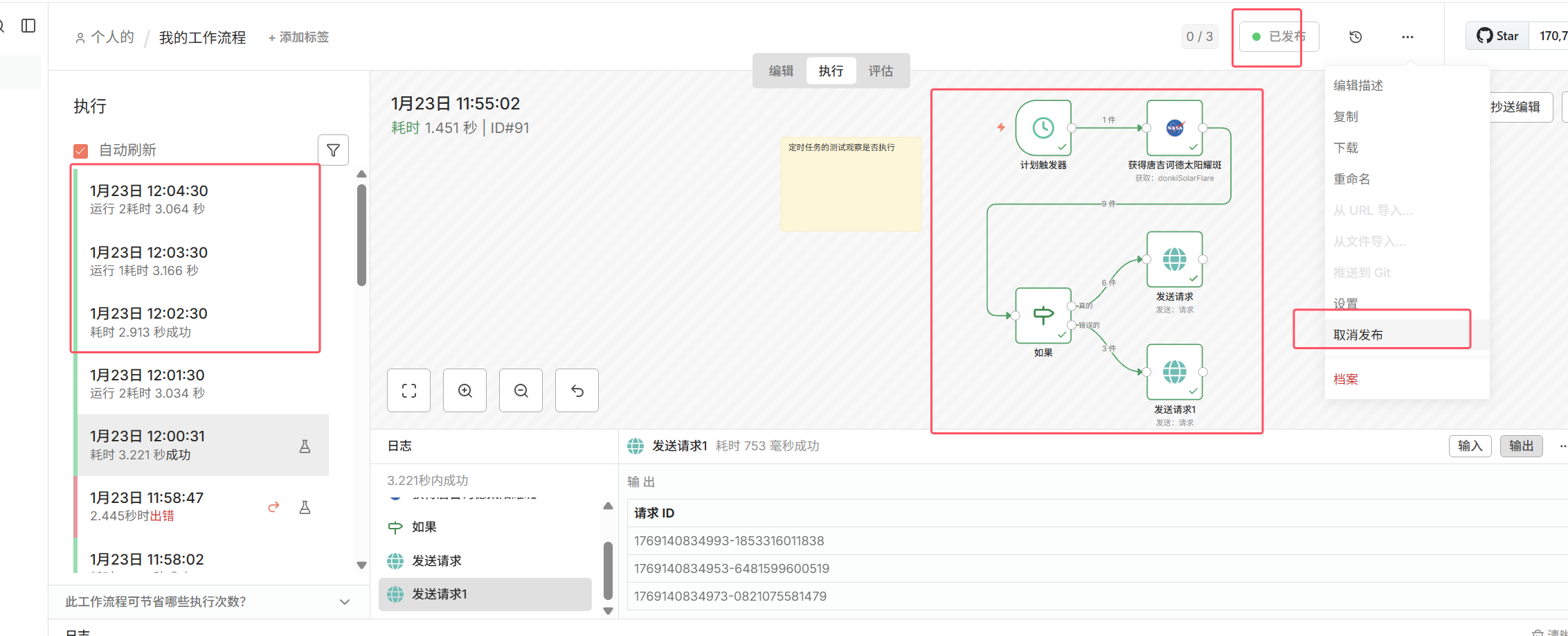
按入门简单定义一个定时任务的demo,发布后测试,发现能按照期望的定期执行。
这里最后的if分支后面用的PostBin的api进行临时数据接收展示测试,api key特别容易过期,只是测试。
2.2 和大模型(ai agent)进行交互的demo(这里主要是配置api key和网络问题)
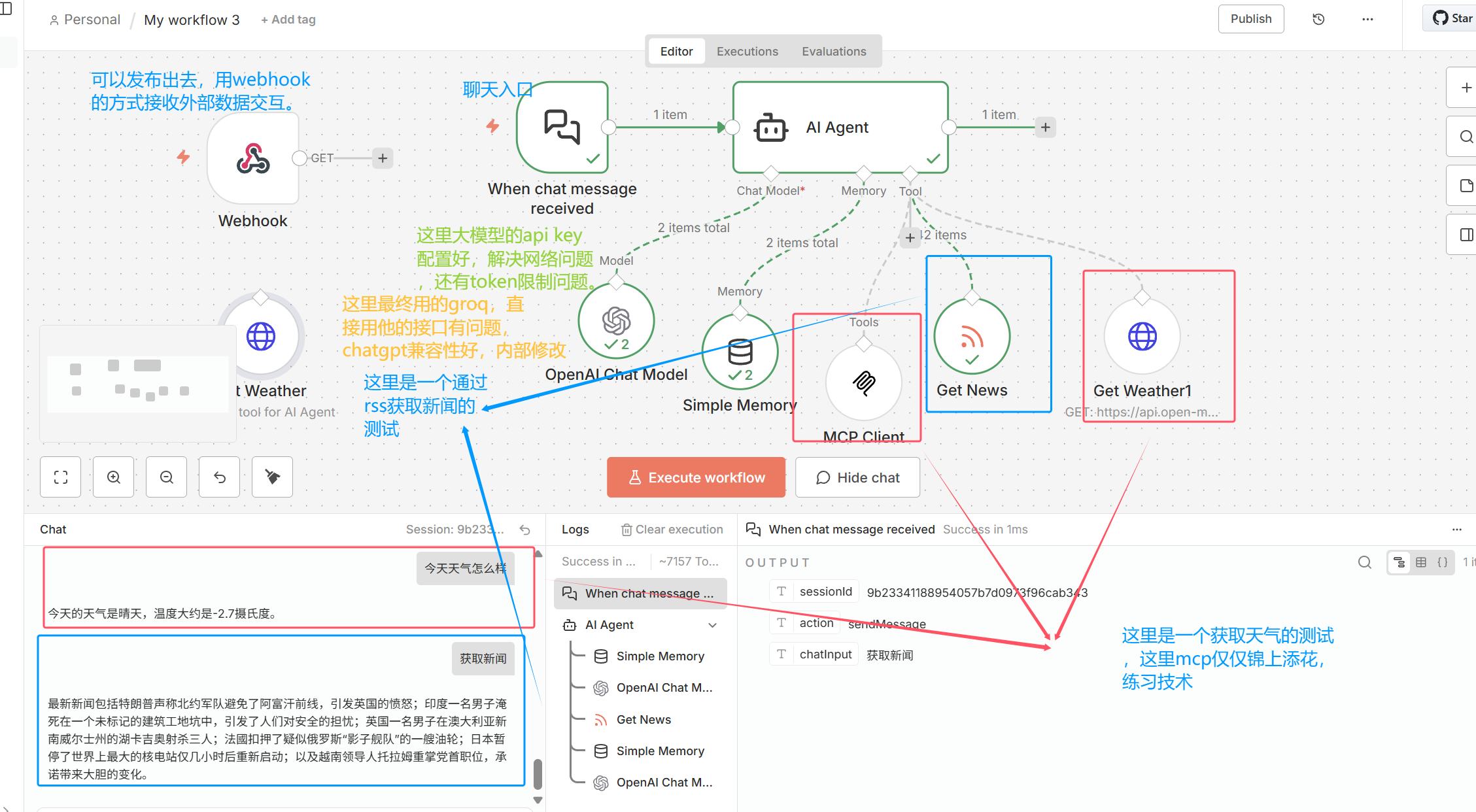
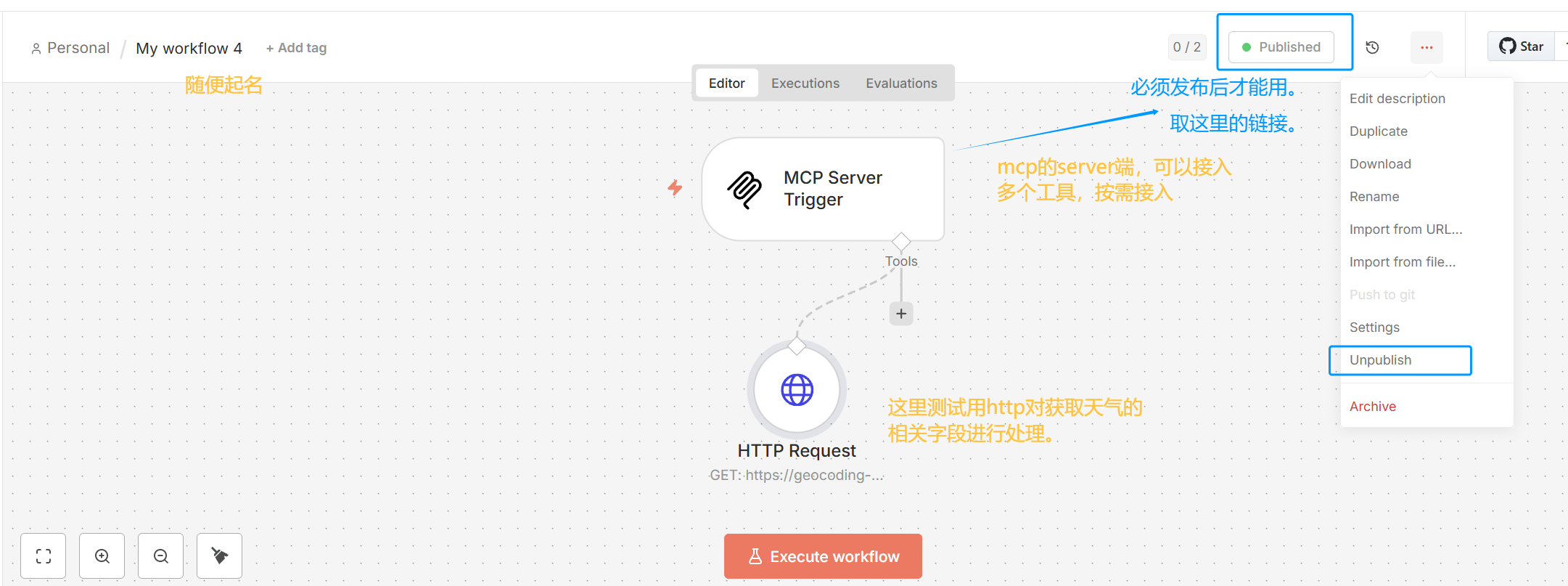
这里为了测试mcp客户端,实际上需要发布一个mcp的服务端。
因为自己内部代理的原因,一直不通,最终在启动时$env:NO_PROXY="localhost,127.0.0.1";发现交互成功,链路打通。
必须发布后,在mcp client端才能使用。
3.汇总遇到的问题及简单总结
个人目的只是尝试使用,对其功能有初步认知。
3.1 网络相关问题
要想和主流的chat 大模型进行交互,需要配置代理和设置api,解决网络链路问题。
mcp server发布后,又因为代理导致mcp client链路一直不通,设置mcp server对应ip过滤。
全局代理没能影响到npm启动的进程,使用专门的指令设置npm的启动进程走代理。
3.2 npm的测试(server端和客户端)
一定要publish发布后,客户端才能用。
取MCP Server Trigger中的Production URL 在对应的mcp client中配置即可。
3.3 chat交互问题
这里测试和chat的交互,尝试了这里提到的各种大模型。
在解决了网络链路的问题后,发现很多在测试时都报token限制问题,要充钱吧。
这里仅仅为了测试,使用的groq进行交互,同时它自己的节点也遇到问题,使用chatgpt的节点配置成groq的url进行处理。
4.4 基于已经正确的交互,总有提示token限制问题。
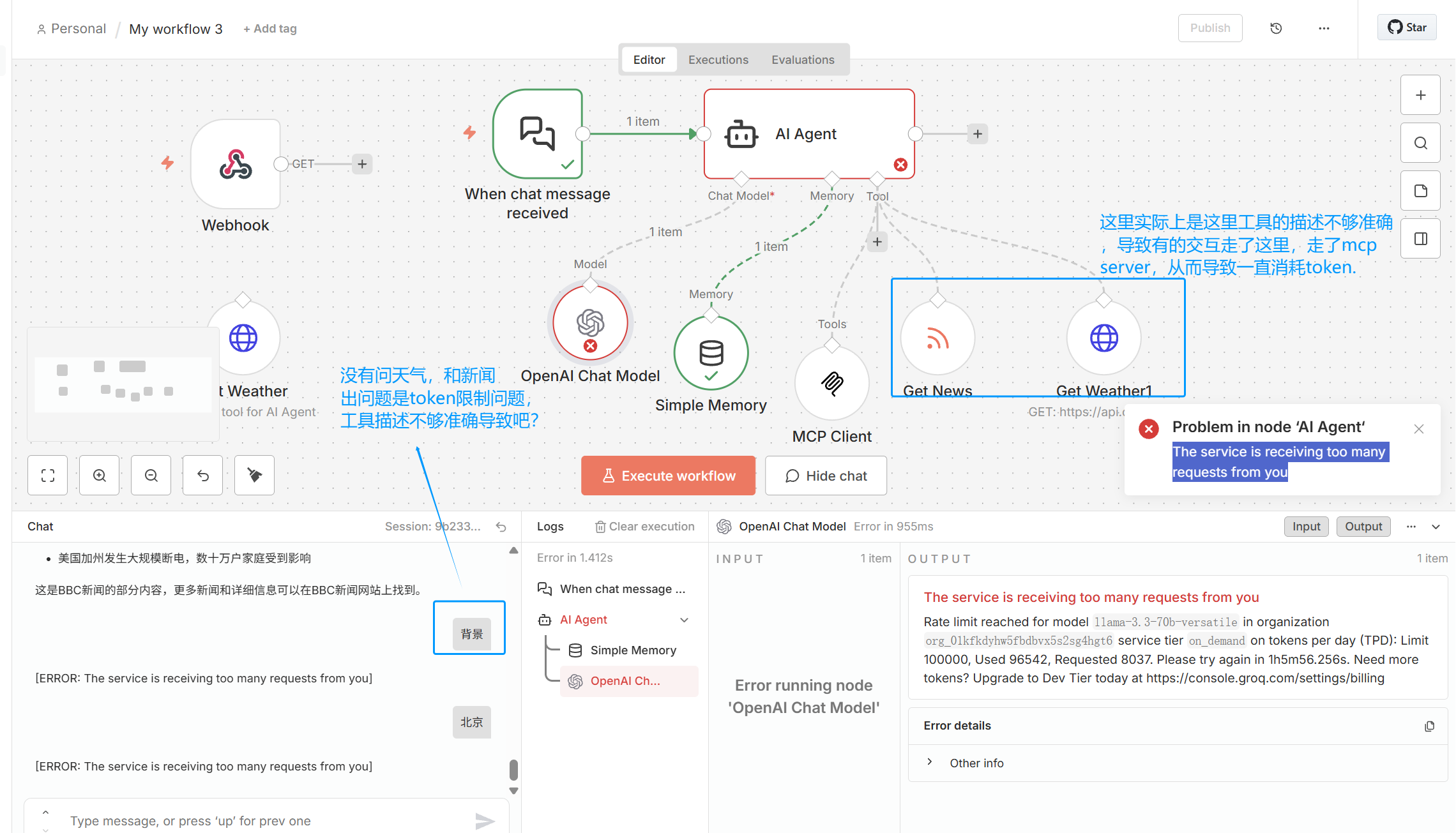
这里再去了解,实际上是大模型根据配置的工具,以及工具的描述进行推理和后续使用的,所以这里可以优化的:
| 因素 | 影响 |
|---|---|
| 工具数量多 | 每次推理输入 token 增加 |
| 工具 schema 大 | 输入 token 暴涨,工具的描述精简准确 |
| 工具描述不够精准 | 工具被误调用,增加额外 token(从现象看一直是mcp client和chat model反复交互) |
===》所以,精简工具数量,工具对应描述准确简单,或许可以优化。
===》对模型的交互次数进行限制是不是也可以。
===》充钱/安装本地的模型进行使用。
4 总结
4.1 自己思考
只是简单用demo进行浅用,了解其所具有的功能,了解其赋能。
有很多基于n8n的现有工作流能实际解决繁琐的问题,可以直接拿来用即可,自己暂时没有过多的需要。
貌似n8n中各节点的交互都是通过json实现的,节点内部实际上都是对json对象的处理(注意内部参数的书写格式)。
对应工具中的Description很重要,以及mcp server下的工具的Description也很重要,影响交互时的选择的链路。
4.2 简单思考n8n底层用到哪些技术(ai汇总)
1)数据层:JSON 数据流
n8n 的所有节点之间通过 JSON 对象传递数据,形成一个结构化的数据管道。
2)执行层:可视化工作流引擎(DAG Engine 有向无环图)
n8n 使用 DAG 执行模型调度节点,支持并行、重试、错误处理和状态管理。
3)AI 层:Agent 推理引擎(类似 LangChain,但非基于 LangChain)
LangChain 是一个用来构建大模型应用(LLM Apps)的开发框架,让 LLM 能够调用工具、使用记忆、执行推理链、做 RAG,并组合成可执行的智能系统。
n8n 内置的 AI Agent 使用 ReAct 风格推理、工具选择、工具调用循环和 LLM Function Calling 技术。
4)工具层:MCP / HTTP / 数据库 / 文件系统
n8n 支持 MCP 协议、HTTP API、数据库、文件系统等作为工具供 Agent 调用。
5)触发层:事件驱动系统
支持 Webhook、定时器、文件、邮件等事件触发工作流。
⭐ 一句话总结
n8n 的底层是 JSON 数据流 + DAG 工作流引擎;
AI Agent 底层使用类似 LangChain 的 ReAct/工具调用技术;
并通过 MCP、HTTP 等协议扩展工具能力;
同时内置事件触发系统和可视化链路执行引擎。
5 练习的工作流
虽然只是自己练习,以及这里的描述不准确待优化,但是也是一个笔记,方便回顾。
定时的工作量:My workflow.json
json
{
  "name": "My workflow",
  "nodes": [
    {
      "parameters": {
        "rule": {
          "interval": [
            {
              "field": "minutes",
              "minutesInterval": 1
            }
          ]
        }
      },
      "type": "n8n-nodes-base.scheduleTrigger",
      "typeVersion": 1.3,
      "position": [
        0,
        -80
      ],
      "id": "e9df67b5-a5fd-48f0-bc81-429803df1959",
      "name": "Schedule Trigger"
    },
    {
      "parameters": {
        "resource": "donkiSolarFlare",
        "additionalFields": {
          "startDate": "={{ $today.minus(7, 'days') }}"
        }
      },
      "type": "n8n-nodes-base.nasa",
      "typeVersion": 1,
      "position": [
        224,
        -80
      ],
      "id": "d355fee1-46ff-49c1-aa08-75f8fad9ff60",
      "name": "Get a DONKI solar flare",
      "credentials": {
        "nasaApi": {
          "id": "DJazzk4bh6p0LXEl",
          "name": "NASA account"
        }
      }
    },
    {
      "parameters": {
        "conditions": {
          "options": {
            "caseSensitive": true,
            "leftValue": "",
            "typeValidation": "strict",
            "version": 3
          },
          "conditions": [
            {
              "id": "49f0be81-d0e3-4880-bdf1-8f3a184c650b",
              "leftValue": "={{ $json[\"classType\"] }}",
              "rightValue": "=M",
              "operator": {
                "type": "string",
                "operation": "startsWith"
              }
            },
            {
              "id": "fdc7de7c-e6a9-4a1c-b6c9-2c7cb32f1e1b",
              "leftValue": "={{ $json[\"classType\"] }}",
              "rightValue": "X",
              "operator": {
                "type": "string",
                "operation": "startsWith"
              }
            }
          ],
          "combinator": "or"
        },
        "options": {}
      },
      "type": "n8n-nodes-base.if",
      "typeVersion": 2.3,
      "position": [
        0,
        240
      ],
      "id": "2f8cc56e-fab9-450c-ac6a-457c27389686",
      "name": "If"
    },
    {
      "parameters": {
        "resource": "request",
        "operation": "send",
        "binId": "1769140807418-2756344985682",
        "binContent": "=There was a solar flare of class {{$json[\"classType\"]}}",
        "requestOptions": {}
      },
      "type": "n8n-nodes-base.postBin",
      "typeVersion": 1,
      "position": [
        224,
        144
      ],
      "id": "b287bb94-8302-4396-9191-b7a249fce6a4",
      "name": "Send a request"
    },
    {
      "parameters": {
        "resource": "request",
        "operation": "send",
        "binId": "1769140807418-2756344985682",
        "binContent": "=There was a solar flare of class {{$json[\"classType\"]}}",
        "requestOptions": {}
      },
      "type": "n8n-nodes-base.postBin",
      "typeVersion": 1,
      "position": [
        224,
        336
      ],
      "id": "3783ac0d-20f3-42cf-9080-ce300ae51bae",
      "name": "Send a request1"
    },
    {
      "parameters": {
        "content": "定时任务的测试 观察是否执行\n"
      },
      "type": "n8n-nodes-base.stickyNote",
      "position": [
        -400,
        -16
      ],
      "typeVersion": 1,
      "id": "a8a88c50-d208-4317-ba46-c39b950b7dcb",
      "name": "Sticky Note3"
    }
  ],
  "pinData": {},
  "connections": {
    "Schedule Trigger": {
      "main": [
        [
          {
            "node": "Get a DONKI solar flare",
            "type": "main",
            "index": 0
          }
        ]
      ]
    },
    "Get a DONKI solar flare": {
      "main": [
        [
          {
            "node": "If",
            "type": "main",
            "index": 0
          }
        ]
      ]
    },
    "If": {
      "main": [
        [
          {
            "node": "Send a request",
            "type": "main",
            "index": 0
          }
        ],
        [
          {
            "node": "Send a request1",
            "type": "main",
            "index": 0
          }
        ]
      ]
    }
  },
  "active": false,
  "settings": {
    "executionOrder": "v1",
    "availableInMCP": false
  },
  "versionId": "df1e0773-a95c-47c7-bef5-58c5681c2af1",
  "meta": {
    "templateCredsSetupCompleted": true,
    "instanceId": "07dd46c9561579b7551b3307ef2439abcbf4e0619c725178970f5dced6631b53"
  },
  "id": "4ROD8TE4QiRF8ClDZH34m",
  "tags": []
}
查询天气和通过rss获取新闻的练习工作流:My workflow3.json
json
{
  "name": "My workflow 3",
  "nodes": [
    {
      "parameters": {
        "options": {}
      },
      "type": "@n8n/n8n-nodes-langchain.chatTrigger",
      "typeVersion": 1.4,
      "position": [
        -112,
        -96
      ],
      "id": "010a5f1f-c23e-426f-bfb1-569b3d61a427",
      "name": "When chat message received",
      "webhookId": "7ce119d8-4740-456a-90be-22e7b50e4c10",
      "alwaysOutputData": false,
      "executeOnce": false
    },
    {
      "parameters": {
        "options": {}
      },
      "type": "@n8n/n8n-nodes-langchain.agent",
      "typeVersion": 3.1,
      "position": [
        112,
        -96
      ],
      "id": "9c816602-d90e-41e8-a81e-286c99687741",
      "name": "AI Agent",
      "executeOnce": false
    },
    {
      "parameters": {},
      "type": "@n8n/n8n-nodes-langchain.memoryBufferWindow",
      "typeVersion": 1.3,
      "position": [
        80,
        144
      ],
      "id": "4e3ddaaf-5658-46a8-8729-f9c460a95781",
      "name": "Simple Memory"
    },
    {
      "parameters": {
        "model": {
          "__rl": true,
          "value": "llama-3.3-70b-versatile",
          "mode": "list",
          "cachedResultName": "llama-3.3-70b-versatile"
        },
        "builtInTools": {},
        "options": {
          "maxRetries": 2
        }
      },
      "type": "@n8n/n8n-nodes-langchain.lmChatOpenAi",
      "typeVersion": 1.3,
      "position": [
        -48,
        112
      ],
      "id": "fb6f65d1-df5d-45b7-91ed-84104a2b0f2e",
      "name": "OpenAI Chat Model",
      "credentials": {
        "openAiApi": {
          "id": "vkcBjbIVxKlGmJEZ",
          "name": "OpenAi account"
        }
      }
    },
    {
      "parameters": {
        "toolDescription": "Get latest world news from BBC RSS feed.",
        "url": "={{ /*n8n-auto-generated-fromAI-override*/ $fromAI('URL', `https://feeds.bbci.co.uk/news/world/rss.xml`, 'string') }}",
        "options": {}
      },
      "id": "e7b78f2e-12dc-4a02-897e-460698fe9820",
      "cid": "Ikx1Y2FzIFBleXJpbiI",
      "name": "Get News",
      "type": "n8n-nodes-base.rssFeedReadTool",
      "creator": "Lucas Peyrin",
      "position": [
        320,
        128
      ],
      "typeVersion": 1.2,
      "notes": "© 2025 Lucas Peyrin"
    },
    {
      "parameters": {
        "toolDescription": "Get weather forecast anywhere, anytime. You can make requests by assuming most information, the only thing you need is the location (use the city name to infer lat and long automatically) and time period (assume today if not specified)",
        "url": "https://api.open-meteo.com/v1/forecast",
        "sendQuery": true,
        "queryParameters": {
          "parameters": [
            {
              "name": "latitude",
              "value": "=$fromAI(\"lat\", \"Infer the latitude of the city name. Only return a number.\", \"string\") "
            },
            {
              "name": "longitude",
              "value": "=$fromAI(\"lon\", \"Infer the longitude of the city name. Only return a number.\", \"string\")"
            },
            {
              "name": "current",
              "value": "temperature_2m,weathercode"
            }
          ]
        },
        "options": {}
      },
      "id": "f47d3feb-545a-4e7a-81f0-e3c1d25f7803",
      "cid": "Ikx1Y2FzIFBleXJpbiI",
      "name": "Get Weather",
      "type": "n8n-nodes-base.httpRequestTool",
      "creator": "Lucas Peyrin",
      "position": [
        -416,
        128
      ],
      "notesInFlow": true,
      "typeVersion": 4.2,
      "notes": "This is a tool for AI Agent"
    },
    {
      "parameters": {
        "toolDescription": "Get weather forecast anywhere, anytime. You can make requests by assuming most information, the only thing you need is the location (use the city name to infer lat and long automatically) and time period (assume today if not specified)",
        "url": "https://api.open-meteo.com/v1/forecast",
        "sendQuery": true,
        "queryParameters": {
          "parameters": [
            {
              "name": "latitude",
              "value": "={{ $fromAI(\"lat\", \"推断用户提到的城市的纬度。只返回一个纯数字,例如 39.9042,不要带单位、不要加引号、不要写任何文字。只返回数字本身。\", \"number\") }}"
            },
            {
              "name": "longitude",
              "value": "={{ $fromAI(\"lon\", \"推断用户提到的城市的经度。只返回一个纯数字,例如 116.4074,不要带单位、不要加引号、不要写任何说明。只返回数字。\", \"number\") }}"
            },
            {
              "name": "current",
              "value": "temperature_2m,weathercode"
            }
          ]
        },
        "options": {}
      },
      "type": "n8n-nodes-base.httpRequestTool",
      "typeVersion": 4.3,
      "position": [
        496,
        128
      ],
      "id": "4a8289a5-d222-447c-88a3-e5430d733831",
      "name": "Get Weather1"
    },
    {
      "parameters": {
        "endpointUrl": "http://localhost:5679/mcp/464ce1ac-d78b-44c2-a86f-ee8c205e396e",
        "options": {}
      },
      "type": "@n8n/n8n-nodes-langchain.mcpClientTool",
      "typeVersion": 1.2,
      "position": [
        208,
        176
      ],
      "id": "46ba5c01-c746-4de6-b93b-77f17740e827",
      "name": "MCP Client"
    },
    {
      "parameters": {
        "path": "e684d18b-212b-4fca-8747-6bcc79ef4c34",
        "options": {}
      },
      "type": "n8n-nodes-base.webhook",
      "typeVersion": 2.1,
      "position": [
        -432,
        -64
      ],
      "id": "9b9a3982-be21-483a-9cea-d4eeecebcdfe",
      "name": "Webhook",
      "webhookId": "e684d18b-212b-4fca-8747-6bcc79ef4c34"
    }
  ],
  "pinData": {},
  "connections": {
    "When chat message received": {
      "main": [
        [
          {
            "node": "AI Agent",
            "type": "main",
            "index": 0
          }
        ]
      ]
    },
    "Simple Memory": {
      "ai_memory": [
        [
          {
            "node": "AI Agent",
            "type": "ai_memory",
            "index": 0
          }
        ]
      ]
    },
    "OpenAI Chat Model": {
      "ai_languageModel": [
        [
          {
            "node": "AI Agent",
            "type": "ai_languageModel",
            "index": 0
          }
        ]
      ]
    },
    "Get Weather": {
      "ai_tool": [
        []
      ]
    },
    "Get News": {
      "ai_tool": [
        [
          {
            "node": "AI Agent",
            "type": "ai_tool",
            "index": 0
          }
        ]
      ]
    },
    "Get Weather1": {
      "ai_tool": [
        [
          {
            "node": "AI Agent",
            "type": "ai_tool",
            "index": 0
          }
        ]
      ]
    },
    "AI Agent": {
      "main": [
        []
      ]
    },
    "MCP Client": {
      "ai_tool": [
        [
          {
            "node": "AI Agent",
            "type": "ai_tool",
            "index": 0
          }
        ]
      ]
    }
  },
  "active": false,
  "settings": {
    "executionOrder": "v1",
    "availableInMCP": false
  },
  "versionId": "b954daa7-3190-48aa-a21f-eb50deec7484",
  "meta": {
    "templateCredsSetupCompleted": true,
    "instanceId": "07dd46c9561579b7551b3307ef2439abcbf4e0619c725178970f5dced6631b53"
  },
  "id": "oZs0EQzRYYeZ3BJYuX0EG",
  "tags": []
}
mcp server的一个练习工作流,这里的描述不够准确导致调用一直和chat交互:My workflow4.json
json
{
  "name": "My workflow 4",
  "nodes": [
    {
      "parameters": {
        "path": "464ce1ac-d78b-44c2-a86f-ee8c205e396e"
      },
      "type": "@n8n/n8n-nodes-langchain.mcpTrigger",
      "typeVersion": 2,
      "position": [
        -416,
        16
      ],
      "id": "f978b2c1-c677-42f8-a646-45122277b37b",
      "name": "MCP Server Trigger",
      "webhookId": "464ce1ac-d78b-44c2-a86f-ee8c205e396e"
    },
    {
      "parameters": {
        "toolDescription": "根据城市名称查询纬度和经度。输入城市名(中文或英文),返回 lat 和 lon 纯数字。\n示例:输入 \"北京\" → 返回 lat: 39.9042, lon: 116.4074\n只返回一个最匹配的结果,不要返回列表。",
        "url": "https://geocoding-api.open-meteo.com/v1/search",
        "sendQuery": true,
        "queryParameters": {
          "parameters": [
            {
              "name": "=name",
              "value": "=={{ $json.arguments.city || $json.arguments.location || $json.arguments.query }}"
            },
            {
              "name": "count",
              "value": "1"
            },
            {
              "name": "language",
              "value": "zh"
            },
            {
              "name": "format",
              "value": "json"
            }
          ]
        },
        "options": {},
        "optimizeResponse": true
      },
      "type": "n8n-nodes-base.httpRequestTool",
      "typeVersion": 4.3,
      "position": [
        -368,
        208
      ],
      "id": "24488687-42b9-4c1e-9e14-e107079ff4c8",
      "name": "HTTP Request"
    }
  ],
  "pinData": {},
  "connections": {
    "HTTP Request": {
      "ai_tool": [
        [
          {
            "node": "MCP Server Trigger",
            "type": "ai_tool",
            "index": 0
          }
        ]
      ]
    }
  },
  "active": true,
  "settings": {
    "executionOrder": "v1",
    "availableInMCP": false
  },
  "versionId": "513c6063-74f6-4df9-996e-0b63a002a8d2",
  "meta": {
    "instanceId": "07dd46c9561579b7551b3307ef2439abcbf4e0619c725178970f5dced6631b53"
  },
  "id": "j3QA8xmtsyk1zITSq9Z8E",
  "tags": []
}