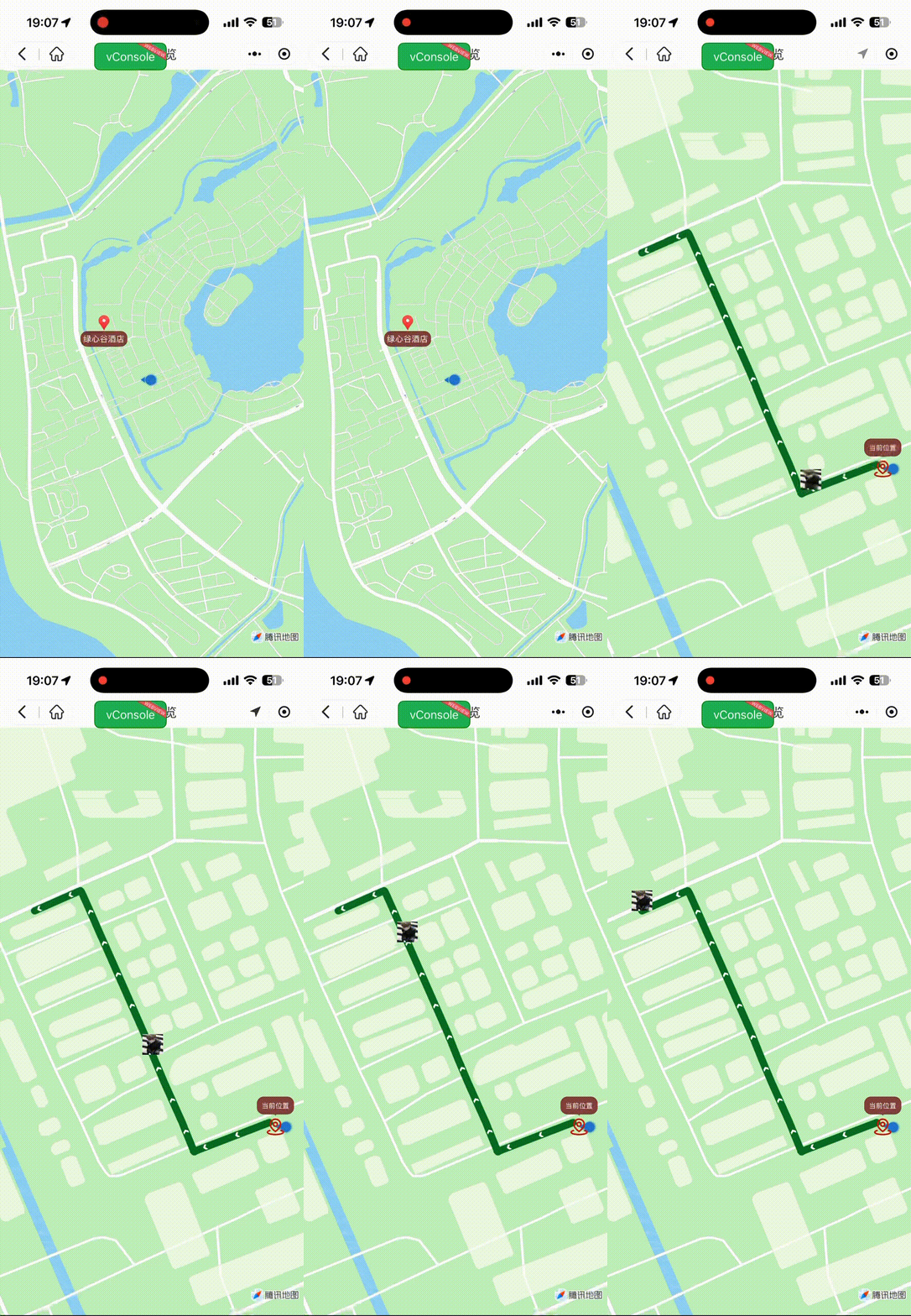
效果图
准备工作
我这里用的是高德位置服务要是换成腾讯位置服务"解析路线数据 parseRouteData "方法换一下算法即可,因为字段和层级不一样了
高德参考手册
https://lbs.amap.com/api/wx/summary
腾讯参考手册
https://lbs.qq.com/miniProgram/jsSdk/jsSdkGuide/jsSdkOverview
上线准备
安全域名设置,在小程序管理后台 -> 开发 -> 开发管理 -> 开发设置 -> "服务器域名" 中设置request合法域名
index.vue
<template>
  <view class="wxy-page" :style="`--head: ${getNavBack()}px;`">
    <wxy-nav-back isOccupy des="导航导览" />
    <map
      id="mapRef"
      class="map"
      :width="700"
      :height="800"
      :latitude="currentLat"
      :longitude="currentLon"
      :polyline="polyline"
      :show-location="true"
      :min-scale="16"
      :max-scale="20"
      :markers="markers"
      :enable-poi="false"
      @labeltap="moveTo" />
  </view>
</template>

<script setup lang='ts'>
import { getNavBack } from '@/modules/tool'
import { useData } from './hooks/data'

const {
  currentLat,
  currentLon,
  polyline,
  markers,
  moveTo,
} = useData()
</script>

<style lang='scss' scoped>
.map{
  width: 100vw;
  height: calc(100vh - var(--head));
}
</style>
data.ts
/* eslint-disable @typescript-eslint/no-explicit-any */
import { ref, onMounted } from 'vue'
import { getLocation } from '@/modules/other'
import { useMove } from './move'
// eslint-disable-next-line import/extensions
const amapFile = require('../../../../../static/other/amap-wx.js')

const myAmapFun = new amapFile.AMapWX({ key: '你的Key' })

interface Line {
  points: { latitude: number; longitude: number }[];
  color: string;
  width: number;
  dottedLine: boolean;
  arrowLine: boolean;
}

const { setMove } = useMove()
export function useData() {
  const mapContext = ref()
  /** 中心纬度 */
  const currentLat = 28.409297
  /** 中心经度 */
  const currentLon = 112.838595
  /** 路径点 */
  const polyline = ref<Line[]>([])
  /** 标记点 */
  const markers = ref<any[]>([])
  // 解析路线数据(解压坐标点并渲染)
  const parseRouteData = (route:any) => {
    // 解压坐标点
    const pointArray = []
    const steps = route.steps
    for (let i = 0; i < steps.length; i++) {
      const poLen = steps[i].polyline.split(';')
      for (let j = 0; j < poLen.length; j++) {
        pointArray.push({
          longitude: parseFloat(poLen[j].split(',')[0]),
          latitude: parseFloat(poLen[j].split(',')[1]),
        })
      }
    }
    // 缩放视野展示所有经纬度
    mapContext.value.includePoints({
      points: pointArray,
      padding: [50, 50, 50, 50],
    })
    // 沿指定路径移动 marker,用于轨迹回放等场景
    mapContext.value.moveAlong({
      markerId: 2,
      path: pointArray,
      duration: 5000,
      autoRotate: false,
    })
    // 设置路线数据(用于map组件渲染)
    polyline.value = [{
      points: pointArray,
      color: '#037726ff',
      width: 10,
      dottedLine: false,
      arrowLine: true,
    }]
  }

  const coordinate = (num:number) => (Math.round(num * 1e6) / 1e6).toString()

  /*
   * * 移动到指定位置
   * @param latitude 纬度
   * @param longitude 经度
   */
  const moveTo = async (e:{detail:{markerId:number}}) => {
    const res = await getLocation() as { latitude: number; longitude: number }
    const markerId = e.detail.markerId
    const index = markers.value.findIndex((item) => item.id === markerId)
    const o = markers.value[index]
    markers.value = await setMove(res, o)
    myAmapFun.getWalkingRoute({
      origin: `${coordinate(res.longitude)},${coordinate(res.latitude)}`,
      destination: `${coordinate(o.longitude)},${coordinate(o.latitude)}`,
      success(rect: any) {
        parseRouteData(rect.paths[0])
      },
    })
  }

  const init = async () => {
    mapContext.value = uni.createMapContext('mapRef')
    markers.value = [{
      id: 2,
      joinCluster: true,
      label: {
        bgColor: '#802429d0',
        borderRadius: 10,
        color: '#fff',
        content: '绿心谷酒店',
        iconPath: 'https://res.xiaolulvxing.com/scenicSpot/picture/1573488217383895041/1663984220408-hf4fbnln.jpg',
        padding: 4,
        textAlign: 'center',
        x: 0,
        y: 0,
      },
      latitude: 28.408935418626,
      longitude: 112.833806276321,
      name: '绿心谷酒店',
    }]
    mapContext.value.initMarkerCluster({
      enableDefaultStyle: false,
    })
  }

  onMounted(() => { init() })

  return {
    currentLat,
    currentLon,
    polyline,
    markers,
    moveTo,
  }
}
move.ts
/* eslint-disable @typescript-eslint/no-explicit-any */
export function useMove() {
  const setMove = async (my:{latitude: number; longitude: number}, o:any) => [{
    id: 0,
    latitude: my.latitude,
    longitude: my.longitude,
    iconPath: 'https://get.hnzmsz.com/home/start.png',
    width: 30,
    height: 30,
    animation: {
      duration: 500,
      timingFunction: 'ease',
    },
    callout: {
      content: '当前位置',
      display: 'ALWAYS',
      bgColor: '#802429d0',
      color: '#fff',
      borderRadius: 10,
      padding: 6,
    },
  }, {
    id: 1,
    latitude: o.latitude,
    longitude: o.longitude,
    iconPath: 'https://get.hnzmsz.com/home/start.png',
    width: 30,
    height: 30,
    animation: {
      duration: 500,
      timingFunction: 'ease',
    },
    callout: {
      content: o.name,
      bgColor: '#802429d0',
      color: '#fff',
      display: 'ALWAYS',
      borderRadius: 10,
      padding: 6,
    },
  }, {
    id: 2,
    latitude: my.latitude,
    longitude: my.longitude,
    iconPath: 'https://i-avatar.csdnimg.cn/23d974abe35a4e6aaed83e6118c07fbd_qq_43764578.jpg!1',
    width: 30,
    height: 30,
    animation: {
      duration: 500,
      timingFunction: 'ease',
    },
  }]
  return { setMove }
}
遇到问题可以看我主页加我,很少看博客,对你有帮助别忘记点赞收藏。