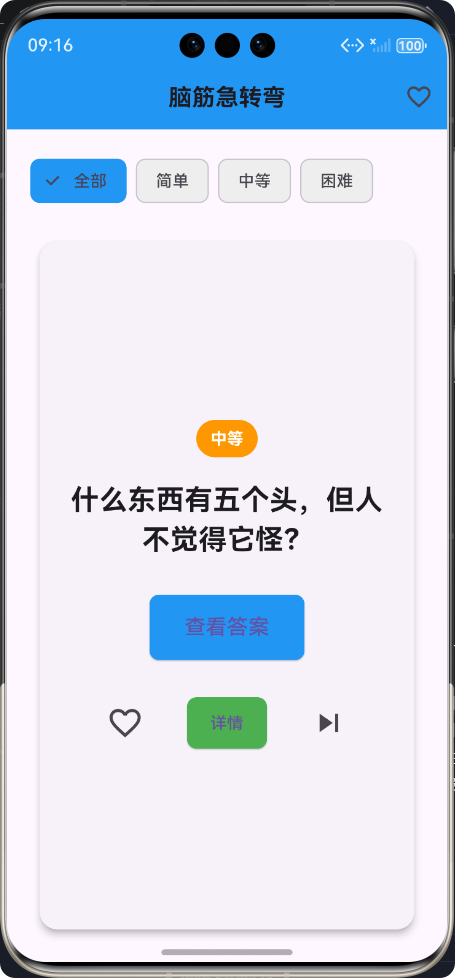
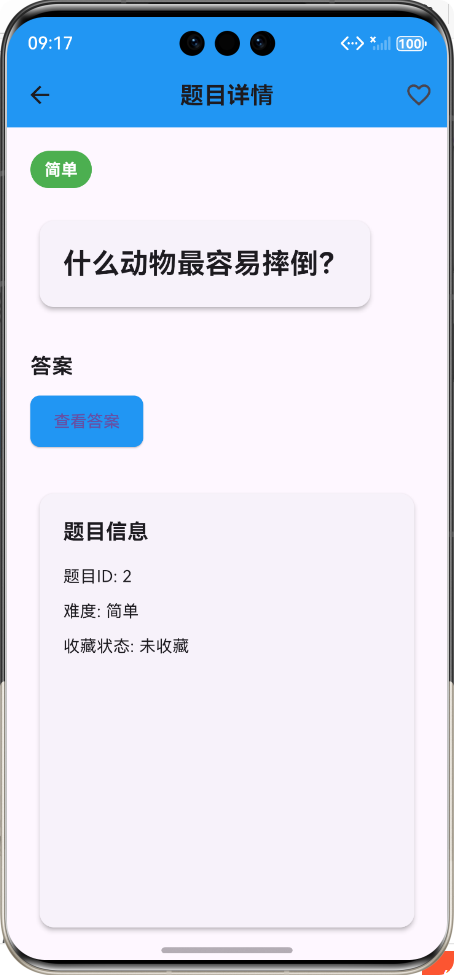
🚀运行效果展示
Flutter框架跨平台鸿蒙开发------脑筋急转弯小游戏的开发流程
📝 前言
随着移动应用开发的快速发展,跨平台开发框架越来越受到开发者的青睐。Flutter作为Google推出的开源UI框架,凭借其"一次编写,到处运行"的特性,成为跨平台开发的热门选择。本文将详细介绍如何使用Flutter框架开发一款跨平台的脑筋急转弯小游戏,并成功运行在鸿蒙系统上。
🎮 游戏介绍
游戏概述
脑筋急转弯小游戏是一款休闲益智类应用,旨在通过有趣的题目挑战用户的思维能力。用户可以随机获取题目,查看答案,按难度筛选,并收藏喜欢的题目。
核心功能
- ✅ 随机获取脑筋急转弯题目
- ✅ 支持按难度筛选(简单/中等/困难)
- ✅ 答案隐藏/显示切换
- ✅ 题目收藏管理
- ✅ 题目详情查看
- ✅ 收藏列表管理
技术栈
- 开发框架:Flutter 3.x
- 开发语言:Dart
- 目标平台:鸿蒙系统
- 状态管理:StatefulWidget
- UI组件:Material Design
🔧 开发流程
1. 需求分析与规划
功能模块划分
| 模块 | 功能描述 |
|---|---|
| 数据模型 | 定义题目结构、难度枚举 |
| 数据服务 | 提供题目数据管理、筛选、收藏功能 |
| 主页面 | 随机展示题目、答案切换、收藏管理 |
| 详情页面 | 展示题目详细信息 |
| 收藏页面 | 管理收藏的题目 |
开发流程图
需求分析
数据模型设计
数据服务实现
页面设计
主页面开发
详情页面开发
收藏页面开发
功能集成
测试与调试
鸿蒙平台适配
发布准备
2. 数据模型设计
题目模型
dart
/// 脑筋急转弯题目模型
class BrainTeaser {
  /// 题目ID
  final int id;

  /// 题目内容
  final String question;

  /// 答案
  final String answer;

  /// 题目难度
  final Difficulty difficulty;

  /// 是否已收藏
  bool isFavorite;

  /// 创建题目实例
  BrainTeaser({
    required this.id,
    required this.question,
    required this.answer,
    required this.difficulty,
    this.isFavorite = false,
  });
}

/// 题目难度枚举
enum Difficulty {
  /// 简单
  easy,

  /// 中等
  medium,

  /// 困难
  hard,
}
3. 数据服务实现
数据管理服务
dart
/// 脑筋急转弯数据管理服务
class BrainTeaserService {
  /// 示例题目数据
  final List<BrainTeaser> _brainTeasers = [
    BrainTeaser(
      id: 1,
      question: '什么东西越洗越脏?',
      answer: '水',
      difficulty: Difficulty.easy,
    ),
    // 更多题目...
  ];

  /// 获取所有题目
  List<BrainTeaser> getAllBrainTeasers() {
    return List.from(_brainTeasers);
  }

  /// 获取随机题目
  BrainTeaser getRandomBrainTeaser() {
    final randomIndex = DateTime.now().millisecond % _brainTeasers.length;
    return _brainTeasers[randomIndex];
  }

  /// 切换收藏状态
  void toggleFavorite(int id) {
    final index = _brainTeasers.indexWhere((teaser) => teaser.id == id);
    if (index != -1) {
      _brainTeasers[index].isFavorite = !_brainTeasers[index].isFavorite;
    }
  }

  // 更多功能方法...
}
4. 页面设计与开发
主页面设计
主页面是应用的核心,负责展示随机题目、答案切换、收藏管理和题目筛选。
dart
/// 主页面 - 脑筋急转弯APP
class MainPage extends StatefulWidget {
  /// 创建主页面实例
  const MainPage({super.key});

  @override
  State<MainPage> createState() => _MainPageState();
}

class _MainPageState extends State<MainPage> {
  /// 数据管理服务
  final BrainTeaserService _service = BrainTeaserService();

  /// 当前显示的题目
  late BrainTeaser _currentTeaser;

  /// 是否显示答案
  bool _showAnswer = false;

  /// 当前选中的难度筛选
  Difficulty? _selectedDifficulty;

  @override
  void initState() {
    super.initState();
    _currentTeaser = _service.getRandomBrainTeaser();
  }

  @override
  Widget build(BuildContext context) {
    return Scaffold(
      appBar: AppBar(
        title: const Text('脑筋急转弯'),
        backgroundColor: Colors.blue,
        actions: [
          IconButton(
            icon: const Icon(Icons.favorite_border),
            onPressed: () {
              // 跳转到收藏页面
              Navigator.push(
                context,
                MaterialPageRoute(
                  builder: (context) => const FavoritesPage(),
                ),
              );
            },
          ),
        ],
      ),
      body: Padding(
        padding: const EdgeInsets.all(20.0),
        child: Column(
          crossAxisAlignment: CrossAxisAlignment.stretch,
          children: [
            // 难度筛选
            _buildDifficultyFilter(),
            const SizedBox(height: 20),

            // 题目卡片
            Expanded(
              child: Card(
                elevation: 5,
                shape: RoundedRectangleBorder(
                  borderRadius: BorderRadius.circular(15),
                ),
                child: Padding(
                  padding: const EdgeInsets.all(20.0),
                  child: Column(
                    mainAxisAlignment: MainAxisAlignment.center,
                    children: [
                      // 难度标签
                      _buildDifficultyBadge(_currentTeaser.difficulty),
                      const SizedBox(height: 20),

                      // 题目内容
                      Text(
                        _currentTeaser.question,
                        textAlign: TextAlign.center,
                        style: const TextStyle(
                          fontSize: 24,
                          fontWeight: FontWeight.bold,
                        ),
                      ),
                      const SizedBox(height: 30),

                      // 答案区域
                      _buildAnswerSection(),
                      const SizedBox(height: 30),

                      // 操作按钮
                      _buildActionButtons(),
                    ],
                  ),
                ),
              ),
            ),
          ],
        ),
      ),
    );
  }

  // 更多方法实现...
}
详情页面设计
详情页面用于展示单个题目的详细信息,支持收藏管理。
dart
/// 题目详情页面
class DetailPage extends StatefulWidget {
  /// 当前题目
  final BrainTeaser teaser;

  /// 创建详情页面实例
  const DetailPage({super.key, required this.teaser});

  @override
  State<DetailPage> createState() => _DetailPageState();
}

class _DetailPageState extends State<DetailPage> {
  /// 数据管理服务
  final BrainTeaserService _service = BrainTeaserService();

  /// 是否显示答案
  bool _showAnswer = false;

  @override
  Widget build(BuildContext context) {
    return Scaffold(
      appBar: AppBar(
        title: const Text('题目详情'),
        backgroundColor: Colors.blue,
        actions: [
          IconButton(
            icon: Icon(
              widget.teaser.isFavorite ? Icons.favorite : Icons.favorite_border,
              color: widget.teaser.isFavorite ? Colors.red : null,
            ),
            onPressed: () {
              setState(() {
                _service.toggleFavorite(widget.teaser.id);
                widget.teaser.isFavorite = !widget.teaser.isFavorite;
              });
            },
          ),
        ],
      ),
      body: Padding(
        padding: const EdgeInsets.all(20.0),
        child: Column(
          crossAxisAlignment: CrossAxisAlignment.start,
          children: [
            // 难度标签
            _buildDifficultyBadge(widget.teaser.difficulty),
            const SizedBox(height: 20),

            // 题目内容
            Card(
              elevation: 3,
              child: Padding(
                padding: const EdgeInsets.all(20.0),
                child: Text(
                  widget.teaser.question,
                  style: const TextStyle(
                    fontSize: 24,
                    fontWeight: FontWeight.bold,
                  ),
                ),
              ),
            ),
            // 更多UI组件...
          ],
        ),
      ),
    );
  }

  // 更多方法实现...
}
5. 鸿蒙平台适配
配置修改
- 修改应用名称 :在
pubspec.yaml中修改应用名称和描述 - 适配主题:使用鸿蒙系统支持的Material Design主题
- 权限配置:根据需要添加鸿蒙系统权限
构建与运行
bash
# 构建鸿蒙应用
flutter build ohos

# 运行在鸿蒙设备上
flutter run -d ohos
6. 测试与调试
测试要点
- ✅ 功能测试:所有功能是否正常工作
- ✅ 性能测试:应用启动速度、页面切换流畅度
- ✅ 适配测试:不同屏幕尺寸适配
- ✅ 稳定性测试:长时间运行是否崩溃
调试工具
- Flutter DevTools:用于性能分析和调试
- 鸿蒙开发者工具:用于鸿蒙平台特定调试
🎯 核心功能实现
1. 随机题目获取
dart
/// 获取随机题目
BrainTeaser getRandomBrainTeaser() {
  final randomIndex = DateTime.now().millisecond % _brainTeasers.length;
  return _brainTeasers[randomIndex];
}
2. 答案隐藏/显示切换
dart
/// 构建答案展示区域
Widget _buildAnswerSection() {
  return Column(
    children: [
      if (!_showAnswer) ...[
        ElevatedButton(
          onPressed: () {
            setState(() {
              _showAnswer = true;
            });
          },
          style: ElevatedButton.styleFrom(
            backgroundColor: Colors.blue,
            padding: const EdgeInsets.symmetric(horizontal: 30, vertical: 15),
          ),
          child: const Text(
            '查看答案',
            style: TextStyle(fontSize: 18),
          ),
        ),
      ] else ...[
        Card(
          color: Colors.yellow[100],
          elevation: 3,
          child: Padding(
            padding: const EdgeInsets.all(20.0),
            child: Text(
              _currentTeaser.answer,
              textAlign: TextAlign.center,
              style: const TextStyle(
                fontSize: 20,
                fontStyle: FontStyle.italic,
              ),
            ),
          ),
        ),
        TextButton(
          onPressed: () {
            setState(() {
              _showAnswer = false;
            });
          },
          child: const Text('隐藏答案'),
        ),
      ],
    ],
  );
}
3. 难度筛选
dart
/// 构建难度筛选组件
Widget _buildDifficultyFilter() {
  return SingleChildScrollView(
    scrollDirection: Axis.horizontal,
    child: Row(
      children: [
        _buildDifficultyChip(null, '全部'),
        _buildDifficultyChip(Difficulty.easy, '简单'),
        _buildDifficultyChip(Difficulty.medium, '中等'),
        _buildDifficultyChip(Difficulty.hard, '困难'),
      ],
    ),
  );
}

/// 构建单个难度标签
Widget _buildDifficultyChip(Difficulty? difficulty, String label) {
  final isSelected = _selectedDifficulty == difficulty;
  return Padding(
    padding: const EdgeInsets.only(right: 8.0),
    child: FilterChip(
      label: Text(label),
      selected: isSelected,
      onSelected: (selected) {
        setState(() {
          _selectedDifficulty = selected ? difficulty : null;
          _getNextTeaser();
        });
      },
      selectedColor: Colors.blue,
      backgroundColor: Colors.grey[200],
    ),
  );
}
4. 收藏管理
dart
/// 切换收藏状态
void toggleFavorite(int id) {
  final index = _brainTeasers.indexWhere((teaser) => teaser.id == id);
  if (index != -1) {
    _brainTeasers[index].isFavorite = !_brainTeasers[index].isFavorite;
  }
}

/// 获取收藏的题目
List<BrainTeaser> getFavoriteBrainTeasers() {
  return _brainTeasers.where((teaser) => teaser.isFavorite).toList();
}
📊 项目结构
lib/
├── main.dart              # 应用入口
├── data_model.dart        # 数据模型定义
├── brain_teaser_service.dart  # 数据管理服务
├── main_page.dart         # 主页面
├── detail_page.dart       # 详情页面
└── favorites_page.dart    # 收藏页面(主页面内部类)
📈 性能优化
- 状态管理优化:使用StatefulWidget进行局部状态管理,避免不必要的重建
- 列表性能:使用ListView.builder优化长列表性能
- 图片资源:使用适当大小的图片,避免内存占用过大
- 代码拆分:将复杂页面拆分为多个小组件,提高代码复用性和性能
🎉 总结
通过本文的介绍,我们详细了解了如何使用Flutter框架开发一款跨平台的脑筋急转弯小游戏,并成功适配鸿蒙系统。从需求分析、数据模型设计、页面开发到鸿蒙平台适配,完整展示了Flutter跨平台开发的流程和技巧。
Flutter框架凭借其优秀的跨平台能力和丰富的UI组件,为开发者提供了高效的开发体验。通过合理的架构设计和性能优化,可以开发出高质量的跨平台应用,同时支持Android、iOS、鸿蒙等多个平台。
未来,随着Flutter对鸿蒙系统支持的不断完善,我们可以期待更多优秀的Flutter应用运行在鸿蒙设备上,为用户带来更好的体验。
📚 参考资料
欢迎加入开源鸿蒙跨平台社区:https://openharmonycrossplatform.csdn.net