目录
只有认知的突破 💫才能带来真正的成长 💫编程技术的学习 💫没有捷径 💫一起加油💫

🍁感谢各位的观看 🍁欢迎大家留言 🍁咱们一起加油 🍁努力成为更好的自己🍁
head
作用:查询文件前面部分的内容。用法:head -数字 文件。如下所示:
sql
#text里面有1000行hello world
#head后面不加数字的话,默认是查询开头10行的数据
ubuntu@VM-4-17-ubuntu:~$ head text
hello world
hello world
hello world
hello world
hello world
hello world
hello world
hello world
hello world
hello world

#也可以指定查询多少行的数据
ubuntu@VM-4-17-ubuntu:~$ head -12 text
hello world
hello world
hello world
hello world
hello world
hello world
hello world
hello world
hello world
hello world
hello world
hello world
tail
作用:和head作用相反。用法:和head的用法一样。如下所示:
sql
ubuntu@VM-4-17-ubuntu:~$ tail text
hello world
hello world
hello world
hello world
hello world
hello world
hello world
hello world
hello world
hello world
ubuntu@VM-4-17-ubuntu:~$ tail -12 text
hello world
hello world
hello world
hello world
hello world
hello world
hello world
hello world
hello world
hello world
hello world
hello world
|管道
作用:传出数据资源的。如下所示:
bash
#查询5~10行的数据
ubuntu@VM-4-17-ubuntu:~$ head -10 text | tail -5    #head查询前10行数据,然后通过|传给tail
hello world
hello world
hello world
hello world
hello world
find
作用:在当前的目录包括子目录下查找目标文件。用法:find -name 文件名。如下所示:
bash
ubuntu@VM-4-17-ubuntu:~$ ls -l
total 24
drwxr-xr-x 5 ubuntu ubuntu  4096 Nov  3 22:12 boost-searcher
drwxr-xr-x 2 ubuntu ubuntu  4096 Dec  9 17:42 d1
drwxr-xr-x 3 ubuntu ubuntu  4096 Aug  1 19:49 test
-rw-r--r-- 1 ubuntu ubuntu 12012 Dec 10 13:32 text
ubuntu@VM-4-17-ubuntu:~$ tree d1
d1
├── mylog.txt
└── text

0 directories, 2 files
ubuntu@VM-4-17-ubuntu:~$ find -name mylog.txt
./d1/mylog.txt
grep
作用:过滤的作用。如下所示:
cpp
ubuntu@VM-4-17-ubuntu:~$ head text
hello world
hello world
hello world
hello world
hello world
hello world  wwp
hello world
hello world
hello world
hello world
ubuntu@VM-4-17-ubuntu:~$ head text | grep wwp
hello world  wwp
top
作用:实时系统监测,动态查看系统(CPU,内存,进程)的使用情况。相当于资源管理器。
bash
top - 13:54:21 up 40 days, 17:57,  3 users,  load average: 0.04, 0.08, 0.03
Tasks: 107 total,   1 running, 106 sleeping,   0 stopped,   0 zombie
%Cpu(s):  1.5 us,  2.7 sy,  0.0 ni, 95.8 id,  0.0 wa,  0.0 hi,  0.0 si,  0.0 st
MiB Mem :   1963.6 total,    173.5 free,    656.2 used,   1134.0 buff/cache
MiB Swap:      0.0 total,      0.0 free,      0.0 used.   1123.8 avail Mem

    PID USER      PR  NI    VIRT    RES    SHR S  %CPU  %MEM     TIME+ COMMAND
3044979 root      20   0 1033048 102844  28792 S   2.0   5.1  81:48.14 YDService
1663718 root      20   0  777244  25948   4948 S   1.3   1.3 105:33.21 barad_agent
   1092 root      20   0   37992  10392   6868 S   0.3   0.5   8:08.53 tat_agent
   1187 mysql     20   0 1786212 356392      0 S   0.3  17.7 149:20.22 mysqld
 963628 ubuntu    20   0   10468   4000   3312 R   0.3   0.2   0:00.01 top
      1 root      20   0  167700  10984   6192 S   0.0   0.5   3:57.79 systemd
      2 root      20   0       0      0      0 S   0.0   0.0   0:00.24 kthreadd
      3 root       0 -20       0      0      0 I   0.0   0.0   0:00.00 rcu_gp
      4 root       0 -20       0      0      0 I   0.0   0.0   0:00.00 rcu_par_gp
      5 root       0 -20       0      0      0 I   0.0   0.0   0:00.00 slub_flushwq
      6 root       0 -20       0      0      0 I   0.0   0.0   0:00.00 netns
      8 root       0 -20       0      0      0 I   0.0   0.0   0:00.00 kworker/0:0H-events_highpri
     10 root       0 -20       0      0      0 I   0.0   0.0   0:00.00 mm_percpu_wq
     11 root      20   0       0      0      0 S   0.0   0.0   0:00.00 rcu_tasks_rude_
     12 root      20   0       0      0      0 S   0.0   0.0   0:00.00 rcu_tasks_trace
     13 root      20   0       0      0      0 S   0.0   0.0   0:31.79 ksoftirqd/0
     14 root      20   0       0      0      0 I   0.0   0.0   4:41.44 rcu_sched
zip
作用:用来压缩文件的。用法:zip dst src。如下所示:
bash
#压缩普通文件
ubuntu@VM-4-17-ubuntu:~$ ls -l
total 24
drwxr-xr-x 5 ubuntu ubuntu  4096 Nov  3 22:12 boost-searcher
drwxr-xr-x 2 ubuntu ubuntu  4096 Dec  9 17:42 d1
drwxr-xr-x 3 ubuntu ubuntu  4096 Aug  1 19:49 test
-rw-r--r-- 1 ubuntu ubuntu 12017 Dec 10 13:52 text
ubuntu@VM-4-17-ubuntu:~$ zip text.zip text
  adding: text (deflated 99%)
ubuntu@VM-4-17-ubuntu:~$ ls -l
total 28
drwxr-xr-x 5 ubuntu ubuntu  4096 Nov  3 22:12 boost-searcher
drwxr-xr-x 2 ubuntu ubuntu  4096 Dec  9 17:42 d1
drwxr-xr-x 3 ubuntu ubuntu  4096 Aug  1 19:49 test
-rw-r--r-- 1 ubuntu ubuntu 12017 Dec 10 13:52 text
-rw-r--r-- 1 ubuntu ubuntu   222 Dec 10 23:17 text.zip

#压缩目录文件,一定要加 -r 选项,否则就会压缩失败
ubuntu@VM-4-17-ubuntu:~$ ls -l
total 28
drwxr-xr-x 5 ubuntu ubuntu  4096 Nov  3 22:12 boost-searcher
drwxr-xr-x 2 ubuntu ubuntu  4096 Dec  9 17:42 d1
drwxr-xr-x 3 ubuntu ubuntu  4096 Aug  1 19:49 test
-rw-r--r-- 1 ubuntu ubuntu 12017 Dec 10 13:52 text
drwxr-xr-x 2 ubuntu ubuntu  4096 Dec 10 23:33 tmp
ubuntu@VM-4-17-ubuntu:~$ tree d1
d1
├── mylog.txt
└── text

0 directories, 2 files
ubuntu@VM-4-17-ubuntu:~$ zip -r d1.zip d1
  adding: d1/ (stored 0%)
  adding: d1/mylog.txt (deflated 14%)
  adding: d1/text (stored 0%)
  ubuntu@VM-4-17-ubuntu:~$ tree tmp
tmp
└── d1
    ├── mylog.txt
    └── text

1 directory, 2 files
unzip
作用:解压文件。用法:unzip src dst / -d dst_path。
-
直接解压在当前目录里面------unzip src dst
-
解压在指定的目录里面,要加上-d ,加上路径。
where
作用:查找指令的位置。用法:where + 指令。
bash
ubuntu@VM-4-17-ubuntu:~$ where ls
/usr/bin/ls
whereis
作用:查找指令的位置,并且还会查找指令源码的位置。用法:whereis + 指令。
bash
ubuntu@VM-4-17-ubuntu:~$ whereis ls
ls: /usr/bin/ls /usr/share/man/man1/ls.1.gz
rz
作用:从本地系统向Linux系统传输文件,任意类型的文件都OK。如下图所示。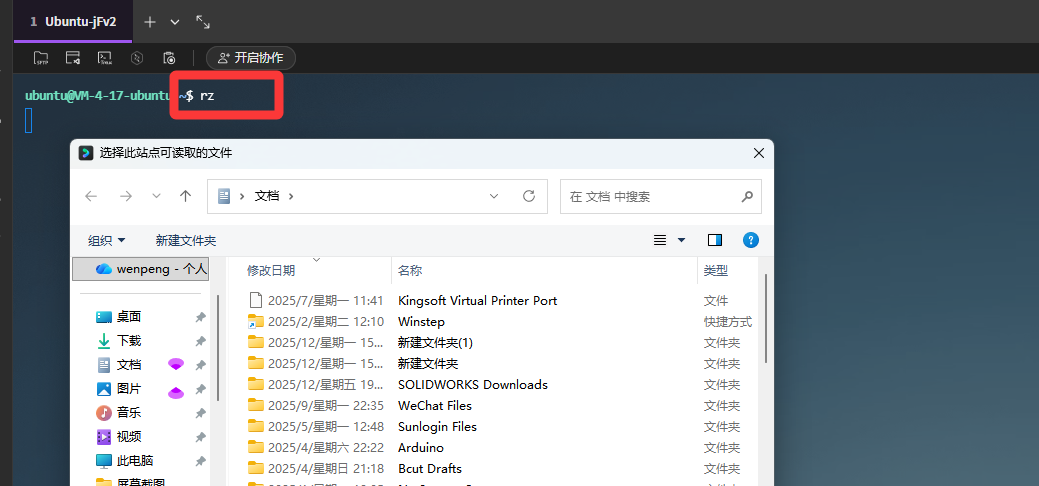
sz
作用:从Linux系统向本地系统传输文件,任意类型的文件都OK。用法:sz + 文件名 。如下图所示。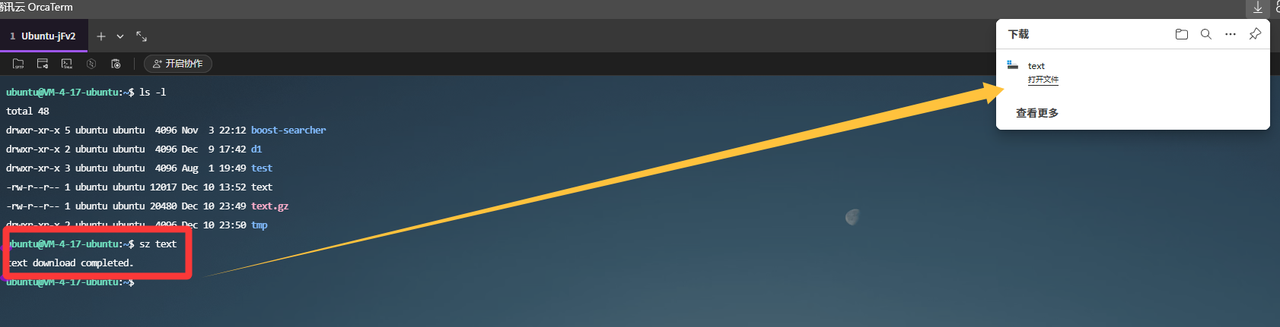
uname
作用:查询系统硬件的信息。用法:常用的指令------uname -a。如下所示。
cpp
 ubuntu@VM-4-17-ubuntu:~$ uname -a
Linux VM-4-17-ubuntu 5.15.0-142-generic #152-Ubuntu SMP Mon May 19 10:54:31 UTC 2025 x86_64 x86_64 x86_64 GNU/Linux
lsb_release
作用:查询系统的软件信息。用法:常用的指令------lsb_release -a。如下所示。
cpp
ubuntu@VM-4-17-ubuntu:~$ lsb_release -a
LSB Version:    core-11.1.0ubuntu4-noarch:printing-11.1.0ubuntu4-noarch:security-11.1.0ubuntu4-noarch
Distributor ID: Ubuntu
Description:    Ubuntu 22.04 LTS
Release:        22.04
Codename:       jammy
reboot
作用:让系统重新启动。用法:直接输入reboot。
cpp
ubuntu@VM-4-17-ubuntu:~$ rebootshutdown
作用:让系统直接关机。用法:直接输入shutdown。
cpp
ubuntu@VM-4-17-ubuntu:~$ shutdownsu
作用:用来切换用户的。用法:su + 目标用户。如下所示。
cpp
ubuntu@VM-4-17-ubuntu:~$ ls -l /home
total 12
drwxr-x---  2 lighthouse lighthouse 4096 Jul 28 18:01 lighthouse
drwxr-x--- 15 ubuntu     ubuntu     4096 Dec 11 17:01 ubuntu
drwxr-x---  2 wwp        wwp        4096 Aug  2 19:00 wwp
ubuntu@VM-4-17-ubuntu:~$ su wwp
Password:
wwp@VM-4-17-ubuntu:/home/ubuntu$ whoami
wwp
file
作用:查看文件的类型。用法:file + 文件。
cpp
total 48
drwxr-xr-x 5 ubuntu ubuntu  4096 Nov  3 22:12 boost-searcher
drwxr-xr-x 2 ubuntu ubuntu  4096 Dec  9 17:42 d1
prw-rw-r-- 1 ubuntu ubuntu     0 Dec 11 17:29 p
drwxr-xr-x 3 ubuntu ubuntu  4096 Aug  1 19:49 test
-rw-r--r-- 1 ubuntu ubuntu 12017 Dec 10 13:52 text
-rw-r--r-- 1 ubuntu ubuntu 20480 Dec 10 23:49 text.gz
drwxr-xr-x 2 ubuntu ubuntu  4096 Dec 10 23:50 tmp
ubuntu@VM-4-17-ubuntu:~$ file p        #管道文件
p: fifo (named pipe)
ubuntu@VM-4-17-ubuntu:~$ file d1        #目录文件
d1: directory
ubuntu@VM-4-17-ubuntu:~$ file text       #普通的文本文件
text: ASCII text