Flutter虚拟拼豆图纸查看应用开发教程
项目简介
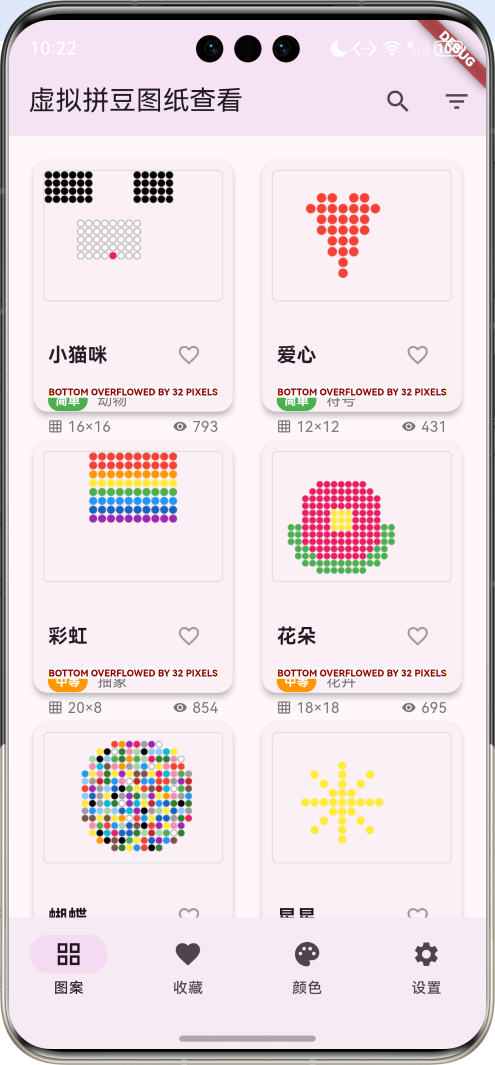
虚拟拼豆图纸查看是一款专为拼豆爱好者设计的图案查看和管理应用。拼豆(Perler Beads)是一种流行的手工艺品,通过将彩色小珠子按照图案排列并熨烫定型来创作艺术品。本应用提供了丰富的拼豆图案库、便捷的查看工具和完善的管理功能。
运行效果图
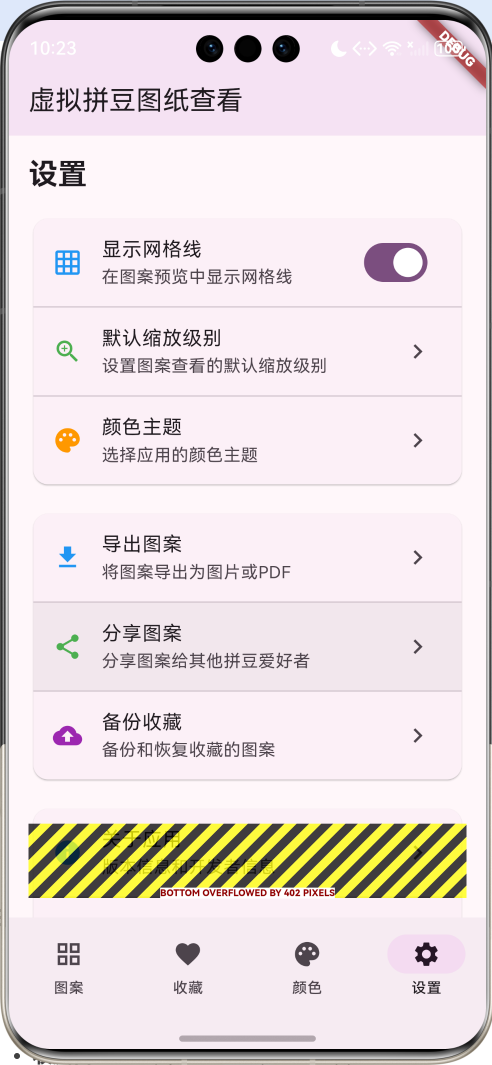
主要功能
- 图案库浏览:丰富的拼豆图案分类浏览
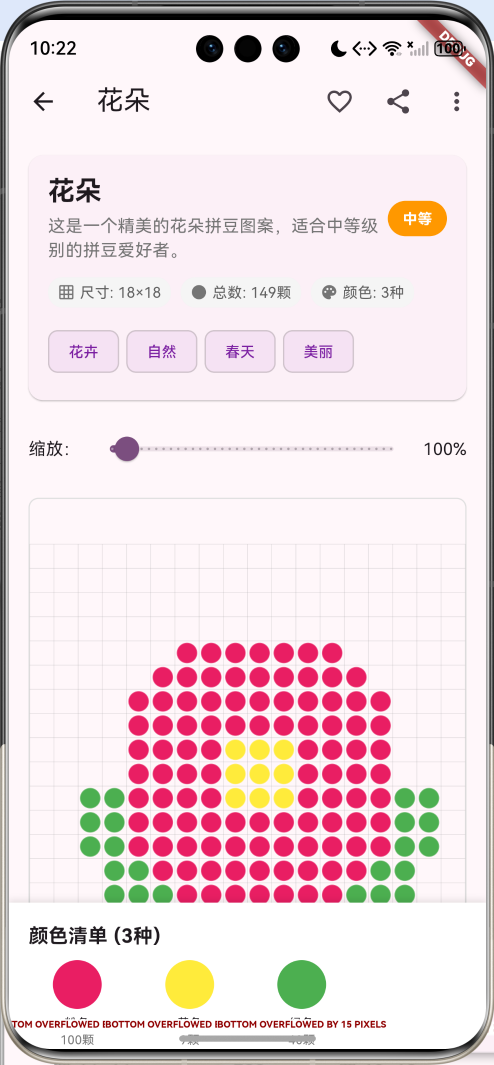
- 图案详细查看:支持缩放、网格显示的详细查看
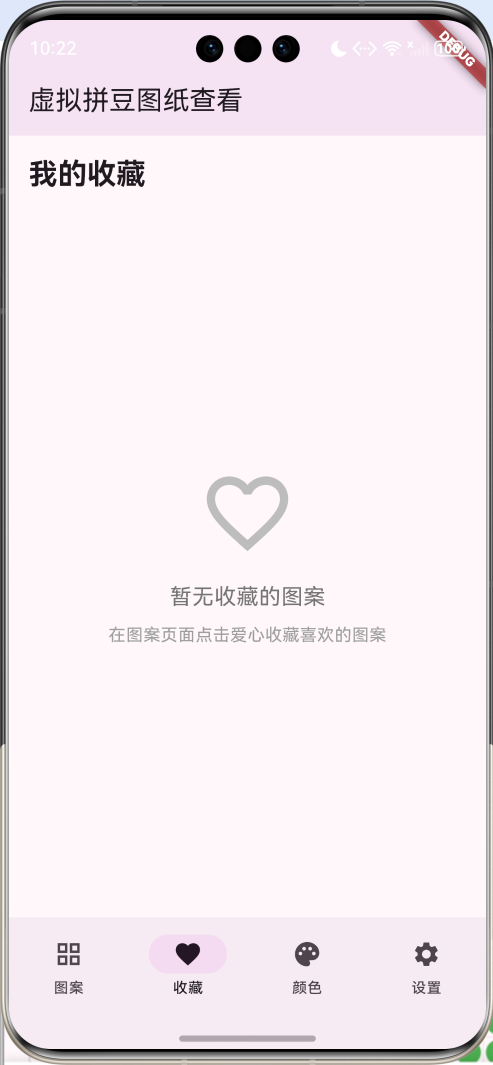
- 收藏管理:收藏喜欢的图案并统一管理
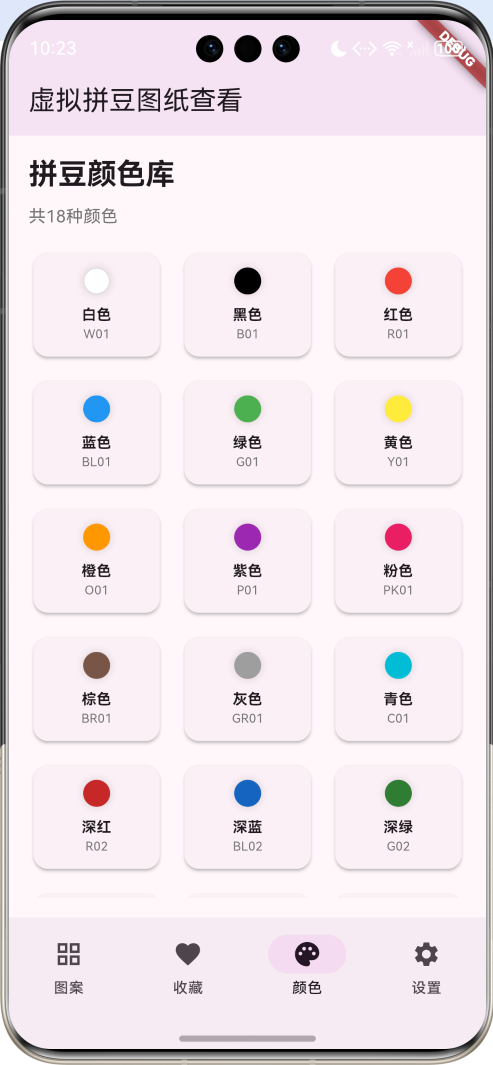
- 颜色库查看:完整的拼豆颜色库和颜色信息
- 搜索筛选:按名称、分类、难度等条件筛选图案
- 图案信息:详细的图案信息和颜色使用统计
技术架构
核心技术栈
- Flutter框架:跨平台UI开发
- Dart语言:应用逻辑实现
- CustomPainter:自定义图案绘制
- InteractiveViewer:图案缩放和拖拽查看
- State管理:应用状态管理
- 数学计算:图案生成算法
项目结构
lib/
├── main.dart                    # 应用入口和主要逻辑
├── models/                      # 数据模型
│   ├── bead_color.dart         # 拼豆颜色模型
│   ├── bead_pattern.dart       # 拼豆图案模型
│   └── enums.dart              # 枚举定义
├── widgets/                     # 自定义组件
│   ├── pattern_card.dart       # 图案卡片组件
│   ├── pattern_painter.dart    # 图案绘制器
│   └── color_card.dart         # 颜色卡片组件
├── pages/                       # 页面组件
│   ├── pattern_detail_page.dart # 图案详情页面
│   └── pattern_list_page.dart   # 图案列表页面
└── utils/                       # 工具类
    ├── pattern_generator.dart   # 图案生成工具
    └── color_utils.dart         # 颜色工具函数
数据模型设计
拼豆颜色模型
dart
class BeadColor {
  final String name;
  final Color color;
  final String code;
  final bool isTransparent;

  BeadColor({
    required this.name,
    required this.color,
    required this.code,
    this.isTransparent = false,
  });
}
拼豆图案模型
dart
class BeadPattern {
  final String id;
  final String name;
  final String category;
  final int width;
  final int height;
  final List<List<String>> grid; // 存储颜色代码
  final String difficulty;
  final List<String> tags;
  final String description;
  final DateTime createdAt;
  bool isFavorite;
  int viewCount;
  double rating;

  BeadPattern({
    required this.id,
    required this.name,
    required this.category,
    required this.width,
    required this.height,
    required this.grid,
    required this.difficulty,
    required this.tags,
    required this.description,
    required this.createdAt,
    this.isFavorite = false,
    this.viewCount = 0,
    this.rating = 0.0,
  });

  // 获取使用的颜色统计
  Map<String, int> getColorCount() {
    Map<String, int> colorCount = {};
    for (var row in grid) {
      for (var colorCode in row) {
        if (colorCode.isNotEmpty) {
          colorCount[colorCode] = (colorCount[colorCode] ?? 0) + 1;
        }
      }
    }
    return colorCount;
  }

  // 获取总拼豆数量
  int getTotalBeadCount() {
    return getColorCount().values.fold(0, (sum, count) => sum + count);
  }
}
枚举定义
dart
// 图案分类
enum PatternCategory {
  animals,
  characters,
  flowers,
  food,
  symbols,
  abstract,
  seasonal,
  custom,
}

// 难度级别
enum DifficultyLevel {
  easy,
  medium,
  hard,
  expert,
}
核心功能实现
1. 应用主框架
dart
class MyApp extends StatelessWidget {
  const MyApp({super.key});

  @override
  Widget build(BuildContext context) {
    return MaterialApp(
      title: '虚拟拼豆图纸查看',
      theme: ThemeData(
        colorScheme: ColorScheme.fromSeed(seedColor: Colors.purple),
        useMaterial3: true,
      ),
      home: const BeadPatternHomePage(),
    );
  }
}
2. 主页面状态管理
dart
class _BeadPatternHomePageState extends State<BeadPatternHomePage>
    with TickerProviderStateMixin {
  int _selectedIndex = 0;

  // 拼豆颜色库
  late List<BeadColor> _beadColors;

  // 图案数据
  List<BeadPattern> _patterns = [];
  List<BeadPattern> _favoritePatterns = [];
  List<BeadPattern> _filteredPatterns = [];

  // 搜索和筛选
  String _searchQuery = '';
  PatternCategory? _selectedCategory;
  DifficultyLevel? _selectedDifficulty;

  // 动画控制器
  late AnimationController _zoomAnimationController;

  // 缩放控制
  double _zoomLevel = 1.0;
  final double _minZoom = 0.5;
  final double _maxZoom = 5.0;
3. 拼豆颜色库初始化
dart
void _initializeBeadColors() {
  _beadColors = [
    BeadColor(name: '白色', color: Colors.white, code: 'W01'),
    BeadColor(name: '黑色', color: Colors.black, code: 'B01'),
    BeadColor(name: '红色', color: Colors.red, code: 'R01'),
    BeadColor(name: '蓝色', color: Colors.blue, code: 'BL01'),
    BeadColor(name: '绿色', color: Colors.green, code: 'G01'),
    BeadColor(name: '黄色', color: Colors.yellow, code: 'Y01'),
    BeadColor(name: '橙色', color: Colors.orange, code: 'O01'),
    BeadColor(name: '紫色', color: Colors.purple, code: 'P01'),
    BeadColor(name: '粉色', color: Colors.pink, code: 'PK01'),
    BeadColor(name: '棕色', color: Colors.brown, code: 'BR01'),
    BeadColor(name: '灰色', color: Colors.grey, code: 'GR01'),
    BeadColor(name: '青色', color: Colors.cyan, code: 'C01'),
    BeadColor(name: '深红', color: Colors.red.shade800, code: 'R02'),
    BeadColor(name: '深蓝', color: Colors.blue.shade800, code: 'BL02'),
    BeadColor(name: '深绿', color: Colors.green.shade800, code: 'G02'),
    BeadColor(name: '浅蓝', color: Colors.blue.shade200, code: 'BL03'),
    BeadColor(name: '浅绿', color: Colors.green.shade200, code: 'G03'),
    BeadColor(name: '浅粉', color: Colors.pink.shade200, code: 'PK02'),
  ];
}
图案生成算法
1. 图案生成框架
dart
BeadPattern _createSamplePattern(String name, PatternCategory category, int width, int height, DifficultyLevel difficulty) {
  // 创建示例图案网格
  List<List<String>> grid = List.generate(
    height,
    (row) => List.generate(width, (col) {
      // 根据图案名称创建不同的样式
      return _generatePatternCell(name, row, col, width, height);
    }),
  );

  return BeadPattern(
    id: DateTime.now().millisecondsSinceEpoch.toString() + _random.nextInt(1000).toString(),
    name: name,
    category: _getCategoryName(category),
    width: width,
    height: height,
    grid: grid,
    difficulty: _getDifficultyName(difficulty),
    tags: _generateTags(name, category),
    description: '这是一个精美的$name拼豆图案,适合${_getDifficultyName(difficulty)}级别的拼豆爱好者。',
    createdAt: DateTime.now().subtract(Duration(days: _random.nextInt(30))),
    viewCount: _random.nextInt(1000),
    rating: 3.0 + _random.nextDouble() * 2.0,
  );
}
2. 具体图案生成算法
小猫咪图案
dart
String _generateCatPattern(int row, int col, int width, int height) {
  // 简单的猫咪图案
  if (row < height / 3) {
    // 耳朵区域
    if ((col < width / 3 && row < height / 4) || (col > 2 * width / 3 && row < height / 4)) {
      return 'B01'; // 黑色耳朵
    }
  }

  if (row >= height / 3 && row < 2 * height / 3) {
    // 脸部区域
    if (col >= width / 4 && col < 3 * width / 4) {
      if (row == height / 2 && (col == width / 3 || col == 2 * width / 3)) {
        return 'B01'; // 眼睛
      }
      if (row == height / 2 + 2 && col == width / 2) {
        return 'PK01'; // 鼻子
      }
      return 'W01'; // 白色脸部
    }
  }

  return '';
}
爱心图案
dart
String _generateHeartPattern(int row, int col, int width, int height) {
  final centerX = width / 2;
  final centerY = height / 2;

  // 心形数学公式的简化版本
  final x = (col - centerX) / (width / 4);
  final y = (centerY - row) / (height / 4);

  if (pow(x, 2) + pow(y - sqrt(x.abs()), 2) <= 1) {
    return 'R01'; // 红色爱心
  }

  return '';
}
彩虹图案
dart
String _generateRainbowPattern(int row, int col, int width, int height) {
  final stripHeight = height / 7;
  final colorCodes = ['R01', 'O01', 'Y01', 'G01', 'BL01', 'BL02', 'P01'];

  if (col >= width / 4 && col < 3 * width / 4) {
    final colorIndex = (row / stripHeight).floor();
    if (colorIndex >= 0 && colorIndex < colorCodes.length) {
      return colorCodes[colorIndex];
    }
  }

  return '';
}
花朵图案
dart
String _generateFlowerPattern(int row, int col, int width, int height) {
  final centerX = width / 2;
  final centerY = height / 2;
  final distance = sqrt(pow(col - centerX, 2) + pow(row - centerY, 2));

  if (distance < 2) {
    return 'Y01'; // 黄色花心
  } else if (distance < 6) {
    return 'PK01'; // 粉色花瓣
  } else if (distance < 8 && row > centerY) {
    return 'G01'; // 绿色茎
  }

  return '';
}
UI界面设计
1. 图案卡片组件
dart
Widget _buildPatternCard(BeadPattern pattern) {
  return Card(
    elevation: 4,
    child: InkWell(
      onTap: () => _showPatternDetail(pattern),
      child: Column(
        crossAxisAlignment: CrossAxisAlignment.start,
        children: [
          // 图案预览
          Expanded(
            flex: 3,
            child: Container(
              width: double.infinity,
              padding: const EdgeInsets.all(8),
              child: _buildPatternPreview(pattern, showGrid: false),
            ),
          ),

          // 图案信息
          Expanded(
            flex: 2,
            child: Padding(
              padding: const EdgeInsets.all(12),
              child: Column(
                crossAxisAlignment: CrossAxisAlignment.start,
                children: [
                  Row(
                    children: [
                      Expanded(
                        child: Text(
                          pattern.name,
                          style: const TextStyle(
                            fontSize: 16,
                            fontWeight: FontWeight.bold,
                          ),
                          maxLines: 1,
                          overflow: TextOverflow.ellipsis,
                        ),
                      ),
                      IconButton(
                        icon: Icon(
                          pattern.isFavorite ? Icons.favorite : Icons.favorite_border,
                          color: pattern.isFavorite ? Colors.red : Colors.grey,
                          size: 20,
                        ),
                        onPressed: () => _toggleFavorite(pattern),
                        padding: EdgeInsets.zero,
                        constraints: const BoxConstraints(),
                      ),
                    ],
                  ),

                  const SizedBox(height: 4),

                  Row(
                    children: [
                      Container(
                        padding: const EdgeInsets.symmetric(horizontal: 6, vertical: 2),
                        decoration: BoxDecoration(
                          color: _getDifficultyColor(pattern.difficulty),
                          borderRadius: BorderRadius.circular(10),
                        ),
                        child: Text(
                          pattern.difficulty,
                          style: const TextStyle(
                            fontSize: 10,
                            color: Colors.white,
                            fontWeight: FontWeight.bold,
                          ),
                        ),
                      ),
                      const SizedBox(width: 8),
                      Text(
                        pattern.category,
                        style: TextStyle(
                          fontSize: 12,
                          color: Colors.grey.shade600,
                        ),
                      ),
                    ],
                  ),

                  const SizedBox(height: 4),

                  Row(
                    children: [
                      Icon(Icons.grid_on, size: 12, color: Colors.grey.shade600),
                      const SizedBox(width: 4),
                      Text(
                        '${pattern.width}×${pattern.height}',
                        style: TextStyle(
                          fontSize: 12,
                          color: Colors.grey.shade600,
                        ),
                      ),
                      const Spacer(),
                      Icon(Icons.visibility, size: 12, color: Colors.grey.shade600),
                      const SizedBox(width: 4),
                      Text(
                        '${pattern.viewCount}',
                        style: TextStyle(
                          fontSize: 12,
                          color: Colors.grey.shade600,
                        ),
                      ),
                    ],
                  ),
                ],
              ),
            ),
          ),
        ],
      ),
    ),
  );
}
2. 图案预览组件
dart
Widget _buildPatternPreview(BeadPattern pattern, {bool showGrid = true}) {
  return Container(
    decoration: BoxDecoration(
      border: Border.all(color: Colors.grey.shade300),
      borderRadius: BorderRadius.circular(4),
    ),
    child: AspectRatio(
      aspectRatio: pattern.width / pattern.height,
      child: CustomPaint(
        painter: BeadPatternPainter(
          pattern: pattern,
          beadColors: _beadColors,
          showGrid: showGrid,
          zoomLevel: _zoomLevel,
        ),
      ),
    ),
  );
}
3. 颜色卡片组件
dart
Widget _buildColorCard(BeadColor beadColor) {
  return Card(
    elevation: 2,
    child: InkWell(
      onTap: () => _showColorDetail(beadColor),
      child: Padding(
        padding: const EdgeInsets.all(12),
        child: Column(
          children: [
            // 颜色圆圈
            Expanded(
              child: Container(
                decoration: BoxDecoration(
                  color: beadColor.color,
                  shape: BoxShape.circle,
                  border: Border.all(
                    color: beadColor.color == Colors.white
                        ? Colors.grey.shade300
                        : Colors.transparent,
                    width: 1,
                  ),
                  boxShadow: [
                    BoxShadow(
                      color: Colors.black.withValues(alpha: 0.1),
                      blurRadius: 4,
                      spreadRadius: 1,
                    ),
                  ],
                ),
              ),
            ),

            const SizedBox(height: 8),

            // 颜色名称
            Text(
              beadColor.name,
              style: const TextStyle(
                fontSize: 12,
                fontWeight: FontWeight.bold,
              ),
              textAlign: TextAlign.center,
              maxLines: 1,
              overflow: TextOverflow.ellipsis,
            ),

            // 颜色代码
            Text(
              beadColor.code,
              style: TextStyle(
                fontSize: 10,
                color: Colors.grey.shade600,
              ),
            ),
          ],
        ),
      ),
    ),
  );
}
自定义图案绘制器
CustomPainter实现
dart
class BeadPatternPainter extends CustomPainter {
  final BeadPattern pattern;
  final List<BeadColor> beadColors;
  final bool showGrid;
  final bool showColorCodes;
  final double zoomLevel;

  BeadPatternPainter({
    required this.pattern,
    required this.beadColors,
    this.showGrid = true,
    this.showColorCodes = false,
    this.zoomLevel = 1.0,
  });

  @override
  void paint(Canvas canvas, Size size) {
    final cellWidth = size.width / pattern.width;
    final cellHeight = size.height / pattern.height;
    final cellSize = cellWidth < cellHeight ? cellWidth : cellHeight;

    // 绘制拼豆
    for (int row = 0; row < pattern.height; row++) {
      for (int col = 0; col < pattern.width; col++) {
        final colorCode = pattern.grid[row][col];
        if (colorCode.isNotEmpty) {
          final beadColor = beadColors.firstWhere(
            (color) => color.code == colorCode,
            orElse: () => BeadColor(name: '未知', color: Colors.grey, code: colorCode),
          );

          final rect = Rect.fromLTWH(
            col * cellSize,
            row * cellSize,
            cellSize,
            cellSize,
          );

          // 绘制拼豆圆形
          final paint = Paint()
            ..color = beadColor.color
            ..style = PaintingStyle.fill;

          final center = rect.center;
          final radius = cellSize * 0.4;

          canvas.drawCircle(center, radius, paint);

          // 绘制拼豆边框
          final borderPaint = Paint()
            ..color = beadColor.color == Colors.white
                ? Colors.grey.shade400
                : beadColor.color.withValues(alpha: 0.7)
            ..style = PaintingStyle.stroke
            ..strokeWidth = 1;

          canvas.drawCircle(center, radius, borderPaint);

          // 绘制颜色代码
          if (showColorCodes && cellSize > 30) {
            final textPainter = TextPainter(
              text: TextSpan(
                text: colorCode,
                style: TextStyle(
                  color: _getContrastColor(beadColor.color),
                  fontSize: cellSize * 0.15,
                  fontWeight: FontWeight.bold,
                ),
              ),
              textDirection: TextDirection.ltr,
            );

            textPainter.layout();
            textPainter.paint(
              canvas,
              Offset(
                center.dx - textPainter.width / 2,
                center.dy - textPainter.height / 2,
              ),
            );
          }
        }
      }
    }

    // 绘制网格线
    if (showGrid) {
      final gridPaint = Paint()
        ..color = Colors.grey.withValues(alpha: 0.3)
        ..style = PaintingStyle.stroke
        ..strokeWidth = 0.5;

      // 垂直线
      for (int col = 0; col <= pattern.width; col++) {
        canvas.drawLine(
          Offset(col * cellSize, 0),
          Offset(col * cellSize, pattern.height * cellSize),
          gridPaint,
        );
      }

      // 水平线
      for (int row = 0; row <= pattern.height; row++) {
        canvas.drawLine(
          Offset(0, row * cellSize),
          Offset(pattern.width * cellSize, row * cellSize),
          gridPaint,
        );
      }
    }
  }

  Color _getContrastColor(Color color) {
    // 计算颜色的亮度,选择对比色
    final luminance = color.computeLuminance();
    return luminance > 0.5 ? Colors.black : Colors.white;
  }

  @override
  bool shouldRepaint(covariant CustomPainter oldDelegate) => true;
}
图案详情页面
详情页面结构
dart
class PatternDetailPage extends StatefulWidget {
  final BeadPattern pattern;
  final List<BeadColor> beadColors;
  final VoidCallback onFavoriteToggle;

  const PatternDetailPage({
    super.key,
    required this.pattern,
    required this.beadColors,
    required this.onFavoriteToggle,
  });

  @override
  State<PatternDetailPage> createState() => _PatternDetailPageState();
}

class _PatternDetailPageState extends State<PatternDetailPage> {
  double _zoomLevel = 1.0;
  final double _minZoom = 0.5;
  final double _maxZoom = 10.0;
  bool _showGrid = true;
  bool _showColorCodes = false;
交互式图案查看
dart
// 图案显示区域
Expanded(
  child: Container(
    margin: const EdgeInsets.all(16),
    decoration: BoxDecoration(
      border: Border.all(color: Colors.grey.shade300),
      borderRadius: BorderRadius.circular(8),
    ),
    child: InteractiveViewer(
      minScale: _minZoom,
      maxScale: _maxZoom,
      child: Center(
        child: CustomPaint(
          painter: BeadPatternPainter(
            pattern: widget.pattern,
            beadColors: widget.beadColors,
            showGrid: _showGrid,
            showColorCodes: _showColorCodes,
            zoomLevel: _zoomLevel,
          ),
          size: Size(
            widget.pattern.width * 20.0 * _zoomLevel,
            widget.pattern.height * 20.0 * _zoomLevel,
          ),
        ),
      ),
    ),
  ),
),
颜色清单显示
dart
Widget _buildColorList(Map<String, int> colorCount) {
  return Container(
    height: 120,
    padding: const EdgeInsets.all(16),
    decoration: BoxDecoration(
      color: Colors.white,
      boxShadow: [
        BoxShadow(
          color: Colors.black.withValues(alpha: 0.1),
          blurRadius: 4,
          offset: const Offset(0, -2),
        ),
      ],
    ),
    child: Column(
      crossAxisAlignment: CrossAxisAlignment.start,
      children: [
        Text(
          '颜色清单 (${colorCount.length}种)',
          style: const TextStyle(
            fontSize: 16,
            fontWeight: FontWeight.bold,
          ),
        ),
        const SizedBox(height: 8),
        Expanded(
          child: ListView.builder(
            scrollDirection: Axis.horizontal,
            itemCount: colorCount.entries.length,
            itemBuilder: (context, index) {
              final entry = colorCount.entries.elementAt(index);
              final beadColor = widget.beadColors.firstWhere(
                (color) => color.code == entry.key,
                orElse: () => BeadColor(name: '未知', color: Colors.grey, code: entry.key),
              );

              return Container(
                width: 80,
                margin: const EdgeInsets.only(right: 12),
                child: Column(
                  children: [
                    Container(
                      width: 40,
                      height: 40,
                      decoration: BoxDecoration(
                        color: beadColor.color,
                        shape: BoxShape.circle,
                        border: Border.all(
                          color: beadColor.color == Colors.white
                              ? Colors.grey.shade300
                              : Colors.transparent,
                        ),
                      ),
                    ),
                    const SizedBox(height: 4),
                    Text(
                      beadColor.name,
                      style: const TextStyle(fontSize: 10),
                      textAlign: TextAlign.center,
                      maxLines: 1,
                      overflow: TextOverflow.ellipsis,
                    ),
                    Text(
                      '${entry.value}颗',
                      style: TextStyle(
                        fontSize: 10,
                        color: Colors.grey.shade600,
                      ),
                    ),
                  ],
                ),
              );
            },
          ),
        ),
      ],
    ),
  );
}
搜索和筛选功能
搜索对话框
dart
void _showSearchDialog() {
  showDialog(
    context: context,
    builder: (context) => AlertDialog(
      title: const Text('搜索图案'),
      content: TextField(
        autofocus: true,
        decoration: const InputDecoration(
          hintText: '输入图案名称或标签',
          prefixIcon: Icon(Icons.search),
        ),
        onChanged: (value) {
          _searchQuery = value;
        },
        onSubmitted: (value) {
          Navigator.of(context).pop();
          _filterPatterns();
        },
      ),
      actions: [
        TextButton(
          onPressed: () => Navigator.of(context).pop(),
          child: const Text('取消'),
        ),
        ElevatedButton(
          onPressed: () {
            Navigator.of(context).pop();
            _filterPatterns();
          },
          child: const Text('搜索'),
        ),
      ],
    ),
  );
}
筛选逻辑
dart
void _filterPatterns() {
  setState(() {
    _filteredPatterns = _patterns.where((pattern) {
      bool matchesSearch = _searchQuery.isEmpty ||
          pattern.name.toLowerCase().contains(_searchQuery.toLowerCase()) ||
          pattern.tags.any((tag) => tag.toLowerCase().contains(_searchQuery.toLowerCase()));

      bool matchesCategory = _selectedCategory == null ||
          pattern.category == _getCategoryName(_selectedCategory!);

      bool matchesDifficulty = _selectedDifficulty == null ||
          pattern.difficulty == _getDifficultyName(_selectedDifficulty!);

      return matchesSearch && matchesCategory && matchesDifficulty;
    }).toList();
  });
}
筛选对话框
dart
void _showFilterDialog() {
  showDialog(
    context: context,
    builder: (context) => AlertDialog(
      title: const Text('筛选图案'),
      content: Column(
        mainAxisSize: MainAxisSize.min,
        crossAxisAlignment: CrossAxisAlignment.start,
        children: [
          const Text('分类:'),
          const SizedBox(height: 8),
          Wrap(
            spacing: 8,
            children: [
              FilterChip(
                label: const Text('全部'),
                selected: _selectedCategory == null,
                onSelected: (selected) {
                  setState(() {
                    _selectedCategory = selected ? null : _selectedCategory;
                  });
                },
              ),
              ...PatternCategory.values.map((category) => FilterChip(
                label: Text(_getCategoryName(category)),
                selected: _selectedCategory == category,
                onSelected: (selected) {
                  setState(() {
                    _selectedCategory = selected ? category : null;
                  });
                },
              )),
            ],
          ),

          const SizedBox(height: 16),
          const Text('难度:'),
          const SizedBox(height: 8),
          Wrap(
            spacing: 8,
            children: [
              FilterChip(
                label: const Text('全部'),
                selected: _selectedDifficulty == null,
                onSelected: (selected) {
                  setState(() {
                    _selectedDifficulty = selected ? null : _selectedDifficulty;
                  });
                },
              ),
              ...DifficultyLevel.values.map((difficulty) => FilterChip(
                label: Text(_getDifficultyName(difficulty)),
                selected: _selectedDifficulty == difficulty,
                onSelected: (selected) {
                  setState(() {
                    _selectedDifficulty = selected ? difficulty : null;
                  });
                },
              )),
            ],
          ),
        ],
      ),
      actions: [
        TextButton(
          onPressed: () => Navigator.of(context).pop(),
          child: const Text('取消'),
        ),
        ElevatedButton(
          onPressed: () {
            Navigator.of(context).pop();
            _filterPatterns();
          },
          child: const Text('应用'),
        ),
      ],
    ),
  );
}
收藏管理功能
收藏切换
dart
void _toggleFavorite(BeadPattern pattern) {
  setState(() {
    pattern.isFavorite = !pattern.isFavorite;

    if (pattern.isFavorite) {
      if (!_favoritePatterns.contains(pattern)) {
        _favoritePatterns.add(pattern);
      }
    } else {
      _favoritePatterns.remove(pattern);
    }
  });

  ScaffoldMessenger.of(context).showSnackBar(
    SnackBar(
      content: Text(
        pattern.isFavorite ? '已添加到收藏' : '已从收藏中移除',
      ),
      duration: const Duration(seconds: 1),
    ),
  );
}
收藏页面
dart
Widget _buildFavoritesPage() {
  return Padding(
    padding: const EdgeInsets.all(16),
    child: Column(
      crossAxisAlignment: CrossAxisAlignment.start,
      children: [
        Text(
          '我的收藏',
          style: Theme.of(context).textTheme.headlineSmall?.copyWith(
            fontWeight: FontWeight.bold,
          ),
        ),
        const SizedBox(height: 16),

        if (_favoritePatterns.isEmpty)
          Expanded(
            child: Center(
              child: Column(
                mainAxisAlignment: MainAxisAlignment.center,
                children: [
                  Icon(
                    Icons.favorite_border,
                    size: 80,
                    color: Colors.grey.shade400,
                  ),
                  const SizedBox(height: 16),
                  Text(
                    '暂无收藏的图案',
                    style: TextStyle(
                      fontSize: 18,
                      color: Colors.grey.shade600,
                    ),
                  ),
                  const SizedBox(height: 8),
                  Text(
                    '在图案页面点击爱心收藏喜欢的图案',
                    style: TextStyle(
                      color: Colors.grey.shade500,
                    ),
                  ),
                ],
              ),
            ),
          )
        else
          Expanded(
            child: GridView.builder(
              gridDelegate: const SliverGridDelegateWithFixedCrossAxisCount(
                crossAxisCount: 2,
                childAspectRatio: 0.8,
                crossAxisSpacing: 16,
                mainAxisSpacing: 16,
              ),
              itemCount: _favoritePatterns.length,
              itemBuilder: (context, index) {
                final pattern = _favoritePatterns[index];
                return _buildPatternCard(pattern);
              },
            ),
          ),
      ],
    ),
  );
}
设置和配置功能
设置页面
dart
Widget _buildSettingsPage() {
  return Padding(
    padding: const EdgeInsets.all(16),
    child: Column(
      crossAxisAlignment: CrossAxisAlignment.start,
      children: [
        Text(
          '设置',
          style: Theme.of(context).textTheme.headlineSmall?.copyWith(
            fontWeight: FontWeight.bold,
          ),
        ),
        const SizedBox(height: 16),

        Card(
          child: Column(
            children: [
              ListTile(
                leading: const Icon(Icons.grid_on, color: Colors.blue),
                title: const Text('显示网格线'),
                subtitle: const Text('在图案预览中显示网格线'),
                trailing: Switch(
                  value: true,
                  onChanged: (value) {
                    // 实现网格线显示切换
                  },
                ),
              ),
              const Divider(height: 1),
              ListTile(
                leading: const Icon(Icons.zoom_in, color: Colors.green),
                title: const Text('默认缩放级别'),
                subtitle: const Text('设置图案查看的默认缩放级别'),
                trailing: const Icon(Icons.chevron_right),
                onTap: _showZoomSettings,
              ),
              const Divider(height: 1),
              ListTile(
                leading: const Icon(Icons.palette, color: Colors.orange),
                title: const Text('颜色主题'),
                subtitle: const Text('选择应用的颜色主题'),
                trailing: const Icon(Icons.chevron_right),
                onTap: _showThemeSettings,
              ),
            ],
          ),
        ),
      ],
    ),
  );
}
缩放设置
dart
void _showZoomSettings() {
  showDialog(
    context: context,
    builder: (context) => AlertDialog(
      title: const Text('缩放设置'),
      content: Column(
        mainAxisSize: MainAxisSize.min,
        children: [
          Text('当前缩放级别:${(_zoomLevel * 100).toInt()}%'),
          const SizedBox(height: 16),
          Slider(
            value: _zoomLevel,
            min: _minZoom,
            max: _maxZoom,
            divisions: 18,
            label: '${(_zoomLevel * 100).toInt()}%',
            onChanged: (value) {
              setState(() {
                _zoomLevel = value;
              });
            },
          ),
        ],
      ),
      actions: [
        TextButton(
          onPressed: () => Navigator.of(context).pop(),
          child: const Text('取消'),
        ),
        ElevatedButton(
          onPressed: () {
            Navigator.of(context).pop();
            ScaffoldMessenger.of(context).showSnackBar(
              const SnackBar(content: Text('缩放设置已保存')),
            );
          },
          child: const Text('确定'),
        ),
      ],
    ),
  );
}
拼豆颜色系统
颜色分类和编码
| 颜色名称 | 颜色代码 | RGB值 | 用途说明 |
|---|---|---|---|
| 白色 | W01 | 255,255,255 | 基础色,常用于背景 |
| 黑色 | B01 | 0,0,0 | 基础色,常用于轮廓 |
| 红色 | R01 | 255,0,0 | 主色调,醒目色彩 |
| 蓝色 | BL01 | 0,0,255 | 冷色调,天空海洋 |
| 绿色 | G01 | 0,255,0 | 自然色,植物主题 |
| 黄色 | Y01 | 255,255,0 | 暖色调,阳光主题 |
| 橙色 | O01 | 255,165,0 | 暖色调,秋季主题 |
| 紫色 | P01 | 128,0,128 | 神秘色,梦幻主题 |
颜色库管理
dart
Widget _buildColorsPage() {
  return Padding(
    padding: const EdgeInsets.all(16),
    child: Column(
      crossAxisAlignment: CrossAxisAlignment.start,
      children: [
        Text(
          '拼豆颜色库',
          style: Theme.of(context).textTheme.headlineSmall?.copyWith(
            fontWeight: FontWeight.bold,
          ),
        ),
        const SizedBox(height: 8),
        Text(
          '共${_beadColors.length}种颜色',
          style: TextStyle(
            color: Colors.grey.shade600,
          ),
        ),
        const SizedBox(height: 16),

        Expanded(
          child: GridView.builder(
            gridDelegate: const SliverGridDelegateWithFixedCrossAxisCount(
              crossAxisCount: 3,
              childAspectRatio: 1.2,
              crossAxisSpacing: 12,
              mainAxisSpacing: 12,
            ),
            itemCount: _beadColors.length,
            itemBuilder: (context, index) {
              final beadColor = _beadColors[index];
              return _buildColorCard(beadColor);
            },
          ),
        ),
      ],
    ),
  );
}
图案分类系统
分类定义
dart
String _getCategoryName(PatternCategory category) {
  switch (category) {
    case PatternCategory.animals:
      return '动物';
    case PatternCategory.characters:
      return '角色';
    case PatternCategory.flowers:
      return '花卉';
    case PatternCategory.food:
      return '食物';
    case PatternCategory.symbols:
      return '符号';
    case PatternCategory.abstract:
      return '抽象';
    case PatternCategory.seasonal:
      return '季节';
    case PatternCategory.custom:
      return '自定义';
  }
}
难度级别
dart
String _getDifficultyName(DifficultyLevel difficulty) {
  switch (difficulty) {
    case DifficultyLevel.easy:
      return '简单';
    case DifficultyLevel.medium:
      return '中等';
    case DifficultyLevel.hard:
      return '困难';
    case DifficultyLevel.expert:
      return '专家';
  }
}

Color _getDifficultyColor(String difficulty) {
  switch (difficulty) {
    case '简单':
      return Colors.green;
    case '中等':
      return Colors.orange;
    case '困难':
      return Colors.red;
    case '专家':
      return Colors.purple;
    default:
      return Colors.grey;
  }
}
性能优化策略
1. 图案渲染优化
dart
class OptimizedPatternPainter extends CustomPainter {
  final BeadPattern pattern;
  final List<BeadColor> beadColors;
  final bool showGrid;
  final double zoomLevel;

  // 缓存绘制对象
  static final Map<String, Paint> _paintCache = {};

  @override
  void paint(Canvas canvas, Size size) {
    final cellSize = size.width / pattern.width;

    // 只绘制可见区域的拼豆
    final visibleRect = Rect.fromLTWH(0, 0, size.width, size.height);

    for (int row = 0; row < pattern.height; row++) {
      for (int col = 0; col < pattern.width; col++) {
        final beadRect = Rect.fromLTWH(
          col * cellSize,
          row * cellSize,
          cellSize,
          cellSize,
        );

        // 跳过不可见的拼豆
        if (!visibleRect.overlaps(beadRect)) continue;

        final colorCode = pattern.grid[row][col];
        if (colorCode.isNotEmpty) {
          _drawBead(canvas, beadRect, colorCode);
        }
      }
    }
  }

  void _drawBead(Canvas canvas, Rect rect, String colorCode) {
    // 使用缓存的Paint对象
    final paint = _paintCache.putIfAbsent(colorCode, () {
      final beadColor = beadColors.firstWhere(
        (color) => color.code == colorCode,
        orElse: () => BeadColor(name: '未知', color: Colors.grey, code: colorCode),
      );
      return Paint()
        ..color = beadColor.color
        ..style = PaintingStyle.fill;
    });

    final center = rect.center;
    final radius = rect.width * 0.4;
    canvas.drawCircle(center, radius, paint);
  }
}
2. 内存管理
dart
class PatternCache {
  static final Map<String, BeadPattern> _cache = {};
  static const int MAX_CACHE_SIZE = 50;

  static BeadPattern? getPattern(String id) {
    return _cache[id];
  }

  static void cachePattern(BeadPattern pattern) {
    if (_cache.length >= MAX_CACHE_SIZE) {
      // 移除最旧的缓存项
      final oldestKey = _cache.keys.first;
      _cache.remove(oldestKey);
    }
    _cache[pattern.id] = pattern;
  }

  static void clearCache() {
    _cache.clear();
  }
}
3. 图片加载优化
dart
class ImageCache {
  static final Map<String, ui.Image> _imageCache = {};

  static Future<ui.Image> loadPatternImage(BeadPattern pattern) async {
    final cacheKey = '${pattern.id}_${pattern.width}x${pattern.height}';

    if (_imageCache.containsKey(cacheKey)) {
      return _imageCache[cacheKey]!;
    }

    // 生成图案图片
    final recorder = ui.PictureRecorder();
    final canvas = Canvas(recorder);

    final painter = BeadPatternPainter(
      pattern: pattern,
      beadColors: [], // 传入颜色库
      showGrid: false,
    );

    painter.paint(canvas, Size(pattern.width * 20.0, pattern.height * 20.0));

    final picture = recorder.endRecording();
    final image = await picture.toImage(
      (pattern.width * 20).toInt(),
      (pattern.height * 20).toInt(),
    );

    _imageCache[cacheKey] = image;
    return image;
  }
}
数据持久化
1. 本地存储
dart
import 'package:shared_preferences/shared_preferences.dart';
import 'dart:convert';

class PatternStorage {
  static const String FAVORITES_KEY = 'favorite_patterns';
  static const String SETTINGS_KEY = 'app_settings';

  static Future<void> saveFavorites(List<BeadPattern> favorites) async {
    final prefs = await SharedPreferences.getInstance();
    final jsonList = favorites.map((pattern) => pattern.toJson()).toList();
    await prefs.setString(FAVORITES_KEY, json.encode(jsonList));
  }

  static Future<List<BeadPattern>> loadFavorites() async {
    final prefs = await SharedPreferences.getInstance();
    final jsonString = prefs.getString(FAVORITES_KEY);

    if (jsonString == null) return [];

    final jsonList = json.decode(jsonString) as List;
    return jsonList.map((json) => BeadPattern.fromJson(json)).toList();
  }

  static Future<void> saveSettings(Map<String, dynamic> settings) async {
    final prefs = await SharedPreferences.getInstance();
    await prefs.setString(SETTINGS_KEY, json.encode(settings));
  }

  static Future<Map<String, dynamic>> loadSettings() async {
    final prefs = await SharedPreferences.getInstance();
    final jsonString = prefs.getString(SETTINGS_KEY);

    if (jsonString == null) return {};

    return json.decode(jsonString);
  }
}
2. 数据模型扩展
dart
extension BeadPatternJson on BeadPattern {
  Map<String, dynamic> toJson() {
    return {
      'id': id,
      'name': name,
      'category': category,
      'width': width,
      'height': height,
      'grid': grid,
      'difficulty': difficulty,
      'tags': tags,
      'description': description,
      'createdAt': createdAt.millisecondsSinceEpoch,
      'isFavorite': isFavorite,
      'viewCount': viewCount,
      'rating': rating,
    };
  }

  static BeadPattern fromJson(Map<String, dynamic> json) {
    return BeadPattern(
      id: json['id'],
      name: json['name'],
      category: json['category'],
      width: json['width'],
      height: json['height'],
      grid: List<List<String>>.from(
        json['grid'].map((row) => List<String>.from(row)),
      ),
      difficulty: json['difficulty'],
      tags: List<String>.from(json['tags']),
      description: json['description'],
      createdAt: DateTime.fromMillisecondsSinceEpoch(json['createdAt']),
      isFavorite: json['isFavorite'] ?? false,
      viewCount: json['viewCount'] ?? 0,
      rating: json['rating']?.toDouble() ?? 0.0,
    );
  }
}
总结
虚拟拼豆图纸查看应用通过Flutter框架实现了一个功能完整的拼豆图案管理系统,包含了图案浏览、详细查看、收藏管理、颜色库等多个方面的功能。
技术亮点
- 自定义绘制系统:使用CustomPainter实现专业的拼豆图案绘制
- 交互式查看:支持缩放、拖拽的图案详细查看功能
- 智能图案生成:基于数学算法的多种图案生成方式
- 完整的分类系统:支持多维度的图案分类和筛选
- 用户友好的界面:Material Design风格的现代化界面
学习收获
- 掌握了Flutter自定义绘制的高级应用
- 学会了复杂数据结构的设计和管理
- 理解了图案生成算法的实现原理
- 实践了用户交互和状态管理的最佳实践
- 体验了完整的图案查看应用开发流程
这个项目展示了如何使用Flutter开发一个功能完整、界面精美的专业应用,为进一步学习图形绘制和创意应用开发奠定了良好的基础。
欢迎加入开源鸿蒙跨平台社区:https://openharmonycrossplatform.csdn.net