mock假数据工具JSON Server使用笔记
- 安装
只在开发环境使用
css
npm install -D json-server- 建假数据文件,在src的同级建mock文件夹,文件夹里新建文件db.json
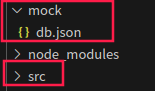
db.json文件内容,users和posts是访问的接口名字
javascript
{
  "users": [
    {
      "id": "1",
      "name": "Alice",
      "value": 1
    },
    {
      "id": "2",
      "name": "Bob",
      "value": 2
    }
  ],
  "posts": [
    {
      "id": "1",
      "name": "张三",
      "value": 1
    }
  ]
}- 配置package.json
javascript
"mock": "json-server --watch mock/db.json --port 3004"- 启动
可以在vscode开两个终端,一个启应用,一个启假数据
启动假数据命令
javascript
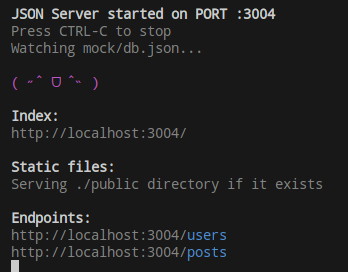
npm run mock启动成功终端显示
- 配置vite.config.js
javascript
      server: {
            port: '3000',
            proxy: {
                '/api': {
                    target: 'http://localhost:3004',
                    changeOrigin: true,
                    rewrite: (path) => path.replace(/^\/api/, ''),
                },
            }
},-
调用接口
按常用的增删改查
-
增
javascript
    const res = await uni.request({
      url: '/api/posts',
      method: 'post',
      data: JSON.stringify({
        name: '新人',
        value:2
      }),
    })
结果展示
javascript
  "posts": [
    {
      "id": "1",
      "name": "张三",
      "value": 1
    },
    {
      "id": "a4f8",
      "name": "新人",
      "value": 2
    }
]- 删
删除请求方法设置delete,加上id
javascript
    const res1 = await uni.request({
      url: '/api/posts/1',
      method: 'delete',
})- 改
(1)属性全覆盖put
把id='2'的这条数据全替换
javascript
   const res = await uni.request({
      url: '/api/posts/2',
      method: 'put',
      data: JSON.stringify({
        name: '新人3',
        value:3
      }),
    })
(2)修改其中的某个属性用patch方法
比如id='2'修改name
javascript
  const res = await uni.request({
      url: '/api/posts/2',
      method: 'patch',
      data: JSON.stringify({
        name: 'patch修改',
      }),
})- 查
(1)根据id查询
查id='2'的
javascript
   const res3 = await uni.request({
      url: '/api/users/2',
      method: 'get',
    })
(2)根据条件查
查name=Alice并且value=3
javascript
  const res3 = await uni.request({
      url: "/api/users?name=Alice&value=3",
      method: 'get',
    })
(3)分页
用切片实现,_start、_end
javascript
 const pageSize = 1;
  const limit = 3;
  const start = (pageSize - 1) * limit
  const end = start + limit
  try {
    const res3 = await uni.request({
      url: `/api/users?_start= ${start}&_end= ${end}`,
      method: 'get',
    })